
1 (edited by lt72884 2018-09-06 00:36:18)

Topic: Print quality is great on one object but crappy on another

Ok, this has never happened to me before. I use my jr1.0 alot. Whenever i print i 95% of the time use the following:

Good quality
standard speed
10% infill
normal shells
0.3 layer height
no increase in temp
4mm retract length
30 retract speed
XYZ PLA CLEAR BLUE

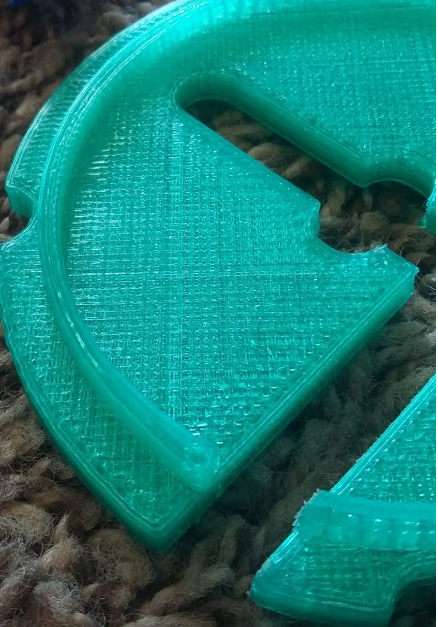
My print have always come out amazing with these settings. I am using the clear blue. then today, i made something on the same settings and it came out crazy looking. lots of theese little snake looking pieces hanging from it. I am wondering if it has something to do with the shape of the object. Here are some pics, first showing the great quality, then the not so great

http://soliforum.com/i/?Vnlye0Q.jpg
http://soliforum.com/i/?y11Zw0C.png
http://soliforum.com/i/?d1VgvxV.jpg
http://soliforum.com/i/?UCsZxDp.jpg
http://soliforum.com/i/?Jpgx40j.jpg
http://soliforum.com/i/?781Q8Pu.jpg

Im wondering if it has something to do with the thin walled circles. they are 1.25mm thick, i did try with 2mm thick walls and it was terrible, but in the first or second photo, with the clear green, you can see how it handles the thin walled rim just fine.

thanks for looking:)

Post's attachments

coin holder no base.skp 461.03 kb, 1 downloads since 2018-09-06 

You don't have the permssions to download the attachments of this post.

2

Re: Print quality is great on one object but crappy on another

I would not say any of the above print came out amazing. The #4 quality is acceptable, if is not due to blurred image. The major issue is the filament of choice, xyzprinting filament do not generate high quality print despite 4 times the price of 3rd party filament. Most people in this forum believe you get what you paid for, so go buy some cheaper filament and check out the paper tag filament hack.

2nd issue is the layer cooling fan is missing, what you have see "little snake looking pieces hanging from it" is due to oozing or stringing, often caused by nozzle temperature too high, no layer cooling fan, inadequate retraction, etc. These issue is more obverses when the time spend to print one layer is short, and these issue can mostly reduced by switch to 3rd party filament, reduce nozzle temperature, add layer cooling fan and play with your retraction settings. 

Google for 3d printing oozing or 3d printing stringing for more detailed information.

(Da Vinci 1.0, Jr. 1.0 RAMPS, miniMaker) X4, (Creality CR-10S, CR-10 mini, Ender-3) X4, Anycubic MEGA X4, Anycubic Chrion X1, ADMILAB Gantry X2 (MonoPrice Maker Select V2, Plus, Ultimate)X4--Select mini X1, Anycubic photon X4, Wanhao duplicate D7 X1.
iNSTONE Inventor Pro X2, CTC Dual X2, ANET-A8, Hictop 3DP-11, Solidoodle Press, FLSUN I3 2017X1

3

Re: Print quality is great on one object but crappy on another

yizhou.he wrote:

I would not say any of the above print came out amazing. The #4 quality is acceptable, if is not due to blurred image. The major issue is the filament of choice, xyzprinting filament do not generate high quality print despite 4 times the price of 3rd party filament. Most people in this forum believe you get what you paid for, so go buy some cheaper filament and check out the paper tag filament hack.

2nd issue is the layer cooling fan is missing, what you have see "little snake looking pieces hanging from it" is due to oozing or stringing, often caused by nozzle temperature too high, no layer cooling fan, inadequate retraction, etc. These issue is more obverses when the time spend to print one layer is short, and these issue can mostly reduced by switch to 3rd party filament, reduce nozzle temperature, add layer cooling fan and play with your retraction settings. 

Google for 3d printing oozing or 3d printing stringing for more detailed information.

no, it is not a blurred image. Compared to the makerbots i use at shcool, these came out cleaner, smoother and better. Nothing against makerbot, i love them and we have about 10 of them in our class room. They get used ALOT so they may be gettin old. All the prints above were printed on same settings

I am in the process of the hack, but the envelop devlivered today was empty... so no tags haha

what i am trying to get at, is that i printed 4 differnt items yesterday and then the 5th one was all jacked up. but my guess is it has something to do with the thin walls and amount of line segments making uyp the circles. As soon as it printed, i printed the calibration squares with exact smae settings and they came out great, no strings, no puddles, just smooth and pretty nice:)

I do have a layer cooling fan, it came with it. How well it works, maybe not that great. So i think i may need to print a shroud for it.

as for PLA third party, what do you recomend?

thanks

4

Re: Print quality is great on one object but crappy on another

https://www.simplify3d.com/support/prin … eshooting/


The above link is very helpful for print troubleshooting.

As far as stringing goes apparently damp filament can cause that issue as well.

Soliddoodle 4 stock w glass bed------Folger Tech Prusa 2020 upgraded to and titan /aero extruder mirror bed
FT5 with titan/ E3D Aero------MP mini select w glass bed
MP Utimate maker pro-W bondtech extruder
Marlin/Repetier Host/ Slic3r and Cura

5

Re: Print quality is great on one object but crappy on another

Thank you for the link and the info. It has been humid here in utah as of late. I did print some calibration cubes and used the new surface ironing feature from xyzprint(im using a jr1.0 non pro) and it printed very well.

I will post any new questions regarding this if needs be:)

thank you.