
1

Topic: Gaps in Perimiter walls

My apologies if this had been a prior topic but I was unable to find a solution.
The problem is gaps in internal perimeter walls, circular holes.
My specs: Solidoodle 3, SlicRr 1.1.7, Filament 1.7mm, Extruder .4mm, Z height 0.2mm,  Perimeter .48mm, retraction 1mm.
The gap is not lined up and the holes ( a 6mm and a 2mm) are not a true circle.
I have run Y axis drive shaft alignment a couple of times and carefully adjusted X and Y belt tensions. The X/Y movement appears to be function smoothly. Belt tensioning seem to be more of an art than a science.
Any suggestions on how I can eliminate this problem would be much appreciated.
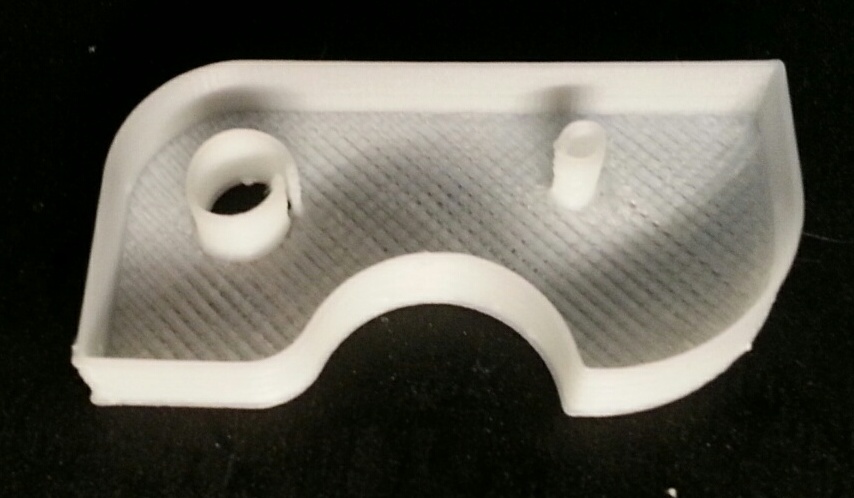
Perimeter Gap

2

Re: Gaps in Perimiter walls

Looks like the short belt on the motor is too loose. Those circles look like ovals which means that belt is flopping all over the place pretty badly.

3

Re: Gaps in Perimiter walls

Much appreciate the help. 
1. By "short belt" is this the one the connects the Y axis stepper motor to the drive shaft which in turn drive the pair of long belts to the head carriage? 
2. Is there preferred technique to get the correct belt tensions or is it trial and error.
I try this anyway and see what happens. 
Thanks again

4 (edited by jagowilson 2015-02-24 17:28:59)

Re: Gaps in Perimiter walls

Yep that's the one.

No proper method just trial and error. If you want to be precise you can use a dial indicator to measure backlash but that isn't really necessary.

5

Re: Gaps in Perimiter walls

Run several tests: tightening short belt, X bet then Y belts. Sill a small gap but cylindricity is much improved.
Many thanks

6

Re: Gaps in Perimiter walls

Run several tests: tightening short belt, X bet then Y belts. Sill a small gap but cylindricity is much improved.
Many thanks

7

Re: Gaps in Perimiter walls

If you've still got gaps something is loose. It can be a challenge to find it but you'll slowly recognize things little by little. Make sure your hotend is secure in its mount.

8

Re: Gaps in Perimiter walls

this video might help you with yours - certainly helped me out a lot with flat spots on my circles...

http://support.solidoodle.com/hc/en-us/ … Tensioning

I know it is in reference to the SD4, but they are basically the same printer - 4 just has an enclosed case....

also, a couple of drops of 3in1 oil on those rod bushings helps reduce friction - work it in good by moving the printhead back and forth a few times with printer off.

SD4 with Lawsy carriages, Rumba board, & new 12v PSU, E3D v6, mirror bed plate, X motor fan.
Stock SD4
Prusa i3 kit, spring loaded extruder upgrade, Y axis belt tensioner