
1 (edited by galaxy99 2015-05-12 15:43:58)

Topic: Print Speeds

Print Speeds

Been using Simplify for several months and thought I start testing print results for printing at different speeds…

The published DaVinci 1.0 printer specs show 150* mm/s ( = 9000 mm/m) [*see my comment in follow-up post ]
The default print speed in Simplify for DaVinci processes is 1800 mm/m.
Review of gcode from xyzware shows a max (default) speed of 7800 mm/m

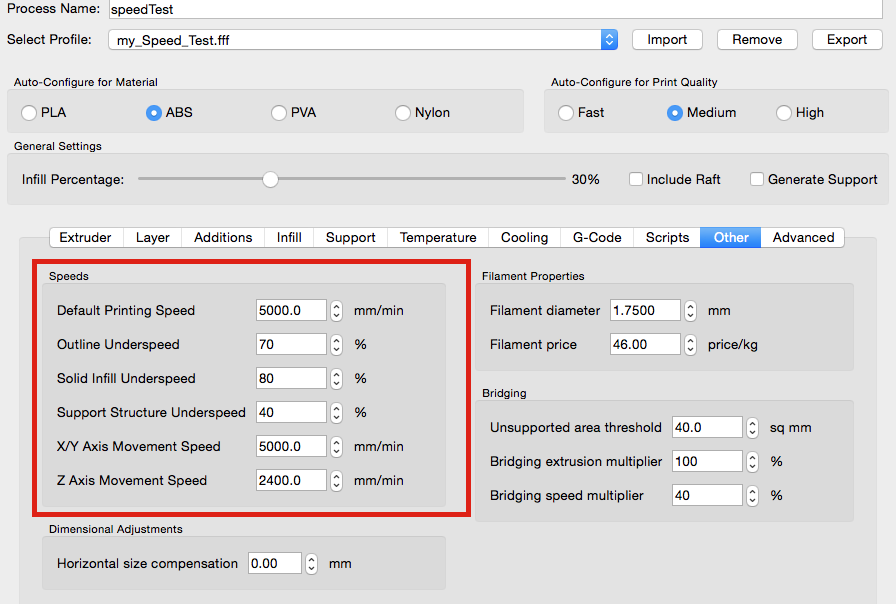
So, I changed the Default print speed and X/Y move speed in Simplify to 5000 mm/m for testing.  I left the underspeed percentages at default (70, 80, 40) and Z speed at 2400. First layer speed = 50%

I printed one of my standard test brackets and a thin journal bearing (a circular part to check hysteresis) using Shaxon and found:
It prints in about 1/2 the time
It prints without problems
Quality is good and compares well with prints at the 1800 mm/m speed (tested with different layers, shells, layer height and infill density).  All prints are good.  Photo attached of print at h=0.2, layers=3 shell=1, 20% infill. (bearing at h=0.1).  No cleanup of part - it's hot off the press, so to speak.

Resulting Simplify gcode shows the correct new default speed and various other speeds as calculated by Simplify or Firmware (?) but, none of them are 70, 80, 40 or 50% of the defaults.

Best speeds to use would naturally depend on the part (and perhaps filament brand/color, luck) but, as a general default going from 1800 mm/m to 5000 mm/m improved speed without loss of quality.

Any comments - in particular, Default speed and the lower software/firmware generated speeds?  Thanks
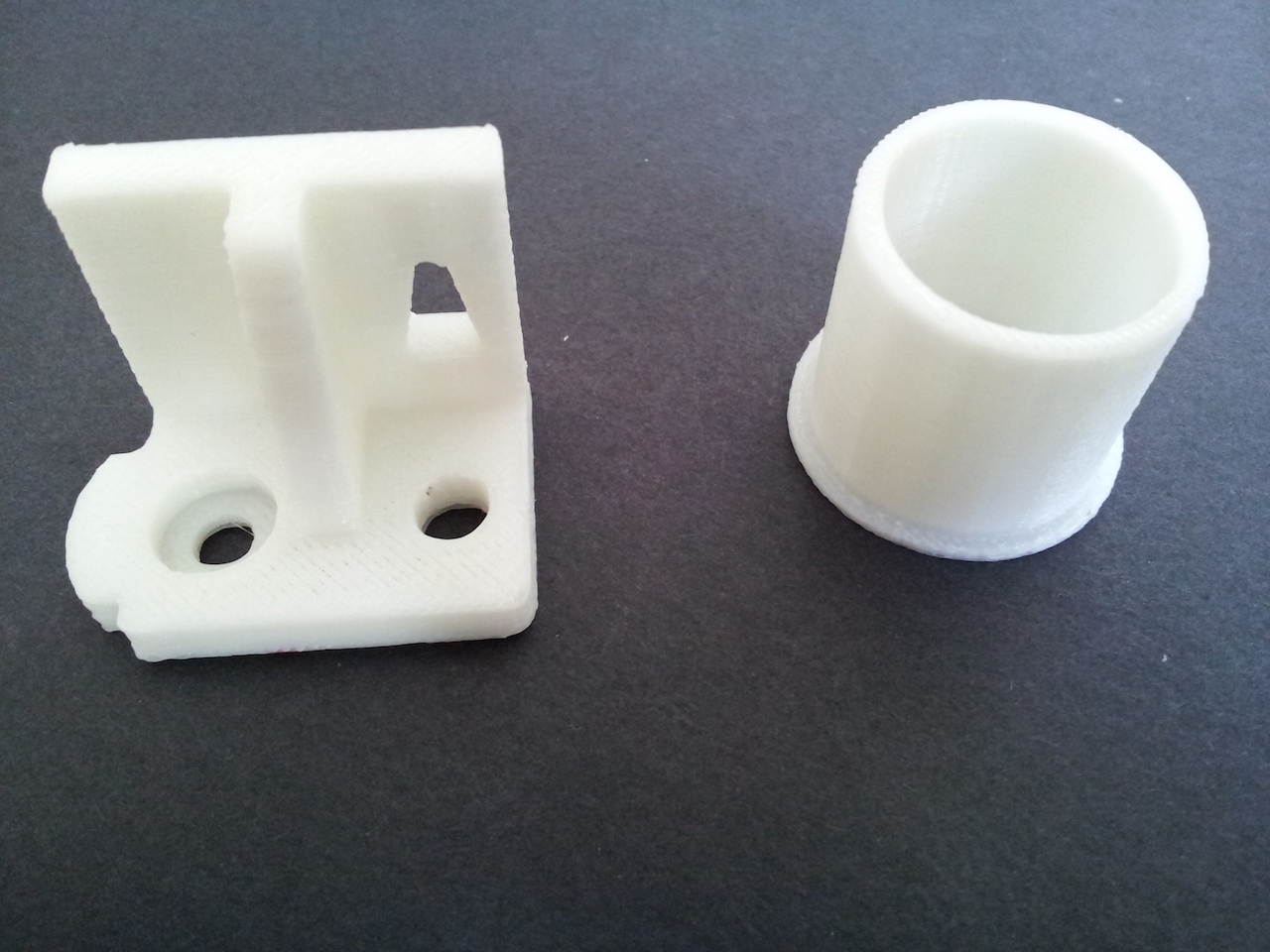
http://soliforum.com/i/?xRcQKii.jpg

Mac OSX ElCapitan
Prusa i3 (two built from kits), 1 hacked DaVinci
Solidworks for models, Netfabb to repair, Repetier/Slic3r and Simplify3D

2

Re: Print Speeds

Umm. I'm pretty sure that's an insanely fast speed. The highest I've printed was 3200mm and I think that is pushing it. That's a lot of work for the stepper motor pushing the filament through and other parts. I think that speed would work if you cooled the stepper motor with a fan and had an upgraded power supply. But the davinci stock power supply barely supplies enough power to handle the printer as it is.

3

Re: Print Speeds

Can anyone else confirm the xyzware speeds? I know that they are different from what S3D uses. I was getting good prints from the stock setup, and, still want to improve on that. I don't think I'm there yet.

4 (edited by galaxy99 2015-05-10 02:34:36)

Re: Print Speeds

Looking at the DaVinci 1.0 user manual (if you can call it that), it says print speeds are 60, 90 and 120 mm/s (3600, 5400 and 7200 mm/m).  Elsewhere in their documentation (before the CES in January) they spec'd it at 150 mm/s (9000 mm/m) but I suspect it was a typo.  Photo attached of current info.

I set it to 5000 mm/m.  Printed 4 parts and zero problems.  Yeah, it moves fast but hasn't shaken the house down, yet.

Common sense suggests lowering and I'll probably set it around 4000 mm/m.

http://soliforum.com/i/?PWNKROp.png

Also, just finished printing a gizmo I designed for loading a pellet gun magazine - photo attached (printed at 5000mm/m)
http://soliforum.com/i/?jfxmIVn.jpg

Mac OSX ElCapitan
Prusa i3 (two built from kits), 1 hacked DaVinci
Solidworks for models, Netfabb to repair, Repetier/Slic3r and Simplify3D
5

Re: Print Speeds

I'm confused. Is there a setting that can multiply the speed in s3d besides the movement over ride? My extruding speed is around 3000 and movement speed is around 2900 and that seems really fast for a printer. Could you post a small video of your extruder moving?  My stepper motor gets pretty hot using my speeds. My stepper motor temp range still seems in spec but it gets very hot. 120F is hot to the touch.

6 (edited by galaxy99 2015-05-10 15:14:58)

Re: Print Speeds

I figure if they post the spec’s saying 120mm/s the machine can safely do it.  I trust their engineers to have at least tested it for burnout at that speed with margin of safety (I’m an engineer for 40 yrs and have servo control systems flying in space so, I’ve got to have faith - at least  until their marketing dept gets involved).

Video from this morning showing it running at 5000 mm/m.  It’s a circular part so speed isn’t as fast as it would be for a straight line but it clearly shows it running fast.  Screenshot shows settings panel
http://soliforum.com/i/?wvezWH9.png

Post's attachments

vid.m4v 3.7 mb, 29 downloads since 2015-05-10 

You don't have the permssions to download the attachments of this post.
Mac OSX ElCapitan
Prusa i3 (two built from kits), 1 hacked DaVinci
Solidworks for models, Netfabb to repair, Repetier/Slic3r and Simplify3D

7

Re: Print Speeds

Cool thanks for sharing. I guess I can test my speeds then. I noticed my fan speeds aren't really high which I imagine is important, I can't override the fan speed either in s3d. I am running rep 9.2. Fan speed in s3d is set to 90% but the fan doesn't seem to be running that fast.

8 (edited by galaxy99 2015-05-10 16:25:23)

Re: Print Speeds

Should have mentioned: Gcode generators look at current position and next position with respect to the mass (and inertia movement) to calculate proper speed between those two positions.  Thus, reducing the speed as appropriate.
I have a CNC mill and the software for that lets me peak at that percentage and adjust it - for the xyz printer, the only clue to speed reduction is by review of Gcode output.  Save a gcode file from s3d and look at the various speeds (the F command).
Also, you can look at the print preview and the colors show the speeds (and, naturally, that speed legend changes when you adjust the speed settings - you can see that the values do change).

And, running at 5000mm/m = 70% of the 120mm/s (7200mm/m) so, it's comfortably in the range of the spec'd speed limits. As shown on the pellet loaded image (above), the circular geometry is round and the tunnel for the pellets does not have drooping filament or bubbles/etc - the part is perfect and it printed very fast because of so many linear line/positions (as opposed to circular).

If you hang/add mass to the extruder head (such as bigger fan, micro camera...etc, you add mass and the internal (gcode calc's) won't know anything about it and will not correctly calculate speed - that's when you can drive it to failure...

Mac OSX ElCapitan
Prusa i3 (two built from kits), 1 hacked DaVinci
Solidworks for models, Netfabb to repair, Repetier/Slic3r and Simplify3D

9 (edited by oscahie 2015-05-10 23:15:43)

Re: Print Speeds

I don't know about yours, but my 1.0 printing at 60mm/s (3600mm/m) makes a lot of loud noises and feels to me like it's running on its limits already. And on my small experience at those speeds, I also had poor layer adhesion with ABS (perhaps I needed more temp though).

Also I read a long time ago in the forum that XYZWare's speeds were 30, 45, or 60 mm/s for Slow, Normal, or Fast.

I'd like to see some video(s) of davincis printing at 5000mm/m. I might even attempt the same model for comparison.

10

Re: Print Speeds

Yes 5000 seems insanely fast to me. I am printing 3200 and the printer can handle it but it's printing fast. Seems something like 5000 would only possibly work for large prints

11

Re: Print Speeds

My previous posts on this page include the spec’s and video.
Regardless of the max setting, that speed is a reference and not a constant on all position moves…
The spec’s I posted are from the manual that came with my machine.
Spec say’s
Standard = 60 mm/s
Speed = 90
Ultra fast = 120

I believe your referenced numbers are for the xyzware settings and not the ability of the machine. I don’t use xyzware.

Attached are three images from s3d: one for speed at 3600, one at 5000 on same part. The third is a linear part and s3d smartly takes advantage of that to go fast ( look a the red on the legend and part). 

Yes, the actual speeds may only get to the max in particular geometries.  I’ve now printed half dozen parts at 5000 and finally settled in on 4000. http://soliforum.com/i/?Xe8Un2R.pnghttp://soliforum.com/i/?P4dA7ru.pnghttp://soliforum.com/i/?13dOcsr.png

Mac OSX ElCapitan
Prusa i3 (two built from kits), 1 hacked DaVinci
Solidworks for models, Netfabb to repair, Repetier/Slic3r and Simplify3D

12

Re: Print Speeds

The Da Vinci 1.0 can just manage 60mm/s if you use stock filament. They have it specially made so it melts at a lower than normal temp of 190. Most third party ABS melts at 220 to 260. The melt temp plays an important role in how fast you can print. The size of the object also plays an important role as small objects must be printed slow to allow each layer to cool enough so you don't get sagging or rubber banding.

Once I changed my controller I found I had to slow the machine to 35mm/s to print third party filament well. If I did not slow it down I would get under feeding or rubber banding from pulling the extrusion too tight.

So although they say the machine can do 60mm/s that is only with stock filament and not aftermarket.

Printing since 2009 and still love it!
Anycubic 4MAX best $225 ever invested.
Voxelabs Proxima SLA. 6 inch 2k Mono LCD.
Anycubic Predator, massive Delta machine. 450 x 370 print envelope.

13 (edited by galaxy99 2015-05-11 15:27:11)

Re: Print Speeds

Good points to note - even at 1800 some small parts have not been happy.

Thus far I’ve been running the speed test parts with Shaxon neutral filament at 230.  Prints as good, if not better, than at lower speed of 1800.  Actually, all the parts look excellent and are at 30% infill density.

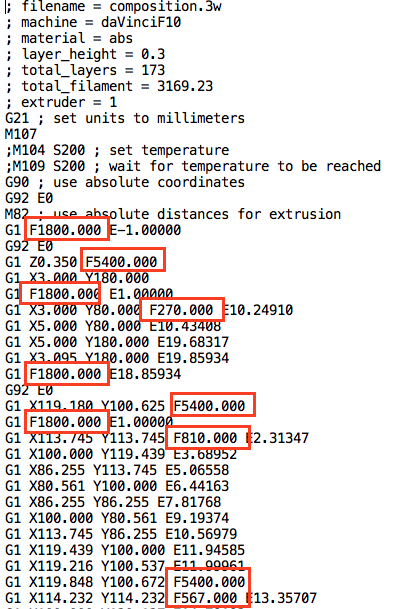
I looked at the SAMPLE01 Gcode on the sdcard - attached screen shot shows speeds (the F command).  Several rapid moves at 5400 so I'm not too concerned about the servo's at brief high speeds (also, I looked up the load curve for the servo part number on my machine).
 
http://soliforum.com/i/?9kCpbjL.png

Mac OSX ElCapitan
Prusa i3 (two built from kits), 1 hacked DaVinci
Solidworks for models, Netfabb to repair, Repetier/Slic3r and Simplify3D

14

Re: Print Speeds

Following up...

After comparing printed parts, actual print times, and my comfort with 5000mm/m,  I dialed it down to 3600 for Print Speed and 5000 for X/Y Rapid Speed.  It increased the print time by only two minutes on the speed-test parts so, I’m going to use that as a default and will adjust as needed.

Thanks for the comments - much appreciated smile

Mac OSX ElCapitan
Prusa i3 (two built from kits), 1 hacked DaVinci
Solidworks for models, Netfabb to repair, Repetier/Slic3r and Simplify3D
15

Re: Print Speeds

Thanks for the follow up galaxy99, I appreciate your sharing.

16

Re: Print Speeds

galaxy99 wrote:

Good points to note - even at 1800 some small parts have not been happy.

Thus far I’ve been running the speed test parts with Shaxon neutral filament at 230.  Prints as good, if not better, than at lower speed of 1800.  Actually, all the parts look excellent and are at 30% infill density.

I looked at the SAMPLE01 Gcode on the sdcard - attached screen shot shows speeds (the F command).  Several rapid moves at 5400 so I'm not too concerned about the servo's at brief high speeds (also, I looked up the load curve for the servo part number on my machine).
 
http://soliforum.com/i/?9kCpbjL.png

Those rapid moves are only travel moves though, not extruding. Also the models you've shown in this thread look small enough that the printer may not even have enough time to accelerate to those speeds in most cases.

Anyway, I personally would never print at more than 3600. And like I said, I already experienced some layer adhesion issues at those speeds.

17 (edited by galaxy99 2015-05-11 23:26:24)

Re: Print Speeds

oscahie wrote:
galaxy99 wrote:

Good points to note - even at 1800 some small parts have not been happy.

Thus far I’ve been running the speed test parts with Shaxon neutral filament at 230.  Prints as good, if not better, than at lower speed of 1800.  Actually, all the parts look excellent and are at 30% infill density.

I looked at the SAMPLE01 Gcode on the sdcard - attached screen shot shows speeds (the F command).  Several rapid moves at 5400 so I'm not too concerned about the servo's at brief high speeds (also, I looked up the load curve for the servo part number on my machine).
 
http://soliforum.com/i/?9kCpbjL.png

Those rapid moves are only travel moves though, not extruding. Also the models you've shown in this thread look small enough that the printer may not even have enough time to accelerate to those speeds in most cases.

Anyway, I personally would never print at more than 3600. And like I said, I already experienced some layer adhesion issues at those speeds.

Thanks.  Naturally, can't go from point A to point B fast if the points are close. FYI  "Rapid Moves" is gcoder terminology for movement without doing work on the part (machining or printing). Having said that, there is no question that it prints twice as fast at 3600 compared to 1800 (actual time compares well with estimated).  The parts above are a couple of inches in size and do take advantage of speed.

I'm rather pleased with the the quality of the fast prints and have no doubt that some parts will do better at lower speed.  Been printing all day at 3600 with rapid at 5000.  A part that previously took 9+ hours now printed in less than 4 hours with better quality than it did at 1800. smile

Mac OSX ElCapitan
Prusa i3 (two built from kits), 1 hacked DaVinci
Solidworks for models, Netfabb to repair, Repetier/Slic3r and Simplify3D

18

Re: Print Speeds

galaxy99 wrote:

I'm rather pleased with the the quality of the fast prints and have no doubt that some parts will do better at lower speed.  Been printing all day at 3600 with rapid at 5000.  A part that previously took 9+ hours now printed in less than 4 hours with better quality than it did at 1800. smile

Didn't know that 'rapid moves' was actually a term, thanks smile

Would you post some close up pics of the same item printed at both speeds? I'd like to see it and like I said, maybe print it myself to compare too.

19

Re: Print Speeds

Off topic here - is there a way to turn off the layer height offset of .3 mm when the print starts without messing with the gcode? It's really annoying and my printer is calibrated to print without that offset

20 (edited by galaxy99 2015-05-12 18:26:29)

Re: Print Speeds

Yes - "Rapid Move" is Gcoder terminology - here's a quote from Wiki (not that it's a reliable source but it compares with gcode & machine CNC books)
"In the RS274NGC Spec, G0 is Rapid Move, which was used to move between the current point in space and the new point as quickly and efficiently as possible"

1. Speed Compare:
  Photo 1 shows parts & speeds (infill=30% Layer H=0.2, Layers=2 (top&bottom), Shell=1, Temp=230, Shaxon filament).
  Photo 2 closeup
  First photo at top of this post shows two parts - the first of my prints at speed of 5000.

2. Z Offset:
  Photo 3 shows panel where to set it (it's by percentage)
  Photo 4 shows it now set to 0.8  (by setting value to 400%)

3. Adding gcode the easy way:
  Photo 5 shows where to add code (entry panel determines where it goes - hover to see context help)
  Photo 6 shows that it got there

http://soliforum.com/i/?kAZ2WTq.jpg
http://soliforum.com/i/?5E3lygK.jpg
http://soliforum.com/i/?WgvENQ2.png
http://soliforum.com/i/?QQduu13.png
http://soliforum.com/i/?1Fofrin.png
http://soliforum.com/i/?sEVVzcU.png

Mac OSX ElCapitan
Prusa i3 (two built from kits), 1 hacked DaVinci
Solidworks for models, Netfabb to repair, Repetier/Slic3r and Simplify3D

21

Re: Print Speeds

Thanks! I guess the only way to change layer height on the first layer is first layer %. I can put this to 1% but the extruded amount is less for some reason. I think I could increase the first layer width to override this. I think my best bet is to export the gcode and edit the first layer and resubmit.

22 (edited by galaxy99 2015-05-13 16:25:52)

Re: Print Speeds

You can leave the " ;layer 1. Z=0.3"  and simply add what you want, via the input panel.  For example, add " ;layer 1. Z=0.0"  if that's the value you want (where and how I indicated "bla bla bla" above).  The machine will respond to it and move before it prints the next line(s).

That way you don't need to edit the gcode.  However, I'm not certain about the machine responding the the H and W values just after the T0 (tool change) -  that functionality could be (should be) dependent on your machine/firmware even though s3d outputs it, since it's a full-featured software for many machines).

Mac OSX ElCapitan
Prusa i3 (two built from kits), 1 hacked DaVinci
Solidworks for models, Netfabb to repair, Repetier/Slic3r and Simplify3D

23

Re: Print Speeds

Ok, so F refers to speed?

Part of my code says the following, but I don't know what it means:

SENT: N105945 G1 X76.004 Y225.837 F9000.000*88
RECV: ok
SENT: N105946 G1 X72.130 Y225.089 E11.35475 F6000.000*32
RECV: ok
SENT: N105947 G1 X71.540 Y227.029 E11.43906*95

On my interface, it says speed is 200. Still learning smile

RoVa3D with five nozzles (first nozzle down, four to go)
Slic3r and Pronterface
Filastruder and Filawinder - soon enough
Current hurdles - humidity, offsets

24

Re: Print Speeds

barry1685 wrote:

Thanks! I guess the only way to change layer height on the first layer is first layer %. I can put this to 1% but the extruded amount is less for some reason. I think I could increase the first layer width to override this. I think my best bet is to export the gcode and edit the first layer and resubmit.


First layer height should not be dictated by the software.

Your nozzle to bed gap determines the first layer and should be atleast half of your desired layer height. Once you decide on a printed layer height such as .3mm you then use a feeler gauge or other item of known thickness in this case .15mm and calibrate the bed to that gap.

If you have no way to fine adjust your bed to nozzle clearance which would be very rare and not the case with Da Vinci as it has adjusters, then you would need to do it through an offset in your slicer.

But since the DaVinci has adjusters you should do it correctly and adjust first layer height by hardware, not software.

Printing since 2009 and still love it!
Anycubic 4MAX best $225 ever invested.
Voxelabs Proxima SLA. 6 inch 2k Mono LCD.
Anycubic Predator, massive Delta machine. 450 x 370 print envelope.

25 (edited by galaxy99 2015-05-14 14:41:31)

Re: Print Speeds

The "N" indicates line number and can start at any number it's generator is programmed to start at.
G1 is move to coordinates X=72.13 and Y=225.089 and E11.43  (E=height, most gcode uses Z instead of E).
F9000 is speed of 9000 and the "*" can be a custom comment or a multiplier, depending on the gcode generator and firmware (gcode can't actually do math - gcode is simply a text file for the firmware to respond to).

Google gcode and learn the basics - it's straight forward and simple...

Mac OSX ElCapitan
Prusa i3 (two built from kits), 1 hacked DaVinci
Solidworks for models, Netfabb to repair, Repetier/Slic3r and Simplify3D