1 (edited by Accessdenied 2013-12-16 17:23:22)

Topic: Did I burn out my Printboard?

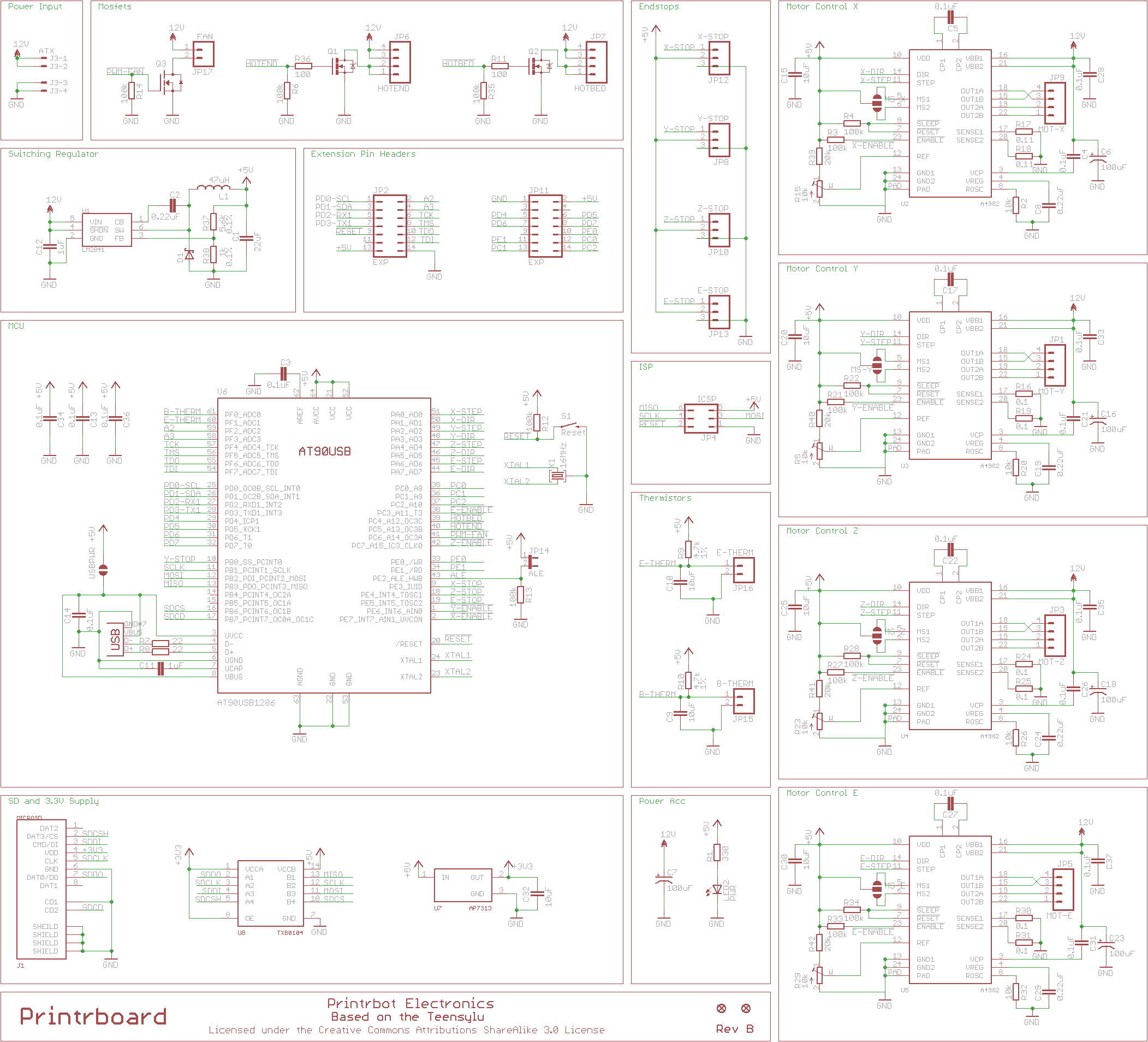
I tested 2 pins for fan on Printboard with multimeter and seems that I touched together both pins, computer restarted and after this extruder heating and extruder motor and bed heating is not working anymore.
Can't see any burned components on Printboard and wasn't smell of anything burned. X,Y,Z motors are working.
This board is dead? Any ideas what to do?

P.S. I have Solidoodle 2 pro, bought it in August.

2

Re: Did I burn out my Printboard?

Did you try resetting the board?

Powder coated steel enclosure, 1/4" Surface grounded hardened aluminum plate, MK2A Heat bed, .200 Polished fused quartz plate, Machined quick change hot bed mount, E3D hot end, Ramps 1.4, DRV8825 stepper motor drivers

3

Re: Did I burn out my Printboard?

techbuilder2175 wrote:

Did you try resetting the board?

Yes, pushed reset button and holded for some seconds also... didn't help.

4

Re: Did I burn out my Printboard?

Reset: cut power off to everything (unplug from wall *and* USB), and let sit for 10-15 min (not just reset button, computer restart, etc).  Try that first.

Which pins did you short?  I mostly have no clue about electronics (so you probably want 2nd opinion), but if the fan pins, then it would seem you shorted the 12V supply.  From symptoms, sounds like nothing that needs 12V works.  Does the board switch on if connected just to wall (i.e., USB is disconnected -- I'm assuming Printrboard takes 5V from USB as well, although it seems that would depend on how a jumper is set)?  If you shorted other ATmega output pins, then you may have damaged your MCU (is it possible to damage *all* pins by shorting *one* though?) and, unfortunately, the ATmega is not easily replaceable on the Printrboard. 

S.

5

Re: Did I burn out my Printboard?

You might have blown the MOSFETS.  There is one MOSFET directly behind each of the extruder and Bed connectors

I'm not an electronics expert but found the below which describes possibly how to test them

http://www.utm.edu/staff/leeb/mostest.htm

6 (edited by Accessdenied 2013-12-17 09:06:42)

Re: Did I burn out my Printboard?

2 pins for extruder cooler - I measured there 5V.
Well, I have some news..
This morning I came to printer which was without power for all night, pushed for 10 sec reset button and turned it on.
Connected to it and bed and extruder heating worked!!!!!!!!!!!!!
In Repetier host I pushed to extrude 2 mm, extruder motor worked for 1 push, then it stopped and temperature heating automatically disabled for both bed and extruder. (Just to be clear - I unscrewed extruder motor).
Then I tried to disconnect printer and connect it back to power with reseting, and again the same - it is possible to turn on heating for bed and extruder, but at the same moment when I push button to extrude 2mm, error appears and all temperature is automatically reseted by soft?!
So extruder motor is not working due to error.
Also there appeared strange error about mintemp triggered... I am not sure, but extruder heating temp. curve is strange.. It is heating till 185 normally, but then it starts to jump like 205, 185 in 2 seconds, then 200, 190 and so on... not stable, after some time it becomes more stable, but before it heated another way - it went to 205C, if I set 195C, then it went down slowly. And again if I push extrude button even when temperature is about 195, heating stops automatically.

P.S. Errors print screen: http://www.bildites.lv/images/k74173s3l0b012klgh1n.jpg

7

Re: Did I burn out my Printboard?

First: The the motors run off of 12V also.

It sounds like you have a problem with your PSU. Shorting the pins may have blown something inside that instead, and when you reach a certain current, the PSU switches itself off.

Chuck Bittner is a quadriplegic gamer who is petitioning the major console developers to include internal button remapping in all console games. You can help.
Sign Chuck Bittners petition

8

Re: Did I burn out my Printboard?

Hazer wrote:

First: The the motors run off of 12V also.

It sounds like you have a problem with your PSU. Shorting the pins may have blown something inside that instead, and when you reach a certain current, the PSU switches itself off.

Which PSU? On board?
Don't you think it's something with temperature sensors on extruder? As temperature raising is a little bit strange, not like before and it says something about "mintemp triggered" and turns off all heating.. But how is it connected with extruder motor? As I understood, there is security mechanism which denies extruder motor while temperature is too low ("echo: cold extrusion prevented", if you try to extrude while temp. is too low), under defined value..?!
Or perhaps microcontroller soft is broken and need to reload it..?!

9

Re: Did I burn out my Printboard?

Min temp usually means a short or gap in one of the thermistors. Check the temps in Repetier to see which one is at zero and check wiring from there.

10 (edited by Accessdenied 2013-12-17 14:16:34)

Re: Did I burn out my Printboard?

lawsy wrote:

Min temp usually means a short or gap in one of the thermistors. Check the temps in Repetier to see which one is at zero and check wiring from there.

Strange things... Now I made 2 clear experiments with different extruder and bed heating. Please, take a look on my temp. curves and what you can see there? (In these experiments when I tried to extrude some mm, heating didn't stop, only errors appeared as in second print screen error log)
What means bottom graph when extruder heating is on?

Well, here are my experiments.
1. Extruder heating on, bed heating off. No errors until I push to extrude some milimeters. After I push to extrude, errors appear as you can see. And heating curve is crazy until it stabilizes.

http://www.bildites.lv/images/429zyii7clh2154ldd.jpg

2. Extruder heating off, bed heating on. All seems to be ok.

http://www.bildites.lv/images/1ymj6yfw1oleooj0tvg9.jpg

11

Re: Did I burn out my Printboard?

Check your thermistor (blue) connection on the hot end. I think the wires are loose. It is definitely an intermittent connection.

SD3 w/ mods:
Glass bed with QU-BD heat pad upgrade, threadless ballscrew w/ 8mm smooth rod, spectra line belt replacement, lawsy MK5 extruder, Lawsy replacement carriage, E3D hotend, Ramps 1.4 w/ reprap discount controller, DRV8825 drivers, 12v 30A PS, Acrylic case, Overkill Y-idlers, Filament alarm, Extruder fan + more.

12

Re: Did I burn out my Printboard?

2n2r5 wrote:

Check your thermistor (blue) connection on the hot end. I think the wires are loose. It is definitely an intermittent connection.

+1

Printit Industries Model 8.10 fully enclosed CoreXY, Chamber heat
3-SD3's & a Workbench all fully enclosed, RH-Slic3r Win7pro, E3D V6, Volcano & Cyclops Hot End
SSR/500W AC Heated Glass Bed, Linear bearings on SS rods. Direct Drive Y-axis, BulldogXL
Thanks to all for your contributions

13

Re: Did I burn out my Printboard?

Accessdenied wrote:

2 pins for extruder cooler - I measured there 5V.

You mean the Printrboard PWM fan pin?  That should be 12V (unless running at ~40% duty cycle).  Or the extruder (always-on) fan pins?  Those should always be 12V too.  So you probably shorted something else.

In any case, I don't think the short is relevant anymore, completely agree that it sounds like the thermistor wire.

14

Re: Did I burn out my Printboard?

spapadim wrote:
Accessdenied wrote:

2 pins for extruder cooler - I measured there 5V.

You mean the Printrboard PWM fan pin?  That should be 12V (unless running at ~40% duty cycle).  Or the extruder (always-on) fan pins?  Those should always be 12V too.  So you probably shorted something else.

In any case, I don't think the short is relevant anymore, completely agree that it sounds like the thermistor wire.

Extruder always on fan pins. There goes white fan connection with "F" on it.

----
Well, here is a photo with my extruder thermistor, what you think about it? ))
http://www.bildites.lv/images/36hfvijvmeva0jo9g3e.jpg

15

Re: Did I burn out my Printboard?

Guys.....?

16

Re: Did I burn out my Printboard?

Accessdenied wrote:

Guys.....?

It's like a ghost town in here isn't it?
I wish I could help more but I have no idea how to go about testing a thermistor.  The best advice I can give is make sure there are no shorts or loose connections.

Printit Industries Model 8.10 fully enclosed CoreXY, Chamber heat
3-SD3's & a Workbench all fully enclosed, RH-Slic3r Win7pro, E3D V6, Volcano & Cyclops Hot End
SSR/500W AC Heated Glass Bed, Linear bearings on SS rods. Direct Drive Y-axis, BulldogXL
Thanks to all for your contributions

17

Re: Did I burn out my Printboard?

wardjr wrote:
Accessdenied wrote:

Guys.....?

It's like a ghost town in here isn't it?
I wish I could help more but I have no idea how to go about testing a thermistor.  The best advice I can give is make sure there are no shorts or loose connections.

Unfortunatly, yes. Seems that all I can do is try to replace this thermistor and see what happens... smile

18

Re: Did I burn out my Printboard?

Again, no electornics expert, but thermistor is just resistor whose value varies with temperature. So it seems to me not much you can check: continuity, shorts, and maybe value (should be order of 100K in room temp). Thing is, your problem may be intermittent (so unless you check when it happens, or keep the multimeter clipped on... may not see anything).

19

Re: Did I burn out my Printboard?

Accessdenied wrote:

Extruder always on fan pins. There goes white fan connection with "F" on it.

----
Well, here is a photo with my extruder thermistor, what you think about it? ))
http://www.bildites.lv/images/36hfvijvmeva0jo9g3e.jpg

Hm, those pins are connected straight to the 12V input. Strange.

Visually, thermistor looks fine, but doesn't hurt to check. Might also be the blue connectors (I accidentally pulled one wire out once, while fiddling with hotend, but could barely see it was out... then, again, it was a connector I had inserted with a jeweler's screwdriver, not the proper IDC insertion tool).

20

Re: Did I burn out my Printboard?

BTW, did you see the sticky topic:
http://www.soliforum.com/topic/636/hot- … to-repair/

spapadim wrote:

Again, no electornics expert, but thermistor is just resistor whose value varies with temperature. So it seems to me not much you can check: continuity, shorts, and maybe value (should be order of 100K in room temp). Thing is, your problem may be intermittent (so unless you check when it happens, or keep the multimeter clipped on... may not see anything).

21

Re: Did I burn out my Printboard?

Well, I unmounted thermistor, checked wires and didn' t find any intermittend connecions.. Then added it back and printer started working normally, but now I see again some problems.. Tried to print 1 detail and as I see there is stable temperature and in one moment temp. goes down for 1 second and then goes back, but printer is stopped due to 999 temp. error. Seems like signal loss from temp sensor or interrupted connection.. what can you advice? Change thermistor? Or where else can be the problem? Somewhere in wires?

22

Re: Did I burn out my Printboard?

http://www.bildites.lv/images/od6z7qe0c5xomwiorzx.jpg

23

Re: Did I burn out my Printboard?

Problem solved.
There was bad contact between 2 connectors from thermistor and from plate wires. I ringed all wires and found that one wire on the white connector from board side has not stable connection. smile

24

Re: Did I burn out my Printboard?

thats what they told you to do in the first place! lol

25

Re: Did I burn out my Printboard?

Glad to hear you figured it out.

Printit Industries Model 8.10 fully enclosed CoreXY, Chamber heat
3-SD3's & a Workbench all fully enclosed, RH-Slic3r Win7pro, E3D V6, Volcano & Cyclops Hot End
SSR/500W AC Heated Glass Bed, Linear bearings on SS rods. Direct Drive Y-axis, BulldogXL
Thanks to all for your contributions