1

Topic: QU-BD heating pad setup

I just ordered a QU-BD heating pad for my SD3 after my original heating bed crapped out.  I should be getting this tomorrow and I'm getting everything ready for the installation.

QU-BD states that this heater pad requires at least 150W by itself, so they suggest a separate power supply , or a 350W main power supply if I want to run everything off a single PS.  So this brings up the following questions:

If I'm to run it off a separate power supply, how will I be able to control the temperature?  yes the thermistor will be connected to the Sanguinololu board, but it has no control over the external PS?

What do most of you use when upgrading the power supply above 200W?  a PC or Server PS with the 12V rails tied together ?

If I were to run the new pad off the Sanguino board with the original 150W PS, would it still work, but just heat up slower, or will it blow the MOSFET

The QU-BD heater comes with its own thermistor, but it's my understanding that it would require firmware changes for to make that work.  So what about bypassing its internal thermistor and using the original one that came with the SD3?


Thanks for any input.

To print or, 3D print, that is the question...
SD3 printer w/too many mods,  Printrbot Simple Maker Ed.,  FormLabs Form 1+
AnyCubic Photon, Shining 3D EinScan-S & Atlas 3D scanners...
...and too much time on my hands.

2

Re: QU-BD heating pad setup

Tag, I'm getting sick of waiting for my stock bed to heat up.

3 (edited by adrian 2013-09-18 14:13:51)

Re: QU-BD heating pad setup

In order of your questions:

DC-to-DC SSR rated for at least 20-30amps and of the 12V variety. with the switch side connected to the sang and the outputs across the positive of the power supply to the bed.

Dell Powersupplies as referenced on board already, or Meanwell power supplies like lawsy has if you want glossy product.

It will trip the power supplies over-current protection.

You will need to change the thermistor in firmware if you want to avoid problems - its a single number in a file, and uploading it. its not overly complicated and far safer.

4

Re: QU-BD heating pad setup

This is the one I ordered when I bought mine
http://www.amazon.com/gp/product/B005X4 … &psc=1

Powder coated steel enclosure, 1/4" Surface grounded hardened aluminum plate, MK2A Heat bed, .200 Polished fused quartz plate, Machined quick change hot bed mount, E3D hot end, Ramps 1.4, DRV8825 stepper motor drivers

5 (edited by pirvan 2013-09-19 05:36:27)

Re: QU-BD heating pad setup

Since I work for a computer company and I have access to computer equipment, I went with the server power supply option.  I found a few power supplies laying around, including a 750W Delta DPS-750EB and a 850W Astec DS850-3.

I liked the Astec a lot, as it's physically smaller, but I didn't like that the fans are running all the time the AC cord is plugged in.  Even though the power switch is off, and the PS is not outputting any power, the fans are still running, and they're not exactly quiet (it's a server after all)

So I decided to go with the Delta.  Its fans only come on when the power is turned on, so once you turn it off, it's quiet.

Anyway, I will post a few pics as I go along with this rebuild.

To print or, 3D print, that is the question...
SD3 printer w/too many mods,  Printrbot Simple Maker Ed.,  FormLabs Form 1+
AnyCubic Photon, Shining 3D EinScan-S & Atlas 3D scanners...
...and too much time on my hands.

6 (edited by pirvan 2013-09-19 05:39:43)

Re: QU-BD heating pad setup

Here are a few pics of the new power supply installation.  I used Hobby grade servo tape to attach the power supply to the back of the Solidoodle.  This stuff withstands high temperatures, and can hold up to 30lbs/in². 

To clear the wiring coming out of the bottom hole, I used a 1/4" plate under the power supply to offset it from the surface.  All the wiring is done, but I need to make some type of holder for the power switch.  The switch is 1/2" diameter, and I don't want to drill a 1/2" hole in the printer frame, and undermine the rigidity , so I'll simply print a power switch enclosure.

In the last image you can see the 150mm x 150mm QU-BD heating pad.  I'll first use the original thermistor, and if that works, I'll keep that setup, if not I'll use the thermistor that came with the pad and modify the firmware.

http://www.soliforum.com/misc.php?action=pun_attachment&item=3426
http://www.soliforum.com/misc.php?action=pun_attachment&item=3427
http://www.soliforum.com/misc.php?action=pun_attachment&item=3428

Post's attachments

750W_PS-1.jpg
750W_PS-1.jpg 150.74 kb, file has never been downloaded. 

750W_PS-2.jpg
750W_PS-2.jpg 155.02 kb, file has never been downloaded. 

750W_PS-3.jpg
750W_PS-3.jpg 120.71 kb, file has never been downloaded. 

You don't have the permssions to download the attachments of this post.
To print or, 3D print, that is the question...
SD3 printer w/too many mods,  Printrbot Simple Maker Ed.,  FormLabs Form 1+
AnyCubic Photon, Shining 3D EinScan-S & Atlas 3D scanners...
...and too much time on my hands.

7 (edited by adrian 2013-09-19 06:18:12)

Re: QU-BD heating pad setup

pirvan wrote:

In the last image you can see the 150mm x 150mm QU-BD heating pad.  I'll first use the original thermistor, and if that works, I'll keep that setup, if not I'll use the thermistor that came with the pad and modify the firmware.

It will 'work'... it will even report a tempreature, and you'll be able to type 95°C and it'll 'report' 95°C...

Its just that the heated pad will be MUCH higher than 95... Because you have placed the thermistor so far away and on the otherside of a metal plate.... there will be anywhere up to 20°C difference between the top side of the QU-BD and the bottom side of the aluminium plate.

Seriously - you are cutting a corner that will end in a huge troubleshooting headache... Not to mention it will cause you QU-BD to run much hotter, and harder, than it should.. and will introduce a massively wide PID cycle as the distance the tempreature has to travel from where its created to where its measured is so much larger than it should be and thus the on/off cycles will be increased in duration... longer to (apprently) heatup and longer to (apprently) cooldown... 

Its just like on the stock SD Extruder, why you have to 'add 30°C' to the reported tempreature to know what the Actual Meltzone tempreature is.  That 30°C Delta is from a realtively short distance of brass, that transmits heat quite nicely. Do you know what the delta is between the top side of your QU-BD and the bottom side of the aluminium plate and the *side* (the standard thermistor is side mounted not center mounted) of it ? Its going to probably be a lot more than 30°C and you're the only one who can work out what that temp delta is because you don't have the benefit of the research that gave you that 30°C figure in the first place smile You're essentially suggesting that its 'ok' to set the Tempreature on an Airconditioner to control a room to a precise tempreature by employing a thermostat down the corridor and in an entirely different room wink

So unless you want the center of your bed running at 120°C, the sides at 105°C and the 'reported' tempreature to be 90°C... (which it will duly report) then deal with the fact you have to make a tiny change in firmware that 100's of people have made already to "great success" (to quote Bruno...). Or accept that you are cutting a serious corner that you really haven't examined the ramifications of and feel free to disregard the advice offered and go along your merry way smile smile 

But I just can't get my head around doing all this effort to skimp on one line in firmware... that will give you nothing but negatives in return ?

8

Re: QU-BD heating pad setup

OK, it's back together (the bed is not yet adjusted but I wanted to test the heater and the rest of the functions, so here it is.

Check out the temp curve.  From 25°C to 96°C in under 4 minutes.  Not too bad, although I was kinda hoping for even faster performance based on the specs from QU-BD, which claims this pad can heat to 130°C in 1 minute.  The power supply is certainly capable of delivering the amps.

On the other hand, I don't have the temp gun here, so I don't know if the reading is correct.  It certainly feels hot, in fact it feels quite a bit hotter than it did with the old pad at the same temp readings.  I'll borrow a temp gun from work and check it tomorrow.

The only complaint I have so far is the PS fan noise.  I need to do something about it...

http://www.soliforum.com/misc.php?action=pun_attachment&item=3429
http://www.soliforum.com/misc.php?action=pun_attachment&item=3430

Post's attachments

750W_PS-4.jpg
750W_PS-4.jpg 194.68 kb, file has never been downloaded. 

750W_PS-5.jpg 143.84 kb, file has never been downloaded. 

You don't have the permssions to download the attachments of this post.
To print or, 3D print, that is the question...
SD3 printer w/too many mods,  Printrbot Simple Maker Ed.,  FormLabs Form 1+
AnyCubic Photon, Shining 3D EinScan-S & Atlas 3D scanners...
...and too much time on my hands.

9 (edited by pirvan 2013-09-19 07:25:22)

Re: QU-BD heating pad setup

adrian wrote:

It will 'work'... it will even report a tempreature, and you'll be able to type 95°C and it'll 'report' 95°C...

Its just that the heated pad will be MUCH higher than 95... Because you have placed the thermistor so far away and on the otherside of a metal plate.... there will be anywhere up to 20°C difference between the top side of the QU-BD and the bottom side of the aluminium plate.

Are you thinking I'm putting the bed on top of the aluminum plate and the thermistor at the bottom? 

I'm not, I have it setup the same way as the original pad, at the bottom, with the thermistor sandwitched between the pad and the bottom of the plate

adrian wrote:

the standard thermistor is side mounted not center mounted

Not on my machine.  The thermistor was mounted dead center in the bed.  There's even a drilled n indentation at the bottom for the thermistor head to sit flush with the surface, it's just that they didn't route a groove for the wires, but they're fairly thin.

http://www.soliforum.com/misc.php?action=pun_attachment&item=3431

adrian wrote:

So unless you want the center of your bed running at 120°C, the sides at 105°C and the 'reported' tempreature to be 90°C... (which it will duly report) then deal with the fact you have to make a tiny change in firmware that 100's of people have made already to "great success" (to quote Bruno...). Or accept that you are cutting a serious corner that you really haven't examined the ramifications of and feel free to disregard the advice offered and go along your merry way smile smile

But I just can't get my head around doing all this effort to skimp on one line in firmware... that will give you nothing but negatives in return ?

Wow...I can see you feel quite strongly about this.  I never said I won't do the firmware change, only that I wanted to try this setup .  I don't think I'm cutting any corners, it's just a different approach.  If I find the readings to be erroneous (after I check them with a heat gun), then I'll do the change.

I have no problems with firmware changes, but man, cut me some slack, I'm not and idiot with a soldering gun....

Post's attachments

750W_PS-6.jpg
750W_PS-6.jpg 144.13 kb, file has never been downloaded. 

You don't have the permssions to download the attachments of this post.
To print or, 3D print, that is the question...
SD3 printer w/too many mods,  Printrbot Simple Maker Ed.,  FormLabs Form 1+
AnyCubic Photon, Shining 3D EinScan-S & Atlas 3D scanners...
...and too much time on my hands.

10 (edited by adrian 2013-09-19 07:45:59)

Re: QU-BD heating pad setup

We have different stock bed setups then, because mines not centered. Center-left at best.

And yes, I assumed (erroneously) you were putting it on top, as having the same sized pad as the build area means you'll foul the levelling screws. I see instead you got a 150 pad.. and thus its within the screws footprint. My bad. Most others have gone with the equal build size and gone on top in order to gain a directly heated larger surface area instead of relying on the aluminium to spread the heat..

As for feeling strongly - I've been more miffed by the desire to not just go with the 'as built' solution. And yes, I perhaps came across a bit strongly, and by no means assume you where no idiot with a soldering iron - that was what compunded my confusion in trying to (apparently) avoid a measly one line mod when you've done all the other work... it seemed entirely non-intuitive to me.

All to often lately people have been getting very , shall we say, cavalier, about thermistors. My attempt at highly discouraging yourself here is borne from having seen quite a few others passing it off as 'ok' or even, 'good'... so apologies if thats come out in these posts as being overly assertive... but I'm trying to discourage the perception that A: firmware mods are very very hard and therefore not worth bothering with and B: thermistors, meh, close enough's good enough right ? ....

So my apologies.

11 (edited by pirvan 2013-09-20 02:53:50)

Re: QU-BD heating pad setup

Today I borrowed the heat gun from work and ran a few tests. 

The following readings and findings seem to go against the conventional wisdom as it pertains to the installation of the thermistor, at least for a QU-BD heater pad.

I heated the pad to 70°C, and read the temps in a few different place, including the bottom of the pad, and top of the print bed. 

Take a look at the following 2 images.  The one with the high reading is taken at the spot where the QU-BD thermistor is, the other is in the center of the pad, where I placed the original thermistor.  Notice the difference between these reading which were taken a couple of seconds apart.  I also flipped the bed and took a reading on top, but forgot to snap a picture of it, the top read about 67.5°C.

http://www.soliforum.com/misc.php?action=pun_attachment&item=3438
http://www.soliforum.com/misc.php?action=pun_attachment&item=3439


The QU-BD thermistor is built into the pad near the place where the wires are soldered to the coils.  For this reason, the readings are much higher than the rest of the pad.  Not only that, but the temps build up a lot faster in that area compared to the rest of the pad, giving the false impression that the pad heats up super fast, when in fact it takes a lot longer for the entire pad to heat up evenly.

So, at least for my setup (and I think this would probably apply to anyone upgrading the original heater to a QU-BD model), reusing the original thermistor instead of the one built-into the QU-BD heater, is in my opinion a more accurate solution (sorry, Adrian).

Post's attachments

Heat_pad-1.jpg
Heat_pad-1.jpg 74 kb, file has never been downloaded. 

Heat_pad-2.jpg
Heat_pad-2.jpg 79.03 kb, file has never been downloaded. 

You don't have the permssions to download the attachments of this post.
To print or, 3D print, that is the question...
SD3 printer w/too many mods,  Printrbot Simple Maker Ed.,  FormLabs Form 1+
AnyCubic Photon, Shining 3D EinScan-S & Atlas 3D scanners...
...and too much time on my hands.

12 (edited by adrian 2013-09-20 03:06:10)

Re: QU-BD heating pad setup

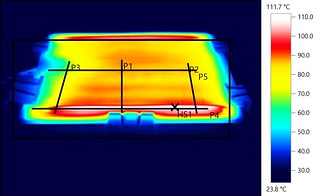
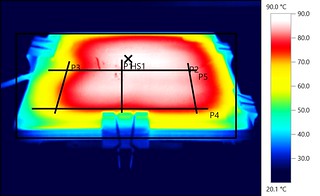
Interesting. No need for apologies, but I'll continue to disagree as it would seem to be completely different to the finding using a Thermal imaging camera from above. I wasn't just asserting myself - I was doing it based on a bit of research and experimentation - so interesting your testing under neath using an IR thermometer got different results.

With glass plate ontop:
http://farm9.staticflickr.com/8261/8691513821_6a36268108_n.jpg

With ceramic tile, where you'll note the HS1 mark is almost centered...
http://farm9.staticflickr.com/8406/8692630744_1f1db9b598_n.jpg

So yes, weird that you got readings completely different to multiples tests with multiple materials done over at http://www.soliforum.com/topic/2230/the … ed-setups/

Anyways - guess we'll have to agree to disagree here.

13 (edited by pirvan 2013-09-20 03:11:16)

Re: QU-BD heating pad setup

After the earlier tests, I heated the bed up to 95°C, and tested the temps across multiple points across the print bed, to check for evenness.

First of all, while the thermistor reading got up to 95°C in a little over 3 minutes, the top of the printbed never actually reached those temps, it actually topped out at about 91°C in about 6-7 minutes.  Additionally, while the readings around the center of the bed were around 90-91°C, the edges (about 1" in) read between 86-88°C.  I also took a few readings of the bottom of the heater pad, and the average was 113°C.

I cranked up Repetier to 100°C, but the actual bed temps only went up to 90°C around the edges and 92-93 in the middle.

To print or, 3D print, that is the question...
SD3 printer w/too many mods,  Printrbot Simple Maker Ed.,  FormLabs Form 1+
AnyCubic Photon, Shining 3D EinScan-S & Atlas 3D scanners...
...and too much time on my hands.

14

Re: QU-BD heating pad setup

I don't have FLIR camera to do this, but our setups are quite different.  You placed the pad on top of the aluminum bed, then placed glass on top of the pad.  So your pad is heating both simultaneously.  Your readings are taken on the glass, which heats up more evenly than the Aluminum.

In my case the "bottom" of the heater pad is attached to the bottom of the aluminum bed, and the readings are taken on the opposite side.  My pad heats up the aluminum bed on one side, and radiates the heat on the other.  I plan on putting the original insulation cloth back so that should help trap some of the heat instead of radiating it outward.

Once I get the bed fully installed, the glass will also go back on top, which should help even out the readings across the entire surface.

Anyway, I have a few question regarding your setup.  Did you use a QU-BD heater pad?  If so, I assume your pad has the thermistor near the top edge where the wires connect to the coils.  How accurate did you find the thermistor readings to be compared to the readings from your FLIR camera?

To print or, 3D print, that is the question...
SD3 printer w/too many mods,  Printrbot Simple Maker Ed.,  FormLabs Form 1+
AnyCubic Photon, Shining 3D EinScan-S & Atlas 3D scanners...
...and too much time on my hands.

15

Re: QU-BD heating pad setup

Since we are talking heatbeds I was wondering if anyone had some info on the nichrome from the stock pro beds. I'm mostly curious about the pattern and the ohms. I haven't felt like pulling mine apart to find out but i figured people who have done replacements might know.

The reason is I just found out that autodesk gives away free student copies so I've been modeling some parts from my sd2 to try and learn inventor (and also play with simulation CFD which I know nothing about, but seems pretty cool). I added some files to the wiki for the extruder and the heatbeds even though I know no one uses the glitchy wiki.

Post's attachments

Assembly-exploded.png
Assembly-exploded.png 89.96 kb, file has never been downloaded. 

Untitled-3.png
Untitled-3.png 857.19 kb, file has never been downloaded. 

You don't have the permssions to download the attachments of this post.

16 (edited by pirvan 2013-09-21 19:39:32)

Re: QU-BD heating pad setup

Finally Done.

I double-faced taped the fiber insulation cloth that was on the original heater pad, and wrapped everything in Kapton tape.  Then I clipped my glass surface on top.

http://www.soliforum.com/misc.php?action=pun_attachment&item=3456

The temp build up from 23°C to 95°C (according to Repetier) takes about 3 1/2 minutes. at that time the top of the glass read and average of 80°C.  After another 5 minutes (about 8 minutes in all), the top of the glass reads about 89-90°C, and it seems to stay there.  I have to actually crank the Repetier setting to 105° to get the bed to read 95°C.

I also took a couple of readings at the bottom of the print bed, now that I insulated it, and it seems to average 102°-106°C, so it looks like (some/most?) of the heat is getting trapped inside rather than radiated outward.

Nevertheless, I ran a couple of test print at the 95°C (Repetier) temp and the prints seem to stick quite well, so I'll leave it at that.  Never having done any temperature readings of the original bed setup, I have no reference of how hot the top of the glass used to get before, so for all I know it's hotter now than ever before.

http://www.soliforum.com/misc.php?action=pun_attachment&item=3457

I also printed a little switch holder for my power switch, and glued it in the lower left hand corner.  So at this moment it looks like the machine is working fine, but I'll probably need to get a replacement print bed frame one of these days.  Look how twisted the wood bed frame is on the front view.  The front right corner droops down about 1/4".  It's been like this from day one.  If you put it on a flat surface it just rocks back and forth, it doesn't sit flat.

Quality control at Soliddodle is not an exacting science, I'd say it's more like "close enough" hmm

Post's attachments

750W_PS-7.jpg
750W_PS-7.jpg 146.28 kb, file has never been downloaded. 

750W_PS-8.jpg
750W_PS-8.jpg 173.25 kb, file has never been downloaded. 

You don't have the permssions to download the attachments of this post.
To print or, 3D print, that is the question...
SD3 printer w/too many mods,  Printrbot Simple Maker Ed.,  FormLabs Form 1+
AnyCubic Photon, Shining 3D EinScan-S & Atlas 3D scanners...
...and too much time on my hands.

17

Re: QU-BD heating pad setup

Hey Pirvan - looks good.

I've been away for the weekend, so just catching up. Will post details for you re my setup later on.

18

Re: QU-BD heating pad setup

Loving the ballscrew conversion! Part numbers? I probably missed that thread somewhere.

19

Re: QU-BD heating pad setup

diyengineer wrote:

Loving the ballscrew conversion! Part numbers? I probably missed that thread somewhere.

Here it is

http://www.soliforum.com/topic/2998/sd3 … all-screw/

To print or, 3D print, that is the question...
SD3 printer w/too many mods,  Printrbot Simple Maker Ed.,  FormLabs Form 1+
AnyCubic Photon, Shining 3D EinScan-S & Atlas 3D scanners...
...and too much time on my hands.