
1

Topic: Power switch

Has anyone made/bought/found a power switch for the SD2? I refuse to leave it plugged in, LED's shining and fans running all the time and cannot seem to find any sort of switch to control the main power. Am I blind or was it just not included in the design? If the latter is the case, I am not surprised, there are a lot of things that should have been done that were overlooked.
>.>

No trees were harmed in the creation of this email, though some electrons were horribly inconvenienced.

2

Re: Power switch

It's simple enough to put a switch in line if you want one, but I wouldn't... this printer was made to print and putting a switch in there would just make it easier to turn off and that just wouldn't be right...However if you really want to install one just make sure it is rated for the max supply which in this case for the SD2 with heated bed is 12Vdc at 10 Amps any single pole or double pole switch will do just wire it in series with the power in on the main board.

http://www.ebay.com/itm/12v-red-Round-r … mp;vxp=mtr

3

Re: Power switch

I just use the switch on a power strip.  Not as neat as a switch in a box, but simple.

4

Re: Power switch

I bought one of these:
http://www.ebay.com/itm/Red-Sign-Weathe … 5aef07dd36
and just put it on the cable to the psu.

5

Re: Power switch

Rondavouz wrote:

I bought one of these:
http://www.ebay.com/itm/Red-Sign-Weathe … 5aef07dd36
and just put it on the cable to the psu.

I agree. The switch should be on the cable between the socket and the power supply, not between the power supply and the printer.

6

Re: Power switch

^^^^^^
Is it bad for the control board if the switch is placed between power and control board??

7

Re: Power switch

No, but it is more efficient if you switch the mains that way the powersupply isn't online always... however the newer powersupplies they make are getting pretty good about how much power they take when not in use. I haven't checked the SD's brick to see how much it uses on or off but probably sooner or later just for the fun of it wink

8

Re: Power switch

ronsii wrote:

No, but it is more efficient if you switch the mains that way the powersupply isn't online always... however the newer powersupplies they make are getting pretty good about how much power they take when not in use. I haven't checked the SD's brick to see how much it uses on or off but probably sooner or later just for the fun of it wink

It's also more safe, as a faulty power supply might overheat and catch fire.

9 (edited by Schieggster 2013-03-13 14:20:25)

Re: Power switch

IanJohnson wrote:

I just use the switch on a power strip.  Not as neat as a switch in a box, but simple.

This

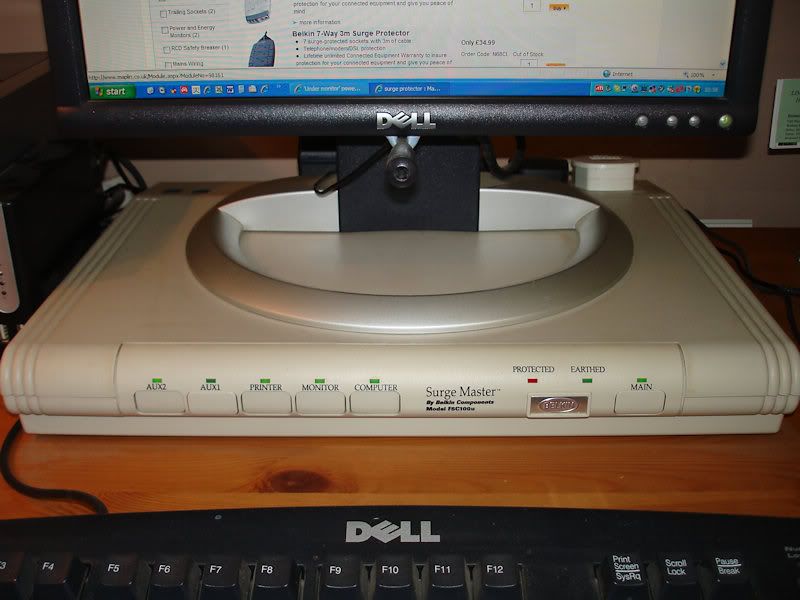
I have a neat little Flat Power strip (like in the picture, But not as Dell-y) that I pur my monitor on and use the buttons on the front to control the power to things like: My Printer, My workspace LED's, My printer dedicated monitor, and maybe a heat gun or something eventually.


http://img.photobucket.com/albums/v230/BillG/Misc/belkin.jpg

10

Re: Power switch

Rincewind wrote:
ronsii wrote:

No, but it is more efficient if you switch the mains that way the powersupply isn't online always... however the newer powersupplies they make are getting pretty good about how much power they take when not in use. I haven't checked the SD's brick to see how much it uses on or off but probably sooner or later just for the fun of it wink

It's also more safe, as a faulty power supply might overheat and catch fire.

This is true, it is safer... Unless your power strip catches fire, I had one do that it was an older unit with dropout protection which was basically just a latching relay that would cut out if the power was lost so it would not keep coming back on and surge the equipment. Turns out it was the circuit that was supposed to protect everything just started pouring smoke out one day and melted the whole back of the unit, just glad we were in the office when it happened. I would think that todays power strips are tested and designed a lot better than 20 years ago.

11

Re: Power switch

ronsii wrote:
Rincewind wrote:
ronsii wrote:

No, but it is more efficient if you switch the mains that way the powersupply isn't online always... however the newer powersupplies they make are getting pretty good about how much power they take when not in use. I haven't checked the SD's brick to see how much it uses on or off but probably sooner or later just for the fun of it wink

It's also more safe, as a faulty power supply might overheat and catch fire.

This is true, it is safer... Unless your power strip catches fire

Well it's not me who has the switch on the power strip, I placed it directly on the power cord smile Anyway I doubt that the power strip could catch fire while off, so if you use the switch when you are finished with it you should be pretty safe. (Provided that you don't leave the printer working unsupervised, which is something that none of us ever does because we are very conscious of safety issues right? smile ).

However, placing the switch on the 110/220V is better also because the current that flows through it is much smaller.

12

Re: Power switch

Rincewind wrote:

(Provided that you don't leave the printer working unsupervised, which is something that none of us ever does because we are very conscious of safety issues right? smile ).

LOL, of course wink Now if I could just remember to turn off the soldering station I would be all set.

13

Re: Power switch

BeerBellyJoe wrote:

^^^^^^
Is it bad for the control board if the switch is placed between power and control board??


if you let your printer connected to your USB port, the control board is always "on" even if you switch off the main power. it's the +5v of the USB port that put power in the control board.

14

Re: Power switch

Sorry for the off topic post, but...

There is a mod to cut the 5v rail on the Sanguinolou.

From http://reprap.org/wiki/Sanguinololu
-------------------------
Bugs:
The USB 5V VBUS is connected to the output of the 5V regulator. This is bad for the regulator and bad for the PC. Some users report the regulator getting very hot (because it is trying to power the PC), other users report the PC giving USB over current errors. Nophead and Nothinman recommend cutting the 5V track to the USB connector. The only downside is the board needs the 12V supply before it will do anything, but who cares?
-------------------------

I found that my PC was very occasionally shutting itself down as it saw a power spike on the 5v rail which always happened mid print no matter how long my PC was on. Since cutting the track I have no problems at all. Plus there is now less current draw of the USB bus.

15

Re: Power switch

I would love a timer. Just like the ones used in coffee makers. One of the worst parts about waking up is having to manually turn on my printer and manually make coffee.
Seriously though, I would like to have a way for it to completely shutdown at a determined time. Or, have it so the print bed automatically heats once plugged in.

16

Re: Power switch

Zarni wrote:

Sorry for the off topic post, but...

There is a mod to cut the 5v rail on the Sanguinolou.

From http://reprap.org/wiki/Sanguinololu
-------------------------
Bugs:
The USB 5V VBUS is connected to the output of the 5V regulator. This is bad for the regulator and bad for the PC. Some users report the regulator getting very hot (because it is trying to power the PC), other users report the PC giving USB over current errors. Nophead and Nothinman recommend cutting the 5V track to the USB connector. The only downside is the board needs the 12V supply before it will do anything, but who cares?
-------------------------

I found that my PC was very occasionally shutting itself down as it saw a power spike on the 5v rail which always happened mid print no matter how long my PC was on. Since cutting the track I have no problems at all. Plus there is now less current draw of the USB bus.


hahah...thanks I was needing to do this....really sick of it jacking with my PC....

17 (edited by ysb 2013-03-19 16:18:01)

Re: Power switch

haaa... good catch.. will do that also...

edit: i just see a problem when we flash a new firmware... do wee need this (as it is recommended to switch off the 12v when you flash your firmware)

18 (edited by jefferysanders 2013-03-19 17:55:39)

Re: Power switch

I never have personally (I've flashed this 644 chip at least a dozen times), I leave everything plugged in as normal while flashing, (not saying you should do this, I just have); I also don't even have to touch the reset button to flash, which seems atypical from what I have read.

19

Re: Power switch

jefferysanders wrote:

I never have personally (I've flashed this 644 chip at least a dozen times), I leave everything plugged in as normal while flashing,

I did it once and the motors moved, which scared me because I thought they could break something. Does it happen to you as well?