1

Topic: My prints suck... So I emailed tech support...

And after a very curt response, I tried to calibrate according to the wiki. The bed is level, extruder is extruding, and I keep getting rough parts, layers separating, edges peeling, prints popping off (unless I use a raft, which makes my parts even rougher) even the raft starts separating around the part.
When I tried calibrating the extruder output, it told me to print a box & when I've seen people's box prints here (1 layer thick walls) they were beautiful, nice resolution, straight walls, etc. Mine, not so much. I did everything I was supposed to do, but my response from tech was that it was out of calibration.

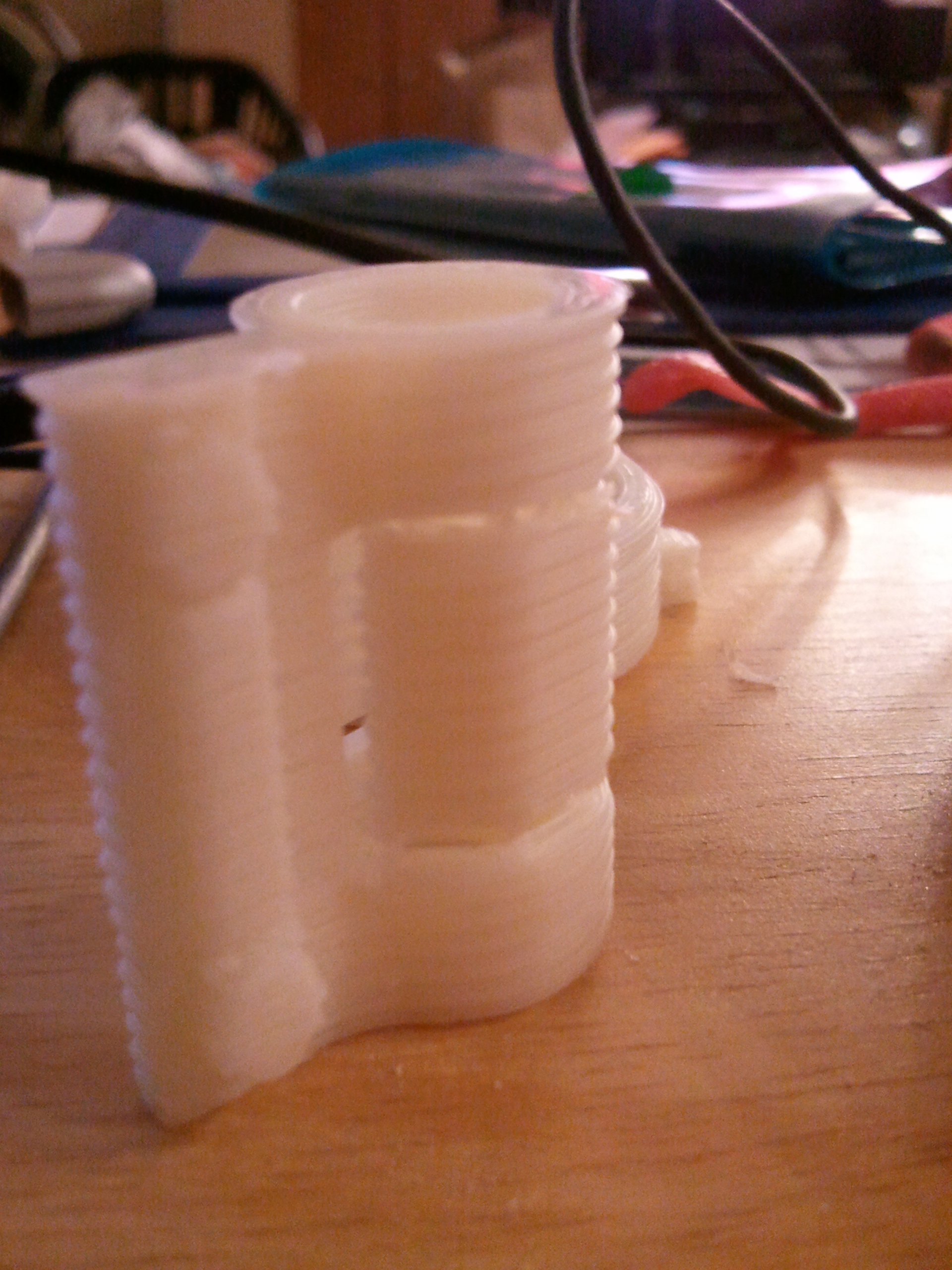
Anyone have this problem with theirs too? Here is some pics:

https://sphotos-b.xx.fbcdn.net/hphotos-snc7/421376_567664049912180_1350751156_n.jpg

https://sphotos-b.xx.fbcdn.net/hphotos-snc6/181040_567450219933563_1401935628_n.jpg

The strings indicate that the extruder gear is slipping, which it is, I keep having to adjust it, which sucks. The picture on top shows the sides peeling & compressing (that was just support material) and the front end shows the horrible resolution I am getting at .3mm which is ridiculous. You ever look at the parts printed at .3mm that are part of your Solidoodle ? They're beautiful.

Forgive me if I sound like I'm grumbling in a scatter brained fashion, but I feel a little let down in my high expectations of this printer. hmm

No trees were harmed in the creation of this email, though some electrons were horribly inconvenienced.

2

Re: My prints suck... So I emailed tech support...

I'm no expert at troubleshooting these things so I won't bother to try. But I just wanted to throw some stuff out there. You mentioned your bed is level; did you mean it's level in respect to earth, or that the bed surface is perpendicular to the nozzle. I ask only because another fellow was practically pulling his hair out thinking his bed was leveled correctly, but what he did was leveled it to earth instead of making it level in respect to the nozzle.

The peeling/warping issue is something we all have to combat. Try enclosing your printer as much as you can to retain some of that heat in the print area, as the cool ambient temp will cause warping issues, as well as any breeze that may hit your part while being printed.

You may have a bed that isn't exactly straight, which some of the folks here have switched to using a glass pane to create a more flat surface to print on.

Hope this gives you some things to check out. Hopefully someone else will chime in on the more technical stuff.

3

Re: My prints suck... So I emailed tech support...

Hi.

First things first.  If your extruder isn't reliably pushing out filament, you can forget about leveling the bed, or doing any calibration, as that won't make a difference.  Brush/blow out any loose filament fragments from the extruder.  You mentioned tightening the side clamp.  Mine almost completely compresses the spring.  Also check your extruder temperature.  Thermostats vary from unit to unit, so you might need to bump it a bit (5-10 degrees?) to get good results.

4

Re: My prints suck... So I emailed tech support...

vince7c95 wrote:

I'm no expert at troubleshooting these things so I won't bother to try. But I just wanted to throw some stuff out there. You mentioned your bed is level; did you mean it's level in respect to earth, or that the bed surface is perpendicular to the nozzle. I ask only because another fellow was practically pulling his hair out thinking his bed was leveled correctly, but what he did was leveled it to earth instead of making it level in respect to the nozzle.

I used my feeler gauge to check nozzle -> bed height (touch off at each screw) and it measured the same, no adjustment was necessary.
I am doing the enclosure tomorrow, well, the sides, waiting on the party tray to arrive in a few days.
As far as bed flatness, I will grab my Starrett straight edge & check in a few. When traveling my nozzle across the surface, it never caught or went across any noticeable valleys, I will check for sure though.
Will blow the crud out of it, adjust the screw properly and get back to this thread.
What I am thinking though, maybe my extruder is pushing out too much on each pass, causing it to compress each previous layer & band like that?

No trees were harmed in the creation of this email, though some electrons were horribly inconvenienced.

5

Re: My prints suck... So I emailed tech support...

You've got a number of issues going on.

Your bed temps/ambient temps are too low, causing that warping.
You're probably overextruding, you need to calibrate your extruder. There's a number of guides here. Search.
You have some degree of z-backlash/z-wobble. Print the z-nuthugger fix jamesh posted. Use a spring. If that doesn't fix it enough, you'll need to either use a firmware hack or ask SD for a better threaded rod.
If your extruder can extrude at 400 mm/min as noted in repetier-host under manual control without skipping, then it's not clogged.
You said you use a feeler gauge... what gap are you measuring? You want about 0.2mm of gap on 0.3mm layers. Maybe a bit less, even. It'll give a bit of a skirt, but stick a whole lot better.

6

Re: My prints suck... So I emailed tech support...

elmoret wrote:

You've got a number of issues going on.

Your bed temps/ambient temps are too low, causing that warping.
Yes, I can see the ambient temps, working on a case, I start my print at 115 degrees, it drops to 98 or so during print.
You're probably overextruding, you need to calibrate your extruder. There's a number of guides here. Search.
Do you work for Solidoodle?
You have some degree of z-backlash/z-wobble. Print the z-nuthugger fix jamesh posted. Use a spring. If that doesn't fix it enough, you'll need to either use a firmware hack or ask SD for a better threaded rod.
Thanks, I sent a vid of the wobbling Z-axis motor & they told me it won't effect print quality. Yeah.
If your extruder can extrude at 400 mm/min as noted in repetier-host under manual control without skipping, then it's not clogged.
Will have to check that out, but it isn't my extruder, it's the filament drive gear, & it is clogged, it is so white I can't see teeth in one section of it.
You said you use a feeler gauge... what gap are you measuring? You want about 0.2mm of gap on 0.3mm layers. Maybe a bit less, even. It'll give a bit of a skirt, but stick a whole lot better.
I was doing what I (and many others) call "touching off" (I was a CNC machine operator/programmer for a long time) which is sliding paper under the tool tip as you lower it a ten-thousandth at a time until the paper gets stuck between the tool & the table, but this being the nozzle & the bed (and not one ten-thousandth at a time lol). I am using a .129 (thinnest feeler I have on hand) just to touch the nozzle off at different locations to check for distance of nozzle from bed at each screw, it is all the same.

Replies in red obviously. And my question relating to you working for Solidoodle was in jest, the tech there was rather curt as well.

No trees were harmed in the creation of this email, though some electrons were horribly inconvenienced.

7 (edited by elmoret 2013-03-05 06:23:04)

Re: My prints suck... So I emailed tech support...

If you can see wobbling, it will definitely affect your print. If they're not offering to replace it, that's gonna be bad PR for them. Keep blowing up their facebook page.

I was curt because it's been covered at least a dozen times. Click wiki at the top of this page. Scroll down to "calibration of the extrusion stepper". Follow the video.

If your drive gear has any dust in it, much less if there's so much you can't see the teeth, it will definitely slip.

All of the printed parts on your Solidoodle were printed by a Solidoodle. That's the quality that can be achieved, if you take time to handle all the troubleshooting. It looks like a new z-rod is in your future though...

8

Re: My prints suck... So I emailed tech support...

elmoret wrote:

If you can see wobbling, it will definitely affect your print. If they're not offering to replace it, that's gonna be bad PR for them. Keep blowing up their facebook page.

I was curt because it's been covered at least a dozen times. Click wiki at the top of this page. Scroll down to "calibration of the extrusion stepper". Follow the video.

If your drive gear has any dust in it, much less if there's so much you can't see the teeth, it will definitely slip.

All of the printed parts on your Solidoodle were printed by a Solidoodle. That's the quality that can be achieved, if you take time to handle all the troubleshooting. It looks like a new z-rod is in your future though...

Thanks, here is a link to my Z-rod video on FB.

https://www.facebook.com/photo.php?v=56 … mp;theater

No trees were harmed in the creation of this email, though some electrons were horribly inconvenienced.

9

Re: My prints suck... So I emailed tech support...

iowajames wrote:
elmoret wrote:

If you can see wobbling, it will definitely affect your print. If they're not offering to replace it, that's gonna be bad PR for them. Keep blowing up their facebook page.

I was curt because it's been covered at least a dozen times. Click wiki at the top of this page. Scroll down to "calibration of the extrusion stepper". Follow the video.

If your drive gear has any dust in it, much less if there's so much you can't see the teeth, it will definitely slip.

All of the printed parts on your Solidoodle were printed by a Solidoodle. That's the quality that can be achieved, if you take time to handle all the troubleshooting. It looks like a new z-rod is in your future though...

Thanks, here is a link to my Z-rod video on FB.

https://www.facebook.com/photo.php?v=56 … mp;theater

Oh is that motor wiggle not normal? Mine has done that since day one. I just assumed it was no big deal.

10

Re: My prints suck... So I emailed tech support...

Clean the gear out with a toothbrush, the thin sections of the raft in the second picture are definitely caused by the filament slipping against all that plastic.  Don't tighten the spring too much.  The point of that is that it can keep the tension steady despite changes in filament diameter.  If you have the spring compressed too much, it can't adjust very much and is more likely to grind the filament against the gear, filling the teeth with dust.

Wobbling of the motor and the top of the rod actually isn't a bad thing.  If both ends of the rod are tightly constrained, then any wobble will push against the bed.  As it is, the top of the rod and the motor itself can move a bit so wobble will move those instead.

11

Re: My prints suck... So I emailed tech support...

Ian - did you watch the video? You can see the motor and smooth rods moving up and down...

12

Re: My prints suck... So I emailed tech support...

Will have to check that out, but it isn't my extruder, it's the filament drive gear, & it is clogged, it is so white I can't see teeth in one section of it.

the stripping of filament that causes material to build up in the teeth is, when the extruder is perhaps a little blocked it becomes harder to extrude, then the gear slips a bit, strips the filament and clogs up a bit.

then it's clogged, so the gear doesn't grip the filament as well and is prone to slip more, stripping filament more, creating more dust and getting more clogged.

long story short, make sure the extruder drive gear stays clean.

13

Re: My prints suck... So I emailed tech support...

That Z is very bad...request a new threaded rod. That's your major source of de-lamination and warping.  Tell them they can send you new parts and if they refuse...report them to the BBB like I did...they are knowingly selling defective printers all day long...kinda annoying...they know they US market won't be stable much longer for them...so they are running to inferior markets were quality is less important to those citizens.

14

Re: My prints suck... So I emailed tech support...

You're getting tons of advice here, some of it conflicting, so my advice is to take everything at face value and isolate and fix each problem individually, as you likely have multiple problems:

1) Extruding - make sure you can extrude smoothly with no skipping.  If you can't find a spring adjustment that works after cleaning out any shavings, try bumping up your extrusion temperature.

2) PID Tuning - you mentioned your temperature varying a lot.  If you mean your measured extrusion temperature is dropping when you print, this would *definitely* cause your extruding to fail whenever the temp drops too low.  You likely need to retune your PID values if this is the case:

http://www.soliwiki.com/PID_tuning

3) Wobble - your wobbling looks like it may be pretty bad, but you really need to *measure* it to be sure.  Use a dial gauge or laser rocker to see how nonlinear it is, and you may be able to use wobble-compensation to eliminate it:

http://www.soliwiki.com/Calibration_of_the_Z_wobble

15

Re: My prints suck... So I emailed tech support...

elmoret wrote:

Ian - did you watch the video? You can see the motor and smooth rods moving up and down...

I didn't see any movement in the smooth rods.  I've seen recommendations at RepRap of using zip ties to mount the motor so it has some play in it.  It's the same idea as using a flexible hose coupling between the rod and motor shaft.  Any wobble from bent rod or misalignment will move the motor instead of the bed.

In this case, the motor is bolted down and has to bend the metal to move, so there is plenty of force acting on the bed as well.  Actually adding a bit of foam or rubber under the motor might actually help a little bit.

16

Re: My prints suck... So I emailed tech support...

IanJohnson wrote:
elmoret wrote:

Ian - did you watch the video? You can see the motor and smooth rods moving up and down...

I didn't see any movement in the smooth rods.  I've seen recommendations at RepRap of using zip ties to mount the motor so it has some play in it.  It's the same idea as using a flexible hose coupling between the rod and motor shaft.  Any wobble from bent rod or misalignment will move the motor instead of the bed.

In this case, the motor is bolted down and has to bend the metal to move, so there is plenty of force acting on the bed as well.  Actually adding a bit of foam or rubber under the motor might actually help a little bit.

Yes it's ok if the motor moves in the XY plane, but it shouldn't move in the Z direction, or this would definitely cause wobbling. By the way, are the smooth rods adequately greased?

17

Re: My prints suck... So I emailed tech support...

Yes, it is greased well. I calibrated the extruder and it is spot on, now, thanks Ian (video). However, the gear still strips the filament no matter whether I leave it loose, tighten a bit, or wrench it down. I tightened it snug, but not enough to smoosh it & then I turned the feed rate down to 150mm (from 300mm, is that the right setting?) and it fed the 100mm just fine.

Any suggestions? I have been cleaning the gear out with a toothbrush & making sure it is dust free, but it just won't stop eating filament.

No trees were harmed in the creation of this email, though some electrons were horribly inconvenienced.

18

Re: My prints suck... So I emailed tech support...

iowajames wrote:

Yes, it is greased well. I calibrated the extruder and it is spot on, now, thanks Ian (video). However, the gear still strips the filament no matter whether I leave it loose, tighten a bit, or wrench it down. I tightened it snug, but not enough to smoosh it & then I turned the feed rate down to 150mm (from 300mm, is that the right setting?) and it fed the 100mm just fine.

Any suggestions? I have been cleaning the gear out with a toothbrush & making sure it is dust free, but it just won't stop eating filament.

Try raising the temperature a bit (5-10°) and if it still happens it might mean that you have a partial clog.

19 (edited by cckens 2013-03-05 16:52:56)

Re: My prints suck... So I emailed tech support...

As for the lead screw (and I know we're beating a horse that's down, but not dead), the real indicator of how bent it is, is at the top of the screw.  Everyone shows the base and the motor and Ian is right; with the motor mounted to sheet metal on the base, you're going to see this.  If the top of the screw is wobbling like a flag pole in hurricane winds, you've got a bent screw.

EDIT:
Also, you'd see definite banding on the print in the pitch of the screw if the screw is that bent.
http://www.kenzden.com/download/HingePart.jpg

20 (edited by iowajames 2013-03-19 05:00:01)

Re: My prints suck... So I emailed tech support...

I am printing at °195 - °200 already, doesn't the instructions say not to go above °200 or you run the risk of damaging the unit?
As far as the gear eating filament, it doesn't do it if I slow the feed rate down by half 300 to 150) I am wondering if it is a partial clog, in which case I will be down for several weeks until I can get some kapton tape, unless anyone has a less invasive method of clearing a clog in the hot end?

No trees were harmed in the creation of this email, though some electrons were horribly inconvenienced.

21

Re: My prints suck... So I emailed tech support...

If it is a partial clog, you might have some luck poking a thin wire into the nozzle like a guitar string or violin E string.  When you extrude into air, does it look smooth, or is it uneven and wiggly?

22

Re: My prints suck... So I emailed tech support...

It's smooth.

No trees were harmed in the creation of this email, though some electrons were horribly inconvenienced.

23 (edited by tealvince 2013-03-05 19:42:23)

Re: My prints suck... So I emailed tech support...

iowajames wrote:

I am printing at °195 - °200 already, doesn't the instructions say not to go above °200 or you run the risk of damaging the unit?
As far as the gear eating filament, it doesn't do it if I slow the feed rate down by half 300 to 250) I am wondering if it is a partial clog, in which case I will be down for several weeks until I can get some kapton tape, unless anyone has a less invasive method of clearing a clog in the hot end?

The official instructions say not to go above 210, so you should be safe to try 205:

http://www.solidoodle.com/how-to-2/printing-guidelines/

But again, monitor the actual temps you are getting.  If the numbers are fluctuating, do PID calibration.

24 (edited by iowajames 2013-03-06 02:29:41)

Re: My prints suck... So I emailed tech support...

On the topic of bad resolution, I was extruding 104mm instead of 100mm so I changed that in the firmware, thanks again Ian, would it being out that little (1mm every 25mm) cause that bad of resolution?

No trees were harmed in the creation of this email, though some electrons were horribly inconvenienced.

25

Re: My prints suck... So I emailed tech support...

It might make the dimensions slightly larger than they should be, but would be consistent in its effect.