Re: XYZ Printing Da Vinci Jr (w) / Da Vinci Mini (w) Hacking
Really all you have to do is make changes in pages 10, 11, 20 and it will work.
Wait - the checksum isn't important ?
You are not logged in. Please login or register.
SoliForum - 3D Printing Community → XYZ Printing Hacks & Mods → XYZ Printing Da Vinci Jr (w) / Da Vinci Mini (w) Hacking
Really all you have to do is make changes in pages 10, 11, 20 and it will work.
Wait - the checksum isn't important ?
If I remember correctly when I set mine to 300m I do not change any checksum pages and they work.
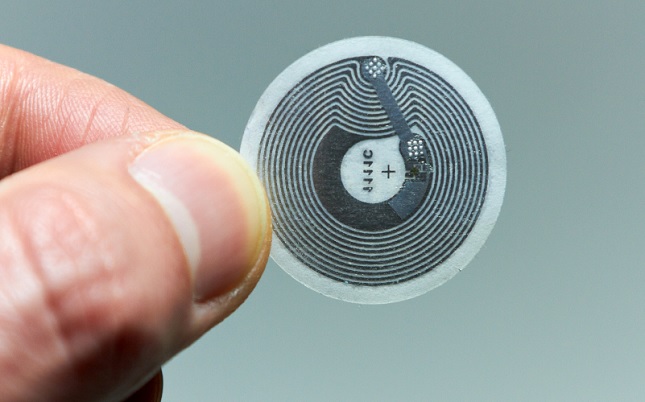
Just a thought, wouldn't it be easier to just write an NFC-sticker and stick it on a roll? I'm doing this for a long time with Amiibo (Nintendo Figures) now and it works great. I think it would be much easier to just use new stickers instead of hacking the original chip.

For those who cannot reuse original tag, you are 100% correct.
So, after some hours reading, all I have to do in my junior with FW 2.3.1 is to remove de eeprom chip, and rewrite the nfc chips with my phone to the values you provide for 10,11 and 20?? that´s all?
And even I can buy cheap nfc stickers and program them?
That would be great, and that is what I understand after read a lot
So, after some hours reading, all I have to do in my junior with FW 2.3.1 is to remove de eeprom chip, and rewrite the nfc chips with my phone to the values you provide for 10,11 and 20?? that´s all?
And even I can buy cheap nfc stickers and program them?
That would be great, and that is what I understand after read a lot
If you go the cheap paper tags route - there is no need to mess with the EEProm chip.
Hello people! I am new to this card and do not speak English I'm Spanish. I've been reading some of the post with the help of a translator, by what they do not understand many of the things that you say and if was recently don't be programming.
Step to tell them my case:
I have a printer da vinci mini w with firmware 1.2.3. and I have read that with zero meters tags cannot be read but if that did not reach 0 m.
I have 2 original XYZ tags and NFC Ultraling paper labels tagc 213. I would like to indicate me that I need to do to use another strand cheaper.
Excuse my English because I use a translator
RuBeN16V wrote:So, after some hours reading, all I have to do in my junior with FW 2.3.1 is to remove de eeprom chip, and rewrite the nfc chips with my phone to the values you provide for 10,11 and 20?? that´s all?
And even I can buy cheap nfc stickers and program them?
That would be great, and that is what I understand after read a lotIf you go the cheap paper tags route - there is no need to mess with the EEProm chip.
So just buy some paper tags, program them, stick them in place and it´s done? with any firmware?
I think I´m going to try this, cause I have been able to "reset" my original tag, wich was 0m out of 100 to 8m out of 200 or 300, and it work, problem is I can´t find a code for more than 8m at page 20
Going to read a little more about programing a new paper tag, thank you very much
cgrillo wrote:RuBeN16V wrote:So, after some hours reading, all I have to do in my junior with FW 2.3.1 is to remove de eeprom chip, and rewrite the nfc chips with my phone to the values you provide for 10,11 and 20?? that´s all?
And even I can buy cheap nfc stickers and program them?
That would be great, and that is what I understand after read a lotIf you go the cheap paper tags route - there is no need to mess with the EEProm chip.
So just buy some paper tags, program them, stick them in place and it´s done? with any firmware?
I think I´m going to try this, cause I have been able to "reset" my original tag, wich was 0m out of 100 to 8m out of 200 or 300, and it work, problem is I can´t find a code for more than 8m at page 20Going to read a little more about programing a new paper tag, thank you very much
Do a little more reading on the forum posts and you'll find the 200m and 300m values.
Good morning who can help me to reset the filament of my davinci mini w printer
action failed
ntag213
page:date
00:0484969e
01:8a3e4d80
02:79480000
03:e1101200
04:0103a00c
05:340300fe
06:00000000
07:00000000
read successful
ntag213
page data starting from : 0x00
0484969e
8a3ead80
79480000
e1101200
Hi All, I seem to be having some difficulties resetting my filament length.
I can read the chip.
I can change the colour.
I can change the spool length between 200 and 300m.
But when I start to change Pages 21 - 23 it all goes wrong and I get unidentified spool.
My original data is,
20 - 73 DF 01 00 (that matches the 122m left on the spool)
21 - 3B CD 33 54
22 - 6D E3 E1 CE
23 - 87 D2 48 76
I have tried to use many different settings I have found on this forum and others, but keep getting unidentified spool.
I have tried,
20 - E0 93 04 00
21 - A8 81 36 54
22 - F0 3F EE CE
23 - F2 6E 4D 76
And
20 - E0 93 04 00
21 - D4 12 32 54
22 - 34 8C E3 CE
23 - AE F3 4A 76
To name 2 different packets of data I have tried without any luck.
Any chance anyone can tell me where I am going wrong.
Many Thanks.

I would venture to say you are trying to use a hacked tag in a printers who's firmware does not allow hacked tags to be used. Your data is correct.
Bozo, thanks for the reply, the firmware of the printer is 1.0.8(1A8).
If it is not a JR then you are out of luck with that tag.
I have managed to read two labels with 78 m and the other 170 m.Recognizes them with new footage, but when I try to print get me error.Printer da vinci mini w with firmware 1.2.3. You have any solution.Thank you
Same answer I gave for m70ppn, you are cannot use hacked tags. I would recommend some of the other solutions mentioned in the threads on this forum.
Can someone sum things up for mini fw>=1.1.1? Is it possible to program paper tags for it?
I was playing around with mine, made a code for Arduino+RC522 that allows me to modify tags. After changing color and length (with respective checksums) in the bundled Clear Yellow, it refused to recognize it - however accepted after I have rolled back changes. When I tried to do the same with another tag from "original" filament, it now refuses it even after I have rolled back all changes.
So, if the printer previously only kept remaining lengths per UIDs, did they now make it have a kind of blacklist also? Any ideas what to do to bring my chip back to recognizeable state? And why did it accept rolled back bundled spool tag?
Still waiting for my paper tags and also PN532. Rumors are it's possible to emulate cards with that one.
Can someone sum things up for mini fw>=1.1.1? Is it possible to program paper tags for it?
I was playing around with mine, made a code for Arduino+RC522 that allows me to modify tags. After changing color and length (with respective checksums) in the bundled Clear Yellow, it refused to recognize it - however accepted after I have rolled back changes. When I tried to do the same with another tag from "original" filament, it now refuses it even after I have rolled back all changes.
So, if the printer previously only kept remaining lengths per UIDs, did they now make it have a kind of blacklist also? Any ideas what to do to bring my chip back to recognizeable state? And why did it accept rolled back bundled spool tag?
Still waiting for my paper tags and also PN532. Rumors are it's possible to emulate cards with that one.
Sometimes you need to modify the last byte on page 9.
Thanks, but that did not help either.
Soldered out EEPROM. So my mini has permanent amnesia now and does not mind the modified tag.
There you go!
Soldered out EEPROM. So my mini has permanent amnesia now and does not mind the modified tag.
I wonder if the new firmware with "resume printing" feature will complain about no eeprom - as it probably stores the print details in there.
How do you know what features they add in new firmwares? Do they post changelogs or something similar somewhere?
Ok, found answer myself, again. They are in \AppData\Roaming\Temp\ReleaseNote
I wonder what happens if I lock remaining filament pages when EEPROM is removed? Will it be a permanent solution when counter resets with printer restart?
Don't want to lock my only available chip, though.
How do you know what features they add in new firmwares? Do they post changelogs or something similar somewhere?
Ok, found answer myself, again. They are in \AppData\Roaming\Temp\ReleaseNote
I would suspect that the release notes would NOT contain changes relating to blocking what ever hacks / work around that have been developed by the community.
So, be careful when you upgrade for a new feature, you MAY get some unwanted results.
SoliForum - 3D Printing Community → XYZ Printing Hacks & Mods → XYZ Printing Da Vinci Jr (w) / Da Vinci Mini (w) Hacking
Powered by PunBB, supported by Informer Technologies, Inc.