
1 (edited by caswal 2013-01-16 13:43:25)

Topic: Horizontal Perimeter Failing

Swapped over to some new black filament (not ordered from SD). Did some calibration prints to set the Extrustion Multiplier. All looked good, 0.42mm wall width.

Started to print quite a large item at 0.1mm (using the SD provided profile, it has worked well for me so far), but when it flattened out to the top, it did not do a very good job on the top 3 horizontal perimeters on the flat, this is what it looks like:

https://lh3.googleusercontent.com/-Hu2xGhNGfio/UPaBR-V55DI/AAAAAAAABCA/0ex5KfJxXo4/s1024/IMG_7007.JPG

On the first (lowest) perimeter on the flat, it was barely extruding any plastic. Is this due to a too low Bridge flow ratio? I did a smaller test print of just a signature plaque at 0.3mm and it was perfect.

Also at Brad or someone with enough power. Perhaps making a dedicated Print Help/Improvement forum would be great. And could be used to help collect print tips, or examples of what to do in certain cases.

Lead Programmer & Co-Owner of Camshaft Software - Creators of Automation - The Car Company Tycoon Game

2

Re: Horizontal Perimeter Failing

it looks like the extruder is (partially) blocked.

unless the part is hollow it seems unlikely that the problem is bridge flow

3 (edited by caswal 2013-01-16 14:31:48)

Re: Horizontal Perimeter Failing

danny wrote:

it looks like the extruder is (partially) blocked.

unless the part is hollow it seems unlikely that the problem is bridge flow

If it is partially blocked, why doesn't it show in any other prints previously. Or prints since at 0.3mm? The infill and outer vertical perimeters, and the bottom perimeters pretty good.

It is a bit better on the left, than the right, so there might be a bit of bed levelling in it. But still, seems to be extruding far too little plastic.

Lead Programmer & Co-Owner of Camshaft Software - Creators of Automation - The Car Company Tycoon Game

4

Re: Horizontal Perimeter Failing

What temp are you using?

I normally use Octave White at 195. I put on my first roll of Octave Black yesterday and started to print without calibrating like a dummy.  My 195 temp seemed nice, but I had way to much plastic being laid down. I had to adjust the Repetier-Host live flow slider down to 91% for my layers to look right.

Your question raises a question that I have had for awhile though.  Does slic3r consider a top layer that is being laid over infill a bridge?  I would think that slic3r would only use it's bridge speed/flow settings if it was printing on top of generated support or over an area without infill or a perimeter below it.

5 (edited by caswal 2013-01-16 15:02:44)

Re: Horizontal Perimeter Failing

nickythegreek wrote:

What temp are you using?.

I was also sticking to 195 as that worked so well for my previous roll of silver. And made very nice perimeter calibration prints on the new black filiament (but that is under fan assist).

nickythegreek wrote:

Does slic3r consider a top layer that is being laid over infill a bridge?

That is what I have been wondering, and that is what it feels like. Just a spattering of spider web like plastic came out. 0.3mm seems to also have reduced extrude rates, but as it is a thicker layer is not as badly effected. Does this carry all the way up to the top layer?

Lead Programmer & Co-Owner of Camshaft Software - Creators of Automation - The Car Company Tycoon Game

6

Re: Horizontal Perimeter Failing

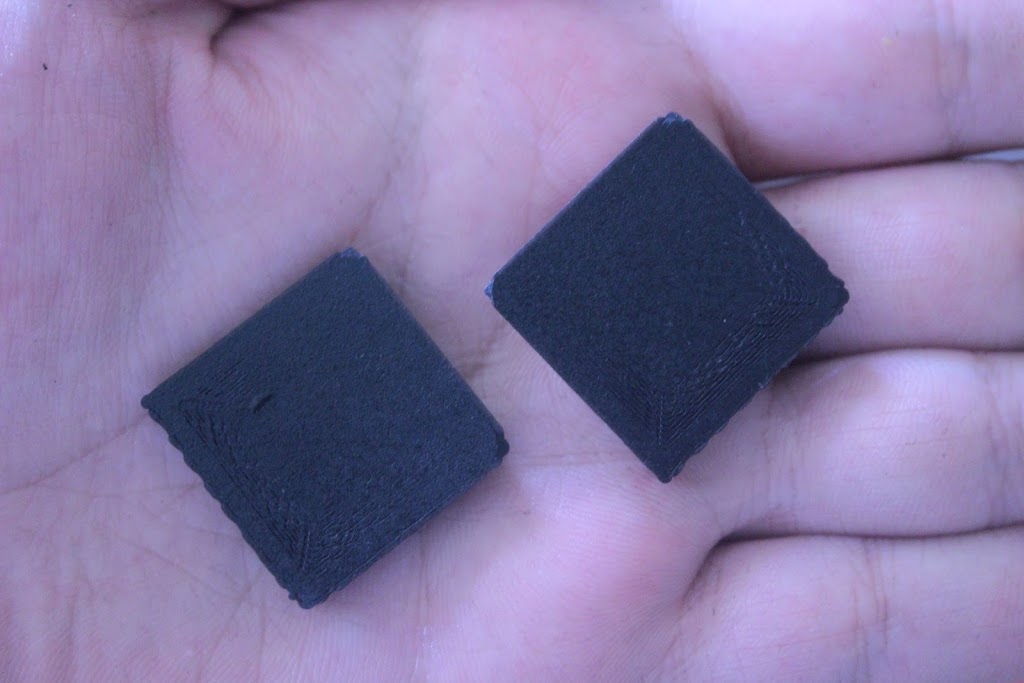
So I have done a couple of test print little slabs. 25mm square, by 5mm wide. 0.1mm profile. One with Bridging Extrusion at 0.75 and the other at 1. Didn't make a difference.

Here are some pictures of the tip, sides and bottom:

https://lh3.googleusercontent.com/-5WzmBg339xc/UPjMY6cPegI/AAAAAAAABCk/AeRsfCYfqAg/s1024/IMG_7008.JPG
https://lh3.googleusercontent.com/-OWpXM-VCs94/UPjMYVHZclI/AAAAAAAABCg/yZ7l2FRUyx0/s1024/IMG_7009.JPG
https://lh3.googleusercontent.com/-gCdIJH6Wd3U/UPjMYNH-2ZI/AAAAAAAABCc/dnfDrUyXtYQ/s1024/IMG_7010.JPG

The other layers while printing seem to be perfectly fine. Is this a weird 0.9.7 Slic3r issue? It just seems to be extruding far less plastic for these top layers.

Lead Programmer & Co-Owner of Camshaft Software - Creators of Automation - The Car Company Tycoon Game

7

Re: Horizontal Perimeter Failing

.1 mm printing needs more solid top layers. If you are printing at .3 mm and have 3 solid layers that is .9 mm to fill above the infill and is usually enough. At .1 mm, 3 solid layers only gives you .3 mm which is almost never enough. At the bottom 3 solid layers should be fine since you usually set the first layer at .3 mm and you are building up to infill instead of building on top of it. You should probably try 5 or 6 solid layers on top.

8

Re: Horizontal Perimeter Failing

Ill take a picture of the first top layer it prints. It is extruding so little plastic, it is like cobwebs.

Lead Programmer & Co-Owner of Camshaft Software - Creators of Automation - The Car Company Tycoon Game

9

Re: Horizontal Perimeter Failing

jack up the Flow slider in Repetier-Host during that part and see if it helps at all. Man you have some rough banding! My banding is far less noticeable with my black filament then it was with my white.

Also I would try the rectilinear fill here. I only use the circular infill on organic shapes.

10 (edited by jooshs 2013-01-18 18:27:07)

Re: Horizontal Perimeter Failing

If you are not filling on top of a solid layer, then .1 mm layers are basically cobwebs. That is why you need more solid layers at .1 layer heights. If you watch the first top solid layer at .3 mm layers on a large print, it looks very stringy as well. You almost need a minimum of 3 solid layers at .3 layers. It would actually take 9 solid layers to match this at .1 mm, but you should be able to get away with 5 or 6. You can also up the infill percentage while filling every 3 to reduce the solid layers necessary.  It is difficult to fill a large flat surface with low infill underneath at .1 mm layers.

This is the case with .93 for sure and is intuitive...  Unless .97 compensates, it will be the same deal.

11

Re: Horizontal Perimeter Failing

from what I been seeing Slic3r dont see any gap under about 1 inch as a bridge at all it stays on fast as any perimeter and lets the plastic droop and not adhere to ends most times. thats why I cant print most my N scale vehicles with hollow insides and a roof :^(

Solidoodle 2 with Deluxe kit cover & glass bed with heater. and 2nd board SD2 used not 3rd and alum platform not installed yet still wood. also need cooling fan installed to board. use Repetier Host couple vers. Slic3r also have all free ware STL programs