
1 (edited by keyblade4321 2015-02-15 20:57:10)

Topic: Incorrect Bed Center, using Repetier Host and Cura

Hi guys,

I've had this problem for a while but just decided to do something about it. I recently flashed my printer over to Repetier and am using Cura to slice and Repetier Host to control everything. When I flashed the printer, I changed nothing in the EEPROM and kept the bed size as 200x200 in both Repetier Host and Cura. I think because there is extra room for the drip tray everything is shifted to the right by the size of the extra space. What do I need to change to make everything centered but still be able to view the correct dimension of the build volume in Cura? The reason for this is because I used to print small things so it didn't really matter that they were shifted but now I am printing much larger objects that use almost all the build volume. If the build space view in Cura is incorrect I won't be able to judge where to place the parts effectively. Please help! I am sure other must have this problem as well when flashing to Repetier.

Thanks in advance!

2

Re: Incorrect Bed Center, using Repetier Host and Cura

keyblade4321 wrote:

Hi guys,

I've had this problem for a while but just decided to do something about it. I recently flashed my printer over to Repetier and am using Cura to slice and Repetier Host to control everything. When I flashed the printer, I changed nothing in the EEPROM and kept the bed size as 200x200 in both Repetier Host and Cura. I think because there is extra room for the drip tray everything is shifted to the right by the size of the extra space. What do I need to change to make everything centered but still be able to view the correct dimension of the build volume in Cura? The reason for this is because I used to print small things so it didn't really matter that they were shifted but now I am printing much larger objects that use almost all the build volume. If the build space view in Cura is incorrect I won't be able to judge where to place the parts effectively. Please help! I am sure other must have this problem as well when flashing to Repetier.

Thanks in advance!


What do you have your x and y home position set to?

Printing since 2009 and still love it!
Anycubic 4MAX best $225 ever invested.
Voxelabs Proxima SLA. 6 inch 2k Mono LCD.
Anycubic Predator, massive Delta machine. 450 x 370 print envelope.

3

Re: Incorrect Bed Center, using Repetier Host and Cura

carl_m1968 wrote:
keyblade4321 wrote:

Hi guys,

I've had this problem for a while but just decided to do something about it. I recently flashed my printer over to Repetier and am using Cura to slice and Repetier Host to control everything. When I flashed the printer, I changed nothing in the EEPROM and kept the bed size as 200x200 in both Repetier Host and Cura. I think because there is extra room for the drip tray everything is shifted to the right by the size of the extra space. What do I need to change to make everything centered but still be able to view the correct dimension of the build volume in Cura? The reason for this is because I used to print small things so it didn't really matter that they were shifted but now I am printing much larger objects that use almost all the build volume. If the build space view in Cura is incorrect I won't be able to judge where to place the parts effectively. Please help! I am sure other must have this problem as well when flashing to Repetier.

Thanks in advance!

What do you have your x and y home position set to?


In Repetier Host, in the Printer Settings, the X,Y,Z home all says "Min" and "Min" is all set to 0. In Cura, in the Machine Settings, the box that says "Machine center at 0,0" is unchecked (I don't know what this does). Does this help?

4

Re: Incorrect Bed Center, using Repetier Host and Cura

Would you not set the bed center at 100 x 100

5

Re: Incorrect Bed Center, using Repetier Host and Cura

L.woinson95 wrote:

Would you not set the bed center at 100 x 100

Why would this fix it? Wouldn't everything just get shifted even more or am I missing something or did this work for you?

6

Re: Incorrect Bed Center, using Repetier Host and Cura

According to a YT-vid I saw (search for "Dykstra"), you have to offset the bed in the printerfirmware by x=30 and y=20 (or -30, -20). This is because the bed is "offset" in the Davinci in order to accomodate the waste tray.

Davinci 1.0, Openmod XYZ, Slic3r, 3rd party filament
OpenSCAD, DesignSpark

7

Re: Incorrect Bed Center, using Repetier Host and Cura

Bikeridr wrote:

According to a YT-vid I saw (search for "Dykstra"), you have to offset the bed in the printerfirmware by x=30 and y=20 (or -30, -20). This is because the bed is "offset" in the Davinci in order to accomodate the waste tray.

Thanks for the info! I watched the video and I'm going to try this but the guy in the video said that those numbers do not center the bed. Did those settings work for you?

8

Re: Incorrect Bed Center, using Repetier Host and Cura

keyblade4321 wrote:

Did those settings work for you?

Hi,
Well, I haven't done the leap to liberate my printer yet. I've just spent the last few evenings reading and watching YT before my own upgrade.
I'm leaving for work (ship) and will probably upgrade/liberate my printer when I return home next month.

Davinci 1.0, Openmod XYZ, Slic3r, 3rd party filament
OpenSCAD, DesignSpark

9 (edited by oscahie 2015-02-17 08:16:39)

Re: Incorrect Bed Center, using Repetier Host and Cura

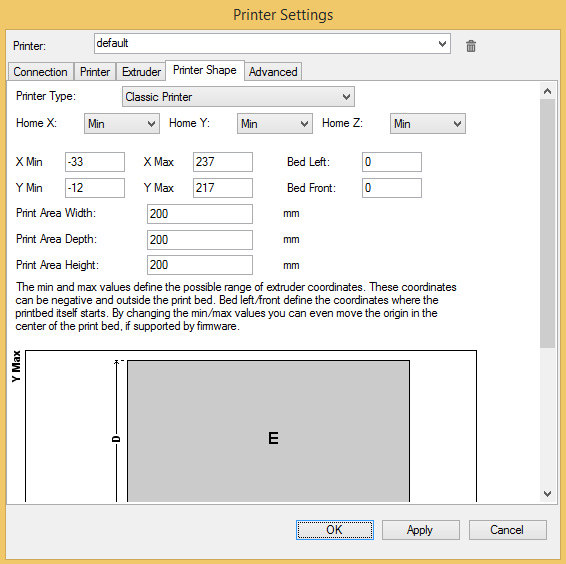
Assuming you have a davinci 1.0, in Repetier Host printer settings use:
Printer type: classic
Home: Min (all axis)
X Min: -33
Y Min: -12
X Max: 237
Y Max: 217
Bed Left: 0
Bed Front: 0
Print Area: 200x200x200

That will fix it  (provided you have not messed up with the default EEPROM values).

10

Re: Incorrect Bed Center, using Repetier Host and Cura

A few months late to the party, but I brought beer.  smile

Thanks to you guys on this forum, and osahie for posting those values.  If you don't mind me asking, where do you put them in the cfg?  I've thrown them under the "Printer Shape" tab within Printer Settings, but unfortunately the printer could care less what I have there and still prints in its original location.

Within Slic3r, I'm able to set the offset of the extruder by those same -x and -y values, and it works like a champ.  Not seeing the same options in Cura.

I'd keep using slic3r, but the quality is beyond abysmal, and even at 0.95 extrusion multiplier, it seems like it's just wanting to jam as much filament onto what it's printing as possible.

http://soliforum.com/i/?8b5GXPE.png

11

Re: Incorrect Bed Center, using Repetier Host and Cura

I had the same problem. You can add an offset value in S3D when you print. I figure out how many mm it need to shift and plugged it in and now the prints are centered.

12

Re: Incorrect Bed Center, using Repetier Host and Cura

Thanks for jumping in...  please forgive me though, what do you mean by S3D?  Are you referring to "Simplify3d" ?

My experience has only been the craptastic DaVinci software, and then moving on up to the much better Repetier controls.

13

Re: Incorrect Bed Center, using Repetier Host and Cura

Are your X and Y home values -33 and -12 in the EEPROM config?

14

Re: Incorrect Bed Center, using Repetier Host and Cura

No sir.   Set to 0 all around.  For testing, I threw those values in as well, and it didn't seem to have any effect.

The only slicing software that seems to mind the updated values is slic3r, unfortunately.  Extremely unfortunate, as Cura's quality is absolutely amazing.

15

Re: Incorrect Bed Center, using Repetier Host and Cura

usslindstrom wrote:

No sir.   Set to 0 all around.  For testing, I threw those values in as well, and it didn't seem to have any effect.

The only slicing software that seems to mind the updated values is slic3r, unfortunately.  Extremely unfortunate, as Cura's quality is absolutely amazing.

Instead of using RH and its curaengine, why not try the actual Cura software which is a host and slicer all in one. Its the real Cura, not the borrowed version.

Printing since 2009 and still love it!
Anycubic 4MAX best $225 ever invested.
Voxelabs Proxima SLA. 6 inch 2k Mono LCD.
Anycubic Predator, massive Delta machine. 450 x 370 print envelope.

16

Re: Incorrect Bed Center, using Repetier Host and Cura

usslindstrom wrote:

No sir.   Set to 0 all around.  For testing, I threw those values in as well, and it didn't seem to have any effect.

The only slicing software that seems to mind the updated values is slic3r, unfortunately.  Extremely unfortunate, as Cura's quality is absolutely amazing.

You should not have set them to zero. What I'd do is:

1) make sure you are running an up to date version of Repetier (eg. latest 0.92)
2) reset the EEPROM config to its default values
3) use the Repetier Host settings that I posted above.

That should work, it's what I use and prints are perfectly centered.

17

Re: Incorrect Bed Center, using Repetier Host and Cura

Hey oscahie those settings worked perfect!
Just solved a huge issue for me man
Thanks.