
1 (edited by Goshdarnit 2015-04-20 13:58:52)

Topic: Extruder wires broken

I know this is a well reported issue, but the wires into my extruder stepper motor have just snapped about 1.5cm from the connector. I have read many comments about "zip tie strain relief" but haven't seen any images of exactly how people have done this. I'm quite annoyed about this one because it is causing a lot of arcing and sparks. The insulation around the break is burned black. This is a real fire risk in my opinion.

Anyhoo, that aside, can someone upload a pic of how I should set my zip tie? I'm going to tackle this tomorrow. I'll have to dismantle the Press (consumer device my a**) to get to the wire and re-solder it. I hope there is enough slack in the cable to allow me to cut out the broken section and re-solder it without making it too short to function.
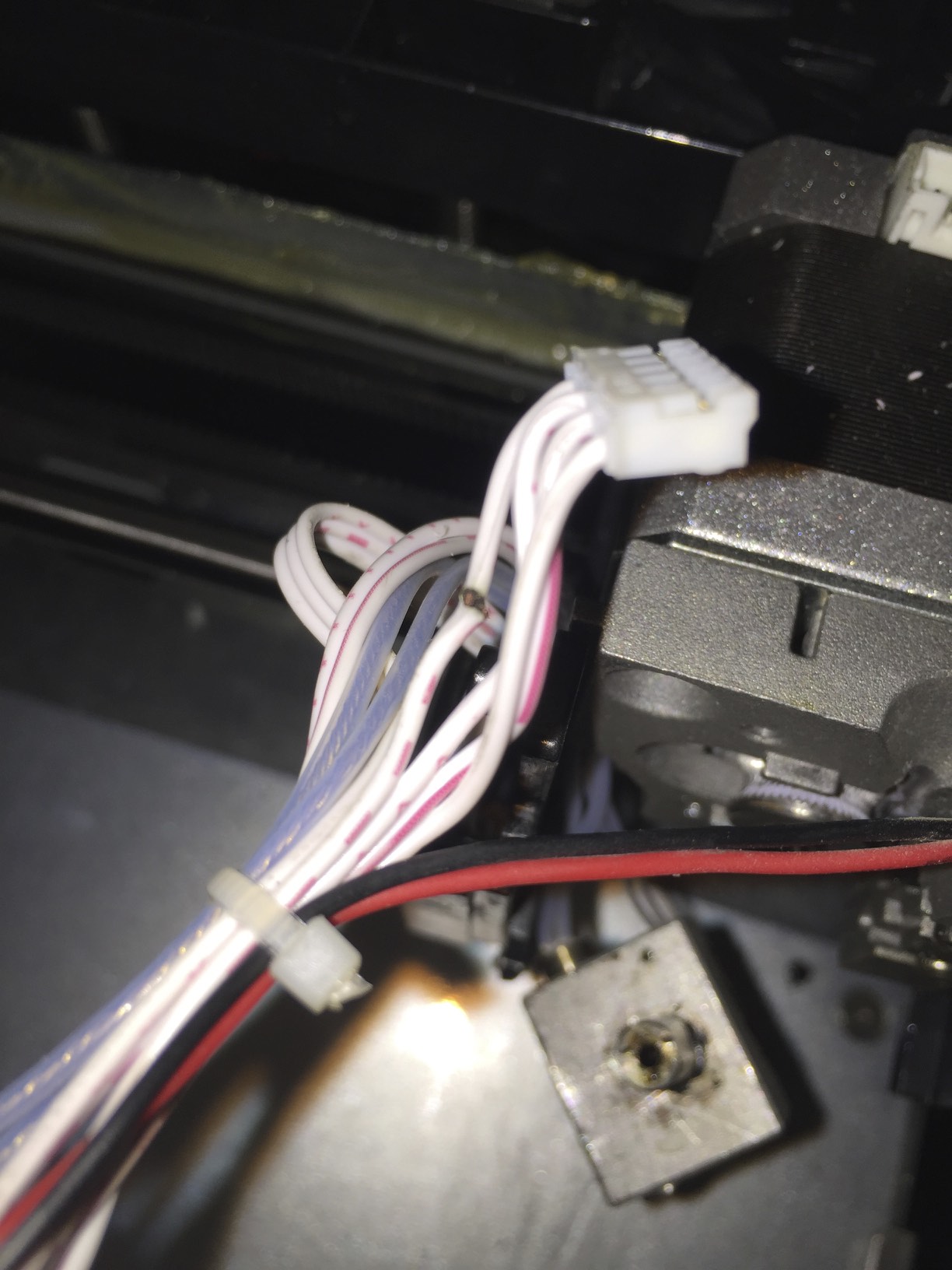
http://soliforum.com/i/?VZ5v9sy.jpg

2

Re: Extruder wires broken

Could the second picture in this post possibly be what you mean?
http://www.soliforum.com/post/93015/#p93015

It looks like it is somehow tied down to the motor?

I wish you luck, "Press-brother".

3 (edited by scruffybob 2015-04-20 05:02:13)

Re: Extruder wires broken

Look at the second picture on this post:  http://www.soliforum.com/topic/10800/ro … ess-vs-me/

This is the way my new Press came from California.   They cable-tied the whole bundle to the fan mount on the right side (the black cable-tie), so the connector takes no pressure whatsoever.   In the last two weeks, I've put almost 100 hours on my new printer with no significant issues.

I had re-soldered the connecter a few times on my first Press before it got RMA'ed, but it won't do any good unless you get the strain off the connector.   The constant back-and-forth of the extruder will eventually break the solder joints again.

By the way, I also thing the spring thingy to hold the cable assembly will also be critical to this fix.

If you look at the first picture in my other post, you'll see that the cable is always directed to the right side of the Press because of the spring that pulls it that way.   Since the cable is always to the right, when the x-axis goes all the way to the right, the flex is at the cable tie (the black zip tie on the fan) and a lesser extent the smaller white zip tie (that holds the block heater cables) in front of the extruder connector.    My extruder connector doesn't move at all with both of these zip ties and the new cable layout that pulls the whole cable assembly to the right.

If you don't understand this, let me know and I'll take more detailed pictures.

Best regards,
Ron

4

Re: Extruder wires broken

Perfect. Thanks both of you. Exactly what I needed to see!

5

Re: Extruder wires broken

Thanks again. Bit of snipping and soldering and a carefully placed cable tie later, and hopefully that's another problem resolved. Took me a long time to work this one out as the extruding was intermittent. I thought it was jams at first, but it was just that the extruder in certain positions was causing the wire to break open and the stepper stopped feeding until the extruder moved elsewhere and the broken wire reconnected itself. Luckily I spotted the arcing which is when it all fell into place.

6 (edited by scruffybob 2015-04-20 19:22:17)

Re: Extruder wires broken

Don't forget the second one (the little white one).   When the carriage runs the full range along the X and Y axes, the black one will actually move, but the little white one completely isolates the extruder connector from the movement.   

By the way, I saw exactly the same thing, intermittent connectivity.   It was a real bear to track down until it broke completely.

7

Re: Extruder wires broken

scruffybob wrote:

Don't forget the second one (the little white one).   When the carriage runs the full range along the X and Y axes, the black one will actually move, but the little white one completely isolates the extruder connector from the movement.   

By the way, I saw exactly the same thing, intermittent connectivity.   It was a real bear to track down until it broke completely.

Thanks for that timely reminder! I hadn't done that one, but I have now. I now have a hot jam, presumably from the same bit of filament sitting in there with no feed going on while the hotend was on. So everything is dismantled and soaking in acetone for now. Hopefully I'll be back printing tomorrow. Hopefully.

Wonder what will be next...