1

Topic: Help calibrating with Feeler Gague

Got myself a digital feeler gague and printed a carrier to attach it to the DaVinci Duo rails. Tried calibrating by starting Repetier's manual calibration, turning the printer off, rotating the leveling screws until the print heads were touching and then backing off to 0.05mm. Manually dragged the heads around the bed adjusting the screws until I came very close to 0.05mm all around. So far so good.

Unfortunately, when I turned the printer back on and tried to run a test print, I noticed the gap between the heads and bed was huge. Tried again with same results. Needed to run some prints so I did manual calibration with sheet of paper and everything worked great.

Can anyone who uses a dial or digital gague for calibration describe the process on the Davinci Duo running Repetier firmware? Clearly I'm doing something wrong, just not sure what.

Davinci Duo, Repetier 0.92, OctoPi

2

Re: Help calibrating with Feeler Gague

montressor wrote:

Got myself a digital feeler gague and printed a carrier to attach it to the DaVinci Duo rails. Tried calibrating by starting Repetier's manual calibration, turning the printer off, rotating the leveling screws until the print heads were touching and then backing off to 0.05mm. Manually dragged the heads around the bed adjusting the screws until I came very close to 0.05mm all around. So far so good.

Unfortunately, when I turned the printer back on and tried to run a test print, I noticed the gap between the heads and bed was huge. Tried again with same results. Needed to run some prints so I did manual calibration with sheet of paper and everything worked great.

Can anyone who uses a dial or digital gague for calibration describe the process on the Davinci Duo running Repetier firmware? Clearly I'm doing something wrong, just not sure what.


Repetier firmware should have a Z offset on -3.05 in it's EEPROM. If you did not set that up then it could be the problem with your gap.

The next thing you want to do is just like with the manual process. Start a print using whatever Host it is you use. As soon as the printer starts laying a layer/line turn off the power. It does not matter if it is too high at this time. Then turn it back on, you should now be able to move the head freely.

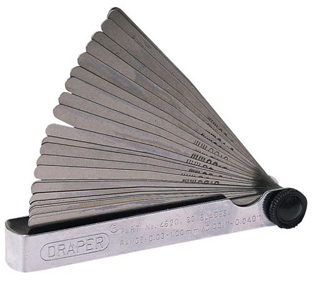
Move the head to each corner and adjust the screws to where it looks almost to touch between the nozzle and bed. Then using a feeler gauge of .05 thickness slip it under the nozzle at each corner and adjust the screws till it just grabs. A feeler gauge has a bunch of very thin metal blades of varied thickness it is what you should be using versus a dial or calipers.

Once you have it set that should be all you have to do. Re home, and restart your print and it should be at the right height now.

Printing since 2009 and still love it!
Anycubic 4MAX best $225 ever invested.
Voxelabs Proxima SLA. 6 inch 2k Mono LCD.
Anycubic Predator, massive Delta machine. 450 x 370 print envelope.

3

Re: Help calibrating with Feeler Gague

I just loaded Repetier 0.92 and also had the same problem with the large gap after homing all and turning off the machine and bed leveling with a piece of paper. After multiple tries starting negative I ended pushing positive  and ended up setting the eeprom setting Z home pos [mm] = 3.0.  I dont know why mine is positive vs everywhere else  I read shows negative values. I might have got it confused about the offset for the z axis. I ended up much closer to the bed without hitting and I printed a single layer test print and adjusted by eye while printing.  Tomorrow I plan to start a print cancel and use the piece of paper to get it even more tuned.

4

Re: Help calibrating with Feeler Gague

I use the following procedure and am able to print multiple parts without leveling in between each print. I don't use anything to make parts stick and rarely have any issues. I'm running repetier firmware 0.92.

1. Level the bed somehow enough to get http://www.thingiverse.com/thing:526058 these new adjusters printed. They will make a massive difference in the ability to quickly adjust the bed.

2. Unload any filament

3. Move the bed down and clean it really well with water. Remove whatever tape, hairspray, junk, glue, etc so you only have nice clean glass. Use water and then isopropyl alcohol as your last two steps. Clean the extruder really well too. Use a small wire brush like the one that came with the unit. First clean it cold, which won't do much, then heated. I print at about 215, so I clean mine at that temp.

4. If you haven't already installed the new adjusters, do so.

5. Get a feeler gauge, probably from an auto store or Sears or similar. You want a gauge that has a 0.100mm shim. Mine is a 0.102mm, so don't drive yourself crazy trying to find a perfect one, just get as close as you can and know for sure what it is.

6. Now, everything should be clean and ready to start.

7. Heat the bed to the temp you will print at. I use 105c. Once it gets there WAIT for 3 to 5 minutes. This lets the whole bed equalize in temp, which is how you should print too.

8. Now heat the extruder to your printing temp. I use 215c. You don't have to wait on this one.

9. Be sure the head is homed.

10. Move the bed down to 5mm with gcode: G1 Z5

11. Now move the head to the front of the bed: G1 X100 Y180

12. Now you are going to carefully lower the bed to roughly adjust the front. Use the move command to lower the bed  mm at a time. When you get close to the bed, adjust it so the head never touches. After you get to 1mm, lower the bed by 0.1 increments until you are at 0.5.

13. Now raise the bed to 5mm and then move to the back left corner (190, 30). Lower the bed again the way you previously did.

14. Raise and move to the back right (10, 30) and lower again.

15. Now the bed is in the ball park and its time to do a final adjust with the feeler gauge.

16. Start at the back left and this time move the bed to the same height as the gauge size you have. I feel its best to make the gauge not fit and then slowly increase the gap with the adjuster until the gauge slides freely between the nozzle and the bed. Your technique may differ, just be consistent.

17. Raise the bed, move to the back right and repeat. Now do the front of the bed.

18. If paranoid or anal, go recheck them.

You're done! Using slic3r, I can print on the glass with nothing else. Every 3 or 4 prints I clean the bed warm with alcohol. The only time I have messed with releveling is if I change print temperatures.

The above really only takes about 5 minutes or so, most of which is waiting for the bed to heat.

5

Re: Help calibrating with Feeler Gague

montressor wrote:

Got myself a digital feeler gague [sic]...

Part of the confusion may be your answer to, "What's a digital feeler gauge?"

This is a feeler gauge.  Basically the precision version of the piece-of-paper leveling...
http://www.diseno-art.com/images_2/feeler_gauge.jpg

This is a dial indicator.  It doesn't really tell you how far away something is, so it's not as useful for setting the nozzle-to-bed distance.  It's mostly used to determine variances, such as sliding it around to determine which areas of a part are further away.  For example, this would be a good tool to tell how warped your bed is.
http://www.harborfreight.com/media/catalog/product/cache/1/image/9df78eab33525d08d6e5fb8d27136e95/i/m/image_18512.jpg

6

Re: Help calibrating with Feeler Gague

Those are great pics. I'm sure it will help folks in understanding.

I've yet to figure out why people use the paper method because its so inaccurate compared to a metal feeler. It's certainly better than nothing, but feelers are cheap. Maybe companies should start including with the printers. IMO, manually leveling and then having a good auto level system is the best, because if both are done well it should give the most accurate positions when printing.

7

Re: Help calibrating with Feeler Gague

I was wondering on bed leveling with the firmware repetier .92. Why do we use the offset in the eprom or others put it in the various slicer software? Shouldn't we just set it to 0, level the bed from there once you do home the position and turn it off? I read around and I am not quite clear on why we use the offsets at all. Though  this guide i ended using a positive z home position of 3.0 to get it print correctly. Thanks in advance...