Re: New mobo fan support?
Gomisan wrote:
A Wiki page with the different boards and steps needed to add a fan for each one would be useful.
+1
You are not logged in. Please login or register.
SoliForum - 3D Printing Community → Solidoodle Discussion → New mobo fan support?
A Wiki page with the different boards and steps needed to add a fan for each one would be useful.
+1
+2
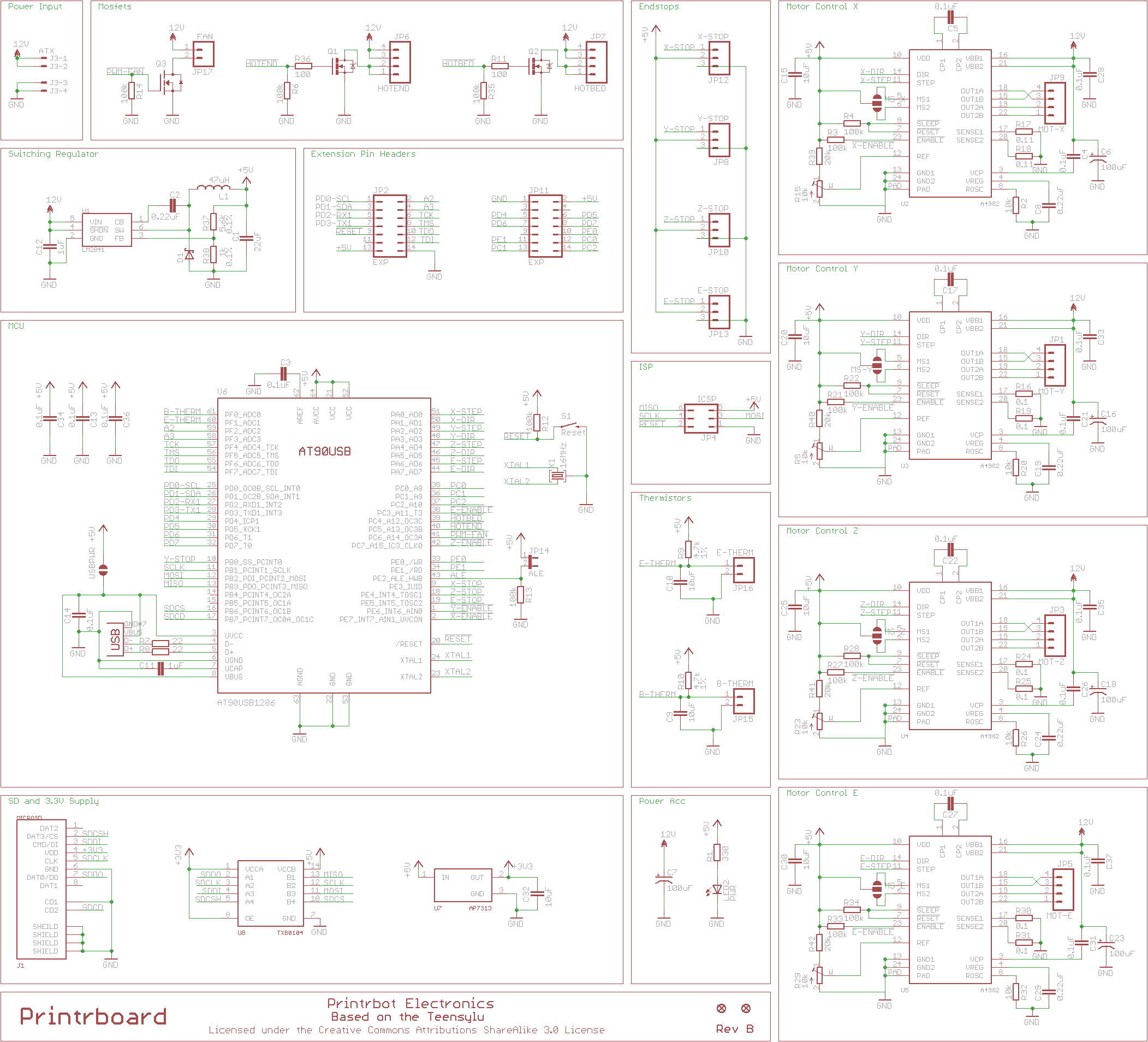
Are there any instructions on getting the fan working with the newer board? I attached a fan to the "fan" pins and it turns on immediately, and doesn't seem to respond to gcode commands. The voltage between the two pins is a constant 12V. Is a firmware update required to get the fan responding, as in previous versions of the motherboard?
I don't have a Printrboard, but looking at the firmware, I don't see a PIN assignment corresponding to the fan:
https://github.com/ozadr1an/Solidoodle- … lin/pins.h
Should be PIN 41
http://reprap.org/mediawiki/images/d/d5 … tic150.png
Perhaps adding this to the printrboard section would do the trick?
#define FAN_PIN 41
Are there any instructions on getting the fan working with the newer board? I attached a fan to the "fan" pins and it turns on immediately, and doesn't seem to respond to gcode commands. The voltage between the two pins is a constant 12V. Is a firmware update required to get the fan responding, as in previous versions of the motherboard?
All that is needed to get the fan running on the Printrboard is to wire it up. In Repetierhost, under the tab for controling speed, feed, extrsuion, and, bed temp(I forgot the name of the tab and I'm not at my printer computer) there is a button labeled fan with a slider. You can control it that way. It should also respond to Slic3rs g code commands.
I got mine wired up and at that time was running the inital firmware.
Perhaps adding this to the printrboard section would do the trick?
#define FAN_PIN 41
I checked into that a little bit. I don't think it's as simple as defining it as the processor pin, since Arduino has some separate, processor specific definition for pin numbers. The Printrboard (and Solidoodle) firmware actually does seem to define a pin for the fan. In the file you linked to, it's line 1437:
#define FAN_PIN            16  // Fan
// You may need to change FAN_PIN to 16 because Marlin isn't using fastio.h
// for the fan and Teensyduino uses a different pin mapping.
I'm not sure what that comment means, but the Solidoodle firmware (not sure why it won't let me link it here) has the same definition on line 997. It's possible I'm just misunderstanding the pin numbering thing altogether, since nothing seems to match between the schematic and pins.h file.
All that is needed to get the fan running on the Printrboard is to wire it up. In Repetierhost, under the tab for controling speed, feed, extrsuion, and, bed temp(I forgot the name of the tab and I'm not at my printer computer) there is a button labeled fan with a slider. You can control it that way. It should also respond to Slic3rs g code commands.
I got mine wired up and at that time was running the inital firmware.
I was using Octoprint to test the fan control, but I'll give this another shot tonight through Repetierhost.
Pin should be 16, which is the Teensyuino pin number for PortC6, where the fan is plugged in.
The mapping is half "FastIO" mapping, and half "Teensyuino" mapping.
The FAN_PIN code use direct analog_write, meaning it wants teensyuino mapping, so it becomes 16 instead of 22 (22 is the fastio pin for 16..).
16 works fine.
for more details, see the Beta Marlin thread in software & firmware
The FAN_PIN code use direct analog_write, meaning it wants teensyuino mapping, so it becomes 16 instead of 22 (22 is the fastio pin for 16..).
Well that's confusing, but I follow you. I just tried controlling the fan with Repetierhost, same results. The fan turns on at power-up, and doesn't respond to any commands. Has anyone gotten this to work?
Well that's confusing, but I follow you. I just tried controlling the fan with Repetierhost, same results. The fan turns on at power-up, and doesn't respond to any commands. Has anyone gotten this to work?
What fan are you using? is it possible to have one with the wrong voltage? Like i said earlier I got mine working right away
It's a 12V fan, I'm pretty sure it should work. The voltage between the two pins is a solid 12V, and doesn't vary with commands, so the problem seems to be on that end. What firmware is running on your board? Mine is:
FIRMWARE_NAME:Marlin V1; Sprinter/grbl mashup for Printrboard FIRMWARE_URL:[can't include links for some reason] PROTOCOL_VERSION:1.0 MACHINE_TYPE:Solidoodle_2 EXTRUDER_COUNT:1
I was able to use the " fan " connection by soldering in 2 90 deg header pins, then use the button and slider in Repetier and the fan worked. It also works if set up in the slic3r settings.
Thanks for the responses. An update - I can see the PWM-FAN pin switching in response to commands, but the transistor is not switching states. I'm going to swap it out and see if that fixes the problem.
Speaking of useful info: Are all the holes where you might want to add headers spaced at 0.1 inch? That seems to be the most common layout, but you never know and zillions of different spaced header strips are available on the web, so it would be nice to get the right spacing.
Speaking of useful info: Are all the holes where you might want to add headers spaced at 0.1 inch? That seems to be the most common layout, but you never know and zillions of different spaced header strips are available on the web, so it would be nice to get the right spacing.
Yes the pins are 2.54mm Pitch
SoliForum - 3D Printing Community → Solidoodle Discussion → New mobo fan support?
Powered by PunBB, supported by Informer Technologies, Inc.