
1

Topic: Color changing process midprint and weird happenings

I've been doing a lot of playing around with changing colors on my current project and I seem to have run into an interesting trait of the gcode.  When I change colors in the middle of a layer and resume the print there are a few things to note that happen.  As a precursor, I'm still using Pronterface and slicing with Slic3r .93 since it has been working for me.  RH hasn't loaded onto my Acer netbook I've committed to the printer yet and it's hard to argue or change what's working.

1.  Before resuming, the extruder evens out the reverse/extrude balance.  For example, I reverse 25 mm twice to remove the filament and then extrude 25 mm twice to get the filament extruding again before resuming.  However, if I reverse 35 which is just enough to remove the filament, but it takes 45 usually to get it extruding again, the extruder will reverse 10 mm before starting again.  This means when it resumes, it will start off 10 mm behind and leave a very thin layer of oozing filament for a small space.  Not a huge deal, but enough to ruin a print that is color dependent.  Therefore, I just make sure to reverse and extrude the same amount. 

2.  Be careful of ooze. As soon as I pause, I lower the bed 10 mm.  I have my tweezers ready to remove the little blob of plastic that inevitably rests on the print.  I also remove the stringy ooze from the nozzle immediately.  I then just lay a little piece of paper under the nozzle on the print to catch the pre-extrude filament.  This has worked consistently and is quite straight forward.

3.  Z backlash is not the same in both directions.  I had to play around and screw up a good bit before I realized that it is difficult to get back to exactly the right z height.  Even with the backlash nut inserted, if I lower the bed 10 mm and then raise it back up 10 mm, it comes back to about .07 mm above where it was last at.  In my case, that means that I raise it 10mm and .1 mm when I finish changing filaments.  It makes the layer ever so slightly smooshed since it has .03 mm less room to work with.  Not enough I notice, but it is enough if I don't raise the extra .1 mm. 

4.  The biggest anomaly is that sometimes the extruder will slow way down for what seems like an arbitrary amount of gcode commands.  This is a computer controlling everything, so I know it is not arbitrary, but I can't figure out a consistent pattern of what makes it happen.  I've changed colors about a gazillion times, and the things that it does not appear to be related to are; the amount of time into a layer before changing filament, the amount of time remaining in a layer when changing filament, how long it takes to change the filament, whether it is on a perimeter or infill? ( not positive about this one), what speed the extruder is supposed to be running at.  This is by far the most annoying anomaly, because a large flat solid layer will take half an hour when this happens sometimes and it ruins the adhesion, the extruder seems less good at flow rates at this speed, and it bothers me.  It seems to run at about 2-3 mm/s.  I have started digging into the gcode and firmware, but still haven't found the logic argument that causes this to happen.

So anyways, I get some really cool prints and great effects when changing colors, but would really like to make this a more consistent process.  It seems like I have mostly everything figured out but the last anomaly.  I'd love to hear what process others use and if anyone knows what causes the slow extruding/maneuvering after the change, you could save me a lot of time reading lots of lines of code.
2

Re: Color changing process midprint and weird happenings

The extruder acting wierd is the fact that it is working on absolute coordinates.  It knows where it is after you have been extruding, and tries to get to the extruder coordinates in the gcode, which is behind where you left it.

Color changing is a good reason to go ahead and switch to Repetier.  What I did with my lithoplanes was enter a @pause command after the last layer of the outgoing color.  Before the pause command I also entered an X move to place the extruder over the dump area without hitting the endstop, and set the temp to 100.  This way if I wasn't around, it wouldn't sit on the print, oozing and burning plastic.

When it hits a pause, Repetier brings up a dialog with a Resume button, but still lets you control the printer.  I change the filament, purge the old color, then press Resume and it picks right back up again.

I did the slicing in KISSlicer which enters and extruder reset (G92 E0) at the beginning of every layer.  Repetier might keep track of what you have done with the extruder and compensate, but I don't know for certain.  With that G92 E0 at the beginning of the layer it doesn't matter.

3

Re: Color changing process midprint and weird happenings

I understand balancing for the reverse/extrude based on the absolute coordinates, but I still don't understand the random extremely slow moving and printing based on that. I guess I should figure out how to get RH working on the netbook. No problems on the other laptops I have, but it asked my acer to install a .net frame 2.xx. I did that and now it won't start with another weird failure code but does not ask for another thing to be installed. Anyways, Ian do you have to resend the commands to get the extruder where it was, or does it automatically know to head back to that position as long as it doesn't hit the end stops?

4

Re: Color changing process midprint and weird happenings

It automatically goes back, or rather it goes to the next position in the gcode.  So long as you don't home or hit the endstop, it still knows where it is and can find the next position.  Also I think Repetier is doing something to help the process.  If I try this while printing from SD, it doesn't work so well.  In fact it turned the motors off on pause, which I didn't realize until I bumped the carriage and then I was screwed.  Each of those lessons (don't home and don't use SD card) were worth 2.5 hours of printing each.

5

Re: Color changing process midprint and weird happenings

jooshs wrote:

I understand balancing for the reverse/extrude based on the absolute coordinates, but I still don't understand the random extremely slow moving and printing based on that.


Not sure where, but I read something about this. If the last manual command you give before resume is to jiggle the x .1 to the right and back it will resume at full speed. It doesnt make sense to me, but it works.

6

Re: Color changing process midprint and weird happenings

I have been experimenting with dual color printing, and so far the @pause command has been ignored once.  But that may have been a coding problem on my end.  I have not had the slow print on resume of the job on 3 different dual color prints.

7

Re: Color changing process midprint and weird happenings

Enough of the tech talk, let's see these multi color prints!

8

Re: Color changing process midprint and weird happenings

Here you go, just a simple test, black on grey.

http://www.pdxmc.com/uploads/SD3/20130428_151412.jpg

9 (edited by Skyblue 2013-04-30 11:11:13)

Re: Color changing process midprint and weird happenings

Been printing two color prints for awhile now.  Here is a sample of one.  Using Repetier to pause, change filament, and resume printing. More of my objects and signs can be found at thingiverse, search for Skyblue...

Post's attachments

Dino.JPG
Dino.JPG 1.69 mb, 1 downloads since 2013-04-30 

You don't have the permssions to download the attachments of this post.

10

Re: Color changing process midprint and weird happenings

Just a thought on printing  two colors .This may not be feasible but here goes. If I wanted a base for an object one color and the object another color, print the base and then leave that print  on the print bed and print the new object another color on top of the base.You would have to "fool" the printer into thinking that the base in actually the print bed. Any thoughts on this?

SD3, E3D hotend,linear bearing on x/y axis',pillow block bearing on y conneting rod, ball bearngs on front y axis, fan on y stepper motor.

11

Re: Color changing process midprint and weird happenings

You could do this with z-offset in kisslicer. I actually recovered a print once by editing out all the coad before the color change and restarting the print.

12

Re: Color changing process midprint and weird happenings

You would have to do something like that that if they were two different files, or not using Repetier.  It is far easier to combine them into a single STL and insert the @pause command into the gcode at the layer where the color changes and then resume after you have swapped filaments and purged the old color.

13 (edited by satman49 2013-05-16 22:25:55)

Re: Color changing process midprint and weird happenings

Just add  "@pause"? Any thing after pause?

SD3, E3D hotend,linear bearing on x/y axis',pillow block bearing on y conneting rod, ball bearngs on front y axis, fan on y stepper motor.

14

Re: Color changing process midprint and weird happenings

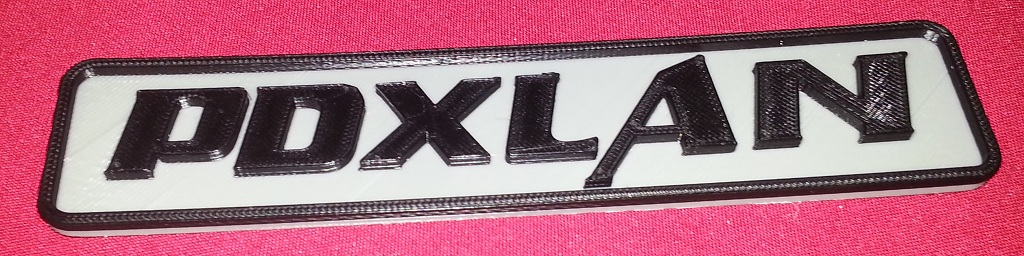
Satman I setup my repetier to do a G1 X203 Z40 after an @pause command.  Then I just change and purge the filament and hit, Continue print.  Been making money doing custom printing name plaques for some people that go to PDXLan you can check them out here.

http://www.pdxlan.net/forums/viewtopic.php?t=17242

All the money generated from those sales is going to go into building/buying a even better 3d printer big_smile

15

Re: Color changing process midprint and weird happenings

I guess I am not quite understanding. Do you actually put  @pause in the gcode then next line G1 X203 Z40.  The "@pause command " is the issue. Where in the gcode does it go?

SD3, E3D hotend,linear bearing on x/y axis',pillow block bearing on y conneting rod, ball bearngs on front y axis, fan on y stepper motor.

16 (edited by nlancaster 2013-05-17 03:04:10)

Re: Color changing process midprint and weird happenings

@pause goes into the code at the point/layer you want to pause the print to change the filament.  The G1 X203 Z40 was intereted into the area in the gcode editor under the drop down "run on pause"  that makes it so the only thing you have to add to your gcode is @pause. Also executes teh X and Z move when you manually press the pause button.

If you were to add all the code into the gcode it would look like this.

G1 X203 Z40
@pause

The @pause has to come after the move you command.

17

Re: Color changing process midprint and weird happenings

Like the prints on the link. Thanks for the how to as well. Been wanting to try this. Thanks!

SD2 - Glass Bed, Fans on PCB and Y motor, Custom enclosure
Slicer - Simplify3D

18 (edited by satman49 2013-05-18 04:49:49)

Re: Color changing process midprint and weird happenings

OK am understanding a bit more, but does the @pause command supposed to pause the print automatically when it reaches the @pause line?

SD3, E3D hotend,linear bearing on x/y axis',pillow block bearing on y conneting rod, ball bearngs on front y axis, fan on y stepper motor.

19 (edited by nlancaster 2013-05-18 06:10:53)

Re: Color changing process midprint and weird happenings

Here is a sample of the code I use to print my signs like the PDXLan one above.  The @pause, pauses the printer.  And the Gcode editor tab on the "run at pause" drop down executes G1 X203 Z40. And the @pause pops up the big "continue printing" box at which point I change out the filament and then continue the print.  I use kisslicer most of the time, and it inserts the comentext text "; BEGIN_LAYER_OBJECT z=2.10" or some such and that is what I use to find the point at which to change filaments.

; BEGIN_LAYER_OBJECT z=2.10
; fan on
M106
@pause
;
; 'Loop', 2.5 [feed mm/s], 49.0 [head mm/s]
G1 X189.08 Y173.96 Z2.6 E0 F4800

20

Re: Color changing process midprint and weird happenings

nlancaster,now I got it  lol , I was using upper case pause.Thanks for all your help.

SD3, E3D hotend,linear bearing on x/y axis',pillow block bearing on y conneting rod, ball bearngs on front y axis, fan on y stepper motor.

21

Re: Color changing process midprint and weird happenings

np big_smile

22 (edited by Hunter Green 2013-07-30 13:45:50)

Re: Color changing process midprint and weird happenings

My first try at using the @pause technique, very similar to above but at a smaller scale.  Making a very gimmicky thing, a 3D-printed business card.  Probably the reasons it came out only just sort of okay include that I haven't yet done a Y-backlash calibration (need to buy a dial indicator) and that I haven't yet learned how to set up Slic3r settings to adjust flow rate.  This also takes forever -- the print is only about 23 minutes, but I spent that much time on switching filament back and forth before and after (takes an age to clear black out to print in white).  Still, it looks pretty impressive.

https://fbcdn-sphotos-d-a.akamaihd.net/hphotos-ak-prn2/q71/s720x720/968860_695105770503771_1885230120_n.jpg

Sliced at 1mm vertical resolution since this whole thing is about a half-millimeter thick.  I figured out using the G-Code Editor's "Show Layer Range" settings where the layers switch between the solid white background and the raised lettering (just to confirm that it was where I expected based on how thick I'd made the layers).  Then by clicking on lines in the gcode I found where layer 4 started, and added "@pause" in just before it did.  Printed in white until the pause, then manually controlled the head to move it up and over so I could change filament without the goop ending up on the model -- making careful notes about how much movement so I move back to exactly the same spot.  Also changed extruder temp to 205 for black since it prints better.  Once I'd run enough black to work out the white, I moved it back to the same spot and resumed printing.  Easy-peasy.

What I ought to be doing, once I know how to make Slic3r settings perfectly adapted to each filament, is slice it separately with each settings, then use a text editor to merge the relevant bits of the two gcodes produced with a @pause in between them.  After I learn enough to be able to understand the articles about calibrating the extruder and flow rates, I'll have to try that.

By way of contrast, here's the one-color version.

https://fbcdn-sphotos-f-a.akamaihd.net/hphotos-ak-ash4/q71/s720x720/1000222_695093997171615_426481657_n.jpg

(The discoloration here just shows I didn't clean off some of the green from the outside of my extruder before doing this print, but it's okay, it was just a test run.)

23

Re: Color changing process midprint and weird happenings

The great thing about @pause is RH remembers where you were.  You don't have to keep track of your movements, it will return automatically.  Just don't bump an endstop along the way.

24

Re: Color changing process midprint and weird happenings

Thanks, good thing to know -- I assumed it didn't, but I didn't actually test it.

25

Re: Color changing process midprint and weird happenings

Looks good! Just try not to burn through them too quick at 20+ minutes each!