
1 (edited by pirvan 2018-04-21 21:44:33)

Topic: FDM vs. DLP vs. SLA Print Speed

Since Lawsy brought up the differences between the 3 different printer technologies, I thought it would be interesting to do a performance test between them.

First of all, I'd like to set the record straight about DLP , SLA and such.  All printers that use a photopolymer resin are collectively known as SLA (Stereo Lithography Apparatus). 

Within that definition, there are different technologies available, and the 3 most common ones are Laser-SLA, which uses laser to draw the image,  DLP-SLA, which uses a Digital Light projector to project the image onto the bottom of the vat and expose the resin, and Masked-SLA (MSLA), which uses a LCD panel with a UV backlight to expose the resin.

The FormLabs Form printers are Laser type, which means they draw the image by deflecting the laser beam with the use of tiny mirrors driven by 2 galvanometers.  Think of these as the X & Y stepper motors.  Once the drawing is done, the printer tilts the vat slightly in order to facilitate the peeling process, and the platform moves up, ready to start the new layer.

The Wanhao Duplicator 7 is a MSLA printer, not a DLP printer, but both of those technologies work almost identically.  The LCD panel or the projector will expose the entire drawing of the layer in a single pass, then do a peel process which usually involves lifting the build platform straight up, without any vat  tilting or sliding.  This should save time, since there is no VAT movement involved.

If anyone has a true DLP printer and would like to participate, they are more than welcome.

Now, to the performance test.  Below is a model which I think some may enjoy printing, of Guan Yu, the legendary Chinese general from the Three Kingdoms period.

Since I only have a Form 1+ printer, I can only run my part of the test.  If anyone is interested in participating in this test, please download the model and print it, then post the time here.  If you know that your slicer's estimated print time is accurate, and don't feel like printing the model, please post the estimated times, although I found that most slices do not properly estimate the actual print time.  Also, please post the time it took the slicer to generate the GCode.

For my part, I know the print times estimated by the Preform software are accurate within a minute of the estimated time, so here is what I have.

The model was imported into Preform and tilted 10° on the X and Y axis, then sliced (supports were generated).  The slicing took 23 seconds.  The results of the slice are in the image.  The model will take 3hours and 55 minutes to print at 0.1mm resolution.
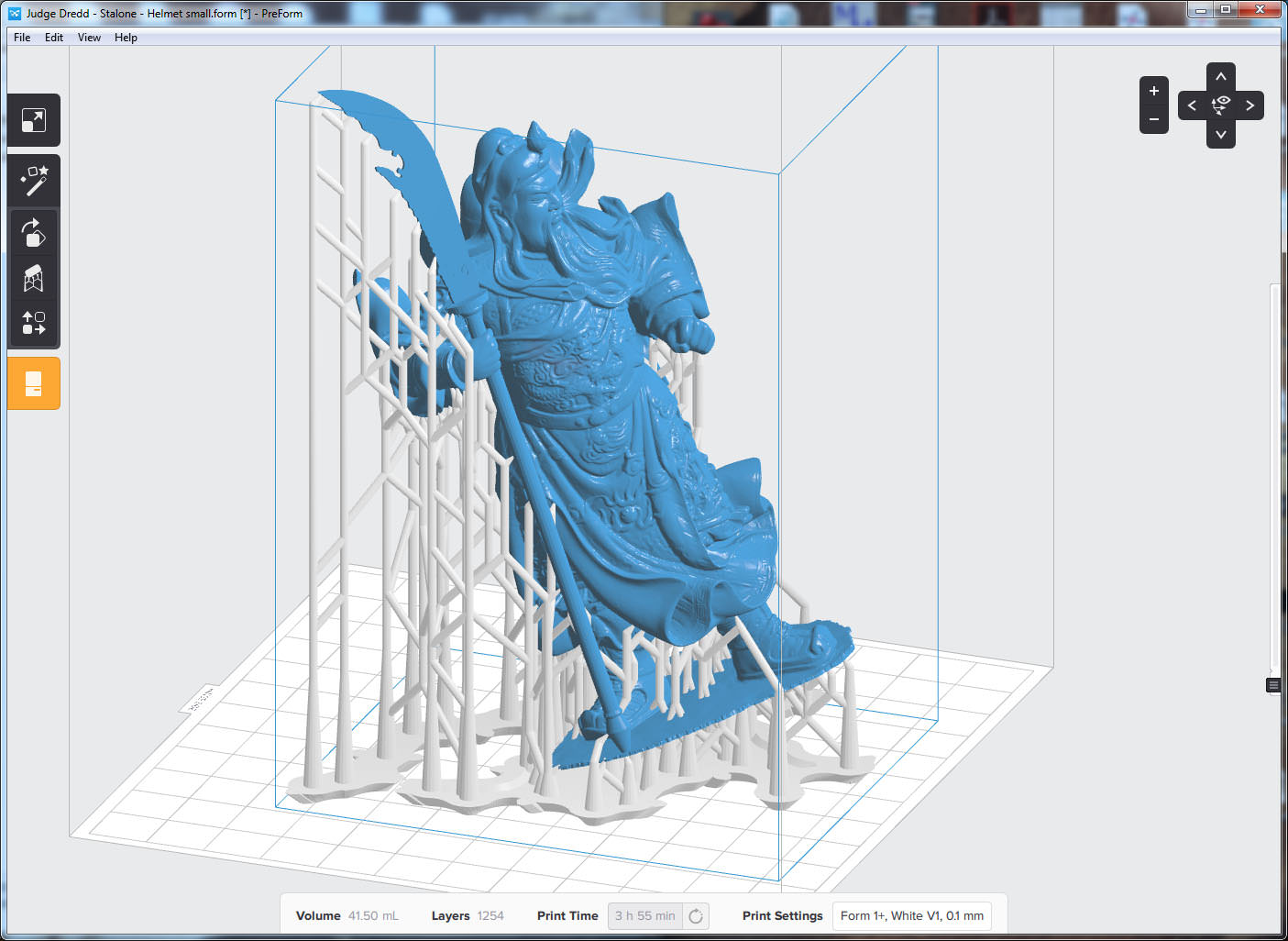

http://soliforum.com/i/?vpCHubt.jpg


Below are Dropbox links to 2 version of the model, The hollow model is for SLA printers, the solid is for FDM.

Guan Yu Solid
https://www.dropbox.com/s/uf0f5gxt7smgb … d.stl?dl=0

Guan Yu Hollow
https://www.dropbox.com/s/8t69ub9ydemnc … w.stl?dl=0

Now let's see some results ! smile

To print or, 3D print, that is the question...
SD3 printer w/too many mods,  Printrbot Simple Maker Ed.,  FormLabs Form 1+
AnyCubic Photon, Shining 3D EinScan-S & Atlas 3D scanners...
...and too much time on my hands.

2

Re: FDM vs. DLP vs. SLA Print Speed

I have a D7 but out of resin. Once I get some resin I can run the test on it unless someone beats me to it.

Printing since 2009 and still love it!
Anycubic 4MAX best $225 ever invested.
Voxelabs Proxima SLA. 6 inch 2k Mono LCD.
Anycubic Predator, massive Delta machine. 450 x 370 print envelope.

3

Re: FDM vs. DLP vs. SLA Print Speed

It would be nice to see the test results

Prusa i3

4 (edited by westyn.elara 2018-04-18 06:31:05)

Re: FDM vs. DLP vs. SLA Print Speed

carl_m1968 wrote:

I have a D7 but out of resin. Once I get some resin I can run the test on it unless someone beats me to it.

I have the same.

5 (edited by heartless 2018-04-17 13:49:57)

Re: FDM vs. DLP vs. SLA Print Speed

Since no one else is stepping up to the plate with an FDM printer I will

I am going to preface this with the statement that I think this is a terrible model for comparisons between FDM & SLA type printers.

Onward...
I use RH and Slic3r v 1.2.9 for my SD4s. I have tweaked the time estimate setting to the point that my estimated print times are typically within a couple of minutes - no more than 5 mins off.

first thing of note: when I loaded the model, it came up with the "non-manifold" error and it is laid on its side (this is the "solid" version of the model, btw) after standing it upright...

http://soliforum.com/i/?33mR2SD.png

the staff/sword seems to be the problem - i can slice it, but the staff/sword disappears. (and yes, there was an attempt at repairing with netfabb basic)

http://soliforum.com/i/?WtOnYpb.png

slicing time was 4m:26s - most likely due to the manifold issues and adding support structures.
Layer height was set to 0.254 (keep in mind this is for the SDs stock 5/16" threaded rod)
infill was set to 15% with supports turned on.

No, I will not actually be printing this.

SD4 #1 & #2 - Lawsy carriages, E3D v6, Rumba controller board, mirror bed plate, X motor fan, upgraded PSU & Mica bed heater
SD4 #3 - in the works ~ Folgertech FT-5, rev 1
Printit Industries Beta Tester - Horizon H1

6 (edited by pirvan 2018-04-21 21:46:43)

Re: FDM vs. DLP vs. SLA Print Speed

heartless wrote:

Since no one else is stepping up to the plate with an FDM printer I will

I am going to preface this with the statement that I think this is a terrible model for comparisons between FDM & SLA type printers.

Onward...
I use RH and Slic3r v 1.2.9 for my SD4s. I have tweaked the time estimate setting to the point that my estimated print times are typically within a couple of minutes - no more than 5 mins off.

first thing of note: when I loaded the model, it came up with the "non-manifold" error and it is laid on its side (this is the "solid" version of the model, btw) after standing it upright...

the staff/sword seems to be the problem - i can slice it, but the staff/sword disappears. (and yes, there was an attempt at repairing with netfabb basic)

slicing time was 4m:26s - most likely due to the manifold issues and adding support structures.
Layer height was set to 0.254 (keep in mind this is for the SDs stock 5/16" threaded rod)
infill was set to 15% with supports turned on.

No, I will not actually be printing this.

Well, I didn't think the model had any errors, but I loaded it back into NetFabb, and it does indeed have a small hole in it.  It's not the staff, rather it's where his left boot intersects the robe.

http://soliforum.com/i/?IB72tha.jpg

But it's the type of error that doesn't affect the printability of a model.  So I opened it back into Repetier, and you can see the slice results below.

Using my SD3 profile I first sliced it with Cura @ 0.2mm.  Slicing time was 23 seconds, print time would be 3:57 hours.  I then sliced it again at 0.1mm.  Slicing time was 47seconds, print time 7:50 hours.

Next I sliced it using Slic3r, which I had stopped using a while ago, because of it's slow print times, and issues with some models.  The first slice produced similar results as yours, the staff missing altogether.  It turns out that Slic3r has a problem with models that are made up of multiple solids.  In this particular case, the staff is a separate object that simply passes through the hand and touches the base.  A lot of my models are composites, and I don't always Boolean them because the process does not always result in a nice clean intersection.

I've never had any issues with this before when using Cura, nor do I have any issues with PreForm.  But apparently Slic3r doesn't like it.  So for a final test, I did Boolean the 2 parts, so Slic3r can now slice the model correctly.

http://soliforum.com/i/?8ci83cl.jpg
I also uploaded the repaired file and linked it in place of the original.

To print or, 3D print, that is the question...
SD3 printer w/too many mods,  Printrbot Simple Maker Ed.,  FormLabs Form 1+
AnyCubic Photon, Shining 3D EinScan-S & Atlas 3D scanners...
...and too much time on my hands.

7

Re: FDM vs. DLP vs. SLA Print Speed

heartless wrote:

Since no one else is stepping up to the plate with an FDM printer I will

I am going to preface this with the statement that I think this is a terrible model for comparisons between FDM & SLA type printers.

Out of curiosity, why do you think it's not a good model for comparisons?

To print or, 3D print, that is the question...
SD3 printer w/too many mods,  Printrbot Simple Maker Ed.,  FormLabs Form 1+
AnyCubic Photon, Shining 3D EinScan-S & Atlas 3D scanners...
...and too much time on my hands.

8

Re: FDM vs. DLP vs. SLA Print Speed

pirvan wrote:

Out of curiosity, why do you think it's not a good model for comparisons?

too much support needed - but that is just my personal opinion. wink I don't typically do things like this, altho I know there are many that do.
most of the things I print need very little to no support, so very little to no post processing involved, lol

I can try slicing again with the updated model, just to see how much of a difference there is between yours and mine.

I have never used Cura myself, altho I understand they have made some pretty serious changes in the last couple of years.

SD4 #1 & #2 - Lawsy carriages, E3D v6, Rumba controller board, mirror bed plate, X motor fan, upgraded PSU & Mica bed heater
SD4 #3 - in the works ~ Folgertech FT-5, rev 1
Printit Industries Beta Tester - Horizon H1

9

Re: FDM vs. DLP vs. SLA Print Speed

Using Creation Workshop which is what comes with the D7 the slice time for .100 layers is 3 seconds and the build time is 4 hours and 45 minutes. I don't have enough resin to actually print it as I am doing a project for work. But the numbers reported have been very accurate so far.

Printing since 2009 and still love it!
Anycubic 4MAX best $225 ever invested.
Voxelabs Proxima SLA. 6 inch 2k Mono LCD.
Anycubic Predator, massive Delta machine. 450 x 370 print envelope.

10

Re: FDM vs. DLP vs. SLA Print Speed

carl_m1968 wrote:

Using Creation Workshop which is what comes with the D7 the slice time for .100 layers is 3 seconds and the build time is 4 hours and 45 minutes. I don't have enough resin to actually print it as I am doing a project for work. But the numbers reported have been very accurate so far.

Can you post a screenshot from Creation Workshop of what the sliced/supported model would look like?

To print or, 3D print, that is the question...
SD3 printer w/too many mods,  Printrbot Simple Maker Ed.,  FormLabs Form 1+
AnyCubic Photon, Shining 3D EinScan-S & Atlas 3D scanners...
...and too much time on my hands.

11

Re: FDM vs. DLP vs. SLA Print Speed

pirvan wrote:
carl_m1968 wrote:

Using Creation Workshop which is what comes with the D7 the slice time for .100 layers is 3 seconds and the build time is 4 hours and 45 minutes. I don't have enough resin to actually print it as I am doing a project for work. But the numbers reported have been very accurate so far.

Can you post a screenshot from Creation Workshop of what the sliced/supported model would look like?


Here ya go.

http://soliforum.com/i/?HHxVuLz.jpg

Printing since 2009 and still love it!
Anycubic 4MAX best $225 ever invested.
Voxelabs Proxima SLA. 6 inch 2k Mono LCD.
Anycubic Predator, massive Delta machine. 450 x 370 print envelope.

12 (edited by pirvan 2018-04-22 16:52:59)

Re: FDM vs. DLP vs. SLA Print Speed

The software intrigued me, so I downloaded it from Wanhao and played with it.

I'm having a hard time understanding why it does some of the things it does, and I fond a lot of things that don't make any sense.

Since this came preconfigured for the D7, I used the default settings for generating support.  The default "Bed of Nails", is pretty useless, as it only generates supports for the areas that face the bed.  If anything needs supports but is not overhanging the bed surface, it doesn't get supported.  Take a look at the shot below.  If the model is oriented right side up, the bottom gets supports and only the parts overhanging the bed. 

http://soliforum.com/i/?5X2weZO.jpg

I can see why you rotated the model upside down, just so you can get more of it facing the bed.  Even so, there are still areas that are not supported.  Here are a couple that are immediately obvious.

http://soliforum.com/i/?jC1Oc7Y.jpg

I understand wanting to use the "Bed of Nails" profile since it very fast (10-15 seconds).  But why not use the "Adaptive" support profile?  It's not as fast (60-90 seconds), but produces much better support and it supports areas that the "Bed of Nails" doesn't.  You can also orient the model normally, which results in much more reasonable support structure.

http://soliforum.com/i/?NVV2u14.jpg

Then there's the estimated build time.  Using the 100 micron slice profile, it always comes up in the 8 hour range, so I was wondering how you got the 4 hour build time, until I noticed you used a default slice profile and a default machine, rather than the Wanhao D7 profiles. 

When I sliced the model with the default profile, it came out to 2 hours build time, not only that but it was at 50 micron.  That simply didn't make any sense, so I took a look at the difference. 

There is a huge difference in exposure times, especially on the bottom layers, then there's another huge difference in the Lift & Sequence time.  That is a starting profile, and is probably to be used as a starting point for other printers.  I can't see it being usable at all on the Wanhao D7, given the huge discrepancies.

I mean exposure time for default is 1000ms, wheres the D7 profile is 7000ms.  The bottom layer exposure is 5000ms vs 60,000ms !!.  Then the actual lift sequence is 2000, vs 15,100.  That's why the default profile is 7-8 times faster than the actual D7 profile.

http://soliforum.com/i/?wsxCpCm.jpg

So while I can understand that you can tweak the profiles to some extent, and get better performance, I doubt that you can deviate too much without compromising the print.

To print or, 3D print, that is the question...
SD3 printer w/too many mods,  Printrbot Simple Maker Ed.,  FormLabs Form 1+
AnyCubic Photon, Shining 3D EinScan-S & Atlas 3D scanners...
...and too much time on my hands.

13 (edited by carl_m1968 2018-04-22 19:55:52)

Re: FDM vs. DLP vs. SLA Print Speed

I only use CW to orient my model and to add support. It is then saved as an STL. That STL is then loaded into nanoDLP which actually slices the model drives the printer through a Raspberry Pi 3. The slicing and resin profiles are in nanoDLP on the Pi. However my CW default profile was altered somewhat to reflect the NanoDLP profile. My base layers are 4 at 24 seconds and the rest are all 8 seconds. My wait times are between 1.5 and 3 seconds depending on the step. nanoDLP also allows you to print while it is slicing so there really is no slice time when using it. Once four layers are sliced it can start printing and slice the rest in background.

Here are profile shots from NanoDLP.

http://soliforum.com/i/?WyKcwIu.jpg

http://soliforum.com/i/?ZiraUkw.jpg

This last image is the time to print and as I said the slicing is done in the background so there is no slicing time. As you can see from the top plate in the list which is what this software calls a print that this model will take 1 hour and 46 minutes using my actual profile that I use with my current load of black Wanhao resin.

http://soliforum.com/i/?Xdn2nQT.jpg

Printing since 2009 and still love it!
Anycubic 4MAX best $225 ever invested.
Voxelabs Proxima SLA. 6 inch 2k Mono LCD.
Anycubic Predator, massive Delta machine. 450 x 370 print envelope.

14 (edited by pirvan 2018-04-22 22:08:44)

Re: FDM vs. DLP vs. SLA Print Speed

carl_m1968 wrote:

I only use CW to orient my model and to add support. It is then saved as an STL. That STL is then loaded into nanoDLP which actually slices the model drives the printer through a Raspberry Pi 3. The slicing and resin profiles are in nanoDLP on the Pi.

Ok, so CW is not the program used to print, therefore it's results are to be disregarded, but the NanoDLP results don't look right either.

Based on the settings shown, the first 4 layers will take 42.5s each, for a total of 170s.  Normal layers take 8s to print, then you have 1.5s wait before print, 0.01s wait after print and 1.9s wait after lift.  That adds up to 11.41s for each layer.

Now to add things up: 

Assuming you have the default raft that CW creates and nothing else, that's 1mm, and the model is 124.57mm.  At 100micron, that should be either 1255 or 1256 layers.

1251 layers x 11.41s = 14,273.91s + 170s (first 4 layers) = 14,443.91s = 240.73m = 4:00:45 hours

Then I noticed that for some reason NanoDLP thinks the model is only 418 layers.  That would be the number of layers if the model was being printed at 300microns, or if the model was shrunk to 1/3of its original size.

I could be wrong but the numbers don't add up, so I would say that Nano DLP print using your settings would be about 4 hours.

carl_m1968 wrote:

As you can see from the top plate in the list which is what this software calls a print that this model will take 1 hour and 46 minutes using my actual profile that I use with my current load of black Wanhao resin.

http://soliforum.com/i/?Xdn2nQT.jpg

Actually based on the previous prints listed below Guan Yu, done with the same profile, it should take even longer than 4 hours, more like 6+ hours. 

Take a look at the three highlighted prints at the bottom, compared to the one at the top.  Based on the prints that were done before, the normal profile seems to average about 195 layers per hour.  So the full 1250+ layers should be 6:30 hours.  Definitely not 1:45h.

http://soliforum.com/i/?AM8sGfD.jpg

To print or, 3D print, that is the question...
SD3 printer w/too many mods,  Printrbot Simple Maker Ed.,  FormLabs Form 1+
AnyCubic Photon, Shining 3D EinScan-S & Atlas 3D scanners...
...and too much time on my hands.

15

Re: FDM vs. DLP vs. SLA Print Speed

I don't usually use a base unless I use supports. I did not load the model into nanoDLP with supports since it would not impact print time. Just to test I will do a dry run without resin and see what the true print time is. That 415 is most likely the number sliced so far when I did the screen grab.

Printing since 2009 and still love it!
Anycubic 4MAX best $225 ever invested.
Voxelabs Proxima SLA. 6 inch 2k Mono LCD.
Anycubic Predator, massive Delta machine. 450 x 370 print envelope.

16

Re: FDM vs. DLP vs. SLA Print Speed

You don't need to do a dry run.  I've got a good idea of the print times the D7 is capable of.

To print or, 3D print, that is the question...
SD3 printer w/too many mods,  Printrbot Simple Maker Ed.,  FormLabs Form 1+
AnyCubic Photon, Shining 3D EinScan-S & Atlas 3D scanners...
...and too much time on my hands.