Re: Android App for resetting/writing blank ntags
reads jr tags,. does nothing with the data,.. does not copy it, hack it, and enables it to be moved to new ntag... i have no idea what this program does, or how people have used it,. it no worky now.
You are not logged in. Please login or register.
SoliForum - 3D Printing Community → XYZ Printing Hacks & Mods → Android App for resetting/writing blank ntags
reads jr tags,. does nothing with the data,.. does not copy it, hack it, and enables it to be moved to new ntag... i have no idea what this program does, or how people have used it,. it no worky now.
reads jr tags,. does nothing with the data,.. does not copy it, hack it, and enables it to be moved to new ntag... i have no idea what this program does, or how people have used it,. it no worky now.
Which Version did you try? Mines or modfreakz?
Thanks a lot for this app.
Working fine on my new minimaker (original app on page 1)
I used a 0.6kg roll of flashforge pla so set to 200m.
Stuck the tag to the underside of the spool holder.
Hi, I'm a 100% noob when it comes to 3d printing. I just got myself a Da Vinci Jr 1.0.
The printer has firmware 2.2.7 on it, can I use this app to write new tags and will these tags work on my printer?

Hi, I'm a 100% noob when it comes to 3d printing. I just got myself a Da Vinci Jr 1.0.
The printer has firmware 2.2.7 on it, can I use this app to write new tags and will these tags work on my printer?
Yes, the app should work with any firmware.
Great work guys, looks fantastic so far. Might I ask that one of you public the sources to VCS such as Github? Doing so will make it much, much easier to centralise development and contribute improvements and new features. Build automation would also be a great benefit of putting the code into version control!

Happy Easter!!!
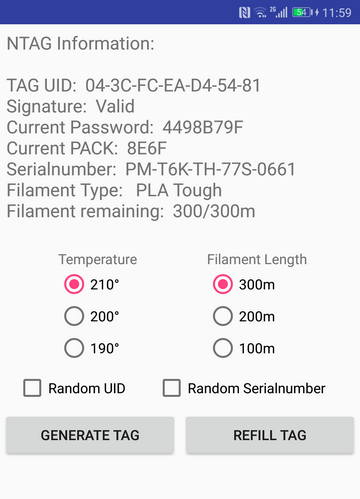
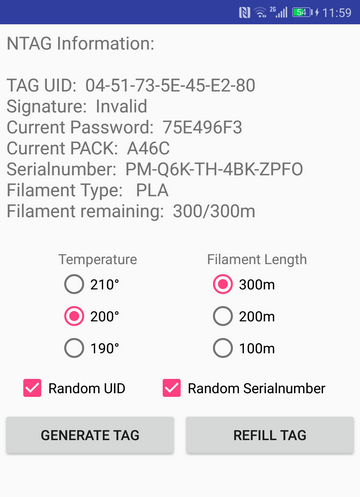
Here is new version, working with EmuTag, original Tags and blank Tags.
Some options are not working for original Tags, is it logical!?!
Whats new:
- added random serial number generation
- checking if the signature match the UID
- supports two languages (English, German)
for EmuTag only
- added random UID generation (invalid signature)
- if the UID random button is uncheked, trasferes UID with valid signature
Sounds good! Source included this time?
Sounds good! Source included this time?
Thx, not yet. Will release later.
By the way, looks like the random serial number generation sometimes not work, the printer does not accept the serial number.
Does anyone know if the ranges are okay, or are there any dependencies?
Here is snip of the code.
if(Random_Serialnumber.isChecked())
{
    byte[] Page09Random = new byte[4];
    Page09Random[0] = (byte) 0x00;
    Page09Random[1] = (byte) (rand.nextInt(((0x39 + 1) - 0x30)) + 0x30);
    Page09Random[2] = (byte) (rand.nextInt(((0x43 + 1) - 0x41)) + 0x41);
    Page09Random[3] = (byte) (rand.nextInt(((0x59 + 1) - 0x41)) + 0x41);

    byte[] Page13Random = new byte[4];
    Page13Random[0] = (byte) 0x54; //T
    Page13Random[1] = (byte) 0x48; //H
    if((rand.nextInt(0x02) == 0x01))
    {
        Page13Random[2] = (byte) 0x47; //G
        Page13Random[3] = (byte) 0x42; //B
    }
    else
    {
        Page13Random[2] = (byte) 0x50; //P
        Page13Random[3] = (byte) 0x4D; //M
    }

    byte[] Page14Random = new byte[4];
    Page14Random[0] = (byte) (rand.nextInt(((0x5A + 1) - 0x41)) + 0x41);
    Page14Random[1] = (byte) (rand.nextInt(((0x5A + 1) - 0x41)) + 0x41);
    Page14Random[2] = (byte) (rand.nextInt(((0x5A + 1) - 0x41)) + 0x41);
    Page14Random[3] = (byte) (rand.nextInt(((0x5A + 1) - 0x41)) + 0x41);

    mifare.writePage(0x09, Page09Random);
    mifare.writePage(0x0D, Page13Random);
    mifare.writePage(0x0E, Page14Random);
}
If the smaller ones work like the larger ones, they call home and compare the cartridge serial number to the database of serial numbers that have been manufactured. So if you where to generate a fake serial that is not in the database it would be rejected. Also if the machine has seen the serial number before it will be rejected.
No the printer is offline, and the UID or serial number are defenetley not used before.
I think you need to use nfc213 tags like these ones: https://www.amazon.de/Tags-Sticker-NTAG … ds=ntag213
do we need ntag213 or 203? cause link directs to ntag203 (or maybe it's the same chip?  )
)
sunsetraving wrote:I think you need to use nfc213 tags like these ones: https://www.amazon.de/Tags-Sticker-NTAG … ds=ntag213
do we need ntag213 or 203? cause link directs to ntag203 (or maybe it's the same chip?
When I open the link I see 213 tags and 213 tags is the proper tag.
Happy Easter!!!
Here is new version, working with EmuTag, original Tags and blank Tags.
Some options are not working for original Tags, is it logical!?!Whats new:
- added random serial number generation
- checking if the signature match the UID
- supports two languages (English, German)for EmuTag only
- added random UID generation (invalid signature)
- if the UID random button is uncheked, trasferes UID with valid signature
I cant install program on my phones (lg g2 and samsung note2) it says "program cant install"
Zip file can not be open
Zip file can not be open
worked fine for me.
It failed to install on Android 5 and 8.0
What system this is working?
Android 8 on samsung s8
think the app need to get signed...?
https://www.digitbin.com/app-not-installed-fix-error/
sorry not an android expert
It failed to install on Android 5 and 8.0
What system this is working?
It failed to install on Android 5 and 8.0
What system this is working?
Exactly how are you trying to install it?
Please check your settings regarding trusted sources. Its explained in the first post of this thread. You should also mention whether you are trying to install modfreakz or mine version of the app.
HI, what happens when this windows appear??
thx for the effor that you put on this, i really apreciate.............
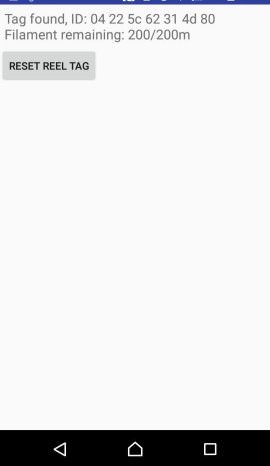
Thanks to all the information floating around this forum, we are able to reset and create new valid ntag-labels for use in our dongled printers using various ways.
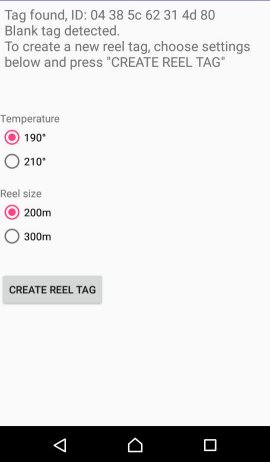
However, I personally felt a little uncomfortable using the famous nfc tools app to manipulate the tags. So I created a little android app that helped me with the process. I noticed some people have trouble going through the steps (which become pretty error-prone when it comes to creating valid tags from blanks), I decided to share it here, hope it helps some people out.
Yes, its not looking nice (not the android/ui guy) but it did the job for me so far, especially for creating new tags.What's needed?
- An NFC-enabled android phone/tablet with at least Android 4.4 (I guess)
- Cheap blank nfc213 paper tags if you want create new tags.No soldering or other tinkering required. Start the app, place it on a blank, choose temp/length, push the button, tape the tag to the printers' nfc reader, happy printing.
Here is one of many tutorials out there that guide you through the steps of installing an apk to your phone:
https://www.maketecheasier.com/install- … he-market/The apps source is also attached (AGPL licensed), so feel free to use and abuse it. Maybe someone can create a fork which is more feature rich and better looking, I'm lacking time atm.
I'd like to thank all the users sharing information here, especially nilezon for reverse engineering the pass/pack code, which is also used in this app (in a very ugly way :-/).
Screenshots:
Have fun!
Just guessing : keep the tag under your phone all the time, dont lift it off the tag until the data is written.
Hello
I am from Germany and my english is not the best. The apk NTAG_Refill_Tool v1.10 runs great after I have signed the apk-file  before not. Thank you. But maybe you can integrate the color (now black) so that it is displayed on the pc/laptop.
MfG Chris
SoliForum - 3D Printing Community → XYZ Printing Hacks & Mods → Android App for resetting/writing blank ntags
Powered by PunBB, supported by Informer Technologies, Inc.