<?xml version="1.0" encoding="utf-8"?>
<feed xmlns="http://www.w3.org/2005/Atom">
	<title type="html"><![CDATA[SoliForum - 3D Printing Community — Noise removal, and cleanup]]></title>
	<link rel="self" href="https://www.soliforum.com/feed/atom/topic/11953/" />
	<updated>2015-09-15T04:14:47Z</updated>
	<generator>PunBB</generator>
	<id>https://www.soliforum.com/topic/11953/noise-removal-and-cleanup/</id>
		<entry>
			<title type="html"><![CDATA[Re: Noise removal, and cleanup]]></title>
			<link rel="alternate" href="https://www.soliforum.com/post/105409/#p105409" />
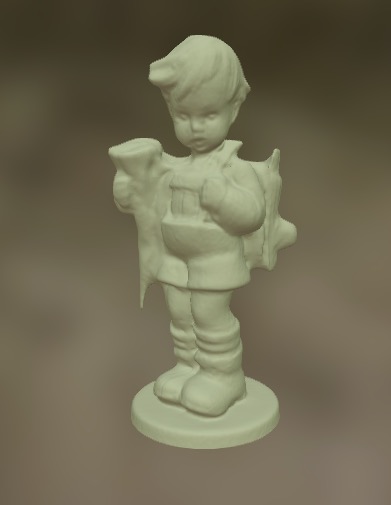
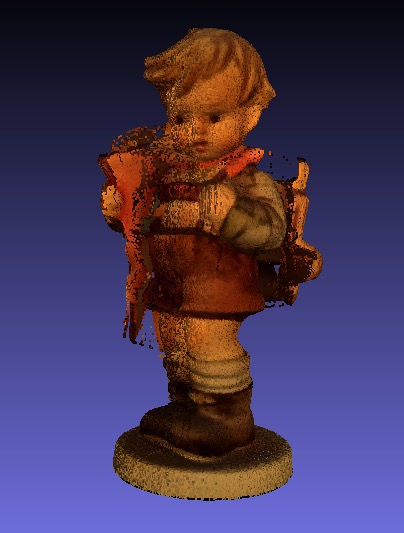
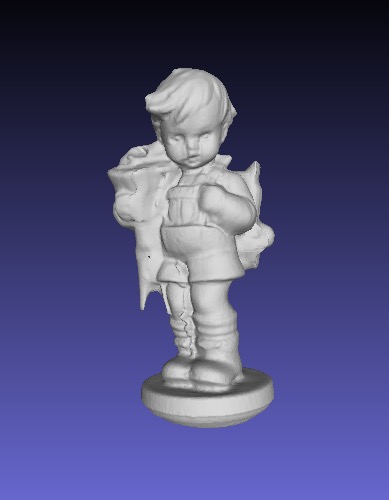
			<content type="html"><![CDATA[<p>Pirvan, After using your coupler to stabilize my turntable and your tutorial to tweak my scans, I feel like I finally have all the pieces in place. Meshmixer is indeed an excellent tool for refining the scans. Here is a link to my rescanned and reprocessed Hummel on Sketchfab: <a href="https://skfb.ly/GQDF">https://skfb.ly/GQDF</a></p><p>Thanks for all your help!!</p><p>--Dave<br /><span class="postimg"><img src="http://soliforum.com/i/?gYdD6MG.jpg" alt="http://soliforum.com/i/?gYdD6MG.jpg" /></span></p>]]></content>
			<author>
				<name><![CDATA[Vinoh]]></name>
				<uri>https://www.soliforum.com/user/10693/</uri>
			</author>
			<updated>2015-09-15T04:14:47Z</updated>
			<id>https://www.soliforum.com/post/105409/#p105409</id>
		</entry>
		<entry>
			<title type="html"><![CDATA[Re: Noise removal, and cleanup]]></title>
			<link rel="alternate" href="https://www.soliforum.com/post/105167/#p105167" />
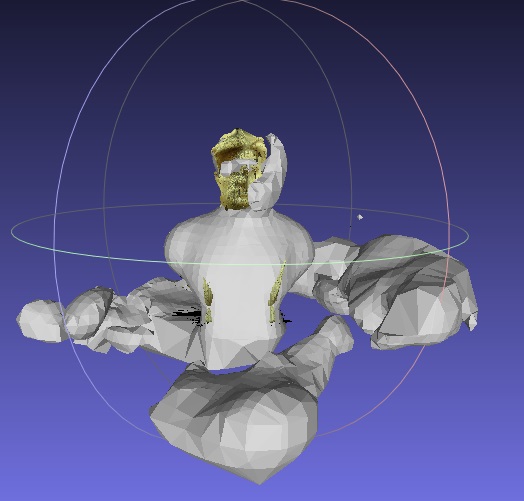
			<content type="html"><![CDATA[<p>Take a look at the tutorial I did the other day, which explains in more detail what needs to be done.</p><p><a href="http://www.soliforum.com/topic/12264/from-scan-to-printable-mesh-tutorial/">http://www.soliforum.com/topic/12264/fr … -tutorial/</a></p><p>Also, I can see in the image you posted that there is still a lot of noise (stray points) in the model, especially at the base.&nbsp; Those inflated mesh pieces that go around your model are probably from those spray points.</p><p>How did you clean your model?&nbsp; Did you clean the point cloud, or did you clean the mesh?&nbsp; You need to clean the point cloud.</p><p>Anyway, take a look at the tutorial, and try again.</p>]]></content>
			<author>
				<name><![CDATA[pirvan]]></name>
				<uri>https://www.soliforum.com/user/1357/</uri>
			</author>
			<updated>2015-09-10T19:46:14Z</updated>
			<id>https://www.soliforum.com/post/105167/#p105167</id>
		</entry>
		<entry>
			<title type="html"><![CDATA[Re: Noise removal, and cleanup]]></title>
			<link rel="alternate" href="https://www.soliforum.com/post/105159/#p105159" />
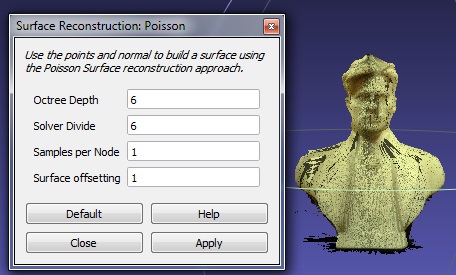
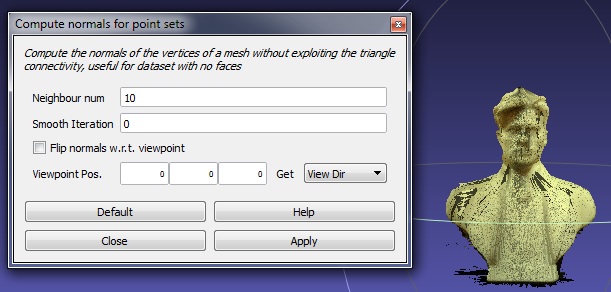
			<content type="html"><![CDATA[<div class="quotebox"><cite>pirvan wrote:</cite><blockquote><p>Did you clean up all the tray noise from around the model?<br />What values did you input in the <strong>Compute Normals</strong> box for <strong>Neighbour Num</strong> and <strong>Viewpoint Position</strong>.<br />In the <strong>Surface Reconstruction</strong> dialog box, what values did you use for <strong>Octree</strong> and <strong>Solver</strong>?</p></blockquote></div><p>i clean noise. all values you can see on my pictures, all by default...</p>]]></content>
			<author>
				<name><![CDATA[rtr989]]></name>
				<uri>https://www.soliforum.com/user/11528/</uri>
			</author>
			<updated>2015-09-10T16:21:11Z</updated>
			<id>https://www.soliforum.com/post/105159/#p105159</id>
		</entry>
		<entry>
			<title type="html"><![CDATA[Re: Noise removal, and cleanup]]></title>
			<link rel="alternate" href="https://www.soliforum.com/post/105143/#p105143" />
			<content type="html"><![CDATA[<p>Did you clean up all the tray noise from around the model?<br />What values did you input in the <strong>Compute Normals</strong> box for <strong>Neighbour Num</strong> and <strong>Viewpoint Position</strong>.<br />In the <strong>Surface Reconstruction</strong> dialog box, what values did you use for <strong>Octree</strong> and <strong>Solver</strong>?</p>]]></content>
			<author>
				<name><![CDATA[pirvan]]></name>
				<uri>https://www.soliforum.com/user/1357/</uri>
			</author>
			<updated>2015-09-10T14:00:59Z</updated>
			<id>https://www.soliforum.com/post/105143/#p105143</id>
		</entry>
		<entry>
			<title type="html"><![CDATA[Re: Noise removal, and cleanup]]></title>
			<link rel="alternate" href="https://www.soliforum.com/post/105140/#p105140" />
			<content type="html"><![CDATA[<div class="quotebox"><cite>pirvan wrote:</cite><blockquote><p>In this photo, the first image (from the left) is the point cloud.&nbsp; I didn&#039;t do any poisson-disc sampling, because I wanted to use all the captured detail, so I simply duplicated the original.&nbsp; I then applied the <strong>Compute Normals for Point Sets</strong> (second image) which aligned all the vertices coherently.&nbsp; After this I used the <strong>Poisson Surface Reconstruction</strong> to generate the mesh.&nbsp; Not too bad.&nbsp; It still needs some work, which I&#039;ll probably do in MeshLab or MeshMixer.</p></blockquote></div><p>Hello Pirvan!<br />I try to make my model and I stumble on the first step. I do <strong>Compute Normals for Point Sets</strong> then <strong>Poisson Surface Reconstruction</strong> to generate the mesh and i gets some trash..<br /><span class="postimg"><img src="http://soliforum.com/i/?yQJzvA2.jpg" alt="http://soliforum.com/i/?yQJzvA2.jpg" /></span><span class="postimg"><img src="http://soliforum.com/i/?wEBxC8u.jpg" alt="http://soliforum.com/i/?wEBxC8u.jpg" /></span><span class="postimg"><img src="http://soliforum.com/i/?o4jAE5P.jpg" alt="http://soliforum.com/i/?o4jAE5P.jpg" /></span></p><p>what i do wrong?</p>]]></content>
			<author>
				<name><![CDATA[rtr989]]></name>
				<uri>https://www.soliforum.com/user/11528/</uri>
			</author>
			<updated>2015-09-10T06:35:00Z</updated>
			<id>https://www.soliforum.com/post/105140/#p105140</id>
		</entry>
		<entry>
			<title type="html"><![CDATA[Re: Noise removal, and cleanup]]></title>
			<link rel="alternate" href="https://www.soliforum.com/post/105138/#p105138" />
			<content type="html"><![CDATA[<div class="quotebox"><cite>pirvan wrote:</cite><blockquote><p>That&#039;s what I&#039;m talking about, nice work.&nbsp; <img src="https://www.soliforum.com/img/smilies/smile.png" width="15" height="15" alt="smile" /></p><p>Now get that little guy on MeshMixer and fix those few things.</p></blockquote></div><p>haha. Tomorrow is another day. Here is a link to the actual result on Sketchfab. Hopefully, I&#039;ll be updating it soon.</p><p><a href="https://skfb.ly/GQDF">https://skfb.ly/GQDF</a></p><p>Thanks again.</p>]]></content>
			<author>
				<name><![CDATA[Vinoh]]></name>
				<uri>https://www.soliforum.com/user/10693/</uri>
			</author>
			<updated>2015-09-10T03:46:35Z</updated>
			<id>https://www.soliforum.com/post/105138/#p105138</id>
		</entry>
		<entry>
			<title type="html"><![CDATA[Re: Noise removal, and cleanup]]></title>
			<link rel="alternate" href="https://www.soliforum.com/post/105135/#p105135" />
			<content type="html"><![CDATA[<p>That&#039;s what I&#039;m talking about, nice work.&nbsp; <img src="https://www.soliforum.com/img/smilies/smile.png" width="15" height="15" alt="smile" /></p><p>Now get that little guy on MeshMixer and fix those few things.</p>]]></content>
			<author>
				<name><![CDATA[pirvan]]></name>
				<uri>https://www.soliforum.com/user/1357/</uri>
			</author>
			<updated>2015-09-10T03:31:32Z</updated>
			<id>https://www.soliforum.com/post/105135/#p105135</id>
		</entry>
		<entry>
			<title type="html"><![CDATA[Re: Noise removal, and cleanup]]></title>
			<link rel="alternate" href="https://www.soliforum.com/post/105132/#p105132" />
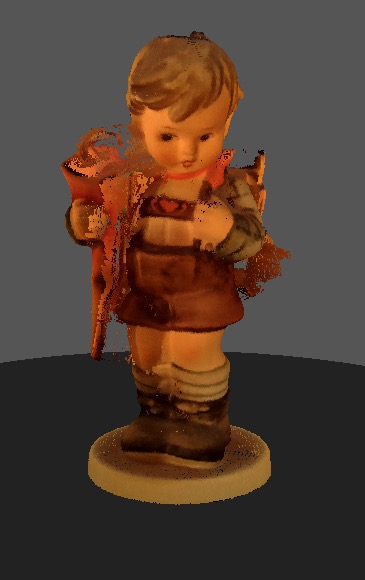
			<content type="html"><![CDATA[<p>Your tutorial did the trick, pirvan! After tweaking my scanner dimension settings and calibrating as you suggested with a checkerboard pattern, I followed your Meshlab tutorial to the letter. Without even processing further in MeshMixer, I&#039;m starting to get some decent results. Thanks so much for all the effort you&#039;ve put into sharing what you learned. Here&#039;s what I did, fwiw:</p><p><span class="postimg"><img src="http://soliforum.com/i/?zSFBwoc.jpg" alt="http://soliforum.com/i/?zSFBwoc.jpg" /></span><span class="postimg"><img src="http://soliforum.com/i/?5HNLAy0.jpg" alt="http://soliforum.com/i/?5HNLAy0.jpg" /></span><span class="postimg"><img src="http://soliforum.com/i/?g8D70fB.jpg" alt="http://soliforum.com/i/?g8D70fB.jpg" /></span></p>]]></content>
			<author>
				<name><![CDATA[Vinoh]]></name>
				<uri>https://www.soliforum.com/user/10693/</uri>
			</author>
			<updated>2015-09-10T03:14:16Z</updated>
			<id>https://www.soliforum.com/post/105132/#p105132</id>
		</entry>
		<entry>
			<title type="html"><![CDATA[Re: Noise removal, and cleanup]]></title>
			<link rel="alternate" href="https://www.soliforum.com/post/105069/#p105069" />
			<content type="html"><![CDATA[<p>I tried to follow the info in your &quot;Getting good scans&quot; thread but I got lost between how you learned about the issues vs what you ended up with. A tutorial to bring together the conclusions and advice would be much appreciated! Thanks.</p><p>--Dave</p>]]></content>
			<author>
				<name><![CDATA[Vinoh]]></name>
				<uri>https://www.soliforum.com/user/10693/</uri>
			</author>
			<updated>2015-09-09T05:13:02Z</updated>
			<id>https://www.soliforum.com/post/105069/#p105069</id>
		</entry>
		<entry>
			<title type="html"><![CDATA[Re: Noise removal, and cleanup]]></title>
			<link rel="alternate" href="https://www.soliforum.com/post/105068/#p105068" />
			<content type="html"><![CDATA[<p>Yes, technically the PLY file, as created by FreeLSS, contains a actual mesh, however, that mesh is pretty rudimentary, and is not suitable for printing.&nbsp; Additionally, that mesh is based on a point cloud which more often than not contains a lot noise, and missing parts (areas which the laser couldn&#039;t see).&nbsp; So for all intents and purposes, that mesh is useless, and I simply ignore it.</p><p>There&#039;s a lot more work involved than simply exporting the PLY file to another format.&nbsp; I&#039;ve explained this before, but I think it&#039;s time for a tutorial, so in the next couple of hours, I&#039;ll do a new post with the tutorial.</p>]]></content>
			<author>
				<name><![CDATA[pirvan]]></name>
				<uri>https://www.soliforum.com/user/1357/</uri>
			</author>
			<updated>2015-09-09T04:47:48Z</updated>
			<id>https://www.soliforum.com/post/105068/#p105068</id>
		</entry>
		<entry>
			<title type="html"><![CDATA[Re: Noise removal, and cleanup]]></title>
			<link rel="alternate" href="https://www.soliforum.com/post/105064/#p105064" />
			<content type="html"><![CDATA[<p>Great info, pirvan. Sorry to be dense, but there is something basic I&#039;m not understanding. I seem to have to bring the FreeLSS .ply into Meshlab with &quot;Import Mesh&quot;. So isn&#039;t the file already a mesh at that point? Simply exporting from Meshlab it as an .obj file to MeshMixer did not seem to have any effect on the holes.</p><p>Maybe you execute some set of functions in Meshlab to do what you mention. If so, which functions do you run to make it watertight?</p><p>Thanks for the help!</p><p>--Dave</p>]]></content>
			<author>
				<name><![CDATA[Vinoh]]></name>
				<uri>https://www.soliforum.com/user/10693/</uri>
			</author>
			<updated>2015-09-09T03:19:29Z</updated>
			<id>https://www.soliforum.com/post/105064/#p105064</id>
		</entry>
		<entry>
			<title type="html"><![CDATA[Re: Noise removal, and cleanup]]></title>
			<link rel="alternate" href="https://www.soliforum.com/post/105061/#p105061" />
			<content type="html"><![CDATA[<p>getting models without holes really starts with Meshlab, when you generate the mesh from the point cloud.&nbsp; Eevry mesh I generated was manifold (watertight).</p><p>In Meshmixer there have been occasions where I &quot;over-sculpted&quot; some area, which ended up pushing one surface through another, but I don&#039;t think I ever had to fill any holes.&nbsp; Nevertheless, you can use the <strong>Analysis/Inspector</strong> feature to check the model for problems, and it will auto fix them. Or you can also use<strong> Edit/Close Cracks</strong> to do the same</p><p>You can also open the STL in NetFabb and fix it there.</p><p>Most of the clean up I do in Meshmixer is done using the <strong>sculpt </strong>tools.&nbsp; I use most of the tools, but I generally use <strong>Inflate</strong>, <strong>Draw </strong>and <strong>Flatten </strong>to fill in areas that are missing, then I use the <strong>Pinch </strong>tool to create or enhance the details.&nbsp; I also use the <strong>Shrink Smooth</strong> to smooth wrinkled areas.&nbsp; Of course, I constantly adjust the size and strength of the tools as needed.</p>]]></content>
			<author>
				<name><![CDATA[pirvan]]></name>
				<uri>https://www.soliforum.com/user/1357/</uri>
			</author>
			<updated>2015-09-09T02:52:31Z</updated>
			<id>https://www.soliforum.com/post/105061/#p105061</id>
		</entry>
		<entry>
			<title type="html"><![CDATA[Re: Noise removal, and cleanup]]></title>
			<link rel="alternate" href="https://www.soliforum.com/post/105048/#p105048" />
			<content type="html"><![CDATA[<p>I tried that and still got crashes. However, I find if my scans are relatively clean, it works much better and seldom crashes. I&#039;m actually starting to like the program a lot and getting some pretty good results with it, although not as good as yours yet. And, as you had mentioned, focusing my camera helped as well.</p><p>Filling in holes and cracks left over from the automatic repair is my current challenge. Which tool do you use? I&#039;m having some success with the Drag brush in the Sculpt tool.</p><p>Thanks for showing us with your great scans that this is indeed possible!</p><p>--Dave</p>]]></content>
			<author>
				<name><![CDATA[Vinoh]]></name>
				<uri>https://www.soliforum.com/user/10693/</uri>
			</author>
			<updated>2015-09-08T23:04:30Z</updated>
			<id>https://www.soliforum.com/post/105048/#p105048</id>
		</entry>
		<entry>
			<title type="html"><![CDATA[Re: Noise removal, and cleanup]]></title>
			<link rel="alternate" href="https://www.soliforum.com/post/105046/#p105046" />
			<content type="html"><![CDATA[<p>Not me, sorry.&nbsp; I use it native on a PC.&nbsp; Emulators or VM&#039;s like Parallels don&#039;t always work like the real deal.</p><p>On the other hand, why not setup your MacBook Pro with Boot Camp so you can run Windows on it natively?</p>]]></content>
			<author>
				<name><![CDATA[pirvan]]></name>
				<uri>https://www.soliforum.com/user/1357/</uri>
			</author>
			<updated>2015-09-08T22:47:01Z</updated>
			<id>https://www.soliforum.com/post/105046/#p105046</id>
		</entry>
		<entry>
			<title type="html"><![CDATA[Re: Noise removal, and cleanup]]></title>
			<link rel="alternate" href="https://www.soliforum.com/post/104900/#p104900" />
			<content type="html"><![CDATA[<p>I think Meshmixer is the most approachable of the various free programs I&#039;ve tried and so I&#039;ve start looking at the tutorials, etc. However, I find that it crashes my Macbook Pro and Parallels/Windows 7 so often that it&#039;s completely unusable. Has anyone had success editing scans with Meshmixer on a Mac or Parallels? Thanks.</p><p>--Dave</p>]]></content>
			<author>
				<name><![CDATA[Vinoh]]></name>
				<uri>https://www.soliforum.com/user/10693/</uri>
			</author>
			<updated>2015-09-06T07:16:04Z</updated>
			<id>https://www.soliforum.com/post/104900/#p104900</id>
		</entry>
</feed>