<?xml version="1.0" encoding="utf-8"?>
<feed xmlns="http://www.w3.org/2005/Atom">
	<title type="html"><![CDATA[SoliForum - 3D Printing Community — Incorrect Bed Center, using Repetier Host and Cura]]></title>
	<link rel="self" href="https://www.soliforum.com/feed/atom/topic/9979/" />
	<updated>2016-04-23T11:00:22Z</updated>
	<generator>PunBB</generator>
	<id>https://www.soliforum.com/topic/9979/incorrect-bed-center-using-repetier-host-and-cura/</id>
		<entry>
			<title type="html"><![CDATA[Re: Incorrect Bed Center, using Repetier Host and Cura]]></title>
			<link rel="alternate" href="https://www.soliforum.com/post/121621/#p121621" />
			<content type="html"><![CDATA[<p>Hey oscahie those settings worked perfect!<br />Just solved a huge issue for me man <br />Thanks.</p>]]></content>
			<author>
				<name><![CDATA[koss2j]]></name>
				<uri>https://www.soliforum.com/user/14185/</uri>
			</author>
			<updated>2016-04-23T11:00:22Z</updated>
			<id>https://www.soliforum.com/post/121621/#p121621</id>
		</entry>
		<entry>
			<title type="html"><![CDATA[Re: Incorrect Bed Center, using Repetier Host and Cura]]></title>
			<link rel="alternate" href="https://www.soliforum.com/post/94479/#p94479" />
			<content type="html"><![CDATA[<div class="quotebox"><cite>usslindstrom wrote:</cite><blockquote><p>No sir.&nbsp; &nbsp;Set to 0 all around.&nbsp; For testing, I threw those values in as well, and it didn&#039;t seem to have any effect.</p><p>The only slicing software that seems to mind the updated values is slic3r, unfortunately.&nbsp; Extremely unfortunate, as Cura&#039;s quality is absolutely amazing.</p></blockquote></div><p>You should not have set them to zero. What I&#039;d do is:</p><p>1) make sure you are running an up to date version of Repetier (eg. latest 0.92)<br />2) reset the EEPROM config to its default values<br />3) use the Repetier Host settings that I posted above.</p><p>That should work, it&#039;s what I use and prints are perfectly centered.</p>]]></content>
			<author>
				<name><![CDATA[oscahie]]></name>
				<uri>https://www.soliforum.com/user/6962/</uri>
			</author>
			<updated>2015-04-30T07:29:13Z</updated>
			<id>https://www.soliforum.com/post/94479/#p94479</id>
		</entry>
		<entry>
			<title type="html"><![CDATA[Re: Incorrect Bed Center, using Repetier Host and Cura]]></title>
			<link rel="alternate" href="https://www.soliforum.com/post/94453/#p94453" />
			<content type="html"><![CDATA[<div class="quotebox"><cite>usslindstrom wrote:</cite><blockquote><p>No sir.&nbsp; &nbsp;Set to 0 all around.&nbsp; For testing, I threw those values in as well, and it didn&#039;t seem to have any effect.</p><p>The only slicing software that seems to mind the updated values is slic3r, unfortunately.&nbsp; Extremely unfortunate, as Cura&#039;s quality is absolutely amazing.</p></blockquote></div><p>Instead of using RH and its curaengine, why not try the actual Cura software which is a host and slicer all in one. Its the real Cura, not the borrowed version.</p>]]></content>
			<author>
				<name><![CDATA[carl_m1968]]></name>
				<uri>https://www.soliforum.com/user/7731/</uri>
			</author>
			<updated>2015-04-29T23:38:14Z</updated>
			<id>https://www.soliforum.com/post/94453/#p94453</id>
		</entry>
		<entry>
			<title type="html"><![CDATA[Re: Incorrect Bed Center, using Repetier Host and Cura]]></title>
			<link rel="alternate" href="https://www.soliforum.com/post/94451/#p94451" />
			<content type="html"><![CDATA[<p>No sir.&nbsp; &nbsp;Set to 0 all around.&nbsp; For testing, I threw those values in as well, and it didn&#039;t seem to have any effect.</p><p>The only slicing software that seems to mind the updated values is slic3r, unfortunately.&nbsp; Extremely unfortunate, as Cura&#039;s quality is absolutely amazing.</p>]]></content>
			<author>
				<name><![CDATA[usslindstrom]]></name>
				<uri>https://www.soliforum.com/user/9407/</uri>
			</author>
			<updated>2015-04-29T23:31:34Z</updated>
			<id>https://www.soliforum.com/post/94451/#p94451</id>
		</entry>
		<entry>
			<title type="html"><![CDATA[Re: Incorrect Bed Center, using Repetier Host and Cura]]></title>
			<link rel="alternate" href="https://www.soliforum.com/post/94436/#p94436" />
			<content type="html"><![CDATA[<p>Are your X and Y home values -33 and -12 in the EEPROM config?</p>]]></content>
			<author>
				<name><![CDATA[oscahie]]></name>
				<uri>https://www.soliforum.com/user/6962/</uri>
			</author>
			<updated>2015-04-29T21:45:59Z</updated>
			<id>https://www.soliforum.com/post/94436/#p94436</id>
		</entry>
		<entry>
			<title type="html"><![CDATA[Re: Incorrect Bed Center, using Repetier Host and Cura]]></title>
			<link rel="alternate" href="https://www.soliforum.com/post/94435/#p94435" />
			<content type="html"><![CDATA[<p>Thanks for jumping in...&nbsp; please forgive me though, what do you mean by S3D?&nbsp; Are you referring to &quot;Simplify3d&quot; ?</p><p>My experience has only been the craptastic DaVinci software, and then moving on up to the much better Repetier controls.</p>]]></content>
			<author>
				<name><![CDATA[usslindstrom]]></name>
				<uri>https://www.soliforum.com/user/9407/</uri>
			</author>
			<updated>2015-04-29T21:31:57Z</updated>
			<id>https://www.soliforum.com/post/94435/#p94435</id>
		</entry>
		<entry>
			<title type="html"><![CDATA[Re: Incorrect Bed Center, using Repetier Host and Cura]]></title>
			<link rel="alternate" href="https://www.soliforum.com/post/94341/#p94341" />
			<content type="html"><![CDATA[<p>I had the same problem. You can add an offset value in S3D when you print. I figure out how many mm it need to shift and plugged it in and now the prints are centered.</p>]]></content>
			<author>
				<name><![CDATA[barry1685]]></name>
				<uri>https://www.soliforum.com/user/8171/</uri>
			</author>
			<updated>2015-04-28T13:51:26Z</updated>
			<id>https://www.soliforum.com/post/94341/#p94341</id>
		</entry>
		<entry>
			<title type="html"><![CDATA[Re: Incorrect Bed Center, using Repetier Host and Cura]]></title>
			<link rel="alternate" href="https://www.soliforum.com/post/94322/#p94322" />
			<content type="html"><![CDATA[<p>A few months late to the party, but I brought beer.&nbsp; <img src="https://www.soliforum.com/img/smilies/smile.png" width="15" height="15" alt="smile" /></p><p>Thanks to you guys on this forum, and osahie for posting those values.&nbsp; If you don&#039;t mind me asking, where do you put them in the cfg?&nbsp; I&#039;ve thrown them under the &quot;Printer Shape&quot; tab within Printer Settings, but unfortunately the printer could care less what I have there and still prints in its original location.</p><p>Within Slic3r, I&#039;m able to set the offset of the extruder by those same -x and -y values, and it works like a champ.&nbsp; Not seeing the same options in Cura.</p><p>I&#039;d keep using slic3r, but the quality is beyond abysmal, and even at 0.95 extrusion multiplier, it seems like it&#039;s just wanting to jam as much filament onto what it&#039;s printing as possible.</p><p><span class="postimg"><img src="http://soliforum.com/i/?8b5GXPE.png" alt="http://soliforum.com/i/?8b5GXPE.png" /></span></p>]]></content>
			<author>
				<name><![CDATA[usslindstrom]]></name>
				<uri>https://www.soliforum.com/user/9407/</uri>
			</author>
			<updated>2015-04-28T02:07:12Z</updated>
			<id>https://www.soliforum.com/post/94322/#p94322</id>
		</entry>
		<entry>
			<title type="html"><![CDATA[Re: Incorrect Bed Center, using Repetier Host and Cura]]></title>
			<link rel="alternate" href="https://www.soliforum.com/post/85719/#p85719" />
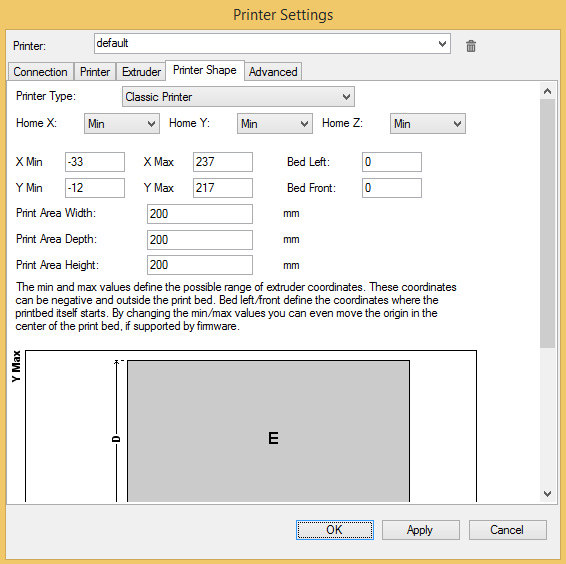
			<content type="html"><![CDATA[<p>Assuming you have a davinci 1.0, in Repetier Host printer settings use:<br />Printer type: classic<br />Home: Min (all axis)<br />X Min: -33<br />Y Min: -12<br />X Max: 237<br />Y Max: 217<br />Bed Left: 0<br />Bed Front: 0<br />Print Area: 200x200x200</p><p>That will fix it&nbsp; (provided you have not messed up with the default EEPROM values).</p>]]></content>
			<author>
				<name><![CDATA[oscahie]]></name>
				<uri>https://www.soliforum.com/user/6962/</uri>
			</author>
			<updated>2015-02-17T08:15:43Z</updated>
			<id>https://www.soliforum.com/post/85719/#p85719</id>
		</entry>
		<entry>
			<title type="html"><![CDATA[Re: Incorrect Bed Center, using Repetier Host and Cura]]></title>
			<link rel="alternate" href="https://www.soliforum.com/post/85577/#p85577" />
			<content type="html"><![CDATA[<div class="quotebox"><cite>keyblade4321 wrote:</cite><blockquote><p>Did those settings work for you?</p></blockquote></div><p>Hi,<br />Well, I haven&#039;t done the leap to liberate my printer yet. I&#039;ve just spent the last few evenings reading and watching YT before my own upgrade.<br />I&#039;m leaving for work (ship) and will probably upgrade/liberate my printer when I return home next month.</p>]]></content>
			<author>
				<name><![CDATA[Bikeridr]]></name>
				<uri>https://www.soliforum.com/user/6193/</uri>
			</author>
			<updated>2015-02-16T18:00:50Z</updated>
			<id>https://www.soliforum.com/post/85577/#p85577</id>
		</entry>
		<entry>
			<title type="html"><![CDATA[Re: Incorrect Bed Center, using Repetier Host and Cura]]></title>
			<link rel="alternate" href="https://www.soliforum.com/post/85546/#p85546" />
			<content type="html"><![CDATA[<div class="quotebox"><cite>Bikeridr wrote:</cite><blockquote><p>According to a YT-vid I saw (search for &quot;Dykstra&quot;), you have to offset the bed in the printerfirmware by x=30 and y=20 (or -30, -20). This is because the bed is &quot;offset&quot; in the Davinci in order to accomodate the waste tray.</p></blockquote></div><p>Thanks for the info! I watched the video and I&#039;m going to try this but the guy in the video said that those numbers do not center the bed. Did those settings work for you?</p>]]></content>
			<author>
				<name><![CDATA[keyblade4321]]></name>
				<uri>https://www.soliforum.com/user/8039/</uri>
			</author>
			<updated>2015-02-16T15:32:56Z</updated>
			<id>https://www.soliforum.com/post/85546/#p85546</id>
		</entry>
		<entry>
			<title type="html"><![CDATA[Re: Incorrect Bed Center, using Repetier Host and Cura]]></title>
			<link rel="alternate" href="https://www.soliforum.com/post/85518/#p85518" />
			<content type="html"><![CDATA[<p>According to a YT-vid I saw (search for &quot;Dykstra&quot;), you have to offset the bed in the printerfirmware by x=30 and y=20 (or -30, -20). This is because the bed is &quot;offset&quot; in the Davinci in order to accomodate the waste tray.</p>]]></content>
			<author>
				<name><![CDATA[Bikeridr]]></name>
				<uri>https://www.soliforum.com/user/6193/</uri>
			</author>
			<updated>2015-02-16T10:08:52Z</updated>
			<id>https://www.soliforum.com/post/85518/#p85518</id>
		</entry>
		<entry>
			<title type="html"><![CDATA[Re: Incorrect Bed Center, using Repetier Host and Cura]]></title>
			<link rel="alternate" href="https://www.soliforum.com/post/85468/#p85468" />
			<content type="html"><![CDATA[<div class="quotebox"><cite>L.woinson95 wrote:</cite><blockquote><p>Would you not set the bed center at 100 x 100</p></blockquote></div><p>Why would this fix it? Wouldn&#039;t everything just get shifted even more or am I missing something or did this work for you?</p>]]></content>
			<author>
				<name><![CDATA[keyblade4321]]></name>
				<uri>https://www.soliforum.com/user/8039/</uri>
			</author>
			<updated>2015-02-16T03:18:44Z</updated>
			<id>https://www.soliforum.com/post/85468/#p85468</id>
		</entry>
		<entry>
			<title type="html"><![CDATA[Re: Incorrect Bed Center, using Repetier Host and Cura]]></title>
			<link rel="alternate" href="https://www.soliforum.com/post/85408/#p85408" />
			<content type="html"><![CDATA[<p>Would you not set the bed center at 100 x 100</p>]]></content>
			<author>
				<name><![CDATA[L.woinson95]]></name>
				<uri>https://www.soliforum.com/user/9465/</uri>
			</author>
			<updated>2015-02-15T21:53:48Z</updated>
			<id>https://www.soliforum.com/post/85408/#p85408</id>
		</entry>
		<entry>
			<title type="html"><![CDATA[Re: Incorrect Bed Center, using Repetier Host and Cura]]></title>
			<link rel="alternate" href="https://www.soliforum.com/post/85405/#p85405" />
			<content type="html"><![CDATA[<div class="quotebox"><cite>carl_m1968 wrote:</cite><blockquote><div class="quotebox"><cite>keyblade4321 wrote:</cite><blockquote><p>Hi guys,</p><p>I&#039;ve had this problem for a while but just decided to do something about it. I recently flashed my printer over to Repetier and am using Cura to slice and Repetier Host to control everything. When I flashed the printer, I changed nothing in the EEPROM and kept the bed size as 200x200 in both Repetier Host and Cura. I think because there is extra room for the drip tray everything is shifted to the right by the size of the extra space. What do I need to change to make everything centered but still be able to view the correct dimension of the build volume in Cura? The reason for this is because I used to print small things so it didn&#039;t really matter that they were shifted but now I am printing much larger objects that use almost all the build volume. If the build space view in Cura is incorrect I won&#039;t be able to judge where to place the parts effectively. Please help! I am sure other must have this problem as well when flashing to Repetier. </p><p>Thanks in advance!</p></blockquote></div><br /><p>What do you have your x and y home position set to?</p></blockquote></div><br /><p>In Repetier Host, in the Printer Settings, the X,Y,Z home all says &quot;Min&quot; and &quot;Min&quot; is all set to 0. In Cura, in the Machine Settings, the box that says &quot;Machine center at 0,0&quot; is unchecked (I don&#039;t know what this does). Does this help?</p>]]></content>
			<author>
				<name><![CDATA[keyblade4321]]></name>
				<uri>https://www.soliforum.com/user/8039/</uri>
			</author>
			<updated>2015-02-15T21:14:17Z</updated>
			<id>https://www.soliforum.com/post/85405/#p85405</id>
		</entry>
</feed>