<?xml version="1.0" encoding="utf-8"?>
<feed xmlns="http://www.w3.org/2005/Atom">
	<title type="html"><![CDATA[SoliForum - 3D Printing Community — Bed Leveling for Beginners]]></title>
	<link rel="self" href="https://www.soliforum.com/feed/atom/topic/8408/" />
	<updated>2018-10-15T00:15:00Z</updated>
	<generator>PunBB</generator>
	<id>https://www.soliforum.com/topic/8408/bed-leveling-for-beginners/</id>
		<entry>
			<title type="html"><![CDATA[Re: Bed Leveling for Beginners]]></title>
			<link rel="alternate" href="https://www.soliforum.com/post/146900/#p146900" />
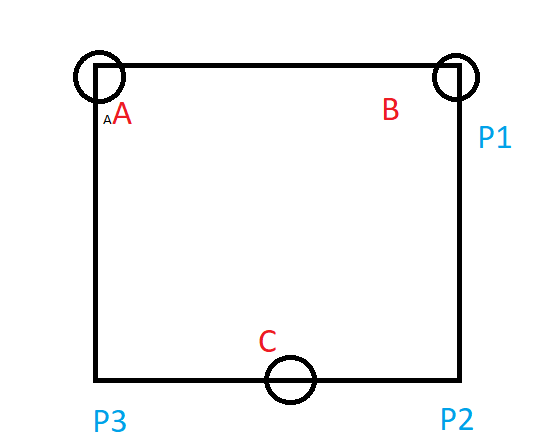
			<content type="html"><![CDATA[<p>Fast and easy metod:<br />1) rotate knob &quot;B&quot; to match some like 2.40 in P1.<br />2) rotate knob &quot;A&quot; to match minimal different between P2 and P3 (their behavior will be like a teeterboard).<br />3) rotate knob &quot;C&quot; to match minimal different between P1 and P2 and P3 (at this step P2 and P3 is leveling both, P1 is already leveled). </p><p>PS. Just remember - rotate only one knob at each step!!!</p><p><span class="postimg"><img src="http://soliforum.com/i/?773ieFI.png" alt="http://soliforum.com/i/?773ieFI.png" /></span></p>]]></content>
			<author>
				<name><![CDATA[subdjet]]></name>
				<uri>https://www.soliforum.com/user/20031/</uri>
			</author>
			<updated>2018-10-15T00:15:00Z</updated>
			<id>https://www.soliforum.com/post/146900/#p146900</id>
		</entry>
		<entry>
			<title type="html"><![CDATA[Re: Bed Leveling for Beginners]]></title>
			<link rel="alternate" href="https://www.soliforum.com/post/133306/#p133306" />
			<content type="html"><![CDATA[<p>just got my printer 1.0Ai0 and the filament wasnt sticking, was lifting off, after finding this post I realised that when it was starting the head was about 1mm above the bed, adjusted with a sheet of paper, and nowstarted a print that looks as though it is sticking to the bed. Thanks, you have saved me a lot of frustration.</p>]]></content>
			<author>
				<name><![CDATA[Grendel]]></name>
				<uri>https://www.soliforum.com/user/16373/</uri>
			</author>
			<updated>2017-03-03T21:52:08Z</updated>
			<id>https://www.soliforum.com/post/133306/#p133306</id>
		</entry>
		<entry>
			<title type="html"><![CDATA[Re: Bed Leveling for Beginners]]></title>
			<link rel="alternate" href="https://www.soliforum.com/post/125370/#p125370" />
			<content type="html"><![CDATA[<div class="quotebox"><cite>VampireV wrote:</cite><blockquote><p>Question <img src="https://www.soliforum.com/img/smilies/smile.png" width="15" height="15" alt="smile" /></p><p>Do you have blue tape on while performing this?</p><p>I assume this would skew the result for anyone using the blue tape / glue method?</p><p>I assume I should be calibrating with this on?</p><p>Thank you</p></blockquote></div><p>You should calibrate as you would print. That also means both the bed and hot end should be hot to account for expansion.</p>]]></content>
			<author>
				<name><![CDATA[carl_m1968]]></name>
				<uri>https://www.soliforum.com/user/7731/</uri>
			</author>
			<updated>2016-07-22T18:50:45Z</updated>
			<id>https://www.soliforum.com/post/125370/#p125370</id>
		</entry>
		<entry>
			<title type="html"><![CDATA[Re: Bed Leveling for Beginners]]></title>
			<link rel="alternate" href="https://www.soliforum.com/post/125359/#p125359" />
			<content type="html"><![CDATA[<p>Question <img src="https://www.soliforum.com/img/smilies/smile.png" width="15" height="15" alt="smile" /></p><p>Do you have blue tape on while performing this?</p><p>I assume this would skew the result for anyone using the blue tape / glue method?</p><p>I assume I should be calibrating with this on?</p><p>Thank you</p>]]></content>
			<author>
				<name><![CDATA[VampireV]]></name>
				<uri>https://www.soliforum.com/user/14818/</uri>
			</author>
			<updated>2016-07-22T13:04:57Z</updated>
			<id>https://www.soliforum.com/post/125359/#p125359</id>
		</entry>
		<entry>
			<title type="html"><![CDATA[Re: Bed Leveling for Beginners]]></title>
			<link rel="alternate" href="https://www.soliforum.com/post/116936/#p116936" />
			<content type="html"><![CDATA[<p>Just wanted to add my thanks to this thread, we are a school who has recently purchased a davinci and we eagerly unpacked it last night, failed the auto calibration but tried a print anyway, it went horribly wrong and i have what has been described by one of our teachers as &quot;the droppings of an epileptic spider&quot; on my desk.</p><p>After following this simple guide on how to level the bed, i reran the same test and i am now sat happily with my demo heart cooling off on the bed.</p><p>Thanks again, myself and the school are looking forward to many years of awesome project (and maybe some personal <img src="https://www.soliforum.com/img/smilies/wink.png" width="15" height="15" alt="wink" />)&nbsp; 3d printing!</p>]]></content>
			<author>
				<name><![CDATA[FoxtrotOff]]></name>
				<uri>https://www.soliforum.com/user/13701/</uri>
			</author>
			<updated>2016-02-19T09:08:45Z</updated>
			<id>https://www.soliforum.com/post/116936/#p116936</id>
		</entry>
		<entry>
			<title type="html"><![CDATA[Re: Bed Leveling for Beginners]]></title>
			<link rel="alternate" href="https://www.soliforum.com/post/116205/#p116205" />
			<content type="html"><![CDATA[<p>Update- The filament wasn&#039;t extruding enough. Held pressure on it to take hold and it is now working!!!</p>]]></content>
			<author>
				<name><![CDATA[lubbinv]]></name>
				<uri>https://www.soliforum.com/user/13590/</uri>
			</author>
			<updated>2016-02-10T00:37:25Z</updated>
			<id>https://www.soliforum.com/post/116205/#p116205</id>
		</entry>
		<entry>
			<title type="html"><![CDATA[Re: Bed Leveling for Beginners]]></title>
			<link rel="alternate" href="https://www.soliforum.com/post/116202/#p116202" />
			<content type="html"><![CDATA[<div class="quotebox"><cite>lubbinv wrote:</cite><blockquote><p>Tried the paper method on each corner and tried it in thee middle sections. Tried cleaning the head again too. 10 attempts at leveling bed. </p><p>Still getting nothing, nothing is coming out of tip on initial pass or when printing object. It goes though the motions but nothing is happening.</p><br /><p>Maddening would be an understatement...</p></blockquote></div><p>Is this a new problem, or has it never printed?</p><p>Have you cleaned the head?</p>]]></content>
			<author>
				<name><![CDATA[Telemachus]]></name>
				<uri>https://www.soliforum.com/user/13355/</uri>
			</author>
			<updated>2016-02-10T00:06:30Z</updated>
			<id>https://www.soliforum.com/post/116202/#p116202</id>
		</entry>
		<entry>
			<title type="html"><![CDATA[Re: Bed Leveling for Beginners]]></title>
			<link rel="alternate" href="https://www.soliforum.com/post/116195/#p116195" />
			<content type="html"><![CDATA[<p>Tried the paper method on each corner and tried it in thee middle sections. Tried cleaning the head again too. 10 attempts at leveling bed. </p><p>Still getting nothing, nothing is coming out of tip on initial pass or when printing object. It goes though the motions but nothing is happening.</p><br /><p>Maddening would be an understatement...</p>]]></content>
			<author>
				<name><![CDATA[lubbinv]]></name>
				<uri>https://www.soliforum.com/user/13590/</uri>
			</author>
			<updated>2016-02-09T23:28:15Z</updated>
			<id>https://www.soliforum.com/post/116195/#p116195</id>
		</entry>
		<entry>
			<title type="html"><![CDATA[Re: Bed Leveling for Beginners]]></title>
			<link rel="alternate" href="https://www.soliforum.com/post/115193/#p115193" />
			<content type="html"><![CDATA[<p>Amazing. Saved countless hours of headache. The only trick part was accounting for the unevenness of the bed - the middle has a slight bulge. So as mentioned, I had to compromise. But dude...very happy to be printing away! <img src="https://www.soliforum.com/img/smilies/smile.png" width="15" height="15" alt="smile" /></p>]]></content>
			<author>
				<name><![CDATA[jkyle]]></name>
				<uri>https://www.soliforum.com/user/13455/</uri>
			</author>
			<updated>2016-01-28T02:34:57Z</updated>
			<id>https://www.soliforum.com/post/115193/#p115193</id>
		</entry>
		<entry>
			<title type="html"><![CDATA[Re: Bed Leveling for Beginners]]></title>
			<link rel="alternate" href="https://www.soliforum.com/post/114987/#p114987" />
			<content type="html"><![CDATA[<p>worked like a champ.&nbsp; ever in tampa bay area I owe u a beer.&nbsp; healy</p>]]></content>
			<author>
				<name><![CDATA[josephehealy]]></name>
				<uri>https://www.soliforum.com/user/13374/</uri>
			</author>
			<updated>2016-01-25T04:09:46Z</updated>
			<id>https://www.soliforum.com/post/114987/#p114987</id>
		</entry>
		<entry>
			<title type="html"><![CDATA[Re: Bed Leveling for Beginners]]></title>
			<link rel="alternate" href="https://www.soliforum.com/post/114633/#p114633" />
			<content type="html"><![CDATA[<div class="quotebox"><cite>JTKD wrote:</cite><blockquote><p>I posted this on another forum, but figured it would be useful here as well.</p><p>If you have issues calibrating the Da Vinci 1.0 Pro bed, make sure that the sensor next to the extruder nozzle is coming into contact with each of the corner brackets holding down the bed. On my printer that I just had delivered yesterday, this was occurring on 3 out of the 4 corners...but on the front right corner, the sensor completely missed the bracket and was touching the bed itself. The end result was that &quot;Calibrate fail&quot; would be displayed, but it did not give me the option to &quot;Adjust uneven bed&quot; as shown in the XYZ Youtube videos. I worked around this by temporarily taping a metal washer to the bed that was the same height as the bracket and placed it in the same spot where the sensor is lowered. When I reran the calibration, then I was prompted to adjust the uneven bed. Hopefully this saves someone wasted time esp. a newbie like me, and is fixed in a firmware update.</p></blockquote></div><br /><p>The thing to keep in mind and the main reason for me creating this guide is that the values that XYZ gets you to set in the 250 range represents .25mm and that is too high..</p><p>You will not get good adhesion if you are printing at .3mm.. The ideal height should be no more than half of your desired print layer thickness. It is not a number that is constant but a number that needs to change depending on your desired layer thickness. </p><p>For example if you ever wanted to go down to .1mm on the layer then you see that .25 is actually thicker so you would need to actually go down to .05 on thew first layer.. A set of feeler gauges is really preferred as then&nbsp; you have an assortment of thicknesses for different layer heights.</p>]]></content>
			<author>
				<name><![CDATA[carl_m1968]]></name>
				<uri>https://www.soliforum.com/user/7731/</uri>
			</author>
			<updated>2016-01-20T21:16:30Z</updated>
			<id>https://www.soliforum.com/post/114633/#p114633</id>
		</entry>
		<entry>
			<title type="html"><![CDATA[Re: Bed Leveling for Beginners]]></title>
			<link rel="alternate" href="https://www.soliforum.com/post/114590/#p114590" />
			<content type="html"><![CDATA[<p>I posted this on another forum, but figured it would be useful here as well.</p><p>If you have issues calibrating the Da Vinci 1.0 Pro bed, make sure that the sensor next to the extruder nozzle is coming into contact with each of the corner brackets holding down the bed. On my printer that I just had delivered yesterday, this was occurring on 3 out of the 4 corners...but on the front right corner, the sensor completely missed the bracket and was touching the bed itself. The end result was that &quot;Calibrate fail&quot; would be displayed, but it did not give me the option to &quot;Adjust uneven bed&quot; as shown in the XYZ Youtube videos. I worked around this by temporarily taping a metal washer to the bed that was the same height as the bracket and placed it in the same spot where the sensor is lowered. When I reran the calibration, then I was prompted to adjust the uneven bed. Hopefully this saves someone wasted time esp. a newbie like me, and is fixed in a firmware update.</p>]]></content>
			<author>
				<name><![CDATA[JTKD]]></name>
				<uri>https://www.soliforum.com/user/13363/</uri>
			</author>
			<updated>2016-01-20T14:06:33Z</updated>
			<id>https://www.soliforum.com/post/114590/#p114590</id>
		</entry>
		<entry>
			<title type="html"><![CDATA[Re: Bed Leveling for Beginners]]></title>
			<link rel="alternate" href="https://www.soliforum.com/post/114378/#p114378" />
			<content type="html"><![CDATA[<p>this recently have been very frustrating for me to say at the least. When I first got the DaVinci 1.0 printer - I didn&#039;t have to calibrate. I printed out some good prints then just recently went back. I noticed the enclosure case for my project I&quot;m working on was messing up constantly. I looked over Youtube tutorials and such - got a dial indicator but even find that one hard. I bough the amazon app Davinci Calibrator and it works okay but when I run a print either the nozzle too close to the print bed. Just now I used the dial indicator and it&#039;s always been 0 - back left; 0 top left; 95 on top right and 0 on back right. I printed a quick smiley face magnet case for the fridge and the nozzle was too close to the print bed. I had to loosen some knobs to get the grinding to stop. It&#039;s printing now without grinding on anything. I&#039;ll try the paper trick possibly tomorrow because as for now I&#039;m taking a break of re calibrating.</p>]]></content>
			<author>
				<name><![CDATA[SIC88]]></name>
				<uri>https://www.soliforum.com/user/13333/</uri>
			</author>
			<updated>2016-01-18T05:01:35Z</updated>
			<id>https://www.soliforum.com/post/114378/#p114378</id>
		</entry>
		<entry>
			<title type="html"><![CDATA[Re: Bed Leveling for Beginners]]></title>
			<link rel="alternate" href="https://www.soliforum.com/post/110386/#p110386" />
			<content type="html"><![CDATA[<p>Unless you&#039;re printing something really big that covers 75%+ of the build plate, I wouldn&#039;t worry too much about the extreme corners.<br />Just focus on getting the centre region of the bed level as that&#039;s where the majority of your prints will be positioned.<br />In any case, if you were to print something that big, it&#039;s more than likely to warp no matter how well you level when using ABS. <br />For that reason, I use PLA for larger prints which doesn&#039;t require such precise levelling.</p>]]></content>
			<author>
				<name><![CDATA[scobo]]></name>
				<uri>https://www.soliforum.com/user/6872/</uri>
			</author>
			<updated>2015-11-28T08:12:29Z</updated>
			<id>https://www.soliforum.com/post/110386/#p110386</id>
		</entry>
		<entry>
			<title type="html"><![CDATA[Re: Bed Leveling for Beginners]]></title>
			<link rel="alternate" href="https://www.soliforum.com/post/110384/#p110384" />
			<content type="html"><![CDATA[<p>I preform this and feel Ive properly adjusted the back left, back right and front center adjust knobs as per the directions in this thread.<br />My question is am I supposed to be able to move the nozzle and paper anywhere on the build plate with the same resistance? Because although points 1, 2 and 3 have equal pressure I feel as though the remaining front corners have different levels of tension. Especially the front right corner feels as though it has the tightest gap and I find it difficult to slide the paper around and when I start my prints during the printing of the purge line the extruder makes a ticking noise as if there isn&#039;t enough space for the filament to flow freely. Loosening the knobs in order to free up this corner results in the original corners now feeling too loose. Am<br />I doing something wrong?</p>]]></content>
			<author>
				<name><![CDATA[reznor9]]></name>
				<uri>https://www.soliforum.com/user/12717/</uri>
			</author>
			<updated>2015-11-28T07:39:07Z</updated>
			<id>https://www.soliforum.com/post/110384/#p110384</id>
		</entry>
</feed>