<?xml version="1.0" encoding="utf-8"?>
<feed xmlns="http://www.w3.org/2005/Atom">
	<title type="html"><![CDATA[SoliForum - 3D Printing Community — List of DaVinci Duo mods (all mods work for 1.0, too)]]></title>
	<link rel="self" href="https://www.soliforum.com/feed/atom/topic/18723/" />
	<updated>2020-09-08T02:07:17Z</updated>
	<generator>PunBB</generator>
	<id>https://www.soliforum.com/topic/18723/list-of-davinci-duo-mods-all-mods-work-for-10-too/</id>
		<entry>
			<title type="html"><![CDATA[Re: List of DaVinci Duo mods (all mods work for 1.0, too)]]></title>
			<link rel="alternate" href="https://www.soliforum.com/post/154039/#p154039" />
			<content type="html"><![CDATA[<p>Awesome!&nbsp; That is exactly what I was looking for.&nbsp; Thanks for your help.</p>]]></content>
			<author>
				<name><![CDATA[FlameOfWrath]]></name>
				<uri>https://www.soliforum.com/user/25046/</uri>
			</author>
			<updated>2020-09-08T02:07:17Z</updated>
			<id>https://www.soliforum.com/post/154039/#p154039</id>
		</entry>
		<entry>
			<title type="html"><![CDATA[Re: List of DaVinci Duo mods (all mods work for 1.0, too)]]></title>
			<link rel="alternate" href="https://www.soliforum.com/post/154037/#p154037" />
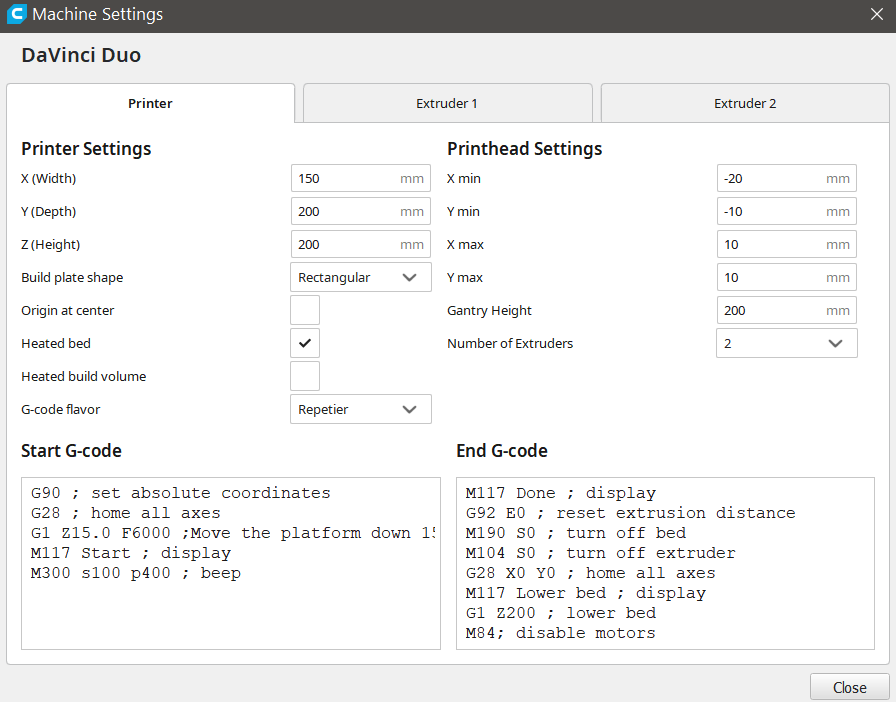
			<content type="html"><![CDATA[<p>I don&#039;t remember changing those values in Cura. However, here is a screenshot of the printer profile in Cura:</p><p><span class="postimg"><img src="http://soliforum.com/i/?fyLrOqe.png" alt="http://soliforum.com/i/?fyLrOqe.png" /></span></p><p>I am not sure about the SD card extender, but I do not see why it should not work. I have installed a Raspberry Pi with Octopi and a 5&quot; touchscreen display on my printer, so it can be controlled locally and remotely with Octoprint. The G-Code files can be sent remotely through Octoprint from a PC via WiFi or copied locally on the Pi using a USB flash drive. The touchscreen is actually not needed since with Octoprint everything can be done remotely, but it adds a nice touch to the printer. The USB camera is also connected to the Pi and streams over WiFi.</p>]]></content>
			<author>
				<name><![CDATA[TComp]]></name>
				<uri>https://www.soliforum.com/user/24941/</uri>
			</author>
			<updated>2020-09-07T10:41:53Z</updated>
			<id>https://www.soliforum.com/post/154037/#p154037</id>
		</entry>
		<entry>
			<title type="html"><![CDATA[Re: List of DaVinci Duo mods (all mods work for 1.0, too)]]></title>
			<link rel="alternate" href="https://www.soliforum.com/post/154036/#p154036" />
			<content type="html"><![CDATA[<p>Thanks!&nbsp; Did you have custom settings for the Printhead in Cura?</p><p>X min<br />Y min<br />X max<br />Y max<br />Gantry Height</p><p>Those are the other things I&#039;m not sure about. I was going to use a SD card extender and plug that ribbon cable into the SD card port on the motherboard and then load code via the exposed SD card holder. Will that work?</p>]]></content>
			<author>
				<name><![CDATA[FlameOfWrath]]></name>
				<uri>https://www.soliforum.com/user/25046/</uri>
			</author>
			<updated>2020-09-07T02:26:42Z</updated>
			<id>https://www.soliforum.com/post/154036/#p154036</id>
		</entry>
		<entry>
			<title type="html"><![CDATA[Re: List of DaVinci Duo mods (all mods work for 1.0, too)]]></title>
			<link rel="alternate" href="https://www.soliforum.com/post/154029/#p154029" />
			<content type="html"><![CDATA[<p>Thanks. I have tried multiple filaments with my printer and have achieved best results with Hatchbox PLA. I buy the filament on Amazon for $22-26. My Cura settings are:</p><p>Print temp&nbsp; &nbsp; &nbsp; &nbsp;&nbsp; &nbsp; &nbsp; &nbsp; &nbsp;180C<br />Bed temp&nbsp; &nbsp; &nbsp; &nbsp;&nbsp; &nbsp; &nbsp; &nbsp; &nbsp;60C<br />Print speed &nbsp; &nbsp; &nbsp; &nbsp; 30-40 mm/s (slower for difficult jobs)<br />Layer height&nbsp; &nbsp; &nbsp; &nbsp; 0.20 mm<br />Retraction&nbsp; &nbsp; &nbsp; &nbsp;&nbsp; &nbsp; &nbsp; &nbsp; &nbsp;8 mm @ 30 mm/s<br />Infill&nbsp; &nbsp; &nbsp; &nbsp; &nbsp; &nbsp;&nbsp; &nbsp; &nbsp; &nbsp; &nbsp;25%<br />Initial layer speed&nbsp; &nbsp; 20 mm/s</p><p>Start code:<br />G90 ; set absolute coordinates<br />G28 ; home all axes<br />G1 Z15.0 F6000 ;Move the platform down 15mm<br />M117 Start ; display<br />M300 s100 p400 ; beep</p><p>End code:<br />M117 Done ; display<br />G92 E0 ; reset extrusion distance<br />M190 S0 ; turn off bed<br />M104 S0 ; turn off extruder<br />G28 X0 Y0 ; home all axes<br />M117 Lower bed ; display<br />G1 Z200 ; lower bed<br />M84; disable motors</p>]]></content>
			<author>
				<name><![CDATA[TComp]]></name>
				<uri>https://www.soliforum.com/user/24941/</uri>
			</author>
			<updated>2020-09-05T19:29:22Z</updated>
			<id>https://www.soliforum.com/post/154029/#p154029</id>
		</entry>
		<entry>
			<title type="html"><![CDATA[Re: List of DaVinci Duo mods (all mods work for 1.0, too)]]></title>
			<link rel="alternate" href="https://www.soliforum.com/post/154009/#p154009" />
			<content type="html"><![CDATA[<p>This is a great post. I&#039;ve just gotten a used Duo 2.0a and I&#039;m going to do a lot of these modifications. I&#039;m wondering if you can share your Cura profile for the printer?</p><p>Thanks!</p>]]></content>
			<author>
				<name><![CDATA[FlameOfWrath]]></name>
				<uri>https://www.soliforum.com/user/25046/</uri>
			</author>
			<updated>2020-09-04T02:17:44Z</updated>
			<id>https://www.soliforum.com/post/154009/#p154009</id>
		</entry>
		<entry>
			<title type="html"><![CDATA[List of DaVinci Duo mods (all mods work for 1.0, too)]]></title>
			<link rel="alternate" href="https://www.soliforum.com/post/153863/#p153863" />
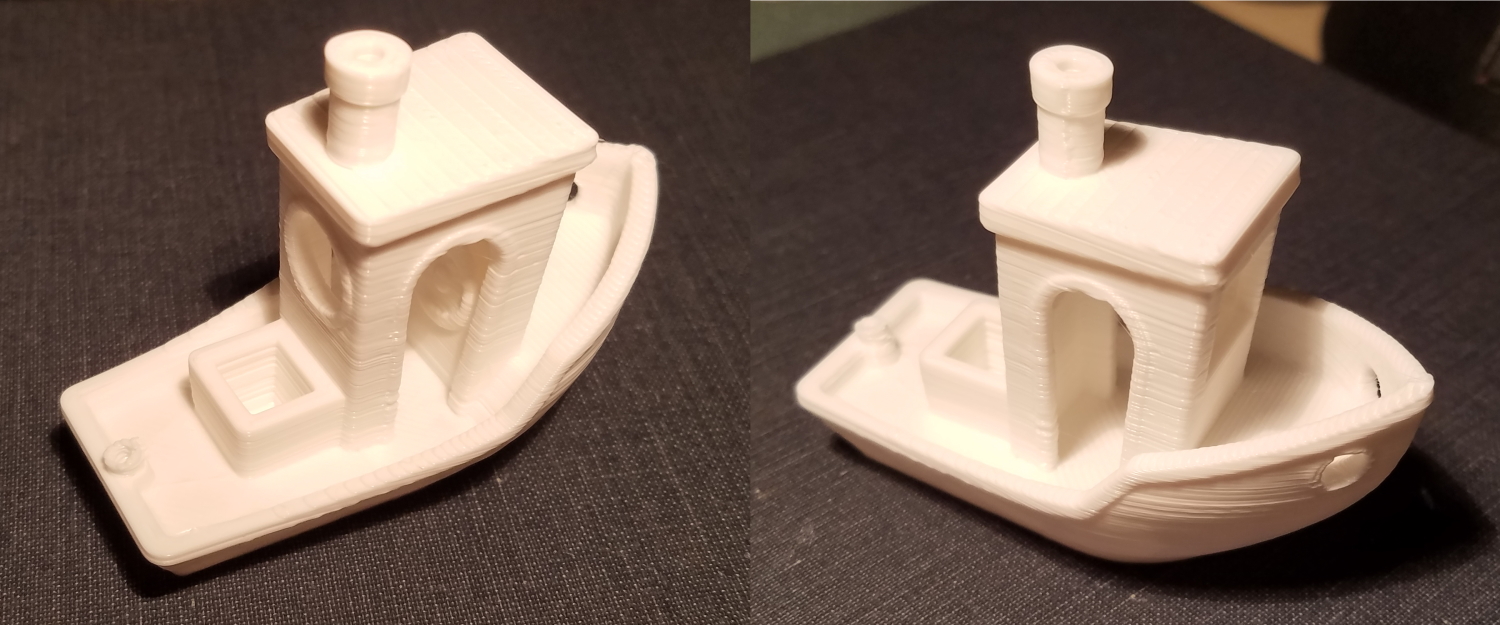
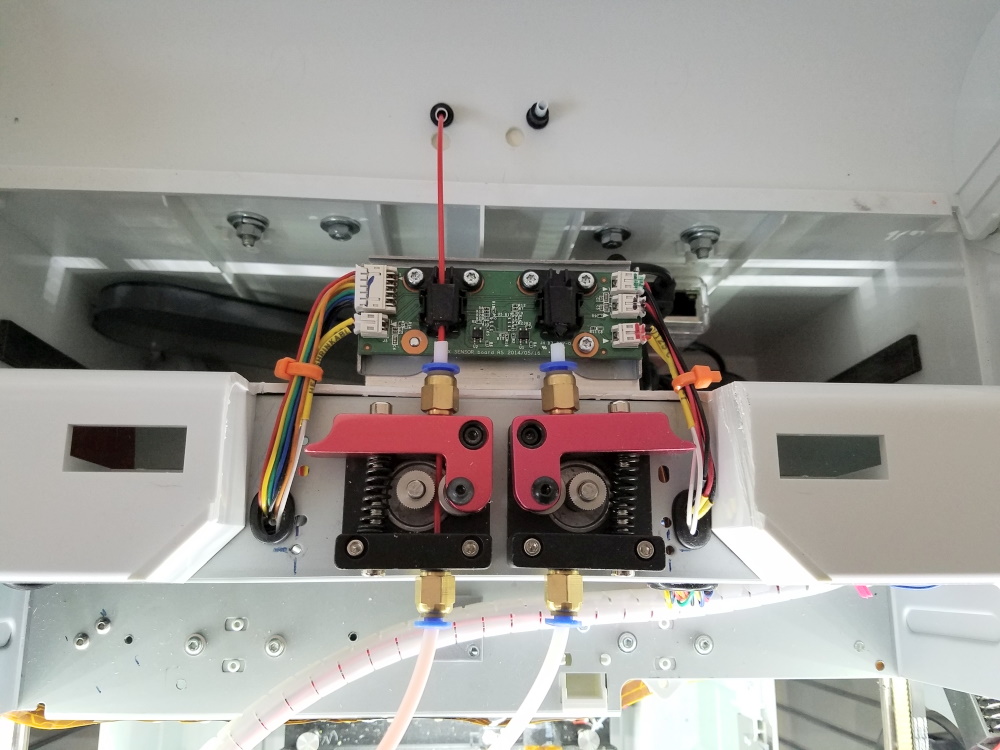
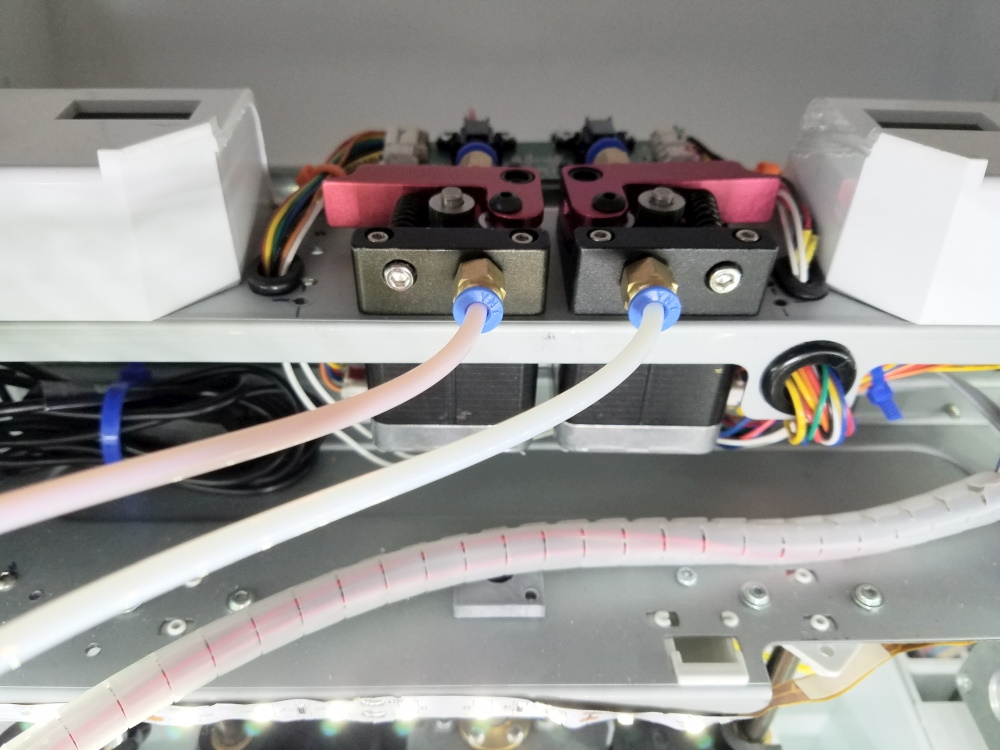
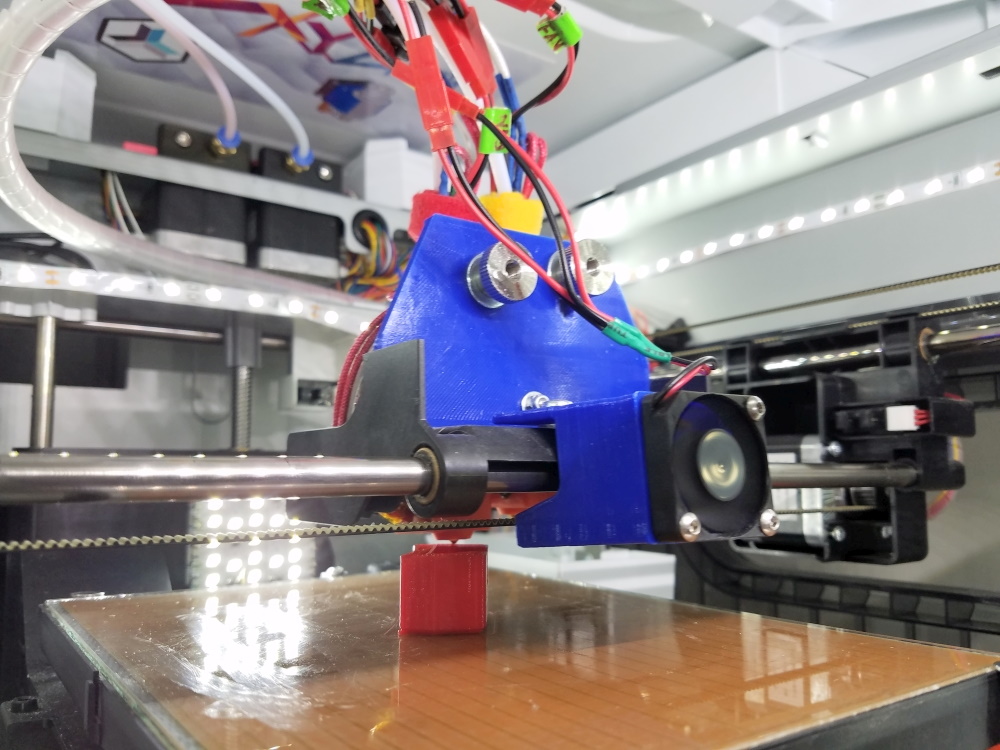
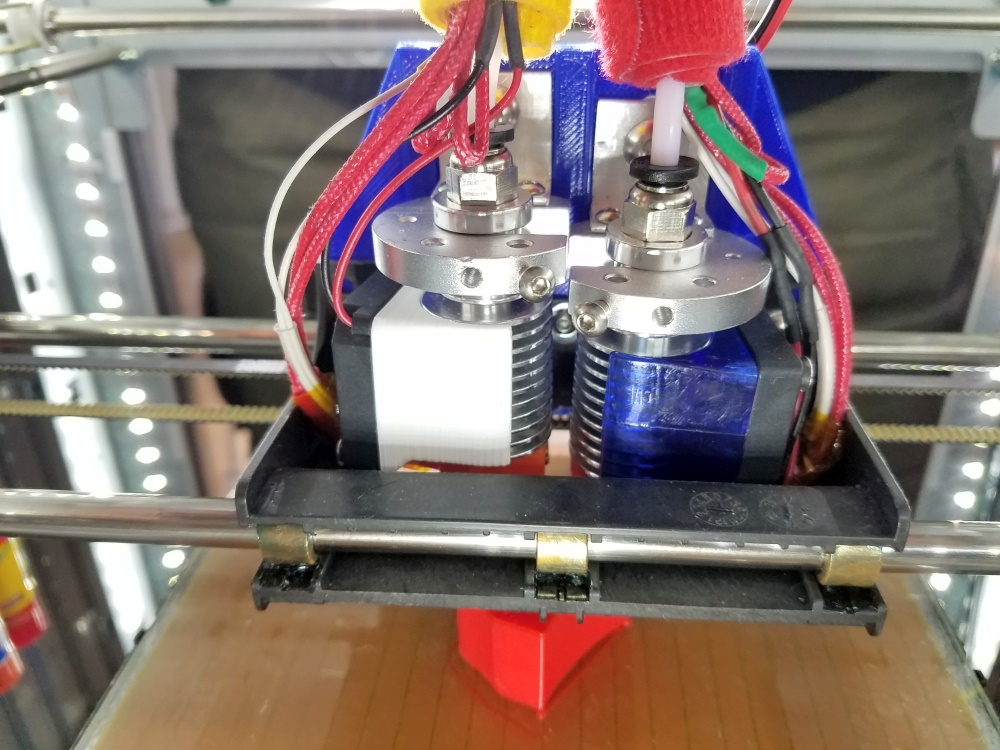
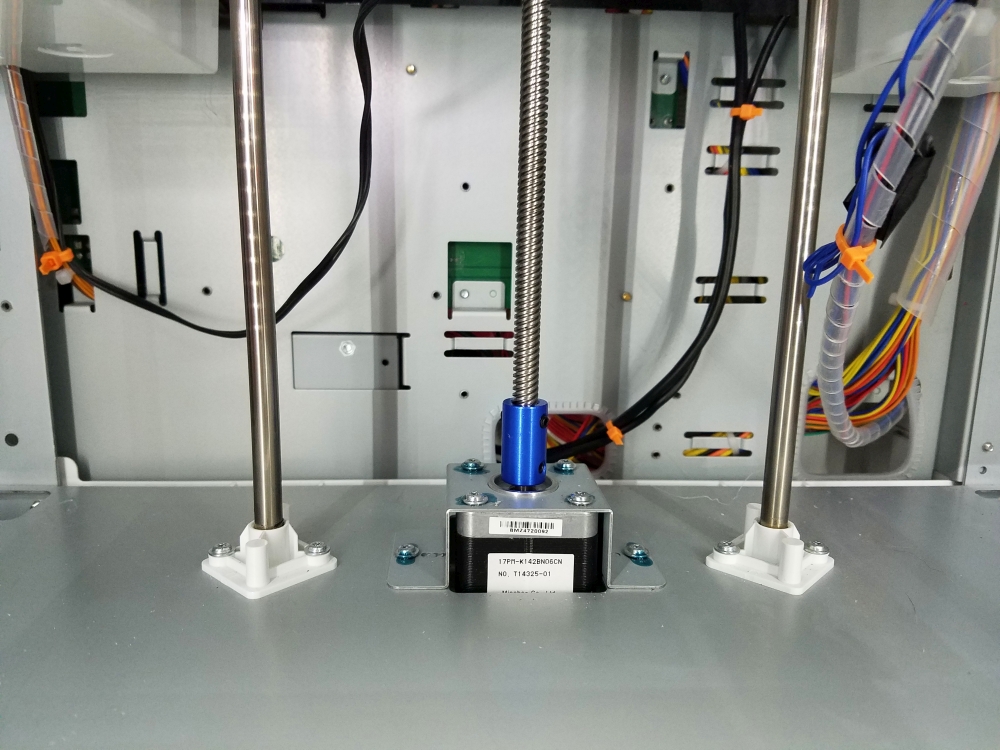
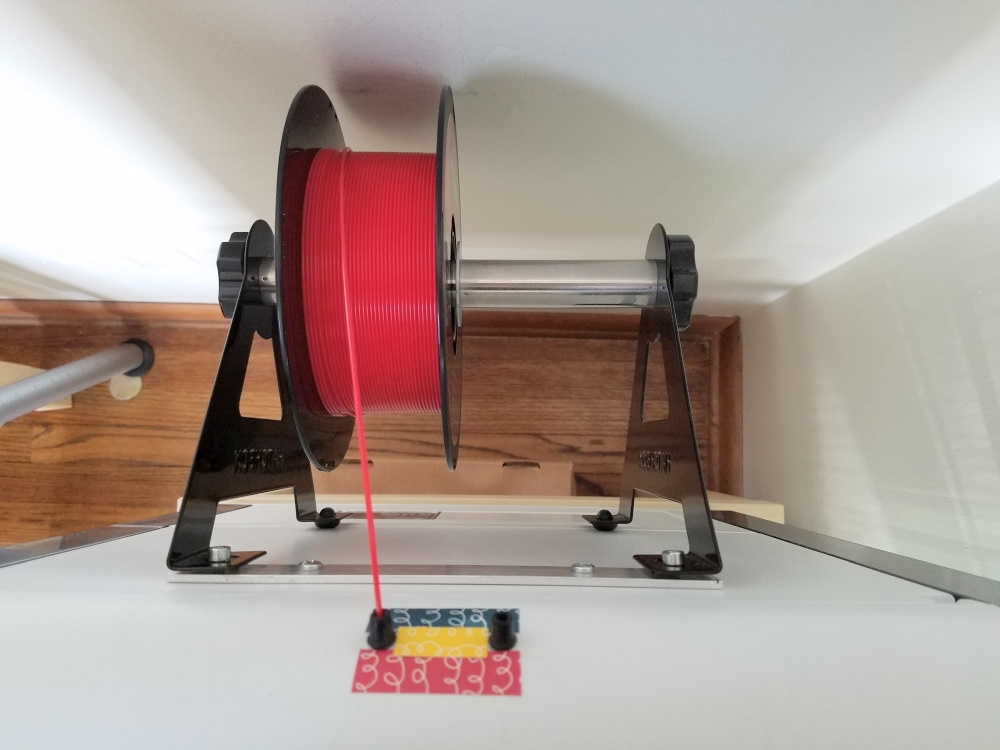
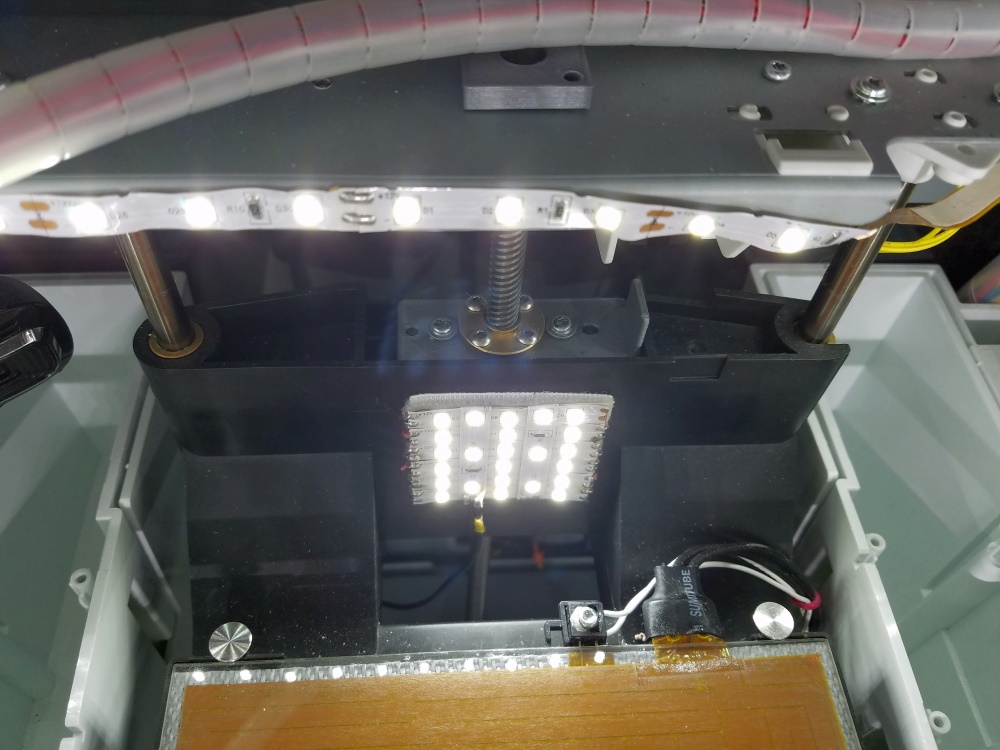
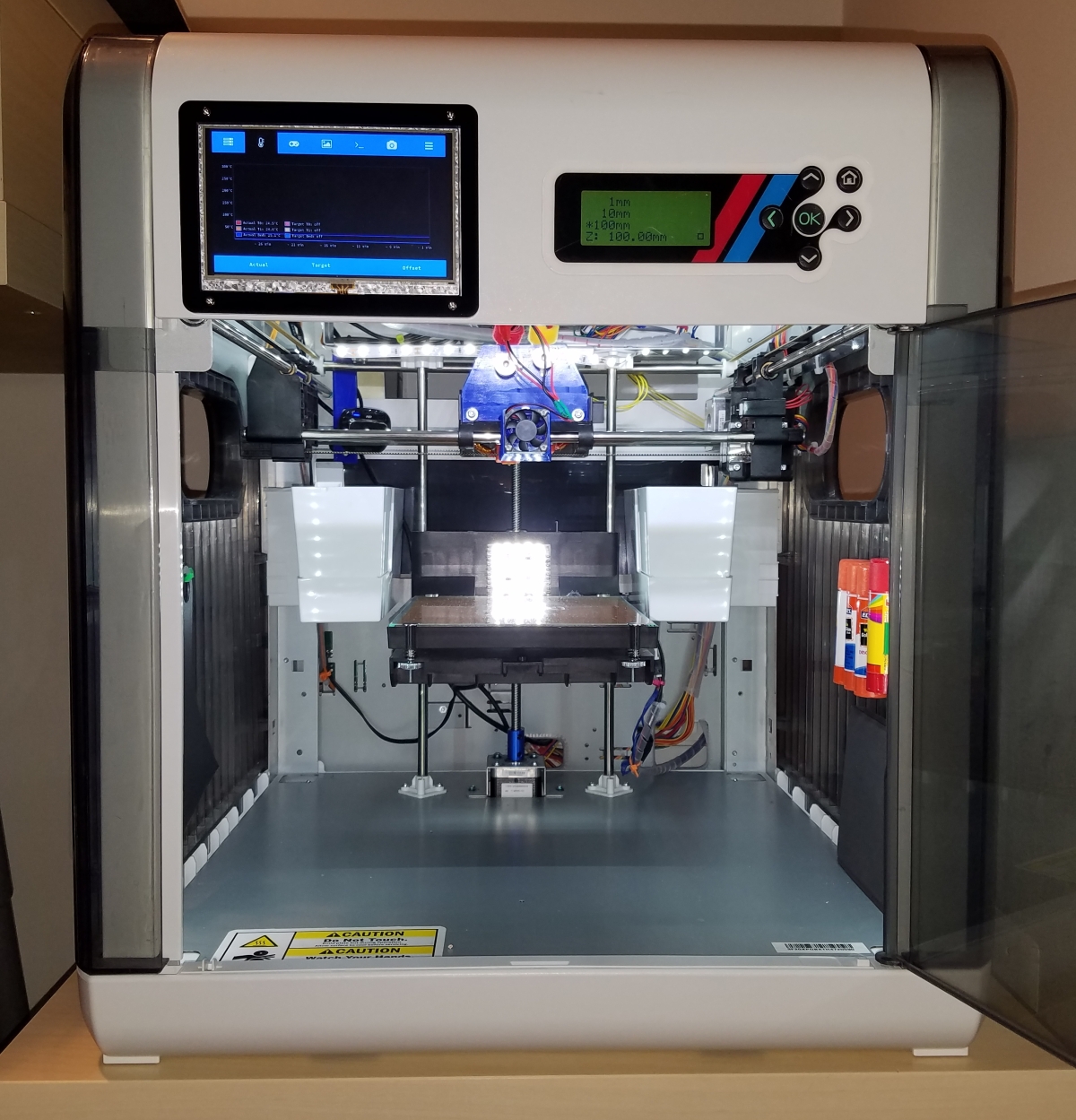
			<content type="html"><![CDATA[<p>List of all mods on my DaVinci Duo printer (can be applied on DaVinci single extruder, too). Result is a totally different printer, comparable to high end models (PDF file with mods list attached). Here is my modded DaVinci Duo:</p><p><span class="postimg"><img src="http://soliforum.com/i/?W0IhA2g.jpg" alt="http://soliforum.com/i/?W0IhA2g.jpg" /></span></p><p>And here is 3DBenchy with the modded DaVinci printer (PLA, 180C, no supports):</p><p><span class="postimg"><img src="http://soliforum.com/i/?dep7iZF.jpg" alt="http://soliforum.com/i/?dep7iZF.jpg" /></span></p><br /><p><strong><span class="bbu">IMPORTANT MODS</span></strong></p><p>1-&nbsp; &nbsp; Replace stock firmware with DaVinci Repetier - <strong><em>Free</em></strong><br /><a href="https://github.com/luc-github/Repetier-Firmware-4-Davinci">https://github.com/luc-github/Repetier- … -4-Davinci</a></p><p>2-&nbsp; &nbsp; Remove the metal strips from the bed sides along with the sensor wires and turn the spring loaded screws upside down to gain some bed real estate (see image under LED addition in optional mods) - <strong><em>Free</em></strong></p><p>3-&nbsp; &nbsp; Modify extrusion from direct to Bowden: DaVinci Duo already has a “hidden” option for Bowden extrusion. Cut the white plastic frame in the top-rear part of the printer for about 5-6” and place two Bowden extruder feeders in the existing holes on the metal frame (left- and right-hand).</p><p><span class="postimg"><img src="http://soliforum.com/i/?3b6iF8k.jpg" alt="http://soliforum.com/i/?3b6iF8k.jpg" /></span></p><p>Remove everything from the carriage, cut the extruder bracket in half horizontally to keep only the upper part with the board and place it before the Bowden feeders using an L-shaped aluminum bracket. Remove the extruder steppers from the carriage and place them underneath the metal frame – <strong><em>$18</em></strong></p><p><span class="postimg"><img src="http://soliforum.com/i/?CNCnWAM.jpg" alt="http://soliforum.com/i/?CNCnWAM.jpg" /></span></p><p><a href="https://www.amazon.com/Improved-YOTINO-Extruder-Accessories-Filament/dp/B07BMLD646/ref=sr_1_2?dchild=1&amp;keywords=right+left+hand+pair+extruder+feeder&amp;qid=1597084437&amp;sr=8-2">https://www.amazon.com/Improved-YOTINO- … amp;sr=8-2</a><br /><a href="https://www.amazon.com/Improved-YOTINO-Extruder-Accessories-Filament/dp/B07BMML4KR/ref=sr_1_12?dchild=1&amp;keywords=right+left+hand+pair+extruder+feeder&amp;qid=1597084488&amp;sr=8-12">https://www.amazon.com/Improved-YOTINO- … mp;sr=8-12</a></p><p>4-&nbsp; &nbsp; Make dual extruder vertical movement independent: Cut horizontally the upper part of the carriage (about 1” above the carriage base) and place a 3D-printed hotend holder plate with two vertical slits with a length of approx. 5/8” length). This allows to adjust the vertical position of the hotend assemblies independently from each other (STL model attached) - <strong><em>Free</em></strong></p><p><span class="postimg"><img src="http://soliforum.com/i/?wOzYnUn.jpg" alt="http://soliforum.com/i/?wOzYnUn.jpg" /></span></p><p>5-&nbsp; &nbsp; Replace hotends: Install two E3D V6 (original or clones) using J-head holder plates. Drill and tap a hole on the side of the J-head plate to tighten the hotends firmly in place. Use two L-shaped aluminum brackets to hold the hotend assemblies and mount them on the hotend holder with screws and knurled thumb nuts allowing them to move vertically independently. Fans will need to be replaced with low profile ones to fit in the carriage. Change 2nd extruder offset in the settings - <strong><em>$54 (if using clones)</em></strong></p><p><span class="postimg"><img src="http://soliforum.com/i/?SAr6syA.jpg" alt="http://soliforum.com/i/?SAr6syA.jpg" /></span></p><p><a href="https://www.amazon.com/Wangdd22-1-75mm-Printer-Extruder-Accessories/dp/B06XBXDJY3/ref=sr_1_8?dchild=1&amp;keywords=e3d+v6&amp;qid=1596976102&amp;sr=8-8">https://www.amazon.com/Wangdd22-1-75mm- … amp;sr=8-8</a><br /><a href="https://www.amazon.com/Aluminum-U-Shaped-Printers-Aluminium-Accessories/dp/B07KDP2XCT/ref=sr_1_9?dchild=1&amp;keywords=hotend+j-head+bracket&amp;qid=1596975997&amp;sr=8-9">https://www.amazon.com/Aluminum-U-Shape … amp;sr=8-9</a><br /><a href="https://www.amazon.com/gp/product/B01M6UT6EC/ref=ppx_yo_dt_b_search_asin_title?ie=UTF8&amp;psc=1">https://www.amazon.com/gp/product/B01M6 … &amp;psc=1</a></p><p>6-&nbsp; &nbsp; Replace original Z-screw with a T8 lead screw. 3D-print the nut holding bracket (see image under LED addition in optional mods, STL model attached). Change Z stepper’s steps per mm in the firmware - <strong><em>$17</em></strong></p><p><span class="postimg"><img src="http://soliforum.com/i/?m6LdyLV.jpg" alt="http://soliforum.com/i/?m6LdyLV.jpg" /></span></p><p><a href="https://www.amazon.com/OctagonStar-L300mm-Start-Screw-Printer/dp/B01HBHUSPQ/ref=sr_1_8?dchild=1&amp;keywords=lead+screw+t8+300mm&amp;qid=1596980678&amp;s=industrial&amp;sr=1-8">https://www.amazon.com/OctagonStar-L300 … amp;sr=1-8</a><br /><a href="https://www.amazon.com/KINGPRINT-Coupling-Accessories-Engraving-Machines/dp/B073FDXHMG/ref=sr_1_5?dchild=1&amp;keywords=5mm+to+8mm+coupler&amp;qid=1596980788&amp;s=industrial&amp;sr=1-5">https://www.amazon.com/KINGPRINT-Coupli … amp;sr=1-5</a></p><p><strong><em>TOTAL COST - $89 (+ $5 for accessories)</em></strong></p><br /><p><strong><span class="bbu">OPTIONAL MODS</span></strong></p><p>7-&nbsp; &nbsp; Highly recommended if using V6 clones: replace cheap heatbreaks and nozzles with better quality products – <strong><em>$46</em></strong></p><p><a href="https://www.amazon.com/gp/product/B06WGRJK1B/ref=ppx_yo_dt_b_asin_title_o09_s00?ie=UTF8&amp;psc=1">https://www.amazon.com/gp/product/B06WG … &amp;psc=1</a><br /><a href="https://www.amazon.com/gp/product/B01J3BB000/ref=ppx_yo_dt_b_asin_title_o00_s00?ie=UTF8&amp;psc=1">https://www.amazon.com/gp/product/B01J3 … &amp;psc=1</a></p><p>8-&nbsp; &nbsp; Place a wall-mount double spool holder on the back of the printer. Reinforce the plastic rear wall of the printer with a piece of aluminum strip (spool holder is heavy) - <strong><em>$12</em></strong></p><p><span class="postimg"><img src="http://soliforum.com/i/?oxR0QHu.jpg" alt="http://soliforum.com/i/?oxR0QHu.jpg" /></span></p><p><a href="https://www.amazon.com/gp/product/B00RC0MASG/ref=ppx_yo_dt_b_search_asin_title?ie=UTF8&amp;psc=1">https://www.amazon.com/gp/product/B00RC … &amp;psc=1</a></p><p>9-&nbsp; &nbsp; Add part cooling fan (one or two) in the front part of the carriage (same as low profile fans for hotends, fan shroud STL model attached) – <strong><em>$8</em></strong></p><p>10-&nbsp; &nbsp; Add lighting on the bed and all around the printer with LED strip. It can be connected to the original LED board using a MOSFET driver (needs some soldering) - <strong><em>$17</em></strong></p><p><span class="postimg"><img src="http://soliforum.com/i/?lxk5Y13.jpg" alt="http://soliforum.com/i/?lxk5Y13.jpg" /></span></p><p><a href="https://www.amazon.com/gp/product/B00HSF65MC/ref=ppx_yo_dt_b_search_asin_title?ie=UTF8&amp;psc=1">https://www.amazon.com/gp/product/B00HS … &amp;psc=1</a><br /><a href="https://www.amazon.com/dp/B07ZGLRFVQ/ref=dp_cerb_1">https://www.amazon.com/dp/B07ZGLRFVQ/ref=dp_cerb_1</a></p><p><strong><em>TOTAL COST - $83 (+ $5 for accessories)</em></strong></p><br /><p><strong><span class="bbu">RECOMMENDATIONS</span></strong></p><p>11-&nbsp; &nbsp; If possible, measure the temperature of the hotends from room temp to 270°C with type K wire thermocouple and a digital thermometer and adjust the thermistor curves in the firmware – <strong><em>Free (if TC and thermometer available)</em></strong></p><p><a href="https://github.com/luc-github/Repetier-Firmware-4-Davinci/issues/140">https://github.com/luc-github/Repetier- … issues/140</a></p><p>12-&nbsp; &nbsp; Print server: OctoPrint for printer controller. Raspberry Pi and microSD card needed. Add a webcam. A touch screen can be added (not listed) to allow local OctoPrint control. – <strong><em>$59</em></strong></p><p><a href="https://octoprint.org/download/">https://octoprint.org/download/</a><br /><a href="https://www.amazon.com/Raspberry-Model-2019-Quad-Bluetooth/dp/B07TD43PDZ/ref=sr_1_3?dchild=1&amp;keywords=raspberry%2Bpi%2B4b&amp;qid=1597083803&amp;sr=8-3&amp;th=1">https://www.amazon.com/Raspberry-Model- … 3&amp;th=1</a><br /><a href="https://www.amazon.com/PNY-Elite-microSDHC-Memory-P-SDU32GU185GW-GE/dp/B07R8GVGN9/ref=sr_1_20?dchild=1&amp;keywords=micro+sd+card&amp;qid=1597083857&amp;sr=8-20">https://www.amazon.com/PNY-Elite-microS … mp;sr=8-20</a><br /><a href="https://www.amazon.com/Aokin-Raspberry-Camera-Module-Compatible/dp/B07JPLV5K1/ref=sr_1_165?dchild=1&amp;keywords=webcam&amp;qid=1597084925&amp;refinements=p_85%3A2470955011&amp;rnid=2470954011&amp;rps=1&amp;sr=8-165">https://www.amazon.com/Aokin-Raspberry- … p;sr=8-165</a></p><p>13-&nbsp; &nbsp; Bed levelling: use the piece of paper technique to manually level the bed. Perform bed levelling using the left extruder only (lift the right extruder when levelling). Once the procedure is completed for the first extruder, lower the right extruder and adjust its height using a piece of paper in one location only (do not touch the bed adjustment screws) – <strong><em>Free</em></strong></p><p><a href="https://all3dp.com/2/3d-printer-bed-leveling-step-by-step-tutorial/">https://all3dp.com/2/3d-printer-bed-lev … -tutorial/</a></p><p>14-&nbsp; &nbsp; Software: DesignSpark Mechanical (direct modelling) or FreeCAD (parametric) for 3D modelling, Netfabb Free for model repairs, Cura for slicing, Notepad++ with G-Code plugin for editing G-Code files – <strong><em>Free</em></strong></p><p><a href="https://www.rs-online.com/designspark/mechanical-download-and-installation">https://www.rs-online.com/designspark/m … stallation</a><br /><a href="https://www.freecadweb.org/">https://www.freecadweb.org/</a><br /><a href="https://github.com/3DprintFIT/netfabb-basic-download">https://github.com/3DprintFIT/netfabb-basic-download</a><br /><a href="https://ultimaker.com/software/ultimaker-cura">https://ultimaker.com/software/ultimaker-cura</a><br /><a href="https://notepad-plus-plus.org/downloads/">https://notepad-plus-plus.org/downloads/</a><br /><a href="https://zero-divide.net/?shell_id=151&amp;article_id=4809_notepad-absolutely-free-g-code-editor-with-code-highlighting">https://zero-divide.net/?shell_id=151&a … ghlighting</a></p>]]></content>
			<author>
				<name><![CDATA[TComp]]></name>
				<uri>https://www.soliforum.com/user/24941/</uri>
			</author>
			<updated>2020-08-10T23:53:38Z</updated>
			<id>https://www.soliforum.com/post/153863/#p153863</id>
		</entry>
</feed>