<?xml version="1.0" encoding="utf-8"?>
<feed xmlns="http://www.w3.org/2005/Atom">
	<title type="html"><![CDATA[SoliForum - 3D Printing Community — minimaker error code 0061]]></title>
	<link rel="self" href="https://www.soliforum.com/feed/atom/topic/18623/" />
	<updated>2020-06-12T08:27:34Z</updated>
	<generator>PunBB</generator>
	<id>https://www.soliforum.com/topic/18623/minimaker-error-code-0061/</id>
		<entry>
			<title type="html"><![CDATA[Re: minimaker error code 0061]]></title>
			<link rel="alternate" href="https://www.soliforum.com/post/153533/#p153533" />
			<content type="html"><![CDATA[<p>Update:<br />Just got my mainborad replacement. Will replace it next week.</p><p>@Gerard<br />Sorry to hear that. I don&#039;t know why the printer has to have warrenty... It&#039;s the software that is causing the problems! I&#039;ts not your fault that you are getting this error. Also they advise you to update your software regularly??? They should send you the replacement part or fix the bloody software.</p><p>For the filament... I use this app to make new tags so I can buy larger roles of filament. <br /><a href="http://www.soliforum.com/topic/17124/android-app-for-resettingwriting-blank-ntags/page/18/">http://www.soliforum.com/topic/17124/an … s/page/18/</a></p><p>But it is important to set the filament quantity to standard length. I usually set it to 200m an to basic colors. PLA White or Yellow. And it works. I also had issues with my tags when setting it to more than 200m.</p>]]></content>
			<author>
				<name><![CDATA[jure.simon]]></name>
				<uri>https://www.soliforum.com/user/21823/</uri>
			</author>
			<updated>2020-06-12T08:27:34Z</updated>
			<id>https://www.soliforum.com/post/153533/#p153533</id>
		</entry>
		<entry>
			<title type="html"><![CDATA[Re: minimaker error code 0061]]></title>
			<link rel="alternate" href="https://www.soliforum.com/post/153510/#p153510" />
			<content type="html"><![CDATA[<p>@jure.simon!</p><p>Same here; here their answer, no warranty!!</p><p><em>Dear Gerard,</em></p><p><em>We are sorry for the delay in response.</em></p><p><em>Since the printer is already out of warranty, we are sorry to inform you but we can&#039;t replace parts or provide repair service without charge anymore. We are just following our company policy so we hope for your understanding.</em></p><p><em>And for this issue, the mainboard needs to be replaced so please let us know if you will proceed. Once you confirmed, we will forward your details to our relevant department for further assistance with our German support.</em></p><br /><p><em>Thank you.</em></p><p><em>Best Regards,<br />Customer Care (Karen)<br />XYZPrinting Inc.<br /><a href="http://www.xyzprinting.com">www.xyzprinting.com</a></em></p><p>p.s. in the meantime I downgrade to 1.2.9 and later to 1.1.9 and the error 0061 doesn&#039;t occurred! My new problem is that all my Filament isn&#039;t excepted by the printer anymore. And all my Spare Tags are used :-(</p>]]></content>
			<author>
				<name><![CDATA[GerardDirks]]></name>
				<uri>https://www.soliforum.com/user/24400/</uri>
			</author>
			<updated>2020-06-09T13:41:14Z</updated>
			<id>https://www.soliforum.com/post/153510/#p153510</id>
		</entry>
		<entry>
			<title type="html"><![CDATA[Re: minimaker error code 0061]]></title>
			<link rel="alternate" href="https://www.soliforum.com/post/153509/#p153509" />
			<content type="html"><![CDATA[<p>Update about error 0061. I wrote to support and they asked me to fill in a RMA form. Today I got an email from them that they are sending a spare part to me. Don&#039;t know what it is yet, cause they didn&#039;t say what is wrong with the printer... Maybe a new memory? Will update upon part arival.</p>]]></content>
			<author>
				<name><![CDATA[jure.simon]]></name>
				<uri>https://www.soliforum.com/user/21823/</uri>
			</author>
			<updated>2020-06-09T13:16:18Z</updated>
			<id>https://www.soliforum.com/post/153509/#p153509</id>
		</entry>
		<entry>
			<title type="html"><![CDATA[Re: minimaker error code 0061]]></title>
			<link rel="alternate" href="https://www.soliforum.com/post/153431/#p153431" />
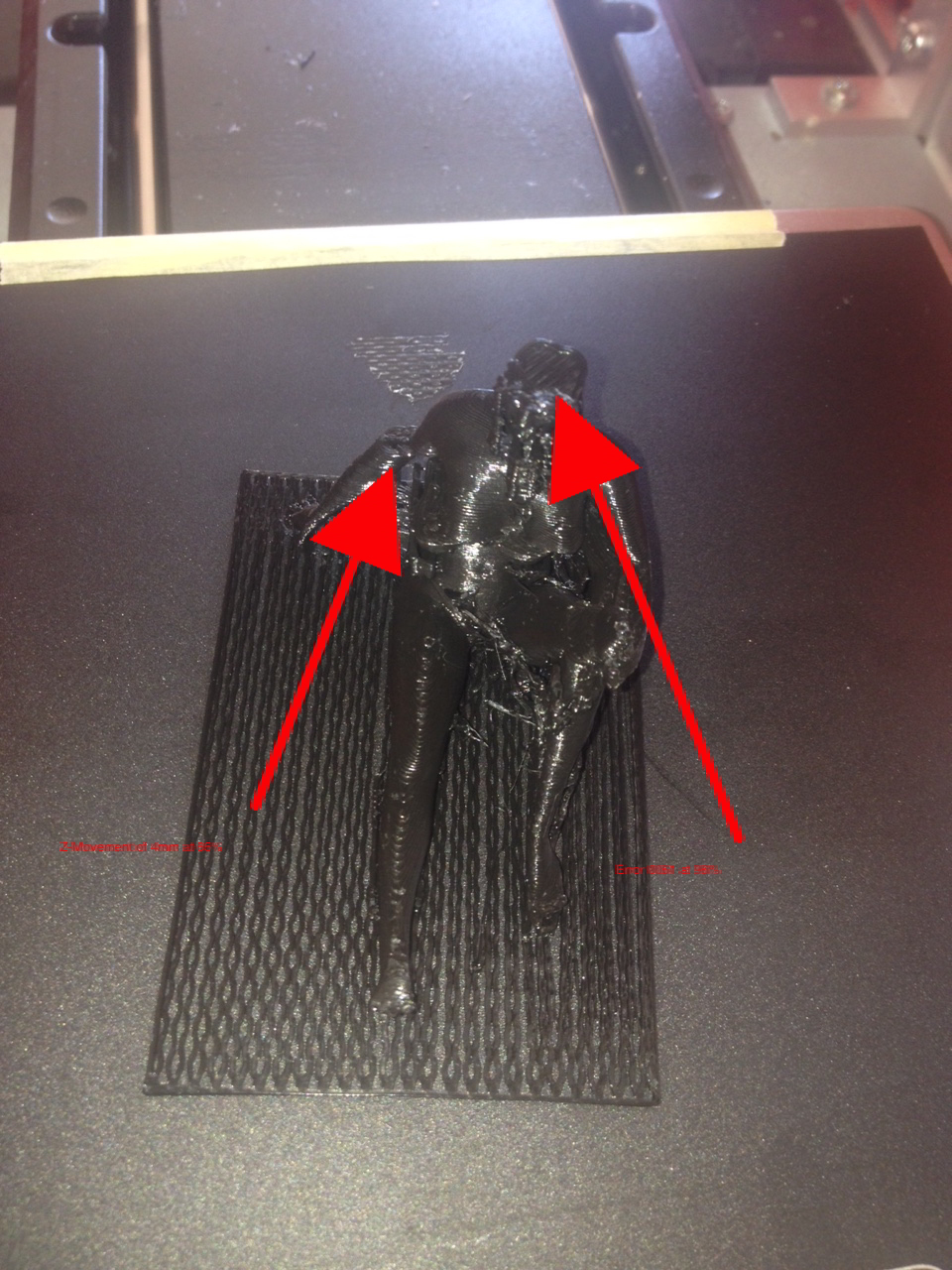
			<content type="html"><![CDATA[<p>Hello</p><p>I reduced my layer from 0.1mm to 0.15mm and the Temperatur to 200 degrees celsius</p><p>Today 3 figures, 3 times an error 0061! The Firmware 1.3.9 has moved my 3D Printer in a Break :-(</p><p>The worst was, that one of the figures als 2 problem;<br />- at 65% the total figure moves 4mm over the Z-axis<br />- at 96% I got error 0061</p><p><span class="postimg"><img src="http://soliforum.com/i/?FZ1i0l4.jpg" alt="http://soliforum.com/i/?FZ1i0l4.jpg" /></span></p><p>PLS, XYZ Printing, bring a fix!!!</p>]]></content>
			<author>
				<name><![CDATA[GerardDirks]]></name>
				<uri>https://www.soliforum.com/user/24400/</uri>
			</author>
			<updated>2020-05-27T16:03:15Z</updated>
			<id>https://www.soliforum.com/post/153431/#p153431</id>
		</entry>
		<entry>
			<title type="html"><![CDATA[Re: minimaker error code 0061]]></title>
			<link rel="alternate" href="https://www.soliforum.com/post/153426/#p153426" />
			<content type="html"><![CDATA[<p>Default Temperatur: 210 for Both Transparent &amp; Black. I thought this values are transmitted with the NFC Chip?</p>]]></content>
			<author>
				<name><![CDATA[GerardDirks]]></name>
				<uri>https://www.soliforum.com/user/24400/</uri>
			</author>
			<updated>2020-05-27T07:48:41Z</updated>
			<id>https://www.soliforum.com/post/153426/#p153426</id>
		</entry>
		<entry>
			<title type="html"><![CDATA[Re: minimaker error code 0061]]></title>
			<link rel="alternate" href="https://www.soliforum.com/post/153420/#p153420" />
			<content type="html"><![CDATA[<div class="quotebox"><cite>GerardDirks wrote:</cite><blockquote><p>At this moment the &quot;da Vinci mini w&quot; with Firmware 1.3.9 is useless. Every 3th oder 4th Print is aborted with this error.</p><p>I am not printing simple cubic figures with only of vectorized parameter. Maybe it is really a problem that the 4Gb RAM isn&#039;t enough to print complex figures of person.</p><p>I printing with a layer height of 0.1mm. to have all the details in my figures. If this is really the problem, I will resell this printer an buy a Resin printer. The waste of Filament and Time is no reason to keep trying! Even a Print of an 0.2mm give a chaotic garbage of Filament :-(</p><p>There are more reasons.</p><p>Today I recognized another dislike which swap my love to this small 3D printer to an hate!<br />My first Roll of Transparent Filament ended this weekend. 50% of the Roll was vor learning to find the correct settings. Now with a new Roll of Black Filament from XYZPrinting everything is else!<br />After 2 to the 3 Layer for the Raft it start warping.Th adhesive of the Black Filament is complete different from the Transparent FLA. I thought it was worth to pay more for the Filament with the an NFC Chip so the 3D Printer has always the same parameter a correct print. No way! All my 3D Prints with the Black Filament I need to throw away! It is really a pain, to start again with Trail &amp; Error to find the settings for the Black Filament. For me it is very strange that the adhesive of the Transparent was really nice after I installed the BuildTax. The Black Filament doesn&#039;t really glued the adhesive of the BuildTax</p><p>Has someone else sorted out the difference of the XYZPrinting Filament?</p><p>I thought that I could save me the Time &amp; Money to upgrade my &quot;da Vinci mini w&quot; with a HeatBed. But after this experience I will ask my self what will be with the next new Roll of Filament. I ordered last week a new Roll &quot;Clear Tangerine&quot; (Orange). Let&#039;s hope this hast the same behavior as the Transparent Filament.</p></blockquote></div><p>What temperatures are you printing at and what type of filament is it?</p>]]></content>
			<author>
				<name><![CDATA[carl_m1968]]></name>
				<uri>https://www.soliforum.com/user/7731/</uri>
			</author>
			<updated>2020-05-26T22:40:24Z</updated>
			<id>https://www.soliforum.com/post/153420/#p153420</id>
		</entry>
		<entry>
			<title type="html"><![CDATA[Re: minimaker error code 0061]]></title>
			<link rel="alternate" href="https://www.soliforum.com/post/153419/#p153419" />
			<content type="html"><![CDATA[<p>At this moment the &quot;da Vinci mini w&quot; with Firmware 1.3.9 is useless. Every 3th oder 4th Print is aborted with this error.</p><p>I am not printing simple cubic figures with only of vectorized parameter. Maybe it is really a problem that the 4Gb RAM isn&#039;t enough to print complex figures of person.</p><p>I printing with a layer height of 0.1mm. to have all the details in my figures. If this is really the problem, I will resell this printer an buy a Resin printer. The waste of Filament and Time is no reason to keep trying! Even a Print of an 0.2mm give a chaotic garbage of Filament :-(</p><p>There are more reasons.</p><p>Today I recognized another dislike which swap my love to this small 3D printer to an hate!<br />My first Roll of Transparent Filament ended this weekend. 50% of the Roll was vor learning to find the correct settings. Now with a new Roll of Black Filament from XYZPrinting everything is else!<br />After 2 to the 3 Layer for the Raft it start warping.Th adhesive of the Black Filament is complete different from the Transparent FLA. I thought it was worth to pay more for the Filament with the an NFC Chip so the 3D Printer has always the same parameter a correct print. No way! All my 3D Prints with the Black Filament I need to throw away! It is really a pain, to start again with Trail &amp; Error to find the settings for the Black Filament. For me it is very strange that the adhesive of the Transparent was really nice after I installed the BuildTax. The Black Filament doesn&#039;t really glued the adhesive of the BuildTax</p><p>Has someone else sorted out the difference of the XYZPrinting Filament?</p><p>I thought that I could save me the Time &amp; Money to upgrade my &quot;da Vinci mini w&quot; with a HeatBed. But after this experience I will ask my self what will be with the next new Roll of Filament. I ordered last week a new Roll &quot;Clear Tangerine&quot; (Orange). Let&#039;s hope this hast the same behavior as the Transparent Filament.</p>]]></content>
			<author>
				<name><![CDATA[GerardDirks]]></name>
				<uri>https://www.soliforum.com/user/24400/</uri>
			</author>
			<updated>2020-05-26T21:29:52Z</updated>
			<id>https://www.soliforum.com/post/153419/#p153419</id>
		</entry>
		<entry>
			<title type="html"><![CDATA[Re: minimaker error code 0061]]></title>
			<link rel="alternate" href="https://www.soliforum.com/post/153410/#p153410" />
			<content type="html"><![CDATA[<p>I just updated my Firmware to version 1.2.4. The problem persists. Will try to open the support ticket... but i doubt it will be of any help.</p>]]></content>
			<author>
				<name><![CDATA[jure.simon]]></name>
				<uri>https://www.soliforum.com/user/21823/</uri>
			</author>
			<updated>2020-05-25T14:27:51Z</updated>
			<id>https://www.soliforum.com/post/153410/#p153410</id>
		</entry>
		<entry>
			<title type="html"><![CDATA[Re: minimaker error code 0061]]></title>
			<link rel="alternate" href="https://www.soliforum.com/post/153403/#p153403" />
			<content type="html"><![CDATA[<p>Hey</p><p>I am on Windows. My Firmware version is 1.2.2. The suit is telling me that there is a 1.2.4 but it wont download.<br />The resolution is 0.3 mm with the first layer 0.35 mm. Everything is set to default. Was dooing a first try print of a model that I&#039;m making. It should take for around 5h but stopt at around 3 with memory error.</p><p>Regards,<br />Jure</p>]]></content>
			<author>
				<name><![CDATA[jure.simon]]></name>
				<uri>https://www.soliforum.com/user/21823/</uri>
			</author>
			<updated>2020-05-24T19:16:52Z</updated>
			<id>https://www.soliforum.com/post/153403/#p153403</id>
		</entry>
		<entry>
			<title type="html"><![CDATA[Re: minimaker error code 0061]]></title>
			<link rel="alternate" href="https://www.soliforum.com/post/153402/#p153402" />
			<content type="html"><![CDATA[<p>Hello Jure</p><p>Which platform you are using; Mac/Windows<br />What is the version of your Firmware<br />What is the Resolution you Print? Layer Height; 0.2, 0.1, 0.05 or 0.02?</p><p>On Mac I wasn&#039;t able to upgrade from 1.3.3 to 1.3.9. On Windows came a prompt that a new version was available and if I want to install it!</p><p>Downgrade Firmware is impossible or you need to replace som components on the Mainboard</p><p>Gérard</p>]]></content>
			<author>
				<name><![CDATA[GerardDirks]]></name>
				<uri>https://www.soliforum.com/user/24400/</uri>
			</author>
			<updated>2020-05-24T18:39:01Z</updated>
			<id>https://www.soliforum.com/post/153402/#p153402</id>
		</entry>
		<entry>
			<title type="html"><![CDATA[Re: minimaker error code 0061]]></title>
			<link rel="alternate" href="https://www.soliforum.com/post/153401/#p153401" />
			<content type="html"><![CDATA[<p>Hey</p><p>Ok, will try first to upgrade my software but don&#039;t know how, because the native software hangs on package download. <br />Have to search the forums for a solution of that problem. </p><p>But I&#039;ve been at this version for a couple of months now without any hickups. I could try to downgrade it to an earlier version...</p><p>With me the error occoures amost every print that is longer than 2 hours. I really hope it&#039;s not the memory it self that has corrupt sectors... Any way to check that?</p><p>PS: the printer is only a year and a half old.</p><p>Regards,<br />Jure</p>]]></content>
			<author>
				<name><![CDATA[jure.simon]]></name>
				<uri>https://www.soliforum.com/user/21823/</uri>
			</author>
			<updated>2020-05-24T18:24:22Z</updated>
			<id>https://www.soliforum.com/post/153401/#p153401</id>
		</entry>
		<entry>
			<title type="html"><![CDATA[Re: minimaker error code 0061]]></title>
			<link rel="alternate" href="https://www.soliforum.com/post/153400/#p153400" />
			<content type="html"><![CDATA[<p>Hello</p><p>I have the same issue! I had it never when using firmware 1.3.3, but after upgrading to 1.3.9 it occurs every 3-4 prints</p><p>It occurs sometimes when I tried to print complex figures in low resolution (0.1mm layer). When I tried to print with 0.05 &amp; 0.02mm layer it happens with every print.</p><p>For me it seems a bug in 1.3.9. Also I can&#039;t understood why the native XYZPrint software doesn&#039;t block the option 0.05 &amp; 0.02</p><p>Gérard</p>]]></content>
			<author>
				<name><![CDATA[GerardDirks]]></name>
				<uri>https://www.soliforum.com/user/24400/</uri>
			</author>
			<updated>2020-05-24T12:04:51Z</updated>
			<id>https://www.soliforum.com/post/153400/#p153400</id>
		</entry>
		<entry>
			<title type="html"><![CDATA[minimaker error code 0061]]></title>
			<link rel="alternate" href="https://www.soliforum.com/post/153399/#p153399" />
			<content type="html"><![CDATA[<p>Hello. I need some help resolving a huge problem.</p><p>I&#039;ve been getting this wierd error during printing, 0061 Memory error, on my minimaker. The error happens at random during same print. Been wasting a lot of filament.</p><p>The printer is connected with USB. I&#039;ve been getting the same error on both native softvare and simplify3d.</p><p>Don&#039;t know what to do. Searched around and this error code does not exist on official website and support seems a bit incompetent... Really thinking of throwing this in to the trash and buy my self an Ender...</p>]]></content>
			<author>
				<name><![CDATA[jure.simon]]></name>
				<uri>https://www.soliforum.com/user/21823/</uri>
			</author>
			<updated>2020-05-24T07:56:46Z</updated>
			<id>https://www.soliforum.com/post/153399/#p153399</id>
		</entry>
</feed>