<?xml version="1.0" encoding="utf-8"?>
<feed xmlns="http://www.w3.org/2005/Atom">
	<title type="html"><![CDATA[SoliForum - 3D Printing Community — Y axis making noises cause my model stuck - Solved]]></title>
	<link rel="self" href="https://www.soliforum.com/feed/atom/topic/18465/" />
	<updated>2020-03-12T10:21:43Z</updated>
	<generator>PunBB</generator>
	<id>https://www.soliforum.com/topic/18465/y-axis-making-noises-cause-my-model-stuck-solved/</id>
		<entry>
			<title type="html"><![CDATA[Re: Y axis making noises cause my model stuck - Solved]]></title>
			<link rel="alternate" href="https://www.soliforum.com/post/152762/#p152762" />
			<content type="html"><![CDATA[<div class="quotebox"><cite>msbarel wrote:</cite><blockquote><p>Solved - manually turn the screw for Y axis then the print head moved up</p></blockquote></div><p>Up and down is the the Z axis regardless of where the screw is located. Just to keep terms correct.</p>]]></content>
			<author>
				<name><![CDATA[carl_m1968]]></name>
				<uri>https://www.soliforum.com/user/7731/</uri>
			</author>
			<updated>2020-03-12T10:21:43Z</updated>
			<id>https://www.soliforum.com/post/152762/#p152762</id>
		</entry>
		<entry>
			<title type="html"><![CDATA[Re: Y axis making noises cause my model stuck - Solved]]></title>
			<link rel="alternate" href="https://www.soliforum.com/post/152757/#p152757" />
			<content type="html"><![CDATA[<p>Solved - manually turn the screw for Y axis then the print head moved up</p>]]></content>
			<author>
				<name><![CDATA[msbarel]]></name>
				<uri>https://www.soliforum.com/user/21849/</uri>
			</author>
			<updated>2020-03-12T06:57:23Z</updated>
			<id>https://www.soliforum.com/post/152757/#p152757</id>
		</entry>
		<entry>
			<title type="html"><![CDATA[Re: Y axis making noises cause my model stuck - Solved]]></title>
			<link rel="alternate" href="https://www.soliforum.com/post/152743/#p152743" />
			<content type="html"><![CDATA[<p>If it is flat just pull really hard. Other wise with power off turn the z screws by hand as evenly as you can.</p>]]></content>
			<author>
				<name><![CDATA[carl_m1968]]></name>
				<uri>https://www.soliforum.com/user/7731/</uri>
			</author>
			<updated>2020-03-11T21:06:15Z</updated>
			<id>https://www.soliforum.com/post/152743/#p152743</id>
		</entry>
		<entry>
			<title type="html"><![CDATA[Y axis making noises cause my model stuck - Solved]]></title>
			<link rel="alternate" href="https://www.soliforum.com/post/152738/#p152738" />
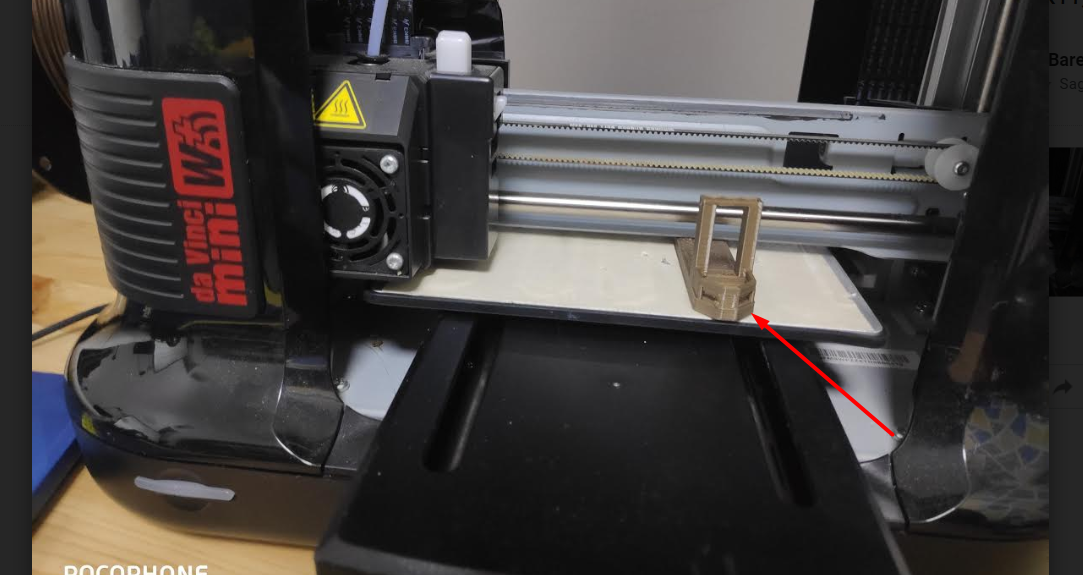
			<content type="html"><![CDATA[<p><span class="postimg"><img src="http://soliforum.com/i/?IomNM0p.png" alt="http://soliforum.com/i/?IomNM0p.png" /></span></p><p>i have print a model, and i didnt remove it from the bed<br />then, i start new printing<br />the y axis motor making noises and after 5 sec the red led turn on with E31 error</p><p>how can i manually release my stuck model ?</p>]]></content>
			<author>
				<name><![CDATA[msbarel]]></name>
				<uri>https://www.soliforum.com/user/21849/</uri>
			</author>
			<updated>2020-03-11T16:52:25Z</updated>
			<id>https://www.soliforum.com/post/152738/#p152738</id>
		</entry>
</feed>
