<?xml version="1.0" encoding="utf-8"?>
<feed xmlns="http://www.w3.org/2005/Atom">
	<title type="html"><![CDATA[SoliForum - 3D Printing Community — Slicing a 3D Image File For Photos.]]></title>
	<link rel="self" href="https://www.soliforum.com/feed/atom/topic/18444/" />
	<updated>2020-02-27T14:49:07Z</updated>
	<generator>PunBB</generator>
	<id>https://www.soliforum.com/topic/18444/slicing-a-3d-image-file-for-photos/</id>
		<entry>
			<title type="html"><![CDATA[Re: Slicing a 3D Image File For Photos.]]></title>
			<link rel="alternate" href="https://www.soliforum.com/post/152678/#p152678" />
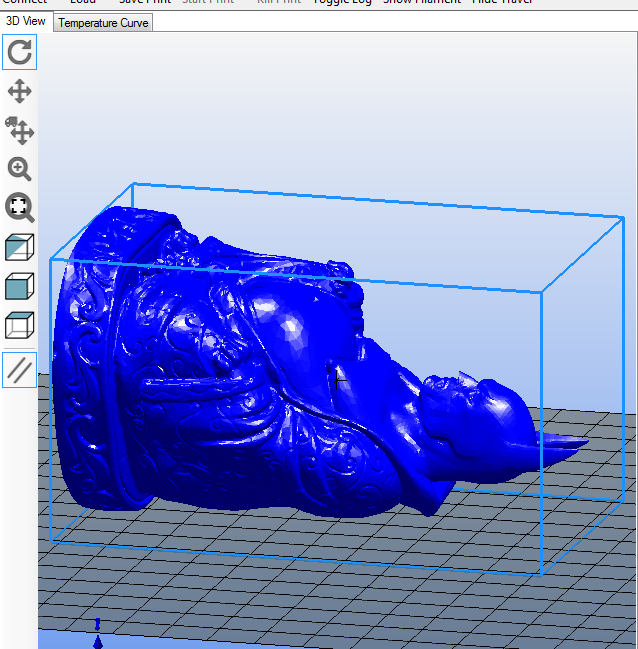
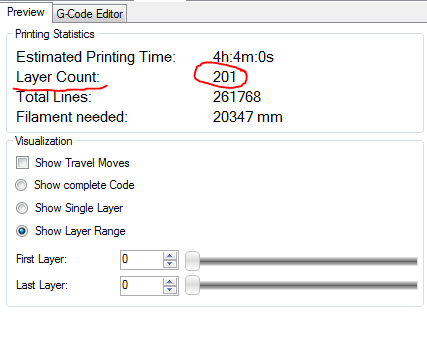
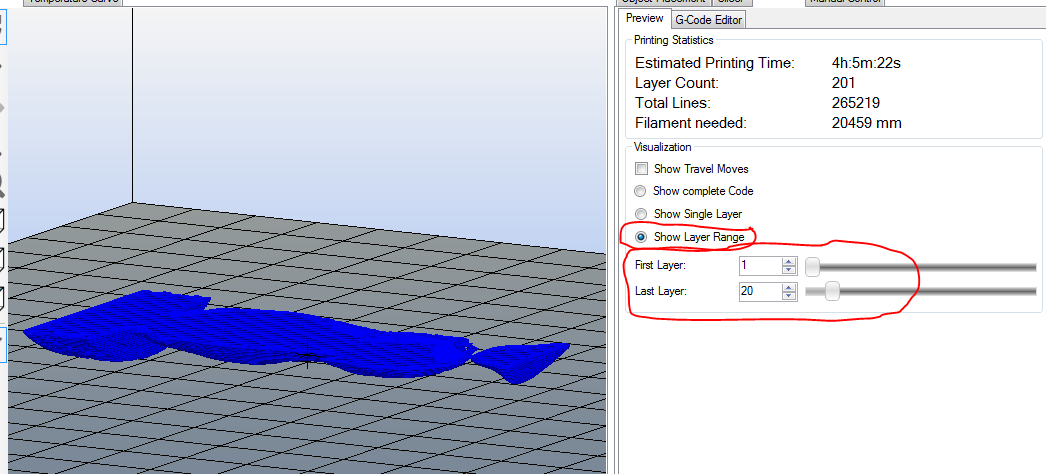
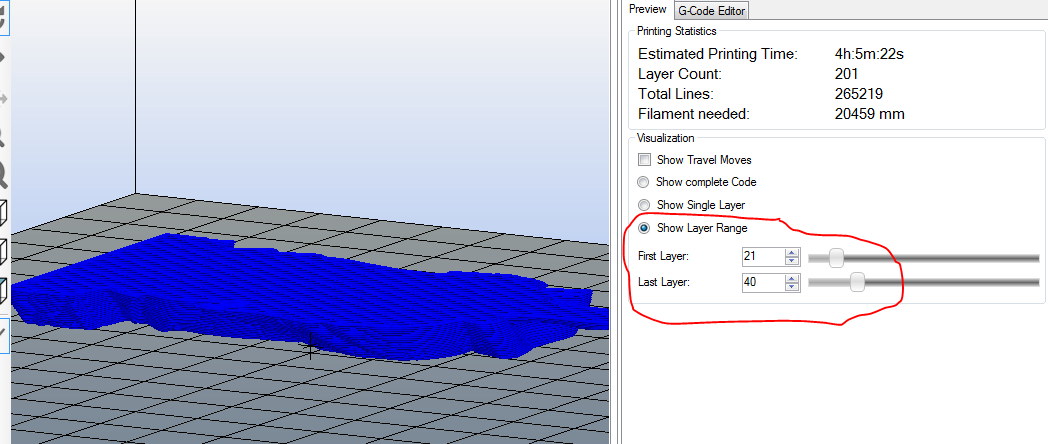
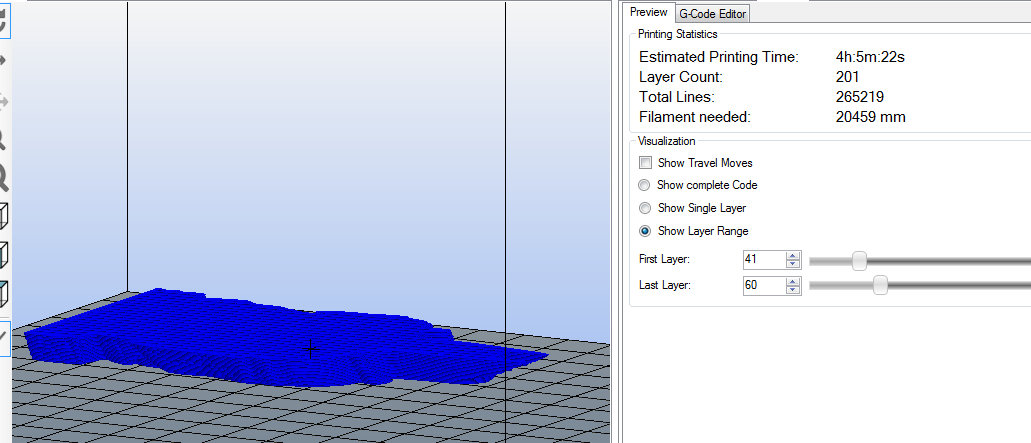
			<content type="html"><![CDATA[<p>ok, so pic tutorial in RH</p><p>stl oriented to get front to back slices...</p><p><span class="postimg"><img src="http://soliforum.com/i/?zz5VsU3.png" alt="http://soliforum.com/i/?zz5VsU3.png" /></span></p><p>after slicing, find the number of layers and divide by how many slices you want..<br />201 / 10 = 20 (rounded off)</p><p><span class="postimg"><img src="http://soliforum.com/i/?6OkSwZe.png" alt="http://soliforum.com/i/?6OkSwZe.png" /></span></p><p>first image slices would be from 1 to 20 like this..</p><p><span class="postimg"><img src="http://soliforum.com/i/?NvVMXER.png" alt="http://soliforum.com/i/?NvVMXER.png" /></span></p><p>then 21 to 40...</p><p><span class="postimg"><img src="http://soliforum.com/i/?qr285Yp.png" alt="http://soliforum.com/i/?qr285Yp.png" /></span></p><p>then 41 to 60...</p><p><span class="postimg"><img src="http://soliforum.com/i/?fOrdXQa.png" alt="http://soliforum.com/i/?fOrdXQa.png" /></span></p><p>and so on until you get all layers</p>]]></content>
			<author>
				<name><![CDATA[heartless]]></name>
				<uri>https://www.soliforum.com/user/10399/</uri>
			</author>
			<updated>2020-02-27T14:49:07Z</updated>
			<id>https://www.soliforum.com/post/152678/#p152678</id>
		</entry>
		<entry>
			<title type="html"><![CDATA[Re: Slicing a 3D Image File For Photos.]]></title>
			<link rel="alternate" href="https://www.soliforum.com/post/152677/#p152677" />
			<content type="html"><![CDATA[<p>another option would be to open the file in Meshmixer and slice it up there, but not sure how you would get X number of equal slices - have not tried it.</p>]]></content>
			<author>
				<name><![CDATA[heartless]]></name>
				<uri>https://www.soliforum.com/user/10399/</uri>
			</author>
			<updated>2020-02-27T14:40:53Z</updated>
			<id>https://www.soliforum.com/post/152677/#p152677</id>
		</entry>
		<entry>
			<title type="html"><![CDATA[Re: Slicing a 3D Image File For Photos.]]></title>
			<link rel="alternate" href="https://www.soliforum.com/post/152676/#p152676" />
			<content type="html"><![CDATA[<p>not terribly difficult, really.. <br />Slice it.<br />divide the number of layers by how many slices you want - say 350 / 10 = 35<br />set the preview to individual layers and then set the slider to layer 1 to start with.. then add 35 to that, so layer 36 would be next, then add 35 again to get the next slice at 71, and so on</p><p>if you want to use the layer range thing.. you would set one slider to 1, 2nd slider to 35 - that will show all layers between 1 &amp; 35.<br />for the next &quot;image&quot; set the 1st slider to 36, and 2nd to 70, and it will show all layers between 36 &amp; 70, and so on<br />(i may have that backwards... 1st slider may be the upper limit, 2nd the lower - would have to test)</p><p>but again, this will not be front to back, unless you orient the piece that way. and it will not be on a white background.</p>]]></content>
			<author>
				<name><![CDATA[heartless]]></name>
				<uri>https://www.soliforum.com/user/10399/</uri>
			</author>
			<updated>2020-02-27T14:29:22Z</updated>
			<id>https://www.soliforum.com/post/152676/#p152676</id>
		</entry>
		<entry>
			<title type="html"><![CDATA[Re: Slicing a 3D Image File For Photos.]]></title>
			<link rel="alternate" href="https://www.soliforum.com/post/152670/#p152670" />
			<content type="html"><![CDATA[<p>Lets say the object is 3 inches from front to back and I want 10 equal slices of it. Is there an easy way to do that? There is a printing on transparent sheets technique MIT came up with to create a 3D effect in 2D space.</p>]]></content>
			<author>
				<name><![CDATA[Rocketman]]></name>
				<uri>https://www.soliforum.com/user/783/</uri>
			</author>
			<updated>2020-02-27T01:34:50Z</updated>
			<id>https://www.soliforum.com/post/152670/#p152670</id>
		</entry>
		<entry>
			<title type="html"><![CDATA[Re: Slicing a 3D Image File For Photos.]]></title>
			<link rel="alternate" href="https://www.soliforum.com/post/152667/#p152667" />
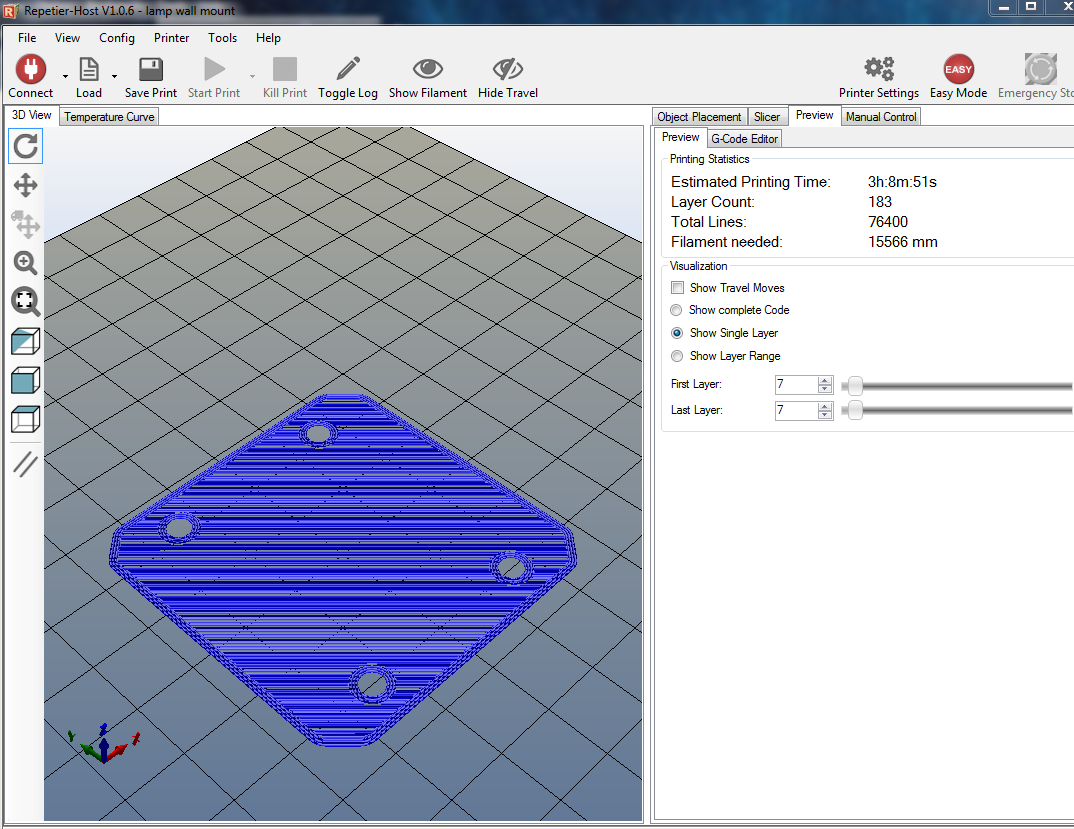
			<content type="html"><![CDATA[<p>that looks more like S3D, but something similar is available in Repetier Host - but it will not be on a white background.</p><p>However.. either will give you top to bottom slices, not front to back - you can re-orient the piece to get front to back, but that would be the only way i know in a slicing program.</p><p>after slicing in RH, in the Preview tab, select &quot;Show Single Layer&quot; then step the slider as needed to view the layer you want - then it is just a simple screen capture for the &quot;picture&quot;</p><p><span class="postimg"><img src="http://soliforum.com/i/?yFWREAR.png" alt="http://soliforum.com/i/?yFWREAR.png" /></span></p><p>Alternatively, you can select &quot;Show Layer Range&quot; and view specific layers in a given range using the sliders to set the range</p>]]></content>
			<author>
				<name><![CDATA[heartless]]></name>
				<uri>https://www.soliforum.com/user/10399/</uri>
			</author>
			<updated>2020-02-26T21:09:13Z</updated>
			<id>https://www.soliforum.com/post/152667/#p152667</id>
		</entry>
		<entry>
			<title type="html"><![CDATA[Re: Slicing a 3D Image File For Photos.]]></title>
			<link rel="alternate" href="https://www.soliforum.com/post/152665/#p152665" />
			<content type="html"><![CDATA[<p>How exactly? I have SD2. This is Repetier Slic3r?</p>]]></content>
			<author>
				<name><![CDATA[Rocketman]]></name>
				<uri>https://www.soliforum.com/user/783/</uri>
			</author>
			<updated>2020-02-26T20:32:30Z</updated>
			<id>https://www.soliforum.com/post/152665/#p152665</id>
		</entry>
		<entry>
			<title type="html"><![CDATA[Re: Slicing a 3D Image File For Photos.]]></title>
			<link rel="alternate" href="https://www.soliforum.com/post/152659/#p152659" />
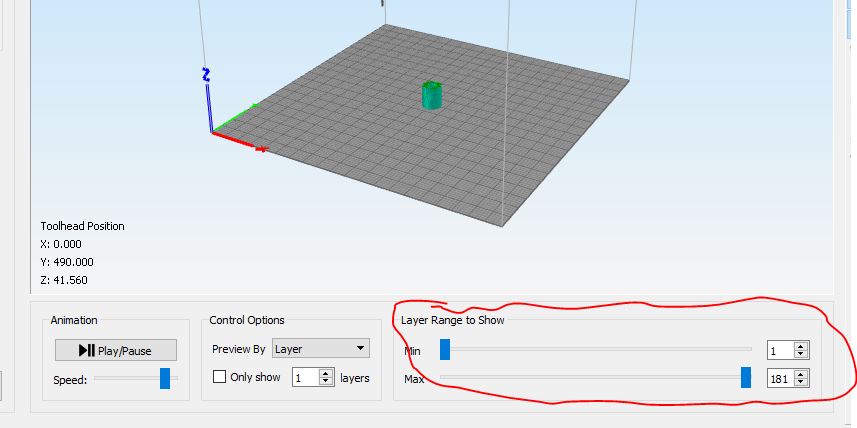
			<content type="html"><![CDATA[<p>slice it. use the g-code viewer and set the layer range where you want it <span class="postimg"><img src="http://soliforum.com/i/?tNiZfV9.jpg" alt="http://soliforum.com/i/?tNiZfV9.jpg" /></span></p>]]></content>
			<author>
				<name><![CDATA[Kronikabuse]]></name>
				<uri>https://www.soliforum.com/user/6797/</uri>
			</author>
			<updated>2020-02-26T10:44:00Z</updated>
			<id>https://www.soliforum.com/post/152659/#p152659</id>
		</entry>
		<entry>
			<title type="html"><![CDATA[Slicing a 3D Image File For Photos.]]></title>
			<link rel="alternate" href="https://www.soliforum.com/post/152656/#p152656" />
			<content type="html"><![CDATA[<p>If I wanted to take a .stl file and cut it into slices front to back and take photos of each slice from a fixed camera position and white background how could that be done?</p>]]></content>
			<author>
				<name><![CDATA[Rocketman]]></name>
				<uri>https://www.soliforum.com/user/783/</uri>
			</author>
			<updated>2020-02-25T20:50:09Z</updated>
			<id>https://www.soliforum.com/post/152656/#p152656</id>
		</entry>
</feed>