<?xml version="1.0" encoding="utf-8"?>
<feed xmlns="http://www.w3.org/2005/Atom">
	<title type="html"><![CDATA[SoliForum - 3D Printing Community — New Firmware for Davinci JR has support for Cura and it works.]]></title>
	<link rel="self" href="https://www.soliforum.com/feed/atom/topic/18370/" />
	<updated>2021-12-04T01:07:22Z</updated>
	<generator>PunBB</generator>
	<id>https://www.soliforum.com/topic/18370/new-firmware-for-davinci-jr-has-support-for-cura-and-it-works/</id>
		<entry>
			<title type="html"><![CDATA[Re: New Firmware for Davinci JR has support for Cura and it works.]]></title>
			<link rel="alternate" href="https://www.soliforum.com/post/155096/#p155096" />
			<content type="html"><![CDATA[<p>hacks still work after upgrade</p>]]></content>
			<author>
				<name><![CDATA[ot]]></name>
				<uri>https://www.soliforum.com/user/26417/</uri>
			</author>
			<updated>2021-12-04T01:07:22Z</updated>
			<id>https://www.soliforum.com/post/155096/#p155096</id>
		</entry>
		<entry>
			<title type="html"><![CDATA[Re: New Firmware for Davinci JR has support for Cura and it works.]]></title>
			<link rel="alternate" href="https://www.soliforum.com/post/154913/#p154913" />
			<content type="html"><![CDATA[<div class="quotebox"><cite>MiB wrote:</cite><blockquote><p>Hello, does the new firmware also open the printer for 3rd party filaments? Or does it stop us from using 3rd party filemanets on the xyz davinci jr. printers with NFC-Tag hacks?<br />Is it also possible to print cura gcode from an sd-card on teh davinci (jr.) printers?<br />Thanks and cheers,m.</p></blockquote></div><p>I want to know too.<br />Thank you guys!</p>]]></content>
			<author>
				<name><![CDATA[daizhuo]]></name>
				<uri>https://www.soliforum.com/user/26172/</uri>
			</author>
			<updated>2021-08-12T07:03:31Z</updated>
			<id>https://www.soliforum.com/post/154913/#p154913</id>
		</entry>
		<entry>
			<title type="html"><![CDATA[Re: New Firmware for Davinci JR has support for Cura and it works.]]></title>
			<link rel="alternate" href="https://www.soliforum.com/post/154637/#p154637" />
			<content type="html"><![CDATA[<p>Hello, does the new firmware also open the printer for 3rd party filaments? Or does it stop us from using 3rd party filemanets on the xyz davinci jr. printers with NFC-Tag hacks?<br />Is it also possible to print cura gcode from an sd-card on teh davinci (jr.) printers?<br />Thanks and cheers,m.</p>]]></content>
			<author>
				<name><![CDATA[MiB]]></name>
				<uri>https://www.soliforum.com/user/17983/</uri>
			</author>
			<updated>2021-03-31T17:09:32Z</updated>
			<id>https://www.soliforum.com/post/154637/#p154637</id>
		</entry>
		<entry>
			<title type="html"><![CDATA[Re: New Firmware for Davinci JR has support for Cura and it works.]]></title>
			<link rel="alternate" href="https://www.soliforum.com/post/153389/#p153389" />
			<content type="html"><![CDATA[<p>Hello</p><p>I installed the 1.3.9 Firmware. But I can&#039;t get the da Vinci mini to work with any of my Macs (10.13.6 &amp; 10.15.4). For me it is strange that there is no Print Button, I can only choose Save to File?</p><p>I suppose it is not a Firmware or Setting Issue but a problem of the Mac Version of Cura ?!?</p>]]></content>
			<author>
				<name><![CDATA[GerardDirks]]></name>
				<uri>https://www.soliforum.com/user/24400/</uri>
			</author>
			<updated>2020-05-23T14:54:40Z</updated>
			<id>https://www.soliforum.com/post/153389/#p153389</id>
		</entry>
		<entry>
			<title type="html"><![CDATA[Re: New Firmware for Davinci JR has support for Cura and it works.]]></title>
			<link rel="alternate" href="https://www.soliforum.com/post/153140/#p153140" />
			<content type="html"><![CDATA[<div class="quotebox"><cite>stefferber wrote:</cite><blockquote><p><img src="https://www.soliforum.com/img/smilies/smile.png" width="15" height="15" alt="smile" />&nbsp; Thx a lot clevenger23 ! Your parameters look great.Mini is printing right now via Cura. Waiting now for the final result</p></blockquote></div><p>Did it work for you? or do you need more help?</p>]]></content>
			<author>
				<name><![CDATA[clevenger23]]></name>
				<uri>https://www.soliforum.com/user/24019/</uri>
			</author>
			<updated>2020-04-29T08:02:27Z</updated>
			<id>https://www.soliforum.com/post/153140/#p153140</id>
		</entry>
		<entry>
			<title type="html"><![CDATA[Re: New Firmware for Davinci JR has support for Cura and it works.]]></title>
			<link rel="alternate" href="https://www.soliforum.com/post/153138/#p153138" />
			<content type="html"><![CDATA[<p>Hi there has any body tried to use the latest firmware and cura to send the g-code to the sd card for the JR and print from it as i know normally it only accepts the .3w file</p>]]></content>
			<author>
				<name><![CDATA[RENIER]]></name>
				<uri>https://www.soliforum.com/user/16813/</uri>
			</author>
			<updated>2020-04-28T19:56:34Z</updated>
			<id>https://www.soliforum.com/post/153138/#p153138</id>
		</entry>
		<entry>
			<title type="html"><![CDATA[Re: New Firmware for Davinci JR has support for Cura and it works.]]></title>
			<link rel="alternate" href="https://www.soliforum.com/post/153110/#p153110" />
			<content type="html"><![CDATA[<p><img src="https://www.soliforum.com/img/smilies/smile.png" width="15" height="15" alt="smile" />&nbsp; Thx a lot clevenger23 ! Your parameters look great.Mini is printing right now via Cura. Waiting now for the final result</p>]]></content>
			<author>
				<name><![CDATA[stefferber]]></name>
				<uri>https://www.soliforum.com/user/24113/</uri>
			</author>
			<updated>2020-04-25T15:28:02Z</updated>
			<id>https://www.soliforum.com/post/153110/#p153110</id>
		</entry>
		<entry>
			<title type="html"><![CDATA[Re: New Firmware for Davinci JR has support for Cura and it works.]]></title>
			<link rel="alternate" href="https://www.soliforum.com/post/153084/#p153084" />
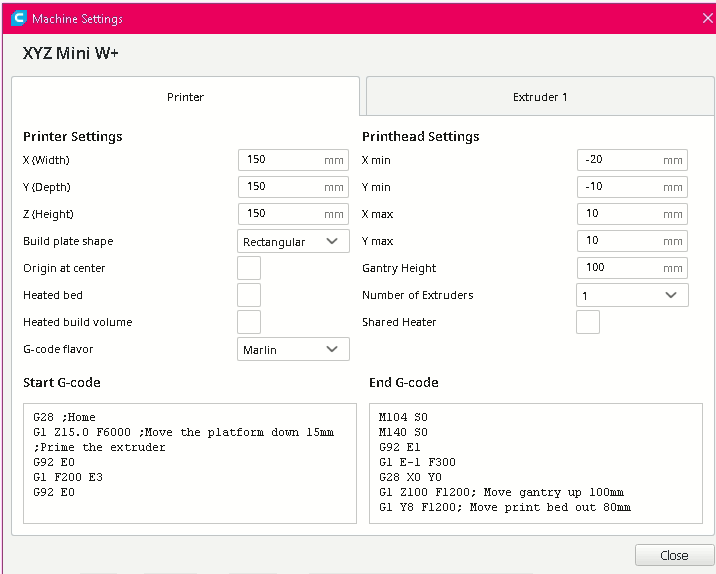
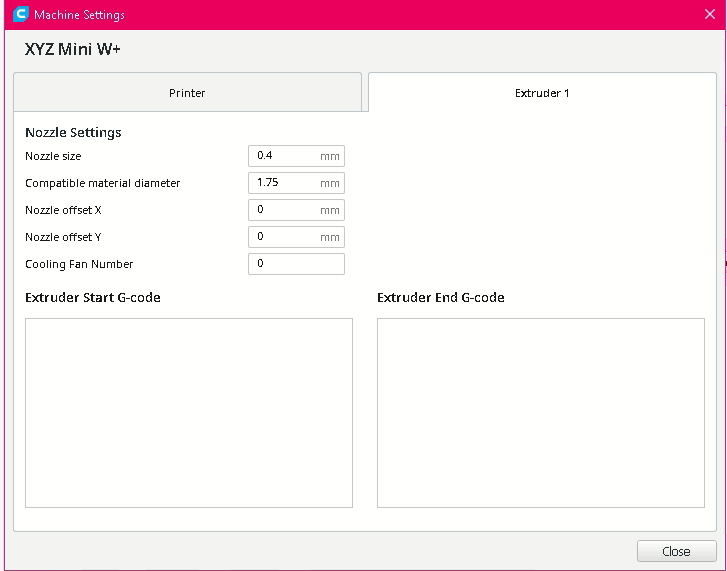
			<content type="html"><![CDATA[<p>for stefferber</p><p>i am attaching pictures of my setting in Cura 4.6 that is working with my mini W+</p><p>Also the auto calibrate left my Z to high and kept causing my issues, i changed my exturder to 0.2 in the xyz settings. after you have it fully set up in XYZ software, never open it again. well i take that back i guess for cleaning but you could but tell Cura to heat the head and clean it that way, or to change filament, i am not sure how to get cura to retract the current filament and take the new one, maybe someone can answer that for me. </p><p>the gCode for copy pasting is <br />G28 ;Home<br />G1 Z15.0 F6000 ;Move the platform down 15mm<br />;Prime the extruder<br />G92 E0<br />G1 F200 E3<br />G92 E0</p><p>and <br />M104 S0<br />M140 S0<br />G92 E1<br />G1 E-1 F300<br />G28 X0 Y0<br />G1 Z100 F1200; Move gantry up 100mm<br />G1 Y8 F1200; Move print bed out 80mm<br />M84</p><p><span class="postimg"><img src="http://soliforum.com/i/?j4XRWiv.png" alt="http://soliforum.com/i/?j4XRWiv.png" /></span><span class="postimg"><img src="http://soliforum.com/i/?skk7U42.png" alt="http://soliforum.com/i/?skk7U42.png" /></span></p>]]></content>
			<author>
				<name><![CDATA[clevenger23]]></name>
				<uri>https://www.soliforum.com/user/24019/</uri>
			</author>
			<updated>2020-04-22T05:57:27Z</updated>
			<id>https://www.soliforum.com/post/153084/#p153084</id>
		</entry>
		<entry>
			<title type="html"><![CDATA[Re: New Firmware for Davinci JR has support for Cura and it works.]]></title>
			<link rel="alternate" href="https://www.soliforum.com/post/153043/#p153043" />
			<content type="html"><![CDATA[<div class="quotebox"><cite>jgc068 wrote:</cite><blockquote><p>I can confirm this works with the da Vinci Mini W+ and firmware release 1.2.0 as well. Needs some work to setup a custom FFF printer (Cura V4.4.1) but I&#039;m now printing with 3rd party PLA after xyz tightened up the checks on 3rd party tags and made all mine useless.</p></blockquote></div><p>For me it does not work with this setting:<br /></p><ul><li><p>da Vinci Mini W+ via USB</p></li><li><p>Firmware V1.3.9 installed 10.04.2020 </p></li><li><p>Ultimate Cura V4.5.0 </p></li><li><p>MacOS 10.15.4 (19E287) </p></li></ul><p>using this specification:<br /><a href="https://xyzofficialweb.blob.core.windows.net/xyz-v3/download/Cura_Profile_XYZ.PDF">https://xyzofficialweb.blob.core.window … le_XYZ.PDF</a></p><p>with this problem:</p><ul><li><p>I guess the the specs for the Start- &amp; End-G-Code are missing </p></li><li><p>I cannot enter positive values for &quot;X min&quot; and &quot;Y min&quot;</p></li></ul><p>See screen shots attached.</p><p>Could you please share what parameters you are using?</p>]]></content>
			<author>
				<name><![CDATA[stefferber]]></name>
				<uri>https://www.soliforum.com/user/24113/</uri>
			</author>
			<updated>2020-04-17T14:14:55Z</updated>
			<id>https://www.soliforum.com/post/153043/#p153043</id>
		</entry>
		<entry>
			<title type="html"><![CDATA[Re: New Firmware for Davinci JR has support for Cura and it works.]]></title>
			<link rel="alternate" href="https://www.soliforum.com/post/152851/#p152851" />
			<content type="html"><![CDATA[<div class="quotebox"><cite>rodrigo.schramm wrote:</cite><blockquote><div class="quotebox"><cite>jgc068 wrote:</cite><blockquote><p>I can confirm this works with the da Vinci Mini W+ and firmware release 1.2.0 as well. Needs some work to setup a custom FFF printer (Cura V4.4.1) but I&#039;m now printing with 3rd party PLA after xyz tightened up the checks on 3rd party tags and made all mine useless.</p></blockquote></div><p>I am trying to print with my da Vinci Mini W+ and Cura software. Can you give some directions of how I can set the custom FFF printer?</p><p>I can use CURA to move the printer head (jog). But when I try to print from CURA, the printer LED gets red.</p></blockquote></div><br /><br /><p>I get the same exact results, no matter what i change... i have the very latest firmware... i do have non-xyz filament..with a nfc tag that i believe is good...&nbsp; &nbsp;Can someone post the settings used in the printer part of cura... i think that may be the problem...But not sure... I would just like to double check... </p><p>Thanks for the help...</p><p>(edit) I got things printing again in XYZprint... Had a bad tag i guess... Redid a new one and all is well with the spool... Now in Cura, I still have issues... It looks like its printing, but the filament just clumps up and balls at the extruder. Like there is an issue with the z settings.... would love to hear any ideas... thanks</p>]]></content>
			<author>
				<name><![CDATA[lilmexx]]></name>
				<uri>https://www.soliforum.com/user/22193/</uri>
			</author>
			<updated>2020-03-30T20:39:27Z</updated>
			<id>https://www.soliforum.com/post/152851/#p152851</id>
		</entry>
		<entry>
			<title type="html"><![CDATA[Re: New Firmware for Davinci JR has support for Cura and it works.]]></title>
			<link rel="alternate" href="https://www.soliforum.com/post/152706/#p152706" />
			<content type="html"><![CDATA[<div class="quotebox"><cite>rodrigo.schramm wrote:</cite><blockquote><div class="quotebox"><cite>jgc068 wrote:</cite><blockquote><p>I can confirm this works with the da Vinci Mini W+ and firmware release 1.2.0 as well. Needs some work to setup a custom FFF printer (Cura V4.4.1) but I&#039;m now printing with 3rd party PLA after xyz tightened up the checks on 3rd party tags and made all mine useless.</p></blockquote></div><p>I am trying to print with my da Vinci Mini W+ and Cura software. Can you give some directions of how I can set the custom FFF printer?</p><p>I can use CURA to move the printer head (jog). But when I try to print from CURA, the printer LED gets red.</p></blockquote></div><p>Follow this guide by XYZPrinting, very easy and with an interesting side effect for me.<br /><a href="https://www.xyzprinting.com/en-US/news/printing-with-cura">https://www.xyzprinting.com/en-US/news/ … -with-cura</a></p><p>I haven&#039;t bothered to use XYZprint at all to print, opened it out of curiosity.</p><p>Also have any of you noticed this as well?<br /><a href="http://www.soliforum.com/topic/18456/da-vinci-jr-10w-firmware-248-bug/">http://www.soliforum.com/topic/18456/da … e-248-bug/</a></p>]]></content>
			<author>
				<name><![CDATA[redkurn]]></name>
				<uri>https://www.soliforum.com/user/23698/</uri>
			</author>
			<updated>2020-03-03T16:48:43Z</updated>
			<id>https://www.soliforum.com/post/152706/#p152706</id>
		</entry>
		<entry>
			<title type="html"><![CDATA[Re: New Firmware for Davinci JR has support for Cura and it works.]]></title>
			<link rel="alternate" href="https://www.soliforum.com/post/152589/#p152589" />
			<content type="html"><![CDATA[<div class="quotebox"><cite>jgc068 wrote:</cite><blockquote><p>I can confirm this works with the da Vinci Mini W+ and firmware release 1.2.0 as well. Needs some work to setup a custom FFF printer (Cura V4.4.1) but I&#039;m now printing with 3rd party PLA after xyz tightened up the checks on 3rd party tags and made all mine useless.</p></blockquote></div><p>I am trying to print with my da Vinci Mini W+ and Cura software. Can you give some directions of how I can set the custom FFF printer?</p><p>I can use CURA to move the printer head (jog). But when I try to print from CURA, the printer LED gets red.</p>]]></content>
			<author>
				<name><![CDATA[rodrigo.schramm]]></name>
				<uri>https://www.soliforum.com/user/21318/</uri>
			</author>
			<updated>2020-02-14T00:57:54Z</updated>
			<id>https://www.soliforum.com/post/152589/#p152589</id>
		</entry>
		<entry>
			<title type="html"><![CDATA[Re: New Firmware for Davinci JR has support for Cura and it works.]]></title>
			<link rel="alternate" href="https://www.soliforum.com/post/152366/#p152366" />
			<content type="html"><![CDATA[<p>So pretty sure thats the expected way for this to work only one program can control the printer at a time. If your going to use cura it has to be open the entire time the print is going. If you need to use xyz sofyware for some reason shutdown cura first. then xyz can use the printer. but will/could complain abain nfc stuff.</p>]]></content>
			<author>
				<name><![CDATA[jnngill1]]></name>
				<uri>https://www.soliforum.com/user/13731/</uri>
			</author>
			<updated>2020-01-13T15:13:23Z</updated>
			<id>https://www.soliforum.com/post/152366/#p152366</id>
		</entry>
		<entry>
			<title type="html"><![CDATA[Re: New Firmware for Davinci JR has support for Cura and it works.]]></title>
			<link rel="alternate" href="https://www.soliforum.com/post/152363/#p152363" />
			<content type="html"><![CDATA[<p>I have found this happens if I have run xyzprint software - even if it is shut down before running CURA. Switching the printer off and back on after exiting xyz and before running CURA works. Both programmes seem to lock out the USB port.</p>]]></content>
			<author>
				<name><![CDATA[jgc068]]></name>
				<uri>https://www.soliforum.com/user/23364/</uri>
			</author>
			<updated>2020-01-13T13:53:55Z</updated>
			<id>https://www.soliforum.com/post/152363/#p152363</id>
		</entry>
		<entry>
			<title type="html"><![CDATA[Re: New Firmware for Davinci JR has support for Cura and it works.]]></title>
			<link rel="alternate" href="https://www.soliforum.com/post/152358/#p152358" />
			<content type="html"><![CDATA[<p>Do you have just cura open or is xyz running too?</p>]]></content>
			<author>
				<name><![CDATA[jnngill1]]></name>
				<uri>https://www.soliforum.com/user/13731/</uri>
			</author>
			<updated>2020-01-12T19:21:23Z</updated>
			<id>https://www.soliforum.com/post/152358/#p152358</id>
		</entry>
</feed>