<?xml version="1.0" encoding="utf-8"?>
<feed xmlns="http://www.w3.org/2005/Atom">
	<title type="html"><![CDATA[SoliForum - 3D Printing Community — Merging Objects 2]]></title>
	<link rel="self" href="https://www.soliforum.com/feed/atom/topic/18216/" />
	<updated>2019-09-22T20:54:13Z</updated>
	<generator>PunBB</generator>
	<id>https://www.soliforum.com/topic/18216/merging-objects-2/</id>
		<entry>
			<title type="html"><![CDATA[Re: Merging Objects 2]]></title>
			<link rel="alternate" href="https://www.soliforum.com/post/151509/#p151509" />
			<content type="html"><![CDATA[<p>I wanted all intersections traced so I can remove parts. Basically creating an object between part 1 and 2.</p>]]></content>
			<author>
				<name><![CDATA[Rocketman]]></name>
				<uri>https://www.soliforum.com/user/783/</uri>
			</author>
			<updated>2019-09-22T20:54:13Z</updated>
			<id>https://www.soliforum.com/post/151509/#p151509</id>
		</entry>
		<entry>
			<title type="html"><![CDATA[Re: Merging Objects 2]]></title>
			<link rel="alternate" href="https://www.soliforum.com/post/151508/#p151508" />
			<content type="html"><![CDATA[<p>I&#039;m afraid I don&#039;t follow what you were trying to do.&nbsp; </p><p>I thought you wanted to join the &quot;S&quot; and the &quot;T&quot; into a single part, as they were already 2 separate objects passing through each other.</p>]]></content>
			<author>
				<name><![CDATA[pirvan]]></name>
				<uri>https://www.soliforum.com/user/1357/</uri>
			</author>
			<updated>2019-09-22T15:22:43Z</updated>
			<id>https://www.soliforum.com/post/151508/#p151508</id>
		</entry>
		<entry>
			<title type="html"><![CDATA[Re: Merging Objects 2]]></title>
			<link rel="alternate" href="https://www.soliforum.com/post/151505/#p151505" />
			<content type="html"><![CDATA[<div class="quotebox"><cite>pirvan wrote:</cite><blockquote><p>were you able to join the 2 parts in SketchUp?</p></blockquote></div><p>I was able to use the right-click menu option to add lines where they crossed through surfaces creating separate shapes to cut through individually.</p>]]></content>
			<author>
				<name><![CDATA[Rocketman]]></name>
				<uri>https://www.soliforum.com/user/783/</uri>
			</author>
			<updated>2019-09-22T01:17:44Z</updated>
			<id>https://www.soliforum.com/post/151505/#p151505</id>
		</entry>
		<entry>
			<title type="html"><![CDATA[Re: Merging Objects 2]]></title>
			<link rel="alternate" href="https://www.soliforum.com/post/151503/#p151503" />
			<content type="html"><![CDATA[<p>were you able to join the 2 parts in SketchUp?</p>]]></content>
			<author>
				<name><![CDATA[pirvan]]></name>
				<uri>https://www.soliforum.com/user/1357/</uri>
			</author>
			<updated>2019-09-21T22:18:54Z</updated>
			<id>https://www.soliforum.com/post/151503/#p151503</id>
		</entry>
		<entry>
			<title type="html"><![CDATA[Re: Merging Objects 2]]></title>
			<link rel="alternate" href="https://www.soliforum.com/post/151502/#p151502" />
			<content type="html"><![CDATA[<p>Ultimately I want to create complex projections in which you see one 2D shape from one side, and a different from the other.</p>]]></content>
			<author>
				<name><![CDATA[Rocketman]]></name>
				<uri>https://www.soliforum.com/user/783/</uri>
			</author>
			<updated>2019-09-21T22:02:35Z</updated>
			<id>https://www.soliforum.com/post/151502/#p151502</id>
		</entry>
		<entry>
			<title type="html"><![CDATA[Re: Merging Objects 2]]></title>
			<link rel="alternate" href="https://www.soliforum.com/post/151487/#p151487" />
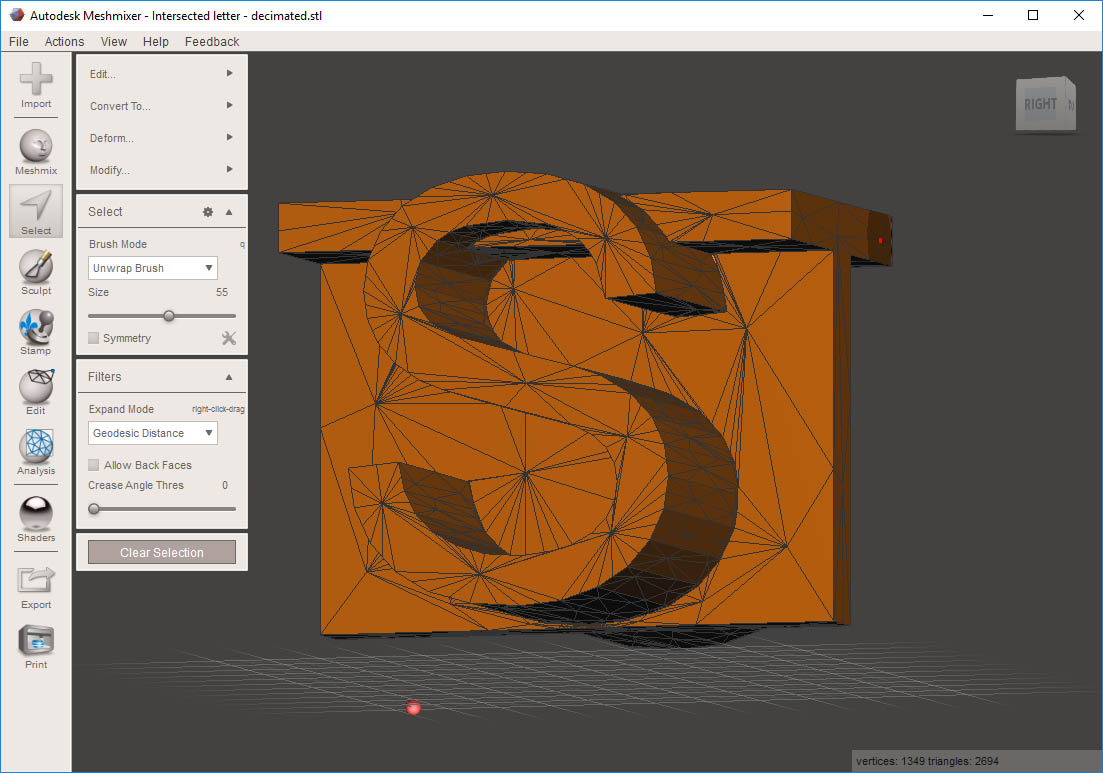
			<content type="html"><![CDATA[<p>BTW.&nbsp; The model I posted last night has 26952 triangles.&nbsp; I was able to further reduce it 90%, down to 2694 triangles.&nbsp; Beyond that the geometry starts to change.</p><p><span class="postimg"><img src="http://soliforum.com/i/?rCpliEQ.jpg" alt="http://soliforum.com/i/?rCpliEQ.jpg" /></span></p>]]></content>
			<author>
				<name><![CDATA[pirvan]]></name>
				<uri>https://www.soliforum.com/user/1357/</uri>
			</author>
			<updated>2019-09-20T15:43:37Z</updated>
			<id>https://www.soliforum.com/post/151487/#p151487</id>
		</entry>
		<entry>
			<title type="html"><![CDATA[Re: Merging Objects 2]]></title>
			<link rel="alternate" href="https://www.soliforum.com/post/151485/#p151485" />
			<content type="html"><![CDATA[<div class="quotebox"><cite>Rocketman wrote:</cite><blockquote><p>That&#039;s a lot of surfaces. I&#039;ll let you know which method works best for me.</p></blockquote></div><p>If you can do the merge within the modelling program, before you export to STL, that would be the ideal method, but with STL&#039;s the choices are limited.</p><p>BTW, the model can be further decimated to less polys, but there&#039;s a threshold beyond which the geometry starts to suffer.</p>]]></content>
			<author>
				<name><![CDATA[pirvan]]></name>
				<uri>https://www.soliforum.com/user/1357/</uri>
			</author>
			<updated>2019-09-20T13:42:29Z</updated>
			<id>https://www.soliforum.com/post/151485/#p151485</id>
		</entry>
		<entry>
			<title type="html"><![CDATA[Re: Merging Objects 2]]></title>
			<link rel="alternate" href="https://www.soliforum.com/post/151484/#p151484" />
			<content type="html"><![CDATA[<p>That&#039;s a lot of surfaces. I&#039;ll let you know which method works best for me.</p>]]></content>
			<author>
				<name><![CDATA[Rocketman]]></name>
				<uri>https://www.soliforum.com/user/783/</uri>
			</author>
			<updated>2019-09-20T13:01:45Z</updated>
			<id>https://www.soliforum.com/post/151484/#p151484</id>
		</entry>
		<entry>
			<title type="html"><![CDATA[Re: Merging Objects 2]]></title>
			<link rel="alternate" href="https://www.soliforum.com/post/151481/#p151481" />
			<content type="html"><![CDATA[<p>Very nice write up Privan</p>]]></content>
			<author>
				<name><![CDATA[Kronikabuse]]></name>
				<uri>https://www.soliforum.com/user/6797/</uri>
			</author>
			<updated>2019-09-20T09:58:12Z</updated>
			<id>https://www.soliforum.com/post/151481/#p151481</id>
		</entry>
		<entry>
			<title type="html"><![CDATA[Re: Merging Objects 2]]></title>
			<link rel="alternate" href="https://www.soliforum.com/post/151480/#p151480" />
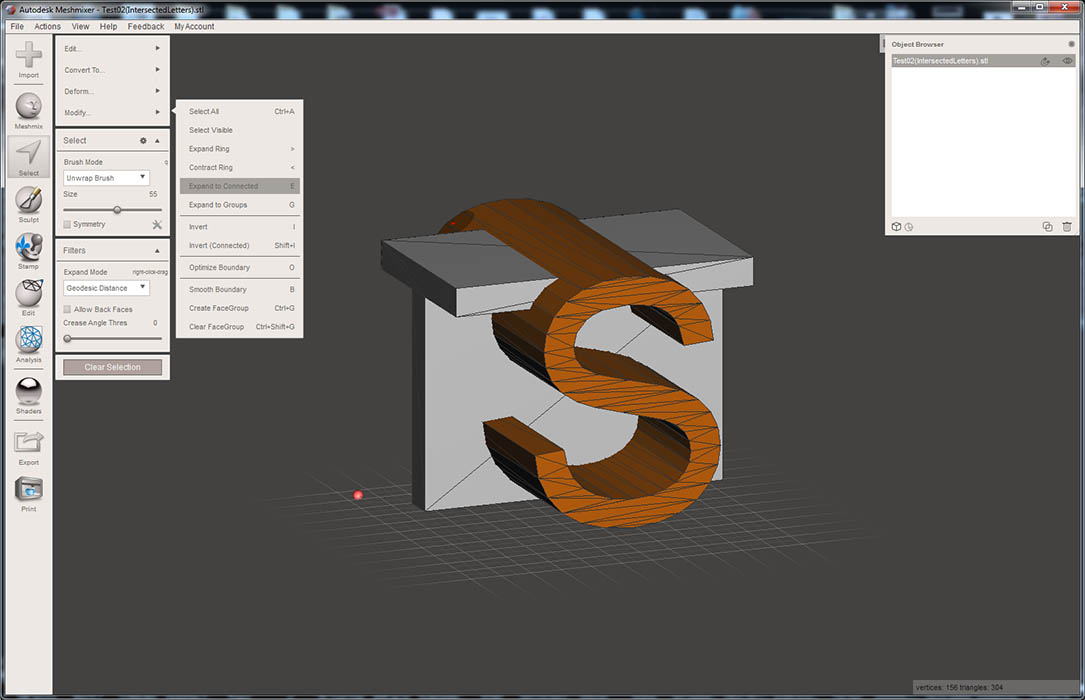
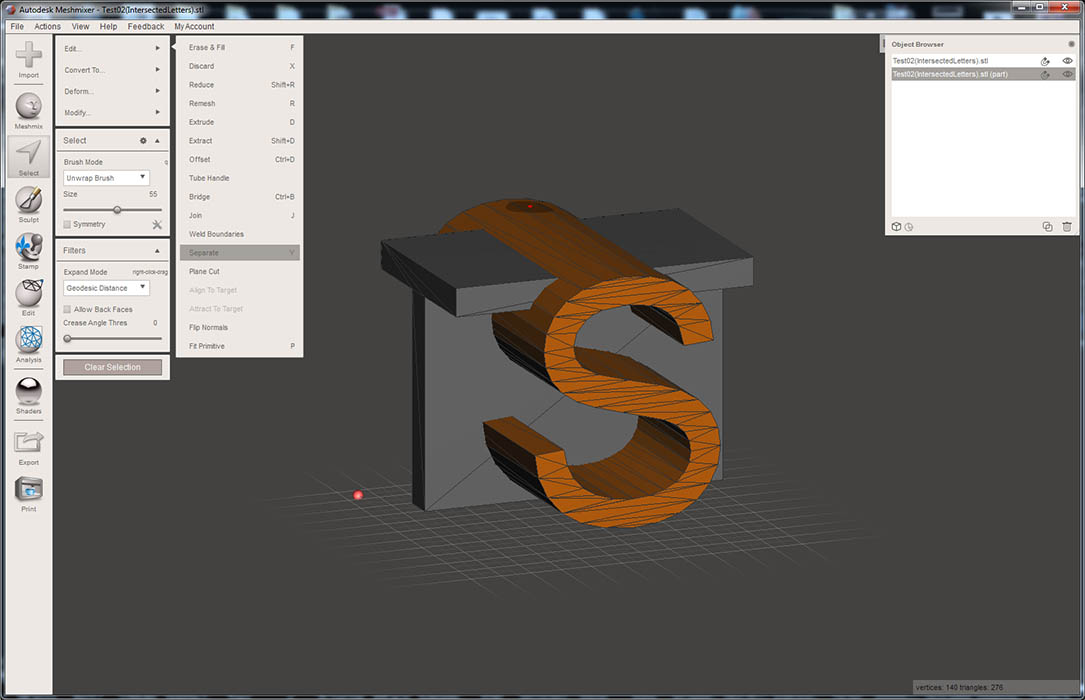
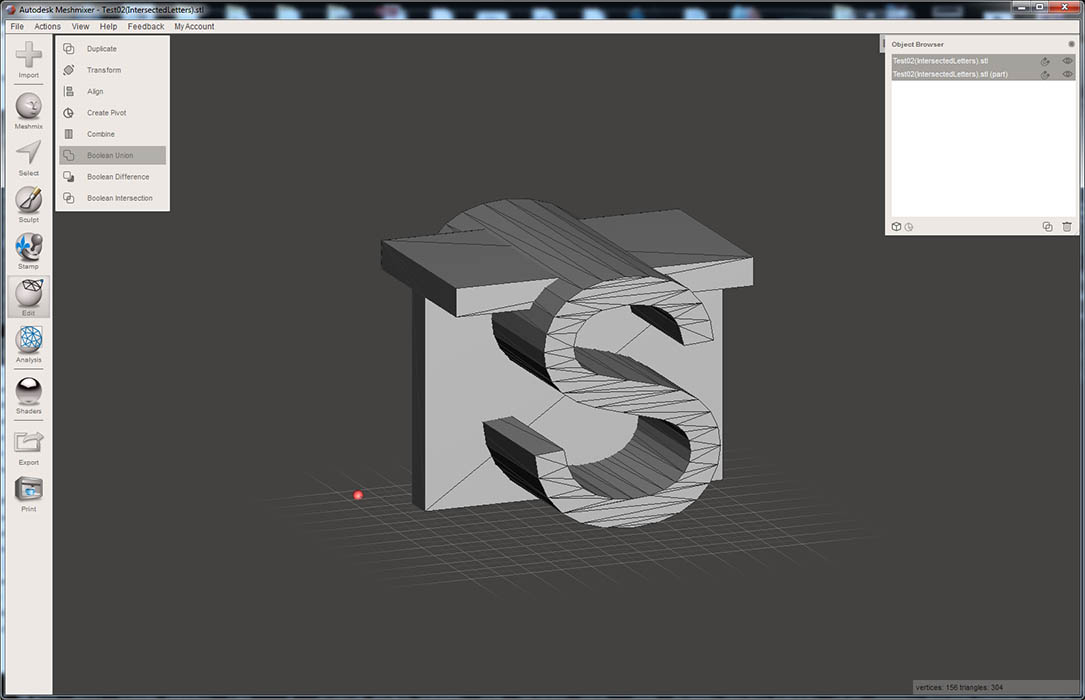
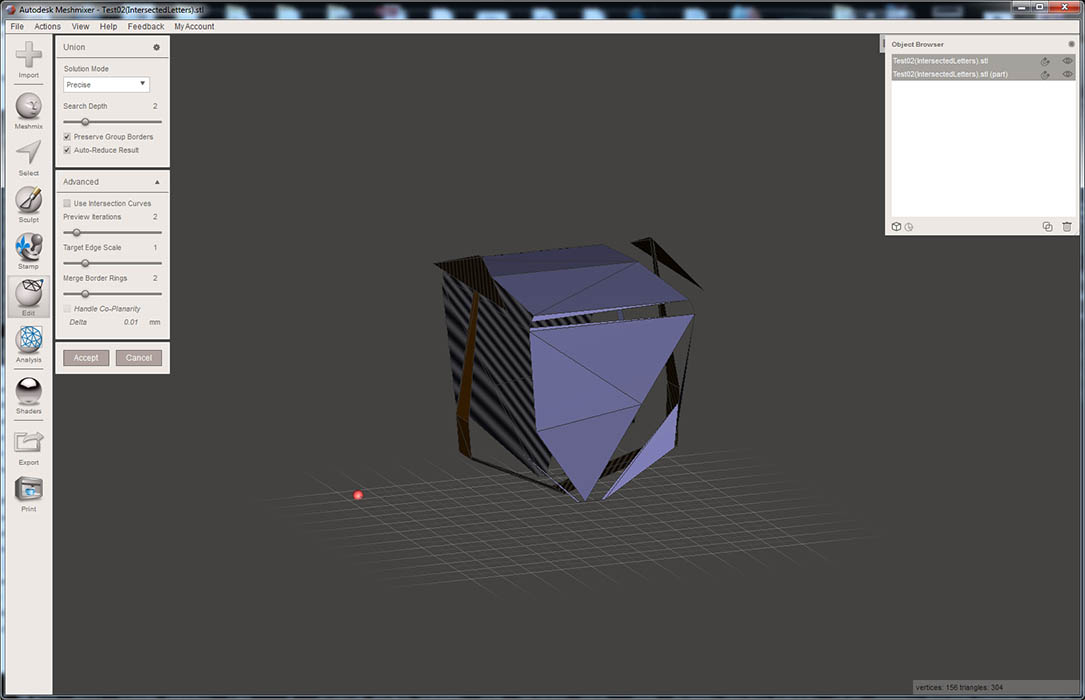
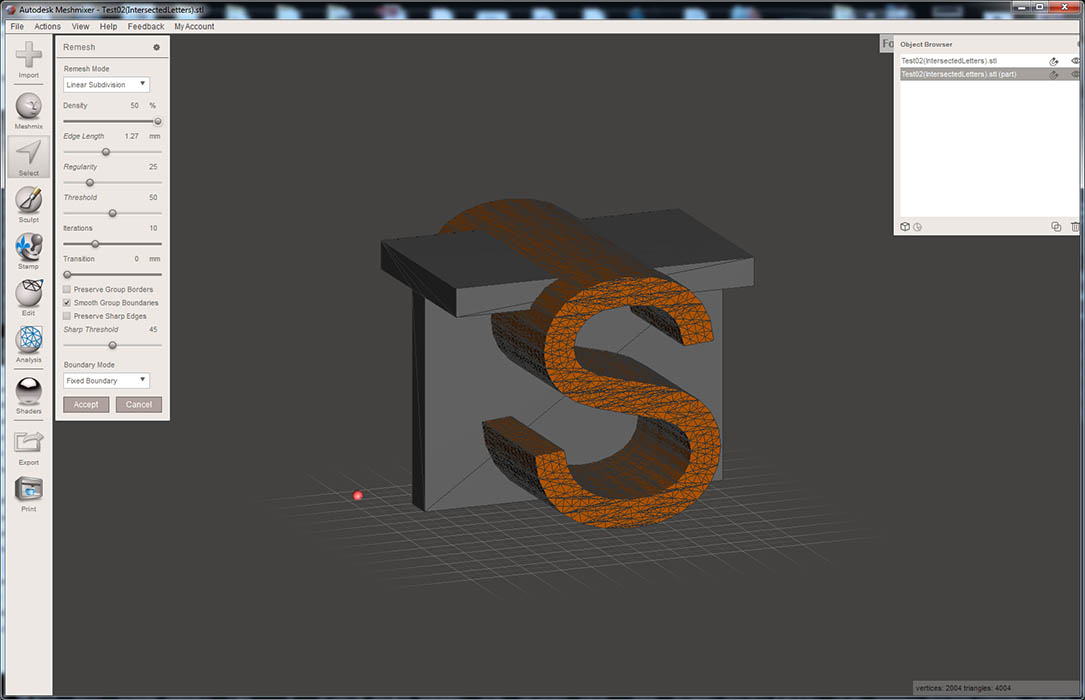
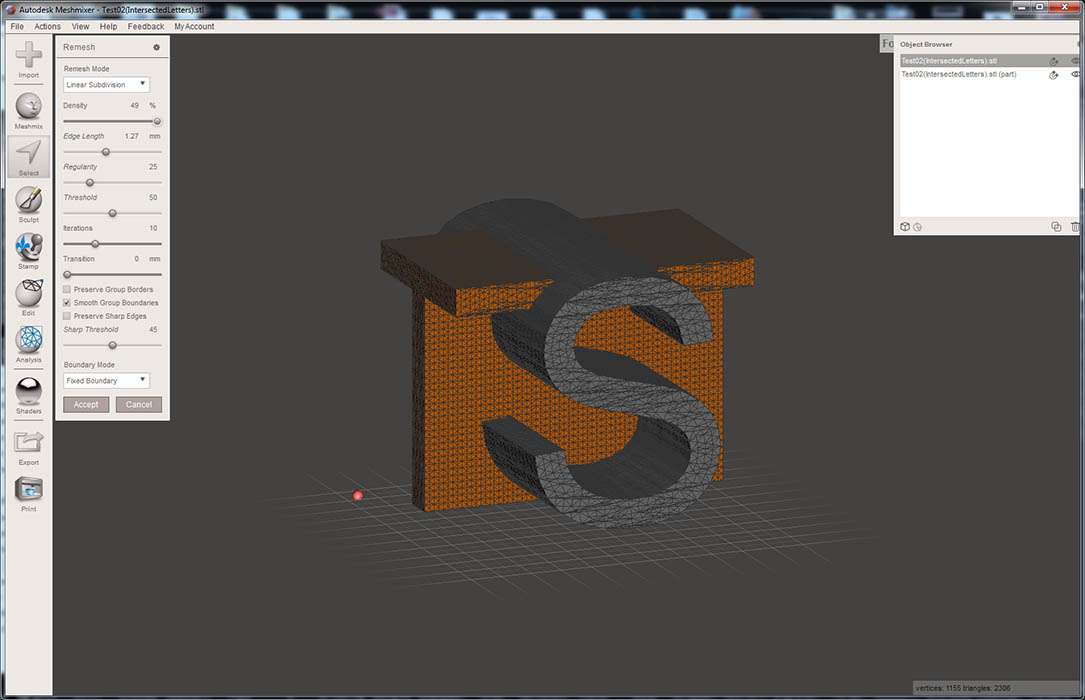
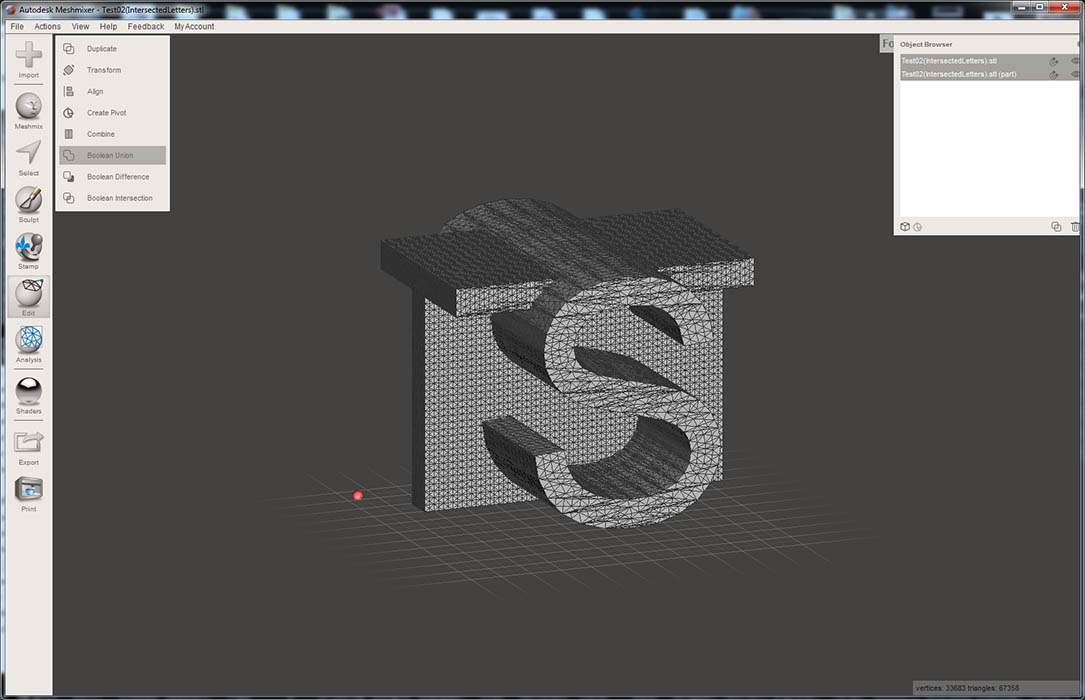
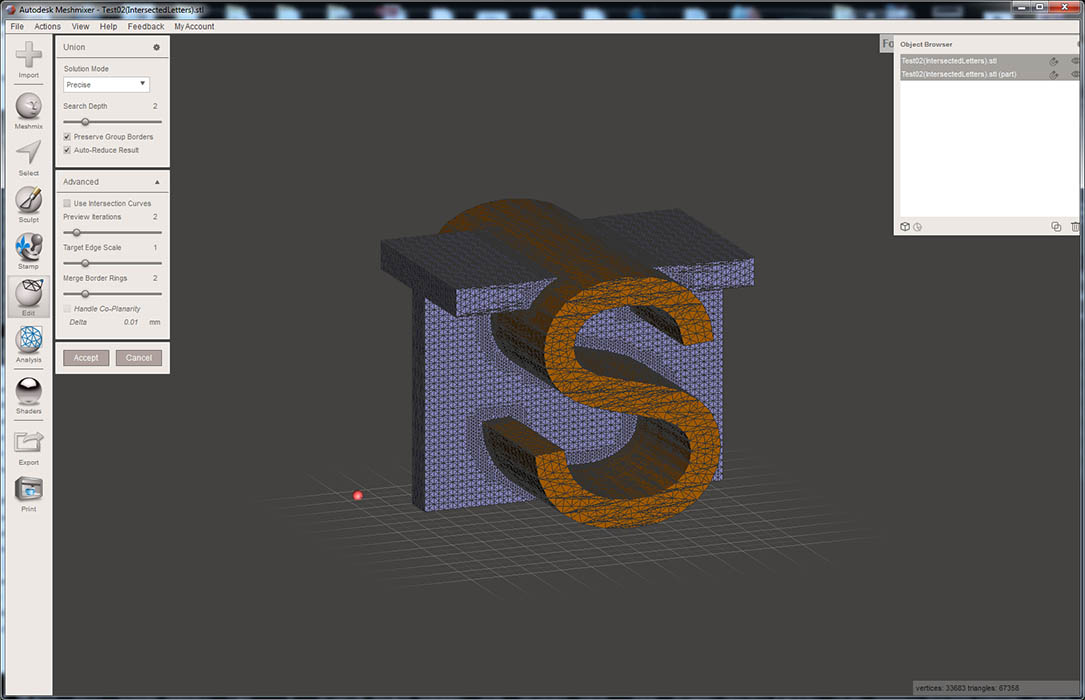
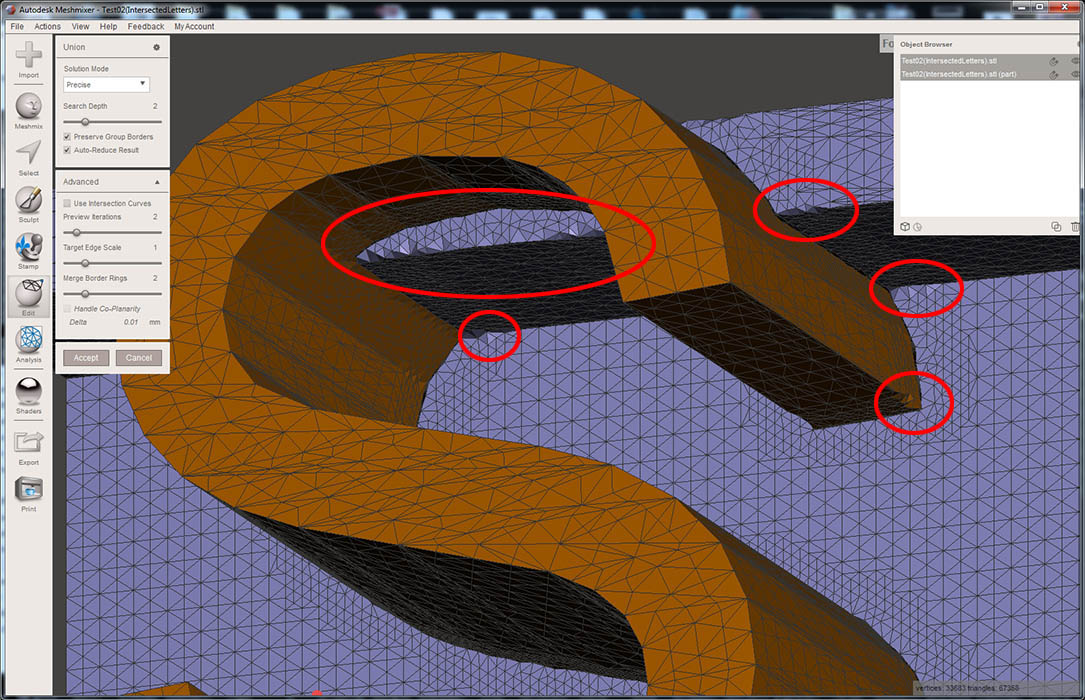
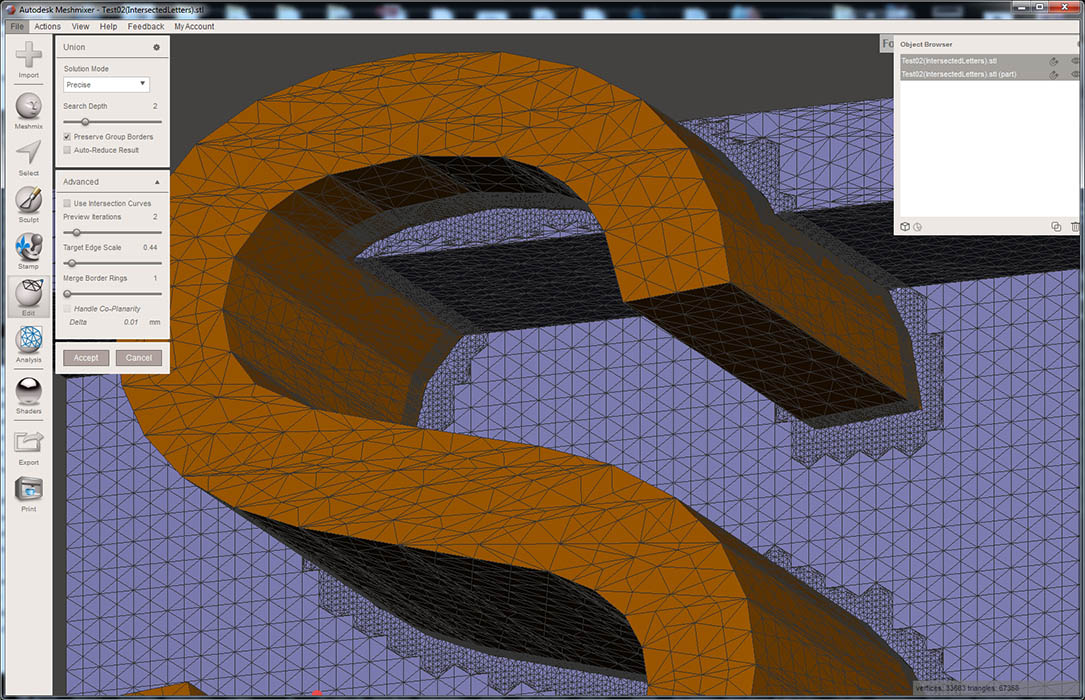
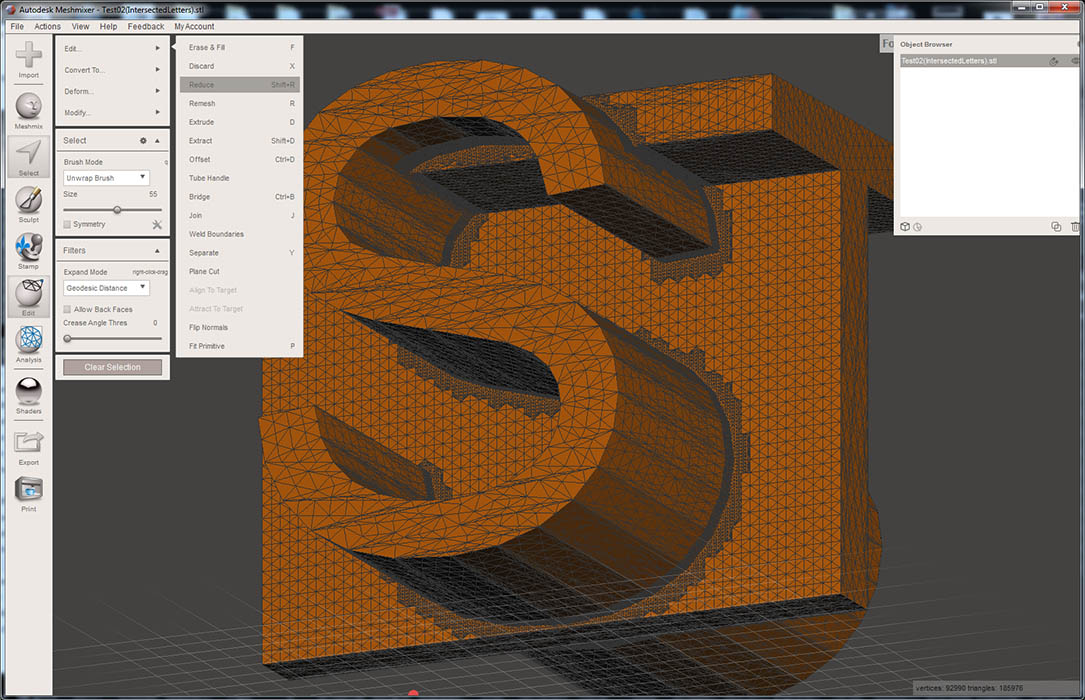
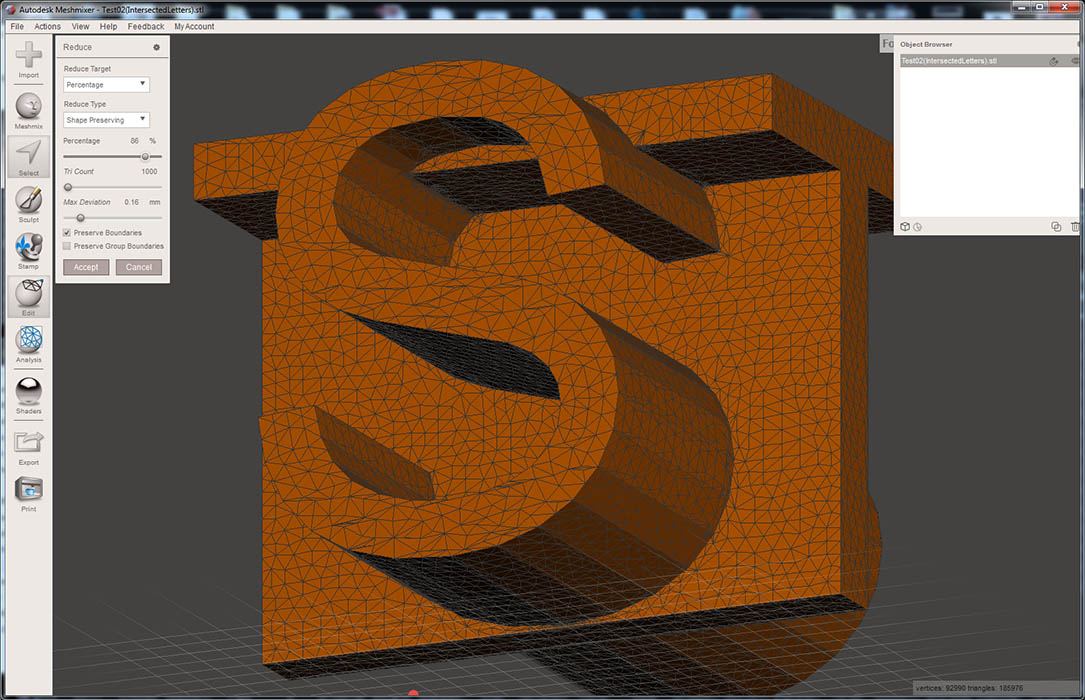
			<content type="html"><![CDATA[<p>Here is a rather lengthy tutorial on how to Boolean merge 2 objects.</p><p>In the case of your model, the 2 letters are actually intersecting, but they are not merged as one single object.&nbsp; To do this we&#039;ll use Meshmixer.&nbsp; To better see what we&#039;re doing also press the &quot;W&quot; key to turn on the wireframe.</p><p>In order to merge the 2 letters, we first need to separate them into separate bodies/objects. from the left pane, click &quot;Select&quot;, then click anywhere on the <strong>S</strong> body surface.&nbsp; This will highlight a few polygons.&nbsp; Press the &quot;E&quot; key to select all connected polys.</p><p><span class="postimg"><img src="http://soliforum.com/i/?IqbIh5b.jpg" alt="http://soliforum.com/i/?IqbIh5b.jpg" /></span></p><p>Next, with the <strong>S</strong> object still highlighted, press the &quot;Y&quot; key.&nbsp; This will separate the <strong>S</strong> object from the <strong>T</strong> object, creating 2 separate objects.</p><p><span class="postimg"><img src="http://soliforum.com/i/?tRsVA8V.jpg" alt="http://soliforum.com/i/?tRsVA8V.jpg" /></span></p><p>Next up we need to merge the 2 object.&nbsp; to do this, all we need to do is select the 2 objects in the object browser, then click Boolean Union on the left pop-up menu.</p><br /><p><span class="postimg"><img src="http://soliforum.com/i/?c5c47mb.jpg" alt="http://soliforum.com/i/?c5c47mb.jpg" /></span></p><p>The problem is that this model has far too few polygons to be able to do a successful merge.&nbsp; Here is what happens if you try to merge it at this stage.</p><p><span class="postimg"><img src="http://soliforum.com/i/?3UsYbfd.jpg" alt="http://soliforum.com/i/?3UsYbfd.jpg" /></span></p><p>So obviously that doesn&#039;t work, so we need to increase the number of polygons for each one of these objects.&nbsp; Select one of the objects (the Letter S in this case), Press &quot;CTRL-A&quot; to select all the polygons, then press &quot;R&quot; to begin the Remesh process.&nbsp; Next use the &quot;density&quot; slider to max.&nbsp; This will divide the existing poly into a few more, then click &quot;accept&quot;.&nbsp; this will need to be repeated 3-4 times to achieve a reasonable density.</p><p><span class="postimg"><img src="http://soliforum.com/i/?5ImGDLt.jpg" alt="http://soliforum.com/i/?5ImGDLt.jpg" /></span></p><p>Do the same for the &quot;T&quot; letter object.</p><p><span class="postimg"><img src="http://soliforum.com/i/?dJhMasY.jpg" alt="http://soliforum.com/i/?dJhMasY.jpg" /></span></p><p>Now we&#039;re ready to merge the 2 objects.&nbsp; once again, select both object layers in the &quot;Objects Browser&quot; windows, then click Boolean Union:</p><p><span class="postimg"><img src="http://soliforum.com/i/?L3KDr3W.jpg" alt="http://soliforum.com/i/?L3KDr3W.jpg" /></span></p><p>If Meshmixer can find a solution, the objects will turn to Orange and Purple like this:</p><p><span class="postimg"><img src="http://soliforum.com/i/?ldjyN5m.jpg" alt="http://soliforum.com/i/?ldjyN5m.jpg" /></span></p><p>At first glance that looks fine, except there are usually some artifacts that occur, which tend to distort sharp edges.&nbsp; Take a look at the close up below.</p><p><span class="postimg"><img src="http://soliforum.com/i/?BFtl9zt.jpg" alt="http://soliforum.com/i/?BFtl9zt.jpg" /></span></p><p>This can be fixed to an extent.&nbsp; To fix it, there are some controls.&nbsp; In the &quot;Boolean Union&quot; dialog box, uncheck the &quot;Auto-Reduce Result&quot;, then slide the &quot;Target edge Scale&quot; down to about 0.4-0.5, and you can also slide the &quot;Merge Border Rings&quot; slider all the way to the left.&nbsp; You will immediately notice that the number of polygons around the intersection grows dramatically, but the edges are now cleaner.&nbsp; If satisfied, click &quot;Accept&quot;.</p><p><span class="postimg"><img src="http://soliforum.com/i/?RFOw9cG.jpg" alt="http://soliforum.com/i/?RFOw9cG.jpg" /></span></p><p>So now we have a Boolean joined object.&nbsp; But there are simply too many polygons, and the model could use a reduction.&nbsp; Press &quot;CTRL-A&quot; to select all, then click Edit/Reduce, as seen in the image below.</p><p><span class="postimg"><img src="http://soliforum.com/i/?vXGRFTq.jpg" alt="http://soliforum.com/i/?vXGRFTq.jpg" /></span></p><p>From the Reduce Menu, use the &quot;Percentage&quot; slider to about 75-85%, then click Accept.</p><p><span class="postimg"><img src="http://soliforum.com/i/?RO28JEA.jpg" alt="http://soliforum.com/i/?RO28JEA.jpg" /></span></p><p>Well the only thing left to do is export the object to STL.</p><p>And here is the result of this tutorial.</p>]]></content>
			<author>
				<name><![CDATA[pirvan]]></name>
				<uri>https://www.soliforum.com/user/1357/</uri>
			</author>
			<updated>2019-09-20T05:39:28Z</updated>
			<id>https://www.soliforum.com/post/151480/#p151480</id>
		</entry>
		<entry>
			<title type="html"><![CDATA[Re: Merging Objects 2]]></title>
			<link rel="alternate" href="https://www.soliforum.com/post/151479/#p151479" />
			<content type="html"><![CDATA[<p>I may have figured it out. I selected both intersecting objects and right clicked in Sketchup and selected &quot;Intersect Faces &gt; With model.&quot; That seems to be what I was after but will need to look closer tomorrow.</p>]]></content>
			<author>
				<name><![CDATA[Rocketman]]></name>
				<uri>https://www.soliforum.com/user/783/</uri>
			</author>
			<updated>2019-09-20T02:32:50Z</updated>
			<id>https://www.soliforum.com/post/151479/#p151479</id>
		</entry>
		<entry>
			<title type="html"><![CDATA[Re: Merging Objects 2]]></title>
			<link rel="alternate" href="https://www.soliforum.com/post/151477/#p151477" />
			<content type="html"><![CDATA[<p>Ok, give it a go. Let me know what you do.</p>]]></content>
			<author>
				<name><![CDATA[Rocketman]]></name>
				<uri>https://www.soliforum.com/user/783/</uri>
			</author>
			<updated>2019-09-19T23:16:00Z</updated>
			<id>https://www.soliforum.com/post/151477/#p151477</id>
		</entry>
		<entry>
			<title type="html"><![CDATA[Re: Merging Objects 2]]></title>
			<link rel="alternate" href="https://www.soliforum.com/post/151473/#p151473" />
			<content type="html"><![CDATA[<p>It&#039;s a little more complicated that just telling you to &quot;click here&quot;.&nbsp; This is going to require a little &quot;how to&quot;.&nbsp; I&#039;ll see what I can do.</p>]]></content>
			<author>
				<name><![CDATA[pirvan]]></name>
				<uri>https://www.soliforum.com/user/1357/</uri>
			</author>
			<updated>2019-09-18T21:22:08Z</updated>
			<id>https://www.soliforum.com/post/151473/#p151473</id>
		</entry>
		<entry>
			<title type="html"><![CDATA[Re: Merging Objects 2]]></title>
			<link rel="alternate" href="https://www.soliforum.com/post/151472/#p151472" />
			<content type="html"><![CDATA[<p>lots of tutorials on youtube</p>]]></content>
			<author>
				<name><![CDATA[Kronikabuse]]></name>
				<uri>https://www.soliforum.com/user/6797/</uri>
			</author>
			<updated>2019-09-18T19:24:57Z</updated>
			<id>https://www.soliforum.com/post/151472/#p151472</id>
		</entry>
		<entry>
			<title type="html"><![CDATA[Re: Merging Objects 2]]></title>
			<link rel="alternate" href="https://www.soliforum.com/post/151471/#p151471" />
			<content type="html"><![CDATA[<div class="quotebox"><cite>pirvan wrote:</cite><blockquote><div class="quotebox"><cite>Rocketman wrote:</cite><blockquote><div class="quotebox"><cite>pirvan wrote:</cite><blockquote><p>Post the STL file, and I&#039;ll merge them for you.</p></blockquote></div><p>Using what software? I really need to do this process a few times.</p></blockquote></div><p>I use Meshmixer.</p></blockquote></div><p>I have meshmixer. What would you do?</p>]]></content>
			<author>
				<name><![CDATA[Rocketman]]></name>
				<uri>https://www.soliforum.com/user/783/</uri>
			</author>
			<updated>2019-09-18T13:23:39Z</updated>
			<id>https://www.soliforum.com/post/151471/#p151471</id>
		</entry>
</feed>