<?xml version="1.0" encoding="utf-8"?>
<feed xmlns="http://www.w3.org/2005/Atom">
	<title type="html"><![CDATA[SoliForum - 3D Printing Community — Newbie  desperate for help.....]]></title>
	<link rel="self" href="https://www.soliforum.com/feed/atom/topic/18135/" />
	<updated>2019-07-18T15:29:25Z</updated>
	<generator>PunBB</generator>
	<id>https://www.soliforum.com/topic/18135/newbie-desperate-for-help/</id>
		<entry>
			<title type="html"><![CDATA[Re: Newbie  desperate for help.....]]></title>
			<link rel="alternate" href="https://www.soliforum.com/post/150916/#p150916" />
			<content type="html"><![CDATA[<div class="quotebox"><cite>carl_m1968 wrote:</cite><blockquote><div class="quotebox"><cite>davidhk129 wrote:</cite><blockquote><p>RE : It seems the fix is getting a 2GB card made by Kingston</p><p>It has to be by<strong> Kingston </strong>?</p></blockquote></div><p>They all say a Kingston 2GB card and keeping the names at 8 characters or less.</p></blockquote></div><p>Update …….. don&#039;t have to have a Kingston sd card. Any 2GB micro sd card will do. <br />I bought a generic one for $14.99 CDN (Kinston would have been $30 +) &gt; copied a gcode file to it &gt; copied the printer&#039;s driver file to it &gt; inserted the card &gt;&nbsp; printer recognized the card and its contents. It&#039;s printing as I speak.</p>]]></content>
			<author>
				<name><![CDATA[davidhk129]]></name>
				<uri>https://www.soliforum.com/user/22195/</uri>
			</author>
			<updated>2019-07-18T15:29:25Z</updated>
			<id>https://www.soliforum.com/post/150916/#p150916</id>
		</entry>
		<entry>
			<title type="html"><![CDATA[Re: Newbie  desperate for help.....]]></title>
			<link rel="alternate" href="https://www.soliforum.com/post/150881/#p150881" />
			<content type="html"><![CDATA[<p>Thank you very much for your patience and assistance.</p><p>Have a good day, or night.</p>]]></content>
			<author>
				<name><![CDATA[davidhk129]]></name>
				<uri>https://www.soliforum.com/user/22195/</uri>
			</author>
			<updated>2019-07-14T00:34:15Z</updated>
			<id>https://www.soliforum.com/post/150881/#p150881</id>
		</entry>
		<entry>
			<title type="html"><![CDATA[Re: Newbie  desperate for help.....]]></title>
			<link rel="alternate" href="https://www.soliforum.com/post/150880/#p150880" />
			<content type="html"><![CDATA[<div class="quotebox"><cite>davidhk129 wrote:</cite><blockquote><p>RE : It seems the fix is getting a 2GB card made by Kingston</p><p>It has to be by<strong> Kingston </strong>?</p></blockquote></div><p>Try reading the links I supplied if they work.&nbsp; They tell you what I know. They all say a Kingston 2GB card and keeping the names at 8 characters or less. </p><br /><p>I don&#039;t use that printer as I prefer a kit so I know it is assembled well and a very large build area. Mine uses a controller with no limitations so I just use cards I can find. But like I said some Chinese printers have very strange hardware and firmware and can have limitations dues to this.</p><p>If you Google your problem you will see there are hundred if not thousands with similar issues and complaints.</p>]]></content>
			<author>
				<name><![CDATA[carl_m1968]]></name>
				<uri>https://www.soliforum.com/user/7731/</uri>
			</author>
			<updated>2019-07-14T00:30:33Z</updated>
			<id>https://www.soliforum.com/post/150880/#p150880</id>
		</entry>
		<entry>
			<title type="html"><![CDATA[Re: Newbie  desperate for help.....]]></title>
			<link rel="alternate" href="https://www.soliforum.com/post/150879/#p150879" />
			<content type="html"><![CDATA[<p>RE : It seems the fix is getting a 2GB card made by Kingston</p><p>It has to be by<strong> Kingston </strong>?</p>]]></content>
			<author>
				<name><![CDATA[davidhk129]]></name>
				<uri>https://www.soliforum.com/user/22195/</uri>
			</author>
			<updated>2019-07-14T00:26:07Z</updated>
			<id>https://www.soliforum.com/post/150879/#p150879</id>
		</entry>
		<entry>
			<title type="html"><![CDATA[Re: Newbie  desperate for help.....]]></title>
			<link rel="alternate" href="https://www.soliforum.com/post/150878/#p150878" />
			<content type="html"><![CDATA[<p>1.The card that came with the unit works? <br />Yes.<br />2.The extra one you have does not. <br />Correct.<br />3.So first are they the same size?<br />The one that comes with the printer is in use now. I am printing a model from the card. So I cannot tell you its size. My recollection is in MB. Not in GB. That indicates it is a small size card. <br />The one that does not work is 8GB<br />4.order the same brand and size<br />No go. The card does not bear any brand name nor size. It&#039;s blank on both sides.<br />5. a small chance the card could be bad<br />No. That&#039;s not it. This sd card is good.</p>]]></content>
			<author>
				<name><![CDATA[davidhk129]]></name>
				<uri>https://www.soliforum.com/user/22195/</uri>
			</author>
			<updated>2019-07-14T00:22:46Z</updated>
			<id>https://www.soliforum.com/post/150878/#p150878</id>
		</entry>
		<entry>
			<title type="html"><![CDATA[Re: Newbie  desperate for help.....]]></title>
			<link rel="alternate" href="https://www.soliforum.com/post/150877/#p150877" />
			<content type="html"><![CDATA[<div class="quotebox"><cite>davidhk129 wrote:</cite><blockquote><p>I did google that before I asked you.<br />I had tried that. It does not help me formatting Fat32 to Fat16.<br />It said when hitting the Format, choose Fat, which would be the same as Fat16.<br />The trouble is, I got the option to choose exFat or NTFS or Fat32.<br />That is no Fat to choose for.</p><p>That is why I came back and asked you for help.</p><p>is exFat same as Fat, same as Fat16 ?</p></blockquote></div><p>Ok then lets start with basics. The card that came with the unit works? The extra one you have does not. </p><p>So first are they the same size? Some devices like printers are limited on how big of a card they can use. </p><p>Can you load the original card in a PC and check properties to see what format it actually is? </p><p>If the card that came with the unit works then just get on ebay or amazon or aliexpress and order the same brand and size. Should come formatted as it needs to be. </p><p>ExFAt is extended FAT and used for systems like linux. </p><p>There is also a small chance the card could be bad, or even locked. But if locked it should give you a write protection warning.</p><br /><p>Did some reading and seems you are not the only one with this issue. It seems the fix is getting a 2GB card made by Kingston. Why? Who knows. I had a Chinese printer once that would only work with Windows 7 so go figure. </p><p><a href="https://www.reddit.com/r/MPSelectMiniOwners/comments/7qvn6y/sd_card_displays_no_files/">https://www.reddit.com/r/MPSelectMiniOw … _no_files/</a></p><p>Also FAT32 should&nbsp; work but it seems the printer cannot recognize a file that has a name with more that 8 characters when using FAT32. The controller in that printer apparently has a very basic processor and can only read vary basic file names and Formats.</p>]]></content>
			<author>
				<name><![CDATA[carl_m1968]]></name>
				<uri>https://www.soliforum.com/user/7731/</uri>
			</author>
			<updated>2019-07-14T00:10:28Z</updated>
			<id>https://www.soliforum.com/post/150877/#p150877</id>
		</entry>
		<entry>
			<title type="html"><![CDATA[Re: Newbie  desperate for help.....]]></title>
			<link rel="alternate" href="https://www.soliforum.com/post/150876/#p150876" />
			<content type="html"><![CDATA[<p>I did google that before I asked you.<br />I had tried that. It does not help me formatting Fat32 to Fat16.<br />It said when hitting the Format, choose Fat, which would be the same as Fat16.<br />The trouble is, I got the option to choose exFat or NTFS or Fat32.<br />That is no Fat to choose for.</p><p>That is why I came back and asked you for help.</p><p>is exFat same as Fat, same as Fat16 ?</p>]]></content>
			<author>
				<name><![CDATA[davidhk129]]></name>
				<uri>https://www.soliforum.com/user/22195/</uri>
			</author>
			<updated>2019-07-13T23:44:17Z</updated>
			<id>https://www.soliforum.com/post/150876/#p150876</id>
		</entry>
		<entry>
			<title type="html"><![CDATA[Re: Newbie  desperate for help.....]]></title>
			<link rel="alternate" href="https://www.soliforum.com/post/150874/#p150874" />
			<content type="html"><![CDATA[<p>Confused as to why you can&#039;t Google &quot;formatting tool&quot;, but here you go.</p><p><a href="https://www.sdcard.org/downloads/formatter/eula_windows/index.html">https://www.sdcard.org/downloads/format … index.html</a></p>]]></content>
			<author>
				<name><![CDATA[carl_m1968]]></name>
				<uri>https://www.soliforum.com/user/7731/</uri>
			</author>
			<updated>2019-07-13T22:51:27Z</updated>
			<id>https://www.soliforum.com/post/150874/#p150874</id>
		</entry>
		<entry>
			<title type="html"><![CDATA[Re: Newbie  desperate for help.....]]></title>
			<link rel="alternate" href="https://www.soliforum.com/post/150873/#p150873" />
			<content type="html"><![CDATA[<div class="quotebox"><cite>carl_m1968 wrote:</cite><blockquote><div class="quotebox"><cite>davidhk129 wrote:</cite><blockquote><p>Yes. Thank you.<br />I have managed to resize the models now.</p><p>There is one perplexing situation.<br />The sd card that comes with the printer is in Fat(default) format.<br />The sd card I used to store the gcode files is Fat32(Default).</p><p>Now the printer will not recognize the Fat32 card. So any gcode files in the card are unusable.<br />HOWEVER, if I copy the gcode files to the &quot;come with the printer&quot; sd card, the printer will see them.<br />Why is that ?????</p></blockquote></div><br /><p>The card needs to be FAT16 for the printer controller to be able to read. Current PC&#039;s only format in FAT32. You will need to get a formatting program where you can select the format you want the card to be or use an older system like 7 so it can be formatted in FAT16.</p></blockquote></div><br /><p>I am unable to google for a program to do that.<br />Would you mind provide me a link ?<br />Thank you.</p>]]></content>
			<author>
				<name><![CDATA[davidhk129]]></name>
				<uri>https://www.soliforum.com/user/22195/</uri>
			</author>
			<updated>2019-07-13T21:39:23Z</updated>
			<id>https://www.soliforum.com/post/150873/#p150873</id>
		</entry>
		<entry>
			<title type="html"><![CDATA[Re: Newbie  desperate for help.....]]></title>
			<link rel="alternate" href="https://www.soliforum.com/post/150871/#p150871" />
			<content type="html"><![CDATA[<p>That&#039;s something I never knew.<br />Thanks for the heads up.</p>]]></content>
			<author>
				<name><![CDATA[davidhk129]]></name>
				<uri>https://www.soliforum.com/user/22195/</uri>
			</author>
			<updated>2019-07-13T21:14:56Z</updated>
			<id>https://www.soliforum.com/post/150871/#p150871</id>
		</entry>
		<entry>
			<title type="html"><![CDATA[Re: Newbie  desperate for help.....]]></title>
			<link rel="alternate" href="https://www.soliforum.com/post/150870/#p150870" />
			<content type="html"><![CDATA[<div class="quotebox"><cite>davidhk129 wrote:</cite><blockquote><p>Yes. Thank you.<br />I have managed to resize the models now.</p><p>There is one perplexing situation.<br />The sd card that comes with the printer is in Fat(default) format.<br />The sd card I used to store the gcode files is Fat32(Default).</p><p>Now the printer will not recognize the Fat32 card. So any gcode files in the card are unusable.<br />HOWEVER, if I copy the gcode files to the &quot;come with the printer&quot; sd card, the printer will see them.<br />Why is that ?????</p></blockquote></div><br /><p>The card needs to be FAT16 for the printer controller to be able to read. Current PC&#039;s only format in FAT32. You will need to get a formatting program where you can select the format you want the card to be or use an older system like 7 so it can be formatted in FAT16.</p>]]></content>
			<author>
				<name><![CDATA[carl_m1968]]></name>
				<uri>https://www.soliforum.com/user/7731/</uri>
			</author>
			<updated>2019-07-13T20:54:04Z</updated>
			<id>https://www.soliforum.com/post/150870/#p150870</id>
		</entry>
		<entry>
			<title type="html"><![CDATA[Re: Newbie  desperate for help.....]]></title>
			<link rel="alternate" href="https://www.soliforum.com/post/150869/#p150869" />
			<content type="html"><![CDATA[<p>Yes. Thank you.<br />I have managed to resize the models now.</p><p>There is one perplexing situation.<br />The sd card that comes with the printer is in Fat(default) format.<br />The sd card I used to store the gcode files is Fat32(Default).</p><p>Now the printer will not recognize the Fat32 card. So any gcode files in the card are unusable.<br />HOWEVER, if I copy the gcode files to the &quot;come with the printer&quot; sd card, the printer will see them.<br />Why is that ?????</p>]]></content>
			<author>
				<name><![CDATA[davidhk129]]></name>
				<uri>https://www.soliforum.com/user/22195/</uri>
			</author>
			<updated>2019-07-13T20:47:37Z</updated>
			<id>https://www.soliforum.com/post/150869/#p150869</id>
		</entry>
		<entry>
			<title type="html"><![CDATA[Re: Newbie  desperate for help.....]]></title>
			<link rel="alternate" href="https://www.soliforum.com/post/150867/#p150867" />
			<content type="html"><![CDATA[<div class="quotebox"><cite>davidhk129 wrote:</cite><blockquote><p>Somehow I have managed to do the 3D printing use the gcode files.<br />Next thing I need to learn/understand is ….. How to shrink a model that is too large for Cura. I need to know how to put the object within the box.<br />Sorry for not using the correct terminology.</p></blockquote></div><br /><p>On the left the black toolbar has a scaling function. The icon is the larger object and smaller object. That will allow you to change the objects size to fit the bed.&nbsp; However if you need the object to actually remain the size you want and to fit the bed you may need to break up the object into smaller sections then rejoin them by glue or other method.</p>]]></content>
			<author>
				<name><![CDATA[carl_m1968]]></name>
				<uri>https://www.soliforum.com/user/7731/</uri>
			</author>
			<updated>2019-07-13T20:19:05Z</updated>
			<id>https://www.soliforum.com/post/150867/#p150867</id>
		</entry>
		<entry>
			<title type="html"><![CDATA[Re: Newbie  desperate for help.....]]></title>
			<link rel="alternate" href="https://www.soliforum.com/post/150866/#p150866" />
			<content type="html"><![CDATA[<p>Somehow I have managed to do the 3D printing use the gcode files.<br />Next thing I need to learn/understand is ….. How to shrink a model that is too large for Cura. I need to know how to put the object within the box.<br />Sorry for not using the correct terminology.</p>]]></content>
			<author>
				<name><![CDATA[davidhk129]]></name>
				<uri>https://www.soliforum.com/user/22195/</uri>
			</author>
			<updated>2019-07-13T17:31:16Z</updated>
			<id>https://www.soliforum.com/post/150866/#p150866</id>
		</entry>
		<entry>
			<title type="html"><![CDATA[Re: Newbie  desperate for help.....]]></title>
			<link rel="alternate" href="https://www.soliforum.com/post/150865/#p150865" />
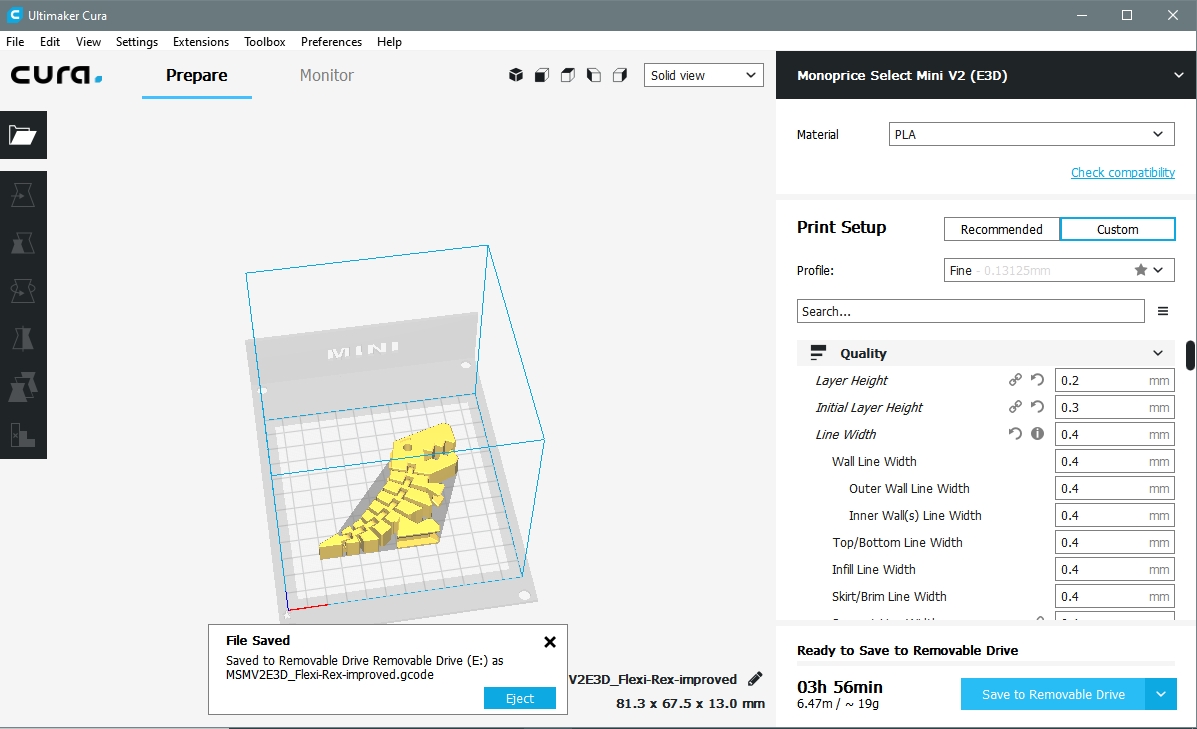
			<content type="html"><![CDATA[<p>Screenshot of File Saved using Cura 3.4.1<br />It shows that the file saved is a gcode file.</p><p><span class="postimg"><img src="http://soliforum.com/i/?cAHyhwf.jpg" alt="http://soliforum.com/i/?cAHyhwf.jpg" /></span></p>]]></content>
			<author>
				<name><![CDATA[davidhk129]]></name>
				<uri>https://www.soliforum.com/user/22195/</uri>
			</author>
			<updated>2019-07-13T06:01:06Z</updated>
			<id>https://www.soliforum.com/post/150865/#p150865</id>
		</entry>
</feed>