<?xml version="1.0" encoding="utf-8"?>
<feed xmlns="http://www.w3.org/2005/Atom">
	<title type="html"><![CDATA[SoliForum - 3D Printing Community — Manually add new printer s3d]]></title>
	<link rel="self" href="https://www.soliforum.com/feed/atom/topic/18081/" />
	<updated>2019-05-25T18:17:24Z</updated>
	<generator>PunBB</generator>
	<id>https://www.soliforum.com/topic/18081/manually-add-new-printer-s3d/</id>
		<entry>
			<title type="html"><![CDATA[Re: Manually add new printer s3d]]></title>
			<link rel="alternate" href="https://www.soliforum.com/post/150491/#p150491" />
			<content type="html"><![CDATA[<p>@ Absolute catalyst. Thank you for this. I will read it and try it out. It looks kind of complicated but maybe its not haha. For me and supports, i just dont like how much cura generates. It adds sooo much time. Meshmixer is cool, but i can only do one type of support. If meshmixer could do latice and tree, that would be cool. I still have not used s3d because there is a ton of setup to do and in cura, its all there. I like saving time because i do not need prints to be perfect. so i usually print at 10% with 0.3 at 75mm/s. Im thinking of dropping it to 0.25 so at least it is an even factor of 1mm. </p><p>@heartless, thanks for the file. I will use that as well. I did try the 20mm cube though as a way to learn how to do it first. So far, my second cube was 20.01 all the way around. I even adjusted the extruders steps/mm.. Its pretty simple, just a percent error calculation fix is all. I thought it would have been something crazy, but nope haha.</p><p>Thanks for the help guys.</p>]]></content>
			<author>
				<name><![CDATA[lt72884]]></name>
				<uri>https://www.soliforum.com/user/18962/</uri>
			</author>
			<updated>2019-05-25T18:17:24Z</updated>
			<id>https://www.soliforum.com/post/150491/#p150491</id>
		</entry>
		<entry>
			<title type="html"><![CDATA[Re: Manually add new printer s3d]]></title>
			<link rel="alternate" href="https://www.soliforum.com/post/150486/#p150486" />
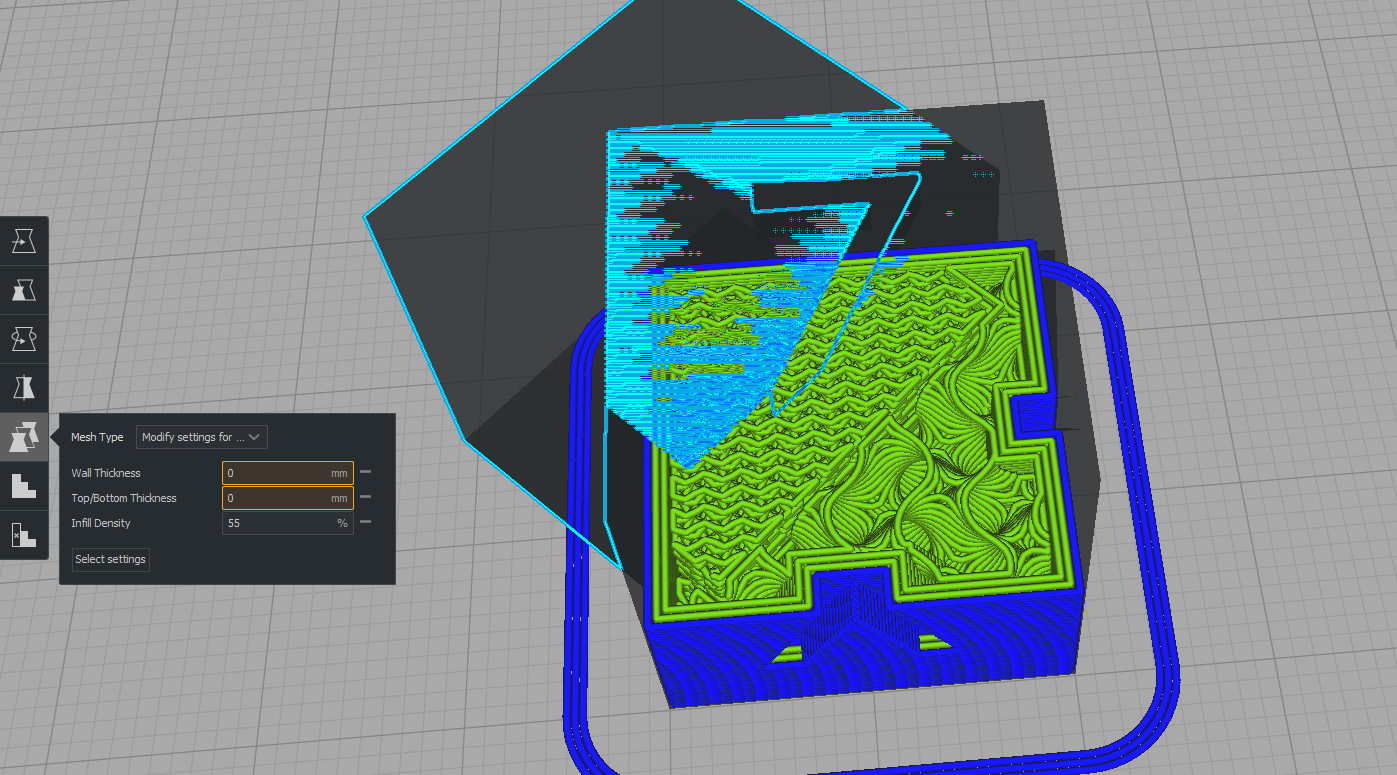
			<content type="html"><![CDATA[<p>Hey,</p><p>In addition to the great answers above, I just wanted to make a very small correction on Cura&#039;s functionality for OP or anyone else who reads this.<br />Cura <em>does</em> support multiple infill densities using similar modifiers as Slic3r, however it&#039;s a tad less straightforward.</p><p><a href="https://3dprinting.stackexchange.com/questions/6522/different-infill-in-the-same-part">It&#039;s explained here at a stackoverflow post.</a><br />They&#039;ve explained it on an older version of Cura, but it still applies to 4.0. <br />(The only difference is that you no longer need to put Cura into &quot;Custom mode&quot; as far as I can see.) </p><p>By default Cura tends to create walls within the modified infill, so you&#039;ll need to make the modifier&#039;s wall thickness&#039;s set to 0mm to mimic slic3r&#039;s modifier.</p><p>This is what it should look like once done on 4.0 using a blank 20mm cube uploaded to be a modifier: <br /><span class="postimg"><img src="http://soliforum.com/i/?ugBWJDX.png" alt="http://soliforum.com/i/?ugBWJDX.png" /></span></p><p>There&#039;s an array of multiple different settings you could use with this modifier feature as well if you click &quot;show all&quot; on the top right when selecting a setting to change. </p><p>Another thing, there&#039;s a popular plugin on the Cura marketplace called &quot;Custom Supports&quot; that&#039;ll allow you to quickly place supports anywhere similar to S3D.</p><p>Regardless, still try out S3D and see how you like it! </p><br /><p>Anyway... as a random babbling side note: <br />I also agree with S3D being over-hyped, and much prefered Cura over it the past few months despite some of Cura&#039;s flaws. I&#039;ve never had an issue with Cura&#039;s supports as well.</p><p>The final kicker for me was that I only came back into 3d printing just a few months ago after a hiatus of years, only to find out S3D hadn&#039;t been updated/improved since I last used it. (I know it has recently though.)<br />Free slicers like Sli3cr and Cura have come a long way since then...</p>]]></content>
			<author>
				<name><![CDATA[AbsoluteCatalyst]]></name>
				<uri>https://www.soliforum.com/user/21298/</uri>
			</author>
			<updated>2019-05-23T22:20:15Z</updated>
			<id>https://www.soliforum.com/post/150486/#p150486</id>
		</entry>
		<entry>
			<title type="html"><![CDATA[Re: Manually add new printer s3d]]></title>
			<link rel="alternate" href="https://www.soliforum.com/post/150480/#p150480" />
			<content type="html"><![CDATA[<p>Yup, what Carl said... and honestly, I would not really rely on a 20mm cube. You want to do something larger that will show issues more clearly.<br />I use the one I am attaching here.. you can check all axis&#039; with it.</p><p>but again, make sure you mark it before removing it so you know which way is X and which is Y</p><p>there are 5 very specific dimensions with this piece.<br />75mm square for the largest section, <br />50mm square for the smaller upper section, <br />5mm high steps x 2 (10mm overall height), <br />and the central hole should be 25mm square</p><p>generally speaking, if your dimensions are within 0.5mm you should be fine for general purpose printing.<br />If you want to be able to do technical prints that need precise dimensional tolerances, you will need to do a bit of tweaking.</p>]]></content>
			<author>
				<name><![CDATA[heartless]]></name>
				<uri>https://www.soliforum.com/user/10399/</uri>
			</author>
			<updated>2019-05-23T02:11:03Z</updated>
			<id>https://www.soliforum.com/post/150480/#p150480</id>
		</entry>
		<entry>
			<title type="html"><![CDATA[Re: Manually add new printer s3d]]></title>
			<link rel="alternate" href="https://www.soliforum.com/post/150479/#p150479" />
			<content type="html"><![CDATA[<p>That would be the steps per mm on your x y and z motors. Make sure to mark the cube before you remove it so you know which sides are x and y.</p>]]></content>
			<author>
				<name><![CDATA[carl_m1968]]></name>
				<uri>https://www.soliforum.com/user/7731/</uri>
			</author>
			<updated>2019-05-23T01:26:48Z</updated>
			<id>https://www.soliforum.com/post/150479/#p150479</id>
		</entry>
		<entry>
			<title type="html"><![CDATA[Re: Manually add new printer s3d]]></title>
			<link rel="alternate" href="https://www.soliforum.com/post/150478/#p150478" />
			<content type="html"><![CDATA[<p>Thanks for the links. I will be doing that soon since i just ran out of filiment. </p><p>What calibration is it where i print the 20x20 mm cube and use my calipers to check to see if it is really 20mm or not?</p><p>thanks</p>]]></content>
			<author>
				<name><![CDATA[lt72884]]></name>
				<uri>https://www.soliforum.com/user/18962/</uri>
			</author>
			<updated>2019-05-23T01:11:51Z</updated>
			<id>https://www.soliforum.com/post/150478/#p150478</id>
		</entry>
		<entry>
			<title type="html"><![CDATA[Re: Manually add new printer s3d]]></title>
			<link rel="alternate" href="https://www.soliforum.com/post/150477/#p150477" />
			<content type="html"><![CDATA[<p>Make sure the frame of the printer is square and tight, belts are properly tensioned, and then start calibrations.</p><p>First calibration you should do is to make sure the feed rate is correct.<br />Feed rate refers to how much filament is pulled into the hotend. If you ask it to feed 100mm, it should feed 100mm - not 98, not 103, just 100. period.</p><p>Second calibration should be on the filament itself - or what is referred to as flow rate (how much is coming out of the hotend).<br />Every single spool of filament will be different - even two spools of the exact same brand &amp; color <strong>will</strong> be different.<br />The only way to get consistent results from your printer is to calibrate your filament properly.</p><p>for a rundown on the proper way to calibrate feed and flow rates, take a look at these links:</p><p><a href="https://northwoods3d.weebly.com/blog/filament-calibration-part-1">https://northwoods3d.weebly.com/blog/fi … ion-part-1</a></p><p><a href="https://northwoods3d.weebly.com/blog/-flow-rate-how-much-plastic-is-coming-out">https://northwoods3d.weebly.com/blog/-f … coming-out</a></p>]]></content>
			<author>
				<name><![CDATA[heartless]]></name>
				<uri>https://www.soliforum.com/user/10399/</uri>
			</author>
			<updated>2019-05-23T00:09:59Z</updated>
			<id>https://www.soliforum.com/post/150477/#p150477</id>
		</entry>
		<entry>
			<title type="html"><![CDATA[Re: Manually add new printer s3d]]></title>
			<link rel="alternate" href="https://www.soliforum.com/post/150476/#p150476" />
			<content type="html"><![CDATA[<p>Cura does not have support for multiple densities of fill in a single model. Cura is very basic in many terms and they try to keep it that way. I use it on my new Anycubic 4Max as I have yet to get S3D dialed in on this new machine.</p>]]></content>
			<author>
				<name><![CDATA[carl_m1968]]></name>
				<uri>https://www.soliforum.com/user/7731/</uri>
			</author>
			<updated>2019-05-22T21:03:32Z</updated>
			<id>https://www.soliforum.com/post/150476/#p150476</id>
		</entry>
		<entry>
			<title type="html"><![CDATA[Re: Manually add new printer s3d]]></title>
			<link rel="alternate" href="https://www.soliforum.com/post/150475/#p150475" />
			<content type="html"><![CDATA[<p>Hmm, this is good to know. I will have to see if cura 4.0 has anything like this. Im going to be trying the supports from mesh mixer soon. I still need to calibrate my printer. I just have a dynamics test this week haha</p><p>Tree supports are cool, but i can see how i need to use the other types of supports as well. to bad mesh mixer cant generate other types besides tree. That would be pretty helpful:)</p><p>thanks again</p>]]></content>
			<author>
				<name><![CDATA[lt72884]]></name>
				<uri>https://www.soliforum.com/user/18962/</uri>
			</author>
			<updated>2019-05-22T20:06:54Z</updated>
			<id>https://www.soliforum.com/post/150475/#p150475</id>
		</entry>
		<entry>
			<title type="html"><![CDATA[Re: Manually add new printer s3d]]></title>
			<link rel="alternate" href="https://www.soliforum.com/post/150474/#p150474" />
			<content type="html"><![CDATA[<p>yes, it is available in Slic3r, but perhaps not in the same way as S3D.</p><p>The newest version of Slic3r (1.3.0) has what they are calling &quot;adaptive quality&quot; - it automatically changes layer heights based on the topology of the model. or, you can set up different layer heights manually, if you prefer.</p><p>different infills are done a little differently in Slic3r, however. <br />It uses &quot;modifiers&quot; to specify areas of different fill density.<br />a modifier is just a simple shape placed in the area of the model that you want to use a different fill density than the rest of the model. <br />some simple modifiers can be created within Slic3r directly, or they can be created in a modeling program and saved to import.<br />Meshmixer is a useful tool for this as well.</p>]]></content>
			<author>
				<name><![CDATA[heartless]]></name>
				<uri>https://www.soliforum.com/user/10399/</uri>
			</author>
			<updated>2019-05-22T12:04:59Z</updated>
			<id>https://www.soliforum.com/post/150474/#p150474</id>
		</entry>
		<entry>
			<title type="html"><![CDATA[Re: Manually add new printer s3d]]></title>
			<link rel="alternate" href="https://www.soliforum.com/post/150472/#p150472" />
			<content type="html"><![CDATA[<p>dang. i see what you two mean. Im still learning this printer. I have had it 2 weeks. its my first real printer. Its the CR10. i am doing a calibration run tomorrow for overhangs and bridging. </p><p>I dont have any real prints yet, just basic cubes. haha.</p><p>thanks for sharing your guys knowledge and expertise, as well as the photos. much much appreciated:)</p><p>one other thing i wanted to ask, i do know the s3d has the multiprocess options such as, from 0-10mm print with this infill and settings, then from 10-13mm these settings, etc. is that avalable in cura or slic3r?</p><p>thanks</p>]]></content>
			<author>
				<name><![CDATA[lt72884]]></name>
				<uri>https://www.soliforum.com/user/18962/</uri>
			</author>
			<updated>2019-05-22T05:16:36Z</updated>
			<id>https://www.soliforum.com/post/150472/#p150472</id>
		</entry>
		<entry>
			<title type="html"><![CDATA[Re: Manually add new printer s3d]]></title>
			<link rel="alternate" href="https://www.soliforum.com/post/150467/#p150467" />
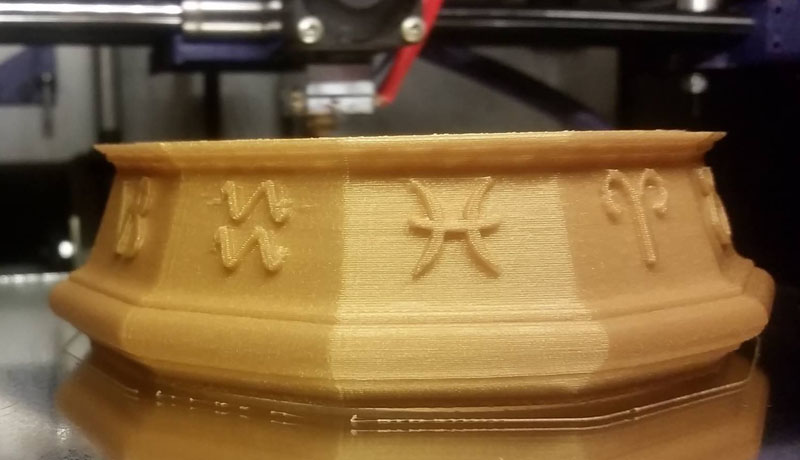
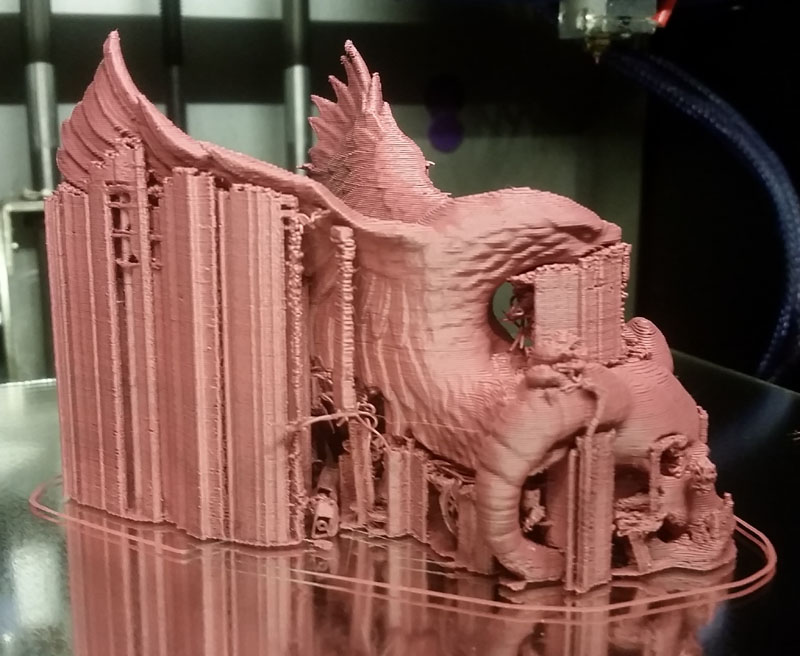
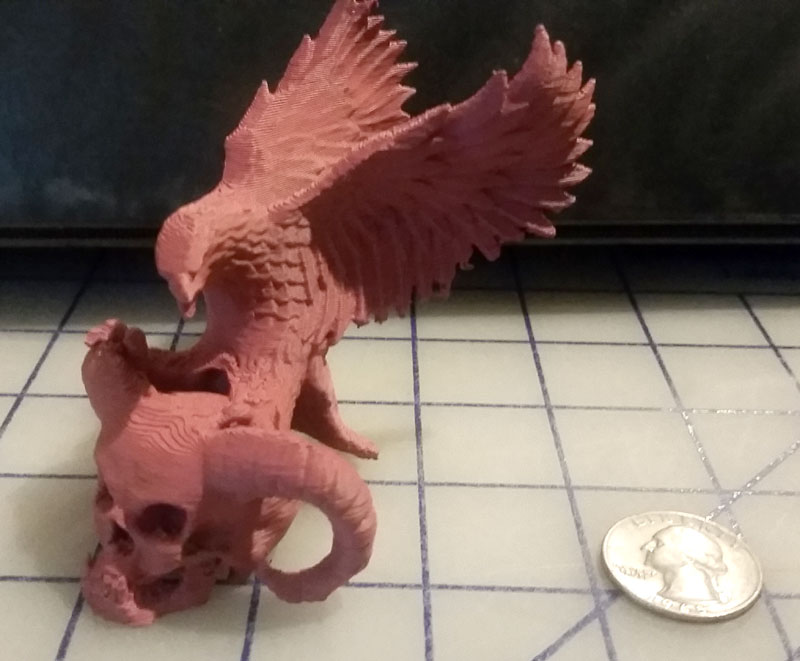
			<content type="html"><![CDATA[<p>i know a few people that would have used supports on this print due to the amount of overhang along the upper edge.<br />My printers are pretty well tuned and calibrated, and I am fairly confident of their capabilities, but I will admit, I was not 100% sure it could be pulled off with no support at all. I am proud to say it did print, and print quite nicely with no supports at all </p><p>Hatchbox Gold ABS printed at a 0.3 layer height, no part fan, just good old fashioned tuning &amp; proper calibration.</p><p><span class="postimg"><img src="http://soliforum.com/i/?U0bwKE9.jpg" alt="http://soliforum.com/i/?U0bwKE9.jpg" /></span></p><p>While this one used standard Slic3r supports..</p><p><span class="postimg"><img src="http://soliforum.com/i/?TODIC1v.jpg" alt="http://soliforum.com/i/?TODIC1v.jpg" /></span></p><p><span class="postimg"><img src="http://soliforum.com/i/?kCdr740.jpg" alt="http://soliforum.com/i/?kCdr740.jpg" /></span></p><br /><p>Some things can be taught, like the proper procedures for calibration and tuning, but some things you just have to experiment with, trial and error, figure out what works and what does not.</p>]]></content>
			<author>
				<name><![CDATA[heartless]]></name>
				<uri>https://www.soliforum.com/user/10399/</uri>
			</author>
			<updated>2019-05-21T23:38:45Z</updated>
			<id>https://www.soliforum.com/post/150467/#p150467</id>
		</entry>
		<entry>
			<title type="html"><![CDATA[Re: Manually add new printer s3d]]></title>
			<link rel="alternate" href="https://www.soliforum.com/post/150466/#p150466" />
			<content type="html"><![CDATA[<p>Like Heartless said it depends. Depends on the model and your printers capabilities. A lot depends on how well your printer can bridge. That means print a layer from one point to another over open air by pulling a strand through the air from point to point. How far your machine can do this depends on how well it is tuned. Some machines can do this over 50mm or more while other can only manage a few mm. Then of course over hangs over a certain angle are the other issues that warrant supports. Some printers can do greater overhangs as well. Much of that depends on your cooling setup. The point is you have to observe what your machine is capable of based on your tuning skills and judge where you need supports based on the model and the orientation you choose to print it at. 3D printing is not just a hobby, it&#039;s a science that requires skills and knowledge that cannot be taught but must be learned.</p>]]></content>
			<author>
				<name><![CDATA[carl_m1968]]></name>
				<uri>https://www.soliforum.com/user/7731/</uri>
			</author>
			<updated>2019-05-21T11:48:26Z</updated>
			<id>https://www.soliforum.com/post/150466/#p150466</id>
		</entry>
		<entry>
			<title type="html"><![CDATA[Re: Manually add new printer s3d]]></title>
			<link rel="alternate" href="https://www.soliforum.com/post/150465/#p150465" />
			<content type="html"><![CDATA[<p>depends on the model. every model is different.<br />some need no support at all, others need a lot of support, and still others may need only a little here and there. </p><p>it takes practice to decide what you need and when you need it. This is not something one can just tell you.</p><p>there is an analysis tool within Meshmixer that can help you decide, but it is not foolproof.</p>]]></content>
			<author>
				<name><![CDATA[heartless]]></name>
				<uri>https://www.soliforum.com/user/10399/</uri>
			</author>
			<updated>2019-05-21T11:42:25Z</updated>
			<id>https://www.soliforum.com/post/150465/#p150465</id>
		</entry>
		<entry>
			<title type="html"><![CDATA[Re: Manually add new printer s3d]]></title>
			<link rel="alternate" href="https://www.soliforum.com/post/150464/#p150464" />
			<content type="html"><![CDATA[<div class="quotebox"><cite>heartless wrote:</cite><blockquote><p>whole bunch of them out there, just search..</p><p><a href="https://www.youtube.com/results?search_query=meshmixer+support">https://www.youtube.com/results?search_ … er+support</a></p></blockquote></div><p>hmm, this might be the move right here. Is there a reason to NOT to use tree supports?</p><p>thanks</p>]]></content>
			<author>
				<name><![CDATA[lt72884]]></name>
				<uri>https://www.soliforum.com/user/18962/</uri>
			</author>
			<updated>2019-05-21T03:31:06Z</updated>
			<id>https://www.soliforum.com/post/150464/#p150464</id>
		</entry>
		<entry>
			<title type="html"><![CDATA[Re: Manually add new printer s3d]]></title>
			<link rel="alternate" href="https://www.soliforum.com/post/150463/#p150463" />
			<content type="html"><![CDATA[<p>whole bunch of them out there, just search..</p><p><a href="https://www.youtube.com/results?search_query=meshmixer+support">https://www.youtube.com/results?search_ … er+support</a></p>]]></content>
			<author>
				<name><![CDATA[heartless]]></name>
				<uri>https://www.soliforum.com/user/10399/</uri>
			</author>
			<updated>2019-05-21T03:18:22Z</updated>
			<id>https://www.soliforum.com/post/150463/#p150463</id>
		</entry>
</feed>