<?xml version="1.0" encoding="utf-8"?>
<feed xmlns="http://www.w3.org/2005/Atom">
	<title type="html"><![CDATA[SoliForum - 3D Printing Community — Repetier firmware on Davinci 1.0 Pro]]></title>
	<link rel="self" href="https://www.soliforum.com/feed/atom/topic/17828/" />
	<updated>2019-01-06T07:43:11Z</updated>
	<generator>PunBB</generator>
	<id>https://www.soliforum.com/topic/17828/repetier-firmware-on-davinci-10-pro/</id>
		<entry>
			<title type="html"><![CDATA[Re: Repetier firmware on Davinci 1.0 Pro]]></title>
			<link rel="alternate" href="https://www.soliforum.com/post/148364/#p148364" />
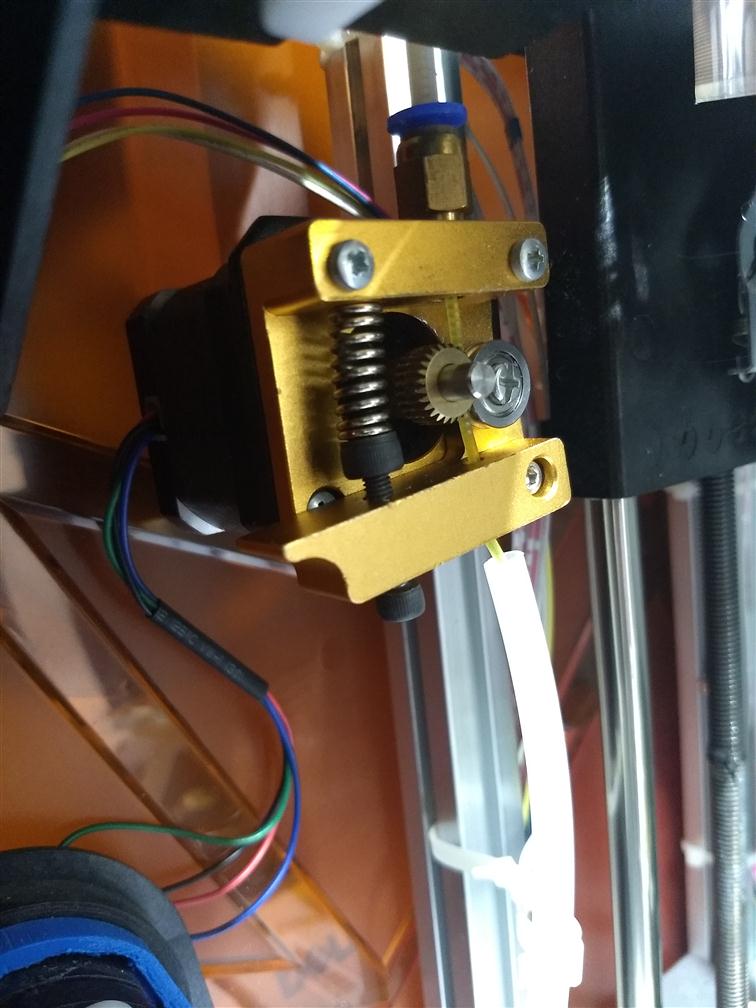
			<content type="html"><![CDATA[<p>I received my MK8 extruder motor the other day and replaced the stock one on the Davinci Pro 1.0.&nbsp; It was pretty much a direct fit with the exception of not being able to use one of the small plastic covers which was really no big deal.&nbsp; It prints much better now and there’s virtually no popping sounds now as the new idler seems to hold much more pressure on the filament reducing the chance of slippage or filament grinding.&nbsp; I highly recommend the upgrade for those thinking about it.&nbsp; The cost was very reasonable from Amazon as well.&nbsp; Thanks for all the help.</p>]]></content>
			<author>
				<name><![CDATA[volvodr66]]></name>
				<uri>https://www.soliforum.com/user/20377/</uri>
			</author>
			<updated>2019-01-06T07:43:11Z</updated>
			<id>https://www.soliforum.com/post/148364/#p148364</id>
		</entry>
		<entry>
			<title type="html"><![CDATA[Re: Repetier firmware on Davinci 1.0 Pro]]></title>
			<link rel="alternate" href="https://www.soliforum.com/post/148296/#p148296" />
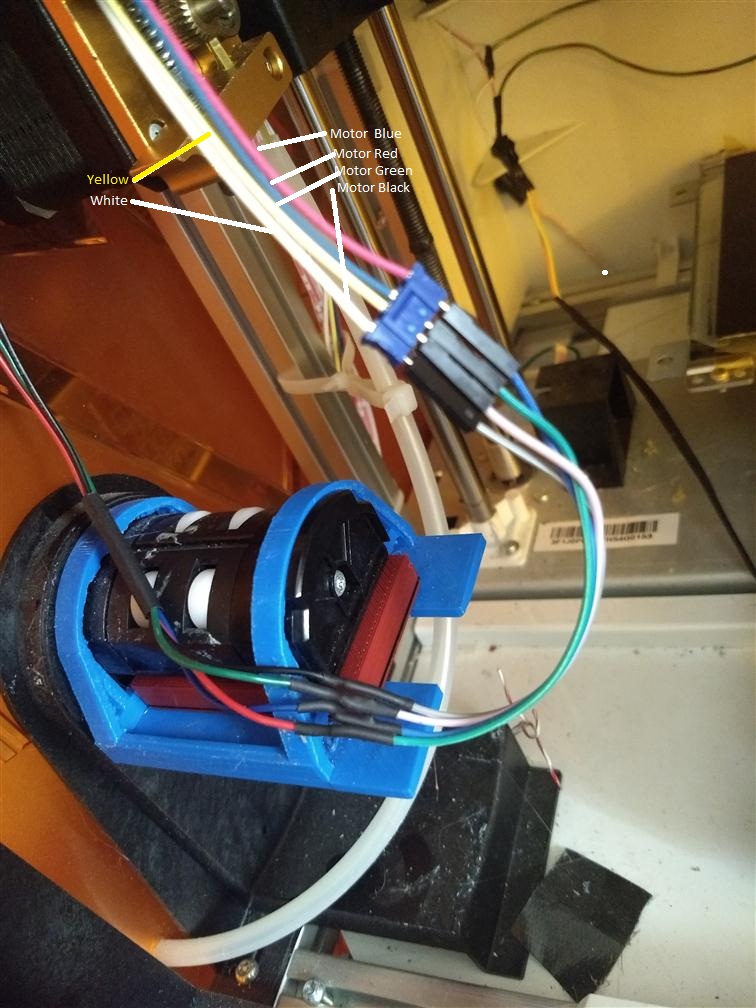
			<content type="html"><![CDATA[<p>Mot sure if your printer has the same colors on the wiring or not but here is how I wired mine. The wires I have indicators on are the ones that go to the motherboard not the motor.</p><br /><br /><br /><p><span class="postimg"><img src="http://soliforum.com/i/?K9Qp1Tu.jpg" alt="http://soliforum.com/i/?K9Qp1Tu.jpg" /></span></p>]]></content>
			<author>
				<name><![CDATA[Bozotclown1970]]></name>
				<uri>https://www.soliforum.com/user/13167/</uri>
			</author>
			<updated>2019-01-02T20:56:32Z</updated>
			<id>https://www.soliforum.com/post/148296/#p148296</id>
		</entry>
		<entry>
			<title type="html"><![CDATA[Re: Repetier firmware on Davinci 1.0 Pro]]></title>
			<link rel="alternate" href="https://www.soliforum.com/post/148295/#p148295" />
			<content type="html"><![CDATA[<p>That&#039;s what I needed to know.&nbsp; I have an MK8 coming in about an hour that I&#039;m going to try and Install.&nbsp; I&#039;ll let you know how it turns out.&nbsp; Thanks for the quick reply.</p>]]></content>
			<author>
				<name><![CDATA[volvodr66]]></name>
				<uri>https://www.soliforum.com/user/20377/</uri>
			</author>
			<updated>2019-01-02T19:41:18Z</updated>
			<id>https://www.soliforum.com/post/148295/#p148295</id>
		</entry>
		<entry>
			<title type="html"><![CDATA[Re: Repetier firmware on Davinci 1.0 Pro]]></title>
			<link rel="alternate" href="https://www.soliforum.com/post/148294/#p148294" />
			<content type="html"><![CDATA[<div class="quotebox"><cite>Bozotclown1970 wrote:</cite><blockquote><p>Ok, here is a picture of my original filament stepper. If you notice, the wires go to the housing/filament detector and no where else. When I pulled the unit out of my printer there were no wires left. I plugged the 4 stepper motor wires into the new stepper motor. I make sure I always have enough filament as to not run out.</p><p>PS. I just found the four wires you were referring to. I just tied them back inside the printer so they would not bind up on anything.</p><br /><br /><br /><p><span class="postimg"><img src="http://soliforum.com/i/?rvJsR60.jpg" alt="http://soliforum.com/i/?rvJsR60.jpg" /></span></p></blockquote></div><br /><p>From there they go through the ribbon cable to mainboard. To my knowledge based on experience with the 1.0 the little wheel would be used for stall or jam detection but even though it is wired it does not seem to be incorporated into the firmware.</p>]]></content>
			<author>
				<name><![CDATA[carl_m1968]]></name>
				<uri>https://www.soliforum.com/user/7731/</uri>
			</author>
			<updated>2019-01-02T19:20:14Z</updated>
			<id>https://www.soliforum.com/post/148294/#p148294</id>
		</entry>
		<entry>
			<title type="html"><![CDATA[Re: Repetier firmware on Davinci 1.0 Pro]]></title>
			<link rel="alternate" href="https://www.soliforum.com/post/148292/#p148292" />
			<content type="html"><![CDATA[<p>Ok, here is a picture of my original filament stepper. If you notice, the wires go to the housing/filament detector and no where else. When I pulled the unit out of my printer there were no wires left. I plugged the 4 stepper motor wires into the new stepper motor. I make sure I always have enough filament as to not run out.</p><p>PS. I just found the four wires you were referring to. I just tied them back inside the printer so they would not bind up on anything.</p><br /><br /><br /><p><span class="postimg"><img src="http://soliforum.com/i/?rvJsR60.jpg" alt="http://soliforum.com/i/?rvJsR60.jpg" /></span></p>]]></content>
			<author>
				<name><![CDATA[Bozotclown1970]]></name>
				<uri>https://www.soliforum.com/user/13167/</uri>
			</author>
			<updated>2019-01-02T18:47:30Z</updated>
			<id>https://www.soliforum.com/post/148292/#p148292</id>
		</entry>
		<entry>
			<title type="html"><![CDATA[Re: Repetier firmware on Davinci 1.0 Pro]]></title>
			<link rel="alternate" href="https://www.soliforum.com/post/148291/#p148291" />
			<content type="html"><![CDATA[<p>What did you do with the two sensors and wires?</p>]]></content>
			<author>
				<name><![CDATA[volvodr66]]></name>
				<uri>https://www.soliforum.com/user/20377/</uri>
			</author>
			<updated>2019-01-02T17:35:13Z</updated>
			<id>https://www.soliforum.com/post/148291/#p148291</id>
		</entry>
		<entry>
			<title type="html"><![CDATA[Re: Repetier firmware on Davinci 1.0 Pro]]></title>
			<link rel="alternate" href="https://www.soliforum.com/post/148290/#p148290" />
			<content type="html"><![CDATA[<p>I am not sure about your printer, but I have a Junior 1.0 and I replaced the feeder on it without any issues. This made a huge difference in the noise coming from my printer. The JR has the same funky setup as yours.</p><p><span class="postimg"><img src="http://soliforum.com/i/?oSrPoOl.jpg" alt="http://soliforum.com/i/?oSrPoOl.jpg" /></span></p>]]></content>
			<author>
				<name><![CDATA[Bozotclown1970]]></name>
				<uri>https://www.soliforum.com/user/13167/</uri>
			</author>
			<updated>2019-01-02T17:11:01Z</updated>
			<id>https://www.soliforum.com/post/148290/#p148290</id>
		</entry>
		<entry>
			<title type="html"><![CDATA[Re: Repetier firmware on Davinci 1.0 Pro]]></title>
			<link rel="alternate" href="https://www.soliforum.com/post/148280/#p148280" />
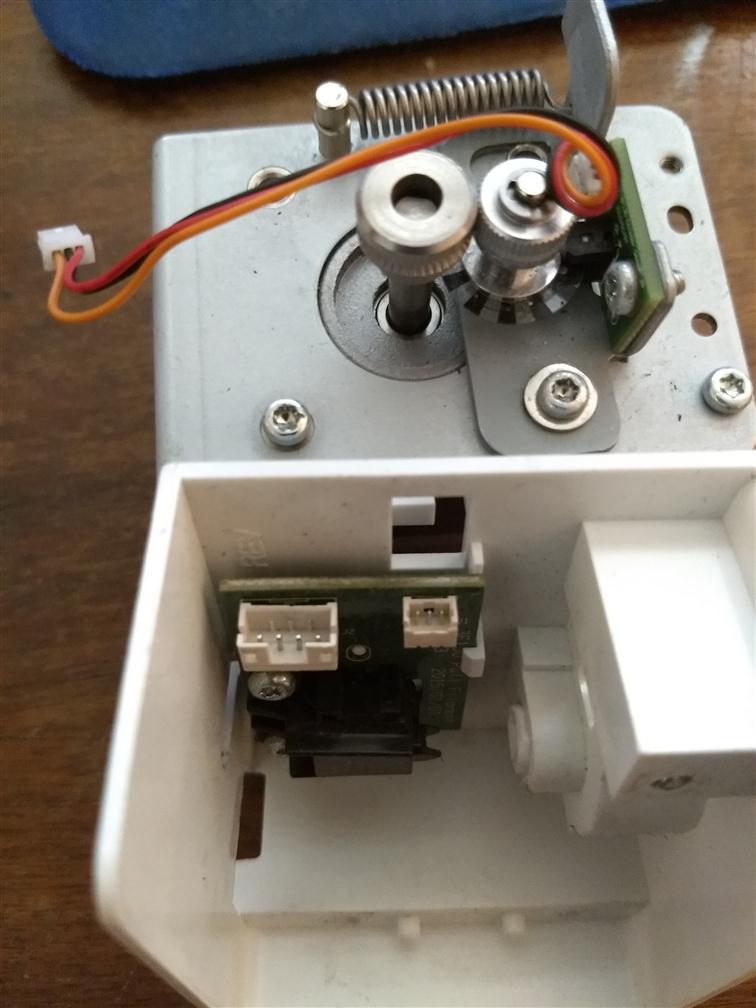
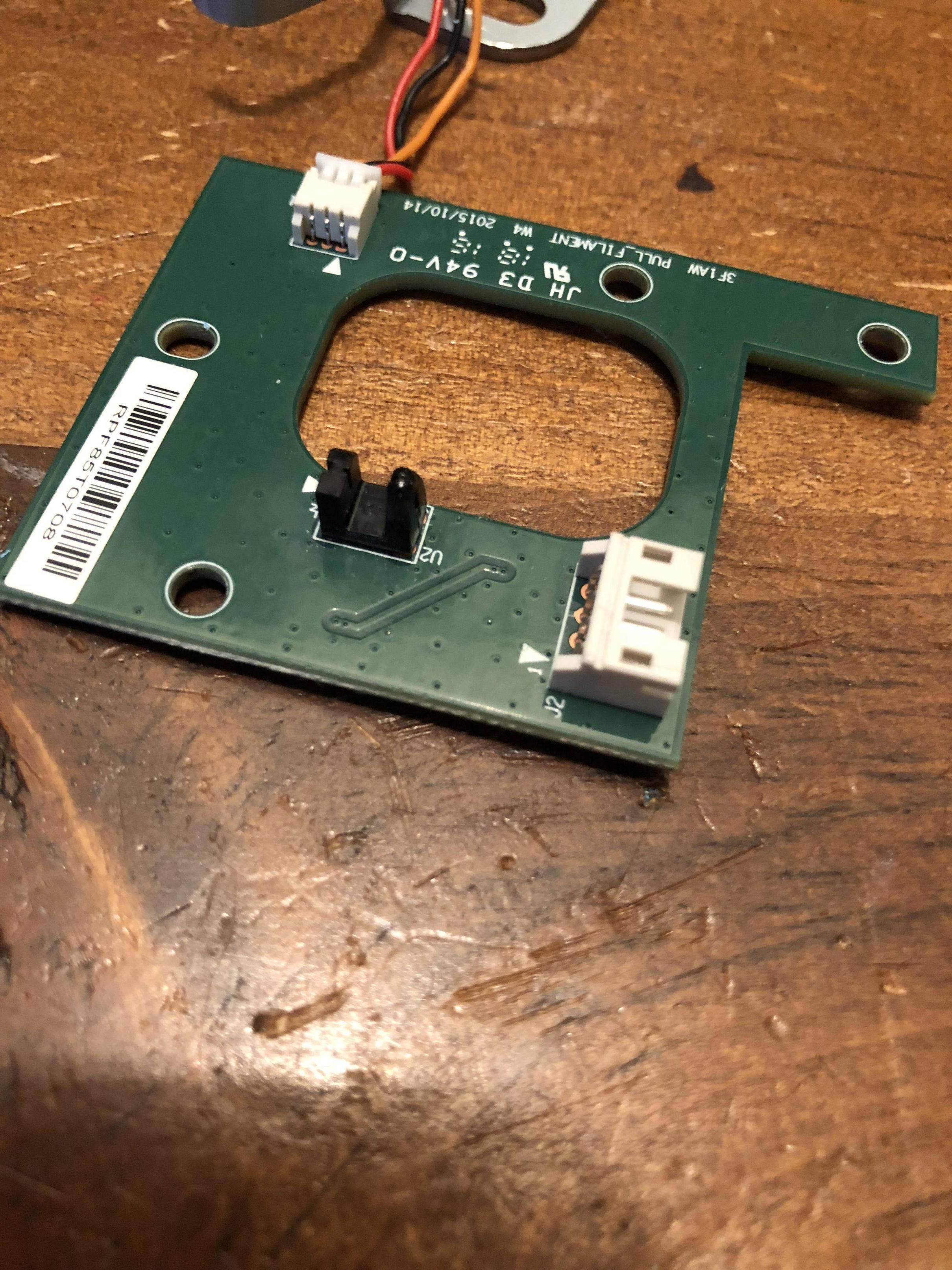
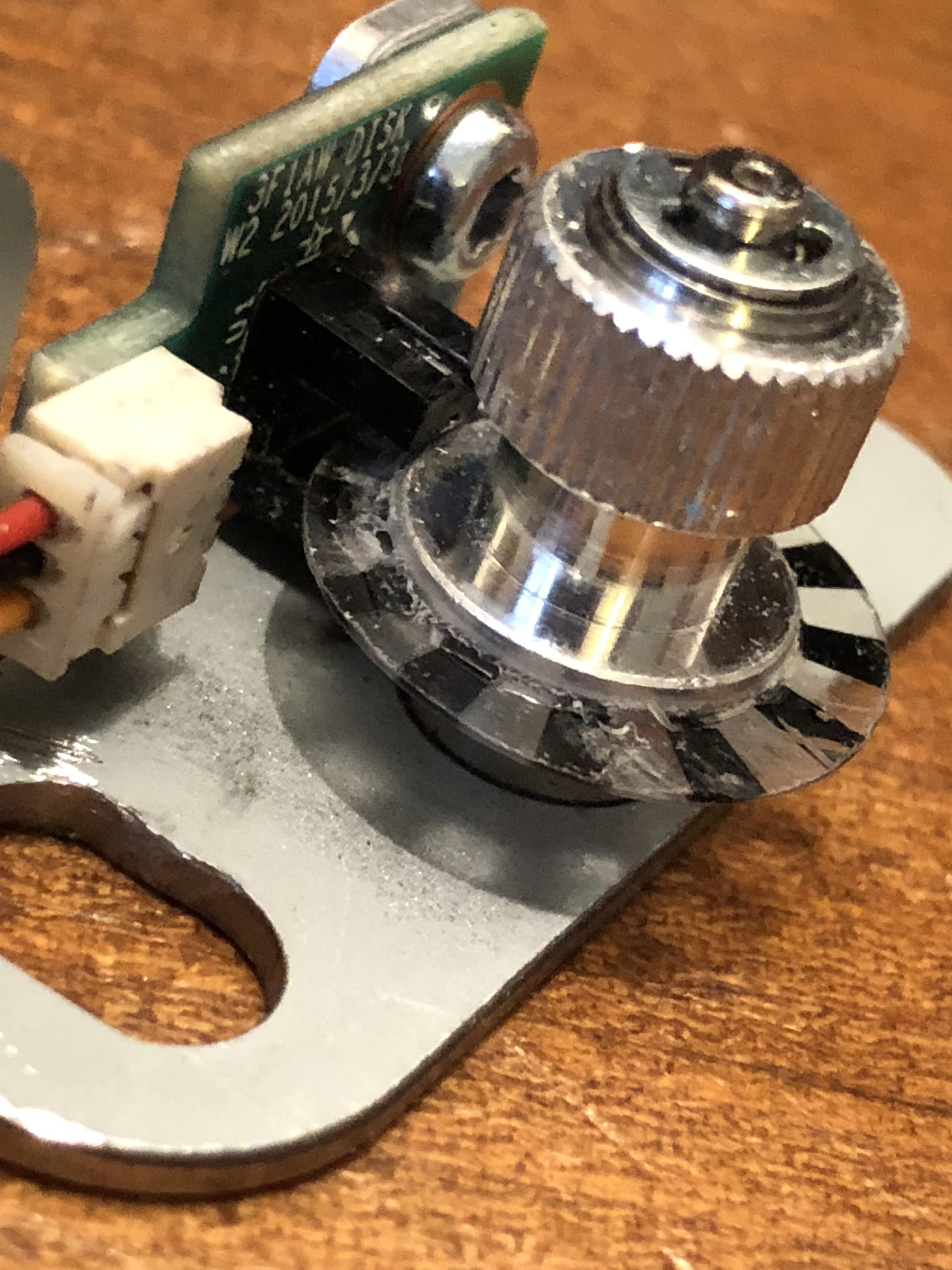
			<content type="html"><![CDATA[<p>I would like to replace my extruder gears with something metal as mentioned previously.&nbsp; The main issue is on my extruder motor idler that is worn out there are two sensors I have to bypass.&nbsp; The one in the first picture is easy as you stated, all I have to do is block the optical sensor with something.&nbsp; The one in the second picture may prove to be more difficult though because it appears the circuit needs to see the little wheel with the white and black marks passing through the sensor as the idler gear turns.&nbsp; In other words, the circuit needs feedback while the idler turns so I don’t think I can just block that optical sensor with something.&nbsp; I would need to find a way to incorporate that mechanism into the new assembly.</p><p>Any ideas?</p><p>Thanks for the help.&nbsp; I really appreciate it.<br /><span class="postimg"><img src="http://soliforum.com/i/?TwWK4f2.jpg" alt="http://soliforum.com/i/?TwWK4f2.jpg" /></span><span class="postimg"><img src="http://soliforum.com/i/?b6qxHkj.jpg" alt="http://soliforum.com/i/?b6qxHkj.jpg" /></span></p>]]></content>
			<author>
				<name><![CDATA[volvodr66]]></name>
				<uri>https://www.soliforum.com/user/20377/</uri>
			</author>
			<updated>2019-01-02T15:16:47Z</updated>
			<id>https://www.soliforum.com/post/148280/#p148280</id>
		</entry>
		<entry>
			<title type="html"><![CDATA[Re: Repetier firmware on Davinci 1.0 Pro]]></title>
			<link rel="alternate" href="https://www.soliforum.com/post/148279/#p148279" />
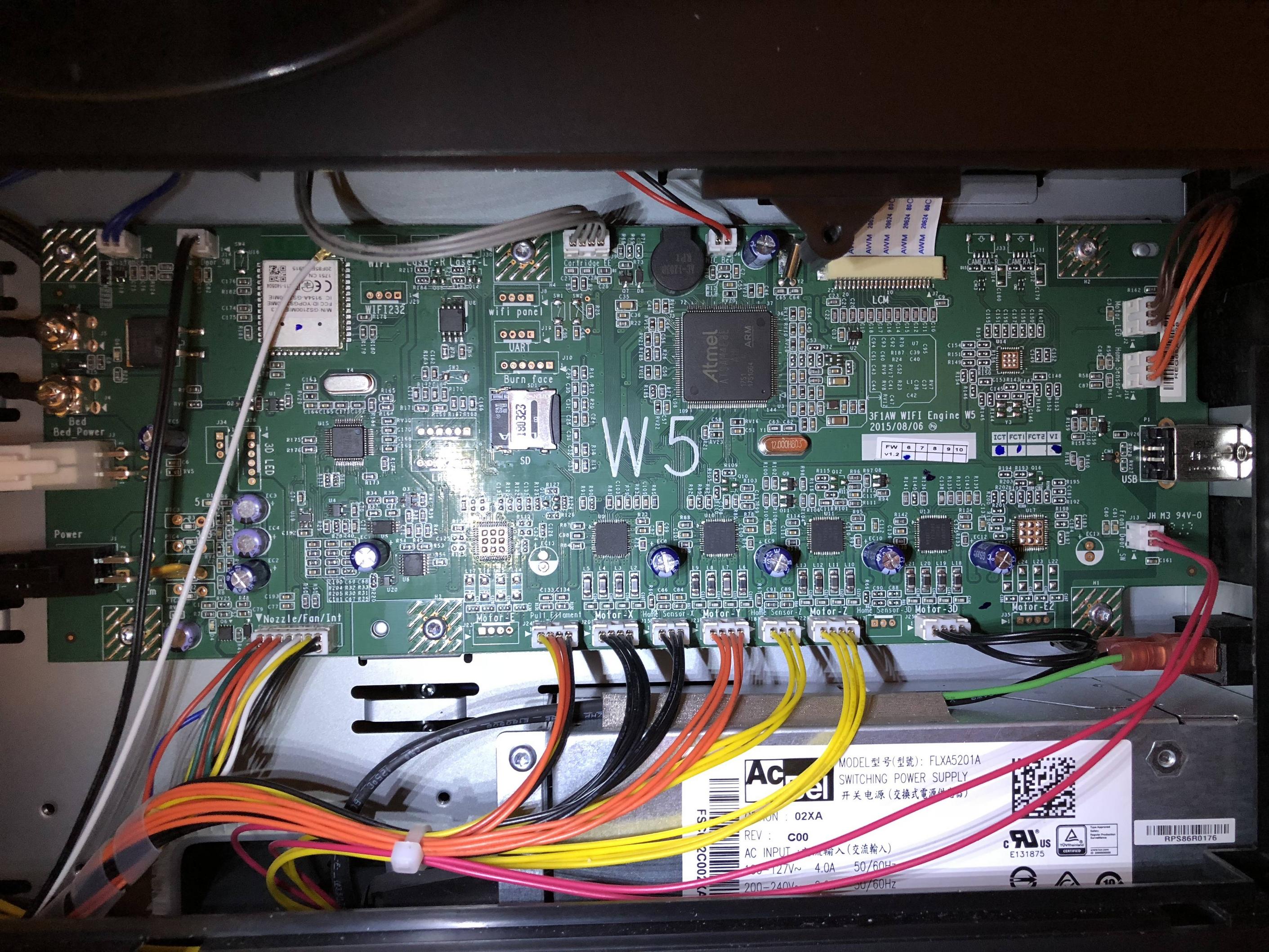
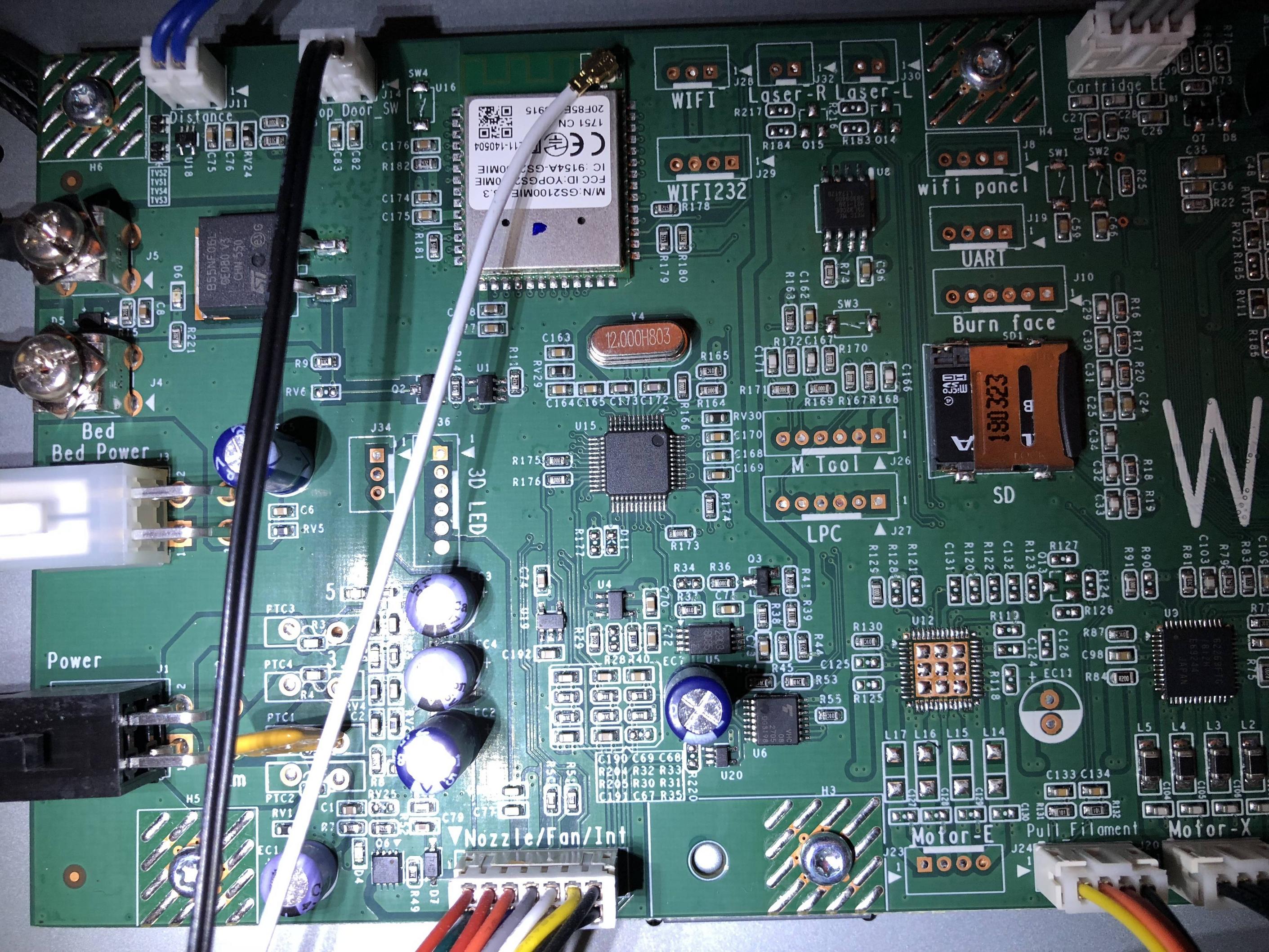
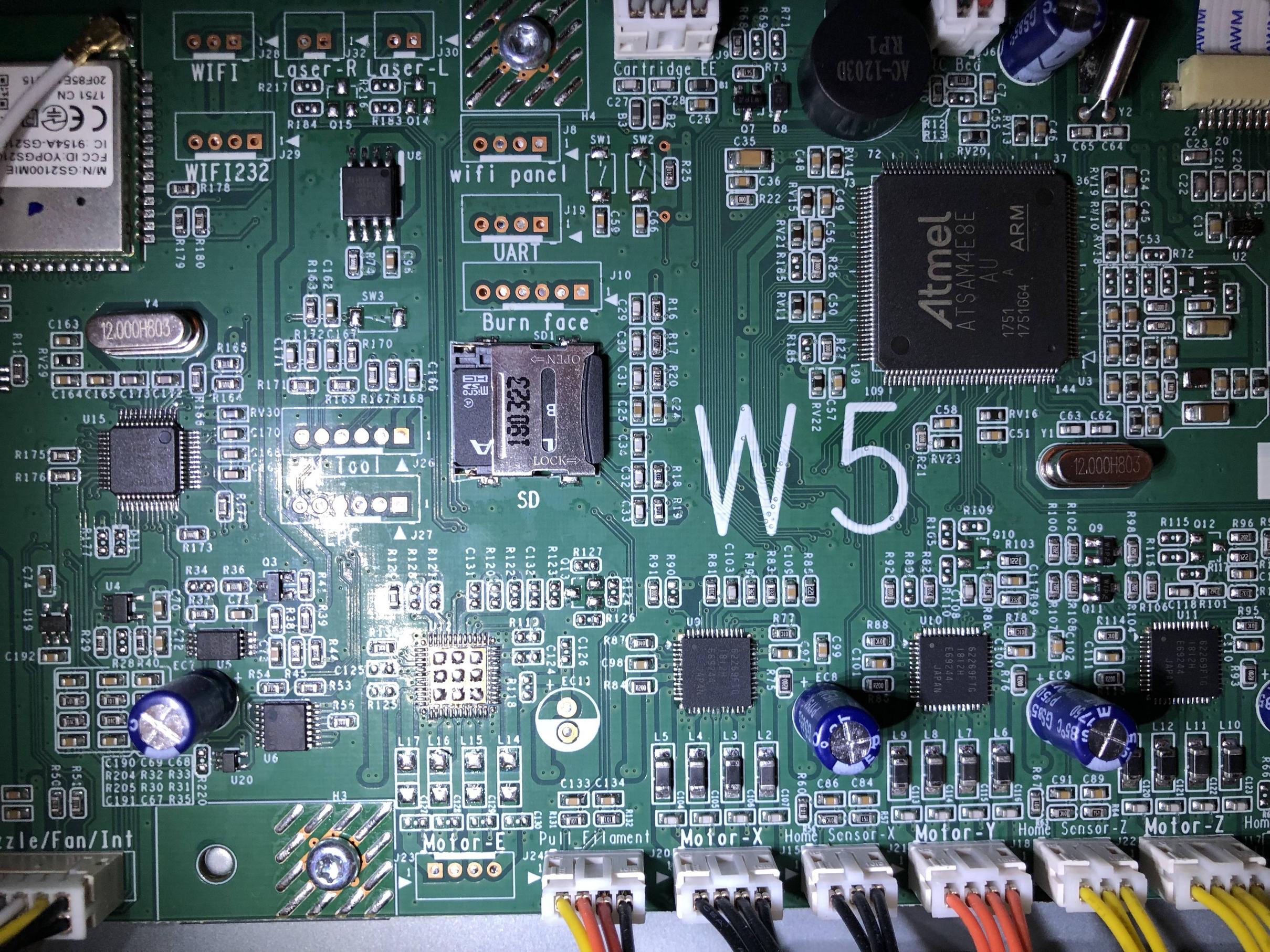
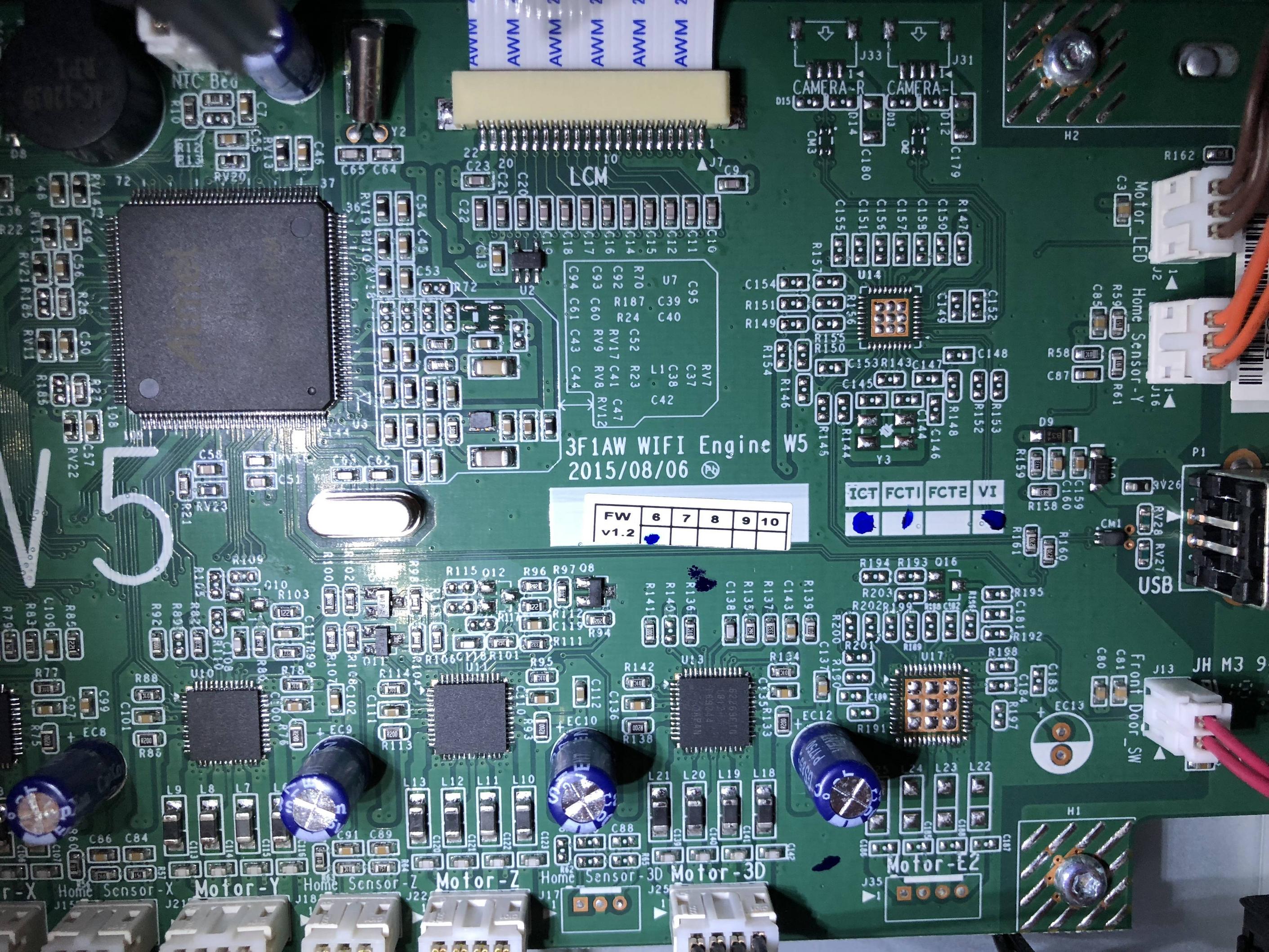
			<content type="html"><![CDATA[<p>That board is the same as JR. Therefore Repetier is not supported on it. What you would have to do is what others have done and replace the controller with another such as RAMPS or an MK series. You will loose some of the pro functions like wifi and the engraver. But you would loose that if Repetier was supported as well.</p><p>Also the that detect switch is optical. All you have to do is tie its sense pin high and the machine will think filament is always passing through it.</p>]]></content>
			<author>
				<name><![CDATA[carl_m1968]]></name>
				<uri>https://www.soliforum.com/user/7731/</uri>
			</author>
			<updated>2019-01-02T14:48:09Z</updated>
			<id>https://www.soliforum.com/post/148279/#p148279</id>
		</entry>
		<entry>
			<title type="html"><![CDATA[Re: Repetier firmware on Davinci 1.0 Pro]]></title>
			<link rel="alternate" href="https://www.soliforum.com/post/148276/#p148276" />
			<content type="html"><![CDATA[<p>Here’s a couple pictures of my board.&nbsp; Hopefully you can tell something from them.&nbsp; Let me know if I need to get better pic.s then these.<span class="postimg"><img src="http://soliforum.com/i/?9MKbr8o.jpg" alt="http://soliforum.com/i/?9MKbr8o.jpg" /></span><span class="postimg"><img src="http://soliforum.com/i/?P7FXJHp.jpg" alt="http://soliforum.com/i/?P7FXJHp.jpg" /></span><span class="postimg"><img src="http://soliforum.com/i/?rNAQFlH.jpg" alt="http://soliforum.com/i/?rNAQFlH.jpg" /></span><span class="postimg"><img src="http://soliforum.com/i/?XzDQppi.jpg" alt="http://soliforum.com/i/?XzDQppi.jpg" /></span></p>]]></content>
			<author>
				<name><![CDATA[volvodr66]]></name>
				<uri>https://www.soliforum.com/user/20377/</uri>
			</author>
			<updated>2019-01-02T14:02:44Z</updated>
			<id>https://www.soliforum.com/post/148276/#p148276</id>
		</entry>
		<entry>
			<title type="html"><![CDATA[Re: Repetier firmware on Davinci 1.0 Pro]]></title>
			<link rel="alternate" href="https://www.soliforum.com/post/148272/#p148272" />
			<content type="html"><![CDATA[<div class="quotebox"><cite>volvodr66 wrote:</cite><blockquote><p>Also, I can&#039;t find JP1 or JP37 to reset the firmware in order to upload new firmware to my Davinci Pro 1.0.&nbsp; Any ideas how I can erase the firmware so I can load Repetier on it?</p></blockquote></div><br /><p>Post a good picture of your main board and we can point them out to you. That printer had two, possibly three different revisions on it&#039;s board when it was being released.</p>]]></content>
			<author>
				<name><![CDATA[carl_m1968]]></name>
				<uri>https://www.soliforum.com/user/7731/</uri>
			</author>
			<updated>2019-01-02T12:52:21Z</updated>
			<id>https://www.soliforum.com/post/148272/#p148272</id>
		</entry>
		<entry>
			<title type="html"><![CDATA[Re: Repetier firmware on Davinci 1.0 Pro]]></title>
			<link rel="alternate" href="https://www.soliforum.com/post/148269/#p148269" />
			<content type="html"><![CDATA[<p>Also, I can&#039;t find JP1 or JP37 to reset the firmware in order to upload new firmware to my Davinci Pro 1.0.&nbsp; Any ideas how I can erase the firmware so I can load Repetier on it?</p>]]></content>
			<author>
				<name><![CDATA[volvodr66]]></name>
				<uri>https://www.soliforum.com/user/20377/</uri>
			</author>
			<updated>2019-01-02T09:08:53Z</updated>
			<id>https://www.soliforum.com/post/148269/#p148269</id>
		</entry>
		<entry>
			<title type="html"><![CDATA[Re: Repetier firmware on Davinci 1.0 Pro]]></title>
			<link rel="alternate" href="https://www.soliforum.com/post/148258/#p148258" />
			<content type="html"><![CDATA[<p>So I went in and looked at downloading Repetier host and Repetier firmware for my Davinci Pro 1.0.&nbsp; The Repetier host software is pretty much straight forward and easy to do.&nbsp; However, the Reppetier firmware has so many options how do I know which options to use for my Davinci Pro when downloading?&nbsp; It wants to know Processor type, motherboard, printer type, EEPROM usage, and none of the choices look familiar to me.&nbsp; Any suggestions?</p>]]></content>
			<author>
				<name><![CDATA[volvodr66]]></name>
				<uri>https://www.soliforum.com/user/20377/</uri>
			</author>
			<updated>2019-01-01T22:40:14Z</updated>
			<id>https://www.soliforum.com/post/148258/#p148258</id>
		</entry>
		<entry>
			<title type="html"><![CDATA[Re: Repetier firmware on Davinci 1.0 Pro]]></title>
			<link rel="alternate" href="https://www.soliforum.com/post/148251/#p148251" />
			<content type="html"><![CDATA[<p>I really doubt you would ever go back to stock once you Flash Repetier. But as Yizhou said you can get the firmware from the XYZ site. You can&#039;t edit it as it is a bin file but you can flash it back if you enjoy self inflicted punishment.</p>]]></content>
			<author>
				<name><![CDATA[carl_m1968]]></name>
				<uri>https://www.soliforum.com/user/7731/</uri>
			</author>
			<updated>2019-01-01T19:34:36Z</updated>
			<id>https://www.soliforum.com/post/148251/#p148251</id>
		</entry>
		<entry>
			<title type="html"><![CDATA[Re: Repetier firmware on Davinci 1.0 Pro]]></title>
			<link rel="alternate" href="https://www.soliforum.com/post/148249/#p148249" />
			<content type="html"><![CDATA[<p>You need solder some port on the main board and buy programmer in order to do so, I think. You can download the firmware from xyzprinting website, so I don&#039;t see why you have to go through all these trouble to backup the original firmware.</p>]]></content>
			<author>
				<name><![CDATA[yizhou.he]]></name>
				<uri>https://www.soliforum.com/user/17164/</uri>
			</author>
			<updated>2019-01-01T18:47:41Z</updated>
			<id>https://www.soliforum.com/post/148249/#p148249</id>
		</entry>
</feed>