<?xml version="1.0" encoding="utf-8"?>
<feed xmlns="http://www.w3.org/2005/Atom">
	<title type="html"><![CDATA[SoliForum - 3D Printing Community — Da Vinci Junior 1.0 heartache]]></title>
	<link rel="self" href="https://www.soliforum.com/feed/atom/topic/17020/" />
	<updated>2024-08-09T12:52:34Z</updated>
	<generator>PunBB</generator>
	<id>https://www.soliforum.com/topic/17020/da-vinci-junior-10-heartache/</id>
		<entry>
			<title type="html"><![CDATA[Re: Da Vinci Junior 1.0 heartache]]></title>
			<link rel="alternate" href="https://www.soliforum.com/post/155827/#p155827" />
			<content type="html"><![CDATA[<p>The URL you provided does not work,</p>]]></content>
			<author>
				<name><![CDATA[Bozotclown1970]]></name>
				<uri>https://www.soliforum.com/user/13167/</uri>
			</author>
			<updated>2024-08-09T12:52:34Z</updated>
			<id>https://www.soliforum.com/post/155827/#p155827</id>
		</entry>
		<entry>
			<title type="html"><![CDATA[Re: Da Vinci Junior 1.0 heartache]]></title>
			<link rel="alternate" href="https://www.soliforum.com/post/155810/#p155810" />
			<content type="html"><![CDATA[<p>I can&#039;t open the official website and download the file. Please help me provide this model and upload it in the attachment of the following post. Thank you very much!</p><p>File Name: Wind Duct.3w<br />Wind Duct<br />File Source:<br />(You can download the 3D file from the website below and use your <br />da Vinci Jr. 1.0 Series 3D Printer for output)</p><p><a href="http://us.gallery.xyzprinting.com/us_en/membergallery/model/201602171056219">http://us.gallery.xyzprinting.com/us_en … 2171056219</a></p><br /><br /><div class="quotebox"><cite>Magic Matt wrote:</cite><blockquote><p>I can&#039;t help but wonder if Simplify3D might just work better than XYZware anyway... however... it&#039;s expensive... and I don&#039;t see a 30 day trial or anything.</p><p><strong>XYZ Support</strong> have still not responded to the ticket opened Wednesday. The supplier (eBuyer) refuse to issue a returns number until XYZ Support have said I need to return the printer. I have to decide if I want that fight, or whether I just continue to solve this myself, and if I can&#039;t, get a different printer from somewhere else (Creality CR10 from Gear Best maybe?)..</p><p>I&#039;m not tied to using XYZ filament - I have a little NFC tag programmer and a load of NTAG213 stickers. They work, I&#039;ve just not had the opportunity to use any yet because the printer broke! I tested the tags just by holding them next to the spool holder and the printer seems tricked into thinking there&#039;s a spool of my choosing there.</p><br /><p><strong>Progress!</strong></p><p>The 6-pin stepper cable was never removed or touched, but I checked it anyway - no issue there. There&#039;s also a 4-pin connector of the same type going to a small board that I had unplugged and reinserted - again no issue there.</p><p>I checked the pinch rollers - they&#039;re perfectly aligned. The filament is sitting absolutely dead centre on both the channel in the drive roller, and the grooved part of the other roller. I can&#039;t see any way to adjust spring tension. It&#039;s quite high, because it takes a bit of effort to pull it far enough to insert filament, so it&#039;s not that easy to get the filament all the way down the bowden to the extruder for loading. This is no different from how it has always been.</p><p>The thing that made the biggest difference is changing the filament. I was using the 100m roll of white that came with the printer, and was down to the last 15m. I&#039;m now using a new roll of &quot;XYZ Junior series 600g clear yellow&quot;. I&#039;ve got thump thump thump from the feeder when it first starts putting down the raft or first layers, but the raft looks fine. That stops after about 2 layers, and it seems to act normal with the setting tweaks below. It is now printing &quot;ok&quot; but I&#039;m sure it was better originally, so there must still be things to resolve. I don&#039;t think the thumping is the offset, because it does it even with the nozzle 2mm above the bed. Could there be something in the main body of the extruder that isn&#039;t right?</p><p>So far the best results I&#039;ve got are by slowing down everything. Print speed to &quot;low&quot;, reducing the retraction speed to 20mm/s, reducing the retraction distance to 3mm, and bumping up the temperature by 5C (it monitors at 206C).</p><p>It seems to have a lot of trouble getting that first layer down, and I&#039;m going back to trying different Z-Offset settings to see if that can be resolved. At the moment my nozzle is 0.25mm from the bed at the edges, and about 0.20mm in the middle - I don&#039;t know why the bed is raised in the middle - I&#039;m thinking of flipping the glass over and see what happens.</p><p>I printed off the official &quot;wind duct&quot; that attaches to the extruder - it printed ok, even though I had the thump-thump at the start. I can&#039;t say that&#039;s making any difference at the moment, but I&#039;ve left it attached for now.</p><p>I printed the samples - the little heart pendant and the twisted vase - both seem ok, and look the same as the ones we printed when we first got the printer. Neither are brilliant, but they&#039;re reasonable. Again, first two or three layers &quot;thump-thump-thump&quot; then normal. Again I needed to adjust the speeds and temp.</p><p>If I printed the E3D hot end mod, does that mean I could have a 0.3mm hot end, or would I need to buy the &quot;XYZ 0.3mm extruder with nozzle&quot; first? If I&#039;m going to have to replace it, I&#039;d rather have the higher resolution.</p></blockquote></div>]]></content>
			<author>
				<name><![CDATA[wnglng]]></name>
				<uri>https://www.soliforum.com/user/27270/</uri>
			</author>
			<updated>2024-08-04T03:35:25Z</updated>
			<id>https://www.soliforum.com/post/155810/#p155810</id>
		</entry>
		<entry>
			<title type="html"><![CDATA[Re: Da Vinci Junior 1.0 heartache]]></title>
			<link rel="alternate" href="https://www.soliforum.com/post/141568/#p141568" />
			<content type="html"><![CDATA[<div class="quotebox"><cite>carl_m1968 wrote:</cite><blockquote><p>If it was stuck plastic then it would not matter what speed you run it, the problem would still be there. However he said when he slows down it goes a way. That being said his problem is what he suspects and not the same as the one you had. </p><p>The firmware update he got is ignoring the temp set in the carts and instead is using a default global temperature. I no longer have an XYZ machine but from what I have heard the newer host for those machines allows you to modify the temps. I also would bet that some where in the settings there is an allowance for it to simply use the carts temp but in his case that is not enabled. So the machine is using a default temp that is too low for the speed is running.</p><p>I have used many printers and I rarely see one whose reported hotend temp is correct. I have seen a variance of up to 20 degrees. In those case you simply have to use trial and error and keep increasing the temp by 5 until it can print all of a layer with no thumps.</p></blockquote></div><p>I don&#039;t know for sure if it is stuck plastic or the inner PFTE tube scratched when I declog the hotend. It happened with my first jr stock hotend twice, the hotend is clogged and I cleaned it. I was still very newbie with 3D printer at that time. after I cleaned it, filament goes though, but does not came out as smooth as before. I have mild under extrusion problem and extruder clicks at first layer. Print at lower speed or low layer height improves. Printing at higher temperature (I increase temperature 15C higher than usual) also improves the extrusion. All problem is gone after I replace the throat. I can go back to normal temperature and have no issue print at 0.3mm layer height. After I switch to E3D clone, this problem did not show up again.</p><p>In my experience, printer have different heat block/thermostats or running different firmware report different temperature. the difference can be up to 20 degrees. All my printer that switched to E3D clones and use marlin firmware report same temperature with error of 0.1 degree.</p>]]></content>
			<author>
				<name><![CDATA[yizhou.he]]></name>
				<uri>https://www.soliforum.com/user/17164/</uri>
			</author>
			<updated>2018-01-12T17:04:05Z</updated>
			<id>https://www.soliforum.com/post/141568/#p141568</id>
		</entry>
		<entry>
			<title type="html"><![CDATA[Re: Da Vinci Junior 1.0 heartache]]></title>
			<link rel="alternate" href="https://www.soliforum.com/post/141546/#p141546" />
			<content type="html"><![CDATA[<div class="quotebox"><cite>Magic Matt wrote:</cite><blockquote><p>I&#039;ve ordered a set of NTAG213 stickers. I&#039;m going to systematically go through all the &quot;colours&quot;, and see if it makes any difference. I&#039;m sure somebody on the pages can make use of the data too.</p><p>With the system doing as it is now, the temp is effectively manually set from 190 to 210, which doesn&#039;t seem right anyway.</p></blockquote></div><p>That is the actual range for most third party PLA.</p>]]></content>
			<author>
				<name><![CDATA[carl_m1968]]></name>
				<uri>https://www.soliforum.com/user/7731/</uri>
			</author>
			<updated>2018-01-12T02:12:06Z</updated>
			<id>https://www.soliforum.com/post/141546/#p141546</id>
		</entry>
		<entry>
			<title type="html"><![CDATA[Re: Da Vinci Junior 1.0 heartache]]></title>
			<link rel="alternate" href="https://www.soliforum.com/post/141544/#p141544" />
			<content type="html"><![CDATA[<p>I&#039;ve ordered a set of NTAG213 stickers. I&#039;m going to systematically go through all the &quot;colours&quot;, and see if it makes any difference. I&#039;m sure somebody on the pages can make use of the data too.</p><p>With the system doing as it is now, the temp is effectively manually set from 190 to 210, which doesn&#039;t seem right anyway.</p>]]></content>
			<author>
				<name><![CDATA[Magic Matt]]></name>
				<uri>https://www.soliforum.com/user/18084/</uri>
			</author>
			<updated>2018-01-12T01:51:03Z</updated>
			<id>https://www.soliforum.com/post/141544/#p141544</id>
		</entry>
		<entry>
			<title type="html"><![CDATA[Re: Da Vinci Junior 1.0 heartache]]></title>
			<link rel="alternate" href="https://www.soliforum.com/post/141537/#p141537" />
			<content type="html"><![CDATA[<div class="quotebox"><cite>yizhou.he wrote:</cite><blockquote><div class="quotebox"><cite>Magic Matt wrote:</cite><blockquote><p>Cracked it at last - printing at &quot;+10C&quot; in clear yellow gives me a nozzle that is supposedly 210C. The &quot;thump thump thump&quot; is related to speed! If I slow the print speed down everything is fine again. If I print normally, it only thumps on long rectilinear fills - slow it down and it&#039;s fine.</p><p>I&#039;m no expert, but I think everything is pointing to that hot end not getting hot enough. I&#039;m also suspicious of the firmware (started a new thread) as every spool is coming up 200C when printing, and I&#039;m sure these colours are supposed to be 210C.</p><p>Where would I stuff the temperature probe - into the extruder down too the end of the nozzle?</p></blockquote></div><p>I had exact same problem like this before, twice with my stock hotend. I&#039;m 100% my hotend is not clogged, but the problem went away after I change the throat. I think some melted plastic may stick in the inside of PFTE tube inside of the throat or I somehow changed the shape of the PFTE tube inside of the throat lead to increased resistance, new throat is $10 for 5 piece from amazon, so I did not bother to figure it out.</p></blockquote></div><br /><p>If it was stuck plastic then it would not matter what speed you run it, the problem would still be there. However he said when he slows down it goes a way. That being said his problem is what he suspects and not the same as the one you had. </p><p>The firmware update he got is ignoring the temp set in the carts and instead is using a default global temperature. I no longer have an XYZ machine but from what I have heard the newer host for those machines allows you to modify the temps. I also would bet that some where in the settings there is an allowance for it to simply use the carts temp but in his case that is not enabled. So the machine is using a default temp that is too low for the speed is running.</p><p>I have used many printers and I rarely see one whose reported hotend temp is correct. I have seen a variance of up to 20 degrees. In those case you simply have to use trial and error and keep increasing the temp by 5 until it can print all of a layer with no thumps.</p>]]></content>
			<author>
				<name><![CDATA[carl_m1968]]></name>
				<uri>https://www.soliforum.com/user/7731/</uri>
			</author>
			<updated>2018-01-11T23:52:54Z</updated>
			<id>https://www.soliforum.com/post/141537/#p141537</id>
		</entry>
		<entry>
			<title type="html"><![CDATA[Re: Da Vinci Junior 1.0 heartache]]></title>
			<link rel="alternate" href="https://www.soliforum.com/post/141534/#p141534" />
			<content type="html"><![CDATA[<div class="quotebox"><cite>Magic Matt wrote:</cite><blockquote><p>Cracked it at last - printing at &quot;+10C&quot; in clear yellow gives me a nozzle that is supposedly 210C. The &quot;thump thump thump&quot; is related to speed! If I slow the print speed down everything is fine again. If I print normally, it only thumps on long rectilinear fills - slow it down and it&#039;s fine.</p><p>I&#039;m no expert, but I think everything is pointing to that hot end not getting hot enough. I&#039;m also suspicious of the firmware (started a new thread) as every spool is coming up 200C when printing, and I&#039;m sure these colours are supposed to be 210C.</p><p>Where would I stuff the temperature probe - into the extruder down too the end of the nozzle?</p></blockquote></div><p>I had exact same problem like this before, twice with my stock hotend. I&#039;m 100% my hotend is not clogged, but the problem went away after I change the throat. I think some melted plastic may stick in the inside of PFTE tube inside of the throat or I somehow changed the shape of the PFTE tube inside of the throat lead to increased resistance, new throat is $10 for 5 piece from amazon, so I did not bother to figure it out.</p>]]></content>
			<author>
				<name><![CDATA[yizhou.he]]></name>
				<uri>https://www.soliforum.com/user/17164/</uri>
			</author>
			<updated>2018-01-11T23:35:20Z</updated>
			<id>https://www.soliforum.com/post/141534/#p141534</id>
		</entry>
		<entry>
			<title type="html"><![CDATA[Re: Da Vinci Junior 1.0 heartache]]></title>
			<link rel="alternate" href="https://www.soliforum.com/post/141517/#p141517" />
			<content type="html"><![CDATA[<p>One thing I do like with the XYZ extruder is that if I had two sizes, it takes about 20 seconds to swap them over. That&#039;s quite appealing, as long as the connector itself is reasonably robust.</p>]]></content>
			<author>
				<name><![CDATA[Magic Matt]]></name>
				<uri>https://www.soliforum.com/user/18084/</uri>
			</author>
			<updated>2018-01-11T04:52:48Z</updated>
			<id>https://www.soliforum.com/post/141517/#p141517</id>
		</entry>
		<entry>
			<title type="html"><![CDATA[Re: Da Vinci Junior 1.0 heartache]]></title>
			<link rel="alternate" href="https://www.soliforum.com/post/141516/#p141516" />
			<content type="html"><![CDATA[<p>Cracked it at last - printing at &quot;+10C&quot; in clear yellow gives me a nozzle that is supposedly 210C. The &quot;thump thump thump&quot; is related to speed! If I slow the print speed down everything is fine again. If I print normally, it only thumps on long rectilinear fills - slow it down and it&#039;s fine.</p><p>I&#039;m no expert, but I think everything is pointing to that hot end not getting hot enough. I&#039;m also suspicious of the firmware (started a new thread) as every spool is coming up 200C when printing, and I&#039;m sure these colours are supposed to be 210C.</p><p>Where would I stuff the temperature probe - into the extruder down too the end of the nozzle?</p>]]></content>
			<author>
				<name><![CDATA[Magic Matt]]></name>
				<uri>https://www.soliforum.com/user/18084/</uri>
			</author>
			<updated>2018-01-11T04:50:50Z</updated>
			<id>https://www.soliforum.com/post/141516/#p141516</id>
		</entry>
		<entry>
			<title type="html"><![CDATA[Re: Da Vinci Junior 1.0 heartache]]></title>
			<link rel="alternate" href="https://www.soliforum.com/post/141505/#p141505" />
			<content type="html"><![CDATA[<div class="quotebox"><cite>carl_m1968 wrote:</cite><blockquote><p>One thing to keep in mind is the smaller the hot end the less filament it can deposit over a given time. This means that for every one step you go down it will almost double your print time. Same thing happens when you reduce layer height. A .3 nozzle will not really improve resolution in my opinion since you can already print at a .3, .2, and even .1 layer height. All the .3 will do again is restrict the amount of filament that can be laid down at any given time. Calibration and proper settings are the key to the max resolution your printer can do.</p><p>The nozzle diameter simply dictates how wide based on extrusion feed rate that the single wall/perimeter will be on each pass.</p></blockquote></div><p>I thought the same thing before I really tried .3 mm nozzle, but after I tried it, the improvement in resolution is very significant. It do take a lot longer to print, and you need to print a lot slower than 0.4 mm nozzle. Layer resolution mostly reflect in how smooth your z-band is and with good Calibration and proper settings I can basically make the z-band not visible by naked eye at 0.2 mm layer height (it still shows up after zoomed with camera and reflected in light). </p><p>But the resolution is still limited with 0.4 mm nozzle especially in application that a box with text on the surface. How clear the text is and how small font you can go will be largely depend on how small the nozzle size is. It also help when print object with fancy pattern with curves on surface. It doesn&#039;t seemed much change from 0.4 mm to 0.3 mm but difference in results are stunning. 0.2 mm nozzle give you even better result but it also clog/wear off quicker.</p><p>But I do agree calibration and proper settings are the key to the max resolution your printer can do. 0.3 mm nozzle will do you no good if printer is not well calibrated or even vibrating. If you are still struggle with z-band consistency, or many other issues, switch to 0.3 mm should not be your first priority.</p>]]></content>
			<author>
				<name><![CDATA[yizhou.he]]></name>
				<uri>https://www.soliforum.com/user/17164/</uri>
			</author>
			<updated>2018-01-10T21:56:03Z</updated>
			<id>https://www.soliforum.com/post/141505/#p141505</id>
		</entry>
		<entry>
			<title type="html"><![CDATA[Re: Da Vinci Junior 1.0 heartache]]></title>
			<link rel="alternate" href="https://www.soliforum.com/post/141504/#p141504" />
			<content type="html"><![CDATA[<p>One thing to keep in mind is the smaller the hot end the less filament it can deposit over a given time. This means that for every one step you go down it will almost double your print time. Same thing happens when you reduce layer height. A .3 nozzle will not really improve resolution in my opinion since you can already print at a .3, .2, and even .1 layer height. All the .3 will do again is restrict the amount of filament that can be laid down at any given time. Calibration and proper settings are the key to the max resolution your printer can do.</p><p>The nozzle diameter simply dictates how wide based on extrusion feed rate that the single wall/perimeter will be on each pass.</p>]]></content>
			<author>
				<name><![CDATA[carl_m1968]]></name>
				<uri>https://www.soliforum.com/user/7731/</uri>
			</author>
			<updated>2018-01-10T19:11:37Z</updated>
			<id>https://www.soliforum.com/post/141504/#p141504</id>
		</entry>
		<entry>
			<title type="html"><![CDATA[Re: Da Vinci Junior 1.0 heartache]]></title>
			<link rel="alternate" href="https://www.soliforum.com/post/141497/#p141497" />
			<content type="html"><![CDATA[<p>1. Simplify3D is very expensive, I would recommend Cura+Threedub. There are post in this forum with instruction, it do improve print quality a lot if you have layer cooling fan and slice with Cura and then convert gcode to .3w with Threedub.</p><p>2. XYZ Support is not very helpful, I would not waste my time deal with them unless out of options.</p><p>3. If you don&#039;t have weak extruder motor, then you have high resistance in the PFTE tube or throat or nozzle. People usually clean throat and nozzle well but ignor the PFTE tube, check both end too see if the opening is wide and round with no melted plastic stick there. You can cut 50mm of the PFTE tube out on both end and round the inside to make sure no additional resistance for filament to go through.</p><p>4. The reason you got&nbsp; thump thump thump from the feeder when it first starts putting down the raft or first layers but not the rest layer because XYZware use 0.3mm for first layer and the rest layer will change with your setting of layer height. So if you have high resistance in PFTE tube or throat, your fist layer will not able to flow plastic fast enough. If you layer height is set to 0.2mm or smaller, then the situation will get better. if you print with 0.3mm layer height, then you are expect to hear the&nbsp; thump thump thump from the feeder all the time.</p><p>5. the wind duct or layer cooling fan will help with print quality, but will not help with your extruder issue.</p><p>6. If I printed the E3D hot end mod, does that mean I could have a 0.3mm hot end, and you don&#039;t need to buy the &quot;XYZ 0.3mm extruder with nozzle&quot;. E3D hot end mod work with E3D or E3D clone hotend, they are cheaper and better, you don&#039;t really get jam with E3D or E3D clone.</p><p>7. High resolution come with cost of much slower printing speed, and it will take much longer to print. I would only recommend 0.3 mm mod if you have another larger build volume 3D printer with 0.4 mm nozzle, then you can use Jr. with 0.3 mm nozzle only for high resolution stuff. </p><p>8. When your printer is cool, you should read room temperature, ice water mix should bring it down to 0C, if you want to test if 200C is acculate, you need thermostats, there are thermostats for oven or candy can go that high, you may find one in your (parents) kitchen.</p><p>9. the temperature +5C adjustment affect all layer, but layer height only affect 2nd layer and above.</p>]]></content>
			<author>
				<name><![CDATA[yizhou.he]]></name>
				<uri>https://www.soliforum.com/user/17164/</uri>
			</author>
			<updated>2018-01-10T18:32:51Z</updated>
			<id>https://www.soliforum.com/post/141497/#p141497</id>
		</entry>
		<entry>
			<title type="html"><![CDATA[Re: Da Vinci Junior 1.0 heartache]]></title>
			<link rel="alternate" href="https://www.soliforum.com/post/141480/#p141480" />
			<content type="html"><![CDATA[<p>Additional thought... when you dial in +5C temp adjustment, does that only apply after the first layer, or raft, etc? I&#039;m actually wondering if the temp sensor on my extruder might be reading too high, so when it thinks it&#039;s 200C it&#039;s far lower... how would I test it though?</p>]]></content>
			<author>
				<name><![CDATA[Magic Matt]]></name>
				<uri>https://www.soliforum.com/user/18084/</uri>
			</author>
			<updated>2018-01-10T02:20:42Z</updated>
			<id>https://www.soliforum.com/post/141480/#p141480</id>
		</entry>
		<entry>
			<title type="html"><![CDATA[Re: Da Vinci Junior 1.0 heartache]]></title>
			<link rel="alternate" href="https://www.soliforum.com/post/141478/#p141478" />
			<content type="html"><![CDATA[<p>I can&#039;t help but wonder if Simplify3D might just work better than XYZware anyway... however... it&#039;s expensive... and I don&#039;t see a 30 day trial or anything.</p><p><strong>XYZ Support</strong> have still not responded to the ticket opened Wednesday. The supplier (eBuyer) refuse to issue a returns number until XYZ Support have said I need to return the printer. I have to decide if I want that fight, or whether I just continue to solve this myself, and if I can&#039;t, get a different printer from somewhere else (Creality CR10 from Gear Best maybe?)..</p><p>I&#039;m not tied to using XYZ filament - I have a little NFC tag programmer and a load of NTAG213 stickers. They work, I&#039;ve just not had the opportunity to use any yet because the printer broke! I tested the tags just by holding them next to the spool holder and the printer seems tricked into thinking there&#039;s a spool of my choosing there.</p><br /><p><strong>Progress!</strong></p><p>The 6-pin stepper cable was never removed or touched, but I checked it anyway - no issue there. There&#039;s also a 4-pin connector of the same type going to a small board that I had unplugged and reinserted - again no issue there.</p><p>I checked the pinch rollers - they&#039;re perfectly aligned. The filament is sitting absolutely dead centre on both the channel in the drive roller, and the grooved part of the other roller. I can&#039;t see any way to adjust spring tension. It&#039;s quite high, because it takes a bit of effort to pull it far enough to insert filament, so it&#039;s not that easy to get the filament all the way down the bowden to the extruder for loading. This is no different from how it has always been.</p><p>The thing that made the biggest difference is changing the filament. I was using the 100m roll of white that came with the printer, and was down to the last 15m. I&#039;m now using a new roll of &quot;XYZ Junior series 600g clear yellow&quot;. I&#039;ve got thump thump thump from the feeder when it first starts putting down the raft or first layers, but the raft looks fine. That stops after about 2 layers, and it seems to act normal with the setting tweaks below. It is now printing &quot;ok&quot; but I&#039;m sure it was better originally, so there must still be things to resolve. I don&#039;t think the thumping is the offset, because it does it even with the nozzle 2mm above the bed. Could there be something in the main body of the extruder that isn&#039;t right?</p><p>So far the best results I&#039;ve got are by slowing down everything. Print speed to &quot;low&quot;, reducing the retraction speed to 20mm/s, reducing the retraction distance to 3mm, and bumping up the temperature by 5C (it monitors at 206C).</p><p>It seems to have a lot of trouble getting that first layer down, and I&#039;m going back to trying different Z-Offset settings to see if that can be resolved. At the moment my nozzle is 0.25mm from the bed at the edges, and about 0.20mm in the middle - I don&#039;t know why the bed is raised in the middle - I&#039;m thinking of flipping the glass over and see what happens.</p><p>I printed off the official &quot;wind duct&quot; that attaches to the extruder - it printed ok, even though I had the thump-thump at the start. I can&#039;t say that&#039;s making any difference at the moment, but I&#039;ve left it attached for now.</p><p>I printed the samples - the little heart pendant and the twisted vase - both seem ok, and look the same as the ones we printed when we first got the printer. Neither are brilliant, but they&#039;re reasonable. Again, first two or three layers &quot;thump-thump-thump&quot; then normal. Again I needed to adjust the speeds and temp.</p><p>If I printed the E3D hot end mod, does that mean I could have a 0.3mm hot end, or would I need to buy the &quot;XYZ 0.3mm extruder with nozzle&quot; first? If I&#039;m going to have to replace it, I&#039;d rather have the higher resolution.</p>]]></content>
			<author>
				<name><![CDATA[Magic Matt]]></name>
				<uri>https://www.soliforum.com/user/18084/</uri>
			</author>
			<updated>2018-01-10T02:17:49Z</updated>
			<id>https://www.soliforum.com/post/141478/#p141478</id>
		</entry>
		<entry>
			<title type="html"><![CDATA[Re: Da Vinci Junior 1.0 heartache]]></title>
			<link rel="alternate" href="https://www.soliforum.com/post/141468/#p141468" />
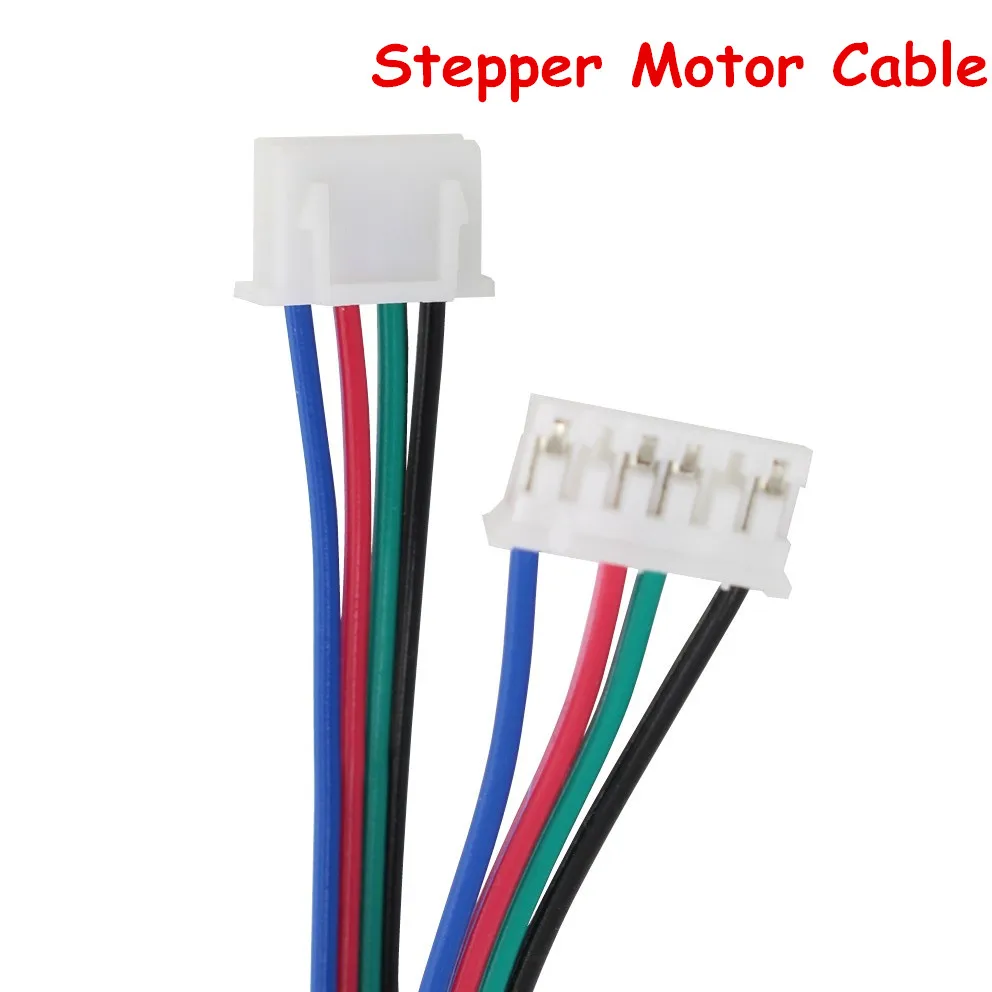
			<content type="html"><![CDATA[<p>1. It is not the three pin connector, the three pin connector is for out of filament monitor, your extruder will work fine without it. I&#039;m talking bout the 6 pin connector that connect to the extruder motor, only four wires are connected to the 6 pin connector, if you accidentally make that connector loose, you will have weak extruder motor. try unplug and replug when machine is off see if that fix the issue. you can also check the wire with multi-meter and replace the wire if necessary. The quality of that wire is usually not a issue, just make sure the connection is secure on both ends. common issue is not pluged securely or the metal connect inside the JST housing did not pushed all the way to the end. (wire shown as the image, but your wire may be all white with pink marks on it. and JST housing may be blue color.)</p><p><span class="postimg"><img src="http://www.primopal.com/web/images/wire_03.jpg" alt="http://www.primopal.com/web/images/wire_03.jpg" /></span></p><p><span class="postimg"><img src="https://ae01.alicdn.com/kf/HTB10wJTRXXXXXbrXFXXq6xXFXXXe/5pcs-lot-XH-2-54-connector-1M-4Pin-female-female-RepRap-Dupont-wire-cable-for-nema17.jpg" alt="https://ae01.alicdn.com/kf/HTB10wJTRXXXXXbrXFXXq6xXFXXXe/5pcs-lot-XH-2-54-connector-1M-4Pin-female-female-RepRap-Dupont-wire-cable-for-nema17.jpg" /></span></p><p>2. if you have partial clogged hotend and good extruder gear alignment, you should hear click sound when you have trouble to get good extrusion. You should also hear click sound if you pull the filament to prevent it from enter extruder. If you have weak extruder motor due to bad connection, your motor gear will stop rotating and will reverse the direction. If your motor gear keep spinning but encoder gear stop spinning, the spring holding motor gear and encoder gear is not strong or not aligned correctly.</p><p>3. If you nozzle is too close to the bed, your filament will also have trouble to come out, and you will also have no problem load and unload filament but it act like clogged hotend only during printing. Adjust your z-offset to give more space between nozzle and print bed and see if filament extrude better. (think z-offset as bed height, decrease z-offset to lower the print bed and get more space between hotend and print bed.) This is unlikely because you already played with z-offset, but it also helps to raise the nozzle and let it print in the air and observe if the filament comes out smoothly. This should mimic filament loading/unload if you have weak extruder connection, if you load and unload fine but have issue print in air, it is your print setting rather than the hardware.</p><p>4. I would not recommend any mod that you can not restore to stock condition before your warranty expires. (not that XYZprinting customer service will be any helpful, but it is easier to troubleshoot when you have most stock setting or can revert back to stock and see if it fix the issue.) But I do think add a layer cooling fan is important to improve your print quality once you get your print back to function. I would also recommend the 3rd party filament hack so that you are not limited by expensive XYZprinting filament. </p><p>I would also recommend you print out E3D hotend mounting mod because Jr. stock hotend tends to clog more often than E3D. This is a good mod to have but I would not recommend do it now. It is always better that you do the mod after you get more experience with your 3D printer and have more idea what kind of print quality issue is caused by what.</p><p>Ultimately doing RAMPS conversion will make this a great printer and allowing dual color printing, but I would not recommend do it now. As I said, get more printing experience and print quality troubleshoot skills before any major mod. You will be lot more confident and your learning experience will be much more rewarding and better quality.</p><p><a href="https://www.simplify3d.com/support/print-quality-troubleshooting/">https://www.simplify3d.com/support/prin … eshooting/</a></p>]]></content>
			<author>
				<name><![CDATA[yizhou.he]]></name>
				<uri>https://www.soliforum.com/user/17164/</uri>
			</author>
			<updated>2018-01-09T17:51:16Z</updated>
			<id>https://www.soliforum.com/post/141468/#p141468</id>
		</entry>
</feed>
