<?xml version="1.0" encoding="utf-8"?>
<feed xmlns="http://www.w3.org/2005/Atom">
	<title type="html"><![CDATA[SoliForum - 3D Printing Community — XYZprinting Da Vinci 2.0A Duo with repetier firmware need help]]></title>
	<link rel="self" href="https://www.soliforum.com/feed/atom/topic/16984/" />
	<updated>2017-12-26T20:01:53Z</updated>
	<generator>PunBB</generator>
	<id>https://www.soliforum.com/topic/16984/xyzprinting-da-vinci-20a-duo-with-repetier-firmware-need-help/</id>
		<entry>
			<title type="html"><![CDATA[Re: XYZprinting Da Vinci 2.0A Duo with repetier firmware need help]]></title>
			<link rel="alternate" href="https://www.soliforum.com/post/141093/#p141093" />
			<content type="html"><![CDATA[<p>I don&#039;t know if it is normal for Da Vinci 2.0A Duo when zero coordinates, the nozzle position will be changed during printing process with the consideration of extruder offset. I think you should calibrate your extruder offset and change the following settings accordingly.</p><p>#define EXT0_X_OFFSET 0<br />#define EXT0_Y_OFFSET 0<br />#define EXT0_Z_OFFSET 0</p><p>#define EXT1_X_OFFSET -2852<br />#define EXT1_Y_OFFSET 12<br />#define EXT1_Z_OFFSET 0</p>]]></content>
			<author>
				<name><![CDATA[yizhou.he]]></name>
				<uri>https://www.soliforum.com/user/17164/</uri>
			</author>
			<updated>2017-12-26T20:01:53Z</updated>
			<id>https://www.soliforum.com/post/141093/#p141093</id>
		</entry>
		<entry>
			<title type="html"><![CDATA[Re: XYZprinting Da Vinci 2.0A Duo with repetier firmware need help]]></title>
			<link rel="alternate" href="https://www.soliforum.com/post/141084/#p141084" />
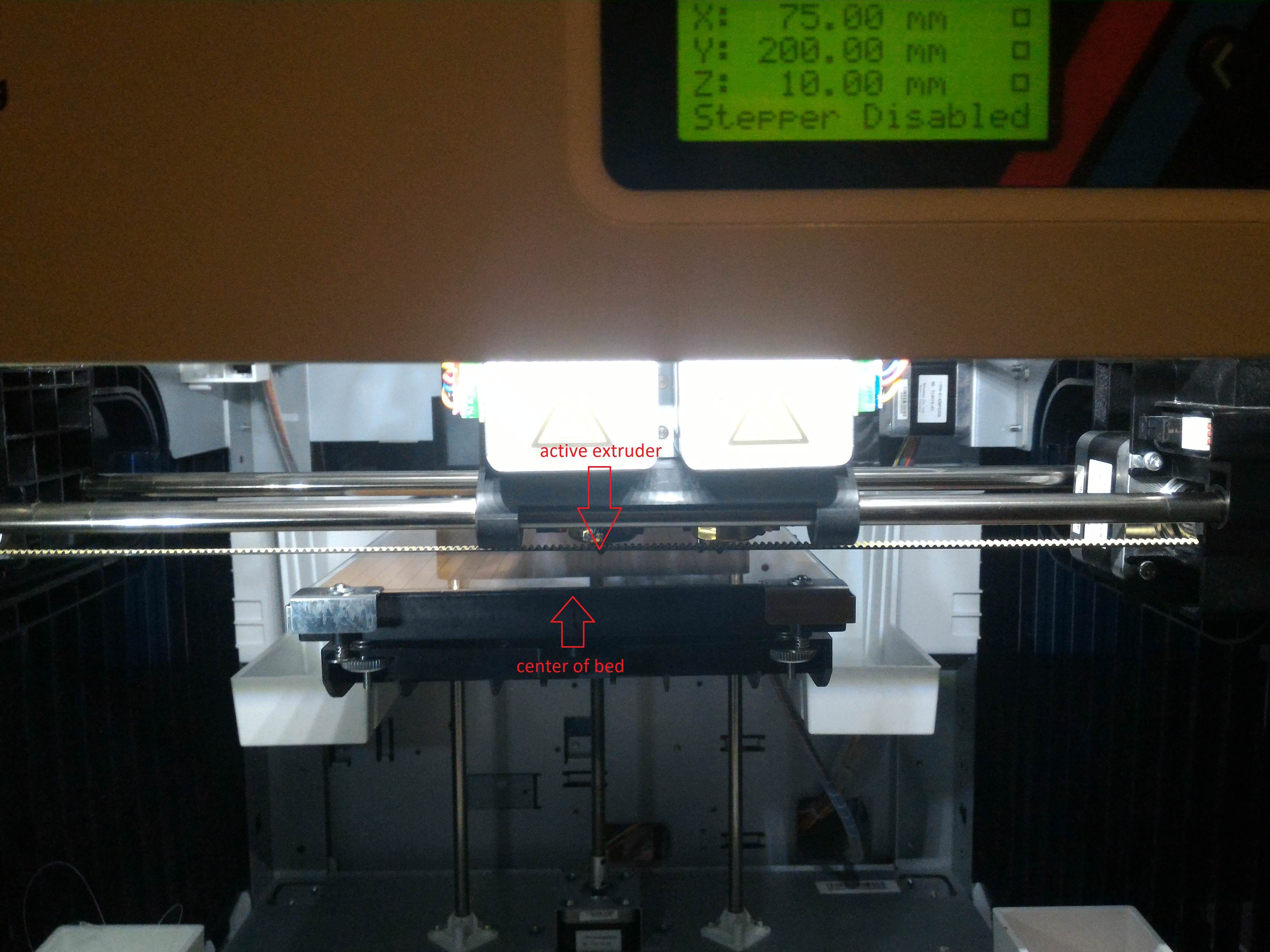
			<content type="html"><![CDATA[<div class="quotebox"><cite>yizhou.he wrote:</cite><blockquote><p>Da Vinci 2.0 Due bed length on x-axis is 150mm, but there are parking area for both hotends, so the x_max_length is 200, the reach center of the bed should be 100mm/200mm instead of 75mm/150mm</p></blockquote></div><p><span class="postimg"><img src="http://soliforum.com/i/?JLzM8vU.jpg" alt="http://soliforum.com/i/?JLzM8vU.jpg" /></span></p><p><span class="postimg"><img src="http://soliforum.com/i/?TFVvoXU.jpg" alt="http://soliforum.com/i/?TFVvoXU.jpg" /></span><br />It&#039;s default settings from eeprom</p><p><span class="postimg"><img src="http://soliforum.com/i/?10bqT8J.jpg" alt="http://soliforum.com/i/?10bqT8J.jpg" /></span></p><div class="quotebox"><cite>yizhou.he wrote:</cite><blockquote><p>You need to define your bed size and homing direction correctly in Simplify3d 4.0.0. Also make sure the flip build table axis selection is correct. Printer usually try to homing before print, if your x-axis homing direction is wrong, it will reaching the left end continues to move (drive belt clicks).</p><p>I use repetitor-host with repetitor-firmware, it is free and worth to try.</p></blockquote></div><p>This occurs after zero coordinates.</p>]]></content>
			<author>
				<name><![CDATA[TrollCtrl]]></name>
				<uri>https://www.soliforum.com/user/18041/</uri>
			</author>
			<updated>2017-12-26T19:10:58Z</updated>
			<id>https://www.soliforum.com/post/141084/#p141084</id>
		</entry>
		<entry>
			<title type="html"><![CDATA[Re: XYZprinting Da Vinci 2.0A Duo with repetier firmware need help]]></title>
			<link rel="alternate" href="https://www.soliforum.com/post/141079/#p141079" />
			<content type="html"><![CDATA[<div class="quotebox"><cite>TrollCtrl wrote:</cite><blockquote><p>3. At the beginning of printing, reaching the left end continues to move (drive belt clicks)<br />Software: Simplify3d 4.0.0<br />Printer: XYZ Printing Da Vinci 2.0A Duo (j37 board with factory fw 1.0b)</p></blockquote></div><p>You need to define your bed size and homing direction correctly in Simplify3d 4.0.0. Also make sure the flip build table axis selection is correct. Printer usually try to homing before print, if your x-axis homing direction is wrong, it will reaching the left end continues to move (drive belt clicks).</p><p>I use repetitor-host with repetitor-firmware, it is free and worth to try.</p>]]></content>
			<author>
				<name><![CDATA[yizhou.he]]></name>
				<uri>https://www.soliforum.com/user/17164/</uri>
			</author>
			<updated>2017-12-26T18:13:13Z</updated>
			<id>https://www.soliforum.com/post/141079/#p141079</id>
		</entry>
		<entry>
			<title type="html"><![CDATA[Re: XYZprinting Da Vinci 2.0A Duo with repetier firmware need help]]></title>
			<link rel="alternate" href="https://www.soliforum.com/post/141078/#p141078" />
			<content type="html"><![CDATA[<div class="quotebox"><cite>TrollCtrl wrote:</cite><blockquote><p>2. If set the position 75/150mm of X axis, the extruder is shifted to the right of the center of the table.</p></blockquote></div><p>Da Vinci 2.0 Due bed length on x-axis is 150mm, but there are parking area for both hotends, so the x_max_length is 200, the reach center of the bed should be 100mm/200mm instead of 75mm/150mm</p>]]></content>
			<author>
				<name><![CDATA[yizhou.he]]></name>
				<uri>https://www.soliforum.com/user/17164/</uri>
			</author>
			<updated>2017-12-26T18:06:00Z</updated>
			<id>https://www.soliforum.com/post/141078/#p141078</id>
		</entry>
		<entry>
			<title type="html"><![CDATA[Re: XYZprinting Da Vinci 2.0A Duo with repetier firmware need help]]></title>
			<link rel="alternate" href="https://www.soliforum.com/post/141077/#p141077" />
			<content type="html"><![CDATA[<div class="quotebox"><cite>yizhou.he wrote:</cite><blockquote><p>Double check if you turned on EEPROM Mode in configure.h<br />#define EEPROM_MODE 1</p></blockquote></div><p>Checked, it&#039;s just like this.</p>]]></content>
			<author>
				<name><![CDATA[TrollCtrl]]></name>
				<uri>https://www.soliforum.com/user/18041/</uri>
			</author>
			<updated>2017-12-26T18:05:56Z</updated>
			<id>https://www.soliforum.com/post/141077/#p141077</id>
		</entry>
		<entry>
			<title type="html"><![CDATA[Re: XYZprinting Da Vinci 2.0A Duo with repetier firmware need help]]></title>
			<link rel="alternate" href="https://www.soliforum.com/post/141075/#p141075" />
			<content type="html"><![CDATA[<p>Double check if you turned on EEPROM Mode in configure.h<br />#define EEPROM_MODE 1</p>]]></content>
			<author>
				<name><![CDATA[yizhou.he]]></name>
				<uri>https://www.soliforum.com/user/17164/</uri>
			</author>
			<updated>2017-12-26T17:58:00Z</updated>
			<id>https://www.soliforum.com/post/141075/#p141075</id>
		</entry>
		<entry>
			<title type="html"><![CDATA[Re: XYZprinting Da Vinci 2.0A Duo with repetier firmware need help]]></title>
			<link rel="alternate" href="https://www.soliforum.com/post/141074/#p141074" />
			<content type="html"><![CDATA[<div class="quotebox"><cite>yizhou.he wrote:</cite><blockquote><p>1. you need to select save to epprom every time you change the setting, and since Da Vinci don&#039;t have epprom, it use sd card to emmulate the epprom, it will be slow, wait for confirmation that your setting is saved to epprom before exit the menu.</p></blockquote></div><p>I try this, thanks.</p><div class="quotebox"><cite>yizhou.he wrote:</cite><blockquote><p>2. make sure you changed your model before compile and upload the firmware, your Da Vinci 2.0A Duo have two extruder, so the definition of bed size and axis max length are different.</p></blockquote></div><p>Yes, I did it:<br /></p><div class="codebox"><pre><code>// ################## EDIT THESE SETTINGS MANUALLY ################

#define DAVINCI 3// &quot;0&quot; if not DAVINCI, &quot;1&quot; For DAVINCI 1.0, &quot;2&quot; For DAVINCI 2.0 with 1 FAN, &quot;3&quot; For DAVINCI 2.0 with 2 FAN, 4 for AiO (WITH NO SCANNER SUPPORT)
#define MODEL  1//&quot;0&quot; for first generation (jumper JP1 to reset ) , &quot;1&quot; for new generation   (jumper J37 to reset)
#define REPURPOSE_FAN_TO_COOL_EXTRUSIONS 0 //Setting this to 1 will repurpose the main Extruder cooling fan to be controlled VIA M106/M107
                                           //Warning: for DaVinci 1.0 need to add a permanent fan with power supply to cool extruder</code></pre></div><p>Will be nice if anyone can upload working export Firmware EEPROM settings from Repetier Host software</p>]]></content>
			<author>
				<name><![CDATA[TrollCtrl]]></name>
				<uri>https://www.soliforum.com/user/18041/</uri>
			</author>
			<updated>2017-12-26T17:51:47Z</updated>
			<id>https://www.soliforum.com/post/141074/#p141074</id>
		</entry>
		<entry>
			<title type="html"><![CDATA[Re: XYZprinting Da Vinci 2.0A Duo with repetier firmware need help]]></title>
			<link rel="alternate" href="https://www.soliforum.com/post/141070/#p141070" />
			<content type="html"><![CDATA[<p>I don&#039;t have Da Vinci 2.0A, I only have Da Vinci 1.0, so the following may not working for you. But they are mostly same design so doen&#039;t hurt to try. </p><p>1. you need to select save to epprom every time you change the setting, and since Da Vinci don&#039;t have epprom, it use sd card to emmulate the epprom, it will be slow, wait for confirmation that your setting is saved to epprom before exit the menu.</p><p>2. make sure you changed your model before compile and upload the firmware, your Da Vinci 2.0A Duo have two extruder, so the definition of bed size and axis max length are different.</p><p>// ################## EDIT THESE SETTINGS MANUALLY ################</p><p>#define DAVINCI 3// &quot;0&quot; if not DAVINCI, &quot;1&quot; For DAVINCI 1.0, &quot;2&quot; For DAVINCI 2.0 with 1 FAN, &quot;3&quot; For DAVINCI 2.0 with 2 FAN, 4 for AiO (WITH NO SCANNER SUPPORT)<br />#define MODEL&nbsp; 1//&quot;0&quot; for first generation (jumper JP1 to reset ) , &quot;1&quot; for new generation&nbsp; &nbsp;(jumper J37 to reset)<br />#define REPURPOSE_FAN_TO_COOL_EXTRUSIONS 0 //Setting this to 1 will repurpose the main Extruder cooling fan to be controlled VIA M106/M107<br />&nbsp; &nbsp; &nbsp; &nbsp; &nbsp; &nbsp; &nbsp; &nbsp; &nbsp; &nbsp; &nbsp; &nbsp; &nbsp; &nbsp; &nbsp; &nbsp; &nbsp; &nbsp; &nbsp; &nbsp; &nbsp; &nbsp;//Warning: for DaVinci 1.0 need to add a permanent fan with power supply to cool extruder</p>]]></content>
			<author>
				<name><![CDATA[yizhou.he]]></name>
				<uri>https://www.soliforum.com/user/17164/</uri>
			</author>
			<updated>2017-12-26T17:24:18Z</updated>
			<id>https://www.soliforum.com/post/141070/#p141070</id>
		</entry>
		<entry>
			<title type="html"><![CDATA[XYZprinting Da Vinci 2.0A Duo with repetier firmware need help]]></title>
			<link rel="alternate" href="https://www.soliforum.com/post/141068/#p141068" />
			<content type="html"><![CDATA[<p>Hi everyone, I recently flashed my Da Vinci Duo 2.0A with repetier firmware 0.92.10 from <a href="https://github.com/luc-github/Repetier-Firmware-0.92">https://github.com/luc-github/Repetier-Firmware-0.92</a> <br />Everything was flashed normally, but<br />1. Doesn’t save settings. if I turn it off.<br />2. If set the position 75/150mm of X axis, the extruder is shifted to the right of the center of the table.<br />3. At the beginning of printing, reaching the left end continues to move (drive belt clicks)<br />Software: Simplify3d 4.0.0<br />Printer: XYZ Printing Da Vinci 2.0A Duo (j37 board with factory fw 1.0b)</p>]]></content>
			<author>
				<name><![CDATA[TrollCtrl]]></name>
				<uri>https://www.soliforum.com/user/18041/</uri>
			</author>
			<updated>2017-12-26T17:01:57Z</updated>
			<id>https://www.soliforum.com/post/141068/#p141068</id>
		</entry>
</feed>