<?xml version="1.0" encoding="utf-8"?>
<feed xmlns="http://www.w3.org/2005/Atom">
	<title type="html"><![CDATA[SoliForum - 3D Printing Community — Atlas 3D Software Help needed]]></title>
	<link rel="self" href="https://www.soliforum.com/feed/atom/topic/16918/" />
	<updated>2017-11-25T15:48:35Z</updated>
	<generator>PunBB</generator>
	<id>https://www.soliforum.com/topic/16918/atlas-3d-software-help-needed/</id>
		<entry>
			<title type="html"><![CDATA[Re: Atlas 3D Software Help needed]]></title>
			<link rel="alternate" href="https://www.soliforum.com/post/140179/#p140179" />
			<content type="html"><![CDATA[<p>Jygrco, the SD card that came with your ATLAS 3D was already setup and ready to be used.&nbsp; Since you have overwritten it, I have PM&#039;d you a link to download the most up to date card image.</p><p>- Uriah</p>]]></content>
			<author>
				<name><![CDATA[hairu526]]></name>
				<uri>https://www.soliforum.com/user/4789/</uri>
			</author>
			<updated>2017-11-25T15:48:35Z</updated>
			<id>https://www.soliforum.com/post/140179/#p140179</id>
		</entry>
		<entry>
			<title type="html"><![CDATA[Re: Atlas 3D Software Help needed]]></title>
			<link rel="alternate" href="https://www.soliforum.com/post/140124/#p140124" />
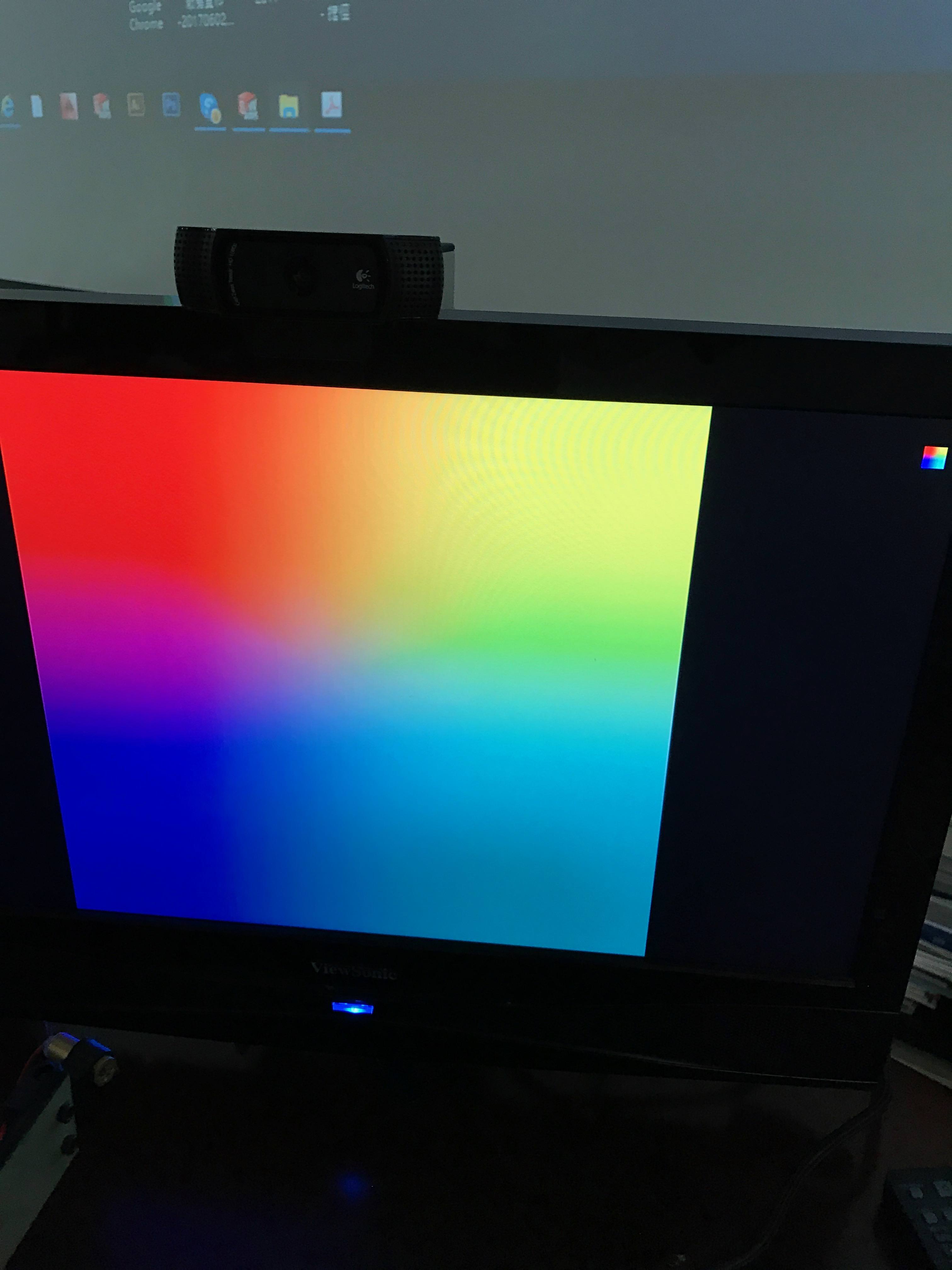
			<content type="html"><![CDATA[<p>The base image doesn&#039;t support Pi3 and you get that screen.&nbsp; </p><p>As above install Noobs and do the base build, then follow instructions to install Atlas.</p>]]></content>
			<author>
				<name><![CDATA[oliver]]></name>
				<uri>https://www.soliforum.com/user/13526/</uri>
			</author>
			<updated>2017-11-24T07:46:30Z</updated>
			<id>https://www.soliforum.com/post/140124/#p140124</id>
		</entry>
		<entry>
			<title type="html"><![CDATA[Re: Atlas 3D Software Help needed]]></title>
			<link rel="alternate" href="https://www.soliforum.com/post/140121/#p140121" />
			<content type="html"><![CDATA[<p>Hi HTH<br />thanks for your help.<br />The power should be good because I did use the Noobs software to run it, and the Raspberry system worked, but then there is no atlas scanning program.<br />Unless there is an atlas 3D scanning software available for download, which I don&#039;t see, then I&#039;ll have to struggle with the img file that was provided online, and I also tried decompressing it using Winrar and it just says the img file is corrupted.&nbsp; Downloaded it for like 5 times and it&#039;s the same file.</p><p>Anyways will try the sd formatter first!thanks for the suggestion</p>]]></content>
			<author>
				<name><![CDATA[jygrco]]></name>
				<uri>https://www.soliforum.com/user/17873/</uri>
			</author>
			<updated>2017-11-24T00:26:12Z</updated>
			<id>https://www.soliforum.com/post/140121/#p140121</id>
		</entry>
		<entry>
			<title type="html"><![CDATA[Re: Atlas 3D Software Help needed]]></title>
			<link rel="alternate" href="https://www.soliforum.com/post/140115/#p140115" />
			<content type="html"><![CDATA[<p>It looks like you pi is trying to boot but isn&#039;t able to.&nbsp; </p><p>Some ideas:<br />try downloading a smaller basic rpi image from raspberrypi.org etc and see if it works<br />the smaller color square in the top right corner of the screen may indicate a power supply problem. <br /> <a href="https://raspberrypi.stackexchange.com/questions/19354/raspberry-pi-with-boots-up-with-rainbow-screen">https://raspberrypi.stackexchange.com/q … bow-screen</a></p><p>the tool i used for writing the image to the card is called &#039;SDFormatter V4.0&quot; </p><br /><p>HTH</p>]]></content>
			<author>
				<name><![CDATA[jz]]></name>
				<uri>https://www.soliforum.com/user/16951/</uri>
			</author>
			<updated>2017-11-23T19:26:03Z</updated>
			<id>https://www.soliforum.com/post/140115/#p140115</id>
		</entry>
		<entry>
			<title type="html"><![CDATA[Atlas 3D Software Help needed]]></title>
			<link rel="alternate" href="https://www.soliforum.com/post/140048/#p140048" />
			<content type="html"><![CDATA[<p>Hi,&nbsp; I&#039;m very new to this forum as I have just bought the Atlas 3D scanner with Raspberry Pi3.</p><p>After assembling everything, I can&#039;t even get the proper program to run.<br />I have downloaded from the <a href="http://www.murobo.com/start.html">www.murobo.com/start.html</a> for the software :<br /><a href="https://s3.amazonaws.com/atlas3d/2015-05-01-atlas3d.zip">https://s3.amazonaws.com/atlas3d/2015-05-01-atlas3d.zip</a></p><p>and used Etcher, windows imager, whatever, to write it on to the Micro SD, and all I got was this screen:</p><p><span class="postimg"><img src="http://soliforum.com/i/?vqq4Hmd.jpg" alt="http://soliforum.com/i/?vqq4Hmd.jpg" /></span></p><p>Can someone tell me exactly what needs to be done to at least get the scanner started?<br />Or, is there another place for the files, as it takes like 6 hours to download the software.</p><p>Thank you all for the help.</p><p>John</p>]]></content>
			<author>
				<name><![CDATA[jygrco]]></name>
				<uri>https://www.soliforum.com/user/17873/</uri>
			</author>
			<updated>2017-11-22T08:23:58Z</updated>
			<id>https://www.soliforum.com/post/140048/#p140048</id>
		</entry>
</feed>