<?xml version="1.0" encoding="utf-8"?>
<feed xmlns="http://www.w3.org/2005/Atom">
	<title type="html"><![CDATA[SoliForum - 3D Printing Community — Totaly out of my depth setting up the Atlas 3D]]></title>
	<link rel="self" href="https://www.soliforum.com/feed/atom/topic/15877/" />
	<updated>2016-12-26T15:56:17Z</updated>
	<generator>PunBB</generator>
	<id>https://www.soliforum.com/topic/15877/totaly-out-of-my-depth-setting-up-the-atlas-3d/</id>
		<entry>
			<title type="html"><![CDATA[Re: Totaly out of my depth setting up the Atlas 3D]]></title>
			<link rel="alternate" href="https://www.soliforum.com/post/129802/#p129802" />
			<content type="html"><![CDATA[<p>The calibration steps are described in the below video.</p><p><a href="http://www.murobo.com/start.html#calibration">http://www.murobo.com/start.html#calibration</a></p>]]></content>
			<author>
				<name><![CDATA[hairu526]]></name>
				<uri>https://www.soliforum.com/user/4789/</uri>
			</author>
			<updated>2016-12-26T15:56:17Z</updated>
			<id>https://www.soliforum.com/post/129802/#p129802</id>
		</entry>
		<entry>
			<title type="html"><![CDATA[Re: Totaly out of my depth setting up the Atlas 3D]]></title>
			<link rel="alternate" href="https://www.soliforum.com/post/129798/#p129798" />
			<content type="html"><![CDATA[<p>OK, great. That explains the missing patches (even on a rectangular object).</p>]]></content>
			<author>
				<name><![CDATA[tonyno]]></name>
				<uri>https://www.soliforum.com/user/8582/</uri>
			</author>
			<updated>2016-12-26T14:11:03Z</updated>
			<id>https://www.soliforum.com/post/129798/#p129798</id>
		</entry>
		<entry>
			<title type="html"><![CDATA[Re: Totaly out of my depth setting up the Atlas 3D]]></title>
			<link rel="alternate" href="https://www.soliforum.com/post/129795/#p129795" />
			<content type="html"><![CDATA[<p>The second laser makes it easier to scan complex objects that have areas where the camera can&#039;t see a single laser line.&nbsp; It&#039;s best to use a single laser for simple shapes and two lasers for more complex shapes.&nbsp; If you see big patches of missing scan data in an object then you most likely need to enable both lasers.&nbsp; However, the calibration becomes much more important when scanning with two lasers because the results need to be brought in sync to produce a single scan.</p><p>- Uriah</p>]]></content>
			<author>
				<name><![CDATA[hairu526]]></name>
				<uri>https://www.soliforum.com/user/4789/</uri>
			</author>
			<updated>2016-12-26T13:26:03Z</updated>
			<id>https://www.soliforum.com/post/129795/#p129795</id>
		</entry>
		<entry>
			<title type="html"><![CDATA[Re: Totaly out of my depth setting up the Atlas 3D]]></title>
			<link rel="alternate" href="https://www.soliforum.com/post/129721/#p129721" />
			<content type="html"><![CDATA[<p>Congrats. By default, it only uses one laser. You can change that in the settings, but I have no idea what is best as it&#039;s not covered in the docs.</p>]]></content>
			<author>
				<name><![CDATA[tonyno]]></name>
				<uri>https://www.soliforum.com/user/8582/</uri>
			</author>
			<updated>2016-12-24T22:59:54Z</updated>
			<id>https://www.soliforum.com/post/129721/#p129721</id>
		</entry>
		<entry>
			<title type="html"><![CDATA[Re: Totaly out of my depth setting up the Atlas 3D]]></title>
			<link rel="alternate" href="https://www.soliforum.com/post/129707/#p129707" />
			<content type="html"><![CDATA[<p>Nothing ventured nothing gained. <br />sometimes you do not know your limits until you stretch them . It is working and you will make it better.</p>]]></content>
			<author>
				<name><![CDATA[Tin Falcon]]></name>
				<uri>https://www.soliforum.com/user/6775/</uri>
			</author>
			<updated>2016-12-24T18:58:26Z</updated>
			<id>https://www.soliforum.com/post/129707/#p129707</id>
		</entry>
		<entry>
			<title type="html"><![CDATA[Re: Totaly out of my depth setting up the Atlas 3D]]></title>
			<link rel="alternate" href="https://www.soliforum.com/post/129706/#p129706" />
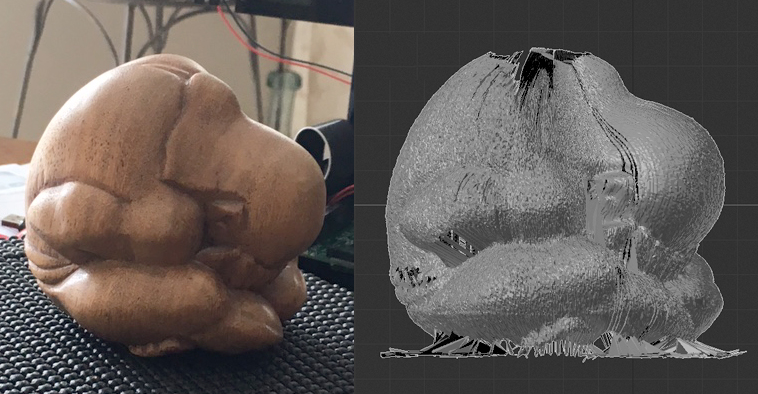
			<content type="html"><![CDATA[<p>Thank you for all your help, it turned out one of the guys I get together with on a Thursday evening to play board games is well versed in the equipment and programing and he came over yesterday and sorted my problems out, see attached!</p><p>One thing that gave me pause for thought was that only one laser was operating, I&#039;ll have to do some research, I think I was a little ambitious<span class="postimg"><img src="http://soliforum.com/i/?M6H6qK6.jpg" alt="http://soliforum.com/i/?M6H6qK6.jpg" /></span> with the subject but I was thrilled with just getting a result.</p>]]></content>
			<author>
				<name><![CDATA[hughes5820]]></name>
				<uri>https://www.soliforum.com/user/15602/</uri>
			</author>
			<updated>2016-12-24T18:40:20Z</updated>
			<id>https://www.soliforum.com/post/129706/#p129706</id>
		</entry>
		<entry>
			<title type="html"><![CDATA[Re: Totaly out of my depth setting up the Atlas 3D]]></title>
			<link rel="alternate" href="https://www.soliforum.com/post/129648/#p129648" />
			<content type="html"><![CDATA[<p>When you say &quot;connect to my network&quot; how do I do that exactly, ether net Atlas to Mac, ether net Atlas to Router, and how do I go to my router&#039;s web page.</p><p>I&#039;m sorry but I don&#039;t think you realize just how little I know about the whole electronics area.</p><p>Just to confirm just how little I know in the instructions it refers to the BYOP Kit, I&#039;m assuming that is what I received from the Kickstarter campaign</p><p><span class="postimg"><img src="http://soliforum.com/i/?5uAyQou.jpg" alt="http://soliforum.com/i/?5uAyQou.jpg" /></span></p>]]></content>
			<author>
				<name><![CDATA[hughes5820]]></name>
				<uri>https://www.soliforum.com/user/15602/</uri>
			</author>
			<updated>2016-12-23T17:05:44Z</updated>
			<id>https://www.soliforum.com/post/129648/#p129648</id>
		</entry>
		<entry>
			<title type="html"><![CDATA[Re: Totaly out of my depth setting up the Atlas 3D]]></title>
			<link rel="alternate" href="https://www.soliforum.com/post/129617/#p129617" />
			<content type="html"><![CDATA[<p>After you connect it to your network, look for the IP address it received. I went to my router&#039;s web page for connected clients.</p>]]></content>
			<author>
				<name><![CDATA[tonyno]]></name>
				<uri>https://www.soliforum.com/user/8582/</uri>
			</author>
			<updated>2016-12-22T23:51:20Z</updated>
			<id>https://www.soliforum.com/post/129617/#p129617</id>
		</entry>
		<entry>
			<title type="html"><![CDATA[Re: Totaly out of my depth setting up the Atlas 3D]]></title>
			<link rel="alternate" href="https://www.soliforum.com/post/129612/#p129612" />
			<content type="html"><![CDATA[<p>Well that sounds easy, just plug it in. <br />I have the SD card plugged in, the WiFi dongle Plugged in and I connected an ether net cable between the Atlas and my mac, nothing showed up, darn.<br />I thought about it for a while and thought I should plug the Atlas into the WiFi router, still nothing.<br />I&#039;ve tried putting&nbsp; -&nbsp; Raspberry Pi Wifi Configuration - into my browser but could find nothing usable, then I tried the&nbsp; &nbsp; http://atlas3d/&nbsp; &nbsp;Still nothing.<br />I&#039;m sure it&#039;s me being particularly dense, if you could tell me what to plug in where I would really appreciate it.</p>]]></content>
			<author>
				<name><![CDATA[hughes5820]]></name>
				<uri>https://www.soliforum.com/user/15602/</uri>
			</author>
			<updated>2016-12-22T23:21:12Z</updated>
			<id>https://www.soliforum.com/post/129612/#p129612</id>
		</entry>
		<entry>
			<title type="html"><![CDATA[Re: Totaly out of my depth setting up the Atlas 3D]]></title>
			<link rel="alternate" href="https://www.soliforum.com/post/129539/#p129539" />
			<content type="html"><![CDATA[<p>Yep, that&#039;s what I ran into also, so I just plugged-in as stated above.</p>]]></content>
			<author>
				<name><![CDATA[tonyno]]></name>
				<uri>https://www.soliforum.com/user/8582/</uri>
			</author>
			<updated>2016-12-22T00:45:54Z</updated>
			<id>https://www.soliforum.com/post/129539/#p129539</id>
		</entry>
		<entry>
			<title type="html"><![CDATA[Re: Totaly out of my depth setting up the Atlas 3D]]></title>
			<link rel="alternate" href="https://www.soliforum.com/post/129532/#p129532" />
			<content type="html"><![CDATA[<p>Although I had the step checked of on the assembly instructions I had not plugged the SD card in, the card is now in and When I power up The lights come on then the Green one flashes for a while then remains off.</p><p>Moving on to the WiFi setup And connecting to the scanner. (Mac)<br />I inserted the WiFi dongle in the Raspberry Pi (one of the 4 USBs in the back of scanner) and a USB flash drive into one of the other USB s on the same panel. The Lasers did not turn on or off. I tried two different flash drive with the same results.<br />I noticed in the Windows instructions Step 3 tells that you insert the flash drive into your PC so I tried that step on the Mac but when plugged into Mac there was no file to edit</p>]]></content>
			<author>
				<name><![CDATA[hughes5820]]></name>
				<uri>https://www.soliforum.com/user/15602/</uri>
			</author>
			<updated>2016-12-21T16:31:06Z</updated>
			<id>https://www.soliforum.com/post/129532/#p129532</id>
		</entry>
		<entry>
			<title type="html"><![CDATA[Re: Totaly out of my depth setting up the Atlas 3D]]></title>
			<link rel="alternate" href="https://www.soliforum.com/post/129519/#p129519" />
			<content type="html"><![CDATA[<p>Hi hughes5820,</p><p>Did plugging in the SD card fix the issue for you?</p><p>- Uriah</p>]]></content>
			<author>
				<name><![CDATA[hairu526]]></name>
				<uri>https://www.soliforum.com/user/4789/</uri>
			</author>
			<updated>2016-12-21T12:00:20Z</updated>
			<id>https://www.soliforum.com/post/129519/#p129519</id>
		</entry>
		<entry>
			<title type="html"><![CDATA[Re: Totaly out of my depth setting up the Atlas 3D]]></title>
			<link rel="alternate" href="https://www.soliforum.com/post/129504/#p129504" />
			<content type="html"><![CDATA[<p>It&#039;s on the bottom of the board towards the front where your pic is centered.</p><p><span class="postimg"><img src="http://core0.staticworld.net/images/article/2014/08/raspberry-pi-b-microsd-photo-100409820-orig.jpg" alt="http://core0.staticworld.net/images/article/2014/08/raspberry-pi-b-microsd-photo-100409820-orig.jpg" /></span></p>]]></content>
			<author>
				<name><![CDATA[tonyno]]></name>
				<uri>https://www.soliforum.com/user/8582/</uri>
			</author>
			<updated>2016-12-21T00:04:39Z</updated>
			<id>https://www.soliforum.com/post/129504/#p129504</id>
		</entry>
		<entry>
			<title type="html"><![CDATA[Re: Totaly out of my depth setting up the Atlas 3D]]></title>
			<link rel="alternate" href="https://www.soliforum.com/post/129474/#p129474" />
			<content type="html"><![CDATA[<p>I have just reconnected the Atlas and see through one of the cracks in the enclosure some LEDs illuminated, solid not flashing.</p><p>I purchased the acrylic enclosure and the opening in the front of where the electronics is doesn&#039;t line up with the LEDs so I have partially disassembled it to rectify this. The Rasebery PI is now visible and I&#039;m not seeing any SD card, is it on the top of this assemble? I&#039;m sure I would have done it if it had been on the assembly instructions but maybe not. I&#039;ll look out the assembly instructions and check it out</p>]]></content>
			<author>
				<name><![CDATA[hughes5820]]></name>
				<uri>https://www.soliforum.com/user/15602/</uri>
			</author>
			<updated>2016-12-20T17:00:22Z</updated>
			<id>https://www.soliforum.com/post/129474/#p129474</id>
		</entry>
		<entry>
			<title type="html"><![CDATA[Re: Totaly out of my depth setting up the Atlas 3D]]></title>
			<link rel="alternate" href="https://www.soliforum.com/post/129433/#p129433" />
			<content type="html"><![CDATA[<p>No LEDs on the board flashing, or even lit up?</p><p>Did you put the SD card into the PI then power it up?</p><p>I had problems with the first part getting it to write to a USB drive, so I just plugged in an Ethernet cable connected to my network, looked up the address for it, and went to that in a browser. After that, it was easy to follow the instructions for the rest.</p>]]></content>
			<author>
				<name><![CDATA[tonyno]]></name>
				<uri>https://www.soliforum.com/user/8582/</uri>
			</author>
			<updated>2016-12-20T00:00:11Z</updated>
			<id>https://www.soliforum.com/post/129433/#p129433</id>
		</entry>
</feed>