<?xml version="1.0" encoding="utf-8"?>
<feed xmlns="http://www.w3.org/2005/Atom">
	<title type="html"><![CDATA[SoliForum - 3D Printing Community — Jr + Cura 2.3.0 + ThreeDub]]></title>
	<link rel="self" href="https://www.soliforum.com/feed/atom/topic/15639/" />
	<updated>2019-07-23T01:00:43Z</updated>
	<generator>PunBB</generator>
	<id>https://www.soliforum.com/topic/15639/jr-cura-230-threedub/</id>
		<entry>
			<title type="html"><![CDATA[Re: Jr + Cura 2.3.0 + ThreeDub]]></title>
			<link rel="alternate" href="https://www.soliforum.com/post/150962/#p150962" />
			<content type="html"><![CDATA[<div class="quotebox"><cite>lawrence_jeff wrote:</cite><blockquote><div class="quotebox"><cite>carl_m1968 wrote:</cite><blockquote><p> If the bed is not adjustable then you will need to play with or create a Z offset in your START gcode. If you have to do this then make very small value changes to avoid allowing the nozzle to hit the bed.</p></blockquote></div><p>@carl - I have been playing with Cura and comparing XYZWare and CURA generated GCODE, I am not following how an offset in the start GCODE affects the first layer as defined by cura</p><p>The examples posted run the priming routine at Z = .35 from start gcode (which matches what XYZware does) but the gcode commands are absolute positional (not relative) so once its done with the priming it seems it will go to whatever Z value is specified by cura&#039;s first layer setting.</p><p>So for instance if start GCODE has .35, Cura first layer height is .25 and standard layer is .2&nbsp; It seems to run the priming line at Z=.35 (from start gcode) and when done it then actually lowers to Z=.25 for the first layer, the next layer will be .45, then .65 etc.</p><p>Am I misunderstanding something. It seems whatever is in start gcode only affects the process until the first layer as output by cura begins. I believe you can reset the Z via a G92 Z command but I don&#039;t see these in any of the examples provided.</p></blockquote></div><br /><p>Your nozzle is set at a position deemed as home. Any movement originates from that home position. So like you said the purge line is done at .35 from the home position of zero. An offset modifies the home zero position by whatever value you use. So say you make an offset of .2 even though it is still seeing home as zero you have actually added .2 to the zero so not your purge line would actually start at .55 and would not be on the bed but start in the air. That&#039;s why it is called an offset as it offset the true zero of home by the offset value.</p>]]></content>
			<author>
				<name><![CDATA[carl_m1968]]></name>
				<uri>https://www.soliforum.com/user/7731/</uri>
			</author>
			<updated>2019-07-23T01:00:43Z</updated>
			<id>https://www.soliforum.com/post/150962/#p150962</id>
		</entry>
		<entry>
			<title type="html"><![CDATA[Re: Jr + Cura 2.3.0 + ThreeDub]]></title>
			<link rel="alternate" href="https://www.soliforum.com/post/150959/#p150959" />
			<content type="html"><![CDATA[<p>Anyone help me get Threedub working on Linux.&nbsp; When I run it (the older version mentioned above as the newer link no longer works)</p><p>I get an error about encryption I think.&nbsp; I am running Python 2.7, I have installed py-crypto, pyserial and padding. Anyone got any suggestions?</p><p>Error is as follows.</p><p>sudo threedub 20140205_Marvin_KeyChain.gcode Marvin.gcode<br />Traceback (most recent call last):<br />&nbsp; File &quot;/usr/local/bin/threedub&quot;, line 11, in &lt;module&gt;<br />&nbsp; &nbsp; load_entry_point(&#039;threedub==0.1&#039;, &#039;console_scripts&#039;, &#039;threedub&#039;)()<br />&nbsp; File &quot;build/bdist.linux-armv7l/egg/threedub/main.py&quot;, line 60, in threedub<br />&nbsp; File &quot;build/bdist.linux-armv7l/egg/threedub/davinci.py&quot;, line 76, in write<br />&nbsp; File &quot;build/bdist.linux-armv7l/egg/threedub/davinci.py&quot;, line 41, in encrypt<br />&nbsp; File &quot;/usr/lib/python2.7/dist-packages/Crypto/Cipher/AES.py&quot;, line 59, in __init__<br />&nbsp; &nbsp; blockalgo.BlockAlgo.__init__(self, _AES, key, *args, **kwargs)<br />&nbsp; File &quot;/usr/lib/python2.7/dist-packages/Crypto/Cipher/blockalgo.py&quot;, line 141, in __init__<br />&nbsp; &nbsp; self._cipher = factory.new(key, *args, **kwargs)<br />ValueError: ECB mode does not use IV</p>]]></content>
			<author>
				<name><![CDATA[QBall1977]]></name>
				<uri>https://www.soliforum.com/user/22258/</uri>
			</author>
			<updated>2019-07-22T22:27:31Z</updated>
			<id>https://www.soliforum.com/post/150959/#p150959</id>
		</entry>
		<entry>
			<title type="html"><![CDATA[Re: Jr + Cura 2.3.0 + ThreeDub]]></title>
			<link rel="alternate" href="https://www.soliforum.com/post/145556/#p145556" />
			<content type="html"><![CDATA[<div class="quotebox"><cite>carl_m1968 wrote:</cite><blockquote><p> If the bed is not adjustable then you will need to play with or create a Z offset in your START gcode. If you have to do this then make very small value changes to avoid allowing the nozzle to hit the bed.</p></blockquote></div><p>@carl - I have been playing with Cura and comparing XYZWare and CURA generated GCODE, I am not following how an offset in the start GCODE affects the first layer as defined by cura</p><p>The examples posted run the priming routine at Z = .35 from start gcode (which matches what XYZware does) but the gcode commands are absolute positional (not relative) so once its done with the priming it seems it will go to whatever Z value is specified by cura&#039;s first layer setting.</p><p>So for instance if start GCODE has .35, Cura first layer height is .25 and standard layer is .2&nbsp; It seems to run the priming line at Z=.35 (from start gcode) and when done it then actually lowers to Z=.25 for the first layer, the next layer will be .45, then .65 etc.</p><p>Am I misunderstanding something. It seems whatever is in start gcode only affects the process until the first layer as output by cura begins. I believe you can reset the Z via a G92 Z command but I don&#039;t see these in any of the examples provided.</p>]]></content>
			<author>
				<name><![CDATA[lawrence_jeff]]></name>
				<uri>https://www.soliforum.com/user/19322/</uri>
			</author>
			<updated>2018-08-12T05:21:27Z</updated>
			<id>https://www.soliforum.com/post/145556/#p145556</id>
		</entry>
		<entry>
			<title type="html"><![CDATA[Re: Jr + Cura 2.3.0 + ThreeDub]]></title>
			<link rel="alternate" href="https://www.soliforum.com/post/143426/#p143426" />
			<content type="html"><![CDATA[<p>I am running linux and would like to print directly from my computer without an sd card. Is there any way to do this from cura?<br /> I got cura set up a year ago with no problems.</p>]]></content>
			<author>
				<name><![CDATA[charlesmillhollin]]></name>
				<uri>https://www.soliforum.com/user/15724/</uri>
			</author>
			<updated>2018-04-03T21:18:55Z</updated>
			<id>https://www.soliforum.com/post/143426/#p143426</id>
		</entry>
		<entry>
			<title type="html"><![CDATA[Re: Jr + Cura 2.3.0 + ThreeDub]]></title>
			<link rel="alternate" href="https://www.soliforum.com/post/142060/#p142060" />
			<content type="html"><![CDATA[<div class="quotebox"><cite>bushy wrote:</cite><blockquote><div class="quotebox"><cite>yizhou.he wrote:</cite><blockquote><p>XYZware is optimized for jr. Cura is not. And default setting for Cura will work on most popular 3d printers, but not jr. in stock condition. You need to fine tune Cura setting in order to get better print quality than XYZware. Option to use Cura on one hand opened the door to many possibilities, on the other hand increase the complexity to identify the best setting for your printer.</p></blockquote></div><p>Yes I under stand that. Tried the many profiles that were posted and tried to tweak them but the first layer fails to print at the proper thickness even when I set it to be twice the size. Uses up a lot of time and filament. So I will probably keep trying when I have excess of both.</p></blockquote></div><br /><p>The first layer is controlled by the height between the nozzle and bed. If your printer allows for calibration and it is calibrated correctly and the proper z offset in your start gcode is set in your slicer than you should just be able to slip a piece of paper between the nozzle and bed with slight drag. The actual layer height setting will influence it to some extent but it still should be squished standard layer. The layer height setting in the slicer is actually for all the other layers after the first and should not even be considered in determining the fist layer. The first layer thickness again is dictated by the nozzle to bed clearance and it sounds like yours could be too high.</p><p>A rule of thumb could be simply be that the gap between your bed an nozzle should be half or less of your desired printing layer height. For example if you want to print a .2 layer then the gap should be .1 or less. You never want the gap to be a value larger than half of your printed layer height.</p><p>Again if your printer allows the bed height to be adjusted then that is how you would achieve this. If the bed is not adjustable then you will need to play with or create a Z offset in your START gcode. If you have to do this then make very small value changes to avoid allowing the nozzle to hit the bed.</p>]]></content>
			<author>
				<name><![CDATA[carl_m1968]]></name>
				<uri>https://www.soliforum.com/user/7731/</uri>
			</author>
			<updated>2018-01-30T23:11:35Z</updated>
			<id>https://www.soliforum.com/post/142060/#p142060</id>
		</entry>
		<entry>
			<title type="html"><![CDATA[Re: Jr + Cura 2.3.0 + ThreeDub]]></title>
			<link rel="alternate" href="https://www.soliforum.com/post/142058/#p142058" />
			<content type="html"><![CDATA[<div class="quotebox"><cite>yizhou.he wrote:</cite><blockquote><p>XYZware is optimized for jr. Cura is not. And default setting for Cura will work on most popular 3d printers, but not jr. in stock condition. You need to fine tune Cura setting in order to get better print quality than XYZware. Option to use Cura on one hand opened the door to many possibilities, on the other hand increase the complexity to identify the best setting for your printer.</p></blockquote></div><p>Yes I under stand that. Tried the many profiles that were posted and tried to tweak them but the first layer fails to print at the proper thickness even when I set it to be twice the size. Uses up a lot of time and filament. So I will probably keep trying when I have excess of both.</p>]]></content>
			<author>
				<name><![CDATA[bushy]]></name>
				<uri>https://www.soliforum.com/user/17884/</uri>
			</author>
			<updated>2018-01-30T23:00:25Z</updated>
			<id>https://www.soliforum.com/post/142058/#p142058</id>
		</entry>
		<entry>
			<title type="html"><![CDATA[Re: Jr + Cura 2.3.0 + ThreeDub]]></title>
			<link rel="alternate" href="https://www.soliforum.com/post/142053/#p142053" />
			<content type="html"><![CDATA[<p>XYZware is optimized for jr. Cura is not. And default setting for Cura will work on most popular 3d printers, but not jr. in stock condition. You need to fine tune Cura setting in order to get better print quality than XYZware. Option to use Cura on one hand opened the door to many possibilities, on the other hand increase the complexity to identify the best setting for your printer.</p>]]></content>
			<author>
				<name><![CDATA[yizhou.he]]></name>
				<uri>https://www.soliforum.com/user/17164/</uri>
			</author>
			<updated>2018-01-30T15:07:10Z</updated>
			<id>https://www.soliforum.com/post/142053/#p142053</id>
		</entry>
		<entry>
			<title type="html"><![CDATA[Re: Jr + Cura 2.3.0 + ThreeDub]]></title>
			<link rel="alternate" href="https://www.soliforum.com/post/142050/#p142050" />
			<content type="html"><![CDATA[<p>I was excited to have an option to XYZware when I found this thread. I am glad it works for so many. I actually get better prints from XYZware then with cura.</p>]]></content>
			<author>
				<name><![CDATA[bushy]]></name>
				<uri>https://www.soliforum.com/user/17884/</uri>
			</author>
			<updated>2018-01-30T03:25:18Z</updated>
			<id>https://www.soliforum.com/post/142050/#p142050</id>
		</entry>
		<entry>
			<title type="html"><![CDATA[Re: Jr + Cura 2.3.0 + ThreeDub]]></title>
			<link rel="alternate" href="https://www.soliforum.com/post/142047/#p142047" />
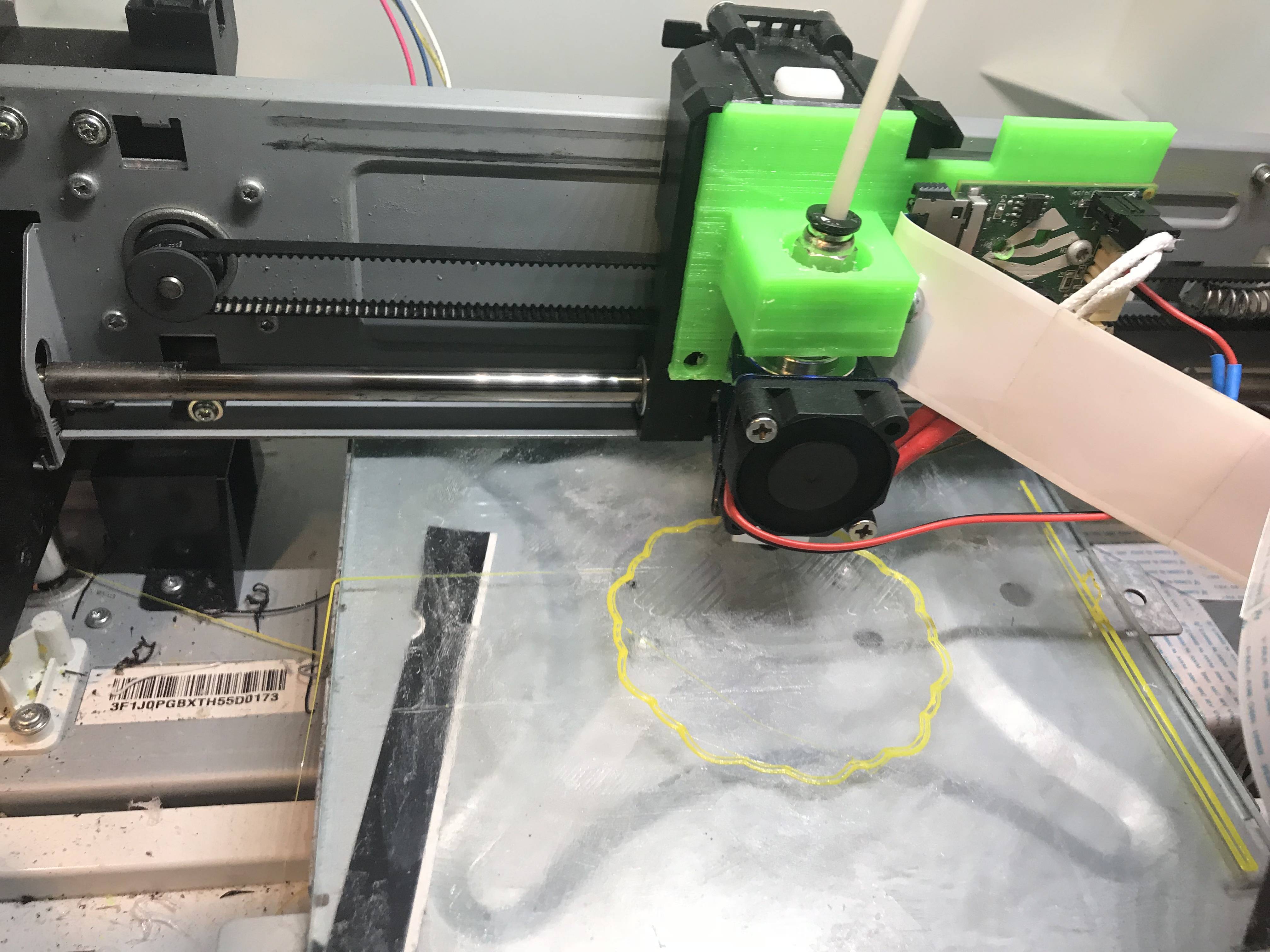
			<content type="html"><![CDATA[<p><a href="https://youtu.be/yfoowvOjNGE">https://youtu.be/yfoowvOjNGE</a><br />Now I can use cura And have a good extruder. I replaced my extruder with a generic Bowden.<br /><span class="postimg"><img src="http://soliforum.com/i/?K04839z.jpg" alt="http://soliforum.com/i/?K04839z.jpg" /></span></p>]]></content>
			<author>
				<name><![CDATA[jdplus3]]></name>
				<uri>https://www.soliforum.com/user/17436/</uri>
			</author>
			<updated>2018-01-29T22:15:58Z</updated>
			<id>https://www.soliforum.com/post/142047/#p142047</id>
		</entry>
		<entry>
			<title type="html"><![CDATA[Re: Jr + Cura 2.3.0 + ThreeDub]]></title>
			<link rel="alternate" href="https://www.soliforum.com/post/141490/#p141490" />
			<content type="html"><![CDATA[<p>Thank you!! That worked <img src="https://www.soliforum.com/img/smilies/smile.png" width="15" height="15" alt="smile" /></p><p>I tried it first on the newer py-threedub (0.2 from <a href="https://gitlab.com/Razor_keen/py-threedub.git)">https://gitlab.com/Razor_keen/py-threedub.git)</a> and it kept failing with an import error on the Padding name. (I&#039;m not very proficient with Python, so I&#039;ll investigate more later). I then applied the same change to the older py-threedub (0.1 from <a href="https://gitlab.com/anthem/py-threedub.git)">https://gitlab.com/anthem/py-threedub.git)</a> and was able to put out a 3w file of a model that xyzWare had refused to slice and then open the 3w file and print it <img src="https://www.soliforum.com/img/smilies/smile.png" width="15" height="15" alt="smile" /></p><p>The initial print was all messed up, but I figure that is probably in slicer settings. Guess I have some tinkering to do this evening <img src="https://www.soliforum.com/img/smilies/smile.png" width="15" height="15" alt="smile" /></p>]]></content>
			<author>
				<name><![CDATA[excalbian]]></name>
				<uri>https://www.soliforum.com/user/18157/</uri>
			</author>
			<updated>2018-01-10T13:52:42Z</updated>
			<id>https://www.soliforum.com/post/141490/#p141490</id>
		</entry>
		<entry>
			<title type="html"><![CDATA[Re: Jr + Cura 2.3.0 + ThreeDub]]></title>
			<link rel="alternate" href="https://www.soliforum.com/post/141465/#p141465" />
			<content type="html"><![CDATA[<p>Appreciate it! Please let me know if there is anything I can do to help.</p>]]></content>
			<author>
				<name><![CDATA[excalbian]]></name>
				<uri>https://www.soliforum.com/user/18157/</uri>
			</author>
			<updated>2018-01-09T13:18:02Z</updated>
			<id>https://www.soliforum.com/post/141465/#p141465</id>
		</entry>
		<entry>
			<title type="html"><![CDATA[Re: Jr + Cura 2.3.0 + ThreeDub]]></title>
			<link rel="alternate" href="https://www.soliforum.com/post/141456/#p141456" />
			<content type="html"><![CDATA[<p>Sorry, just saw your reply. I&#039;m not at home yet, but here are a couple 3w files. The &quot;TARDIS_panel&quot; is something I had printed before and I&#039;m sure was saved after slicing specifically for the miniMaker. The &quot;xzyCalibration_cube&quot; I just downloaded off thingiverse and saved after slicing, but I&#039;m not 100% sure the 3w file is setup for the miniMaker.</p>]]></content>
			<author>
				<name><![CDATA[excalbian]]></name>
				<uri>https://www.soliforum.com/user/18157/</uri>
			</author>
			<updated>2018-01-09T01:43:13Z</updated>
			<id>https://www.soliforum.com/post/141456/#p141456</id>
		</entry>
		<entry>
			<title type="html"><![CDATA[Re: Jr + Cura 2.3.0 + ThreeDub]]></title>
			<link rel="alternate" href="https://www.soliforum.com/post/141443/#p141443" />
			<content type="html"><![CDATA[<div class="quotebox"><cite>razor_keen wrote:</cite><blockquote><p>You will need to use xyz advanced to see gcode with. Slice a model with xyz with your printer, and take note of what it says for model. <br />In threedub you can change this in models.py. that should fix it.</p></blockquote></div><p>I don&#039;t know how to get to xyzzy advanced <img src="https://www.soliforum.com/img/smilies/sad.png" width="15" height="15" alt="sad" />. I&#039;m on a Mac with XYZWare 2.2.19 if that helps.</p><p>I did try to use threedub to extract the gcode from a file saved out of XYZWare that worked on my miniMaker, but it had the same headers (I presume threedub changed them?) as the gcode in the file created by threedub. I then took the same gcode file, repacked it with threedub and validated that indeed it wouldn&#039;t print from XYZWare (so XYZWare 3w -&gt; threedub gcode -&gt; threedub 3w and I can open both 3w files, but only print from the XYZWare 3w and not the threedub 3w).</p><p>I did play around with threedub a little more (found the printers.py file, with a definition for JR10, which I&#039;m guessing is what has to be modified once we can figure out what the miniMaker values are). It was able to query status from the miniMaker (threedub -q) but I noticed that several of the raw status values threedub doesn&#039;t know how to interpret.</p><p>Lastly, I did notice that there are two different versions of the python port of threedub (I couldn&#039;t find the source to the original threedub?):<br /> - origin&nbsp; &nbsp; <a href="https://gitlab.com/Razor_keen/py-threedub.git">https://gitlab.com/Razor_keen/py-threedub.git</a> - more recent (2 months ago)<br /> - origin&nbsp; &nbsp; <a href="https://gitlab.com/anthem/py-threedub.git">https://gitlab.com/anthem/py-threedub.git</a> - older (1 year ago)<br />although both versions behaved the same for me with regards to XYZWare and the printer.</p>]]></content>
			<author>
				<name><![CDATA[excalbian]]></name>
				<uri>https://www.soliforum.com/user/18157/</uri>
			</author>
			<updated>2018-01-08T12:48:23Z</updated>
			<id>https://www.soliforum.com/post/141443/#p141443</id>
		</entry>
		<entry>
			<title type="html"><![CDATA[Re: Jr + Cura 2.3.0 + ThreeDub]]></title>
			<link rel="alternate" href="https://www.soliforum.com/post/141422/#p141422" />
			<content type="html"><![CDATA[<p>Thanks to all for the hard work that got this far!</p><p>I&#039;ve got an STL file (from Tinkercad) that xyzWare just can&#039;t slice (consistently crashes after the print options) so it forced me to finally get around to try using a different slicer. Downloaded Cura (previous experience) and installed threedub on my Mac (easy, thanks to the forum posts). When I open the resulting .3w file in xyzWare, I can see the model, but printing gives me the following error:<br /></p><div class="codebox"><pre><code>Printer mismatch - Please change your printer
settings and make sure you have selected the correct printer model.

For troubleshooting, please refer to our user guide.</code></pre></div><p>I&#039;m assuming something in the threedub process is adding a Davinci JR header that needs to be changed to work with my miniMaker, but I have no idea where to try that.</p><p>Any help would be appreciated!</p>]]></content>
			<author>
				<name><![CDATA[excalbian]]></name>
				<uri>https://www.soliforum.com/user/18157/</uri>
			</author>
			<updated>2018-01-07T22:58:47Z</updated>
			<id>https://www.soliforum.com/post/141422/#p141422</id>
		</entry>
		<entry>
			<title type="html"><![CDATA[Re: Jr + Cura 2.3.0 + ThreeDub]]></title>
			<link rel="alternate" href="https://www.soliforum.com/post/140988/#p140988" />
			<content type="html"><![CDATA[<p>Jdplus3, thanks for the profile.&nbsp; I&#039;ll give it a shot later today.</p>]]></content>
			<author>
				<name><![CDATA[mjf55]]></name>
				<uri>https://www.soliforum.com/user/16979/</uri>
			</author>
			<updated>2017-12-23T18:00:47Z</updated>
			<id>https://www.soliforum.com/post/140988/#p140988</id>
		</entry>
</feed>