<?xml version="1.0" encoding="utf-8"?>
<feed xmlns="http://www.w3.org/2005/Atom">
	<title type="html"><![CDATA[SoliForum - 3D Printing Community — S3 weird behavior after flashing firmware]]></title>
	<link rel="self" href="https://www.soliforum.com/feed/atom/topic/15089/" />
	<updated>2016-08-24T03:13:53Z</updated>
	<generator>PunBB</generator>
	<id>https://www.soliforum.com/topic/15089/s3-weird-behavior-after-flashing-firmware/</id>
		<entry>
			<title type="html"><![CDATA[Re: S3 weird behavior after flashing firmware]]></title>
			<link rel="alternate" href="https://www.soliforum.com/post/126494/#p126494" />
			<content type="html"><![CDATA[<p>Mystery solved- the problem is a worn belt in the X axis combined with a tilted motor which is what wore out the belt, I imagine.&nbsp; A friend wrote a snippet of gcode to wiggle the X and Y axes back and forth by 0.2 mm.&nbsp; The X axis drive pulley moves, but the belt and so the extruder carriage, doesn&#039;t.&nbsp; When you step the motion up to 0.5 mm, everything moves, but not sure about the amount.</p><p>The motor mount for the X axis motor seems to be warped and the motor tilted as if the belt tension caused it.&nbsp; I speculate that the belt teeth meeting the drive pulley teeth at an angle caused the belt teeth to be ground away.</p><p>I&#039;m going to shim the motor mount to straighten the motor and replace the belt as a temporary fix, then replace the X and Y axis carriage parts with freshly printed stuff (and eventually, aluminum) that uses linear bearings instead of bushings.&nbsp; I may even use a small linear guide I recently acquired to replace the X axis guide rails.</p>]]></content>
			<author>
				<name><![CDATA[mark.rehorst]]></name>
				<uri>https://www.soliforum.com/user/8683/</uri>
			</author>
			<updated>2016-08-24T03:13:53Z</updated>
			<id>https://www.soliforum.com/post/126494/#p126494</id>
		</entry>
		<entry>
			<title type="html"><![CDATA[S3 weird behavior after flashing firmware]]></title>
			<link rel="alternate" href="https://www.soliforum.com/post/124722/#p124722" />
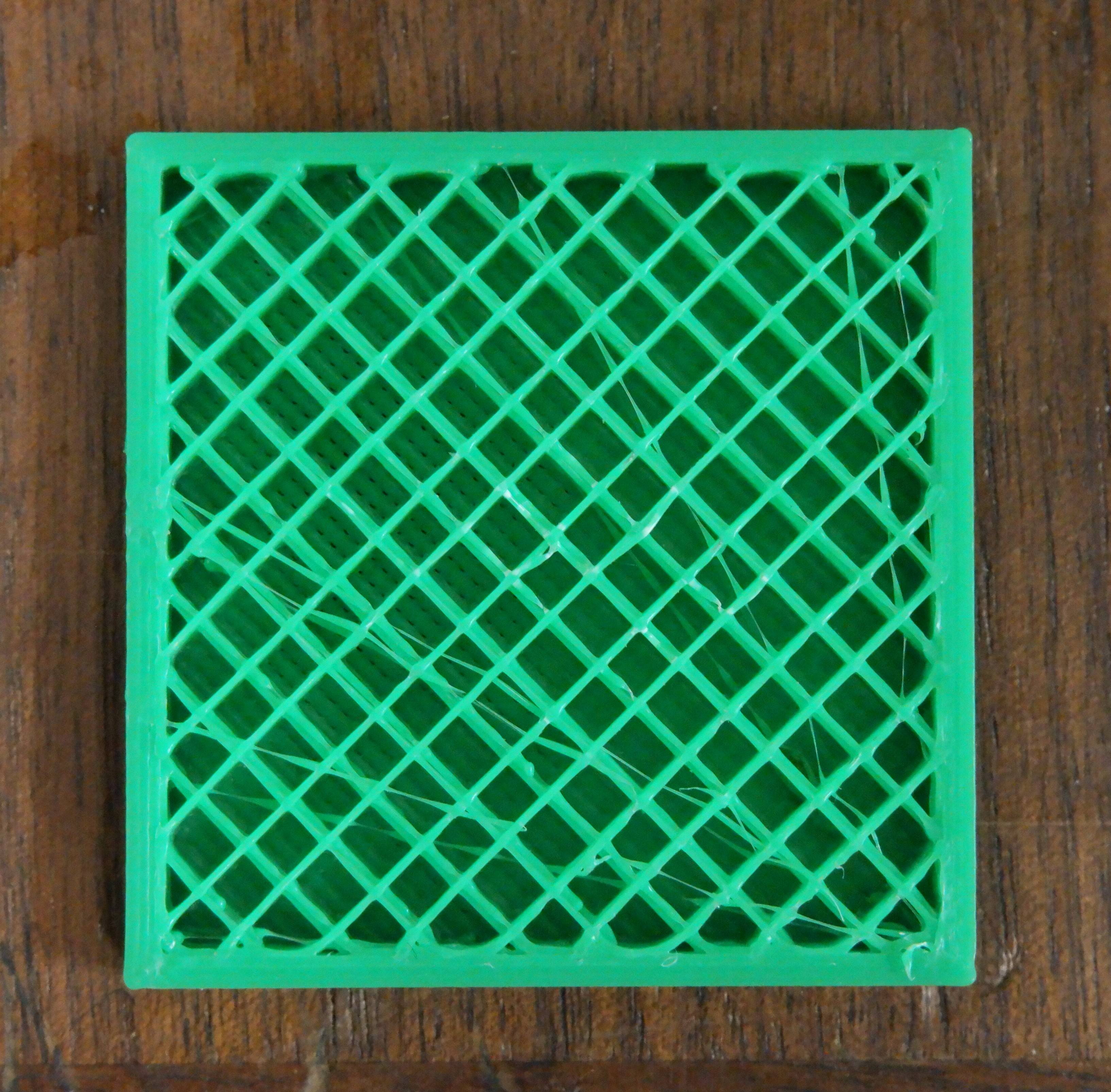
			<content type="html"><![CDATA[<p>I replaced the stock extruder/hot-end with with an E3D Titan and Lite 6 on the S3 printer at Milwaukee Makerspace.</p><p>I updated firmware using Solidoodle-Marlin_v1-Solidoodle_Marlin_v1_beta&nbsp; &nbsp;In config.h I specified S3, selected board 81 (printr board rev E), and increased temperature limits for hot-end and bed.&nbsp; </p><p>Result- New temperature limits work fine.&nbsp; When printing solid infill it prints every other line twice in the same place and skips the adjacent line, leaving gaps in the fill.&nbsp; The nozzle moves across the part, printing a line, then shifts for the next line, then shifts back on top of the line it just laid down, comes back, shifts to the next next line and repeats.&nbsp; The brim and perimeters look OK.&nbsp; Video here: <a href="https://vimeo.com/173202575">https://vimeo.com/173202575</a></p><p>When printing rectilinear infill at 20% (only value I&#039;ve tried so far), lines are spaced unevenly resulting in rectangles of varying sizes, not squares:</p><p><span class="postimg"><img src="http://soliforum.com/i/?TUhEXXa.jpg" alt="http://soliforum.com/i/?TUhEXXa.jpg" /></span></p><p>I tried slicing with Slic3r and Cura and while the tool paths change, the behavior remains the same.&nbsp; I am using pronterface for host on computer running Ubuntu 14 LTS.</p>]]></content>
			<author>
				<name><![CDATA[mark.rehorst]]></name>
				<uri>https://www.soliforum.com/user/8683/</uri>
			</author>
			<updated>2016-07-03T03:15:31Z</updated>
			<id>https://www.soliforum.com/post/124722/#p124722</id>
		</entry>
</feed>