<?xml version="1.0" encoding="utf-8"?>
<feed xmlns="http://www.w3.org/2005/Atom">
	<title type="html"><![CDATA[SoliForum - 3D Printing Community — print fails because it  does  not set on bed correctly]]></title>
	<link rel="self" href="https://www.soliforum.com/feed/atom/topic/14873/" />
	<updated>2016-11-08T20:31:23Z</updated>
	<generator>PunBB</generator>
	<id>https://www.soliforum.com/topic/14873/print-fails-because-it-does-not-set-on-bed-correctly/</id>
		<entry>
			<title type="html"><![CDATA[Re: print fails because it  does  not set on bed correctly]]></title>
			<link rel="alternate" href="https://www.soliforum.com/post/128017/#p128017" />
			<content type="html"><![CDATA[<p>Back to the original question.</p><p>You don&#039;t need to modify the object at all.&nbsp; Assuming you use Cura for the slicer, you can &quot;sink&quot; the object into the print surface.</p><p>Go to Cura Settings, Extrusion tab, and look for &quot;cutoff object bottom&quot;.&nbsp; The value you enter here, in mm, is where the printer starts from.&nbsp; Once you slice the model, you&#039;ll also be able to see what it will look like in the preview vindow.</p>]]></content>
			<author>
				<name><![CDATA[pirvan]]></name>
				<uri>https://www.soliforum.com/user/1357/</uri>
			</author>
			<updated>2016-11-08T20:31:23Z</updated>
			<id>https://www.soliforum.com/post/128017/#p128017</id>
		</entry>
		<entry>
			<title type="html"><![CDATA[Re: print fails because it  does  not set on bed correctly]]></title>
			<link rel="alternate" href="https://www.soliforum.com/post/128015/#p128015" />
			<content type="html"><![CDATA[<p>My rule of thumb for Thingiverse is if the creator has not supplied a print nor has anyone else then the object most likely is not printable or is more work to repair then it is worth. The problem with Thingiverse is that it is not originally for 3d printing but for 3D modeling. That being said many who post there have no clue what is required to 3D print nor did they intend for their models to be printed. So take what you find on Thingiverse with a grain of salt as it may or may not print well or even at all.</p>]]></content>
			<author>
				<name><![CDATA[carl_m1968]]></name>
				<uri>https://www.soliforum.com/user/7731/</uri>
			</author>
			<updated>2016-11-08T19:10:25Z</updated>
			<id>https://www.soliforum.com/post/128015/#p128015</id>
		</entry>
		<entry>
			<title type="html"><![CDATA[Re: print fails because it  does  not set on bed correctly]]></title>
			<link rel="alternate" href="https://www.soliforum.com/post/128012/#p128012" />
			<content type="html"><![CDATA[<div class="quotebox"><cite>3dtech wrote:</cite><blockquote><p>1) Use a good tape on the aluminum printer bed. I use Kapton tape and that works extremely good. There are also other good tapes, like the one provided by XYZPrinting when you buy the printer, but in my opinion, Kapton is the best tape you can use.<br />2) You read a lot about glue stick, don&#039;t you? But not every glue stick is good. For example here in the Netherlands we have a brand called Pritt (biggest supplier of gluesticks here), there gluesticks are no good for 3D printing because they are to moist for this application. I have had very good results with UHU gluestick. You can buy them around the world and they are really the best I have found so far. If the glue gets to hard on the printbed, use a moist, warm towel and place that on the printbed for a few minutes. The glue becomes soft and can be removed easily.<br /><a href="http://vexmatech.com/samples.html">3d printing gujarat india</a></p></blockquote></div><br /><p>this has absolutely nothing to do with a model itself being the issue. <br />If you had taken the time to actually read the posts, you would have known that. </p><p>No tape, glue, or other adhesive will fix a problem model. <img src="https://www.soliforum.com/img/smilies/roll.png" width="15" height="15" alt="roll" /></p>]]></content>
			<author>
				<name><![CDATA[heartless]]></name>
				<uri>https://www.soliforum.com/user/10399/</uri>
			</author>
			<updated>2016-11-08T12:10:49Z</updated>
			<id>https://www.soliforum.com/post/128012/#p128012</id>
		</entry>
		<entry>
			<title type="html"><![CDATA[Re: print fails because it  does  not set on bed correctly]]></title>
			<link rel="alternate" href="https://www.soliforum.com/post/128010/#p128010" />
			<content type="html"><![CDATA[<p>1) Use a good tape on the aluminum printer bed. I use Kapton tape and that works extremely good. There are also other good tapes, like the one provided by XYZPrinting when you buy the printer, but in my opinion, Kapton is the best tape you can use.<br />2) You read a lot about glue stick, don&#039;t you? But not every glue stick is good. For example here in the Netherlands we have a brand called Pritt (biggest supplier of gluesticks here), there gluesticks are no good for 3D printing because they are to moist for this application. I have had very good results with UHU gluestick. You can buy them around the world and they are really the best I have found so far. If the glue gets to hard on the printbed, use a moist, warm towel and place that on the printbed for a few minutes. The glue becomes soft and can be removed easily.<br /><a href="http://vexmatech.com/samples.html">3d printing gujarat india</a></p>]]></content>
			<author>
				<name><![CDATA[3dtech]]></name>
				<uri>https://www.soliforum.com/user/15271/</uri>
			</author>
			<updated>2016-11-08T09:17:10Z</updated>
			<id>https://www.soliforum.com/post/128010/#p128010</id>
		</entry>
		<entry>
			<title type="html"><![CDATA[Re: print fails because it  does  not set on bed correctly]]></title>
			<link rel="alternate" href="https://www.soliforum.com/post/123530/#p123530" />
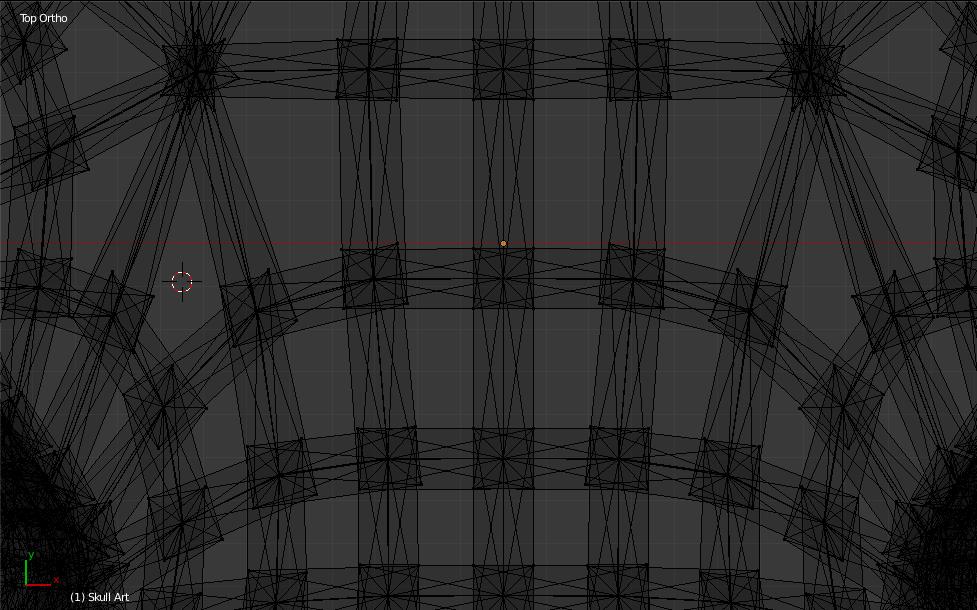
			<content type="html"><![CDATA[<p>ok, so i loaded it back up into Blender to take a closer look at this thing... it is made up of small segments that are not really joined all that well...</p><p>looking at it in wireframe mode from the top looking at the bottom...</p><p><span class="postimg"><img src="http://soliforum.com/i/?I7Xz0JZ.jpg" alt="http://soliforum.com/i/?I7Xz0JZ.jpg" /></span></p><p>it also seems there may be a few faces oriented the wrong way...</p><p>did a recalculation of the normals and exported it...</p><p>try this...see if it behaves any differently.</p>]]></content>
			<author>
				<name><![CDATA[heartless]]></name>
				<uri>https://www.soliforum.com/user/10399/</uri>
			</author>
			<updated>2016-05-29T13:26:24Z</updated>
			<id>https://www.soliforum.com/post/123530/#p123530</id>
		</entry>
		<entry>
			<title type="html"><![CDATA[Re: print fails because it  does  not set on bed correctly]]></title>
			<link rel="alternate" href="https://www.soliforum.com/post/123529/#p123529" />
			<content type="html"><![CDATA[<p>huh... no clue on why it is doing that to you </p><p>It loads fine in RH and slices fine with Slic3r, altho slic3r does give it a solid bottom instead of the grid pattern.... <br />I honestly think it is the design that is the issue here.</p>]]></content>
			<author>
				<name><![CDATA[heartless]]></name>
				<uri>https://www.soliforum.com/user/10399/</uri>
			</author>
			<updated>2016-05-29T13:14:26Z</updated>
			<id>https://www.soliforum.com/post/123529/#p123529</id>
		</entry>
		<entry>
			<title type="html"><![CDATA[Re: print fails because it  does  not set on bed correctly]]></title>
			<link rel="alternate" href="https://www.soliforum.com/post/123517/#p123517" />
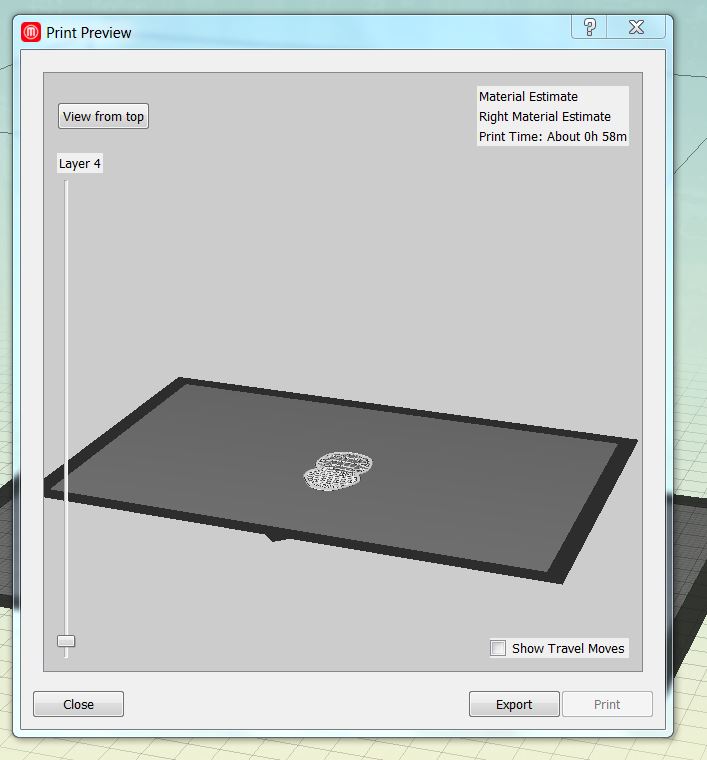
			<content type="html"><![CDATA[<p>I have a Makerbot 2X and use Makerbot desktop it has a button to place on platform and one for center on platform, I can even go in and&nbsp; lower the part&nbsp; z axis which puts it on the bed. But when I slice it it still shows the first 3 layers as blank.<br />see pic below.<br /><span class="postimg"><img src="http://soliforum.com/i/?dQhRzHT.jpg" alt="http://soliforum.com/i/?dQhRzHT.jpg" /></span></p>]]></content>
			<author>
				<name><![CDATA[dubbsd]]></name>
				<uri>https://www.soliforum.com/user/187/</uri>
			</author>
			<updated>2016-05-28T15:56:05Z</updated>
			<id>https://www.soliforum.com/post/123517/#p123517</id>
		</entry>
		<entry>
			<title type="html"><![CDATA[Re: print fails because it  does  not set on bed correctly]]></title>
			<link rel="alternate" href="https://www.soliforum.com/post/123516/#p123516" />
			<content type="html"><![CDATA[<p>fwiw, I just downloaded it, loaded it into RH and sliced using my normal settings... it sliced just fine for me, even has a solid bottom...</p><p>didnt have to make any adjustments or anything... so yeah, maybe try the &quot;lay flat&quot; thing?</p>]]></content>
			<author>
				<name><![CDATA[heartless]]></name>
				<uri>https://www.soliforum.com/user/10399/</uri>
			</author>
			<updated>2016-05-28T14:52:16Z</updated>
			<id>https://www.soliforum.com/post/123516/#p123516</id>
		</entry>
		<entry>
			<title type="html"><![CDATA[Re: print fails because it  does  not set on bed correctly]]></title>
			<link rel="alternate" href="https://www.soliforum.com/post/123515/#p123515" />
			<content type="html"><![CDATA[<p>you can try using Meshmixer to fix it.</p><p>or possibly Blender..</p><p>edit: looks like it was created with Blender - the .blend file is there...</p><p>edit 2: after looking at it in Blender... I think the problem is that the bottom is not solid, it is the same wire-frame pattern with a V shape to it &amp; only the bottom of the V would be touching the bed. It is possible that the slicer is having problems with the very small initial footprint...<br />it really should have a more solid bottom to it...</p>]]></content>
			<author>
				<name><![CDATA[heartless]]></name>
				<uri>https://www.soliforum.com/user/10399/</uri>
			</author>
			<updated>2016-05-28T14:33:23Z</updated>
			<id>https://www.soliforum.com/post/123515/#p123515</id>
		</entry>
		<entry>
			<title type="html"><![CDATA[Re: print fails because it  does  not set on bed correctly]]></title>
			<link rel="alternate" href="https://www.soliforum.com/post/123514/#p123514" />
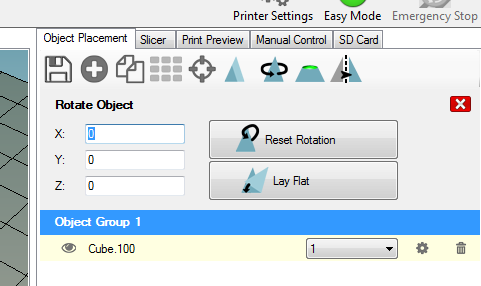
			<content type="html"><![CDATA[<p>If you are using RH, then there is a &quot;Lay Flat&quot; command under the Rotate Object options...this would lay the object flat on the bed relative to the general orientation you positioned it:</p><p><span class="postimg"><img src="http://soliforum.com/i/?0sxzRej.png" alt="http://soliforum.com/i/?0sxzRej.png" /></span></p>]]></content>
			<author>
				<name><![CDATA[IronMan]]></name>
				<uri>https://www.soliforum.com/user/131/</uri>
			</author>
			<updated>2016-05-28T14:31:44Z</updated>
			<id>https://www.soliforum.com/post/123514/#p123514</id>
		</entry>
		<entry>
			<title type="html"><![CDATA[print fails because it  does  not set on bed correctly]]></title>
			<link rel="alternate" href="https://www.soliforum.com/post/123512/#p123512" />
			<content type="html"><![CDATA[<p>lately I have downloaded a few stl files that would not print because they would not set on the bed <br />for instance the below file is 4 layers off the bed. what ia the best way to cut say .2mm off the bottom of the stl file so it will print correctly. <a href="http://www.thingiverse.com/thing:1388237">http://www.thingiverse.com/thing:1388237</a></p>]]></content>
			<author>
				<name><![CDATA[dubbsd]]></name>
				<uri>https://www.soliforum.com/user/187/</uri>
			</author>
			<updated>2016-05-28T13:55:07Z</updated>
			<id>https://www.soliforum.com/post/123512/#p123512</id>
		</entry>
</feed>