<?xml version="1.0" encoding="utf-8"?>
<feed xmlns="http://www.w3.org/2005/Atom">
	<title type="html"><![CDATA[SoliForum - 3D Printing Community — Cura + ThreeDubber on daVinci Jr]]></title>
	<link rel="self" href="https://www.soliforum.com/feed/atom/topic/14843/" />
	<updated>2019-07-22T22:19:24Z</updated>
	<generator>PunBB</generator>
	<id>https://www.soliforum.com/topic/14843/cura-threedubber-on-davinci-jr/</id>
		<entry>
			<title type="html"><![CDATA[Re: Cura + ThreeDubber on daVinci Jr]]></title>
			<link rel="alternate" href="https://www.soliforum.com/post/150957/#p150957" />
			<content type="html"><![CDATA[<p>Anyone still able to ThreeDub (Python version) working on Linux.&nbsp; I think I have done the pre-requisites, installed pycrypto, serial and padding.&nbsp; But it generates errors, I think it&#039;s to do with Encryption.</p><p>Old thread I know, but any suggestions greatly appreciated.</p><p>Error looks like this...</p><p>sudo threedub 20140205_Marvin_KeyChain.gcode Marvin.gcode<br />Traceback (most recent call last):<br />&nbsp; File &quot;/usr/local/bin/threedub&quot;, line 11, in &lt;module&gt;<br />&nbsp; &nbsp; load_entry_point(&#039;threedub==0.1&#039;, &#039;console_scripts&#039;, &#039;threedub&#039;)()<br />&nbsp; File &quot;build/bdist.linux-armv7l/egg/threedub/main.py&quot;, line 60, in threedub<br />&nbsp; File &quot;build/bdist.linux-armv7l/egg/threedub/davinci.py&quot;, line 76, in write<br />&nbsp; File &quot;build/bdist.linux-armv7l/egg/threedub/davinci.py&quot;, line 41, in encrypt<br />&nbsp; File &quot;/usr/lib/python2.7/dist-packages/Crypto/Cipher/AES.py&quot;, line 59, in __init__<br />&nbsp; &nbsp; blockalgo.BlockAlgo.__init__(self, _AES, key, *args, **kwargs)<br />&nbsp; File &quot;/usr/lib/python2.7/dist-packages/Crypto/Cipher/blockalgo.py&quot;, line 141, in __init__<br />&nbsp; &nbsp; self._cipher = factory.new(key, *args, **kwargs)<br />ValueError: ECB mode does not use IV</p>]]></content>
			<author>
				<name><![CDATA[QBall1977]]></name>
				<uri>https://www.soliforum.com/user/22258/</uri>
			</author>
			<updated>2019-07-22T22:19:24Z</updated>
			<id>https://www.soliforum.com/post/150957/#p150957</id>
		</entry>
		<entry>
			<title type="html"><![CDATA[Re: Cura + ThreeDubber on daVinci Jr]]></title>
			<link rel="alternate" href="https://www.soliforum.com/post/130771/#p130771" />
			<content type="html"><![CDATA[<div class="quotebox"><cite>kr15_uk wrote:</cite><blockquote><p>@navymr - Sounds like extruder motor struggling. Do you still have enclosure? Try fitting the fan on top of the motor and see if that helps.</p></blockquote></div><p>thanks! ill give it a whirl. i may disassemble and give a good clean. i really havent used it must through the summer i used it to print the structure for a kossel and a 40&nbsp; hour AR lower print.</p>]]></content>
			<author>
				<name><![CDATA[navymr]]></name>
				<uri>https://www.soliforum.com/user/15165/</uri>
			</author>
			<updated>2017-01-09T01:24:17Z</updated>
			<id>https://www.soliforum.com/post/130771/#p130771</id>
		</entry>
		<entry>
			<title type="html"><![CDATA[Re: Cura + ThreeDubber on daVinci Jr]]></title>
			<link rel="alternate" href="https://www.soliforum.com/post/130713/#p130713" />
			<content type="html"><![CDATA[<p>@navymr - Sounds like extruder motor struggling. Do you still have enclosure? Try fitting the fan on top of the motor and see if that helps.</p>]]></content>
			<author>
				<name><![CDATA[kr15_uk]]></name>
				<uri>https://www.soliforum.com/user/14138/</uri>
			</author>
			<updated>2017-01-07T23:54:23Z</updated>
			<id>https://www.soliforum.com/post/130713/#p130713</id>
		</entry>
		<entry>
			<title type="html"><![CDATA[Re: Cura + ThreeDubber on daVinci Jr]]></title>
			<link rel="alternate" href="https://www.soliforum.com/post/130710/#p130710" />
			<content type="html"><![CDATA[<p>alright i did all this on windows and i had a few great prints but now nothing prints more than half way. it completes but only half way the parts are incomplete. anyone seen this or corrected this issue? is my hotend taking a crap?</p>]]></content>
			<author>
				<name><![CDATA[navymr]]></name>
				<uri>https://www.soliforum.com/user/15165/</uri>
			</author>
			<updated>2017-01-07T22:42:05Z</updated>
			<id>https://www.soliforum.com/post/130710/#p130710</id>
		</entry>
		<entry>
			<title type="html"><![CDATA[Re: Cura + ThreeDubber on daVinci Jr]]></title>
			<link rel="alternate" href="https://www.soliforum.com/post/128252/#p128252" />
			<content type="html"><![CDATA[<div class="quotebox"><cite>Anthem wrote:</cite><blockquote><p>If you use Cura regularly, check out my port of ThreeDubber. It&#039;s command-line only (no fancy GUI at the moment) but gets the job done. I just added support for setting the total_filament value from Cura headers to get a real print time estimate on the Jr&#039;s LCD.</p><p>AND my script will convert those pesky G0 codes into G1s at the same it it makes a .3w from your .gcode file.</p><p><a href="https://gitlab.com/anthem/py-threedub">https://gitlab.com/anthem/py-threedub</a></p><p>To install on Windows:<br />- Download and install Python 2.7 from Python.org<br />- Download and install py-crypto<br />- Download and unpack the source from gitlab<br />- Assuming you now have Python on your path, go into the source directory and run:<br />- python setup.py install<br />- run &#039;threedub model.gcode&#039; to convert it to .3w</p><p>Same basic procedure on Linux except you might already have Python. Don&#039;t forget py-crypto.</p></blockquote></div><br /><p>I have compiled the ThreeDubber source file to change &quot;G0&quot; to &quot;G1&quot; and add header information. It will use the estimated time from the Cura gcode as time, but I could not figure out how to get the usage from Cura so that is still being set to 1. Hopefully this will make things a little easier for Windows users.</p>]]></content>
			<author>
				<name><![CDATA[Bozotclown1970]]></name>
				<uri>https://www.soliforum.com/user/13167/</uri>
			</author>
			<updated>2016-11-21T16:13:50Z</updated>
			<id>https://www.soliforum.com/post/128252/#p128252</id>
		</entry>
		<entry>
			<title type="html"><![CDATA[Re: Cura + ThreeDubber on daVinci Jr]]></title>
			<link rel="alternate" href="https://www.soliforum.com/post/128143/#p128143" />
			<content type="html"><![CDATA[<p>Quick update.<br />Don&#039;t know why I&#039;ve created seperate topic for Cura 2.3.0+ here <a href="http://www.soliforum.com/post/128141/#p128141">http://www.soliforum.com/post/128141/#p128141</a><br />If you&#039;re after Cura 2.3.1+ stuff, please see link above. But still this thread has some valuable info to read.</p><br /><p>Can someone with SuperAdmin rights merge these 2x together?! Thanks.</p>]]></content>
			<author>
				<name><![CDATA[kr15_uk]]></name>
				<uri>https://www.soliforum.com/user/14138/</uri>
			</author>
			<updated>2016-11-15T16:49:18Z</updated>
			<id>https://www.soliforum.com/post/128143/#p128143</id>
		</entry>
		<entry>
			<title type="html"><![CDATA[Re: Cura + ThreeDubber on daVinci Jr]]></title>
			<link rel="alternate" href="https://www.soliforum.com/post/127985/#p127985" />
			<content type="html"><![CDATA[<p>Thank everyone for the information in this post, it solved a lot of my problems.</p>]]></content>
			<author>
				<name><![CDATA[jonnyc]]></name>
				<uri>https://www.soliforum.com/user/15322/</uri>
			</author>
			<updated>2016-11-06T10:39:22Z</updated>
			<id>https://www.soliforum.com/post/127985/#p127985</id>
		</entry>
		<entry>
			<title type="html"><![CDATA[Re: Cura + ThreeDubber on daVinci Jr]]></title>
			<link rel="alternate" href="https://www.soliforum.com/post/126677/#p126677" />
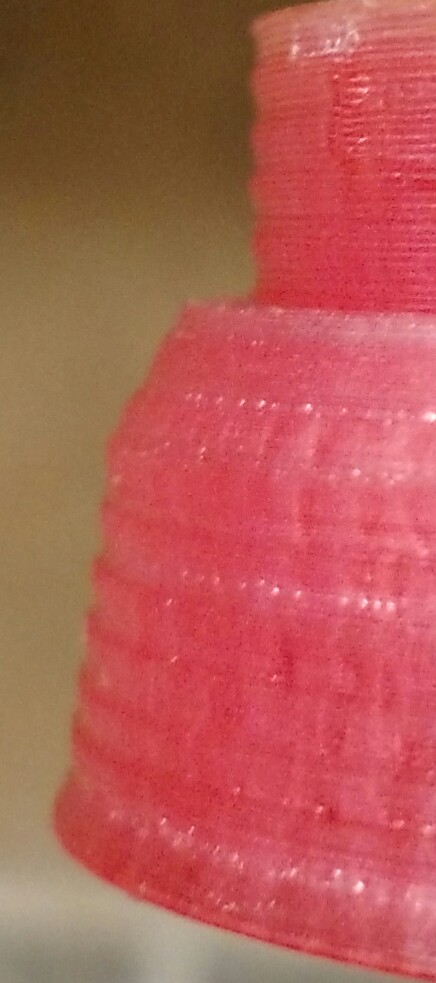
			<content type="html"><![CDATA[<p>@reluttr - The thing that interests me about your photos is that the banding is very regular. It looks like every 8 or so layers you get worse banding in one direction that slowly fades from that side, only to return again.</p><p>I get occasional banding that I definitely would attribute more to irregular extrusion, because it only happens where a new layer starts (that is, the bands start as blobs until the extrusion evens out). That in my case is definitely an extrusion/retraction problem.</p><p>In your case it&#039;s harder to say. I can&#039;t tell from the pics, but do the bands seem to be at all spiralling up the side of your print? Or are the layers that seem to be banding actually wider all the way around?</p><p>One thought that comes to mind is Z wobble, say from a slightly warped Z axis threaded rod (or some misalignment in its mounts). If your Z axis wobbles slightly, then you&#039;d get the same XY shift every time your Z thread is at the same position. If that&#039;s the case though, I&#039;d expect you to have a noticable &quot;spiralling&quot;.</p>]]></content>
			<author>
				<name><![CDATA[Anthem]]></name>
				<uri>https://www.soliforum.com/user/14460/</uri>
			</author>
			<updated>2016-09-02T01:27:28Z</updated>
			<id>https://www.soliforum.com/post/126677/#p126677</id>
		</entry>
		<entry>
			<title type="html"><![CDATA[Re: Cura + ThreeDubber on daVinci Jr]]></title>
			<link rel="alternate" href="https://www.soliforum.com/post/126572/#p126572" />
			<content type="html"><![CDATA[<p>I think your on to something. I took a look at my most recent print *a soap dish* and the area&#039;s without sudden movements look a lot better than the ones where jerky movements are made.</p><p>It&#039;s kinda hard to photograph, but you can clearly see the banding on the upper part of this image.</p><p><span class="postimg"><img src="http://soliforum.com/i/?a0YlMmn.jpg" alt="http://soliforum.com/i/?a0YlMmn.jpg" /></span></p><p>The reason I thought it might be associated with the gantry sag is because it used to actually be a LOT worse before I did a anti-sag mod from thingiverse and re-calibrated the x axis.</p><p>Although... something else it could be is possibly uneven extrusion? Like if the plastic tends to extrude more toward the left of the nozzle, is it possible that when the printer goes to make another pass in the opposite direction on the next layer the plastic flows more inward than its supposed to? Guess I could try cleaning the nozzle and see. <img src="https://www.soliforum.com/img/smilies/big_smile.png" width="15" height="15" alt="big_smile" /></p><p>EDIT:</p><p>Do you think swapping the solid coupler on the z axis with a &quot;jawed&quot; flexible coupler would help? I did some measurements and I would have to cut into the plastic on the gantry some, but it is a very possible mod.</p>]]></content>
			<author>
				<name><![CDATA[reluttr]]></name>
				<uri>https://www.soliforum.com/user/13303/</uri>
			</author>
			<updated>2016-08-27T04:50:51Z</updated>
			<id>https://www.soliforum.com/post/126572/#p126572</id>
		</entry>
		<entry>
			<title type="html"><![CDATA[Re: Cura + ThreeDubber on daVinci Jr]]></title>
			<link rel="alternate" href="https://www.soliforum.com/post/126570/#p126570" />
			<content type="html"><![CDATA[<p><span class="postimg"><img src="http://soliforum.com/i/?od2MlI4.jpg" alt="http://soliforum.com/i/?od2MlI4.jpg" /></span></p><p>Here is a closeup.</p>]]></content>
			<author>
				<name><![CDATA[chorobe]]></name>
				<uri>https://www.soliforum.com/user/14925/</uri>
			</author>
			<updated>2016-08-27T02:08:37Z</updated>
			<id>https://www.soliforum.com/post/126570/#p126570</id>
		</entry>
		<entry>
			<title type="html"><![CDATA[Re: Cura + ThreeDubber on daVinci Jr]]></title>
			<link rel="alternate" href="https://www.soliforum.com/post/126569/#p126569" />
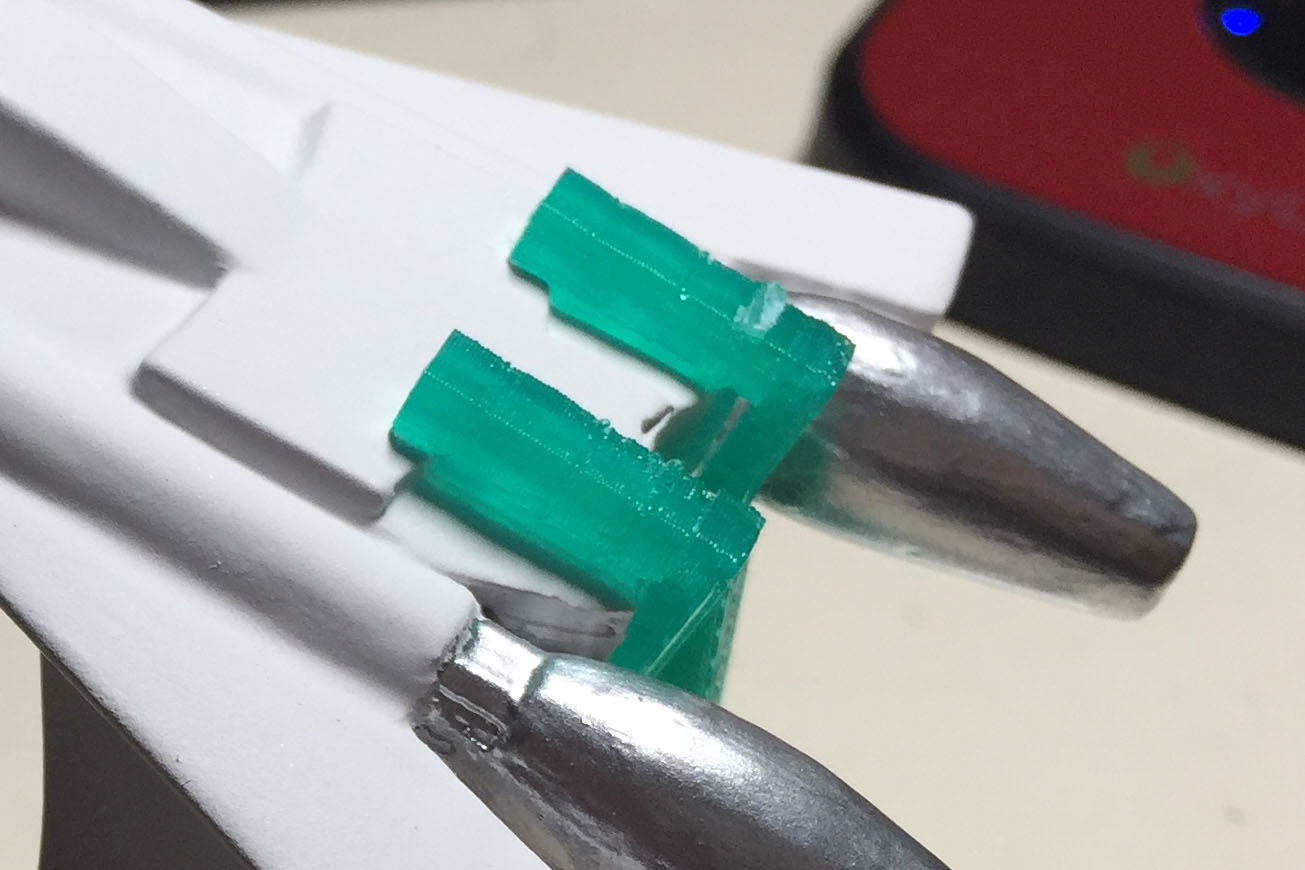
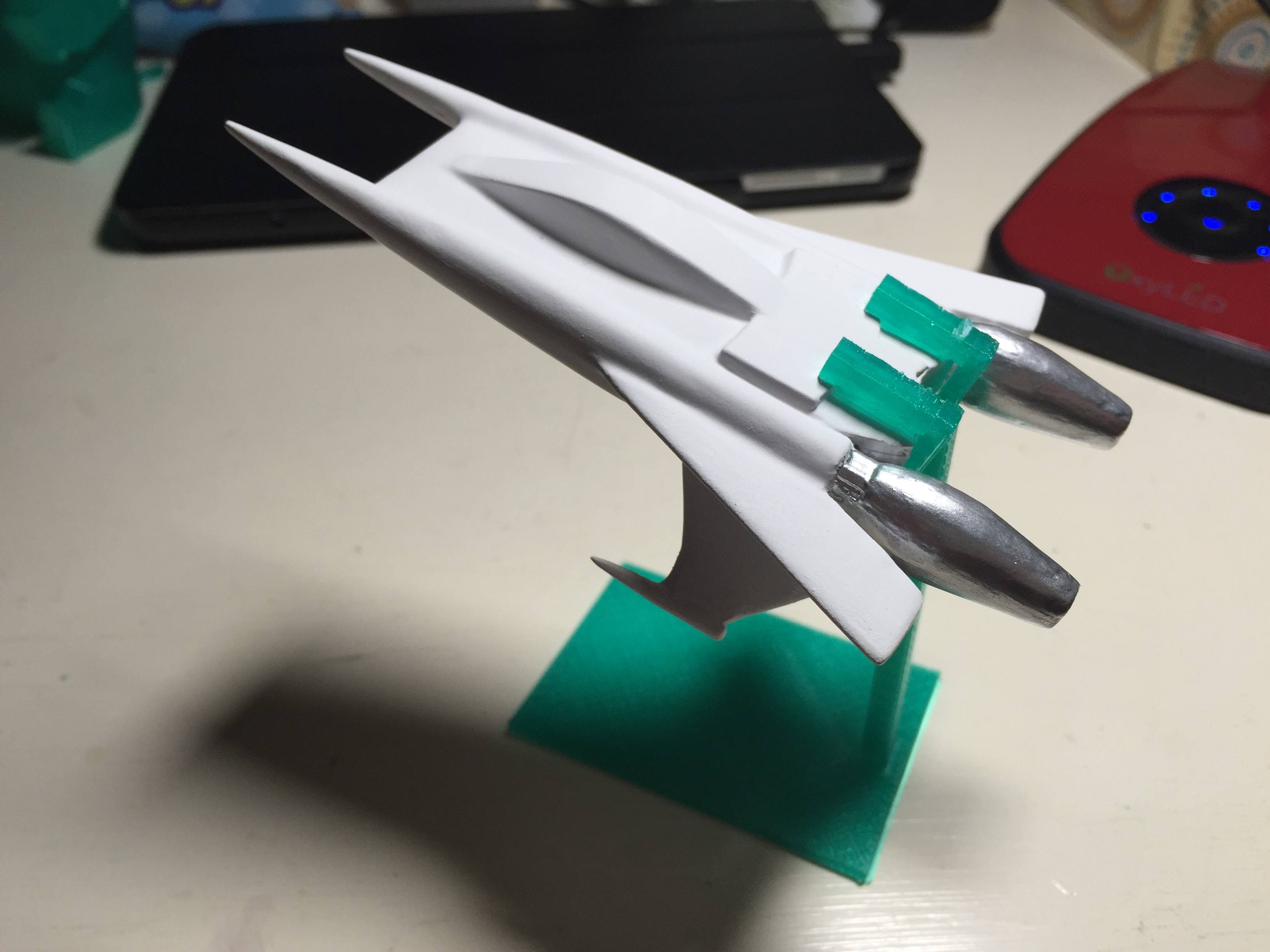
			<content type="html"><![CDATA[<p><span class="postimg"><img src="http://soliforum.com/i/?1RQKCTz.jpg" alt="http://soliforum.com/i/?1RQKCTz.jpg" /></span></p><div class="quotebox"><blockquote><p>Have you noticed any z banding in your prints? Maybe I am just expecting to much out of the Jr. XD<br />I mean, its not horrible, but its noticeable on objects that go straight up, like cubes.</p></blockquote></div><p>@reluttr, yea, it depends, sometimes I do.&nbsp; For example for smaller objects I definitely believe I do see the z banding you are talking about.&nbsp; I made a stand for a model and the part that holds the ship is made up of 4 small pillars with a square cross section (each is about 4mm wide).&nbsp; It was not smooth at all.&nbsp; You can see in the pic how jagged it was.</p><p>But on bigger objects, the vertical walls seem fine.</p>]]></content>
			<author>
				<name><![CDATA[chorobe]]></name>
				<uri>https://www.soliforum.com/user/14925/</uri>
			</author>
			<updated>2016-08-27T02:05:40Z</updated>
			<id>https://www.soliforum.com/post/126569/#p126569</id>
		</entry>
		<entry>
			<title type="html"><![CDATA[Re: Cura + ThreeDubber on daVinci Jr]]></title>
			<link rel="alternate" href="https://www.soliforum.com/post/126568/#p126568" />
			<content type="html"><![CDATA[<div class="quotebox"><cite>chorobe wrote:</cite><blockquote><div class="quotebox"><cite>reluttr wrote:</cite><blockquote><p>Dunno if this is the right place to ask or not... but can adjusting the layer height in cura help reduce z wobble? Because as of the most recent xyzware/firmware I have noticed my prints having VERY noticeable z-wobble.</p><p>Also can you go to smaller layers than the Jr supports? Like 0.05mm?</p></blockquote></div><p>@reluttr, I don&#039;t know if adjusting the layer height will reduce z wobble, but I can say that I have printed as low as 0.06mm layer height.&nbsp; Kr15_uk has gone down to 0.04.</p></blockquote></div><p>Have you noticed any z banding in your prints? Maybe I am just expecting to much out of the Jr. XD</p><p>I mean, its not horrible, but its noticeable on objects that go straight up, like cubes.</p><p>I have a feeling it has something to do with the gantry sag... but I guess it could also be the leadscrew having a non-flexing coupling to, not sure if I can help that or not. XD</p><p>I&#039;m gonna do some tests... like printing stuff on one side of the bed and the other and see if the banding is the same... and if so... I know its the leadscrew.</p>]]></content>
			<author>
				<name><![CDATA[reluttr]]></name>
				<uri>https://www.soliforum.com/user/13303/</uri>
			</author>
			<updated>2016-08-27T01:30:00Z</updated>
			<id>https://www.soliforum.com/post/126568/#p126568</id>
		</entry>
		<entry>
			<title type="html"><![CDATA[Re: Cura + ThreeDubber on daVinci Jr]]></title>
			<link rel="alternate" href="https://www.soliforum.com/post/126534/#p126534" />
			<content type="html"><![CDATA[<div class="quotebox"><cite>reluttr wrote:</cite><blockquote><p>Dunno if this is the right place to ask or not... but can adjusting the layer height in cura help reduce z wobble? Because as of the most recent xyzware/firmware I have noticed my prints having VERY noticeable z-wobble.</p><p>Also can you go to smaller layers than the Jr supports? Like 0.05mm?</p></blockquote></div><p>@reluttr, I don&#039;t know if adjusting the layer height will reduce z wobble, but I can say that I have printed as low as 0.06mm layer height.&nbsp; Kr15_uk has gone down to 0.04.</p>]]></content>
			<author>
				<name><![CDATA[chorobe]]></name>
				<uri>https://www.soliforum.com/user/14925/</uri>
			</author>
			<updated>2016-08-25T20:20:17Z</updated>
			<id>https://www.soliforum.com/post/126534/#p126534</id>
		</entry>
		<entry>
			<title type="html"><![CDATA[Re: Cura + ThreeDubber on daVinci Jr]]></title>
			<link rel="alternate" href="https://www.soliforum.com/post/126518/#p126518" />
			<content type="html"><![CDATA[<p>Dunno if this is the right place to ask or not... but can adjusting the layer height in cura help reduce z wobble? Because as of the most recent xyzware/firmware I have noticed my prints having VERY noticeable z-wobble.</p><p>Also can you go to smaller layers than the Jr supports? Like 0.05mm?</p>]]></content>
			<author>
				<name><![CDATA[reluttr]]></name>
				<uri>https://www.soliforum.com/user/13303/</uri>
			</author>
			<updated>2016-08-25T06:53:59Z</updated>
			<id>https://www.soliforum.com/post/126518/#p126518</id>
		</entry>
		<entry>
			<title type="html"><![CDATA[Re: Cura + ThreeDubber on daVinci Jr]]></title>
			<link rel="alternate" href="https://www.soliforum.com/post/126260/#p126260" />
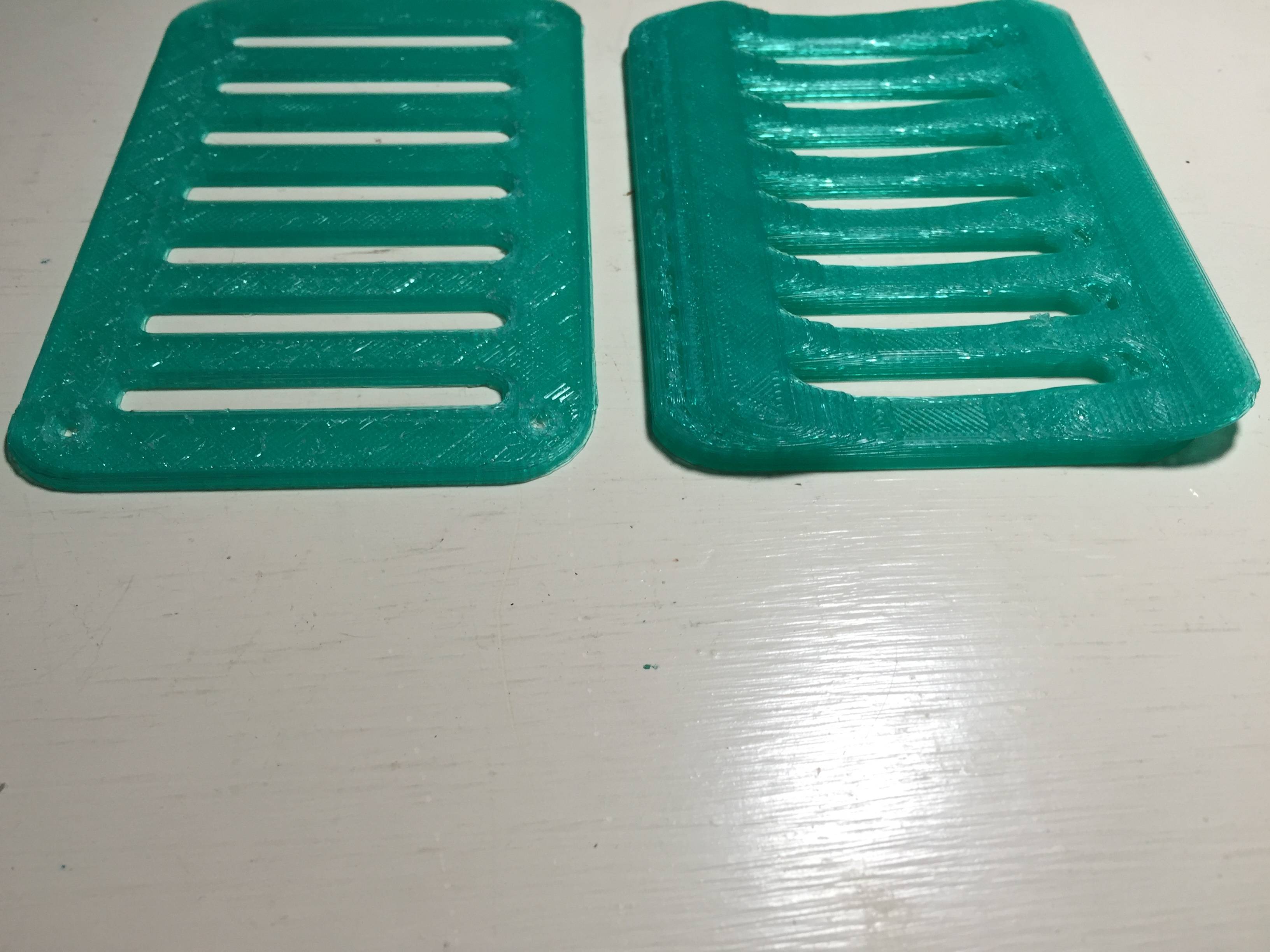
			<content type="html"><![CDATA[<p>@kr15_uk, with the soap dish, the print layers toward the top half moved on the y-axis so instead of a straight wall, it was straight the going diagonal at an angle. Then I tried using the GUI threedubber after changing all the G0s, that started well but the print said it completed only to be missing like the top half. </p><p>I made a 3D cup coaster design as well and noticed the prints were skewing using Cura and Python threedub, so I cancelled it. Now with XYZware I do notice some holes and other imperfections but generally it works. It is sure slow like you mentioned. I may play with Cura and threedub again after I take a break haha.<span class="postimg"><img src="http://soliforum.com/i/?j99WQSk.jpg" alt="http://soliforum.com/i/?j99WQSk.jpg" /></span></p>]]></content>
			<author>
				<name><![CDATA[chorobe]]></name>
				<uri>https://www.soliforum.com/user/14925/</uri>
			</author>
			<updated>2016-08-15T16:21:25Z</updated>
			<id>https://www.soliforum.com/post/126260/#p126260</id>
		</entry>
</feed>