<?xml version="1.0" encoding="utf-8"?>
<feed xmlns="http://www.w3.org/2005/Atom">
	<title type="html"><![CDATA[SoliForum - 3D Printing Community — da Vinci Jr - Manual upgrade/downgrade]]></title>
	<link rel="self" href="https://www.soliforum.com/feed/atom/topic/14713/" />
	<updated>2018-07-16T11:18:56Z</updated>
	<generator>PunBB</generator>
	<id>https://www.soliforum.com/topic/14713/da-vinci-jr-manual-upgradedowngrade/</id>
		<entry>
			<title type="html"><![CDATA[Re: da Vinci Jr - Manual upgrade/downgrade]]></title>
			<link rel="alternate" href="https://www.soliforum.com/post/145154/#p145154" />
			<content type="html"><![CDATA[<p>Are there any advantages to later versions?</p>]]></content>
			<author>
				<name><![CDATA[jmdearras]]></name>
				<uri>https://www.soliforum.com/user/19412/</uri>
			</author>
			<updated>2018-07-16T11:18:56Z</updated>
			<id>https://www.soliforum.com/post/145154/#p145154</id>
		</entry>
		<entry>
			<title type="html"><![CDATA[Re: da Vinci Jr - Manual upgrade/downgrade]]></title>
			<link rel="alternate" href="https://www.soliforum.com/post/145151/#p145151" />
			<content type="html"><![CDATA[<div class="quotebox"><cite>jmdearras wrote:</cite><blockquote><p>I bought a Jr with firmware 1.0.2.&nbsp; Which is the best, safe, firmware to upgrade to, how do I do it, or is it best to stay put?</p></blockquote></div><p>Firmware 2.2.0 is the last safe one to use.<br />But - as there are a million solutions to bypass the card issue now, there should be no reason not to try the latest firmware.</p>]]></content>
			<author>
				<name><![CDATA[cgrillo]]></name>
				<uri>https://www.soliforum.com/user/14612/</uri>
			</author>
			<updated>2018-07-16T09:25:22Z</updated>
			<id>https://www.soliforum.com/post/145151/#p145151</id>
		</entry>
		<entry>
			<title type="html"><![CDATA[Re: da Vinci Jr - Manual upgrade/downgrade]]></title>
			<link rel="alternate" href="https://www.soliforum.com/post/145147/#p145147" />
			<content type="html"><![CDATA[<p>I bought a Jr with firmware 1.0.2.&nbsp; Which is the best, safe, firmware to upgrade to, how do I do it, or is it best to stay put?</p>]]></content>
			<author>
				<name><![CDATA[jmdearras]]></name>
				<uri>https://www.soliforum.com/user/19412/</uri>
			</author>
			<updated>2018-07-16T01:22:54Z</updated>
			<id>https://www.soliforum.com/post/145147/#p145147</id>
		</entry>
		<entry>
			<title type="html"><![CDATA[Re: da Vinci Jr - Manual upgrade/downgrade]]></title>
			<link rel="alternate" href="https://www.soliforum.com/post/140874/#p140874" />
			<content type="html"><![CDATA[<p>The patched XYZware works, did not try to upload firmware. stock XYZware v2.1.26.1 complains no internet connection when click firmware update, then device not found. patched XYZware v2.1.26.1 skipped the checking internet checking and report the device not found. (I did not connect to Jr.)</p>]]></content>
			<author>
				<name><![CDATA[yizhou.he]]></name>
				<uri>https://www.soliforum.com/user/17164/</uri>
			</author>
			<updated>2017-12-20T17:46:27Z</updated>
			<id>https://www.soliforum.com/post/140874/#p140874</id>
		</entry>
		<entry>
			<title type="html"><![CDATA[Re: da Vinci Jr - Manual upgrade/downgrade]]></title>
			<link rel="alternate" href="https://www.soliforum.com/post/140870/#p140870" />
			<content type="html"><![CDATA[<div class="quotebox"><cite>modfreakz wrote:</cite><blockquote><p>I have <a href="https://my.hidrive.com/lnk/BgDVOjbe#file"><strong>patched version of XYZware v2.1.26.1</strong></a>. If you are offline (internet disconnected) then press on About/Firmware Update button a new dialog will popup to select firmware for an update.</p><p>Could someone try downgrading? Be careful with the choice of firmware.</p></blockquote></div><p>Not working</p>]]></content>
			<author>
				<name><![CDATA[nilezon]]></name>
				<uri>https://www.soliforum.com/user/17696/</uri>
			</author>
			<updated>2017-12-20T17:18:15Z</updated>
			<id>https://www.soliforum.com/post/140870/#p140870</id>
		</entry>
		<entry>
			<title type="html"><![CDATA[Re: da Vinci Jr - Manual upgrade/downgrade]]></title>
			<link rel="alternate" href="https://www.soliforum.com/post/140864/#p140864" />
			<content type="html"><![CDATA[<p>I have <a href="https://my.hidrive.com/lnk/BgDVOjbe#file"><strong>patched version of XYZware v2.1.26.1</strong></a>. If you are offline (internet disconnected) then press on About/Firmware Update button a new dialog will popup to select firmware for an update.</p><p>Could someone try downgrading? Be careful with the choice of firmware.</p>]]></content>
			<author>
				<name><![CDATA[modfreakz]]></name>
				<uri>https://www.soliforum.com/user/17913/</uri>
			</author>
			<updated>2017-12-20T14:47:53Z</updated>
			<id>https://www.soliforum.com/post/140864/#p140864</id>
		</entry>
		<entry>
			<title type="html"><![CDATA[Re: da Vinci Jr - Manual upgrade/downgrade]]></title>
			<link rel="alternate" href="https://www.soliforum.com/post/140849/#p140849" />
			<content type="html"><![CDATA[<div class="quotebox"><cite>yizhou.he wrote:</cite><blockquote><div class="quotebox"><cite>nilezon wrote:</cite><blockquote><p>It&#039;s a good idea, but unfortunately it won&#039;t work.<br />The first &quot;line&quot; of the firmware bin you refer to is stripped before the firmware data is sent to the 3d printer. The 3d printer then checks the version from another string inside the firmware file before actually flashing.<br />The firmware bin is encrypted and the last &quot;line&quot; (16 bytes) seem to be a checksum.</p><p>What needs to be done:<br />1. Crack the encryption of the firmware file to be able to decrypt, modify, encrypt the firmware.<br />2. Crack the checksum algorithm to create a firmware bin that the 3d printer will accept.<br />3. Create a hacked firmware that has a higher version number (for example 9.9.9) but does allow downgrades (remove version checks).<br />4. Create a modified firmware that allow printing regardless of NFC tag content.</p><p>This is a lot of work (digging in the dumped firmware code) but should be possible.<br />And I&#039;m still at no 1...</p></blockquote></div><p>I think old Jr. firmware is not encrypted, do you think you can flash old Jr. firmware to mini? Assuming it will not brick your mini?</p></blockquote></div><br /><p>XYZ has encrypted their firmware since their very first 1.0 was released. I had number 90 as I bought one as they where just coming out. I did a firmware dump and it was indeed encrypted.</p>]]></content>
			<author>
				<name><![CDATA[carl_m1968]]></name>
				<uri>https://www.soliforum.com/user/7731/</uri>
			</author>
			<updated>2017-12-20T01:06:10Z</updated>
			<id>https://www.soliforum.com/post/140849/#p140849</id>
		</entry>
		<entry>
			<title type="html"><![CDATA[Re: da Vinci Jr - Manual upgrade/downgrade]]></title>
			<link rel="alternate" href="https://www.soliforum.com/post/140846/#p140846" />
			<content type="html"><![CDATA[<div class="quotebox"><cite>yizhou.he wrote:</cite><blockquote><p>I think old Jr. firmware is not encrypted, do you think you can flash old Jr. firmware to mini? Assuming it will not brick your mini?</p></blockquote></div><p>It will definitely not work</p>]]></content>
			<author>
				<name><![CDATA[nilezon]]></name>
				<uri>https://www.soliforum.com/user/17696/</uri>
			</author>
			<updated>2017-12-19T23:41:00Z</updated>
			<id>https://www.soliforum.com/post/140846/#p140846</id>
		</entry>
		<entry>
			<title type="html"><![CDATA[Re: da Vinci Jr - Manual upgrade/downgrade]]></title>
			<link rel="alternate" href="https://www.soliforum.com/post/140844/#p140844" />
			<content type="html"><![CDATA[<div class="quotebox"><cite>nilezon wrote:</cite><blockquote><p>It&#039;s a good idea, but unfortunately it won&#039;t work.<br />The first &quot;line&quot; of the firmware bin you refer to is stripped before the firmware data is sent to the 3d printer. The 3d printer then checks the version from another string inside the firmware file before actually flashing.<br />The firmware bin is encrypted and the last &quot;line&quot; (16 bytes) seem to be a checksum.</p><p>What needs to be done:<br />1. Crack the encryption of the firmware file to be able to decrypt, modify, encrypt the firmware.<br />2. Crack the checksum algorithm to create a firmware bin that the 3d printer will accept.<br />3. Create a hacked firmware that has a higher version number (for example 9.9.9) but does allow downgrades (remove version checks).<br />4. Create a modified firmware that allow printing regardless of NFC tag content.</p><p>This is a lot of work (digging in the dumped firmware code) but should be possible.<br />And I&#039;m still at no 1...</p></blockquote></div><p>I think old Jr. firmware is not encrypted, do you think you can flash old Jr. firmware to mini? Assuming it will not brick your mini?</p>]]></content>
			<author>
				<name><![CDATA[yizhou.he]]></name>
				<uri>https://www.soliforum.com/user/17164/</uri>
			</author>
			<updated>2017-12-19T22:50:07Z</updated>
			<id>https://www.soliforum.com/post/140844/#p140844</id>
		</entry>
		<entry>
			<title type="html"><![CDATA[Re: da Vinci Jr - Manual upgrade/downgrade]]></title>
			<link rel="alternate" href="https://www.soliforum.com/post/140841/#p140841" />
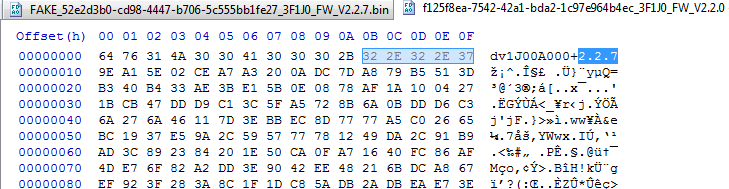
			<content type="html"><![CDATA[<div class="quotebox"><cite>joliver81 wrote:</cite><blockquote><p>What about using a HEX editor to change the firmware version # inside the firmware binary file?<br />As totalitarian pointed out by looking at the source code it checks that the version is not lower than the current version but what if the version was modified using hex editor. So if you are on firmware version 2.2.7 and want to downgrade to 2.2.6, can you download the 2.2.6 firmware but edit the version # in the file to read 2.2.7 or higher to trick it into loading?<br />Seems almost too simple to actually work though. lol.<br /><span class="postimg"><img src="http://soliforum.com/i/?cdAAda3.png" alt="http://soliforum.com/i/?cdAAda3.png" /></span></p></blockquote></div><p>It&#039;s a good idea, but unfortunately it won&#039;t work.<br />The first &quot;line&quot; of the firmware bin you refer to is stripped before the firmware data is sent to the 3d printer. The 3d printer then checks the version from another string inside the firmware file before actually flashing.<br />The firmware bin is encrypted and the last &quot;line&quot; (16 bytes) seem to be a checksum.</p><p>What needs to be done:<br />1. Crack the encryption of the firmware file to be able to decrypt, modify, encrypt the firmware.<br />2. Crack the checksum algorithm to create a firmware bin that the 3d printer will accept.<br />3. Create a hacked firmware that has a higher version number (for example 9.9.9) but does allow downgrades (remove version checks).<br />4. Create a modified firmware that allow printing regardless of NFC tag content.</p><p>This is a lot of work (digging in the dumped firmware code) but should be possible.<br />And I&#039;m still at no 1...</p>]]></content>
			<author>
				<name><![CDATA[nilezon]]></name>
				<uri>https://www.soliforum.com/user/17696/</uri>
			</author>
			<updated>2017-12-19T22:40:29Z</updated>
			<id>https://www.soliforum.com/post/140841/#p140841</id>
		</entry>
		<entry>
			<title type="html"><![CDATA[Re: da Vinci Jr - Manual upgrade/downgrade]]></title>
			<link rel="alternate" href="https://www.soliforum.com/post/140840/#p140840" />
			<content type="html"><![CDATA[<p>I think nilezon already got this issue figured out for mini, I don&#039;t think he have Jr. though. hopefully he will post instruction soon.</p><p><a href="http://www.soliforum.com/topic/16879/davinci-mini-jtag-access/">http://www.soliforum.com/topic/16879/da … ag-access/</a></p>]]></content>
			<author>
				<name><![CDATA[yizhou.he]]></name>
				<uri>https://www.soliforum.com/user/17164/</uri>
			</author>
			<updated>2017-12-19T22:27:12Z</updated>
			<id>https://www.soliforum.com/post/140840/#p140840</id>
		</entry>
		<entry>
			<title type="html"><![CDATA[Re: da Vinci Jr - Manual upgrade/downgrade]]></title>
			<link rel="alternate" href="https://www.soliforum.com/post/140838/#p140838" />
			<content type="html"><![CDATA[<p>What about using a HEX editor to change the firmware version # inside the firmware binary file?<br />As totalitarian pointed out by looking at the source code it checks that the version is not lower than the current version but what if the version was modified using hex editor. So if you are on firmware version 2.2.7 and want to downgrade to 2.2.6, can you download the 2.2.6 firmware but edit the version # in the file to read 2.2.7 or higher to trick it into loading?<br />Seems almost too simple to actually work though. lol.<br /><span class="postimg"><img src="http://soliforum.com/i/?cdAAda3.png" alt="http://soliforum.com/i/?cdAAda3.png" /></span></p>]]></content>
			<author>
				<name><![CDATA[joliver81]]></name>
				<uri>https://www.soliforum.com/user/18015/</uri>
			</author>
			<updated>2017-12-19T21:58:00Z</updated>
			<id>https://www.soliforum.com/post/140838/#p140838</id>
		</entry>
		<entry>
			<title type="html"><![CDATA[Re: da Vinci Jr - Manual upgrade/downgrade]]></title>
			<link rel="alternate" href="https://www.soliforum.com/post/139483/#p139483" />
			<content type="html"><![CDATA[<div class="quotebox"><cite>dpowellmeii wrote:</cite><blockquote><p>Any chance someone on here has a Da Vinci Jr. 1.0 Pro that&#039;s still on firmware version 1.0.0?&nbsp; They updated the firmware for my printer and it&#039;s totally useless right now.&nbsp; Maybe someone on here is smart enough to figure out how to extract the firmware and then I could try to flash it to mine.</p></blockquote></div><p>There are high risk of bricking your printer by flash older version of firmware.</p>]]></content>
			<author>
				<name><![CDATA[yizhou.he]]></name>
				<uri>https://www.soliforum.com/user/17164/</uri>
			</author>
			<updated>2017-11-04T16:53:51Z</updated>
			<id>https://www.soliforum.com/post/139483/#p139483</id>
		</entry>
		<entry>
			<title type="html"><![CDATA[Re: da Vinci Jr - Manual upgrade/downgrade]]></title>
			<link rel="alternate" href="https://www.soliforum.com/post/139443/#p139443" />
			<content type="html"><![CDATA[<p>Any chance someone on here has a Da Vinci Jr. 1.0 Pro that&#039;s still on firmware version 1.0.0?&nbsp; They updated the firmware for my printer and it&#039;s totally useless right now.&nbsp; Maybe someone on here is smart enough to figure out how to extract the firmware and then I could try to flash it to mine.</p>]]></content>
			<author>
				<name><![CDATA[dpowellmeii]]></name>
				<uri>https://www.soliforum.com/user/17667/</uri>
			</author>
			<updated>2017-11-03T18:49:53Z</updated>
			<id>https://www.soliforum.com/post/139443/#p139443</id>
		</entry>
		<entry>
			<title type="html"><![CDATA[Re: da Vinci Jr - Manual upgrade/downgrade]]></title>
			<link rel="alternate" href="https://www.soliforum.com/post/138429/#p138429" />
			<content type="html"><![CDATA[<p>Does anyone have a copy of the 2.3.3 bin?</p>]]></content>
			<author>
				<name><![CDATA[sethgandy]]></name>
				<uri>https://www.soliforum.com/user/17553/</uri>
			</author>
			<updated>2017-09-24T00:50:40Z</updated>
			<id>https://www.soliforum.com/post/138429/#p138429</id>
		</entry>
</feed>