<?xml version="1.0" encoding="utf-8"?>
<feed xmlns="http://www.w3.org/2005/Atom">
	<title type="html"><![CDATA[SoliForum - 3D Printing Community — after E3D V6 upgrade, over extrusion problems]]></title>
	<link rel="self" href="https://www.soliforum.com/feed/atom/topic/14283/" />
	<updated>2016-04-06T13:25:31Z</updated>
	<generator>PunBB</generator>
	<id>https://www.soliforum.com/topic/14283/after-e3d-v6-upgrade-over-extrusion-problems/</id>
		<entry>
			<title type="html"><![CDATA[Re: after E3D V6 upgrade, over extrusion problems]]></title>
			<link rel="alternate" href="https://www.soliforum.com/post/120611/#p120611" />
			<content type="html"><![CDATA[<p>Does everything crack or just the prints that have had acetone treatment?</p>]]></content>
			<author>
				<name><![CDATA[Kronikabuse]]></name>
				<uri>https://www.soliforum.com/user/6797/</uri>
			</author>
			<updated>2016-04-06T13:25:31Z</updated>
			<id>https://www.soliforum.com/post/120611/#p120611</id>
		</entry>
		<entry>
			<title type="html"><![CDATA[Re: after E3D V6 upgrade, over extrusion problems]]></title>
			<link rel="alternate" href="https://www.soliforum.com/post/120604/#p120604" />
			<content type="html"><![CDATA[<p>yup, it does look like a fairly regular interval between the cracks - give or take a layer or 2.</p><p>maxing out at 250? something isn&#039;t right. firmware wasn&#039;t updated properly, or something... <br />I was just recently running some nylon at 270 with no problems at all.</p><p>1 thing to check - make sure the E3D fan is not below the bottom fin of the cool side - a misaligned fan can cause issues.</p>]]></content>
			<author>
				<name><![CDATA[heartless]]></name>
				<uri>https://www.soliforum.com/user/10399/</uri>
			</author>
			<updated>2016-04-06T11:35:06Z</updated>
			<id>https://www.soliforum.com/post/120604/#p120604</id>
		</entry>
		<entry>
			<title type="html"><![CDATA[Re: after E3D V6 upgrade, over extrusion problems]]></title>
			<link rel="alternate" href="https://www.soliforum.com/post/120586/#p120586" />
			<content type="html"><![CDATA[<p>Yep and if you could count the layers you&#039;d most likely find a pattern.&nbsp; Cracks every X number of layers.</p>]]></content>
			<author>
				<name><![CDATA[wardjr]]></name>
				<uri>https://www.soliforum.com/user/2291/</uri>
			</author>
			<updated>2016-04-06T03:11:02Z</updated>
			<id>https://www.soliforum.com/post/120586/#p120586</id>
		</entry>
		<entry>
			<title type="html"><![CDATA[Re: after E3D V6 upgrade, over extrusion problems]]></title>
			<link rel="alternate" href="https://www.soliforum.com/post/120585/#p120585" />
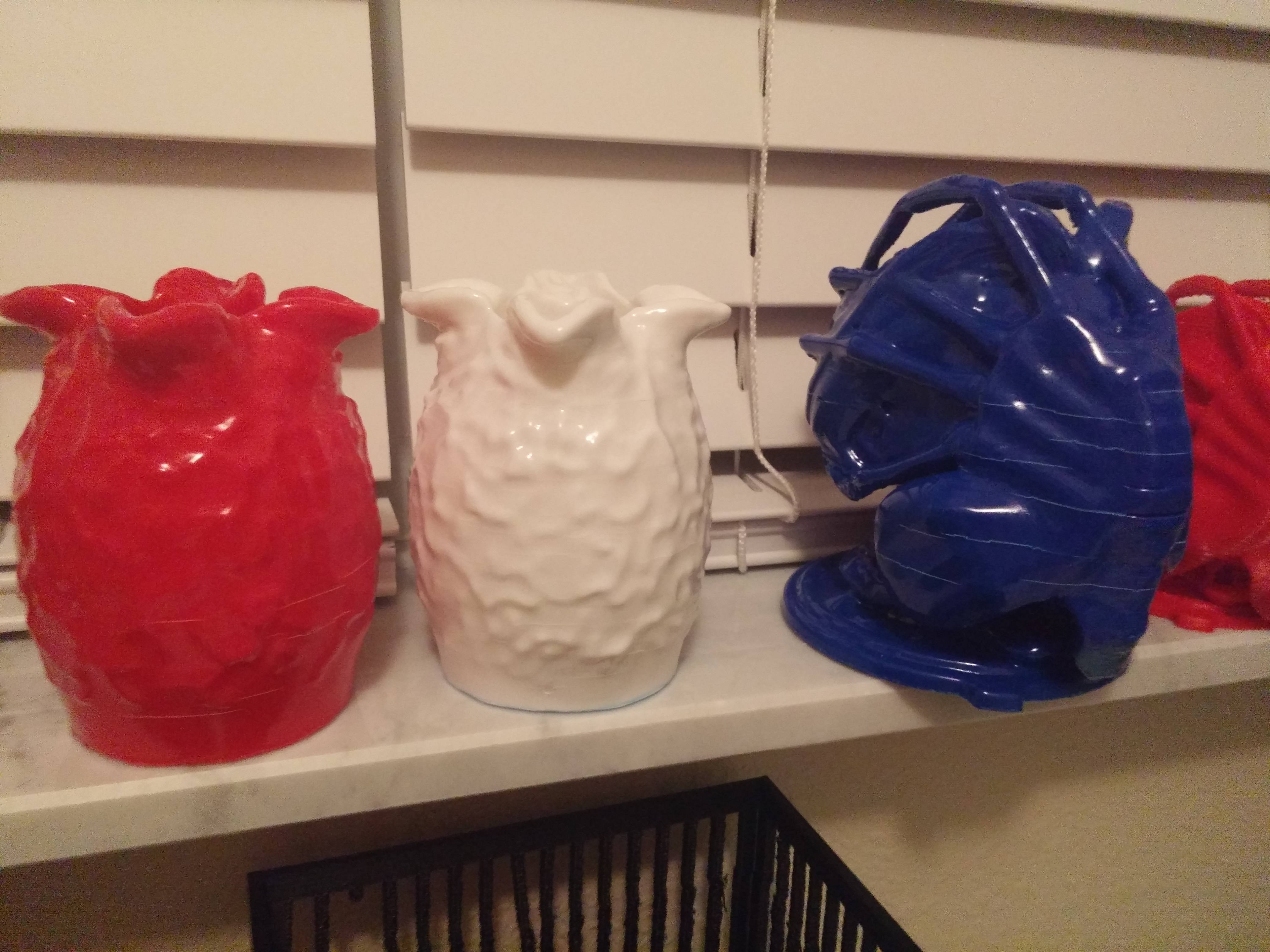
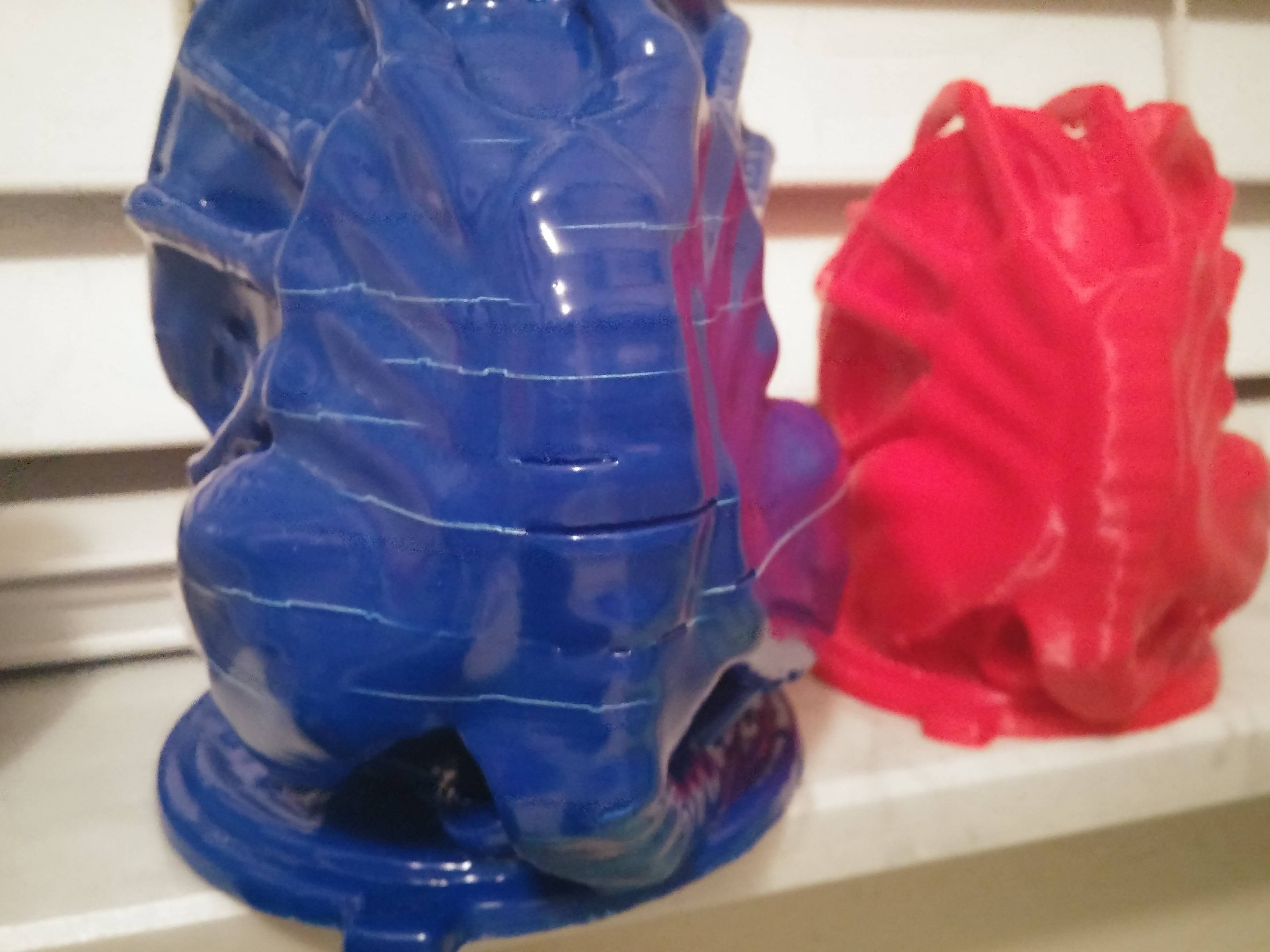
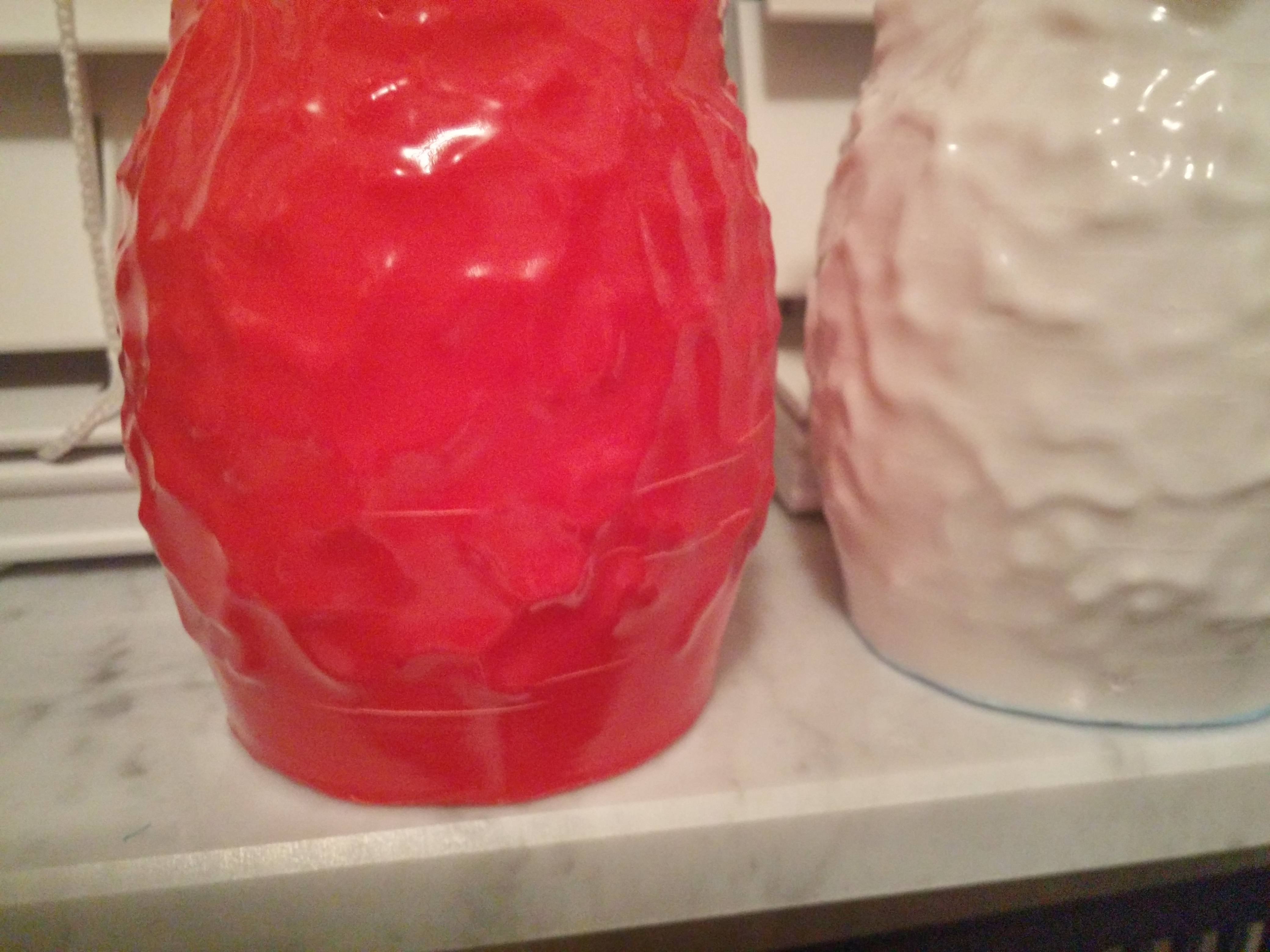
			<content type="html"><![CDATA[<p>Thank you guys for the feedback, I have been usingg 0.3 height whole time, I am updating to 0.2963 layer height and doing print to trial this change.</p><p>I just had another issue with extruder temp, it was struggling to get 240 and when I tried to see if it would get any hotter it would only max out at 250 C. All fans are running like normal without issue, anyone else seen this?</p><p>Here are a few pics of some items that developed cracks 2-3 weeks after printing. This was with old solidoodle head at 200-210 C.<br /><span class="postimg"><img src="http://soliforum.com/i/?WL2tU3g.jpg" alt="http://soliforum.com/i/?WL2tU3g.jpg" /></span><br /><span class="postimg"><img src="http://soliforum.com/i/?l4v3HIc.jpg" alt="http://soliforum.com/i/?l4v3HIc.jpg" /></span><br /><span class="postimg"><img src="http://soliforum.com/i/?sZE32gP.jpg" alt="http://soliforum.com/i/?sZE32gP.jpg" /></span></p>]]></content>
			<author>
				<name><![CDATA[crazyman2099]]></name>
				<uri>https://www.soliforum.com/user/4139/</uri>
			</author>
			<updated>2016-04-06T03:06:10Z</updated>
			<id>https://www.soliforum.com/post/120585/#p120585</id>
		</entry>
		<entry>
			<title type="html"><![CDATA[Re: after E3D V6 upgrade, over extrusion problems]]></title>
			<link rel="alternate" href="https://www.soliforum.com/post/120384/#p120384" />
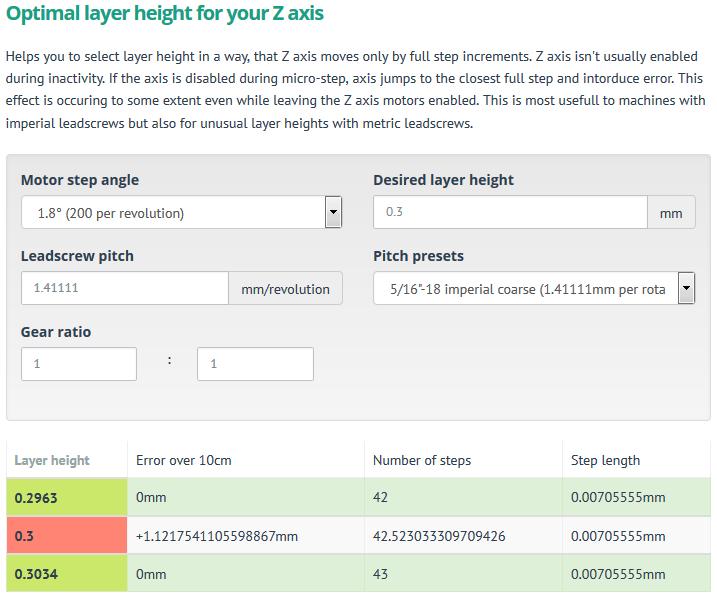
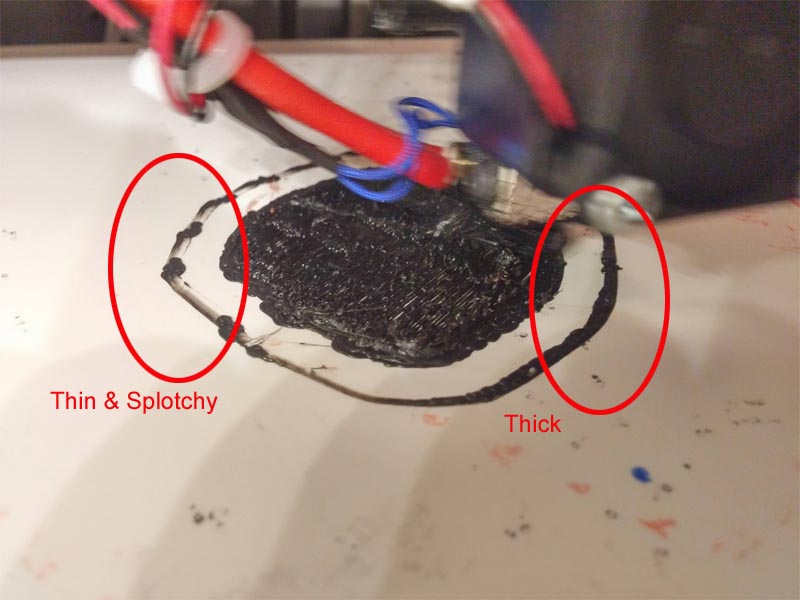
			<content type="html"><![CDATA[<p>I am sorry, but this image says you do not have a level bed...</p><p><span class="postimg"><img src="http://soliforum.com/i/?MOwD8An.jpg" alt="http://soliforum.com/i/?MOwD8An.jpg" /></span></p><p>I have never had parts crack several days later, either... if they are going to crack/split, it is usually during printing, or right after taking it off the print bed from cooling too quickly (impatience) .. days later? nope. </p><p>FWIW, printing too hot can cause just as many issues as printing too cold. you need to find that sweet spot that is just right. </p><p>I am thinking that the cracks you are experiencing are from using the incorrect layer height - using 0.3 as a layer height will cause rounding errors in the steps on a Solidoodle with the stock 5/16&quot; threaded rod which will cause problems in your layers not adhering together well enough. </p><p>Wardjr is not just making up numbers, either - using the RepRap Calculator gives the same results as what he is suggesting...</p><p>&nbsp; &nbsp;<span class="postimg"><img src="http://soliforum.com/i/?Zf0k7Dj.jpg" alt="http://soliforum.com/i/?Zf0k7Dj.jpg" /></span></p><p>Try it for yourself: <a href="http://prusaprinters.org/calculator/#stepspermmlead">http://prusaprinters.org/calculator/#stepspermmlead</a></p>]]></content>
			<author>
				<name><![CDATA[heartless]]></name>
				<uri>https://www.soliforum.com/user/10399/</uri>
			</author>
			<updated>2016-04-02T17:14:04Z</updated>
			<id>https://www.soliforum.com/post/120384/#p120384</id>
		</entry>
		<entry>
			<title type="html"><![CDATA[Re: after E3D V6 upgrade, over extrusion problems]]></title>
			<link rel="alternate" href="https://www.soliforum.com/post/120356/#p120356" />
			<content type="html"><![CDATA[<p>Do what you want but I&#039;d have to see that post, 260 is too hot.&nbsp; Have you done a PID auto tune and used something to verify that temp?&nbsp; Don&#039;t get me wrong I too will run temps that high but it is at extreme speeds, 300+ mm/sec.&nbsp; I would guess your poor layer adhesion has to do with improper layer heights.&nbsp; Are you using .3 layer heights instead of the correct .2963 due to the Z rod being 5/16 instead of a metric thread.&nbsp; I have never had a part crack days after it was printed.&nbsp; A perfectly flat first layer is also incredibly important as it is the foundation for the rest of the print.&nbsp; Keeping a part enclosed and warm is also extremely important with ABS.&nbsp; Let the parts cool gradually to even out shrinkage caused by rapid cooling.</p>]]></content>
			<author>
				<name><![CDATA[wardjr]]></name>
				<uri>https://www.soliforum.com/user/2291/</uri>
			</author>
			<updated>2016-04-01T21:39:35Z</updated>
			<id>https://www.soliforum.com/post/120356/#p120356</id>
		</entry>
		<entry>
			<title type="html"><![CDATA[Re: after E3D V6 upgrade, over extrusion problems]]></title>
			<link rel="alternate" href="https://www.soliforum.com/post/120350/#p120350" />
			<content type="html"><![CDATA[<p>For the E3D change I had my friend to the software and new power supply, I installed the new head, carriage, and ran the wires, friend just did his SD3 and could do it quick.</p><p>I use 260 C for ABS because at colder temps my prints grow cracks in 1-2 weeks. When I acetone smooth it is very evident of multiple white cracks. My friend goes up to 270 C with ABS for better adhesion, he read this somewhere else in this forum site.</p><p>As for first layer here are some items<br />- with old solidoodle head I had a nearly perfect flat first layer, no weeds or anything, no plastic bulges or bumps. Now with E3D it is a mess. I only use Hatchbox, only variable that changed was printer head and temp of printing.<br />- build plate is level, I have a zebra plate attached with binder clips and I have sanded it many items so it has created a little waviness that I live with.<br />- For my first layer I jam the plastic into my build plate so I get perfect adhesion and no lifting during print. I know that causes some sputtering or irregularity in some areas when combine with my worn zebra plate.</p><br /><p>How can I make solid infill lines of plastic be spaced out while keeping spacing for everything else?</p>]]></content>
			<author>
				<name><![CDATA[crazyman2099]]></name>
				<uri>https://www.soliforum.com/user/4139/</uri>
			</author>
			<updated>2016-04-01T19:40:39Z</updated>
			<id>https://www.soliforum.com/post/120350/#p120350</id>
		</entry>
		<entry>
			<title type="html"><![CDATA[Re: after E3D V6 upgrade, over extrusion problems]]></title>
			<link rel="alternate" href="https://www.soliforum.com/post/120328/#p120328" />
			<content type="html"><![CDATA[<p>But wait, you flashed new firmware in order to properly install your E3d.&nbsp; So you should know what version you used or at least what link you followed.&nbsp; Did you change thermistor type when you went through that process?&nbsp; Also check that the EEPROM is working properly when calibrating E:steps as some versions don&#039;t have EEPROM chit chat enabled.<br />Mostly though I&#039;m with heartless 260 is rather hot for ABS.&nbsp; How did you decide that was the temp you should use?</p>]]></content>
			<author>
				<name><![CDATA[wardjr]]></name>
				<uri>https://www.soliforum.com/user/2291/</uri>
			</author>
			<updated>2016-04-01T13:34:34Z</updated>
			<id>https://www.soliforum.com/post/120328/#p120328</id>
		</entry>
		<entry>
			<title type="html"><![CDATA[Re: after E3D V6 upgrade, over extrusion problems]]></title>
			<link rel="alternate" href="https://www.soliforum.com/post/120324/#p120324" />
			<content type="html"><![CDATA[<div class="quotebox"><cite>crazyman2099 wrote:</cite><blockquote><p>Slic3r is version 1.2.9, how would I check Marlin version?</p><p>For filament when I get roll open I check first couple feet at multiple points.</p><p>The biggest concern about all this is that when I printed at 200 C with old Solidoodle head there was no issue at all, perfect extrusion, then just switching to E3D and 260 C printing overextrusion.</p><p>If I only print the walls and no solid infill it is still good, solid infill is the problem area for too much plastic.</p></blockquote></div><br /><p>260C is a bit hot for ABS - should be more in the 235-245 range - 260 is more of a nylon temp...</p><p>for Marlin version, toggle the log on in RH when you first connect to the printer it should show.<br />Will look something like this:<br />07:40:28.073 : FIRMWARE_NAME:Marlin V1; Sprinter/grbl mashup for gen6 FIRMWARE_URL:https://github.com/ErikZalm/Marlin/ PROTOCOL_VERSION:1.0 MACHINE_TYPE:Rumba EXTRUDER_COUNT:1 UUID:00000000-0000-0000-0000-000000000000</p>]]></content>
			<author>
				<name><![CDATA[heartless]]></name>
				<uri>https://www.soliforum.com/user/10399/</uri>
			</author>
			<updated>2016-04-01T12:37:33Z</updated>
			<id>https://www.soliforum.com/post/120324/#p120324</id>
		</entry>
		<entry>
			<title type="html"><![CDATA[Re: after E3D V6 upgrade, over extrusion problems]]></title>
			<link rel="alternate" href="https://www.soliforum.com/post/120323/#p120323" />
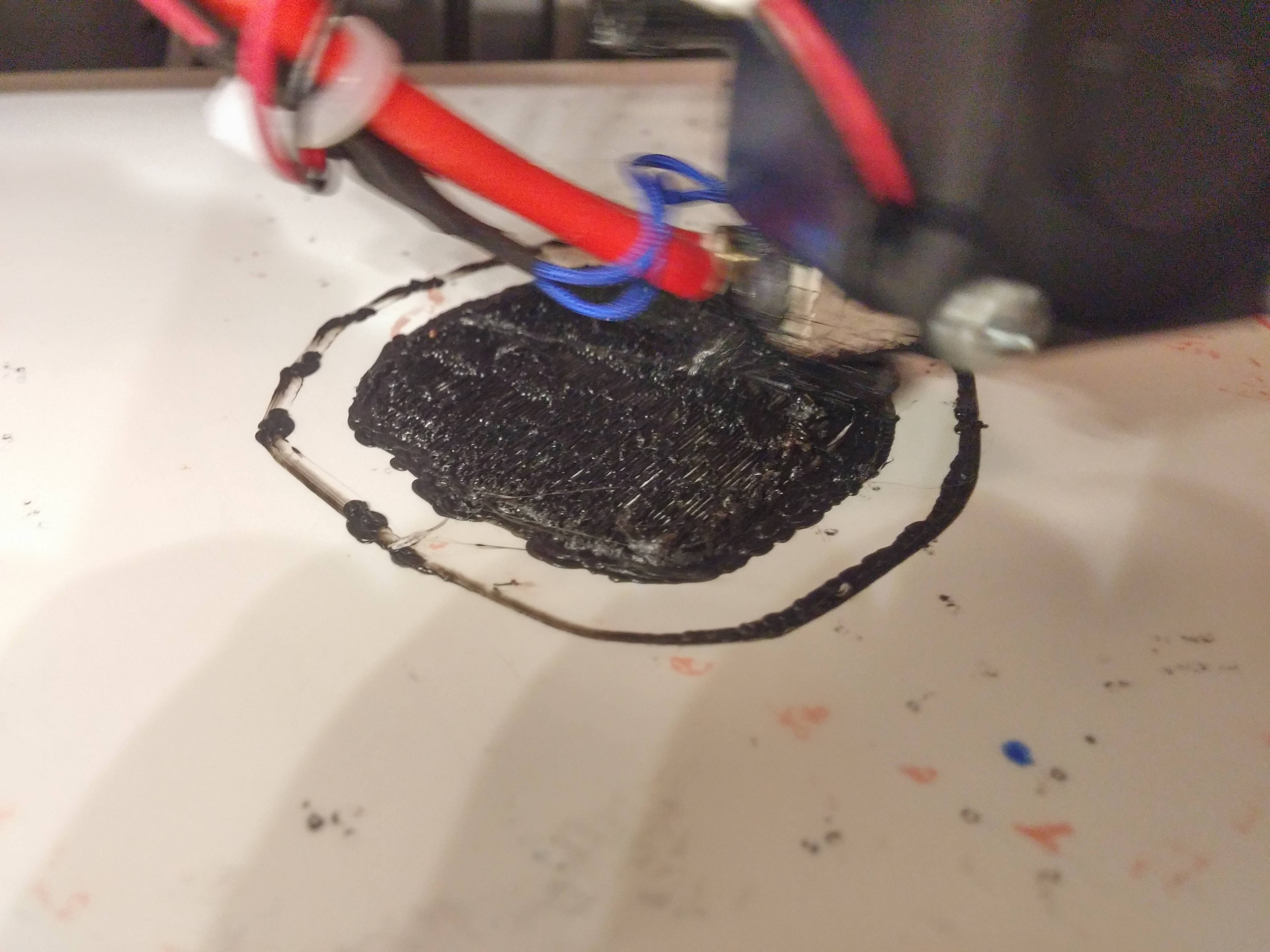
			<content type="html"><![CDATA[<p>looking at that picture, I would say your bed is not level - evidence is the skirt that goes down thicker on one side versus thin &amp; spotty on the other side. you also have a fair amount of moire going on which is not helping the situation any.</p><p>i would also suggest reducing the overlap a bit. </p><p>not really sure why, but Hatchbox ABS seems to &#039;expand&#039; more than other filaments on that critical first layer - even with overlap set to 0, it goes down like it is over-extruding - subsequent layers even things out, but that first layer always looks like an overgrown weed field. and it is ONLY the Hatchbox that does this. Octave &amp; Inland ABS don&#039;t do this. </p><p>increasing the first layer height a little does help a bit - my usual 1st layer height is 0.29, increasing that to 0.31 helps the HB go down a bit smoother on that first layer</p>]]></content>
			<author>
				<name><![CDATA[heartless]]></name>
				<uri>https://www.soliforum.com/user/10399/</uri>
			</author>
			<updated>2016-04-01T12:34:35Z</updated>
			<id>https://www.soliforum.com/post/120323/#p120323</id>
		</entry>
		<entry>
			<title type="html"><![CDATA[Re: after E3D V6 upgrade, over extrusion problems]]></title>
			<link rel="alternate" href="https://www.soliforum.com/post/120321/#p120321" />
			<content type="html"><![CDATA[<p>Slic3r is version 1.2.9, how would I check Marlin version?</p><p>For filament when I get roll open I check first couple feet at multiple points.</p><p>The biggest concern about all this is that when I printed at 200 C with old Solidoodle head there was no issue at all, perfect extrusion, then just switching to E3D and 260 C printing overextrusion.</p><p>If I only print the walls and no solid infill it is still good, solid infill is the problem area for too much plastic.</p>]]></content>
			<author>
				<name><![CDATA[crazyman2099]]></name>
				<uri>https://www.soliforum.com/user/4139/</uri>
			</author>
			<updated>2016-04-01T12:23:12Z</updated>
			<id>https://www.soliforum.com/post/120321/#p120321</id>
		</entry>
		<entry>
			<title type="html"><![CDATA[Re: after E3D V6 upgrade, over extrusion problems]]></title>
			<link rel="alternate" href="https://www.soliforum.com/post/120311/#p120311" />
			<content type="html"><![CDATA[<p>I only print in hatchbox abs and I haven&#039;t had a roll yet with a diameter under 1.71 How often to you check your filament diameter?</p>]]></content>
			<author>
				<name><![CDATA[Kronikabuse]]></name>
				<uri>https://www.soliforum.com/user/6797/</uri>
			</author>
			<updated>2016-04-01T08:46:57Z</updated>
			<id>https://www.soliforum.com/post/120311/#p120311</id>
		</entry>
		<entry>
			<title type="html"><![CDATA[Re: after E3D V6 upgrade, over extrusion problems]]></title>
			<link rel="alternate" href="https://www.soliforum.com/post/120298/#p120298" />
			<content type="html"><![CDATA[<p>Can I ask what version of Slic3r and what version of Marlin ?</p>]]></content>
			<author>
				<name><![CDATA[wardjr]]></name>
				<uri>https://www.soliforum.com/user/2291/</uri>
			</author>
			<updated>2016-04-01T04:57:39Z</updated>
			<id>https://www.soliforum.com/post/120298/#p120298</id>
		</entry>
		<entry>
			<title type="html"><![CDATA[Re: after E3D V6 upgrade, over extrusion problems]]></title>
			<link rel="alternate" href="https://www.soliforum.com/post/120294/#p120294" />
			<content type="html"><![CDATA[<p>I am having exact same issues with my newE3D head conversion. I have a SD3 and before conversion my prints were great, now that I have the new E3D head I get crazy overextrusion with same filament and settings!</p><p>- I have done extruder stepper calibration just to make sure steppers give correct amount<br />- I have done single wall calibration successfully<br />- I use hatchbox ABS with typical setting of diameter 1.66 mm and extrusion multiplier of 0.85-0.86<br />- Printer settings I set nozzle diameter at 0.48 mm<br />- BEFORE E3D I never touched Print advanced tab, I left everything at 0.<br />- From reading this I went and updated my print advanced tab to everything being 0.48 mm and first layer as 100%, infill overlap at 15%</p><p>From all this I am still getting overextrusion. What settings do you guys have that work? Just frustrating I did E3D upgrade and prints are worse and I know it is software related. I am attaching photo of print I am doing right now.</p><p><span class="postimg"><img src="http://soliforum.com/i/?CIWx7ka.jpg" alt="http://soliforum.com/i/?CIWx7ka.jpg" /></span></p>]]></content>
			<author>
				<name><![CDATA[crazyman2099]]></name>
				<uri>https://www.soliforum.com/user/4139/</uri>
			</author>
			<updated>2016-04-01T03:41:06Z</updated>
			<id>https://www.soliforum.com/post/120294/#p120294</id>
		</entry>
		<entry>
			<title type="html"><![CDATA[Re: after E3D V6 upgrade, over extrusion problems]]></title>
			<link rel="alternate" href="https://www.soliforum.com/post/120072/#p120072" />
			<content type="html"><![CDATA[<p>It isn&#039;t mandatory to upgrade the motor or driver, but it would help.<br />I have an SD2 with a Printrboard (1/16) and a stock motor with the Goblin and it runs great. </p><p>Upgrading the driver, if possible, is a great work around to a 1.8 motor. If it is not possible, upgrading to a .9 motor is a great work around for the inability to work on integrated drivers. Regardless, the Goblin upgrade is a solid step in the right direction.</p>]]></content>
			<author>
				<name><![CDATA[AZERATE]]></name>
				<uri>https://www.soliforum.com/user/4188/</uri>
			</author>
			<updated>2016-03-28T12:52:49Z</updated>
			<id>https://www.soliforum.com/post/120072/#p120072</id>
		</entry>
</feed>