<?xml version="1.0" encoding="utf-8"?>
<feed xmlns="http://www.w3.org/2005/Atom">
	<title type="html"><![CDATA[SoliForum - 3D Printing Community — Left Laser Not Picked Up]]></title>
	<link rel="self" href="https://www.soliforum.com/feed/atom/topic/13502/" />
	<updated>2018-03-25T16:21:03Z</updated>
	<generator>PunBB</generator>
	<id>https://www.soliforum.com/topic/13502/left-laser-not-picked-up/</id>
		<entry>
			<title type="html"><![CDATA[Re: Left Laser Not Picked Up]]></title>
			<link rel="alternate" href="https://www.soliforum.com/post/143263/#p143263" />
			<content type="html"><![CDATA[<p>Hello,</p><p>What is the value of amps for the power supply of 12V and 5V?</p>]]></content>
			<author>
				<name><![CDATA[JuanDominguez]]></name>
				<uri>https://www.soliforum.com/user/15801/</uri>
			</author>
			<updated>2018-03-25T16:21:03Z</updated>
			<id>https://www.soliforum.com/post/143263/#p143263</id>
		</entry>
		<entry>
			<title type="html"><![CDATA[Re: Left Laser Not Picked Up]]></title>
			<link rel="alternate" href="https://www.soliforum.com/post/120847/#p120847" />
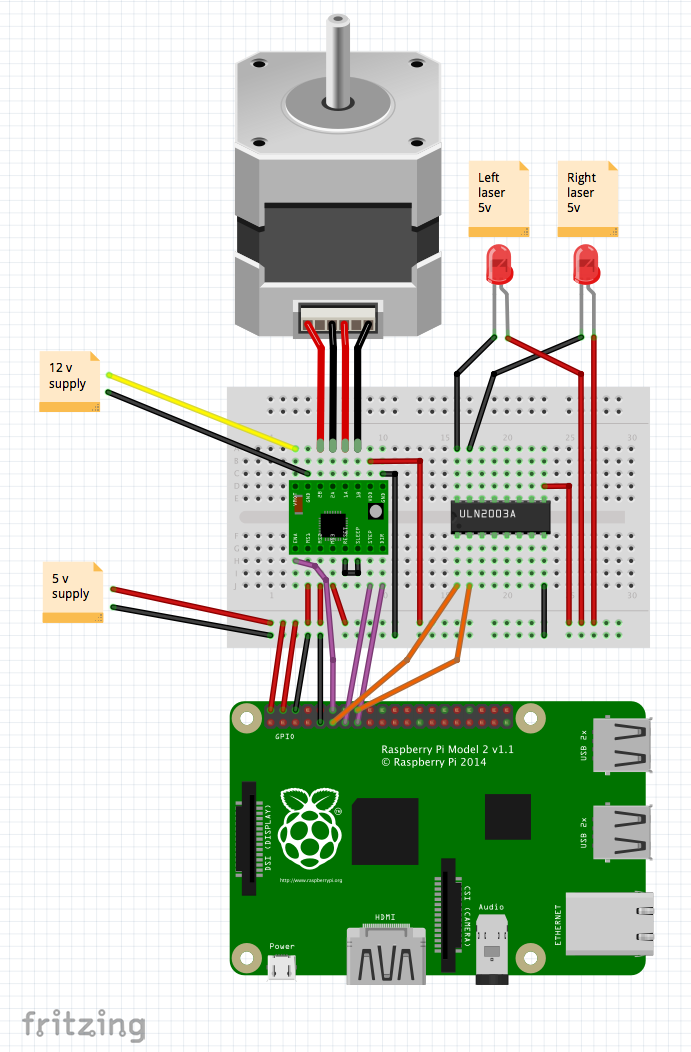
			<content type="html"><![CDATA[<p>I tried FreeLss on the pi 3 and found the default pin assignment does not match the wiring diagram that we find on the freelss website.<br />Only one laser was working and the stepper was making noise and the drive heated a lot. Then I found the pin assignment in the setting menu did not save my modifications. I ended changing the wiring and it worked.<br />I made this diagram corrected for the default one.<br /><span class="postimg"><img src="http://soliforum.com/i/?3leyeue.png" alt="http://soliforum.com/i/?3leyeue.png" /></span></p>]]></content>
			<author>
				<name><![CDATA[minautor]]></name>
				<uri>https://www.soliforum.com/user/14190/</uri>
			</author>
			<updated>2016-04-10T05:24:05Z</updated>
			<id>https://www.soliforum.com/post/120847/#p120847</id>
		</entry>
		<entry>
			<title type="html"><![CDATA[Re: Left Laser Not Picked Up]]></title>
			<link rel="alternate" href="https://www.soliforum.com/post/119535/#p119535" />
			<content type="html"><![CDATA[<p>yeah I posted the reversed pin number thing and Pirvan replied correct numbers in another topic a few weeks ago. the software lately must be coming with the pins swapped from normal.</p>]]></content>
			<author>
				<name><![CDATA[n2ri]]></name>
				<uri>https://www.soliforum.com/user/795/</uri>
			</author>
			<updated>2016-03-18T23:33:29Z</updated>
			<id>https://www.soliforum.com/post/119535/#p119535</id>
		</entry>
		<entry>
			<title type="html"><![CDATA[Re: Left Laser Not Picked Up]]></title>
			<link rel="alternate" href="https://www.soliforum.com/post/119503/#p119503" />
			<content type="html"><![CDATA[<p>The wiringPi pin numbers are not the same as the Broadcom numbers.</p>]]></content>
			<author>
				<name><![CDATA[hairu526]]></name>
				<uri>https://www.soliforum.com/user/4789/</uri>
			</author>
			<updated>2016-03-18T10:37:36Z</updated>
			<id>https://www.soliforum.com/post/119503/#p119503</id>
		</entry>
		<entry>
			<title type="html"><![CDATA[Re: Left Laser Not Picked Up]]></title>
			<link rel="alternate" href="https://www.soliforum.com/post/119480/#p119480" />
			<content type="html"><![CDATA[<p>worked out the lasser part, its not what it shows in the diagrammes posted on the net, shows 1 gpio pin completly wrong, will post a pic when i work out the rest although the pins for the motor also seem mixed up, nothing happens but if i pull pin 13, gpio 7 then the motor will spin up but unable to stop it, i have it as per diagramme.</p>]]></content>
			<author>
				<name><![CDATA[stefi]]></name>
				<uri>https://www.soliforum.com/user/13439/</uri>
			</author>
			<updated>2016-03-18T01:37:01Z</updated>
			<id>https://www.soliforum.com/post/119480/#p119480</id>
		</entry>
		<entry>
			<title type="html"><![CDATA[Re: Left Laser Not Picked Up]]></title>
			<link rel="alternate" href="https://www.soliforum.com/post/119472/#p119472" />
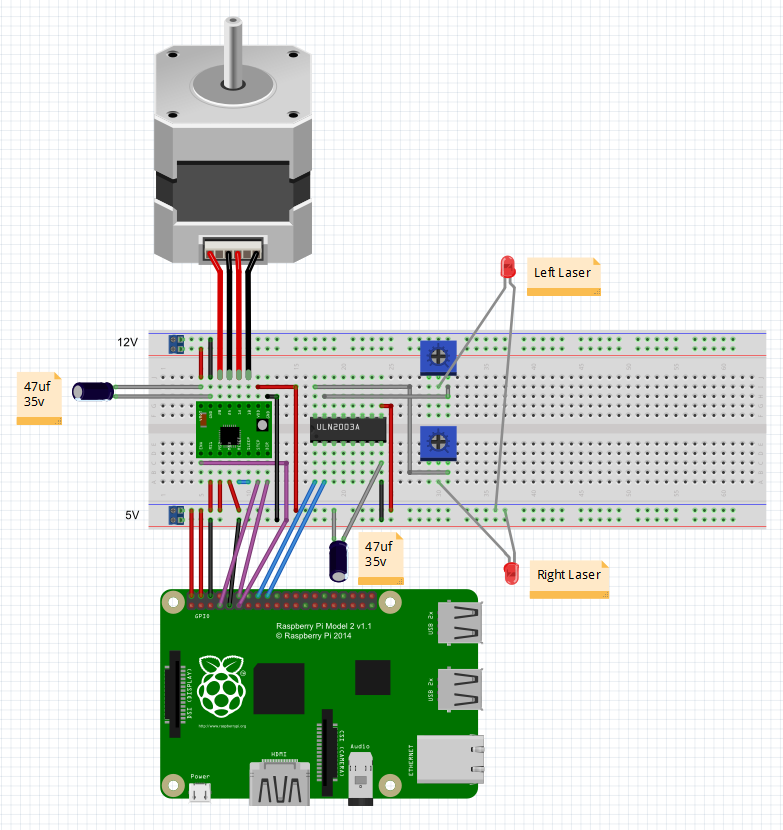
			<content type="html"><![CDATA[<p>worked out the lasser part which has a wrong pin for the left lasser,.most places i searched has this pic. i wil try work out if the motor part is also wrong or not then post a pic of how it should be.<span class="postimg"><img src="http://soliforum.com/i/?5VvdyaP.png" alt="http://soliforum.com/i/?5VvdyaP.png" /></span></p>]]></content>
			<author>
				<name><![CDATA[stefi]]></name>
				<uri>https://www.soliforum.com/user/13439/</uri>
			</author>
			<updated>2016-03-17T23:37:27Z</updated>
			<id>https://www.soliforum.com/post/119472/#p119472</id>
		</entry>
		<entry>
			<title type="html"><![CDATA[Re: Left Laser Not Picked Up]]></title>
			<link rel="alternate" href="https://www.soliforum.com/post/119463/#p119463" />
			<content type="html"><![CDATA[<p>First, check that you don&#039;t have the same pin assigned to multiple things on the Setup page of the software.&nbsp; If that&#039;s not the issue, then there&#039;s likely a wiring error.&nbsp; Post a clearer breadboard picture of just how the ULN is connected to the Pi.</p><p>- Uriah</p>]]></content>
			<author>
				<name><![CDATA[hairu526]]></name>
				<uri>https://www.soliforum.com/user/4789/</uri>
			</author>
			<updated>2016-03-17T21:17:37Z</updated>
			<id>https://www.soliforum.com/post/119463/#p119463</id>
		</entry>
		<entry>
			<title type="html"><![CDATA[Re: Left Laser Not Picked Up]]></title>
			<link rel="alternate" href="https://www.soliforum.com/post/119366/#p119366" />
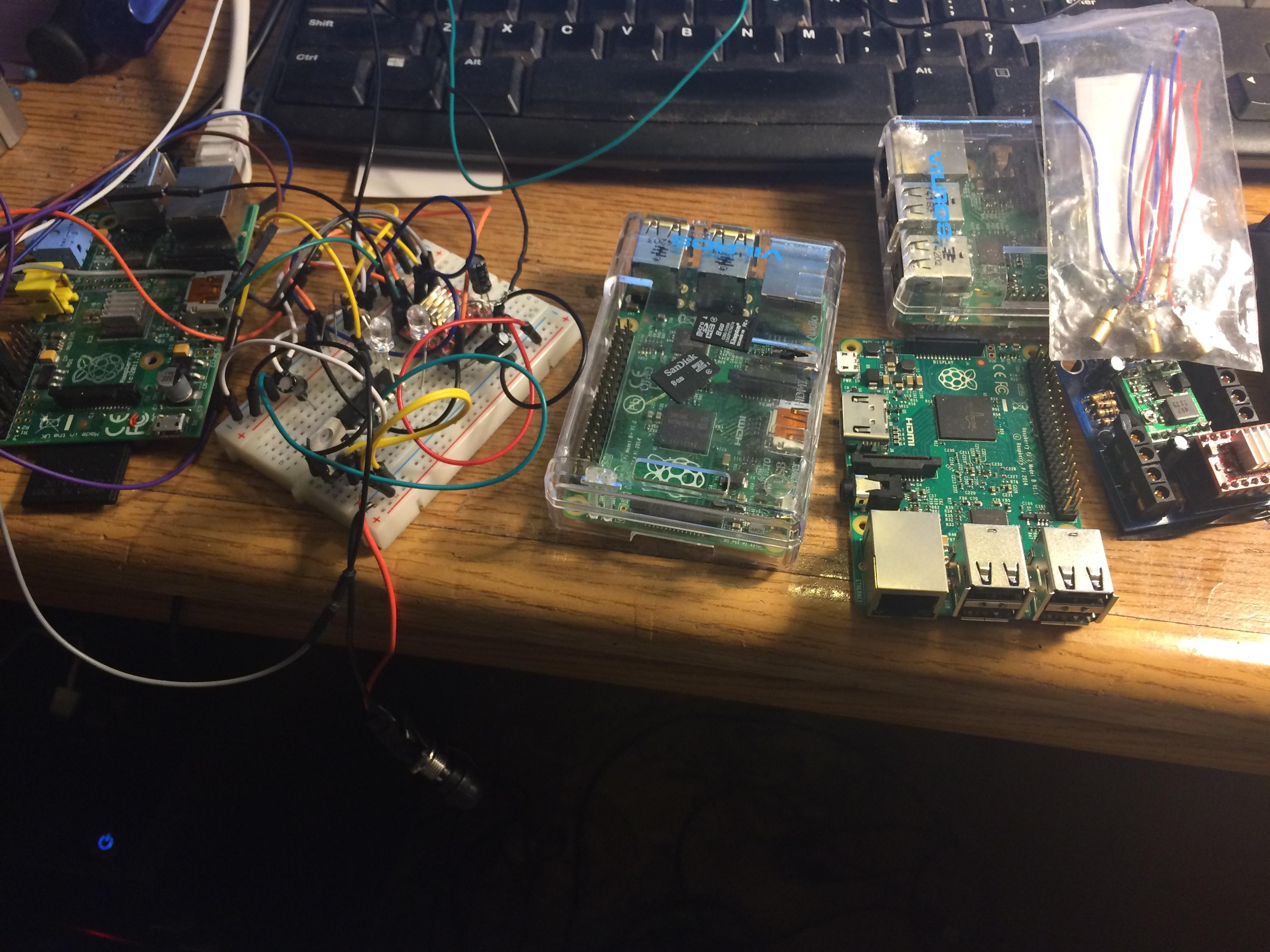
			<content type="html"><![CDATA[<p>Unless its normal to always have the left lasser on when not scanning and goes off when scanning then i am having a problem with the left lasser, pin 4, tried a pi b,b+ and r pi 2 model b,exept the lasser stays on, tried replaced the chip several times, swapped the left wire for the right on the pins on the pi<span class="postimg"><img src="http://soliforum.com/i/?NzHwKeX.jpg" alt="http://soliforum.com/i/?NzHwKeX.jpg" /></span> and then the right one stays on, tried diferent pins, the ones it makes contact with, they stay on to, tried changing pin numbers but comes back with denied, used a copper clad pcb, same happened, re downloaded freelss more than once, yet the same, updated raspbian, no change, tried on a bread board, same happened, the right lasser works fine until i switch the wires then the left works and right does not.even tried diferent sd cards.also tried led&#039;s on the board. and&nbsp; different lassers.and i noticed that when it should be scanning the led is off, when it stops scanning the led comes on solid. lost count how many times i checked the wires.pulled all from th breadbord circuit out and started over to avoid dodgey wires, no diference. i would attempt to wire up a zum scan board but would not know the connections plus the problem i have is happening on 4 pi&#039;s.also, when i try calibrating the lassers, when the right lasser button is pressed it will turn off and on , the left lasser will not respond and stays on. tonight i formated the card yet again and started over, ripped all off the bread board and only reatatched the lasser circuit, no difference. begining to think this is normal</p>]]></content>
			<author>
				<name><![CDATA[stefi]]></name>
				<uri>https://www.soliforum.com/user/13439/</uri>
			</author>
			<updated>2016-03-16T06:48:52Z</updated>
			<id>https://www.soliforum.com/post/119366/#p119366</id>
		</entry>
		<entry>
			<title type="html"><![CDATA[Re: Left Laser Not Picked Up]]></title>
			<link rel="alternate" href="https://www.soliforum.com/post/114964/#p114964" />
			<content type="html"><![CDATA[<p>I was just playing around with the values and forgot to change them back. In reality they are a few hundredths off from each other. The left laser had a thicker line than the right so I changed it. I guess that&#039;s what I get for not keeping a copy of the original numbers. That won&#039;t happen again. Thanks a lot. </p><p>Bob</p>]]></content>
			<author>
				<name><![CDATA[bobswika]]></name>
				<uri>https://www.soliforum.com/user/13047/</uri>
			</author>
			<updated>2016-01-24T21:24:14Z</updated>
			<id>https://www.soliforum.com/post/114964/#p114964</id>
		</entry>
		<entry>
			<title type="html"><![CDATA[Re: Left Laser Not Picked Up]]></title>
			<link rel="alternate" href="https://www.soliforum.com/post/114962/#p114962" />
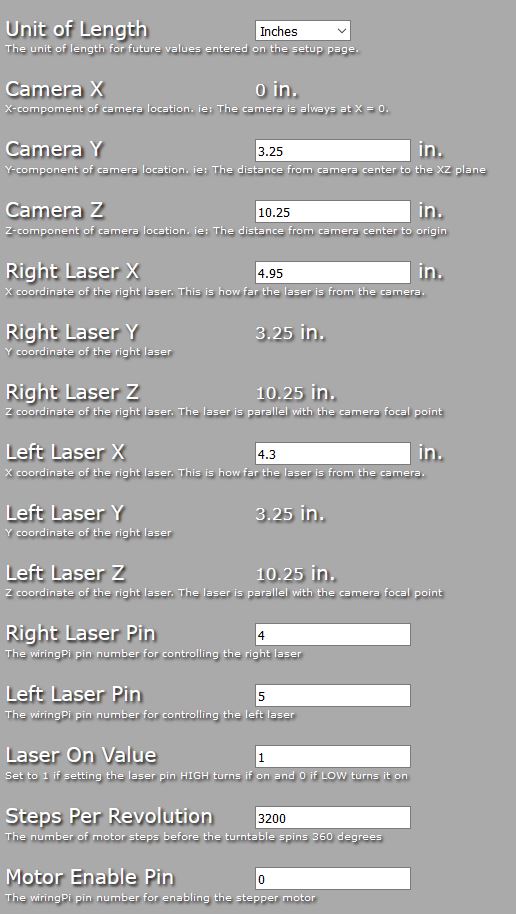
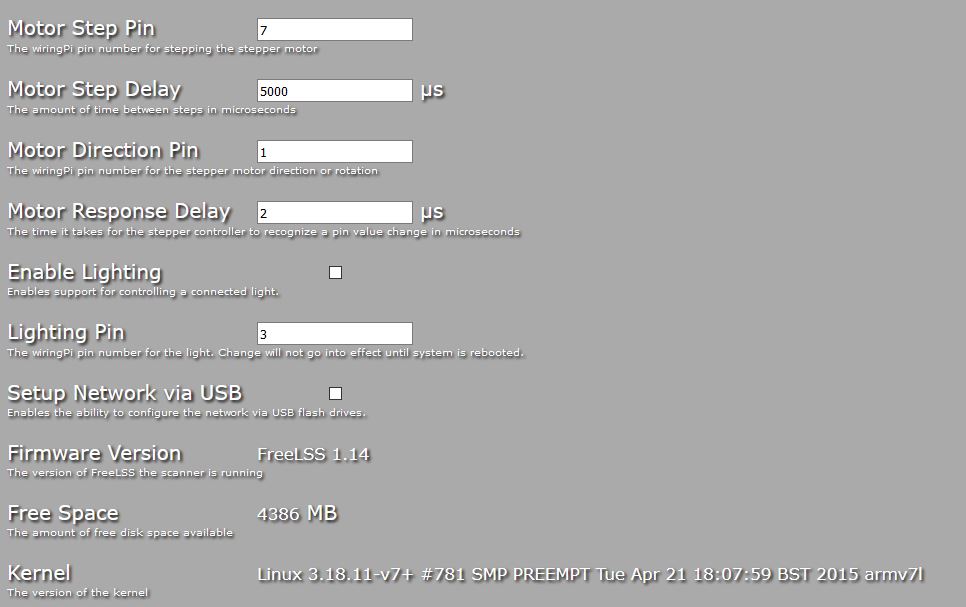
			<content type="html"><![CDATA[<p>Here are my settings (setup Page).&nbsp; </p><p>I&#039;m not sure why all of the sudden the Left Laser started giving you problems, but one thing that looks weird is the value, not that it&#039;s not negative, but the huge discrepancy between the left and right.&nbsp; I can understand a few 100ths of an inch, maybe even 1/8&quot;, but not 5/8&quot;.&nbsp; </p><p>Are those numbers real, or something you entered just to see what happens?</p><p><span class="postimg"><img src="http://www.soliforum.com/misc.php?action=pun_attachment&amp;item=9607" alt="http://www.soliforum.com/misc.php?action=pun_attachment&amp;amp;item=9607" /></span></p>]]></content>
			<author>
				<name><![CDATA[pirvan]]></name>
				<uri>https://www.soliforum.com/user/1357/</uri>
			</author>
			<updated>2016-01-24T20:34:03Z</updated>
			<id>https://www.soliforum.com/post/114962/#p114962</id>
		</entry>
		<entry>
			<title type="html"><![CDATA[Re: Left Laser Not Picked Up]]></title>
			<link rel="alternate" href="https://www.soliforum.com/post/114960/#p114960" />
			<content type="html"><![CDATA[<p>Sorry for being an idiot.&nbsp; I installed the new left laser upside down.&nbsp; I didn&#039;t even realize there was a correct way.&nbsp; I rotated the laser 180 degrees and things are back to normal.&nbsp; Thanks.</p><p>Bob</p>]]></content>
			<author>
				<name><![CDATA[bobswika]]></name>
				<uri>https://www.soliforum.com/user/13047/</uri>
			</author>
			<updated>2016-01-24T20:25:23Z</updated>
			<id>https://www.soliforum.com/post/114960/#p114960</id>
		</entry>
		<entry>
			<title type="html"><![CDATA[Re: Left Laser Not Picked Up]]></title>
			<link rel="alternate" href="https://www.soliforum.com/post/114959/#p114959" />
			<content type="html"><![CDATA[<p>I am running version 1.14 so I know there was no software change.&nbsp; Maybe I accidentally changed a value on the setup page without realizing it.&nbsp; Is it possible to go back to the defaults or would someone please post a screenshot of what the defaults are.&nbsp; I attached my settings.&nbsp; I know that left laser X is way off but if I put it negative then the left laser isn&#039;t seen by the camera.&nbsp; Sorry for all the questions, I was getting good scans and I can&#039;t figure out what I did to break it. Thanks,</p><p>Bob</p><p> <span class="postimg"><img src="http://soliforum.com/i/?I6ph2gd.jpg" alt="http://soliforum.com/i/?I6ph2gd.jpg" /></span><span class="postimg"><img src="http://soliforum.com/i/?l6fNO6I.jpg" alt="http://soliforum.com/i/?l6fNO6I.jpg" /></span></p>]]></content>
			<author>
				<name><![CDATA[bobswika]]></name>
				<uri>https://www.soliforum.com/user/13047/</uri>
			</author>
			<updated>2016-01-24T20:00:43Z</updated>
			<id>https://www.soliforum.com/post/114959/#p114959</id>
		</entry>
		<entry>
			<title type="html"><![CDATA[Re: Left Laser Not Picked Up]]></title>
			<link rel="alternate" href="https://www.soliforum.com/post/114952/#p114952" />
			<content type="html"><![CDATA[<p>I decided this was a good time to change out the left laser which produced a thicker line.&nbsp; Both laser lines are now thin and crisp.&nbsp; When I tested them the left laser was back, then I noticed in the setup page that the left laser X value was positive??&nbsp; I put it back to negative and the left laser picture was gone again.&nbsp; Back to positive and the picture returned.&nbsp; Was there any software update that I missed?&nbsp; Picture attached with the left and right laser X values set to 4.95,&nbsp; Thanks,</p><p>Bob<span class="postimg"><img src="http://soliforum.com/i/?QQAK2T3.jpg" alt="http://soliforum.com/i/?QQAK2T3.jpg" /></span></p>]]></content>
			<author>
				<name><![CDATA[bobswika]]></name>
				<uri>https://www.soliforum.com/user/13047/</uri>
			</author>
			<updated>2016-01-24T17:59:09Z</updated>
			<id>https://www.soliforum.com/post/114952/#p114952</id>
		</entry>
		<entry>
			<title type="html"><![CDATA[Left Laser Not Picked Up]]></title>
			<link rel="alternate" href="https://www.soliforum.com/post/114948/#p114948" />
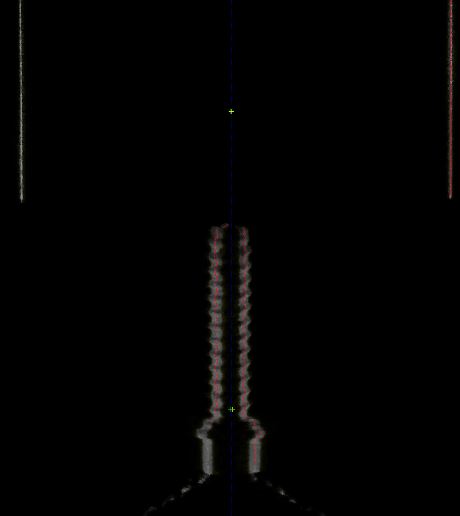
			<content type="html"><![CDATA[<p>Something really strange happened this morning between scans.&nbsp; All of a sudden with no setting changes the left laser is not detected by the camera.&nbsp; It does come on but the camera does not see it.&nbsp; I tried rebooting the machine a few times and also deleted all the scans that were saved just to make sure it wasn&#039;t a memory issue.&nbsp; </p><p>Has anyone ever experienced anything like this before.&nbsp; Attached are a test images using just the left laser, just the right laser and then one with both lasers.&nbsp; You can see that the left laser isn&#039;t detected at all, no red line showing up on the object.&nbsp; </p><p>When I try to scan with just the left laser it doesn&#039;t pick up any image but it also scans much slower than if I do a scan with the right laser at the same settings, this speed difference started at the same time that the laser stopped being picked up by the camera.&nbsp; Any idea to fix this would be much appreciated.</p><p>Thanks,</p><p>Bob</p>]]></content>
			<author>
				<name><![CDATA[bobswika]]></name>
				<uri>https://www.soliforum.com/user/13047/</uri>
			</author>
			<updated>2016-01-24T16:56:00Z</updated>
			<id>https://www.soliforum.com/post/114948/#p114948</id>
		</entry>
</feed>