<?xml version="1.0" encoding="utf-8"?>
<feed xmlns="http://www.w3.org/2005/Atom">
	<title type="html"><![CDATA[SoliForum - 3D Printing Community — Strange Z-printing]]></title>
	<link rel="self" href="https://www.soliforum.com/feed/atom/topic/12973/" />
	<updated>2015-12-04T02:38:25Z</updated>
	<generator>PunBB</generator>
	<id>https://www.soliforum.com/topic/12973/strange-zprinting/</id>
		<entry>
			<title type="html"><![CDATA[Re: Strange Z-printing]]></title>
			<link rel="alternate" href="https://www.soliforum.com/post/110896/#p110896" />
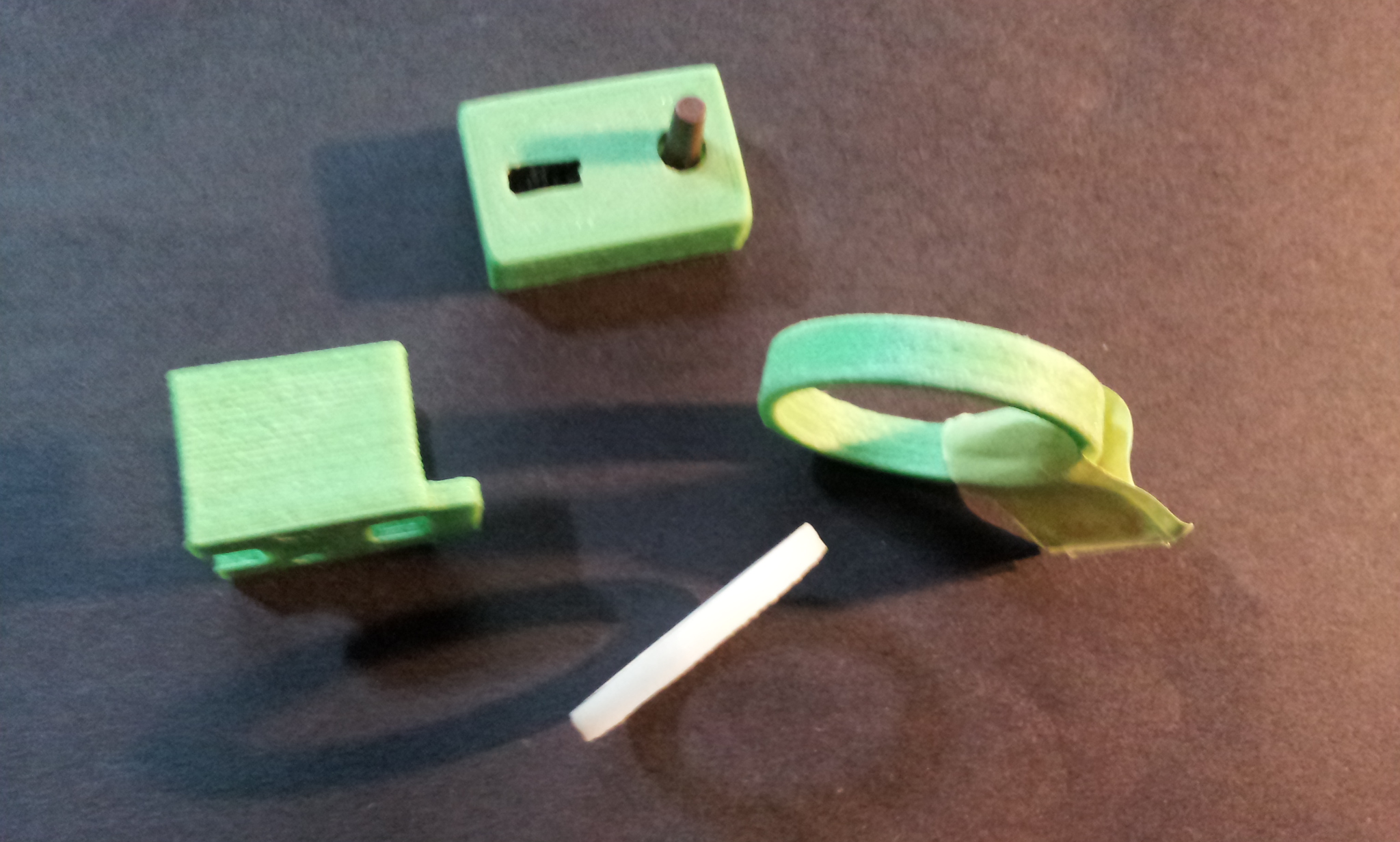
			<content type="html"><![CDATA[<div class="quotebox"><cite>galaxy99 wrote:</cite><blockquote><p>Perhaps the reason / difference in the clicking update profile is Windows versus Mac (I use the Mac version and there are differences [more bugs in Mac version, too]).&nbsp; Curious - Have you looked/compared the resulting Gcode to verify the changes actually take place and not simply in the panel?</p><p>About temps:&nbsp; I print xyz brand filament at 235ºC and Shaxon at 245ºC and others (Hatchbox and eSun in those ranges too)...<br />Examples in photo: green=xyz brand, white=Shaxon.&nbsp; These are printed at H=0.3 and you can barely see the lines. They are thin wall parts...</p><p>Pump up the temps - try it.&nbsp; Can&#039;t hurt it and you can always stop the print.</p><p>Attached is a Simplify3D FFF file - Use the Import function in Menu, BUT, reduce the temps as they are currently set at 250ºC for my hacked extruder needs.&nbsp; Change them as suggested above - the other settings should give you a good print.&nbsp; The file has a couple of macros and Start &amp; Ending scripts that may or may not work with import/export between Mac/Windows....</p></blockquote></div><p>It might be a Mac vs Windows thing with the &quot;update&quot; button.</p><p>I always get a warp on my builds when I go up in temp. but I have change the gluestick to a better one so I might test to raise the temp a bit. </p><p>I have not compared the G-code, but the infill pattern, temps in the machinepanel and the look of my builds when changing between 0.1 and 0.3 is all there.</p>]]></content>
			<author>
				<name><![CDATA[Landin81]]></name>
				<uri>https://www.soliforum.com/user/11562/</uri>
			</author>
			<updated>2015-12-04T02:38:25Z</updated>
			<id>https://www.soliforum.com/post/110896/#p110896</id>
		</entry>
		<entry>
			<title type="html"><![CDATA[Re: Strange Z-printing]]></title>
			<link rel="alternate" href="https://www.soliforum.com/post/110826/#p110826" />
			<content type="html"><![CDATA[<p>Perhaps the reason / difference in the clicking update profile is Windows versus Mac (I use the Mac version and there are differences [more bugs in Mac version, too]).&nbsp; Curious - Have you looked/compared the resulting Gcode to verify the changes actually take place and not simply in the panel?</p><p>About temps:&nbsp; I print xyz brand filament at 235ºC and Shaxon at 245ºC and others (Hatchbox and eSun in those ranges too)...<br />Examples in photo: green=xyz brand, white=Shaxon.&nbsp; These are printed at H=0.3 and you can barely see the lines. They are thin wall parts...</p><p>Pump up the temps - try it.&nbsp; Can&#039;t hurt it and you can always stop the print.</p><p>Attached is a Simplify3D FFF file - Use the Import function in Menu, BUT, reduce the temps as they are currently set at 250ºC for my hacked extruder needs.&nbsp; Change them as suggested above - the other settings should give you a good print.&nbsp; The file has a couple of macros and Start &amp; Ending scripts that may or may not work with import/export between Mac/Windows....</p><p><span class="postimg"><img src="http://soliforum.com/i/?DhO9pxo.jpg" alt="http://soliforum.com/i/?DhO9pxo.jpg" /></span></p>]]></content>
			<author>
				<name><![CDATA[galaxy99]]></name>
				<uri>https://www.soliforum.com/user/9607/</uri>
			</author>
			<updated>2015-12-03T15:43:22Z</updated>
			<id>https://www.soliforum.com/post/110826/#p110826</id>
		</entry>
		<entry>
			<title type="html"><![CDATA[Re: Strange Z-printing]]></title>
			<link rel="alternate" href="https://www.soliforum.com/post/110810/#p110810" />
			<content type="html"><![CDATA[<div class="quotebox"><cite>galaxy99 wrote:</cite><blockquote><p>Assuming the model for the stl has decent wall thickness (assuming it&#039;s hollow) you should be able to improve the print regardless of the Height setting.</p><p>Two changes to consider (do one at a time and print a dozen layers to see what you get…)<br />&nbsp; &nbsp;Layer&gt; Outline Direction - Inside-Out&nbsp; or&nbsp; Outside-In<br />&nbsp; &nbsp;Infill&gt; Optimize Startpoints</p><p><strong>Important:</strong>&nbsp; - In your printing process panel - you MUST click the Update Profile button after making a change, otherwise changes are not made to output... (if it say&#039;s Modified, you need to click)</p><p>[edit] Your extrude temp is too low - the part looks it and the end-tag at the tip should be melted and stringy.&nbsp; Temps very depending on brand of filament...&nbsp; Simplify has a good (newly released) Print Quality Guide... check it out</p></blockquote></div><br /><p>Thanx for the tips, I will try to change them. </p><p>Well, the changes are made without clicking on the &quot;update profile&quot; button, I have never clicked it and temps and settings are saved anyway, I have change temp, layer, infill, infill pattern etc etc and all is changed. =/</p><p>The temp is set to 223c and that seems to work fine for 3dprima filament, dont think it will work alot better with higher temperature for it?</p>]]></content>
			<author>
				<name><![CDATA[Landin81]]></name>
				<uri>https://www.soliforum.com/user/11562/</uri>
			</author>
			<updated>2015-12-03T09:13:51Z</updated>
			<id>https://www.soliforum.com/post/110810/#p110810</id>
		</entry>
		<entry>
			<title type="html"><![CDATA[Re: Strange Z-printing]]></title>
			<link rel="alternate" href="https://www.soliforum.com/post/110654/#p110654" />
			<content type="html"><![CDATA[<p>Assuming the model for the stl has decent wall thickness (assuming it&#039;s hollow) you should be able to improve the print regardless of the Height setting.</p><p>Two changes to consider (do one at a time and print a dozen layers to see what you get…)<br />&nbsp; &nbsp;Layer&gt; Outline Direction - Inside-Out&nbsp; or&nbsp; Outside-In<br />&nbsp; &nbsp;Infill&gt; Optimize Startpoints</p><p><strong>Important:</strong>&nbsp; - In your printing process panel - you MUST click the Update Profile button after making a change, otherwise changes are not made to output... (if it say&#039;s Modified, you need to click)</p><p>[edit] Your extrude temp is too low - the part looks it and the end-tag at the tip should be melted and stringy.&nbsp; Temps very depending on brand of filament...&nbsp; Simplify has a good (newly released) Print Quality Guide... check it out</p>]]></content>
			<author>
				<name><![CDATA[galaxy99]]></name>
				<uri>https://www.soliforum.com/user/9607/</uri>
			</author>
			<updated>2015-12-01T20:57:03Z</updated>
			<id>https://www.soliforum.com/post/110654/#p110654</id>
		</entry>
		<entry>
			<title type="html"><![CDATA[Re: Strange Z-printing]]></title>
			<link rel="alternate" href="https://www.soliforum.com/post/110591/#p110591" />
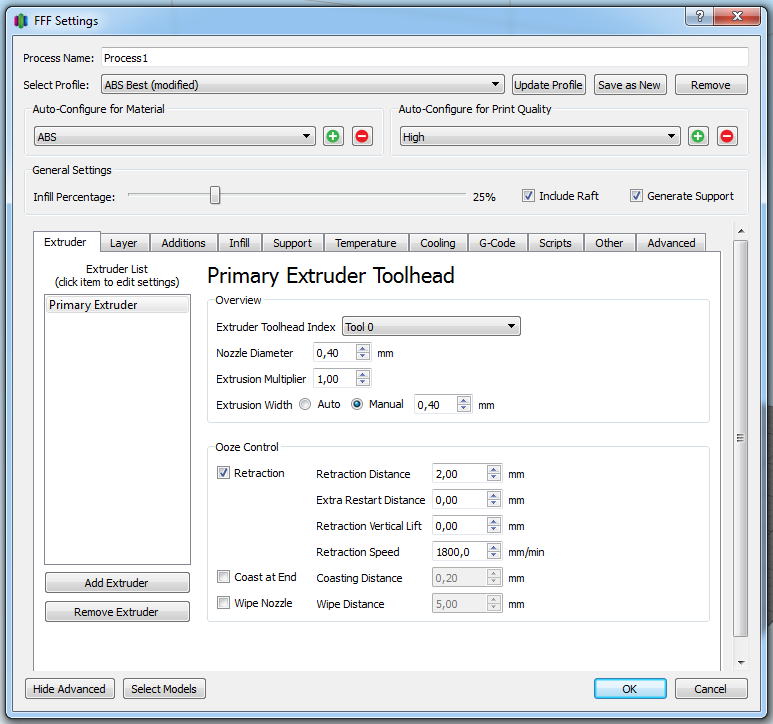
			<content type="html"><![CDATA[<div class="quotebox"><cite>ggunners wrote:</cite><blockquote><p>Looks very good to me. It looks like you have a slight under-extrusion at the layer change. So check on settings for that. Also, you can vary the layer change spot by using random layer starts. Some like that setting, I prefer the seam all in the same place.</p></blockquote></div><p>Thanx! Its the layerchange that nugging me alot. </p><p>So is it somewhere in here I should change something?</p><p><span class="postimg"><img src="http://soliforum.com/i/?tpjdqCS.png" alt="http://soliforum.com/i/?tpjdqCS.png" /></span></p>]]></content>
			<author>
				<name><![CDATA[Landin81]]></name>
				<uri>https://www.soliforum.com/user/11562/</uri>
			</author>
			<updated>2015-11-30T23:00:50Z</updated>
			<id>https://www.soliforum.com/post/110591/#p110591</id>
		</entry>
		<entry>
			<title type="html"><![CDATA[Re: Strange Z-printing]]></title>
			<link rel="alternate" href="https://www.soliforum.com/post/110580/#p110580" />
			<content type="html"><![CDATA[<p>Looks very good to me. It looks like you have a slight under-extrusion at the layer change. So check on settings for that. Also, you can vary the layer change spot by using random layer starts. Some like that setting, I prefer the seam all in the same place.</p>]]></content>
			<author>
				<name><![CDATA[ggunners]]></name>
				<uri>https://www.soliforum.com/user/4235/</uri>
			</author>
			<updated>2015-11-30T21:57:03Z</updated>
			<id>https://www.soliforum.com/post/110580/#p110580</id>
		</entry>
		<entry>
			<title type="html"><![CDATA[Strange Z-printing]]></title>
			<link rel="alternate" href="https://www.soliforum.com/post/110575/#p110575" />
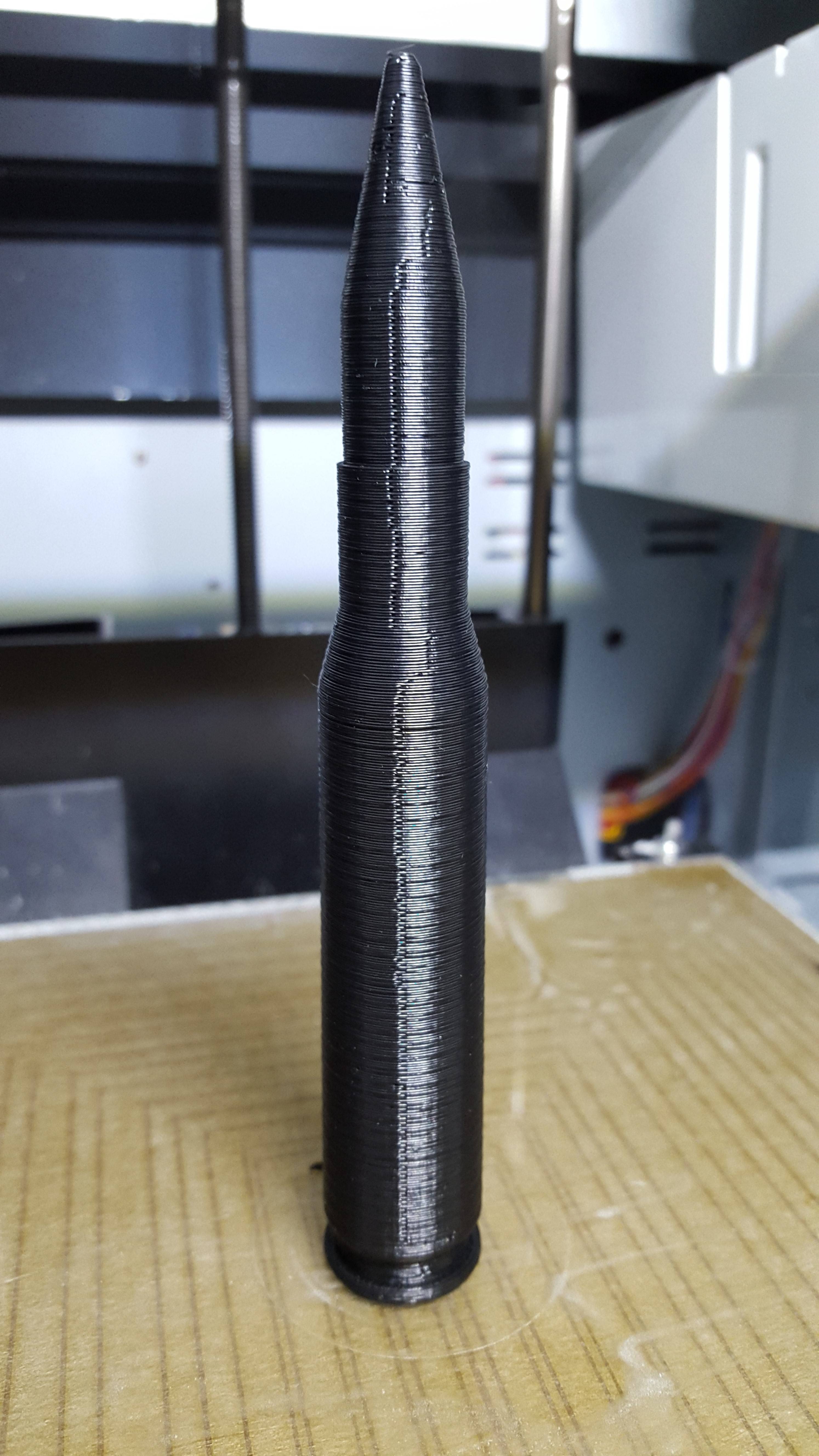
			<content type="html"><![CDATA[<p>There is something strange with my Z-axis when printing, after installing repetier.</p><p>Maby there is some settings to fix this?<br />No fun to get this on every layer. </p><p>Photo attached.</p><p><span class="postimg"><img src="http://soliforum.com/i/?g72b2qF.jpg" alt="http://soliforum.com/i/?g72b2qF.jpg" /></span></p>]]></content>
			<author>
				<name><![CDATA[Landin81]]></name>
				<uri>https://www.soliforum.com/user/11562/</uri>
			</author>
			<updated>2015-11-30T20:54:21Z</updated>
			<id>https://www.soliforum.com/post/110575/#p110575</id>
		</entry>
</feed>