<?xml version="1.0" encoding="utf-8"?>
<feed xmlns="http://www.w3.org/2005/Atom">
	<title type="html"><![CDATA[SoliForum - 3D Printing Community — Model prep help. New to 3D modeling and 3D printing.]]></title>
	<link rel="self" href="https://www.soliforum.com/feed/atom/topic/1278/" />
	<updated>2013-02-13T16:18:48Z</updated>
	<generator>PunBB</generator>
	<id>https://www.soliforum.com/topic/1278/model-prep-help-new-to-3d-modeling-and-3d-printing/</id>
		<entry>
			<title type="html"><![CDATA[Re: Model prep help. New to 3D modeling and 3D printing.]]></title>
			<link rel="alternate" href="https://www.soliforum.com/post/12701/#p12701" />
			<content type="html"><![CDATA[<p>Good to hear!</p><p>Sometimes you have to know what you&#039;re looking at to arrive at the solution.&nbsp; I didn&#039;t know what I was seeing until I did the MeshLab on your objects and zoomed in.&nbsp; Still wasn&#039;t sure what had caused it, but I could see the multiple faces clogging the model.</p><p>Carry on! <img src="https://www.soliforum.com/img/smilies/smile.png" width="15" height="15" alt="smile" /></p>]]></content>
			<author>
				<name><![CDATA[cckens]]></name>
				<uri>https://www.soliforum.com/user/129/</uri>
			</author>
			<updated>2013-02-13T16:18:48Z</updated>
			<id>https://www.soliforum.com/post/12701/#p12701</id>
		</entry>
		<entry>
			<title type="html"><![CDATA[Re: Model prep help. New to 3D modeling and 3D printing.]]></title>
			<link rel="alternate" href="https://www.soliforum.com/post/12648/#p12648" />
			<content type="html"><![CDATA[<p>I think I got it! Apparently I somehow ended up with a buttload (imperial, not metric) of duplicate faces. Deleting those I am now able to easily see and fix the far fewer remaining problem areas.</p>]]></content>
			<author>
				<name><![CDATA[Puck]]></name>
				<uri>https://www.soliforum.com/user/814/</uri>
			</author>
			<updated>2013-02-13T03:41:36Z</updated>
			<id>https://www.soliforum.com/post/12648/#p12648</id>
		</entry>
		<entry>
			<title type="html"><![CDATA[Re: Model prep help. New to 3D modeling and 3D printing.]]></title>
			<link rel="alternate" href="https://www.soliforum.com/post/12568/#p12568" />
			<content type="html"><![CDATA[<p>Actually that helps quite a bit! I was looking for actual openings as all the tutorials stated. I&#039;ll do some cleanup and see how that goes. Thanks!</p>]]></content>
			<author>
				<name><![CDATA[Puck]]></name>
				<uri>https://www.soliforum.com/user/814/</uri>
			</author>
			<updated>2013-02-12T08:46:03Z</updated>
			<id>https://www.soliforum.com/post/12568/#p12568</id>
		</entry>
		<entry>
			<title type="html"><![CDATA[Re: Model prep help. New to 3D modeling and 3D printing.]]></title>
			<link rel="alternate" href="https://www.soliforum.com/post/12558/#p12558" />
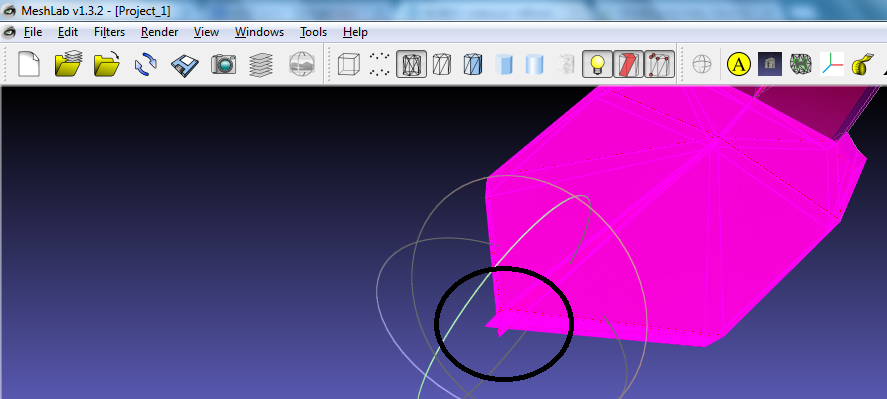
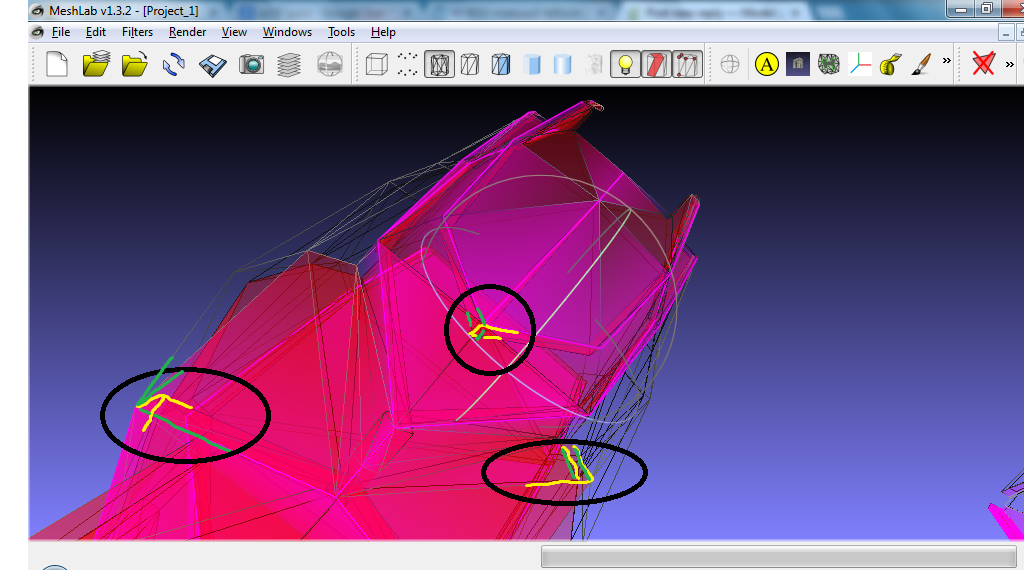
			<content type="html"><![CDATA[<p>Here&#039;s one thing that I see...<br /><span class="postimg"><img src="http://kenzden.com/download/NonManifold.png" alt="http://kenzden.com/download/NonManifold.png" /></span></p><p>The black circle shows co-joined facets.&nbsp; Looks like a weld that didn&#039;t take, or two objects that were booleaned that were overshot a bit.&nbsp; Either way, there are other things that are there as well and most of them look like this. This one shows a few more issues.</p><p><span class="postimg"><img src="http://kenzden.com/download/NonManifold1.png" alt="http://kenzden.com/download/NonManifold1.png" /></span></p><p>The green and yellow show separate objects that seems to be joined together in a single object.&nbsp; This is not watertight, therefore non-manifold.</p><p>As I don&#039;t use blender, I can&#039;t tell you how they got there, but they need to be fixed before it will be sliced correctly.</p><p>I know, I&#039;m not telling you anything that you don&#039;t know... sorry, maybe I can take a deeper look at the model tomorrow.</p>]]></content>
			<author>
				<name><![CDATA[cckens]]></name>
				<uri>https://www.soliforum.com/user/129/</uri>
			</author>
			<updated>2013-02-12T05:48:51Z</updated>
			<id>https://www.soliforum.com/post/12558/#p12558</id>
		</entry>
		<entry>
			<title type="html"><![CDATA[Re: Model prep help. New to 3D modeling and 3D printing.]]></title>
			<link rel="alternate" href="https://www.soliforum.com/post/12556/#p12556" />
			<content type="html"><![CDATA[<div class="quotebox"><cite>cckens wrote:</cite><blockquote><p>Try porting the model into MeshLab.&nbsp; Go to Filters-&gt;Cleaning and Repairing-&gt;Select non Manifold Edges.<br />Check Preview, then Apply, then OK.</p><p>Switch the view to Flat Lines (toolbar, looks like a mesh with blue facets in it.&nbsp; &nbsp;Rotate the model and look for red/pink areas.&nbsp; These are non-manifold parts.&nbsp; Load the model into Blender then fix the facets and edges that were red/pink</p><p>It takes some doing, but you can clean up a mesh pretty easily.</p></blockquote></div><p>I have no problem seeing what is non-manifold but what I can&#039;t tell is WHY it&#039;s non-manifold. If I can&#039;t tell what is causing it I can&#039;t fix it. One object is symmetrical with one part having a non-manifold place on it and the other identical half does not.&nbsp; MeshLab does seem to be a pretty decent program though.</p><div class="quotebox"><cite>helagak wrote:</cite><blockquote><p>If you want, you can send me the stl and ill take a look at it.<br />Helagaking@yahoo.com</p></blockquote></div><p>The files are above in post 6, both in .stl and .blend formats. I can still email to you if you&#039;d prefer though.</p>]]></content>
			<author>
				<name><![CDATA[Puck]]></name>
				<uri>https://www.soliforum.com/user/814/</uri>
			</author>
			<updated>2013-02-12T05:19:16Z</updated>
			<id>https://www.soliforum.com/post/12556/#p12556</id>
		</entry>
		<entry>
			<title type="html"><![CDATA[Re: Model prep help. New to 3D modeling and 3D printing.]]></title>
			<link rel="alternate" href="https://www.soliforum.com/post/12500/#p12500" />
			<content type="html"><![CDATA[<p>If you want, you can send me the stl and ill take a look at it. <br />Helagaking@yahoo.com</p>]]></content>
			<author>
				<name><![CDATA[helagak]]></name>
				<uri>https://www.soliforum.com/user/733/</uri>
			</author>
			<updated>2013-02-11T17:12:51Z</updated>
			<id>https://www.soliforum.com/post/12500/#p12500</id>
		</entry>
		<entry>
			<title type="html"><![CDATA[Re: Model prep help. New to 3D modeling and 3D printing.]]></title>
			<link rel="alternate" href="https://www.soliforum.com/post/12499/#p12499" />
			<content type="html"><![CDATA[<p>Try porting the model into MeshLab.&nbsp; Go to Filters-&gt;Cleaning and Repairing-&gt;Select non Manifold Edges.<br />Check Preview, then Apply, then OK.</p><p>Switch the view to Flat Lines (toolbar, looks like a mesh with blue facets in it.&nbsp; &nbsp;Rotate the model and look for red/pink areas.&nbsp; These are non-manifold parts.&nbsp; Load the model into Blender then fix the facets and edges that were red/pink</p><p>It takes some doing, but you can clean up a mesh pretty easily.</p>]]></content>
			<author>
				<name><![CDATA[cckens]]></name>
				<uri>https://www.soliforum.com/user/129/</uri>
			</author>
			<updated>2013-02-11T17:11:55Z</updated>
			<id>https://www.soliforum.com/post/12499/#p12499</id>
		</entry>
		<entry>
			<title type="html"><![CDATA[Re: Model prep help. New to 3D modeling and 3D printing.]]></title>
			<link rel="alternate" href="https://www.soliforum.com/post/12492/#p12492" />
			<content type="html"><![CDATA[<p>I&#039;ve been trying that and it&#039;s not working. Driving me crazy. O_O&nbsp; I can&#039;t see any holes in most parts but they still show up as non-manifold.</p>]]></content>
			<author>
				<name><![CDATA[Puck]]></name>
				<uri>https://www.soliforum.com/user/814/</uri>
			</author>
			<updated>2013-02-11T15:33:41Z</updated>
			<id>https://www.soliforum.com/post/12492/#p12492</id>
		</entry>
		<entry>
			<title type="html"><![CDATA[Re: Model prep help. New to 3D modeling and 3D printing.]]></title>
			<link rel="alternate" href="https://www.soliforum.com/post/12489/#p12489" />
			<content type="html"><![CDATA[<p>It can be tedious to fix non manifold pieces in blender but not hard<br />Select your object, hit tab to go into edit mode. <br />Hit Z to go into wire frame mode. <br />Click A to Unselected everything. <br />Not click the &quot;select&quot; button on the bottom left of the screen<br />Click &quot;select non manifold&quot; <br />It will highlight all your problem areas. <br />Now hit Z so you can see the problems better. <br />Zoom in on one of the issues and use your basic blender skills (extrude, fill, etc) fix the hole.<br />Now unselected everything, rise, wash, repeat until when you hit the select non manifold&quot;,it does t highlight any vertices.<br />Boom! Your done. Export stl and enjoy your day! :-)</p>]]></content>
			<author>
				<name><![CDATA[helagak]]></name>
				<uri>https://www.soliforum.com/user/733/</uri>
			</author>
			<updated>2013-02-11T15:24:56Z</updated>
			<id>https://www.soliforum.com/post/12489/#p12489</id>
		</entry>
		<entry>
			<title type="html"><![CDATA[Re: Model prep help. New to 3D modeling and 3D printing.]]></title>
			<link rel="alternate" href="https://www.soliforum.com/post/12467/#p12467" />
			<content type="html"><![CDATA[<p>When exported apparently nearly every line become non-manifold. Since the cloud.netfabb.com deletes half of the faces I&#039;m trying to figure out how to fix this myself and it&#039;s driving me crazy.</p><br /><p>The second is the exported .stl while the first is the original file.</p>]]></content>
			<author>
				<name><![CDATA[Puck]]></name>
				<uri>https://www.soliforum.com/user/814/</uri>
			</author>
			<updated>2013-02-11T05:12:26Z</updated>
			<id>https://www.soliforum.com/post/12467/#p12467</id>
		</entry>
		<entry>
			<title type="html"><![CDATA[Re: Model prep help. New to 3D modeling and 3D printing.]]></title>
			<link rel="alternate" href="https://www.soliforum.com/post/12247/#p12247" />
			<content type="html"><![CDATA[<p>vince7c95: Thanks! I hadn&#039;t thought of that. I&#039;ll change it so the inside cavity is facing down instead.&nbsp; Hopefully the 3 won&#039;t have that problem but just in case I&#039;ll print one piece at a time with this project as it is precious to me... O_O</p><p>Manx: I appreciate the program recommendations but I&#039;ve already gotten comfortable with Blender and finally figured out how to do the operations that I required. It&#039;s actually quite spiffy once you get past the learning curve, plus it&#039;s open source!</p><p>jon_bondy That&#039;s good to know. I was needing to do it in program as it is many pieces than need to be scaled to the proper size together. </p><p>I seem to have figured it all out now, except for non-manifold parts. I used cloud.netfabb.com to fix them but it butchered one piece and messed up the scale. =o\</p>]]></content>
			<author>
				<name><![CDATA[Puck]]></name>
				<uri>https://www.soliforum.com/user/814/</uri>
			</author>
			<updated>2013-02-08T11:18:31Z</updated>
			<id>https://www.soliforum.com/post/12247/#p12247</id>
		</entry>
		<entry>
			<title type="html"><![CDATA[Re: Model prep help. New to 3D modeling and 3D printing.]]></title>
			<link rel="alternate" href="https://www.soliforum.com/post/12220/#p12220" />
			<content type="html"><![CDATA[<p>Repetier Host (recommended!) allows you to reorient and scale at the last moment, so no need to find these features elsewhere.</p>]]></content>
			<author>
				<name><![CDATA[jon_bondy]]></name>
				<uri>https://www.soliforum.com/user/181/</uri>
			</author>
			<updated>2013-02-08T02:14:08Z</updated>
			<id>https://www.soliforum.com/post/12220/#p12220</id>
		</entry>
		<entry>
			<title type="html"><![CDATA[Re: Model prep help. New to 3D modeling and 3D printing.]]></title>
			<link rel="alternate" href="https://www.soliforum.com/post/12216/#p12216" />
			<content type="html"><![CDATA[<p>Puck check out daz 3d and hexagon2 from daz the software is free and an excellent modelign program</p>]]></content>
			<author>
				<name><![CDATA[Manx]]></name>
				<uri>https://www.soliforum.com/user/168/</uri>
			</author>
			<updated>2013-02-08T01:52:45Z</updated>
			<id>https://www.soliforum.com/post/12216/#p12216</id>
		</entry>
		<entry>
			<title type="html"><![CDATA[Re: Model prep help. New to 3D modeling and 3D printing.]]></title>
			<link rel="alternate" href="https://www.soliforum.com/post/12212/#p12212" />
			<content type="html"><![CDATA[<p>I can&#039;t fully tell from the 3d viewer, but it looks like you have an area on the underside of the ceiling that may cause the printer to extrude into the air. You could turn on the support settings though, but it may be difficult to remove the support inside of a cavity. I would try flipping as support would be easier to remove. </p><p>I don&#039;t use blender and don&#039;t know what it is, but the program you download for the printer will have a program that will allow you to scale, rotate, and place an object however you need it to sit on the bed, so don&#039;t worry about if you&#039;re not modeling it in the position you need it for printing.</p><p>If you can fit the parts onto the bed shown in the program then it should be fine other than possible issues with blobs and or strings, and maybe uneven bed temps as you start placing objects further from center, (this was the case for SD2, I don&#039;t know how the bed is built with the SD3 so maybe this won&#039;t be an issue).</p>]]></content>
			<author>
				<name><![CDATA[vince7c95]]></name>
				<uri>https://www.soliforum.com/user/155/</uri>
			</author>
			<updated>2013-02-08T01:31:03Z</updated>
			<id>https://www.soliforum.com/post/12212/#p12212</id>
		</entry>
		<entry>
			<title type="html"><![CDATA[Model prep help. New to 3D modeling and 3D printing.]]></title>
			<link rel="alternate" href="https://www.soliforum.com/post/12195/#p12195" />
			<content type="html"><![CDATA[<p>As I am awaiting for the arrival of my Solidoodle 3 (in about 6 weeks I hope) I decided to get a jump start on some things I want to print. Being an absolute n00b I though I should ask for some advice.</p><p>Would the attached file print properly?</p><p>How do I scale the model to control print size in Blender?</p><p>How should the pieces be oriented in Blender to result in the proper facings being toward the build platform?</p><p>Are multiple large-ish parts in a single print okay?</p><br /><p>I appreciate any help!</p>]]></content>
			<author>
				<name><![CDATA[Puck]]></name>
				<uri>https://www.soliforum.com/user/814/</uri>
			</author>
			<updated>2013-02-07T22:40:06Z</updated>
			<id>https://www.soliforum.com/post/12195/#p12195</id>
		</entry>
</feed>