<?xml version="1.0" encoding="utf-8"?>
<feed xmlns="http://www.w3.org/2005/Atom">
	<title type="html"><![CDATA[SoliForum - 3D Printing Community — New ATLAS 3D Features]]></title>
	<link rel="self" href="https://www.soliforum.com/feed/atom/topic/12746/" />
	<updated>2015-11-19T15:23:18Z</updated>
	<generator>PunBB</generator>
	<id>https://www.soliforum.com/topic/12746/new-atlas-3d-features/</id>
		<entry>
			<title type="html"><![CDATA[Re: New ATLAS 3D Features]]></title>
			<link rel="alternate" href="https://www.soliforum.com/post/109842/#p109842" />
			<content type="html"><![CDATA[<p>Uriah<br />I have managed to update by using cable to conect to my modem<br />Bill</p>]]></content>
			<author>
				<name><![CDATA[Mwaypilot]]></name>
				<uri>https://www.soliforum.com/user/8732/</uri>
			</author>
			<updated>2015-11-19T15:23:18Z</updated>
			<id>https://www.soliforum.com/post/109842/#p109842</id>
		</entry>
		<entry>
			<title type="html"><![CDATA[Re: New ATLAS 3D Features]]></title>
			<link rel="alternate" href="https://www.soliforum.com/post/109835/#p109835" />
			<content type="html"><![CDATA[<p>Uriah I have enterd the serial but when I try to update I get the message &quot;0 Error&quot; <br />Could that be caused by not having my wifi setup<br />Bill</p>]]></content>
			<author>
				<name><![CDATA[Mwaypilot]]></name>
				<uri>https://www.soliforum.com/user/8732/</uri>
			</author>
			<updated>2015-11-19T14:04:23Z</updated>
			<id>https://www.soliforum.com/post/109835/#p109835</id>
		</entry>
		<entry>
			<title type="html"><![CDATA[Re: New ATLAS 3D Features]]></title>
			<link rel="alternate" href="https://www.soliforum.com/post/109831/#p109831" />
			<content type="html"><![CDATA[<p>Bill,</p><p>You must enter your ATLAS 3D serial number on the Settings page in order to use the auto-update feature.</p><p>Uriah</p>]]></content>
			<author>
				<name><![CDATA[hairu526]]></name>
				<uri>https://www.soliforum.com/user/4789/</uri>
			</author>
			<updated>2015-11-19T11:54:04Z</updated>
			<id>https://www.soliforum.com/post/109831/#p109831</id>
		</entry>
		<entry>
			<title type="html"><![CDATA[Re: New ATLAS 3D Features]]></title>
			<link rel="alternate" href="https://www.soliforum.com/post/109827/#p109827" />
			<content type="html"><![CDATA[<p>Hi I found the update link but I am getting an error message <br />403 error: missing serial number <br />Bill</p>]]></content>
			<author>
				<name><![CDATA[Mwaypilot]]></name>
				<uri>https://www.soliforum.com/user/8732/</uri>
			</author>
			<updated>2015-11-19T09:29:44Z</updated>
			<id>https://www.soliforum.com/post/109827/#p109827</id>
		</entry>
		<entry>
			<title type="html"><![CDATA[Re: New ATLAS 3D Features]]></title>
			<link rel="alternate" href="https://www.soliforum.com/post/109826/#p109826" />
			<content type="html"><![CDATA[<p>Hi how do you get the software to update<br />Cheers<br />Bill</p>]]></content>
			<author>
				<name><![CDATA[Mwaypilot]]></name>
				<uri>https://www.soliforum.com/user/8732/</uri>
			</author>
			<updated>2015-11-19T08:48:24Z</updated>
			<id>https://www.soliforum.com/post/109826/#p109826</id>
		</entry>
		<entry>
			<title type="html"><![CDATA[Re: New ATLAS 3D Features]]></title>
			<link rel="alternate" href="https://www.soliforum.com/post/109802/#p109802" />
			<content type="html"><![CDATA[<p>@ Uriah </p><p>I am definitely getting cleaner scans and find the best setting to be low threshold.&nbsp; High threshold produced gaps in the mesh.&nbsp; At the moment I have not found the best setting for noise as I am using a basic penguin to test so I guess performance will depend on the object being scanned and this is quite a simple object.&nbsp; I assume the best threshold setting will depend on the lighting - mine is currently dim and does need improving.</p><p>Great to see continued progress with the software - keep the updates coming.&nbsp; I will move on to some more challenging scans.</p>]]></content>
			<author>
				<name><![CDATA[james76]]></name>
				<uri>https://www.soliforum.com/user/12307/</uri>
			</author>
			<updated>2015-11-19T01:10:47Z</updated>
			<id>https://www.soliforum.com/post/109802/#p109802</id>
		</entry>
		<entry>
			<title type="html"><![CDATA[Re: New ATLAS 3D Features]]></title>
			<link rel="alternate" href="https://www.soliforum.com/post/108998/#p108998" />
			<content type="html"><![CDATA[<p>@ Uriah&nbsp; <br />Now you&#039;re just showing off...... <img src="https://www.soliforum.com/img/smilies/wink.png" width="15" height="15" alt="wink" /></p><p>All kidding aside, awesome features.&nbsp; I&#039;ll post some results as soon as I get a chance.</p>]]></content>
			<author>
				<name><![CDATA[pirvan]]></name>
				<uri>https://www.soliforum.com/user/1357/</uri>
			</author>
			<updated>2015-11-06T03:10:40Z</updated>
			<id>https://www.soliforum.com/post/108998/#p108998</id>
		</entry>
		<entry>
			<title type="html"><![CDATA[New ATLAS 3D Features]]></title>
			<link rel="alternate" href="https://www.soliforum.com/post/108991/#p108991" />
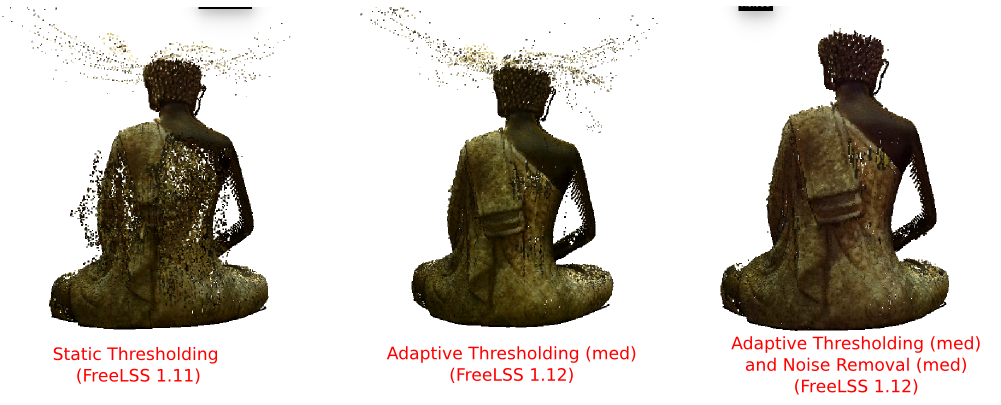
			<content type="html"><![CDATA[<p>Version 1.12 of the ATLAS 3D software is available through the auto-update system.&nbsp; This version introduces several new features that improve scan quality while also making the software easier to use.</p><p><strong>Adaptive Thresholding</strong><br />Previously, a thresholding value would need to be tested and adjusted before each scan in order to achieve good results.&nbsp; This same static threshold value was applied to every row of every frame.&nbsp; Adaptive thresholding is a new concept in version 1.12 that automatically detects the appropriate threshold value for each row of the frame independently.&nbsp; This allows it to adapt to the unique conditions of the object at that row, The result is improved scan quality, more scan coverage of objects, and no longer needing to manually pick a threshold value.</p><p><strong>Noise Removal</strong><br />ATLAS 3D now has real-time noise removal support.&nbsp; This feature uses the distance of points to their neighbors to detect and remove noisy data from the scan.&nbsp; This reduces much of the post processing cleanup that is required.</p><p><strong>Improved Primary Line Detection</strong><br />ATLAS 3D now uses an energy based algorithm to choose the correct laser result in situations where multiple hits are found within the same row.&nbsp; This replaces the &quot;closest to previous row&quot; algorithm and results in more accuracy when scanning small objects with sharp corners.</p><p><span class="postimg"><img src="http://i58.photobucket.com/albums/g274/hairu526/freelss-1.12.png" alt="http://i58.photobucket.com/albums/g274/hairu526/freelss-1.12.png" /></span></p><p>The version 1.12 features are only available via the ATLAS 3D auto-update system and are not available via Github.</p>]]></content>
			<author>
				<name><![CDATA[hairu526]]></name>
				<uri>https://www.soliforum.com/user/4789/</uri>
			</author>
			<updated>2015-11-06T01:16:02Z</updated>
			<id>https://www.soliforum.com/post/108991/#p108991</id>
		</entry>
</feed>