<?xml version="1.0" encoding="utf-8"?>
<feed xmlns="http://www.w3.org/2005/Atom">
	<title type="html"><![CDATA[SoliForum - 3D Printing Community — Adjusting camera focus improve scan quality.]]></title>
	<link rel="self" href="https://www.soliforum.com/feed/atom/topic/11914/" />
	<updated>2015-07-30T11:14:08Z</updated>
	<generator>PunBB</generator>
	<id>https://www.soliforum.com/topic/11914/adjusting-camera-focus-improve-scan-quality/</id>
		<entry>
			<title type="html"><![CDATA[Adjusting camera focus improve scan quality.]]></title>
			<link rel="alternate" href="https://www.soliforum.com/post/102428/#p102428" />
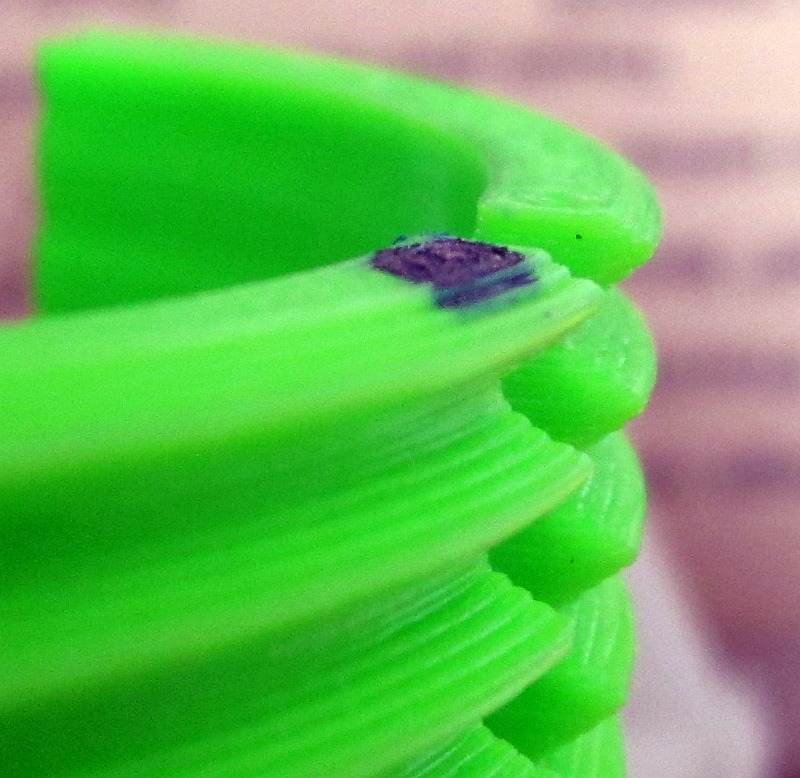
			<content type="html"><![CDATA[<p>Hi.<br />I&#039;m new to 3d scan, BYOP kit received 3 days ago. Test and try is only time consumming, so I&#039;ve probably already made 30-40 scans and 20-30 calibrations !<br /> At beginning I found calibration difficult, mostly due to the poor image quality. I made some scans, good, bad, ugly and even strange when calibration fail or laser rotate unatendly. At least I was quite satisfied and have a lote to learn/understand</p><p>The image quality bothered me greatly, so I decided to adjust the focus. A bit of googling said that it have already been done successfully. I decided to work on my camera, realy carrefully with my fat fingers holding and forcing a small and fragile part. It was a success, the glu break and the objective was still operationnal (tried another camera, no glu, easier, only need a small amount of force applied with nails).<br />I made some test with raspivid /raspistill to adust the focus to 10-15inches, before reinserting the camera in it&#039;s support.</p><p>The quality is way better, as sample pics of a square before and after.</p><p>Now, I&#039;ve to understand software parameters (laser width, threshold,...) for the best result and learning meshlab to get a usable stl !</p><br /><p>A sample with a printed part, I could have an idea about layers in the scan.</p><p>The model on the plate.<br /><span class="postimg"><img src="http://pascalp2.free.fr/images/1usinage/Atlas3D/printed-part.PNG" alt="http://pascalp2.free.fr/images/1usinage/Atlas3D/printed-part.PNG" /></span></p><p>A close-up of the screw part with an external camera.<br /><span class="postimg"><img src="http://pascalp2.free.fr/images/1usinage/Atlas3D/printed_part_layers_IMG_4243_cut_800.jpg" alt="http://pascalp2.free.fr/images/1usinage/Atlas3D/printed_part_layers_IMG_4243_cut_800.jpg" /></span></p><p>A close-up of the preview screen.<br /><span class="postimg"><img src="http://pascalp2.free.fr/images/1usinage/Atlas3D/layers.PNG" alt="http://pascalp2.free.fr/images/1usinage/Atlas3D/layers.PNG" /></span><br />Layers are here, but I don&#039;t know if it&#039;s good for the work with meshlab ?</p><br /><p>[edit]<br />I discover lately a post from &quot;FaanP&quot; with the same advice on re-focusing and understand how some scans that I&#039;ve seen looked so good.</p>]]></content>
			<author>
				<name><![CDATA[pascalp]]></name>
				<uri>https://www.soliforum.com/user/10101/</uri>
			</author>
			<updated>2015-07-30T11:14:08Z</updated>
			<id>https://www.soliforum.com/post/102428/#p102428</id>
		</entry>
</feed>
