<?xml version="1.0" encoding="utf-8"?>
<feed xmlns="http://www.w3.org/2005/Atom">
	<title type="html"><![CDATA[SoliForum - 3D Printing Community — Print Speeds]]></title>
	<link rel="self" href="https://www.soliforum.com/feed/atom/topic/11067/" />
	<updated>2015-05-14T20:33:49Z</updated>
	<generator>PunBB</generator>
	<id>https://www.soliforum.com/topic/11067/print-speeds/</id>
		<entry>
			<title type="html"><![CDATA[Re: Print Speeds]]></title>
			<link rel="alternate" href="https://www.soliforum.com/post/95852/#p95852" />
			<content type="html"><![CDATA[<p>Thanks Galaxy!! I will do that!</p><p>I was lucky, and altered my Gcode and saved my first big failed print several times. The seams were a bit ugly, but for my very first print, and doing all that, I was extremely impressed with myself lol. I look forward to getting more into it, and understanding what I&#039;m actually doing with it.</p>]]></content>
			<author>
				<name><![CDATA[MyMultiExtruder]]></name>
				<uri>https://www.soliforum.com/user/10416/</uri>
			</author>
			<updated>2015-05-14T20:33:49Z</updated>
			<id>https://www.soliforum.com/post/95852/#p95852</id>
		</entry>
		<entry>
			<title type="html"><![CDATA[Re: Print Speeds]]></title>
			<link rel="alternate" href="https://www.soliforum.com/post/95819/#p95819" />
			<content type="html"><![CDATA[<p>Carl, The answer to your question is &#039;Yes&#039;, sort of...</p><p>Recognize Gcode has been around for many years and was developed for CNC and knew nothing about extruders.&nbsp; In the beginning, some Gcode interpreters used &quot;E&quot; for speed on Lathes, some used it for &quot;Z&quot; position, others used it for other commands relative to their (or specific) machines.</p><p>In the case at hand, a 3D printer, &quot;E&quot; can mean anything the gcode interpreter coder wanted it to be and, possibly for Extrude, in this case.&nbsp; However, I can&#039;t say without looking at more of the code - if the code contains &quot;Z&quot; elsewhere, then the &quot;E&quot; would probably be for Extrude.&nbsp; If no &quot;Z&quot;, then it would be for Z-axis position.</p><p>There a many sites /&nbsp; books on Gcode, but it&#039;s important to recognize that &#039;some&#039; commands change with respect to the developer of the interpreter.&nbsp; Here&#039;s a link to wiki, it shows &quot;E&quot; for lathe feed rate. <a href="https://en.wikipedia.org/wiki/G-code">https://en.wikipedia.org/wiki/G-code</a>&nbsp; and, here&#039;s a link to RepRap <a href="http://www.reprap.org/wiki/G-code">http://www.reprap.org/wiki/G-code</a>&nbsp; - read down the page and you&#039;ll see comment about writing your own Host software (the point being, &quot;E&quot; or &quot;Z&quot;, or what ever, can be different things to different developers.&nbsp; There is a universal specification for gcode to use as a baseline and most follow it.</p>]]></content>
			<author>
				<name><![CDATA[galaxy99]]></name>
				<uri>https://www.soliforum.com/user/9607/</uri>
			</author>
			<updated>2015-05-14T16:32:04Z</updated>
			<id>https://www.soliforum.com/post/95819/#p95819</id>
		</entry>
		<entry>
			<title type="html"><![CDATA[Re: Print Speeds]]></title>
			<link rel="alternate" href="https://www.soliforum.com/post/95811/#p95811" />
			<content type="html"><![CDATA[<div class="quotebox"><cite>galaxy99 wrote:</cite><blockquote><p>The &quot;N&quot; indicates line number and can start at any number it&#039;s generator is programmed to start at.<br />G1 is move to coordinates X=72.13 and Y=225.089 and E11.43&nbsp; (E=height, most gcode uses Z instead of E).<br />F9000 is speed of 9000 and the &quot;*&quot; can be a custom comment or a multiplier, depending on the gcode generator and firmware (gcode can&#039;t actually do math - gcode is simply a text file for the firmware to respond to).</p><p>Google gcode and learn the basics - it&#039;s straight forward and simple...</p></blockquote></div><p>Would not E mean to extrude 11.43.... mm of filament along the specified axis?</p>]]></content>
			<author>
				<name><![CDATA[carl_m1968]]></name>
				<uri>https://www.soliforum.com/user/7731/</uri>
			</author>
			<updated>2015-05-14T15:49:39Z</updated>
			<id>https://www.soliforum.com/post/95811/#p95811</id>
		</entry>
		<entry>
			<title type="html"><![CDATA[Re: Print Speeds]]></title>
			<link rel="alternate" href="https://www.soliforum.com/post/95796/#p95796" />
			<content type="html"><![CDATA[<p>The &quot;N&quot; indicates line number and can start at any number it&#039;s generator is programmed to start at.<br />G1 is move to coordinates X=72.13 and Y=225.089 and E11.43&nbsp; (E=height, most gcode uses Z instead of E).<br />F9000 is speed of 9000 and the &quot;*&quot; can be a custom comment or a multiplier, depending on the gcode generator and firmware (gcode can&#039;t actually do math - gcode is simply a text file for the firmware to respond to).</p><p>Google gcode and learn the basics - it&#039;s straight forward and simple...</p>]]></content>
			<author>
				<name><![CDATA[galaxy99]]></name>
				<uri>https://www.soliforum.com/user/9607/</uri>
			</author>
			<updated>2015-05-14T14:40:08Z</updated>
			<id>https://www.soliforum.com/post/95796/#p95796</id>
		</entry>
		<entry>
			<title type="html"><![CDATA[Re: Print Speeds]]></title>
			<link rel="alternate" href="https://www.soliforum.com/post/95754/#p95754" />
			<content type="html"><![CDATA[<div class="quotebox"><cite>barry1685 wrote:</cite><blockquote><p>Thanks! I guess the only way to change layer height on the first layer is first layer %. I can put this to 1% but the extruded amount is less for some reason. I think I could increase the first layer width to override this. I think my best bet is to export the gcode and edit the first layer and resubmit.</p></blockquote></div><br /><p>First layer height should not be dictated by the software. </p><p>Your nozzle to bed gap determines the first layer and should be atleast half of your desired layer height. Once you decide on a printed layer height such as .3mm you then use a feeler gauge or other item of known thickness in this case .15mm and calibrate the bed to that gap.</p><p>If you have no way to fine adjust your bed to nozzle clearance which would be very rare and not the case with Da Vinci as it has adjusters, then you would need to do it through an offset in your slicer.</p><p>But since the DaVinci has adjusters you should do it correctly and adjust first layer height by hardware, not software.</p>]]></content>
			<author>
				<name><![CDATA[carl_m1968]]></name>
				<uri>https://www.soliforum.com/user/7731/</uri>
			</author>
			<updated>2015-05-14T03:23:28Z</updated>
			<id>https://www.soliforum.com/post/95754/#p95754</id>
		</entry>
		<entry>
			<title type="html"><![CDATA[Re: Print Speeds]]></title>
			<link rel="alternate" href="https://www.soliforum.com/post/95753/#p95753" />
			<content type="html"><![CDATA[<p>Ok, so F refers to speed?</p><p>Part of my code says the following, but I don&#039;t know what it means:</p><p>SENT: N105945 G1 X76.004 Y225.837 F9000.000*88<br />RECV: ok<br />SENT: N105946 G1 X72.130 Y225.089 E11.35475 F6000.000*32<br />RECV: ok<br />SENT: N105947 G1 X71.540 Y227.029 E11.43906*95</p><p>On my interface, it says speed is 200. Still learning <img src="https://www.soliforum.com/img/smilies/smile.png" width="15" height="15" alt="smile" /></p>]]></content>
			<author>
				<name><![CDATA[MyMultiExtruder]]></name>
				<uri>https://www.soliforum.com/user/10416/</uri>
			</author>
			<updated>2015-05-14T03:12:39Z</updated>
			<id>https://www.soliforum.com/post/95753/#p95753</id>
		</entry>
		<entry>
			<title type="html"><![CDATA[Re: Print Speeds]]></title>
			<link rel="alternate" href="https://www.soliforum.com/post/95669/#p95669" />
			<content type="html"><![CDATA[<p>You can leave the &quot; ;layer 1. Z=0.3&quot;&nbsp; and simply add what you want, via the input panel.&nbsp; For example, add &quot; ;layer 1. Z=0.0&quot;&nbsp; if that&#039;s the value you want (where and how I indicated &quot;bla bla bla&quot; above).&nbsp; The machine will respond to it and move before it prints the next line(s).</p><p>That way you don&#039;t need to edit the gcode.&nbsp; However, I&#039;m not certain about the machine responding the the H and W values just after the T0 (tool change) -&nbsp; that functionality could be (should be) dependent on your machine/firmware even though s3d outputs it, since it&#039;s a full-featured software for many machines).</p>]]></content>
			<author>
				<name><![CDATA[galaxy99]]></name>
				<uri>https://www.soliforum.com/user/9607/</uri>
			</author>
			<updated>2015-05-13T14:14:41Z</updated>
			<id>https://www.soliforum.com/post/95669/#p95669</id>
		</entry>
		<entry>
			<title type="html"><![CDATA[Re: Print Speeds]]></title>
			<link rel="alternate" href="https://www.soliforum.com/post/95664/#p95664" />
			<content type="html"><![CDATA[<p>Thanks! I guess the only way to change layer height on the first layer is first layer %. I can put this to 1% but the extruded amount is less for some reason. I think I could increase the first layer width to override this. I think my best bet is to export the gcode and edit the first layer and resubmit.</p>]]></content>
			<author>
				<name><![CDATA[barry1685]]></name>
				<uri>https://www.soliforum.com/user/8171/</uri>
			</author>
			<updated>2015-05-13T13:22:28Z</updated>
			<id>https://www.soliforum.com/post/95664/#p95664</id>
		</entry>
		<entry>
			<title type="html"><![CDATA[Re: Print Speeds]]></title>
			<link rel="alternate" href="https://www.soliforum.com/post/95590/#p95590" />
			<content type="html"><![CDATA[<p>Yes - &quot;Rapid Move&quot; is Gcoder terminology - here&#039;s a quote from Wiki (not that it&#039;s a reliable source but it compares with gcode &amp; machine CNC books)<br /><span style="color: Green">&quot;In the RS274NGC Spec, G0 is Rapid Move, which was used to move between the current point in space and the new point as quickly and efficiently as possible&quot;</span></p><p>1. Speed Compare:<br />&nbsp; Photo 1 shows parts &amp; speeds (infill=30% Layer H=0.2, Layers=2 (top&amp;bottom), Shell=1, Temp=230, Shaxon filament).<br />&nbsp; Photo 2 closeup<br />&nbsp; First photo at top of this post shows two parts - the first of my prints at speed of 5000.</p><p>2. Z Offset:<br />&nbsp; Photo 3 shows panel where to set it (it&#039;s by percentage)<br />&nbsp; Photo 4 shows it now set to 0.8&nbsp; (by setting value to 400%)</p><p>3. Adding gcode the easy way:<br />&nbsp; Photo 5 shows where to add code (entry panel determines where it goes - hover to see context help)<br />&nbsp; Photo 6 shows that it got there</p><p><span class="postimg"><img src="http://soliforum.com/i/?kAZ2WTq.jpg" alt="http://soliforum.com/i/?kAZ2WTq.jpg" /></span><br /><span class="postimg"><img src="http://soliforum.com/i/?5E3lygK.jpg" alt="http://soliforum.com/i/?5E3lygK.jpg" /></span><br /><span class="postimg"><img src="http://soliforum.com/i/?WgvENQ2.png" alt="http://soliforum.com/i/?WgvENQ2.png" /></span><br /><span class="postimg"><img src="http://soliforum.com/i/?QQduu13.png" alt="http://soliforum.com/i/?QQduu13.png" /></span><br /><span class="postimg"><img src="http://soliforum.com/i/?1Fofrin.png" alt="http://soliforum.com/i/?1Fofrin.png" /></span><br /><span class="postimg"><img src="http://soliforum.com/i/?sEVVzcU.png" alt="http://soliforum.com/i/?sEVVzcU.png" /></span></p>]]></content>
			<author>
				<name><![CDATA[galaxy99]]></name>
				<uri>https://www.soliforum.com/user/9607/</uri>
			</author>
			<updated>2015-05-12T15:24:50Z</updated>
			<id>https://www.soliforum.com/post/95590/#p95590</id>
		</entry>
		<entry>
			<title type="html"><![CDATA[Re: Print Speeds]]></title>
			<link rel="alternate" href="https://www.soliforum.com/post/95576/#p95576" />
			<content type="html"><![CDATA[<p>Off topic here - is there a way to turn off the layer height offset of .3 mm when the print starts without messing with the gcode? It&#039;s really annoying and my printer is calibrated to print without that offset</p>]]></content>
			<author>
				<name><![CDATA[barry1685]]></name>
				<uri>https://www.soliforum.com/user/8171/</uri>
			</author>
			<updated>2015-05-12T13:47:06Z</updated>
			<id>https://www.soliforum.com/post/95576/#p95576</id>
		</entry>
		<entry>
			<title type="html"><![CDATA[Re: Print Speeds]]></title>
			<link rel="alternate" href="https://www.soliforum.com/post/95568/#p95568" />
			<content type="html"><![CDATA[<div class="quotebox"><cite>galaxy99 wrote:</cite><blockquote><p>I&#039;m rather pleased with the the quality of the fast prints and have no doubt that some parts will do better at lower speed.&nbsp; Been printing all day at 3600 with rapid at 5000.&nbsp; A part that previously took 9+ hours now printed in less than 4 hours with better quality than it did at 1800. <img src="https://www.soliforum.com/img/smilies/smile.png" width="15" height="15" alt="smile" /></p></blockquote></div><p>Didn&#039;t know that &#039;rapid moves&#039; was actually a term, thanks <img src="https://www.soliforum.com/img/smilies/smile.png" width="15" height="15" alt="smile" /></p><p>Would you post some close up pics of the same item printed at both speeds? I&#039;d like to see it and like I said, maybe print it myself to compare too.</p>]]></content>
			<author>
				<name><![CDATA[oscahie]]></name>
				<uri>https://www.soliforum.com/user/6962/</uri>
			</author>
			<updated>2015-05-12T11:22:40Z</updated>
			<id>https://www.soliforum.com/post/95568/#p95568</id>
		</entry>
		<entry>
			<title type="html"><![CDATA[Re: Print Speeds]]></title>
			<link rel="alternate" href="https://www.soliforum.com/post/95510/#p95510" />
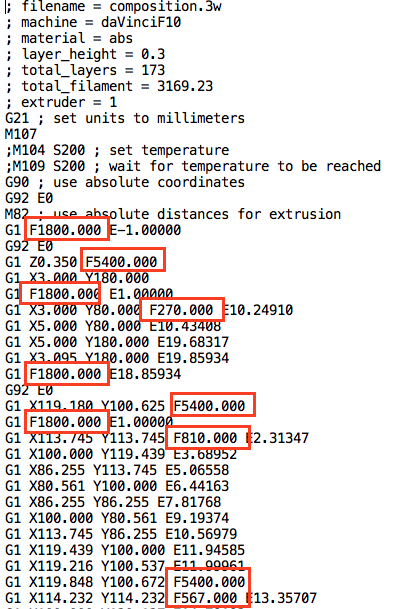
			<content type="html"><![CDATA[<div class="quotebox"><cite>oscahie wrote:</cite><blockquote><div class="quotebox"><cite>galaxy99 wrote:</cite><blockquote><p>Good points to note - even at 1800 some small parts have not been happy.</p><p>Thus far I’ve been running the speed test parts with Shaxon neutral filament at 230.&nbsp; Prints as good, if not better, than at lower speed of 1800.&nbsp; Actually, all the parts look excellent and are at 30% infill density.</p><p>I looked at the SAMPLE01 Gcode on the sdcard - attached screen shot shows speeds (the F command).&nbsp; Several <strong>rapid moves</strong> at 5400 so I&#039;m not too concerned about the servo&#039;s at brief high speeds (also, I looked up the load curve for the servo part number on my machine).<br />&nbsp; <br /><span class="postimg"><img src="http://soliforum.com/i/?9kCpbjL.png" alt="http://soliforum.com/i/?9kCpbjL.png" /></span></p></blockquote></div><p>Those <strong>rapid moves</strong> are only travel moves though, not extruding. Also the models you&#039;ve shown in this thread look small enough that the printer may not even have enough time to accelerate to those speeds in most cases. </p><p>Anyway, I personally would never print at more than 3600. And like I said, I already experienced some layer adhesion issues at those speeds.</p></blockquote></div><p>Thanks.&nbsp; Naturally, can&#039;t go from point A to point B fast if the points are close. FYI&nbsp; &quot;Rapid Moves&quot; is gcoder terminology for movement without doing work on the part (machining or printing). Having said that, there is no question that it prints twice as fast at 3600 compared to 1800 (actual time compares well with estimated).&nbsp; The parts above are a couple of inches in size and do take advantage of speed.</p><p>I&#039;m rather pleased with the the quality of the fast prints and have no doubt that some parts will do better at lower speed.&nbsp; Been printing all day at 3600 with rapid at 5000.&nbsp; A part that previously took 9+ hours now printed in less than 4 hours with better quality than it did at 1800. <img src="https://www.soliforum.com/img/smilies/smile.png" width="15" height="15" alt="smile" /></p>]]></content>
			<author>
				<name><![CDATA[galaxy99]]></name>
				<uri>https://www.soliforum.com/user/9607/</uri>
			</author>
			<updated>2015-05-11T23:20:36Z</updated>
			<id>https://www.soliforum.com/post/95510/#p95510</id>
		</entry>
		<entry>
			<title type="html"><![CDATA[Re: Print Speeds]]></title>
			<link rel="alternate" href="https://www.soliforum.com/post/95503/#p95503" />
			<content type="html"><![CDATA[<div class="quotebox"><cite>galaxy99 wrote:</cite><blockquote><p>Good points to note - even at 1800 some small parts have not been happy.</p><p>Thus far I’ve been running the speed test parts with Shaxon neutral filament at 230.&nbsp; Prints as good, if not better, than at lower speed of 1800.&nbsp; Actually, all the parts look excellent and are at 30% infill density.</p><p>I looked at the SAMPLE01 Gcode on the sdcard - attached screen shot shows speeds (the F command).&nbsp; Several rapid moves at 5400 so I&#039;m not too concerned about the servo&#039;s at brief high speeds (also, I looked up the load curve for the servo part number on my machine).<br />&nbsp; <br /><span class="postimg"><img src="http://soliforum.com/i/?9kCpbjL.png" alt="http://soliforum.com/i/?9kCpbjL.png" /></span></p></blockquote></div><p>Those rapid moves are only travel moves though, not extruding. Also the models you&#039;ve shown in this thread look small enough that the printer may not even have enough time to accelerate to those speeds in most cases. </p><p>Anyway, I personally would never print at more than 3600. And like I said, I already experienced some layer adhesion issues at those speeds.</p>]]></content>
			<author>
				<name><![CDATA[oscahie]]></name>
				<uri>https://www.soliforum.com/user/6962/</uri>
			</author>
			<updated>2015-05-11T22:42:17Z</updated>
			<id>https://www.soliforum.com/post/95503/#p95503</id>
		</entry>
		<entry>
			<title type="html"><![CDATA[Re: Print Speeds]]></title>
			<link rel="alternate" href="https://www.soliforum.com/post/95492/#p95492" />
			<content type="html"><![CDATA[<p>Thanks for the follow up galaxy99, I appreciate your sharing.</p>]]></content>
			<author>
				<name><![CDATA[Coin]]></name>
				<uri>https://www.soliforum.com/user/8363/</uri>
			</author>
			<updated>2015-05-11T20:35:53Z</updated>
			<id>https://www.soliforum.com/post/95492/#p95492</id>
		</entry>
		<entry>
			<title type="html"><![CDATA[Re: Print Speeds]]></title>
			<link rel="alternate" href="https://www.soliforum.com/post/95476/#p95476" />
			<content type="html"><![CDATA[<p>Following up...</p><p>After comparing printed parts, actual print times, and my comfort with 5000mm/m,&nbsp; I dialed it down to 3600 for Print Speed and 5000 for X/Y Rapid Speed.&nbsp; It increased the print time by only two minutes on the speed-test parts so, I’m going to use that as a default and will adjust as needed.</p><p>Thanks for the comments - much appreciated <img src="https://www.soliforum.com/img/smilies/smile.png" width="15" height="15" alt="smile" /></p>]]></content>
			<author>
				<name><![CDATA[galaxy99]]></name>
				<uri>https://www.soliforum.com/user/9607/</uri>
			</author>
			<updated>2015-05-11T17:18:05Z</updated>
			<id>https://www.soliforum.com/post/95476/#p95476</id>
		</entry>
</feed>