<?xml version="1.0" encoding="utf-8"?>
<feed xmlns="http://www.w3.org/2005/Atom">
	<title type="html"><![CDATA[SoliForum - 3D Printing Community — Artifact on surface of prints]]></title>
	<link rel="self" href="https://www.soliforum.com/feed/atom/topic/10923/" />
	<updated>2015-05-04T01:15:33Z</updated>
	<generator>PunBB</generator>
	<id>https://www.soliforum.com/topic/10923/artifact-on-surface-of-prints/</id>
		<entry>
			<title type="html"><![CDATA[Re: Artifact on surface of prints]]></title>
			<link rel="alternate" href="https://www.soliforum.com/post/94843/#p94843" />
			<content type="html"><![CDATA[<p>Here&#039;s a status update in case anyone is interested:</p><p>Most of the tips were things I was already doing (0.2mm layer height, 3 layers, 220 temp).&nbsp; Changing the slope isn&#039;t an option on a dome, since all angles are represented at some point on the dome.&nbsp; I changed the overlap to 50% with little change.&nbsp; </p><p>What shook stuff up was the over-extruding tip.&nbsp; I looked around and found the best way to test for this is to print out a hollow cube with no top and measure the wall thickness.&nbsp; I set Simplify3D to 0.48 width and a 1.0 extrusion ratio, and found the wall thickness was a whopping 0.96mm!&nbsp; I reduced the extrusion ratio to around 0.5 (I fiddled with it until I got an actual 0.48mm wall thickness).&nbsp; With this thickness, I was still having troubles, especially with holes in the outer walls.&nbsp; I ended up keeping the 0.5 extrusion ratio, but upping the filament wall thickness to 0.8mm. This seems to work much better, and at least with my initial tests, the artifacts are gone.&nbsp; I think with a 0.2mm layer height, the Davinci is uncomfortable with very low extrusion rates.&nbsp; The extrusion path is still wide, but at least Simplify3D knows about it know and seems to compensate OK.&nbsp; I will retest at 0.1mm and see what happens.</p><p>Does anyone have a recommendation on what the best layer height to extrusion width ratio is?&nbsp; Is my current ratio (0.2mm height / 0.8mm width) unusual?</p>]]></content>
			<author>
				<name><![CDATA[Jozer99]]></name>
				<uri>https://www.soliforum.com/user/8951/</uri>
			</author>
			<updated>2015-05-04T01:15:33Z</updated>
			<id>https://www.soliforum.com/post/94843/#p94843</id>
		</entry>
		<entry>
			<title type="html"><![CDATA[Re: Artifact on surface of prints]]></title>
			<link rel="alternate" href="https://www.soliforum.com/post/94311/#p94311" />
			<content type="html"><![CDATA[<p>I get bumps like that when I am slightly over-extruding.&nbsp; Can come and go depending on the amount of infill for that layer.</p>]]></content>
			<author>
				<name><![CDATA[TickTock]]></name>
				<uri>https://www.soliforum.com/user/6045/</uri>
			</author>
			<updated>2015-04-27T21:53:32Z</updated>
			<id>https://www.soliforum.com/post/94311/#p94311</id>
		</entry>
		<entry>
			<title type="html"><![CDATA[Re: Artifact on surface of prints]]></title>
			<link rel="alternate" href="https://www.soliforum.com/post/94279/#p94279" />
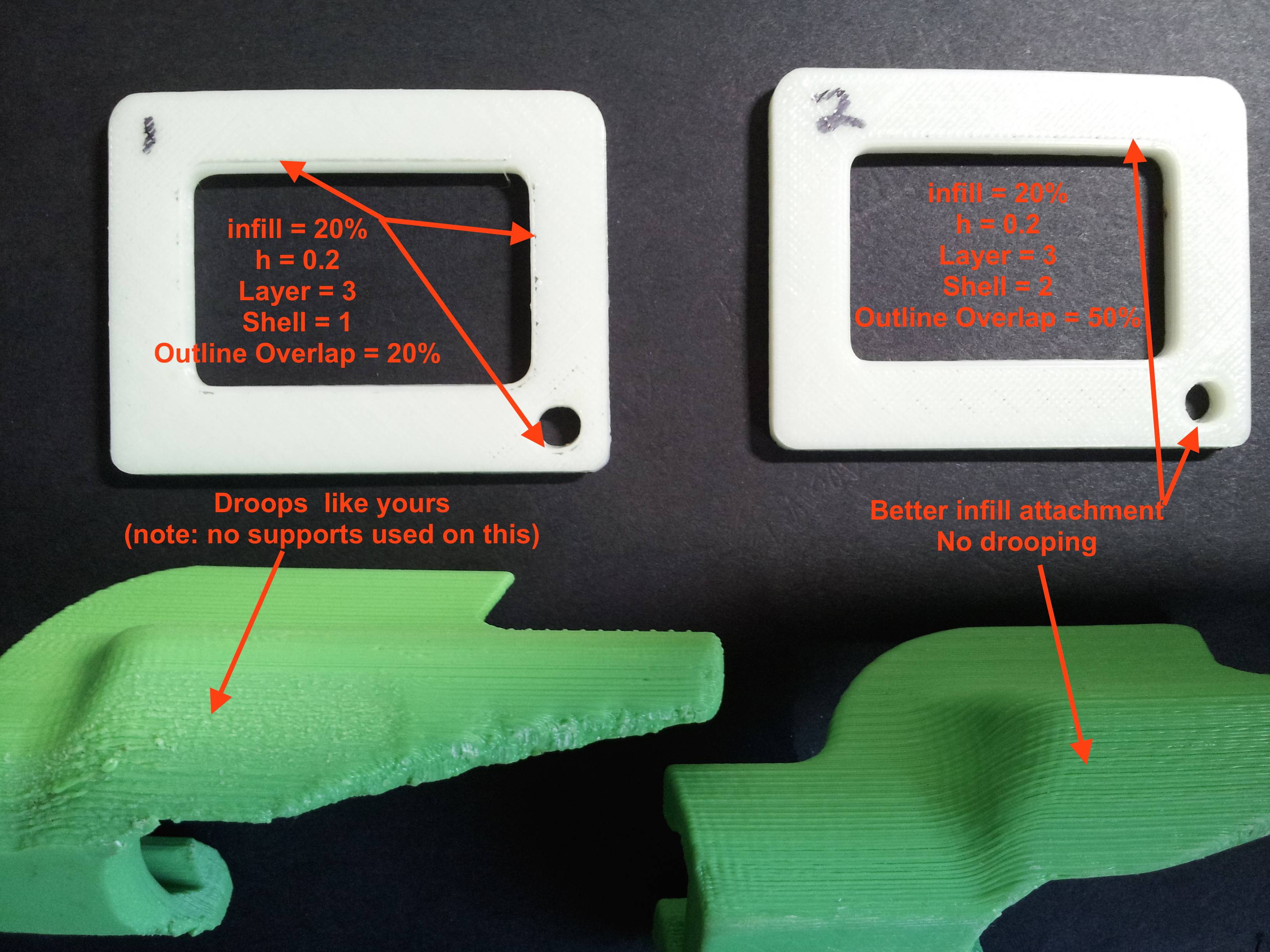
			<content type="html"><![CDATA[<p><span class="postimg"><img src="http://soliforum.com/i/?VI6qSyK.jpg" alt="http://soliforum.com/i/?VI6qSyK.jpg" /></span>This has happened to me and I found that, on my parts with overhangs (especially on overhanging chamfers and curved surfaces), print can be improved by:<br /></p><ul><li><p>Increasing the slope of the surface to 55 or 60 degrees</p></li><li><p>Increasing the infill overlap percentage (in Simplify) to 50%</p></li><li><p>Two shells</p></li><li><p>Three layers (top and bottom)</p></li><li><p>Layer height = 0.1 to 0.2</p></li><li><p>Min infill density = 20%</p></li><li><p>Extrude temp = 220 for abs</p></li></ul><p>Of course, best parameters depend on the part/features, size... etc.&nbsp; Some variability from different materials and manufacturer... You can expect cosmetic and structural oddities when not doing an optimized setup for a given part - especially a quick, low infill, 0.3/0.4 layer height...&nbsp; Lot&#039;s of opportunity to discover what works best for the part...</p><p>See attached photo</p>]]></content>
			<author>
				<name><![CDATA[galaxy99]]></name>
				<uri>https://www.soliforum.com/user/9607/</uri>
			</author>
			<updated>2015-04-27T17:15:36Z</updated>
			<id>https://www.soliforum.com/post/94279/#p94279</id>
		</entry>
		<entry>
			<title type="html"><![CDATA[Artifact on surface of prints]]></title>
			<link rel="alternate" href="https://www.soliforum.com/post/94226/#p94226" />
			<content type="html"><![CDATA[<p>I bought a Davinci 1.0 around Christmas, and have been playing with it since.&nbsp; With some TLC, I have gotten quite good prints.&nbsp; One problem that has persisted is shown in the image below.&nbsp; Occasionally, I get this pattern of bumps on my prints.&nbsp; You can see it as the bumpy later running along the otherwise nice and smooth tube. </p><p>It doesn&#039;t matter what I am printing, how fast, with which slicer (I&#039;ve used Slic3r, Cura, and Simplify3D).&nbsp; Does anyone know what the cause of this type of bump is?&nbsp; It doesn&#039;t seem to be infill; this print was done with 30% infill and three perimeter layers.&nbsp; </p><p><span class="postimg"><img src="http://soliforum.com/i/?bRfaqHk.jpg" alt="http://soliforum.com/i/?bRfaqHk.jpg" /></span></p>]]></content>
			<author>
				<name><![CDATA[Jozer99]]></name>
				<uri>https://www.soliforum.com/user/8951/</uri>
			</author>
			<updated>2015-04-27T01:16:05Z</updated>
			<id>https://www.soliforum.com/post/94226/#p94226</id>
		</entry>
</feed>
