<?xml version="1.0" encoding="utf-8"?>
<feed xmlns="http://www.w3.org/2005/Atom">
	<title type="html"><![CDATA[SoliForum - 3D Printing Community — Help/Repair/Maintenance]]></title>
	<link rel="self" href="https://www.soliforum.com/feed/atom/forum/6/" />
	<updated>2026-01-15T06:44:52Z</updated>
	<generator>PunBB</generator>
	<id>https://www.soliforum.com/</id>
		<entry>
			<title type="html"><![CDATA[SLA 3D Printing Services in Chennai – Trusted Local Support]]></title>
			<link rel="alternate" href="https://www.soliforum.com/topic/19880/sla-3d-printing-services-in-chennai-trusted-local-support/new/posts/" />
			<summary type="html"><![CDATA[<p>Hello forum members,</p><p>If anyone here is searching for <a href="https://metamorph3dprint.com/fdm-3d-printing-and-sla-3d-printing-solutions/">SLA 3D Printing</a> with high accuracy and smooth surface finish, our team can help. SLA (Stereolithography) is one of the most established 3D printing technologies and is ideal for detailed prototypes, product designs, and functional models.<br /><span class="postimg"><img src="http://soliforum.com/i/?eym3vt9.jpeg" alt="http://soliforum.com/i/?eym3vt9.jpeg" /></span></p><p>At Metamorph3dprint, we provide professional SLA 3D Printing in Chennai along with end-to-end <a href="https://metamorph3dprint.com/">3D printing services in Chennai</a> for designers, engineers, and regular 3D printer users. As a local 3D print shop in Chennai, we focus on precision, material quality, and quick support. Feel free to ask questions or share your requirements — happy to guide you.</p><p>Visit Us: <a href="https://metamorph3dprint.com/fdm-3d-printing-and-sla-3d-printing-solutions/">https://metamorph3dprint.com/fdm-3d-pri … solutions/</a> </p><p>Address: Plot No: 38, Door No:40, Ground Floor, Second Main Road, Ambattur Industrial Estate, Chennai, Tamil Nadu – 600058.</p><p>Whatsapp – <a href="https://metamorph3dprint.com/contact/">+91 88840 52777</a></p><p>Email: <a href="http://mailto:metamorph@monotech.in">metamorph@monotech.in</a></p>]]></summary>
			<author>
				<name><![CDATA[Metamorph]]></name>
				<uri>https://www.soliforum.com/user/28041/</uri>
			</author>
			<updated>2026-01-15T06:44:52Z</updated>
			<id>https://www.soliforum.com/topic/19880/sla-3d-printing-services-in-chennai-trusted-local-support/new/posts/</id>
		</entry>
		<entry>
			<title type="html"><![CDATA[Solidoodle Press Ramps 1.4 Conversion]]></title>
			<link rel="alternate" href="https://www.soliforum.com/topic/19138/solidoodle-press-ramps-14-conversion/new/posts/" />
			<summary type="html"><![CDATA[<p>I got my hands on a used solidoodle press. Upon attempting to print, the y axis was unable to move. I discovered that the y axis stepper motor controller chip on the motherboard was blown. Upon further disasembly I discovered the previous owner had put a screw through the cable. This shorted it out and killed the driver. I am working on converting to ramps 1.4. Im sure I will have many questions to come. Right now, im am wondering what the steps per mm is by default. If anybody can help I would be very thankful.</p>]]></summary>
			<author>
				<name><![CDATA[robjac04]]></name>
				<uri>https://www.soliforum.com/user/27182/</uri>
			</author>
			<updated>2023-05-29T01:26:26Z</updated>
			<id>https://www.soliforum.com/topic/19138/solidoodle-press-ramps-14-conversion/new/posts/</id>
		</entry>
		<entry>
			<title type="html"><![CDATA[Need help setting up SD4 for the first time]]></title>
			<link rel="alternate" href="https://www.soliforum.com/topic/18922/need-help-setting-up-sd4-for-the-first-time/new/posts/" />
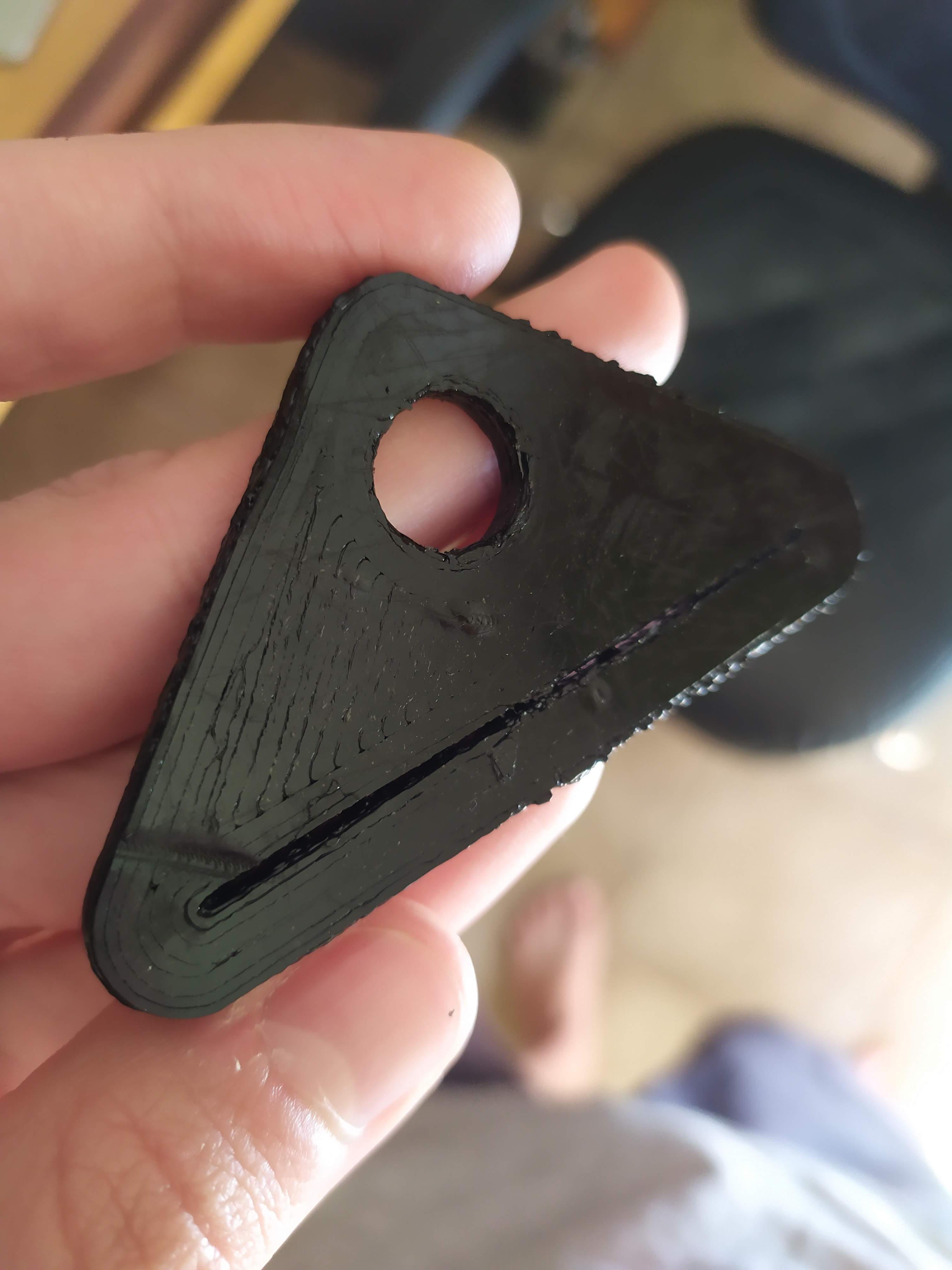
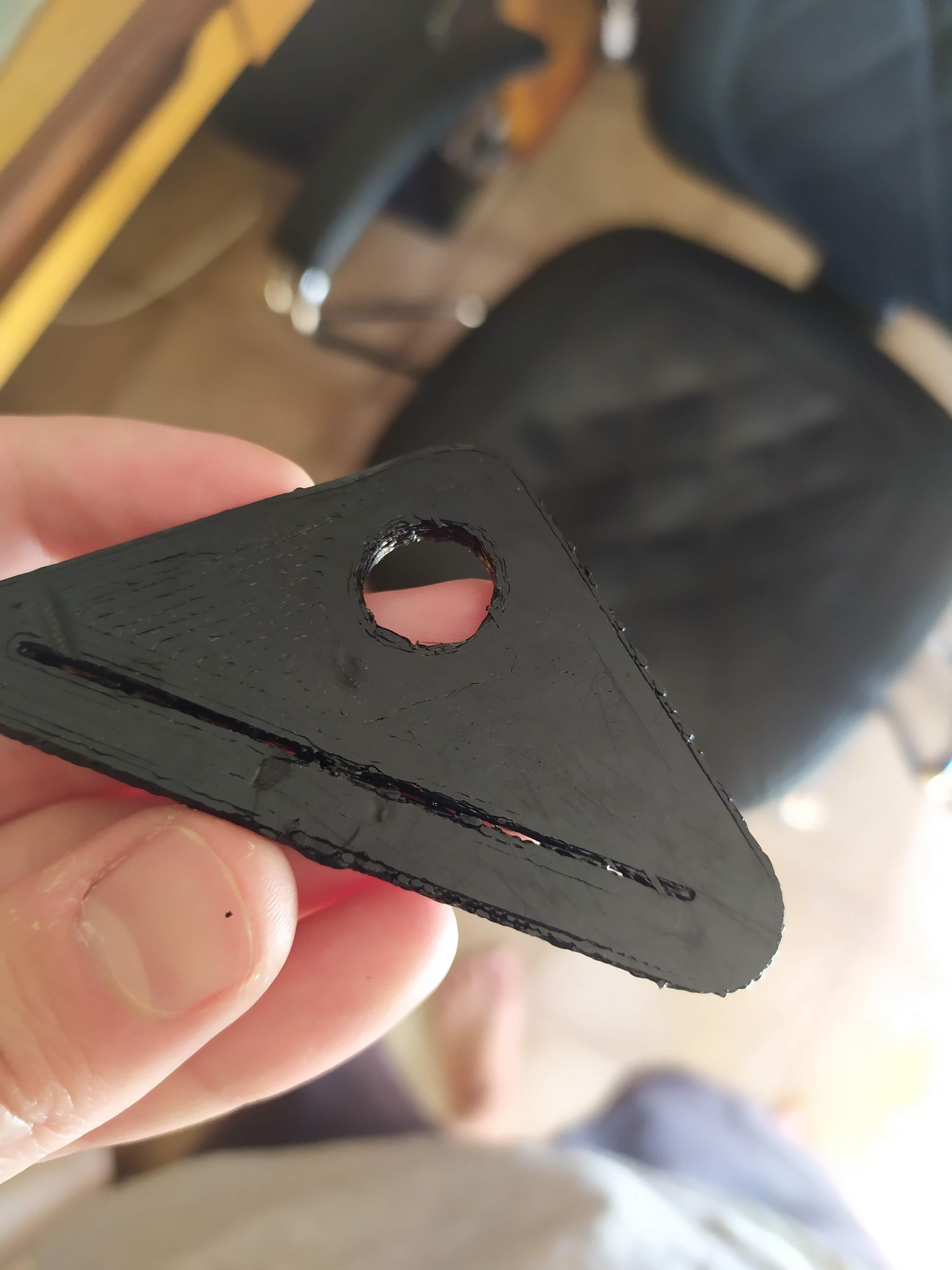
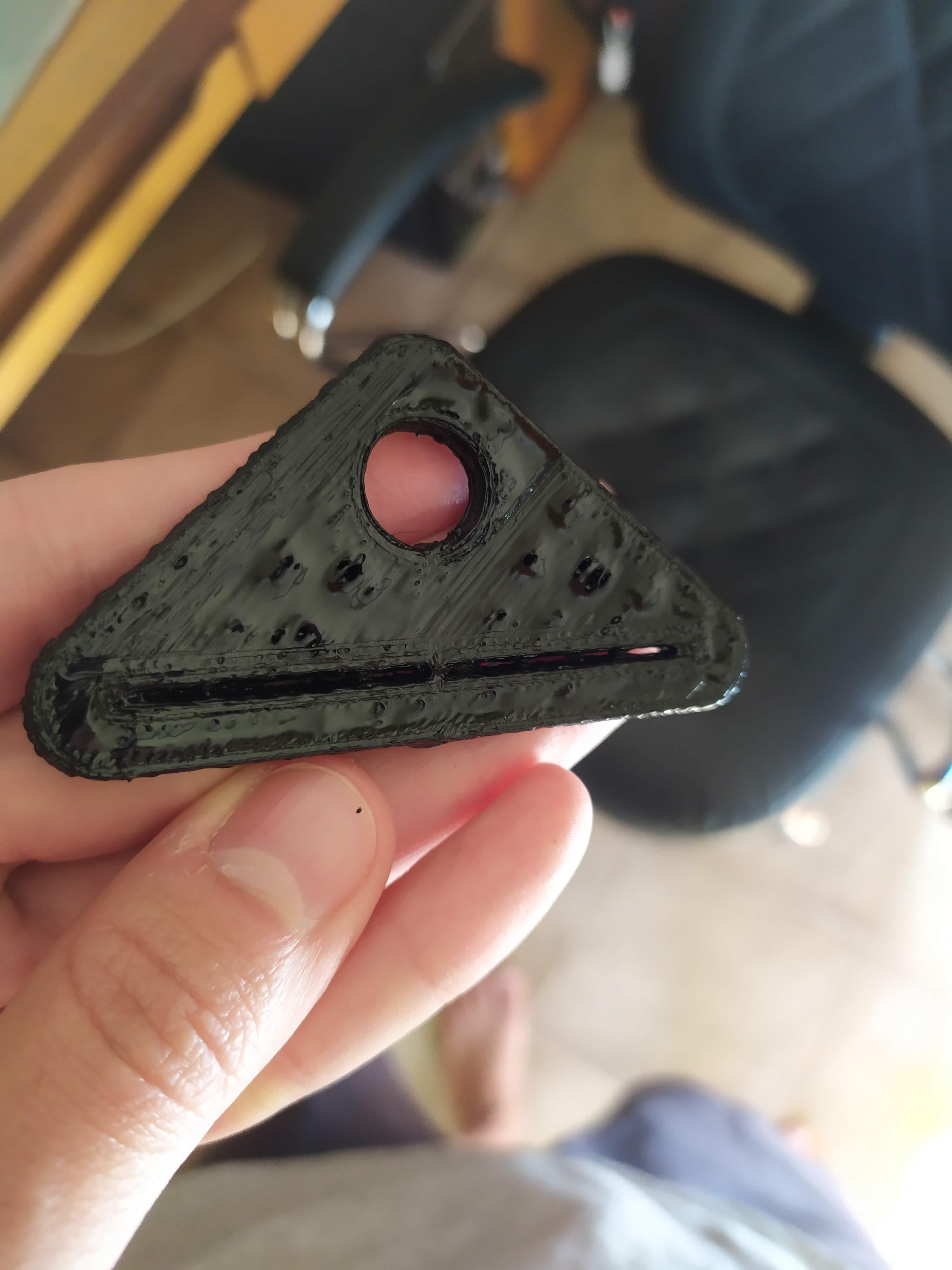
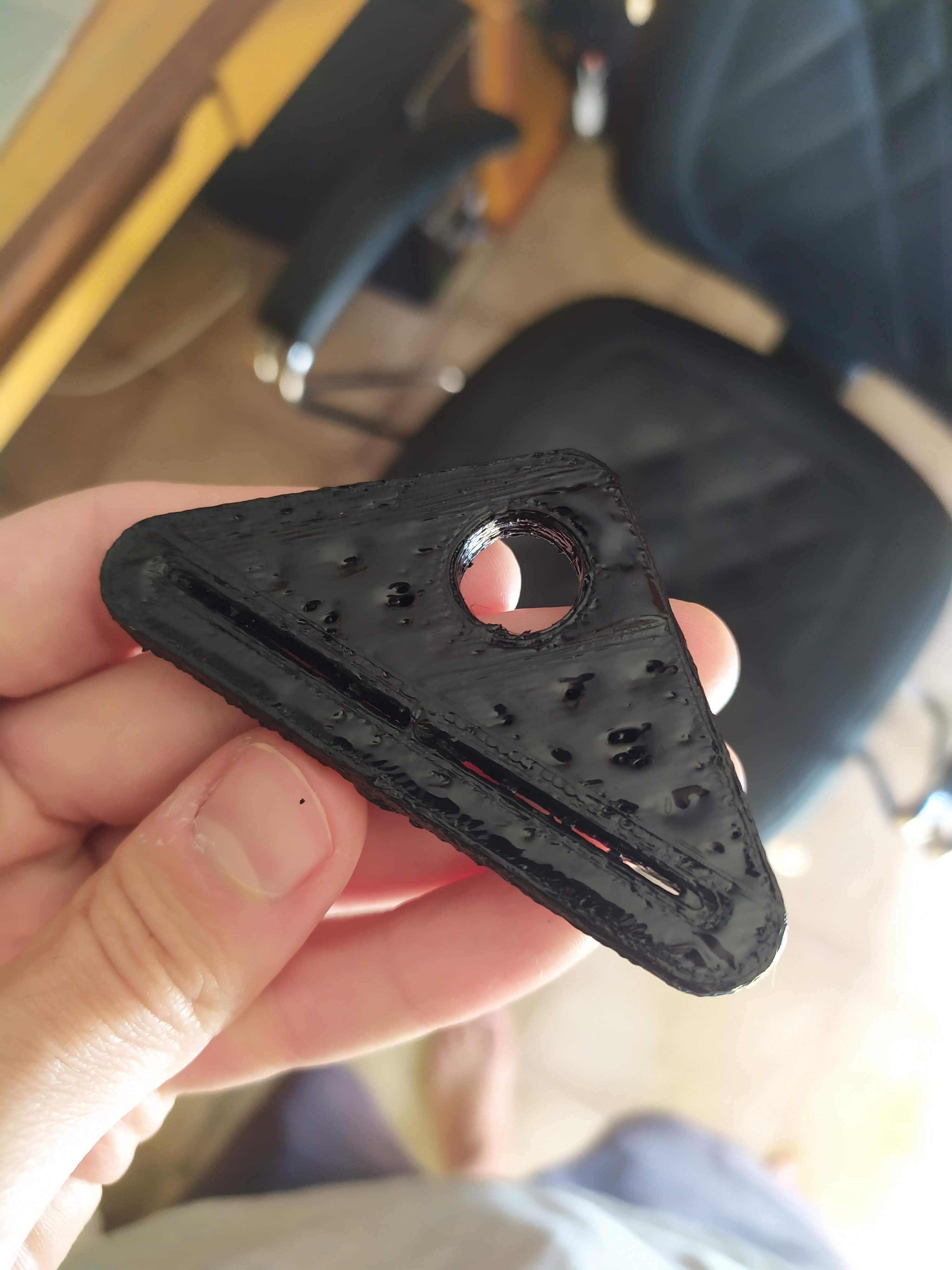
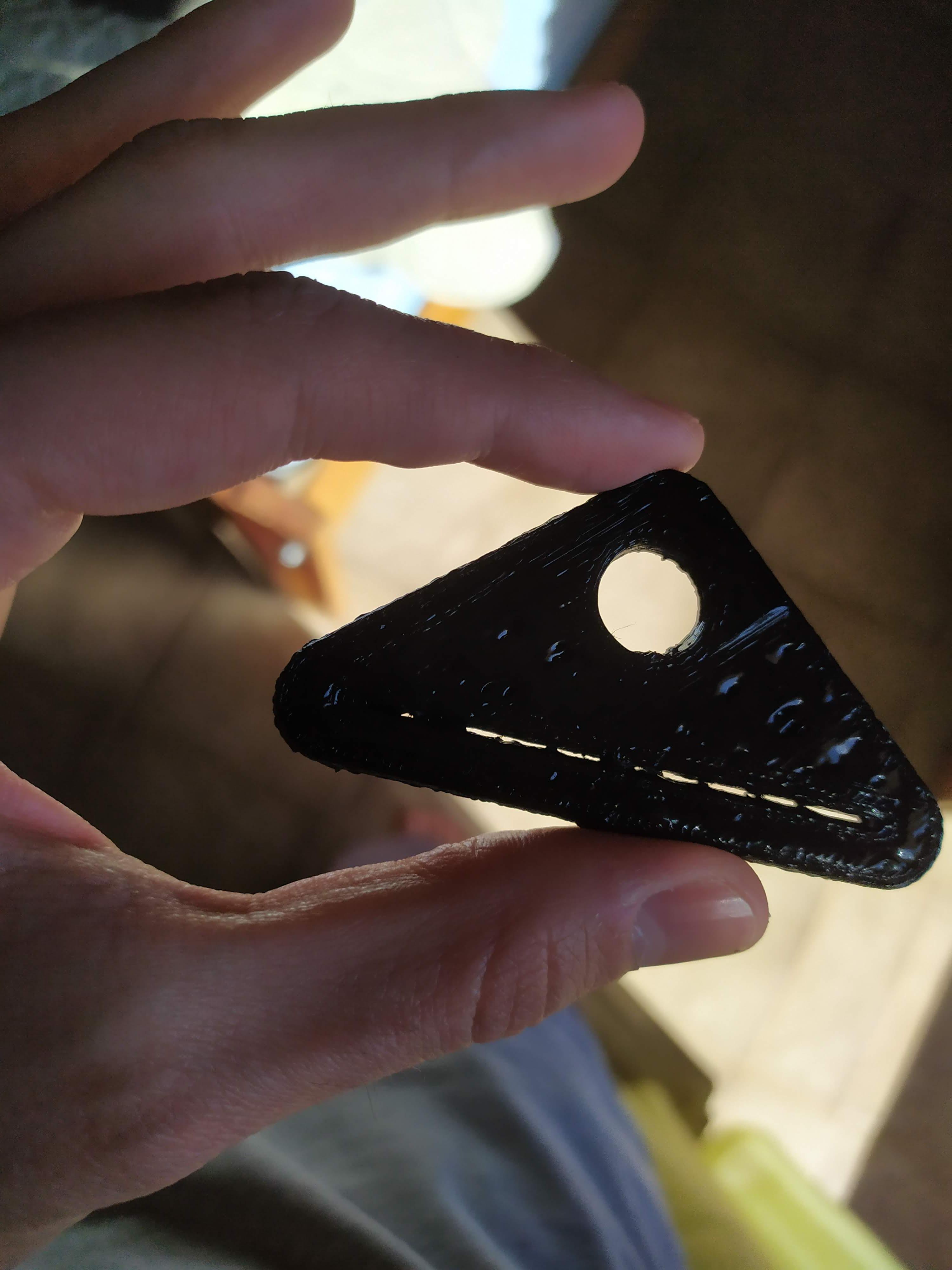
			<summary type="html"><![CDATA[<p>Hello everyone! I&#039;m new to 3D printing and I just got a used SD4 from my cousin. I did some tinkering and printing with it. I tried to calibrate and set it up as good as I could based on some stuff I found on google. Turns out the printing is not as good as it should be... I think. I tried to print a toothpaste squeezer I found on Thingverse (<a href="https://www.thingiverse.com/thing:867811">https://www.thingiverse.com/thing:867811</a>) after changing some values in the software, just to see how it goes, and the result was:</p><p><span class="postimg"><img src="http://soliforum.com/i/?MvOW0Mm.jpg" alt="http://soliforum.com/i/?MvOW0Mm.jpg" /></span></p><p><span class="postimg"><img src="http://soliforum.com/i/?q7W1eOw.jpg" alt="http://soliforum.com/i/?q7W1eOw.jpg" /></span></p><p><span class="postimg"><img src="http://soliforum.com/i/?FKdX9Ke.jpg" alt="http://soliforum.com/i/?FKdX9Ke.jpg" /></span></p><p><span class="postimg"><img src="http://soliforum.com/i/?SopyQWa.jpg" alt="http://soliforum.com/i/?SopyQWa.jpg" /></span></p><p><span class="postimg"><img src="http://soliforum.com/i/?4fSv3vT.jpg" alt="http://soliforum.com/i/?4fSv3vT.jpg" /></span></p><p>As you can see, the gap where the toothpaste is supposed to go through is filled with filament on some spots. Also, on the first layer bottom left corner, it looks like the nozzle is sort of dragging over the fresh filament and leaving a trace on it. You have any suggestions on how to properly configure the software or even the printer itself? I&#039;m using Repetier-Host v1.2.1 for MacOS (I can get Windows running on if needed). My nozzle temp is set to 215C and the bed to 105C. Currently using PLA.</p><p>Please excuse me for any misspelled words, English is not my first language.</p>]]></summary>
			<author>
				<name><![CDATA[tortelli.victor]]></name>
				<uri>https://www.soliforum.com/user/26195/</uri>
			</author>
			<updated>2021-08-22T13:53:42Z</updated>
			<id>https://www.soliforum.com/topic/18922/need-help-setting-up-sd4-for-the-first-time/new/posts/</id>
		</entry>
		<entry>
			<title type="html"><![CDATA[New to 3D printing]]></title>
			<link rel="alternate" href="https://www.soliforum.com/topic/18919/new-to-3d-printing/new/posts/" />
			<summary type="html"><![CDATA[<p>Just received a slightly used SD4 printer for free but having trouble getting my computer to recognize it when its plugged in on both SoliPrint and Repetier-Host, I downloaded the latest version of software from the SD website and nothing. Im running a Dell Inspiron with Windows 10. Any advise/suggestions? Thanks in advance!</p>]]></summary>
			<author>
				<name><![CDATA[ballard_88]]></name>
				<uri>https://www.soliforum.com/user/26190/</uri>
			</author>
			<updated>2021-08-21T02:13:41Z</updated>
			<id>https://www.soliforum.com/topic/18919/new-to-3d-printing/new/posts/</id>
		</entry>
		<entry>
			<title type="html"><![CDATA[Need help getting SD2 up and running again]]></title>
			<link rel="alternate" href="https://www.soliforum.com/topic/18884/need-help-getting-sd2-up-and-running-again/new/posts/" />
			<summary type="html"><![CDATA[<p><span class="postimg"><img src="http://soliforum.com/i/?yI0zdEG.jpg" alt="http://soliforum.com/i/?yI0zdEG.jpg" /></span></p><p>It&#039;s been a while since I had my SD2 up and running. Pulled it out to get back into 3D printing. Had some more difficulties than I wanted to deal with with ABS so switched to PLA. This printer and myself included don&#039;t have much experience with PLA but it seems less picky than ABS. Prints were coming out nicer and cleaner. Only thing was trying to figure out what temps to use. 170 on the extruder seemed to be working ok and 70 on the bed with a flowrate of 75. If you have recommendations, I&#039;d like to hear what they are.</p><p>So here&#039;s the problem. The extruder clogged up during a print. Maybe it was some ABS that was still inside and clogged up the hole. I stuck a 1.5mm hex driver down the shaft of the barrel and pushed a bunch of black stuff out. I thought that did the trick but as I pulled up the hex driver, liquid PLA oozed up and got in the hole of the teflon. Has anyone dealt with this type of issue? I tried pushing it down again but no luck. My next step is disassembly but if anyone has experience or knows a better way, please let me know. Hope to share some of my work and mods with you guys once I get Wompus I up and running again.</p>]]></summary>
			<author>
				<name><![CDATA[wompus]]></name>
				<uri>https://www.soliforum.com/user/2760/</uri>
			</author>
			<updated>2021-06-07T05:19:40Z</updated>
			<id>https://www.soliforum.com/topic/18884/need-help-getting-sd2-up-and-running-again/new/posts/</id>
		</entry>
		<entry>
			<title type="html"><![CDATA[Has anyone gotten one of these to work on a SD2...???]]></title>
			<link rel="alternate" href="https://www.soliforum.com/topic/18692/has-anyone-gotten-one-of-these-to-work-on-a-sd2/new/posts/" />
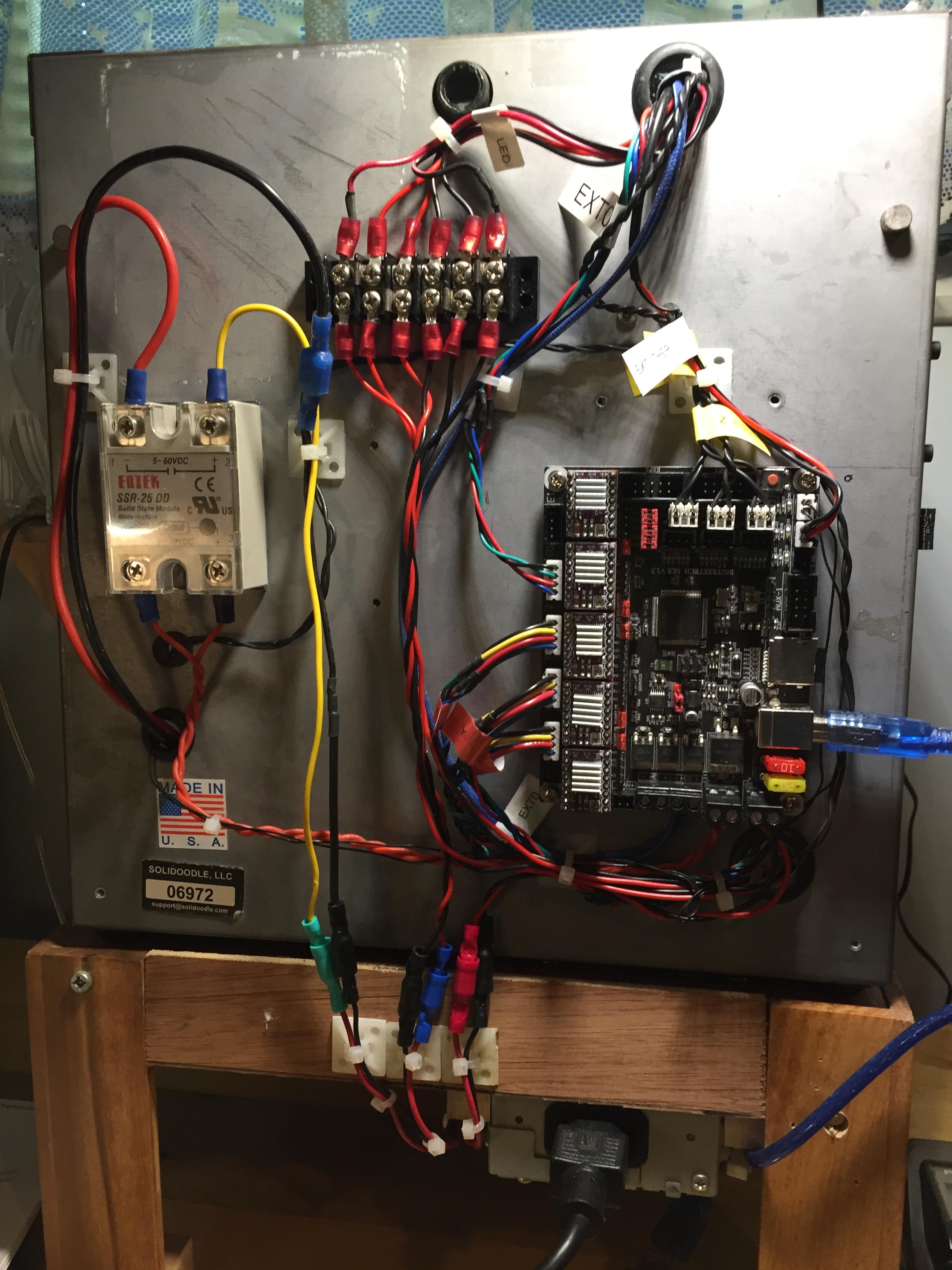
			<summary type="html"><![CDATA[<p>BIG TREE TECH - SKR - V1.3<br /><span class="postimg"><img src="http://soliforum.com/i/?HTwIVpk.jpg" alt="http://soliforum.com/i/?HTwIVpk.jpg" /></span></p><p>8 months or so ago, my SD motherboard quit, it was almost 7 years old.&nbsp; I bought one of these Big Tree Tech boards.&nbsp; Well, lots has happened since then precluding me from just jumping on it.&nbsp; I finally got it installed with new plugs. It fires up with no smoke, and Repetier recognizes it, but absolutely no commands respond.&nbsp; &nbsp;Have been trying to install/update the firmware.&nbsp; The links with the board directed me to Marlin 2.0 (with corrections) and they don&#039;t recommend Arduino.&nbsp; Instead they use a M$ derivative - MS Visual Studio Code.&nbsp; I&#039;ve used Arduino before - took me 4 different machines and about 10 days to upgrade the SD firmware for the E3D - didn&#039;t bother for the Lite version.&nbsp; This visual Studio worked great, lists the entire document and allows access anywhere.&nbsp; When you are done - mash the compile button and bingo...&nbsp; I&#039;ve done all that numerous times, I&#039;m missing something...&nbsp; Hopefully someone here has a working version of Marlin 2.0 that I could beg, buy, borrow, or steal to get my machine running.&nbsp; I have some things I really need to develop.</p><p>Thanx for any help<br />Ski</p>]]></summary>
			<author>
				<name><![CDATA[Ski52]]></name>
				<uri>https://www.soliforum.com/user/3790/</uri>
			</author>
			<updated>2020-07-06T21:34:43Z</updated>
			<id>https://www.soliforum.com/topic/18692/has-anyone-gotten-one-of-these-to-work-on-a-sd2/new/posts/</id>
		</entry>
		<entry>
			<title type="html"><![CDATA[Solidoodle 2 bed sled needed]]></title>
			<link rel="alternate" href="https://www.soliforum.com/topic/18577/solidoodle-2-bed-sled-needed/new/posts/" />
			<summary type="html"><![CDATA[<p>Hi, </p><p>I just rescued an old Solidoodle 2 that someone was throwing out. It has all the original parts, it turns on, etc. Unfortunately the wood bed sled is broken. Anyone have a metal SD2 sled for sale or that they want to get rid of? Alternatively, does anyone know of a good replacement design out there that I can build?</p><p>Thanks!</p>]]></summary>
			<author>
				<name><![CDATA[capibara]]></name>
				<uri>https://www.soliforum.com/user/9989/</uri>
			</author>
			<updated>2020-05-06T05:41:49Z</updated>
			<id>https://www.soliforum.com/topic/18577/solidoodle-2-bed-sled-needed/new/posts/</id>
		</entry>
		<entry>
			<title type="html"><![CDATA[Filament bunching up between extruder gear and E3D V6]]></title>
			<link rel="alternate" href="https://www.soliforum.com/topic/18569/filament-bunching-up-between-extruder-gear-and-e3d-v6/new/posts/" />
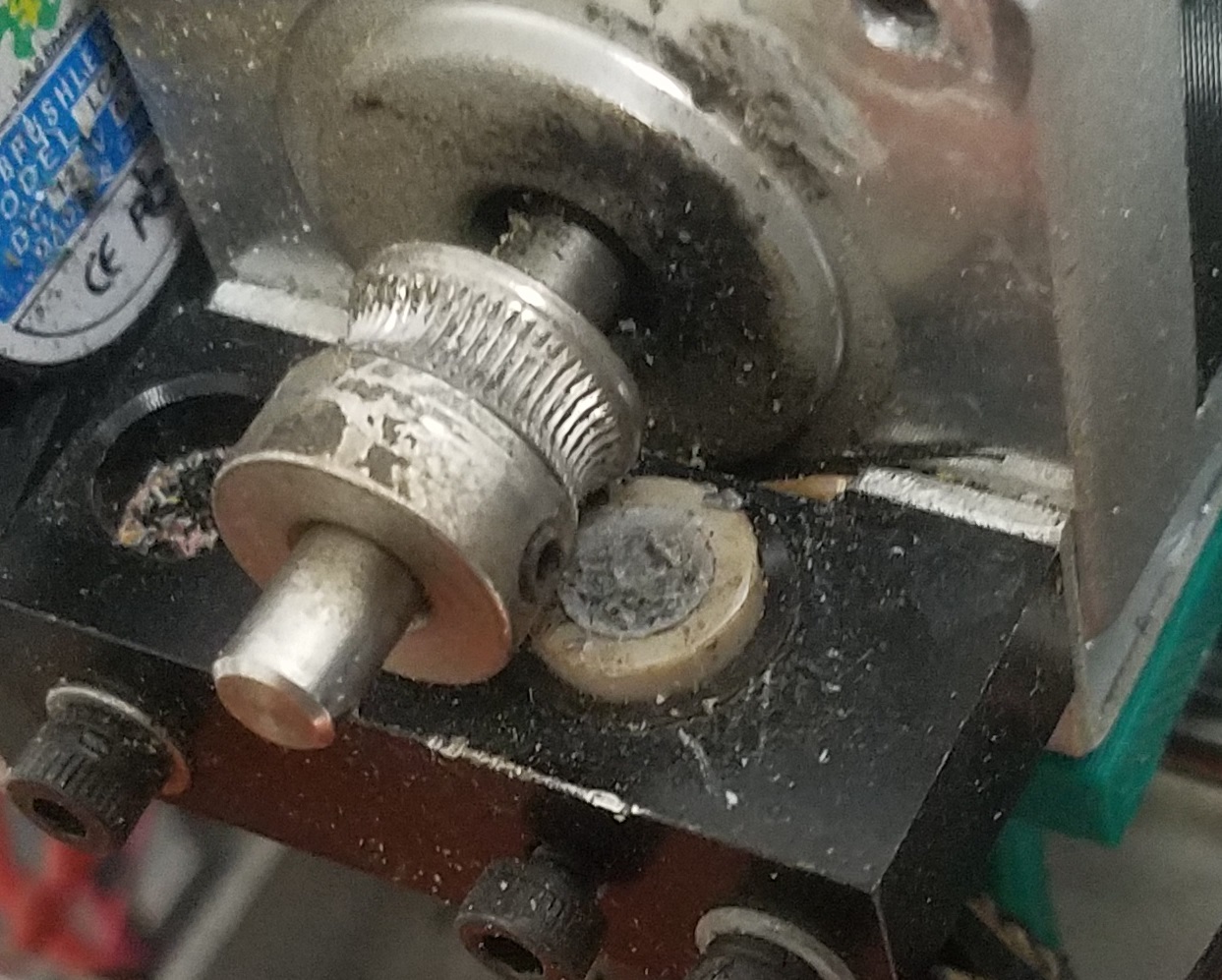
			<summary type="html"><![CDATA[<p>This just started happening a few days ago after it has been printing pretty much flawlessly about 12 hrs a day, everyday for the past 3 weeks.&nbsp; Any ideas as to what could keep causing this to happen?&nbsp; This one is about 2 hours into a 2.5 hour print:<br /><span class="postimg"><img src="http://soliforum.com/i/?aCMb9qP.jpg" alt="http://soliforum.com/i/?aCMb9qP.jpg" /></span></p>]]></summary>
			<author>
				<name><![CDATA[kgkern01]]></name>
				<uri>https://www.soliforum.com/user/20349/</uri>
			</author>
			<updated>2020-05-04T17:52:22Z</updated>
			<id>https://www.soliforum.com/topic/18569/filament-bunching-up-between-extruder-gear-and-e3d-v6/new/posts/</id>
		</entry>
		<entry>
			<title type="html"><![CDATA[Replacing the Power Supply Pt. 2]]></title>
			<link rel="alternate" href="https://www.soliforum.com/topic/18531/replacing-the-power-supply-pt-2/new/posts/" />
			<summary type="html"><![CDATA[<p>So I’m replacing the power supply and it turns on. However it won’t heat up. What do I do about that ?</p>]]></summary>
			<author>
				<name><![CDATA[juliaragno]]></name>
				<uri>https://www.soliforum.com/user/23985/</uri>
			</author>
			<updated>2020-04-14T16:51:59Z</updated>
			<id>https://www.soliforum.com/topic/18531/replacing-the-power-supply-pt-2/new/posts/</id>
		</entry>
		<entry>
			<title type="html"><![CDATA[Replacing the Power Supply]]></title>
			<link rel="alternate" href="https://www.soliforum.com/topic/18526/replacing-the-power-supply/new/posts/" />
			<summary type="html"><![CDATA[<p>So I’m trying to replace my power supply with the SolidGear pc power supply. It’s the same size except the wires are different. Does anyone know how to splice the wires to make it work?</p>]]></summary>
			<author>
				<name><![CDATA[juliaragno]]></name>
				<uri>https://www.soliforum.com/user/23985/</uri>
			</author>
			<updated>2020-04-12T20:47:07Z</updated>
			<id>https://www.soliforum.com/topic/18526/replacing-the-power-supply/new/posts/</id>
		</entry>
		<entry>
			<title type="html"><![CDATA[Anet A8 won't print from SD card]]></title>
			<link rel="alternate" href="https://www.soliforum.com/topic/18379/anet-a8-wont-print-from-sd-card/new/posts/" />
			<summary type="html"><![CDATA[<p>I can preheat both the extruder and the bed with all indications being normal.</p><p>However, when I try to print from the SD card, the printer ignores my command.&nbsp; The target temps stay at 0 and heating never starts.&nbsp; When I check the printing status, the machine seems to think it is printing, since the &quot;STOP PRINT&quot; option is available.</p><p>I printed a part yesterday with no problem.&nbsp; I use Cura 4.4.1 as my slicer and have had success in the past (as recently as yesterday).</p><p>Help!</p>]]></summary>
			<author>
				<name><![CDATA[jfields115]]></name>
				<uri>https://www.soliforum.com/user/23367/</uri>
			</author>
			<updated>2020-01-11T20:41:24Z</updated>
			<id>https://www.soliforum.com/topic/18379/anet-a8-wont-print-from-sd-card/new/posts/</id>
		</entry>
		<entry>
			<title type="html"><![CDATA[How to install a bootloader on a Sanguinololu 1.3a with 1284P in 2019+]]></title>
			<link rel="alternate" href="https://www.soliforum.com/topic/18350/how-to-install-a-bootloader-on-a-sanguinololu-13a-with-1284p-in-2019/new/posts/" />
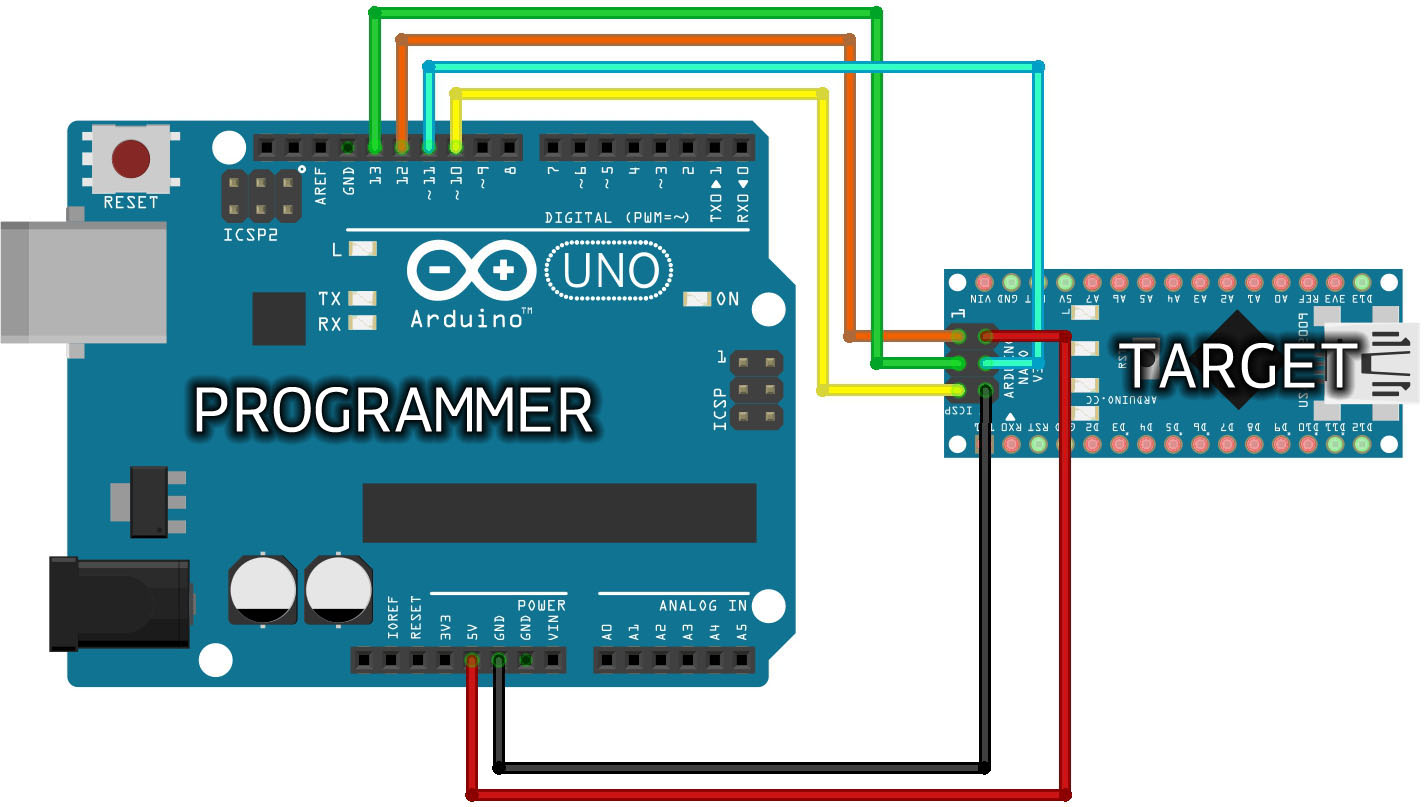
			<summary type="html"><![CDATA[<p>Hi,</p><p>I am trying to install a bootloader on my Sanguinololu 1.3a board (with new ATmega1284P) since days!</p><p>Here are my previous attempts:<br /></p><ul><li><p>Arduino IDE 0022 with <a href="https://code.google.com/archive/p/sanguino/downloads">Sanguino-0023r4</a> bootloader</p></li><li><p>Arduino IDE 0023 with <a href="https://github.com/jmgiacalone/sanguino1284p">jmgiacalone/sanguino1284p</a> bootloader</p></li><li><p>Arduino IDE 1.01 with <a href="https://code.google.com/archive/p/sanguino/downloads">Sanguino-0101r1</a> Bootloader</p></li><li><p>Arduino IDE 1.01 with <a href="https://github.com/Lauszus/Sanguino">Lauszus/Sanguino</a> Bootloader</p></li><li><p>Arduino IDE 1.01 with <a href="https://reprap.org/wiki/Gen7_Arduino_IDE_Support">Gen7 Arduino IDE Support 2.1</a> Bootloader</p></li><li><p>Arduino IDE 1.01 with <a href="https://github.com/maniacbug/mighty-1284p">maniacbug/mighty-1284p</a> Bootloader</p></li><li><p>Arduino IDE 1.8.7 (TH3DUF_R2) with there integrated Sanguino 1284p Bootloader</p></li><li><p>Arduino IDE 1.8.10 with <a href="https://github.com/Lauszus/Sanguino">Lauszus/Sanguino</a> Bootloader</p></li><li><p>Arduino IDE 1.8.10 with <a href="https://github.com/maniacbug/mighty-1284p">maniacbug/mighty-1284p</a> Bootloader</p></li><li><p>aso.</p></li></ul><p>I tried several Fuse-Settings, like <a href="https://reprap.org/wiki/Sanguinololu#1284P_Fuse_Settings">&#039;0xD6 LFuse, 0xDA HFuse &amp; 0xFD EFuse&#039;</a> or <a href="https://dcgtek.blogspot.com/2013/05/installing-bootloader-on-sanguinololu.html">&#039;0xD7 LFuse, 0xDC HFuse &amp; 0xFD EFuse&#039;</a> or &#039;0xFF LFuse, 0xDE HFuse &amp; 0xFD EFuse&#039; or &#039;0xFF LFuse, 0xDA HFuse &amp; 0xFF EFuse&#039; ...and several&nbsp; programmers as well &#039;stk500v1&#039;, &#039;stk500v2&#039;, &#039;Arduino&#039;, ...</p><p>BTW: I use an Arduino Uni as ISP, and i have used it successfully before with several creality boards. Wired this way...<br /><span class="postimg"><img src="https://www.arduino.cc/en/uploads/Tutorial/Arduino_ISP_wires.jpg" alt="https://www.arduino.cc/en/uploads/Tutorial/Arduino_ISP_wires.jpg" /></span><br />Target = Sanguinololu 1.3a ICSP</p><p>Recently, I tried the following... <a href="https://youtu.be/S95-5Ft4RPQ">https://youtu.be/S95-5Ft4RPQ</a> (a horrible video, but without a 16Mhz resonator)</p><p><strong>And yet so far no success!</strong></p><p>My last try will be the tutorial &#039;<a href="https://reprap.org/wiki/Burning_the_Sanguino_Bootloader_using_Arduino_as_ISP">Burning the Sanguino Bootloader using Arduino as ISP</a>&#039; from RepRap. But as I said before I am (still) missing a 16Mhz resonator.</p><p>First I got an error like &#039;ATmega1284p expected&#039; from time to time, but now it just comes:</p><p><strong>Yikes!&nbsp; Invalid device signature. 0x000000</strong></p><div class="codebox"><pre><code>Arduino: 1.8.10 (Windows 10), Board: &quot;Sanguino, ATmega1284 or ATmega1284P (16 MHz)&quot;

C:\Arduino\hardware\tools\avr/bin/avrdude -CC:\Arduino\hardware\tools\avr/etc/avrdude.conf -v -patmega1284p -cstk500v1 -PCOM3 -b19200 -e -Ulock:w:0x3F:m -Uefuse:w:0xFD:m -Uhfuse:w:0xDC:m -Ulfuse:w:0xD7:m 

avrdude: Version 6.3-20190619
         Copyright (c) 2000-2005 Brian Dean, http://www.bdmicro.com/
         Copyright (c) 2007-2014 Joerg Wunsch

         System wide configuration file is &quot;C:\Arduino\hardware\tools\avr/etc/avrdude.conf&quot;

         Using Port                    : COM3
         Using Programmer              : stk500v1
         Overriding Baud Rate          : 19200
         AVR Part                      : ATmega1284P
         Chip Erase delay              : 55000 us
         PAGEL                         : PD7
         BS2                           : PA0
         RESET disposition             : dedicated
         RETRY pulse                   : SCK
         serial program mode           : yes
         parallel program mode         : yes
         Timeout                       : 200
         StabDelay                     : 100
         CmdexeDelay                   : 25
         SyncLoops                     : 32
         ByteDelay                     : 0
         PollIndex                     : 3
         PollValue                     : 0x53
         Memory Detail                 :

                                  Block Poll               Page                       Polled
           Memory Type Mode Delay Size  Indx Paged  Size   Size #Pages MinW  MaxW   ReadBack
           ----------- ---- ----- ----- ---- ------ ------ ---- ------ ----- ----- ---------
           eeprom        65    10   128    0 no       4096    8      0  9000  9000 0xff 0xff
           flash         65    10   256    0 yes    131072  256    512  4500  4500 0xff 0xff
           lock           0     0     0    0 no          1    0      0  9000  9000 0x00 0x00
           lfuse          0     0     0    0 no          1    0      0  9000  9000 0x00 0x00
           hfuse          0     0     0    0 no          1    0      0  9000  9000 0x00 0x00
           efuse          0     0     0    0 no          1    0      0  9000  9000 0x00 0x00
           signature      0     0     0    0 no          3    0      0     0     0 0x00 0x00
           calibration    0     0     0    0 no          1    0      0     0     0 0x00 0x00

         Programmer Type : STK500
         Description     : Atmel STK500 Version 1.x firmware
         Hardware Version: 2
         Firmware Version: 1.18
         Topcard         : Unknown
         Vtarget         : 0.0 V
         Varef           : 0.0 V
         Oscillator      : Off
         SCK period      : 0.1 us

avrdude: AVR device initialized and ready to accept instructions

Reading | ################################################## | 100% 0.02s

avrdude: Device signature = 0x000000 (retrying)

Reading | ################################################## | 100% 0.02s

avrdude: Device signature = 0x000000 (retrying)

Fehler beim Brennen des Bootloaders.
Reading | ################################################## | 100% 0.02s

avrdude: Device signature = 0x000000
avrdude: Yikes!  Invalid device signature.
         Double check connections and try again, or use -F to override
         this check.


avrdude done.  Thank you.</code></pre></div><p><strong>Please help me, I&#039;m getting desperate. What am I doing wrong?</strong></p><p>Thanks and best regards,<br />Chris aka soliuser ;-)</p>]]></summary>
			<author>
				<name><![CDATA[soliuser]]></name>
				<uri>https://www.soliforum.com/user/23216/</uri>
			</author>
			<updated>2019-12-22T12:53:41Z</updated>
			<id>https://www.soliforum.com/topic/18350/how-to-install-a-bootloader-on-a-sanguinololu-13a-with-1284p-in-2019/new/posts/</id>
		</entry>
		<entry>
			<title type="html"><![CDATA[stuck @ 10 mm/s max printing speed]]></title>
			<link rel="alternate" href="https://www.soliforum.com/topic/18284/stuck-10-mms-max-printing-speed/new/posts/" />
			<summary type="html"><![CDATA[<p>i was printing all day yesterday and now i must have done something that now my gcode is stuck at 10 mm/s perimeter speed.. i tried both slic3r and cura with same results with perimeter speeds set @ 60 but when i put gcode in &quot;gcodeviewer&quot; it shows 10mm/s</p><p>using solidoodle 3 with repetier</p><p>Edit: first object was a single wall hollow box for calibration;<br />now if i try to slice it as a solid box with 10% infill, the perimeters print normal speeds but NOW infill gets stuck at 10 mm/s</p>]]></summary>
			<author>
				<name><![CDATA[Incognito24]]></name>
				<uri>https://www.soliforum.com/user/4104/</uri>
			</author>
			<updated>2019-11-16T21:56:08Z</updated>
			<id>https://www.soliforum.com/topic/18284/stuck-10-mms-max-printing-speed/new/posts/</id>
		</entry>
		<entry>
			<title type="html"><![CDATA[Broken 10mm rod clamp]]></title>
			<link rel="alternate" href="https://www.soliforum.com/topic/18278/broken-10mm-rod-clamp/new/posts/" />
			<summary type="html"><![CDATA[<p>While removing the Y rods on my Workbench today, I discovered that one of my mounting collars is broken.&nbsp; I&#039;ve googled extensively, and cannot find a replacement.&nbsp; Any leads from the &#039;brain trust&#039; would be helpful.</p><p><a href="https://www.dropbox.com/s/km1eih9v8e8p27v/10mm%20collar.jpg?dl=1">https://www.dropbox.com/s/km1eih9v8e8p2 … r.jpg?dl=1</a></p><p>Thanks.</p><p>-Kevin</p>]]></summary>
			<author>
				<name><![CDATA[knowack]]></name>
				<uri>https://www.soliforum.com/user/4251/</uri>
			</author>
			<updated>2019-11-15T04:55:10Z</updated>
			<id>https://www.soliforum.com/topic/18278/broken-10mm-rod-clamp/new/posts/</id>
		</entry>
		<entry>
			<title type="html"><![CDATA[Issue getting solidoodle 2 to connect to my pc through repetier]]></title>
			<link rel="alternate" href="https://www.soliforum.com/topic/18244/issue-getting-solidoodle-2-to-connect-to-my-pc-through-repetier/new/posts/" />
			<summary type="html"><![CDATA[<p>Hello all!</p><p>I&#039;m just beginning in the 3d printing world and have been following the instruction through the solidoodle wiki on setting up the software. I installed Ardiuno software, repetier, as well as the python software. I&#039;m just trying to connect my printer to my pc, and every time I try I get an error in repetier saying &quot;The connection failed with the following error: Access to the port &#039;COM#&#039; is denied.. Make sure your printer is connected, enabled, and connection type is set correct.&quot;</p><p>I&#039;m not sure what I need to do to fix this error, I&#039;ve tried googling and it seems to bring me to the same few pages that just follow the same things I&#039;ve already tried. I used the solidoodle wiki to set the printer settings in repetier as well so I feel that&#039;s all correct, but I could be wrong. </p><p>Any help with this would be greatly appreciated! </p><p>Evan</p>]]></summary>
			<author>
				<name><![CDATA[hooliganskate]]></name>
				<uri>https://www.soliforum.com/user/22516/</uri>
			</author>
			<updated>2019-10-13T04:35:44Z</updated>
			<id>https://www.soliforum.com/topic/18244/issue-getting-solidoodle-2-to-connect-to-my-pc-through-repetier/new/posts/</id>
		</entry>
</feed>