<?xml version="1.0" encoding="utf-8"?>
<feed xmlns="http://www.w3.org/2005/Atom">
	<title type="html"><![CDATA[SoliForum - 3D Printing Community — XYZ Printing Hacks & Mods]]></title>
	<link rel="self" href="https://www.soliforum.com/feed/atom/forum/32/" />
	<updated>2026-05-23T14:16:47Z</updated>
	<generator>PunBB</generator>
	<id>https://www.soliforum.com/</id>
		<entry>
			<title type="html"><![CDATA[How to use third-party filament on da Vinci 1.1 Plus?]]></title>
			<link rel="alternate" href="https://www.soliforum.com/topic/19938/how-to-use-thirdparty-filament-on-da-vinci-11-plus/new/posts/" />
			<summary type="html"><![CDATA[<p>Hi everyone,</p><p>I have a XYZprinting da Vinci 1.1 Plus and the original filament cartridge is now empty.</p><p>I would like to know how I can continue using this printer with other filament brands or generic filament.</p><p>Is there a way to bypass the cartridge chip or reset it?</p><p>What type of filament works best with this printer?</p><p>Thanks for your help!</p>]]></summary>
			<author>
				<name><![CDATA[skaterage]]></name>
				<uri>https://www.soliforum.com/user/28123/</uri>
			</author>
			<updated>2026-05-23T14:16:47Z</updated>
			<id>https://www.soliforum.com/topic/19938/how-to-use-thirdparty-filament-on-da-vinci-11-plus/new/posts/</id>
		</entry>
		<entry>
			<title type="html"><![CDATA[xyz davinci junior 1 new hotend]]></title>
			<link rel="alternate" href="https://www.soliforum.com/topic/19923/xyz-davinci-junior-1-new-hotend/new/posts/" />
			<summary type="html"><![CDATA[<p>I have an XYZ Davinci Junior 1.0.<br />Is there a cheaper hot end replacement available without modifying the Ramps 1.4?</p><p>Can I buy an Executor replacement?</p>]]></summary>
			<author>
				<name><![CDATA[pirek23]]></name>
				<uri>https://www.soliforum.com/user/28087/</uri>
			</author>
			<updated>2026-04-04T17:19:17Z</updated>
			<id>https://www.soliforum.com/topic/19923/xyz-davinci-junior-1-new-hotend/new/posts/</id>
		</entry>
		<entry>
			<title type="html"><![CDATA[Davinci Jr with open filament - Old file stuck - Almost Fixed...]]></title>
			<link rel="alternate" href="https://www.soliforum.com/topic/19879/davinci-jr-with-open-filament-old-file-stuck-almost-fixed/new/posts/" />
			<summary type="html"><![CDATA[<p>I have recently updated my XYZPrint software with the R2 Beta Version 2.0.23. I updated the printer firmware to Version 3.5.1 as mentioned in the directions and see that my Open Smart Tag has the correct serial number. Everything looked great but when I loaded up a STL file to print, a different file prints.&nbsp; I&#039;ve tried 4 different files. They load, slice, and show reasonable object information. When I print, a different file prints.</p><p>It&#039;s like the last file I printed under the old XYZMaker is stuck in the printer and nothing else will print. I&#039;ve removed all the old software, rebooted, removed and reloaded the new software, and the same file always prints.</p><p>Has anyone experienced this or have any ideas on what I can do to get my printer printer again?</p>]]></summary>
			<author>
				<name><![CDATA[sdburton]]></name>
				<uri>https://www.soliforum.com/user/19705/</uri>
			</author>
			<updated>2026-01-06T00:45:09Z</updated>
			<id>https://www.soliforum.com/topic/19879/davinci-jr-with-open-filament-old-file-stuck-almost-fixed/new/posts/</id>
		</entry>
		<entry>
			<title type="html"><![CDATA[Da Vinci 2.0A Duo + Repetier Firmware + E3D V6 Doubts]]></title>
			<link rel="alternate" href="https://www.soliforum.com/topic/19863/da-vinci-20a-duo-repetier-firmware-e3d-v6-doubts/new/posts/" />
			<summary type="html"><![CDATA[<p>I know that after XYZ Printing went bankrupt most of the people is moving to different printer vendors apart from XYZ and that indeed this was not the best printer in the market but as I already have two Da Vincis&nbsp; and my usage of 3D printing is very basic I would like to still maintain them and give them an opportunity.</p><p>As mentioned I have a Da Vinci 1.0 pro with very limited usage since I bought it brand new some years ago, where I use SImplify3D software.</p><p>Quite recently, and just looking for some spare XYZ cartridges (I know that with the pro I can use open filament but for me and because of space reasons it is more convenient to refill the cartridges with other filament brands) I have the opportunity to get a second hand Da Vinci 2.0A Duo with a faulty Extruder.</p><p>I have flashed it with the Repetier Firmware and I was thinking if it makes sense to replace the extruder with two E3D V6 or even a Chimera one, I have seen different mods and adaptions but I have a doubt about those adaptations and how to handle the different distance between the nozzles that I have seen there. Is this something that you need to adapt in the firmware? in the printer settings menu? or in the printer software? May someone guide me on this?</p><p>Thanks in advance</p>]]></summary>
			<author>
				<name><![CDATA[JuanLUX]]></name>
				<uri>https://www.soliforum.com/user/27975/</uri>
			</author>
			<updated>2025-10-20T16:39:56Z</updated>
			<id>https://www.soliforum.com/topic/19863/da-vinci-20a-duo-repetier-firmware-e3d-v6-doubts/new/posts/</id>
		</entry>
		<entry>
			<title type="html"><![CDATA[XYZPrinting Da Vinci Jr. 2.0 Mix Tag hacking]]></title>
			<link rel="alternate" href="https://www.soliforum.com/topic/19860/xyzprinting-da-vinci-jr-20-mix-tag-hacking/new/posts/" />
			<summary type="html"><![CDATA[<p>Hello,<br />Because the jr. 2.0 Mix has a tag problem, a big one, i would like to Read the firmware to a file, then disassamble it, remove the tag parts, write it to the chip and test it, but, where to begin.<br />Any help is welcome !</p>]]></summary>
			<author>
				<name><![CDATA[scumari]]></name>
				<uri>https://www.soliforum.com/user/27962/</uri>
			</author>
			<updated>2025-09-22T06:55:32Z</updated>
			<id>https://www.soliforum.com/topic/19860/xyzprinting-da-vinci-jr-20-mix-tag-hacking/new/posts/</id>
		</entry>
		<entry>
			<title type="html"><![CDATA[Just got an XYZ DaVinci 1.0 or 1.0a]]></title>
			<link rel="alternate" href="https://www.soliforum.com/topic/19853/just-got-an-xyz-davinci-10-or-10a/new/posts/" />
			<summary type="html"><![CDATA[<p>It says 1.0 on the back but says 1.0a when hooked up to the software.</p><p>I’ve followed the instructions to update to the open filament firmware, but it doesn’t update automatically and I have no option to update.<br />The pro-e give no option, the regular XYZware says server is down.</p><p>I’ve found an offline updater, but I can’t find the open filament firmware.</p><p>Please help, I just want to use this printer.</p>]]></summary>
			<author>
				<name><![CDATA[jamesjx]]></name>
				<uri>https://www.soliforum.com/user/27956/</uri>
			</author>
			<updated>2025-09-17T22:48:33Z</updated>
			<id>https://www.soliforum.com/topic/19853/just-got-an-xyz-davinci-10-or-10a/new/posts/</id>
		</entry>
		<entry>
			<title type="html"><![CDATA[New member with davinci 2.0a duo]]></title>
			<link rel="alternate" href="https://www.soliforum.com/topic/19818/new-member-with-davinci-20a-duo/new/posts/" />
			<summary type="html"><![CDATA[<p>going round in circles with the firmware and possibly messed it up</p><p>the only firmware I can get to do anything is a download of repetire a bin file, system comes on great but dosnt save any setings</p><p>using repetire host I can send item to print but&nbsp; it seems the bed in to the extruder, it trys to print but all the media just curls around the extruder not sticking to the print bed</p><p>i would like to get back to xyz firmware so I can try out the new open source offered by XYZ</p><p>using bossa I can send davinci firmware to printer but all version just&nbsp; render the printer dead not recognised by the computer</p><p>using davinci firmware upgrade I can install repetire in recovery mode this is the only firmware that boots the printer</p><p>also should there be any files or folders on the SD card ? I belive the printer uses part of the SD card as eeprom save files?</p>]]></summary>
			<author>
				<name><![CDATA[L33UKS]]></name>
				<uri>https://www.soliforum.com/user/27748/</uri>
			</author>
			<updated>2025-01-27T15:20:29Z</updated>
			<id>https://www.soliforum.com/topic/19818/new-member-with-davinci-20a-duo/new/posts/</id>
		</entry>
		<entry>
			<title type="html"><![CDATA[XYZ Printing da Vinci Open Tag Firmware Released!]]></title>
			<link rel="alternate" href="https://www.soliforum.com/topic/19482/xyz-printing-da-vinci-open-tag-firmware-released/new/posts/" />
			<summary type="html"><![CDATA[<p>I&#039;m not sure if this has already been posted, but I contacted support last week and they sent me a PDF providing instructions on how to upgrade the firmware of my Da Vinci Mini w+ so that it is now Open Tag and supports third-party filament.</p><p>I have followed this process and can confirm that my Da Vinci Mini w+ is now on firmware 3.2.7 and prints without a NFC tag present.</p><p>Here are the guides for all Open Tag upgradable printers:</p><p> • <a href="https://xyzprod.blob.core.windows.net/document-service-center/da%20Vinci%20Color(EN).pdf"> da Vinci Color</a><br /> • <a href="https://xyzprod.blob.core.windows.net/document-service-center/da%20Vinci%20nano(EN).pdf"> da Vinci nano</a><br /> • <a href="https://xyzprod.blob.core.windows.net/document-service-center/da%20Vinci%C2%A0%20Jr.%201.0%203-in-1(EN).pdf"> da Vinci Jr. 1.0 3 in 1</a><br /> • <a href="https://xyzprod.blob.core.windows.net/document-service-center/da%20Vinci%C2%A0%20Jr.%201.0(EN).pdf">da Vinci Jr. 1.0</a><br /> • <a href="https://xyzprod.blob.core.windows.net/document-service-center/da%20Vinci%C2%A0Jr.1.0w(EN).pdf">da Vinci Jr. 1.0w</a><br /> • <a href="https://xyzprod.blob.core.windows.net/document-service-center/da%20Vinci%C2%A0mini%20w(EN).pdf">da Vinci mini w</a><br /> • <a href="https://xyzprod.blob.core.windows.net/document-service-center/da%20Vinci%C2%A0mini%20w+(EN).pdf">da Vinci mini w +</a><br /> • <a href="https://xyzprod.blob.core.windows.net/document-service-center/da%20Vinci%C2%A0miniMaker(EN).pdf">da Vinci miniMaker</a><br /> • <a href="https://xyzprod.blob.core.windows.net/document-service-center/da%20Vinci%C2%A0nano%20w(EN).pdf">da Vinci nano w</a><br /> • <a href="https://xyzprod.blob.core.windows.net/document-service-center/XYZware%20Pro%20e%20Instrusction.pdf">da Vinci 1.0</a><br /> • <a href="https://xyzprod.blob.core.windows.net/document-service-center/XYZware%20Pro%20e%20Instrusction.pdf">da Vinci 1.0A</a><br /> • <a href="https://xyzprod.blob.core.windows.net/document-service-center/XYZware%20Pro%20e%20Instrusction.pdf">da Vinci 1.0 AiO</a><br /> • <a href="https://xyzprod.blob.core.windows.net/document-service-center/XYZware%20Pro%20e%20Instrusction.pdf">da Vinci 1.1</a><br /> • <a href="https://xyzprod.blob.core.windows.net/document-service-center/XYZware%20Pro%20e%20Instrusction.pdf">da Vinci 2.0 Duo</a><br /> • <a href="https://xyzprod.blob.core.windows.net/document-service-center/XYZware%20Pro%20e%20Instrusction.pdf">da Vinci 2.0A</a></p><p>I hope this helps those still wanting to use their XYZ Printer!</p>]]></summary>
			<author>
				<name><![CDATA[shoestorekid]]></name>
				<uri>https://www.soliforum.com/user/27589/</uri>
			</author>
			<updated>2024-10-01T04:11:41Z</updated>
			<id>https://www.soliforum.com/topic/19482/xyz-printing-da-vinci-open-tag-firmware-released/new/posts/</id>
		</entry>
		<entry>
			<title type="html"><![CDATA[XYZ colour printer help]]></title>
			<link rel="alternate" href="https://www.soliforum.com/topic/19226/xyz-colour-printer-help/new/posts/" />
			<summary type="html"><![CDATA[<p>hi all. need help i came across a XYZ colour printer but the extruder burnt out, replaced extruder but its only showing room temp now and does not seem to be heating up. also stepper motors do not seem to calibrate. do need a second hand board for this and any help getting it, or shall just sell it for not much more than new extruder, I&#039;m stumped with it and getting fed up. any help please,</p>]]></summary>
			<author>
				<name><![CDATA[gibbop24]]></name>
				<uri>https://www.soliforum.com/user/27449/</uri>
			</author>
			<updated>2024-06-10T04:06:12Z</updated>
			<id>https://www.soliforum.com/topic/19226/xyz-colour-printer-help/new/posts/</id>
		</entry>
		<entry>
			<title type="html"><![CDATA[Paper Tags]]></title>
			<link rel="alternate" href="https://www.soliforum.com/topic/19162/paper-tags/new/posts/" />
			<summary type="html"><![CDATA[<p>If anyone in the USA needs a couple of paper tags, I have some left that I have no use for. PM me with an address to mail them to along with temperature needed and length preferred.</p>]]></summary>
			<author>
				<name><![CDATA[Bozotclown1970]]></name>
				<uri>https://www.soliforum.com/user/13167/</uri>
			</author>
			<updated>2023-12-28T17:38:41Z</updated>
			<id>https://www.soliforum.com/topic/19162/paper-tags/new/posts/</id>
		</entry>
		<entry>
			<title type="html"><![CDATA[Paper tags for the Mini W: I'm Stumped]]></title>
			<link rel="alternate" href="https://www.soliforum.com/topic/19161/paper-tags-for-the-mini-w-im-stumped/new/posts/" />
			<summary type="html"><![CDATA[<p>Ok, so I&#039;ve really tried, done as much troubleshooting as I can. <br />I am trying to make paper tags with the android apps. I&#039;m on version 1.1.9 <br />(Really hesitant to try to refill my existing tags. as my most full legit tag is only at 41m, and I&#039;m seeing that some of the XYZ filament people are buying now is just coming with NFC stickers instead of real chips. I tried refilling my other, less full tags and they were all blacklisted)</p><p>I made sure to get 213 tags, not 215 or some other capacity.</p><p>I&#039;m both using a new android phone and an old Galaxy S4, so there shouldn&#039;t be a quirk with one single device- I&#039;ve seen multiple posts specifically talking about the S4. I&#039;m getting the same results from both phones. except Reel Tool wants to crash on the S4.</p><p>NFCXYZ Refill Tag Pro 1.6 isn&#039;t generating tags that the printers seem to be able to read- I&#039;m simply getting errors stating that there is no spool present at all- the tags are not being recognized, despite them being directly affixed to the bottom of the spool arm.<br />(Using 200/200 filament length)</p><p>The NTAG Refill tool default mode can&#039;t seem to do anything with these tags after I used the above tool- it just comes up with blank tag information, only lets me toggle the material, color, whether the UID and Serial Number is valid or not, and not allow me to hit Generate Tag. (Some tutorials state that use of this app is important, others skip it)</p><p>Some information IS being written at the NFCXYZ app step- when I use the NTAG Refill tool Dump Editor Read Tool, there&#039;s four pages present, with the first six having data, the last two being blank zeroes. None of the tags I&#039;ve used have become locked. <br />Reel Tool doesn&#039;t seem to want to do much with my paper tags- if I hold them up to either phone, it just repeatedly chimes without doing anything else. </p><p>I&#039;ve also noticed a curious behavior- many people state that you should disconnect the XYZ software from the internet entirely, but my printer will refuse to connect to the software unless a full or partly-full tag is loaded and is connected to the internet. Its making it rather tedious to test things, so I&#039;ve resorted to simply starting the program with a valid tag, and disconnecting the internet entirely before trying tags.</p><p>Anyone have any advice? Am I overlooking something obvious? <br />With my firmware, should the refill tool for the 40mm spool chip be safe?<br />Maybe an earlier version of the NFC Refill tool might work? I&#039;ve seen some folks say that the 1.4 version works better for them, but all the links I&#039;ve found for it are dead. </p><br /><p>Thanks in advance for your time.</p>]]></summary>
			<author>
				<name><![CDATA[Aces]]></name>
				<uri>https://www.soliforum.com/user/27290/</uri>
			</author>
			<updated>2023-12-20T23:34:37Z</updated>
			<id>https://www.soliforum.com/topic/19161/paper-tags-for-the-mini-w-im-stumped/new/posts/</id>
		</entry>
		<entry>
			<title type="html"><![CDATA[How I Hacked Da Vinci mini w+]]></title>
			<link rel="alternate" href="https://www.soliforum.com/topic/19129/how-i-hacked-da-vinci-mini-w/new/posts/" />
			<summary type="html"><![CDATA[<p>Hey everyone! After trying to do the filament hack on my mini w+, I finally made it work! Since the forum has little to no information about Da Vinci w+ printers, I decided to help.</p><p>All you need is:<br />1. XYZprint or XYZware that works without any errors (except for the filament empty error)<br />2. A couple of NTAG213 tags<br />3. A couple of apps (My phone is on Android 10 by the way)<br />3.1. LINK TO APP APK FILES --&gt; <a href="https://drive.google.com/drive/folders/1ErEslT91ZLO5zFncwp00zYWgGQK3hUmG?usp=sharing">https://drive.google.com/drive/folders/ … sp=sharing</a><br />4. A whole lot of patience.</p><p>STEP ONE<br />- Download all the apps<br />- Obtain NTAG213<br />- Download or open your desired XYZ 3D program (XYZprinting or Xyzware)</p><p>STEP TWO<br />- Open NFCXYZ app<br />- Scan the NTAG213 with the app<br />- Edit the info however you like</p><p>STEP THREE<br />- Open NFC Refill Tool<br />- Scan the NTAG213 with the app<br />- Edit the info however you like<br />- Press &quot;Generate TAG&quot;</p><p>STEP FOUR<br />- Google how to disable internet access to a program (I have McAfee so I disabled from there)<br />- Disable internet access to XYZware or XYZprinting<br />- Open XYZware or XYZprinting<br />- Decline everuything, even updates (if there are any updates)</p><p>STEP FIVE<br />- Connect printer to the PC<br />- Choose the printer<br />- Import .stl file or any other file that works<br />- Slice the object according to the NTAG213 info you wrote with the usage of apps (ex: choose PLA if wrote PLA with the app)</p><p>STEP SIX<br />- Take out the original chip and place the tag neatly<br />OR<br />- Tape the tag to the bottom of the filament holder (dunno if that works, but the tag must be in contact wit the bottom)<br />- Ckeck the XYZware or XYZprinting screen for filament updates</p><p>STEP SEVEN<br />- Cross your fingers and print</p><br /><p>This is all that I&#039;ve done to make mine work. I&#039;m still a beginner at such things but feel free to ask anything. <img src="https://www.soliforum.com/img/smilies/smile.png" width="15" height="15" alt="smile" /></p>]]></summary>
			<author>
				<name><![CDATA[wertyshow]]></name>
				<uri>https://www.soliforum.com/user/27098/</uri>
			</author>
			<updated>2023-01-31T12:13:28Z</updated>
			<id>https://www.soliforum.com/topic/19129/how-i-hacked-da-vinci-mini-w/new/posts/</id>
		</entry>
		<entry>
			<title type="html"><![CDATA[Emutag doesn't save PACK value, timout mode etc. hardware issue?]]></title>
			<link rel="alternate" href="https://www.soliforum.com/topic/19115/emutag-doesnt-save-pack-value-timout-mode-etc-hardware-issue/new/posts/" />
			<summary type="html"><![CDATA[<p>Hey guys, I&#039;m new here. I have just bought an EmuTag (ntag213) and I&#039;m struggling to set the PACK value as well as the sniffing mode 000000E0 at 0x2D. The Emutag allows me to write the values but as soon as I read the Tag again, the pack (0x2C) is restored to 00040000!</p><p>Same goes for the timeout mode enabled value of 000000E0. This one gets resetted to the first part of the UID in 0x2D. 0x2D to 0x2F aren&#039;t changeable as well.</p><p>I have also disabled the dynamic lock byte feature at 0x28. standard value was 000000BD and I have set it to 00000000 just to make sure.</p><p>Thanks for your help guys! It&#039;s driving me nuts already:-)</p>]]></summary>
			<author>
				<name><![CDATA[Dan63]]></name>
				<uri>https://www.soliforum.com/user/27037/</uri>
			</author>
			<updated>2022-12-15T18:50:12Z</updated>
			<id>https://www.soliforum.com/topic/19115/emutag-doesnt-save-pack-value-timout-mode-etc-hardware-issue/new/posts/</id>
		</entry>
		<entry>
			<title type="html"><![CDATA[Repetier for Da Vinci Jr Pro 1.0?]]></title>
			<link rel="alternate" href="https://www.soliforum.com/topic/19101/repetier-for-da-vinci-jr-pro-10/new/posts/" />
			<summary type="html"><![CDATA[<p>Is there a Repetier firmware for the Da Vinci Jr Pro 1.0? </p><p>I&#039;m about ready to sling this thing out the window.</p><p>I&#039;ve tried every firmware available including downgrading. Each stock firmware has some sort of issue.</p>]]></summary>
			<author>
				<name><![CDATA[jxke]]></name>
				<uri>https://www.soliforum.com/user/26982/</uri>
			</author>
			<updated>2022-11-01T16:40:38Z</updated>
			<id>https://www.soliforum.com/topic/19101/repetier-for-da-vinci-jr-pro-10/new/posts/</id>
		</entry>
		<entry>
			<title type="html"><![CDATA[Extruder Optimization Filament Cooling for all DaVinci Mini]]></title>
			<link rel="alternate" href="https://www.soliforum.com/topic/19084/extruder-optimization-filament-cooling-for-all-davinci-mini/new/posts/" />
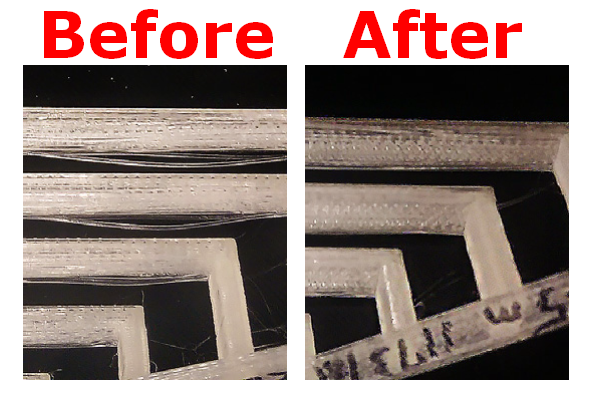
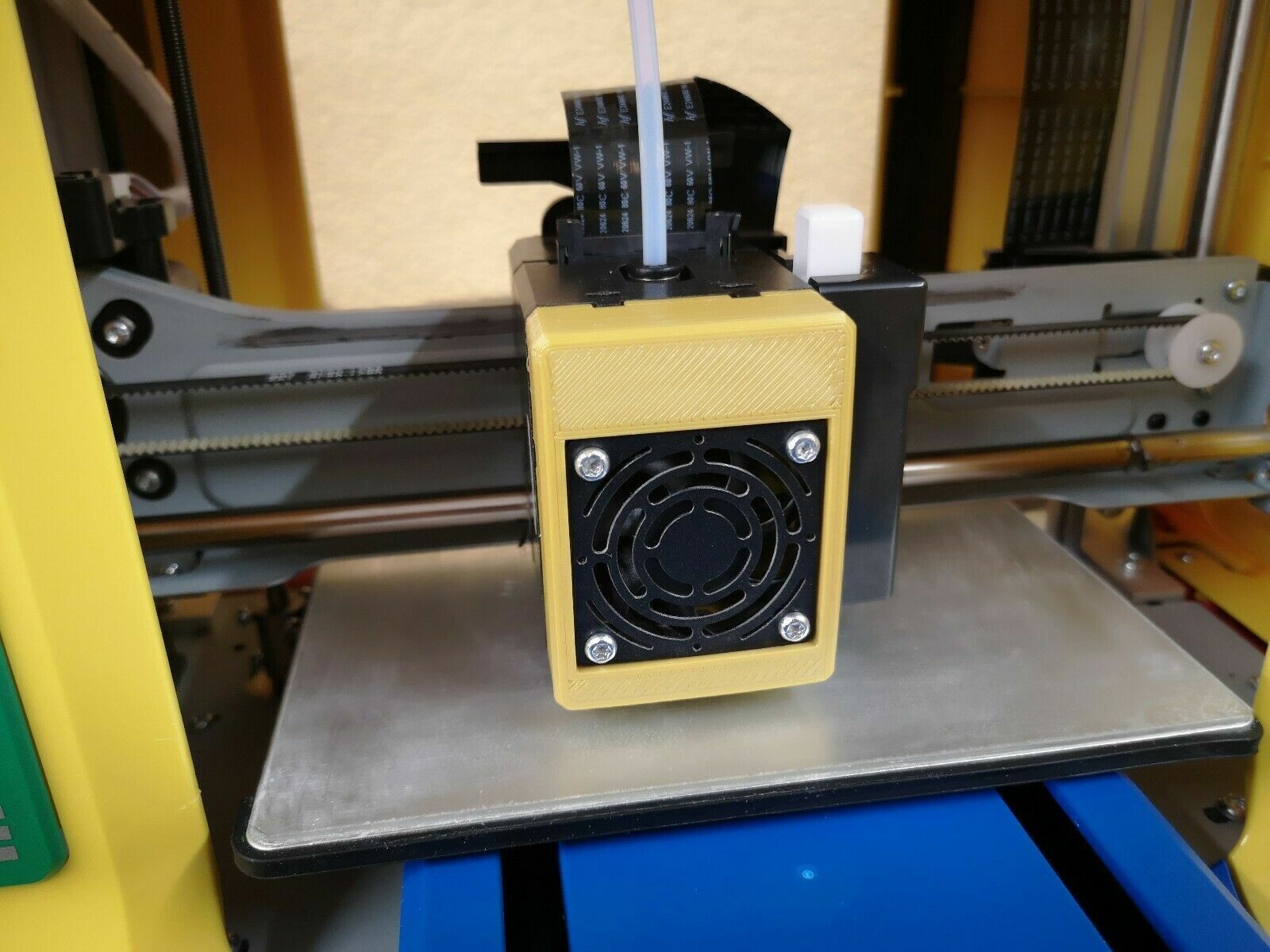
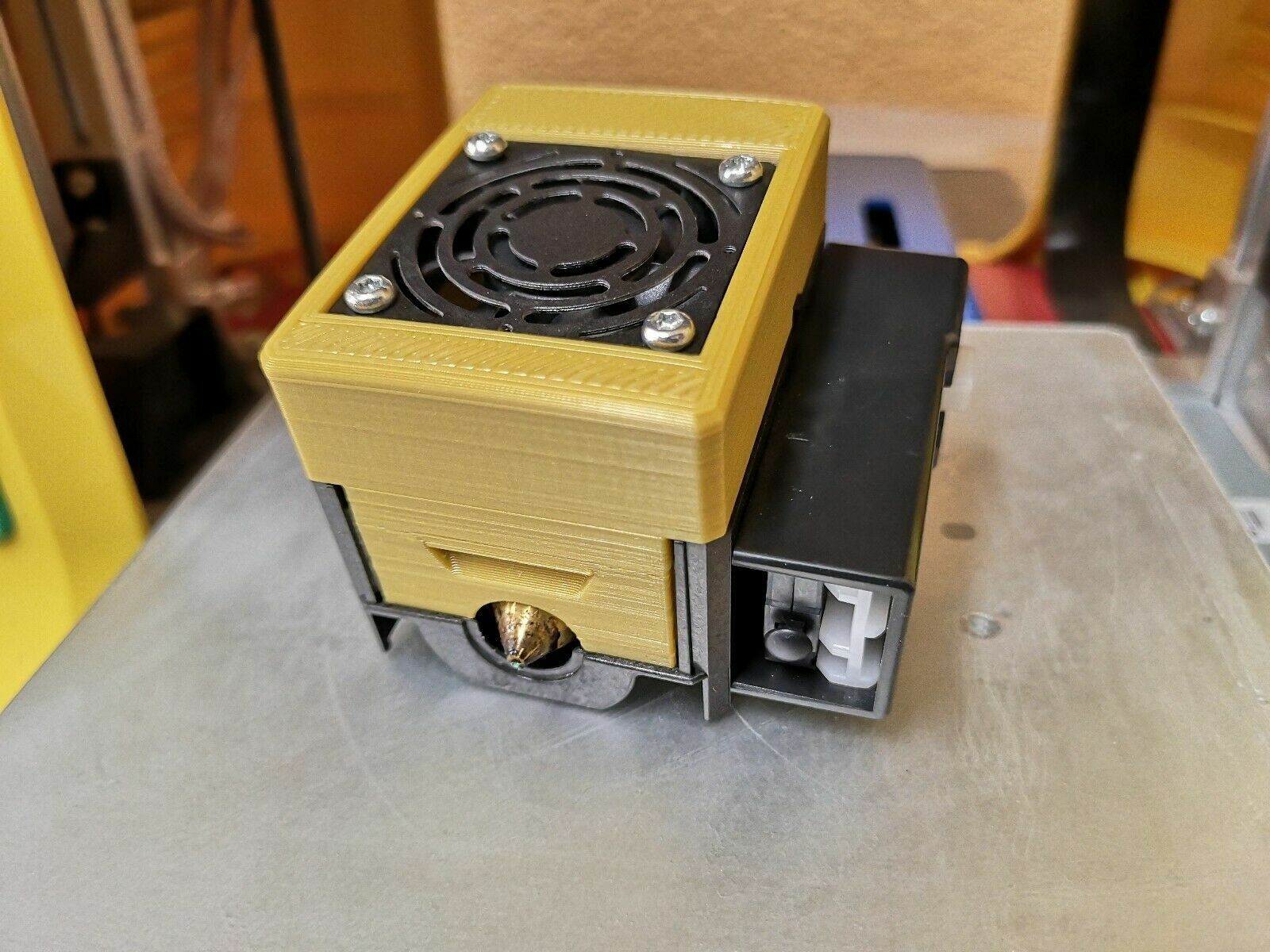
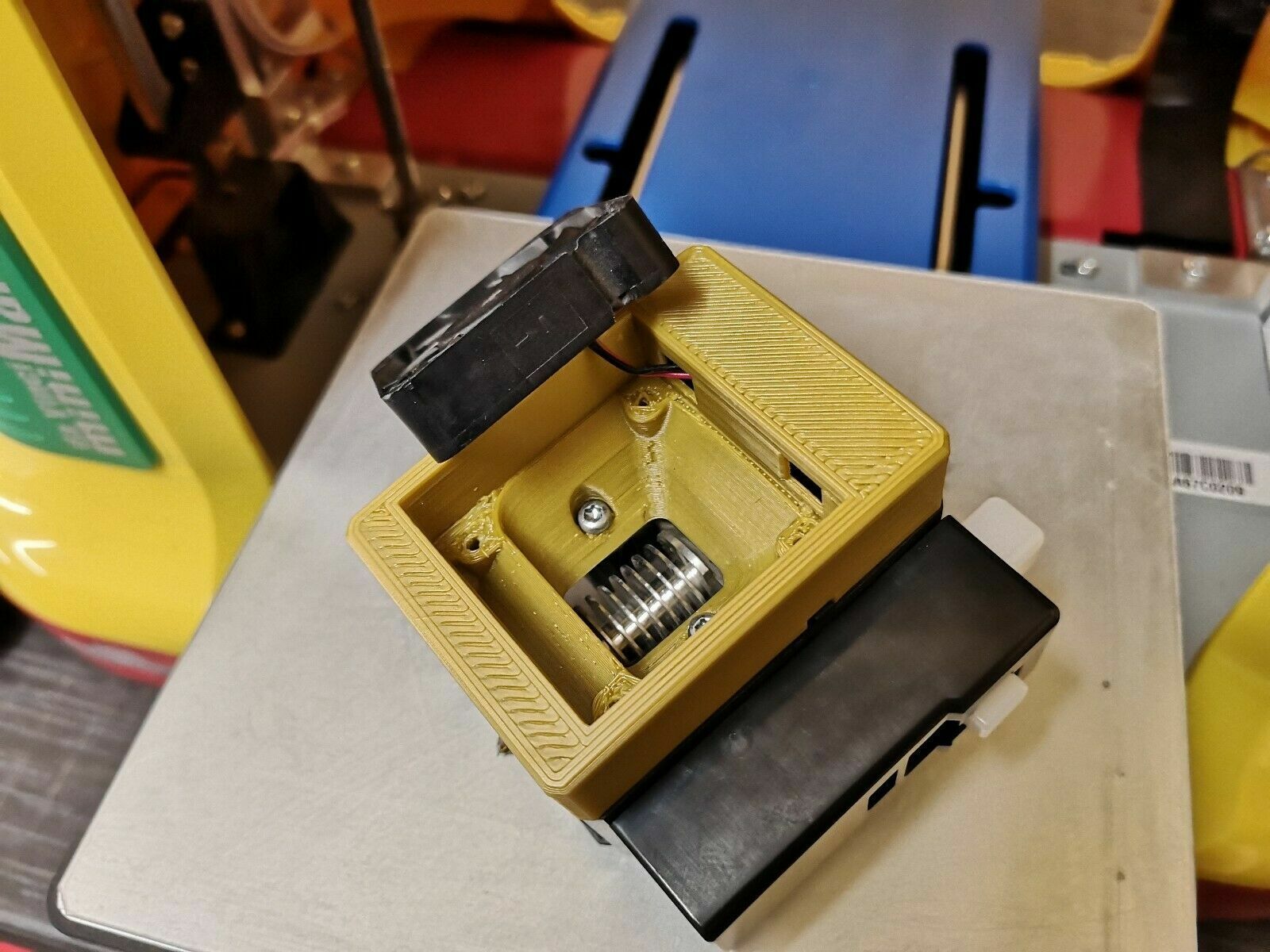
			<summary type="html"><![CDATA[<p>I would like to share my mod <strong>&quot;Extruder Optimization - Filament Cooling&quot;</strong></p><p>Significantly improve the print quality of the daVinci Mini series by quickly cooling down the PLA/PETG print object. An improved cooling effect reduces filament dripping and streaking for more consistent print quality, also poor bridging.</p> <br /><br /><p><strong><span class="bbu"><em>Notes on printing:</em></span></strong><br />Due to the required small tolerances of the object, it is recommended to use the highest printing settings.</p><br /><p><span class="bbu"><strong><em>Notes on assembly:</em></strong></span><br />Rotate the fan so that it blows air toward the extruder. All screws are reused, no additional material is required.</p><br /><p><span class="postimg"><img src="http://soliforum.com/i/?VFe8JZH.png" alt="http://soliforum.com/i/?VFe8JZH.png" /></span><br /><span class="postimg"><img src="http://soliforum.com/i/?aeGqEXD.jpg" alt="http://soliforum.com/i/?aeGqEXD.jpg" /></span><br /><span class="postimg"><img src="http://soliforum.com/i/?V9GquML.jpg" alt="http://soliforum.com/i/?V9GquML.jpg" /></span><br /><span class="postimg"><img src="http://soliforum.com/i/?LhscGW2.jpg" alt="http://soliforum.com/i/?LhscGW2.jpg" /></span><br /><span class="postimg"><img src="http://soliforum.com/i/?5q82ELw.png" alt="http://soliforum.com/i/?5q82ELw.png" /></span><br /><span class="postimg"><img src="http://soliforum.com/i/?xXHSrqM.png" alt="http://soliforum.com/i/?xXHSrqM.png" /></span></p>]]></summary>
			<author>
				<name><![CDATA[modfreakz]]></name>
				<uri>https://www.soliforum.com/user/17913/</uri>
			</author>
			<updated>2022-09-29T17:34:00Z</updated>
			<id>https://www.soliforum.com/topic/19084/extruder-optimization-filament-cooling-for-all-davinci-mini/new/posts/</id>
		</entry>
</feed>